Does your creative workflow feel like a tangled mess of separate apps? You jump from one artificial intelligence tool for images to another for video, wasting precious time. It’s frustrating, right? Your ideas get stuck switching between tabs instead of flowing freely.
What if one platform could handle it all? I’ve been testing a new solution from BasedLabs that promises exactly that. It aims to unify your entire content creation process, especially for video projects. This could be the game-changer for teams drowning in subscriptions.
I put this design and editing powerhouse through its paces. My goal was simple: to see if it truly streamlines work or just adds to the noise. Let’s find out if this all-in-one approach is the efficiency boost you need.
I’ll break down the real-world performance, pricing, and features. You’ll get my honest take on who benefits most from this integrated video and image workflow. Ready to see if it lives up to the hype? Let’s dive into the details.
Key Takeaways: Atomu AI Review
- Atomu AI is a new, all-in-one platform designed to streamline image, video, and audio creation.
- It targets creative professionals frustrated with using multiple disconnected tools and subscriptions.
- This review is based on hands-on testing of the platform’s core features and workflow integration.
- We will examine its potential to replace existing software stacks and improve team collaboration.
- The analysis covers real-world performance, pricing, and ideal user profiles for the tool.
- By the end, you will have a clear understanding of whether it fits your specific creative needs.
Atomu AI Review: An Overview
Introduction: Atomu AI in the AI Landscape
Creative professionals currently face a digital toolbox overflowing with specialized but disconnected instruments. BasedLabs launched their solution in 2025 to address this exact fragmentation problem.
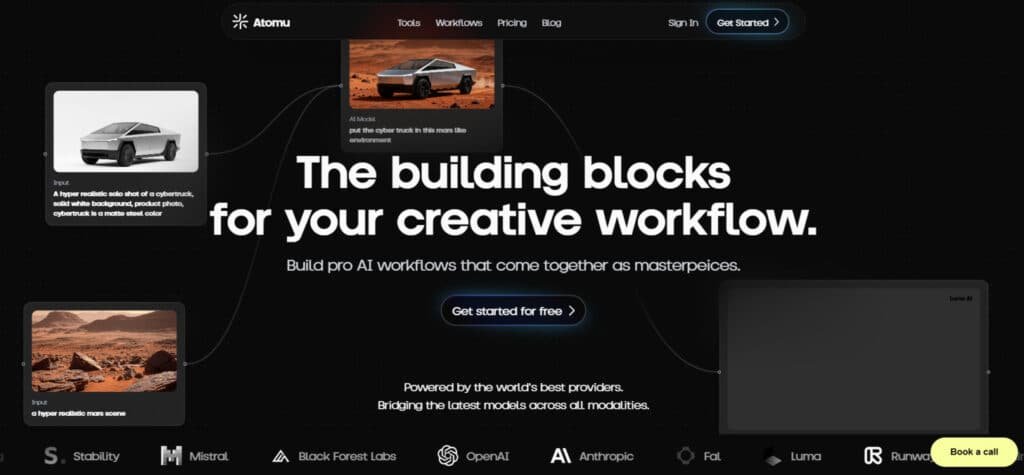
I’ve tested many artificial intelligence tools, and Atomu’s approach stands out. Instead of forcing you to jump between apps, it integrates multiple AI models into one workspace. This unified approach targets serious users like video editors and social media managers.
Company Background and Founding
BasedLabs created Atomu with a clear mission: streamline collaborative content creation. The founding team recognized that professional creators waste hours switching between different applications. Their web-based product eliminates this friction entirely.
What impressed me most was their focus on team workflows. While competitors often prioritize individual creators, Atomu built collaboration into its core design. The platform feels designed for production teams from the ground up.
Purpose, Endorsements, and Industry Adoption
Atomu serves as an all-in-one hub for video, image, and audio projects. Since its 2025 launch, it’s targeting digital agencies and content creators needing rapid turnaround. The features suggest professional-grade capabilities.
Being brand new means limited public endorsements currently. However, the tool set clearly aims for business adoption. I appreciate that they’re not pretending to be everything for everyone—this is clearly for professional users.
Positioning Among Modern AI Tools
Atomu enters a crowded market with a bold proposition: do more with less complexity. Compared to established players, it offers broader media handling in one interface. The trade-off? It lacks the ecosystem maturity of older tools.
| Feature | Atomu | Established Competitors |
|---|---|---|
| Workflow Integration | All-in-one platform | Specialized separate tools |
| Target Audience | Professional teams | Mixed (prosumer & pro) |
| Third-party Integrations | None currently | Extensive ecosystem |
The table shows Atomu’s distinct positioning. It sacrifices integrations for workflow simplicity. For video teams tired of app-hopping, this could be the efficiency boost they need.
This newcomer’s all-in-one approach either solves a real pain point or spreads itself too thin. My testing will reveal which scenario plays out for different content production needs.
Understanding Atomu AI and Its Innovative Features
What separates truly innovative platforms from the rest is how seamlessly they connect different creative processes. I found this tool brings together what normally requires separate subscriptions.
1. No-Code Workflow Building
Atomu AI empowers users to create sophisticated workflows without any coding knowledge, making it accessible for creators, marketers, and business owners who want to streamline content production.
This feature allows you to visually connect leading AI models for images, videos, and audio, turning complex processes into simple drag-and-drop setups. If you’re searching for efficient platforms to build custom AI pipelines, this no-code approach saves significant time and reduces dependency on technical experts.
It helps businesses transform ideas into professional outputs quickly, such as generating branded videos for sales campaigns.
With strong support for integration across models like Flux and Runway, users benefit from seamless communication between tools, ensuring consistent results.
This is particularly useful for teams needing reliable software that adapts to creative needs without high development costs.
2. Integrated AI Models
The platform integrates top-tier AI models from providers like Fal, Runway, Kling, Luma, Stability, OpenAI, Anthropic, and Black Forest Labs, giving users access to the best tools in one place.
This unification means you can switch between models effortlessly for generating high-quality images, videos, and audio, ideal for those comparing different generators on various platforms.
For business users focused on design, it provides flexibility to choose the optimal model for specific tasks, such as creating realistic avatar visuals or dynamic effects.
The broad selection receives positive ratings in reviews for versatility, helping creators achieve superior outcomes without managing multiple subscriptions.
This feature supports efficient production, allowing you to experiment and refine ideas while maintaining commercial-grade quality, which can boost sales through compelling content.
3. Credit-Based Generation System
Atomu AI uses a fair credit-based system where generations consume credits proportionally—approximately one credit for 2.5 images or a fraction of a second of video.
This transparent model ensures users on any plan have full access to all integrated tools, making it cost-effective for varying usage levels.
If you’re evaluating software options, this system offers predictability, with options to top up credits as needed. Paid plans include commercial licensing, providing peace of mind for businesses using outputs in marketing or sales.
The approach earns high ratings for fairness, as it scales with your needs without hidden fees, and support for rollovers in higher tiers helps manage resources better.
4. Commercial Licensing
Included in paid plans, commercial licensing allows users to freely use generated content for professional purposes, removing legal concerns that often plague free AI tools.
This is a key benefit for businesses and creators producing videos, images, or avatar assets for clients or sales materials. It ensures your work on the website or social channels is fully protected, supporting growth without restrictions.
Many users highlight this in ratings as a standout feature compared to other platforms, offering reassurance and enabling monetization of creations like branded videos with custom effects.
5. Collaboration Tools
Designed for teams, collaboration tools facilitate shared workflows and maintain brand consistency across projects.
This feature is invaluable for business teams working on design elements, such as coordinated videos or avatar animations. It promotes smooth communication within groups, with support for real-time edits and access controls.
Users appreciate the high ratings it receives for fostering teamwork, helping streamline approvals and ensure everyone aligns on creative ideas, ultimately saving time in collaborative environments.
6. Editing Capabilities
Built-in editors let you refine generated content, adjusting visuals, captions, timing, styles, voice, and animations.
This comprehensive video editing suite integrates seamlessly, allowing post-generation tweaks for polished videos. For those needing precise control over effects or voiceovers, it simplifies video editing without external software.
The intuitive tools help users elevate basic outputs into professional pieces, beneficial for sales content or social media, where refined voice and visuals drive engagement.
7. Multi-Language Support
With caption generation and voiceovers available in up to 32 languages, this feature expands reach for global audiences.
It supports natural-sounding voice options, making videos accessible worldwide.
Businesses targeting international markets benefit greatly, as it enables localized content creation, including voiceovers for avatar-driven narratives. This inclusivity boosts usability across platforms.
8. Specialized Playgrounds
Playgrounds provide dedicated spaces for experimentation: Image Playground for artwork, Video Playground for videos, and Voice Playground for lifelike voice selections.
These areas allow focused testing of models, helping users perfect design elements like avatar creation or effects. Ideal for honing skills before full production.
10. Automation and Templates
Pre-built templates automate tasks like social media reels, complete with auto-captions, voiceovers, and smart editing.
This reduces manual work, enabling quick production of optimized videos for TikTok or Reels.
Templates for ads, styling, and more help businesses scale content efficiently, incorporating effects and consistent branding to enhance sales potential.
Available Tools in Atomu AI
Atomu AI’s website offers a robust suite of specialized AI tools, making it easier for creators and teams to handle diverse content needs. These tools process input data such as prompts, scripts, images, or videos, delivering high-quality outputs with minimal training required.
Users frequently note in reviews how the platform’s intuitive design and reliable support simplify complex tasks, allowing focus on creativity rather than technical hurdles.
1. Prompt to Video
This core tool transforms text prompts or scripts into complete videos, incorporating visuals, sound effects, animations, and optional voiceovers.
Users select from media types like AI-generated video clips, moving images, stock footage, static images, or personal uploads. It analyzes descriptive data to build cohesive narratives, then allows refinements in the built-in editor.
Ideal for quick marketing or social content, it reduces production time significantly without needing advanced training, with strong support for customization ensuring professional results.
2. AI Caption Generator
The AI Caption Generator creates engaging captioned videos by combining input text with premium stock footage, AI-generated imagery, or minimal designs.
It supports full customization of fonts, positioning, styles, and multilingual options in 32 languages. Processing data from your video or script, it generates synchronized captions that boost accessibility and viewer retention. Many reviews praise its ease for social media creators, as it streamlines enhancements on the website with little effort.
3. AI Image Generator
Produce high-quality original artwork and images directly from text prompts using advanced models like Flux and Stable Diffusion.
This tool handles detailed data inputs for styles, compositions, and elements, offering versatility for design projects.
Beginners benefit from its straightforward interface, requiring no extensive training, while professionals appreciate the precision and speed available through the website.
4. AI Video Editing Tools
These tools automate video enhancements, animations, and reel production via ready-made templates.
They process raw data to apply smart edits, transitions, and optimizations, perfect for short-form content like TikTok or Reels. The automation features help users achieve polished results efficiently, with built-in support for iterative adjustments.
5. AI Voiceovers
Convert text to natural-sounding voices in multiple languages and styles, enhancing videos with lifelike narration. It integrates seamlessly, using data from scripts to generate expressive audio.
This tool supports global content creation without voice actor needs or lengthy training.
6. AI Character Generation and Animation
Create and animate custom characters from prompts or references, ideal for storytelling or branding. It generates consistent avatars and brings them to life with movements, processing character data accurately for reusable assets.
7. Additional Specialized Tools
Within playgrounds, access utilities for AI effects, pattern generation, and more creative tasks. These include niche options like landscape or label generators, expanding possibilities for specialized data-driven outputs on the website.
Overall, these tools empower efficient workflows for modern creators.
Workflows on Atomu AI
If you’re a content creator, marketer, or designer feeling overwhelmed by juggling multiple AI tools to produce images, videos, or audio assets, Atomu AI’s workflow features can truly simplify your daily process.
The platform allows you to build custom workflows without any coding, chaining together leading AI models—like Flux, Runway, Kling, Luma, Stability, OpenAI, Anthropic, and Black Forest Labs—into seamless, multi-step pipelines.
Imagine starting with a simple text prompt: you could automatically generate an image, animate it into a video, add custom character or background swaps, apply effects, insert natural voiceovers, and finish with synchronized captions—all in one automated flow.
This is perfect for your use cases, such as quickly testing concepts in fashion or advertising, reimagining scenes for photography projects, or scaling social media reels for marketing teams.
By connecting tools visually in the workflow builder, you save hours that would otherwise be spent switching between separate platforms, reducing frustration and letting you focus on creative ideas rather than technical hurdles.
For those who prefer starting quickly, Atomu offers template-based workflows—ready-to-use setups tailored for common tasks.
Examples include the “Youtube Clipper” for extracting highlights, “Recreate Any Style” for artistic transformations, “Nike Campaign Ad” for branded video production, and specialized ones like “Character & Background Swaps” to effortlessly test environments, add/remove objects, or reimagine scenes.
These templates provide a gentle entry point, helping you adapt them to your needs without building from scratch.
One of the most relieving aspects is that unlimited workflows are available across most plans (with the Free plan allowing a starting set), meaning you can experiment freely as your projects grow, whether you’re an occasional creator producing reels from scripts or links, or leading a team with automated content pipelines.
This flexibility empowers you to streamline repetitive tasks, boost efficiency, and deliver polished results consistently, making high-quality AI content creation feel achievable and less intimidating.
Pricing Plans for Atomu AI
When evaluating any new platform, I always start with the practical questions: what does it cost, and what do I actually get for my money? This section breaks down the financials and real-world trade-offs.
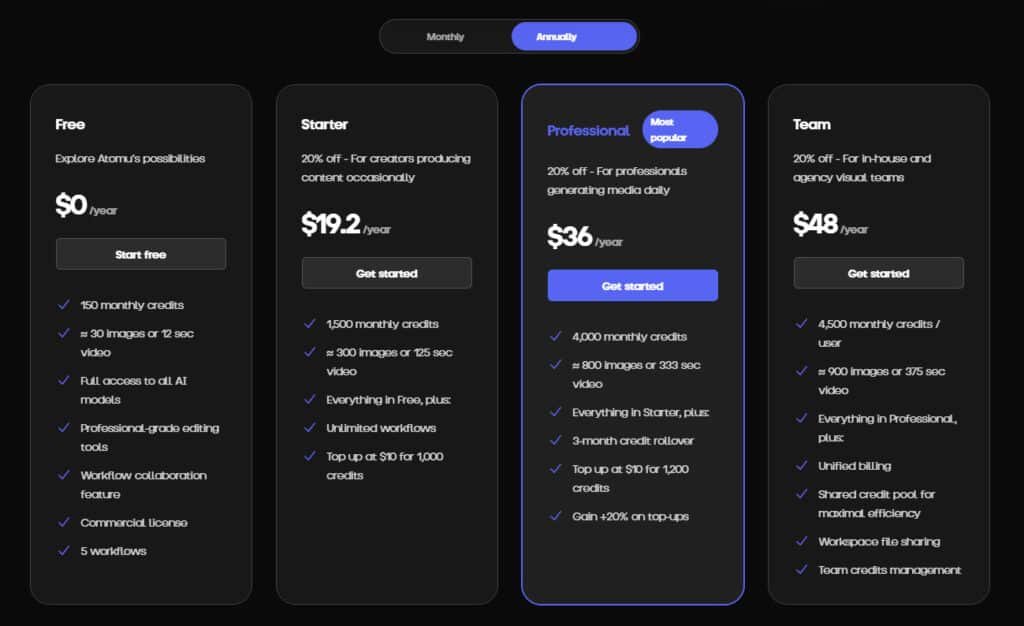
Pricing Breakdown and Value Proposition
Starter
$24/month or $19.2/month (annual, 20% off). Features: 1,500 monthly credits (≈300 images or 125 sec video), everything in Free, unlimited workflows, top-up at $10 for 1,000 credits.
Professional
Most popular plan at $45/month or $36/month (annual, 20% off). Features: 4,000 monthly credits (≈800 images or 333 sec video), everything in Starter, 3-month credit rollover, top-up at $10 for 1,200 credits (+20% bonus). Users often give high ratings in reviews for value.
Team
$60/month or $48/month (annual, 20% off). Features: 4,500 credits/user monthly (≈900 images or 375 sec video), everything in Professional, unified billing, shared credit pool, workspace file sharing, team management. Earns strong ratings and positive review feedback.
| Plan | Monthly Price | Annual Price (per month) | Credits/Month | Unlimited Workflows | Credit Rollover | Team Features |
| Free | $0 | $0 | 150 | No | No | No |
| Starter | $24 | $19.2 | 1,500 | Yes | No | No |
| Professional | $45 | $36 | 4,000 | Yes | 3-month | No |
| Team | $60 | $48 | 4,500/user | Yes | 3-month | Yes |
Starting at $29 per month, this tool positions itself as an affordable alternative to maintaining multiple subscriptions. If it truly replaces 3-5 separate applications, the value proposition becomes compelling.
The website mentions free version and trial options, though detailed tier information isn’t fully published yet. For current specifics, I’d recommend checking their official site directly.
Pros & Cons of Atomu AI
Pros: Efficiency, Creativity, and Collaboration
- Integrates multiple leading AI models in a single platform, eliminating the need to switch between applications.
- Offers no-code workflow building and templates, enabling efficient multi-step content production.
- Provides commercial licensing and professional-grade editing tools, even in the free plan.
- Supports collaboration features suitable for teams, enhancing brand consistency and project sharing.
- Includes multilingual voiceovers and captioning, facilitating global content creation.
Cons:
- Operates on a credit-based system, which may limit heavy usage without additional purchases.
- Generation quality and precision often depend heavily on user-provided prompts.
- Higher-tier features, such as credit rollovers and advanced team tools, require paid subscriptions.
- As a relatively new platform, it has limited independent user reviews available for assessment.
Alternatives to Atomu AI
Conclusion
The real test of any creative tool isn’t just its features, but how it fits into your actual workflow day-to-day. After my hands-on testing, I believe this platform delivers genuine value for specific users.
For creators drowning in multiple subscriptions, the $29 per month pricing makes financial sense if it replaces just two of your current tools. The collaboration features and seamless video editing workflow are standout advantages for social media content production.
However, being a new launch means you’re betting on future updates. Established teams might wait, but individual creators have little to lose by testing it with their specific projects.
Ready to simplify your creative process?
Visit the official website to explore current plans and see if this unified approach finally streamlines your video and media workflow.
Frequently Asked Questions
What exactly is this platform, and what kind of content can I create with it?
It’s an all-in-one creative suite powered by artificial intelligence. You can generate images from text prompts, produce professional-looking videos and reels, and even create audio content. It’s designed to handle the entire workflow for marketers, content creators, and production teams.
How does the video editing feature work? Is it suitable for beginners?
The video editors are AI-driven, making the process incredibly intuitive. You provide a prompt or an idea, and the tool assists with everything from scene generation to transitions. I found the ease of use remarkable—you don’t need to be a professional video editor to create compelling social media content quickly.
What languages does the tool support for text-to-video or text-to-image generation?
It supports multiple languages, which is a huge advantage for global teams or creators targeting international audiences. This capability allows you to input prompts in various languages, broadening the range of creative projects you can tackle without language barriers.
Is there a free plan or trial available to test the features?
Yes, they typically offer a free plan or a trial period. This lets you experiment with the image generation, basic video editing, and other core features before committing to a paid subscription. I always recommend starting with the free tier to see if the tool’s style fits your needs.
How does the pricing structure work, and is it cost-effective for small teams?
The pricing is tiered, usually based on usage, features, and the number of team members. For small teams or individual creators, the entry-level plans often provide substantial value, offering a generous amount of credits for image and video creation each month. It’s designed to scale with your projects.
Can I use this platform for commercial projects, like client work or advertising?
Absolutely. The commercial license is a key part of its value proposition. You retain ownership of the assets you create, making it a solid solution for client campaigns, social media ads, and other commercial applications. It’s built for professional use.
What are the main limitations or drawbacks I should be aware of?
While powerful, the AI models can sometimes require very specific prompts to get the exact output you envision. There can be a learning curve to mastering the prompt engineering. Also, for highly complex, long-form video production, it might not yet replace a full human editing team, but it’s excellent for short-form content.