Gathering evidence, cleaning citations, and turning messy notes into coherent drafts eats time—and often leaves you anxious before deadlines.
I felt that pain too. I kept juggling PDFs, citation managers, and half‑finished paragraphs while chasing accurate summaries and traceable sources.
That’s why I tried a new web‑based academic platform designed to speed up literature searches and produce reliable summaries with citations. In practice, it generates literature reviews, paraphrases text, and plugs into Zotero and Mendeley—so your references move with you.
I’ll give an honest, first‑person take on how this tool fits the current AI landscape: what it does well, which features truly help thesis prep or seminar work, and where it still trips up—accuracy, traceability, and export options matter a lot in real research.
A hands‑on look at core capabilities, standout features, pricing tiers, pros and cons, alternatives, and a clear recommendation based on my experience.
Ready to see if it saves you time? Let’s dive in.
Key Takeaways: ResearchPal Review
- I tested the tool on real academic tasks—literature reviews, summaries, and citation exports.
- The web platform integrates with Zotero/Mendeley and supports GDPR controls.
- Works well for fast evidence gathering and cleaner citations—best for students and R&D teams.
- Expect solid templates and library management; accuracy and traceability need scrutiny.
- There’s a free tier for core functions; premium plans add volume and advanced tools.
ResearchPal Review: An Overview

Raamish’s Take
ResearchPal serves as a comprehensive AI research assistant tailored for academic workflows.
I value its ability to automate literature reviews with authentic citations from credible sources, saving hours on manual searches.
The paper insights feature stands out, allowing quick summarization of methodologies and contributions from uploaded PDFs.
It integrates seamlessly with Zotero and Mendeley for easy library management, plus tools like in-text citations and a paraphraser to refine writing in multiple languages.
Users report significant productivity gains—one PhD researcher called it a “game changer” for organizing references and chatting with PDFs.
For those bogged down by endless reading, ResearchPal focuses efforts on analysis over admin. Trusted by 100,000+ researchers, it delivers reliable results for quality output.
Introduction to ResearchPal: Where It Fits in Today’s AI Research Landscape
In a crowded AI field, some tools aim to help you read less and understand more; this one targets academic workflows directly. I’ve used it on literature mapping and citation chores. It’s web‑based, needs no install, and focuses on turning scattered PDFs into structured, cited summaries.
Who’s behind it and the core purpose
The team built the platform to solve a simple, persistent problem: too many sources, too little time. Its purpose is pragmatic—automate initial literature scans, produce traceable in‑text citations, and export clean reference lists.
How students, academics, and R&D teams use it today
Undergrads use it to draft topic overviews and fix citations. Faculty and PhDs use it for rapid scoping and extracting key insights. R&D teams rely on it to summarize methods and results into short briefs for decision makers.
“It cut my initial reading list by half and gave me citation‑ready summaries—useful when time is short.”
| User group | Primary task | Benefit |
|---|---|---|
| Students | Literature overviews | Faster drafts, cleaner citations |
| Academics | Paper analysis | Quick insights, reference hygiene |
| R&D teams | Domain monitoring | Decision‑ready briefs |
- Integrations: syncs with zotero mendeley and works like zotero to keep libraries aligned.
- Category: an AI research tool focused on evidence‑first workflows.
What Is ResearchPal?
I tested a browser-based platform that turns scattered PDFs and search queries into citation-ready drafts. At its core, this platform helps you move from messy source files to structured content quickly.
Inner workings: from uploading PDFs to extracting paper insights
How it works: you upload a pdf or enter a topic, then an NLP/ML pipeline parses text, extracts metadata, and highlights methodology, contributions, and conclusions.
The loop is simple: upload → query → extract. Each extracted section comes with attached in-text citations so you can reuse passages without hunting for sources.
Ideal users and use cases
Students building a thesis, PhD researchers doing systematic scans, and R&D teams scoping new domains all benefit.
Use cases: fast literature reviews, method extraction for papers, concise summaries for meetings, and draft-ready content that respects academic formatting.
Under the hood: NLP/ML-driven summaries, citations, and templates
The platform generates summaries and paper insights you can edit. Built-in AI writing tools let you rewrite text, adjust tone, or tighten length for different venues.
- Key features: literature summaries, in-text citations, templates, and library management.
- Search for research papers, pull abstracts and metadata, then spin up a scoped literature overview in minutes.
- Templates nudge you toward structured outputs (intro, methods, findings), reducing rework later.
“It shortens the distance from messy notes to a clean draft—fast and surprisingly handy.”
Best Features of ResearchPal
My hands-on checks centered on how fast it turns raw PDFs and searches into usable literature reviews. Below I list standout functions and what they actually do for your workflow.
1. Literature Review Generation
ResearchPal offers a powerful tool to generate comprehensive literature reviews in seconds, streamlining the research process for students and academics.
By synthesizing new ideas and pulling authentic citations from credible sources, this feature saves hours of manual work. Researchers can input a research question and receive a structured review with accurate references, ensuring academic rigor.
This is ideal for users seeking to kickstart their projects efficiently, allowing them to focus on analysis rather than sourcing.
It helps readers with search intent by providing a quick, reliable foundation for their research, enhancing productivity in academic writing tasks.
2. AI Essay Writer
The AI Essay Writer creates customized essays of any type or length, complete with headings and citations from credible sources.
This feature supports students and professionals needing polished content for assignments or publications. By automating essay structure and referencing, it reduces time spent on formatting and source verification.
Readers searching for essay-writing solutions benefit from its ability to deliver tailored, high-quality drafts, which can boost productivity by simplifying the writing process.
The tool’s intuitive design ensures users can generate professional-grade essays without extensive manual effort.
3. Citation Generator
The Citation Generator simplifies creating citations in formats like APA, MLA, or Chicago. Users can input a paper’s title or upload a PDF to produce accurate references instantly.
This feature is crucial for maintaining academic integrity in research papers. It eliminates errors in manual citation creation, making it a go-to for researchers needing fast, reliable formatting.
For readers searching for citation tools, this feature saves time and ensures compliance with academic standards, enhancing efficiency across platforms like journals or institutional submissions.
4. In-Text Citations
Finding authentic in-text citations from credible journals is seamless with this feature. Users can locate and insert citations for their claims in seconds, supporting evidence-based writing.
This is valuable for researchers aiming to strengthen arguments without extensive source hunting. For those searching for citation solutions, it offers precision and speed, ensuring claims are backed by reputable sources.
This tool enhances productivity by integrating citations directly into drafts, streamlining the research workflow.
5. AI-Powered Tools
These tools allow users to rewrite papers in any tone, adjust length, or translate into multiple languages.
Researchers can refine drafts to match academic or professional styles, making it versatile for global use. For readers seeking editing solutions, this feature simplifies tailoring content to specific audiences or requirements.
The ability to use tools for rewriting or translation saves time, ensuring polished outputs without manual revisions, which is critical for efficient research workflows.
6. Search Papers
The Search Papers feature optimizes literature discovery by saving relevant citations and abstracts instantly. Its domain-specific search ensures users find papers tailored to their field.
For readers searching for research papers, this tool accelerates sourcing relevant studies, reducing time spent on broad searches.
It supports researchers by organizing findings efficiently, making it easier to build a robust literature base.
7. Paper Insights
Paper Insights analyzes research papers at high speed, automating summaries, methodology extraction, and contribution synthesis.
This helps researchers quickly grasp key elements of complex studies. For users searching for analysis tools, it offers rapid insights, saving hours of manual reading.
The feature supports synthesizing findings across multiple papers, aiding in comprehensive research projects.
8. Chat with PDF
This feature lets users upload PDFs and ask questions, receiving instant answers with saved conversations.
It’s ideal for researchers needing to extract specific details from research papers. For those searching for interactive tools, it acts like a personal assistant, simplifying document navigation and boosting efficiency in research tasks.
9. Research Library Management
Organize research papers in project folders with automatic citation fetching and metadata viewing. Integrated with Chat with PDF, it centralizes resources.
Readers searching for library tools benefit from streamlined organization, making it easier to manage extensive research projects.
10. Paraphraser
The in-built Paraphraser refines writing by adjusting tone, translating, or paraphrasing to suit academic or professional needs.
For readers seeking editing tools, it ensures polished, context-appropriate text, enhancing clarity and style in research outputs.
Pricing Plan For ResearchPal
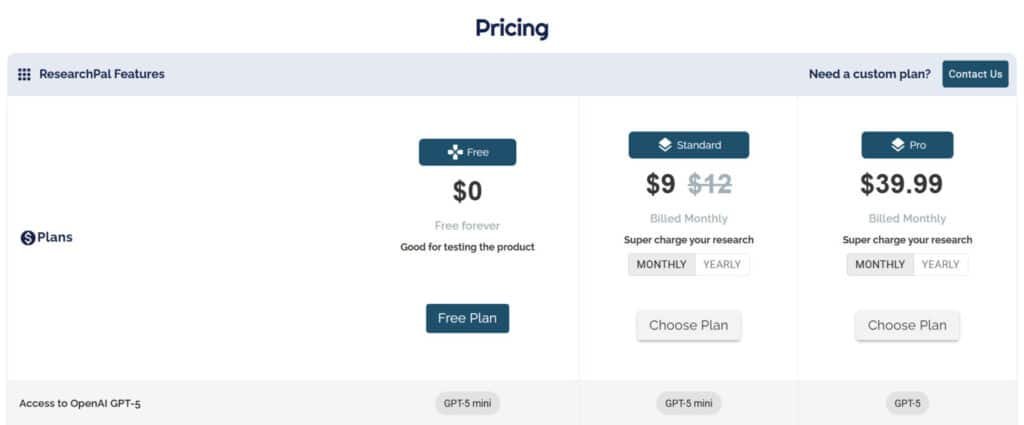
Pricing keeps things simple: start on the free tier to test core features, then pick a plan that matches your workload and budget.
Who it fits: students, lab teams, and solo researchers who need a web tool that balances quotas with clear costs.
Plans at a glance
| Plan | Key quotas | Monthly price | Best for |
|---|---|---|---|
| Free | 1 project · 3 uploads · 2 paper insights · 2 literature reviews | $0 | Try core workflow |
| Standard | Unlimited projects · 50 manual references · 50 Ask queries · 100 Text Tuner | $9/month ($99 For Annual Plan (Save 33%)) | Active semester work |
| Premium | 150 generate citation · 300 Library Chat · OpenAI 4‑Turbo & Gemini 1.5 Pro | $39.99/month ($360 For Annual Plan (Save 25%)) | Heavy synthesis & model access |
- Free plan lets new users road‑test the platform with a small but useful quota.
- Standard ($9/month or $99 Annual Plan) is the most cost‑effective for students—unlimited projects and solid reference credits.
- Premium ($39.99/month or $360 Annual Plan) suits intensive research: extra citation actions, many chat turns, and top models.
- The web app removes install hassles, so your budget buys outputs, not IT time.
Frequently asked: do free quotas reset? No—once used, upgrade is required. Can you cancel anytime? Yes, and you keep exported work.
Pros & Cons of ResearchPal
After using it across projects, I noticed clear wins and a few tradeoffs worth calling out. Below I summarize what helps you move faster and when you may want something else.
Pros
- Fast, referenced literature reviews: automates draft creation and keeps claims traceable, which boosts research productivity.
- Tight citation management: syncs with Zotero and Mendeley so your references stay clean across documents.
- Advanced PDF Chat: lets you pull cited excerpts for methods, limitations, or dataset notes—great for quick analysis.
- Writing tools and language support: tone and text tuning help polish content without severing links to sources.
- Project management: boards and folders keep team and solo work organized and repeatable.
Cons and when to consider alternatives
The best long‑form, high‑volume literature outputs live behind paid tiers—so the free plan is mainly for evaluation, not heavy lifting.
Enterprise needs (SSO, governance) often need a custom arrangement. If you require strict enterprise controls, plan for extra setup time and cost.
If your priority is lightweight writing help or a pure reference manager without AI features, consider dedicated alternatives instead of this all‑in‑one tool.
“Good for evidence‑first drafting, but match the tier to your workload.”
Who Is ResearchPal Best For?
Different users need different outcomes—so I mapped practical gains by role. Below I explain how students, academics, and R&D professionals get measurable value, and what to expect when you add this tool to your workflow.
Undergrads and Master’s Students
Undergrads get fast, digestible summaries and clean citations that reduce friction on assignments. Quick summaries help build confidence and speed up background reading for papers.
Master’s students benefit from structured templates and scoped literature reviews that shepherd a thesis from proposal to final draft. It helps keep projects organized and references synced—works like zotero mendeley—so you spend less time on formatting and more on argumentation.
PhD Researchers and Academics
For PhD students and faculty, the platform extracts granular insights from dense papers: methods, limitations, and contribution maps. That makes literature mapping faster and helps prioritize which articles need deep reading.
Outcome: more time for analysis, cleaner citation management, and reusable snippets for future papers and grant drafts.
R&D Scientists and Professionals
R&D teams use it to stay current with domain research and to produce short, cited briefs for decision makers. Rapid interrogation of new papers lets teams spot shifts in methods or findings quickly.
Teams can share structured outputs across projects and keep momentum high. For anyone drowning in PDFs, this converts reading lists into action plans with traceable insights you can trust.
- Educators: generate course bibliographies and starter packs for students.
- Thesis builders: use it as a scaffold—organize projects, spin up literature reviews, and keep citations tidy.
“It turns a messy reading list into a roadmap—fast and citation-ready.”
Top Alternatives to Consider
I looked at competitors that specialize in method extraction, library control, or pure writing help—each one suits a different bottleneck.
ResearchPal simplifies academic writing with citations and summaries, but these four tools offer deeper research support or polished outputs.
Paperpal stands out for journal-ready manuscripts: real-time edits, plagiarism checks, and submission templates. Researchers love the academic tone guard—starts at $12/month.
PDF AI extracts insights from papers fast, answers questions in-chat, and builds literature maps. Perfect for heavy PDF workflows; $15/month.
JotBot AI writes in your voice, pulls live sources, and handles outlines to full drafts. Great for students juggling deadlines—from $9/month.
WordVice AI focuses on precision editing: grammar, clarity, and style fixes with human-level suggestions. Ideal for non-native speakers; $19/month entry.
Select based on your bottleneck—research speed or final polish.
| Tool | Key Strengths | Starting Price | Best For |
|---|---|---|---|
| ResearchPal | In-text citations, summaries, outlines | $10/month | Quick academic drafting |
| Paperpal | Journal edits, plagiarism, templates | $12/month | Submission-ready papers |
| PDF AI | PDF chat, source extraction, lit maps | $15/month | Deep literature reviews |
| JotBot AI | Your-voice writing, live sources, drafts | $9/month | Students & fast essays |
| WordVice AI | Advanced editing, clarity, style polish | $19/month | Non-native & final refinement |
When a writing assistant or note app is a better fit
Prefer drafting help?
A pure writing assistant can speed prose without the overhead of literature parsing.
And if you already use a note app for thinking, keep it alongside your research tool to link ideas to sources for easier sharing and team management.
“Choose the tool that matches your bottleneck—method navigation, library mastery, or end‑to‑end synthesis.”
Security, Data Privacy, and Compliance
Security matters as much as speed in academic work. I looked closely at how the platform treats sensitive material before I trusted it with my thesis sources. Below is a clear summary so you can decide if it meets your institution’s standards.
Core practices and user control
Encrypted cloud storage protects files at rest and in transit. The vendor states that users retain full ownership and control, so you decide on visibility and sharing.
Deletion and export
Delete a project or a PDF and it’s removed from the cloud with no recovery. Export tools let you keep local copies of structured outputs, references, and notes to support audits or IRB needs.
- Library management & sharing: the app enforces permission settings so team sharing follows set rules.
- Permanent deletion: supported—deleted items are unrecoverable.
- Compliance: GDPR‑aligned practices are built in for multi‑jurisdiction collaborations.
Bottom line: the cloud convenience comes with solid controls—good for everyday research tasks and for teams that need traceable audit trails.
Case Study and Personal Experience
I began with a tight research question and a three-paper seed to see how fast a usable draft would appear. This was a real-world task: find key studies, extract methods, and produce a citation-ready literature review for a conference outline.
Real-world walkthrough: from topic selection to a citation-ready review
I ran a quick discovery pass on the web to surface relevant papers. Then I uploaded three core PDFs and pulled paper insights—methods, limitations, and contributions—into a scoped literature review.
Small edits and a short re-write turned the raw extracts into neat summaries that anchored my outline.
My experience: speed, accuracy, and how PDF Chat changed my workflow
PDF Chat answered targeted questions (sample size, primary outcomes) and linked to the exact page. That cut verification time and made accuracy checks simple.
I used Text Tuner to adjust tone and compress text for a conference slot—keeping citations intact while improving flow.
Outcomes: time saved, clearer insights, and cleaner references
Results: a citation-ready draft in hours, not days—ideal when a thesis deadline looms. References synced to Zotero/Mendeley and exported cleanly as a project moved between folders.
“Accuracy checks were faster because answers linked to source pages—fewer back-and-forth edits.”
| Step | Action | Benefit |
|---|---|---|
| Discovery | Search + surface key studies | Faster topic framing |
| Extraction | Upload papers & pull methods | Clear analysis points |
| Verification | PDF Chat answers | Traceable claims, quick checks |
| Polish | Text Tuner + export | Conference-ready writing & citations |
Conclusion
Raamish’s Take
ResearchPal serves as a comprehensive AI research assistant tailored for academic workflows.
I value its ability to automate literature reviews with authentic citations from credible sources, saving hours on manual searches.
The paper insights feature stands out, allowing quick summarization of methodologies and contributions from uploaded PDFs.
It integrates seamlessly with Zotero and Mendeley for easy library management, plus tools like in-text citations and a paraphraser to refine writing in multiple languages.
Users report significant productivity gains—one PhD researcher called it a “game changer” for organizing references and chatting with PDFs.
For those bogged down by endless reading, ResearchPal focuses efforts on analysis over admin. Trusted by 100,000+ researchers, it delivers reliable results for quality output.
If you want fewer hours lost to formatting and more time on argument, this tool keeps the heavy lifting in the background. It produces citation-ready literature reviews, offers a searchable PDF Chat for quick insights, and syncs with Zotero and Mendeley so references stay aligned.
My take: start on the free tier to test fit. For regular syntheses, the Standard plan is the sweet spot; choose Premium when you need more model access and heavy library chat. Security is solid—encrypted storage and permanent deletion give you control.
In short, this is a practical research companion that turns reading into usable writing. If a deadline is looming, trial it on one chapter this week—you’ll know fast whether it earns a permanent place in your platforms and workflows.
Frequently Asked Questions
Who built this platform and what problem does it solve?
The team behind the platform combines NLP researchers, software engineers, and academic product designers to tackle a common pain: turning scattered PDFs and references into structured literature reviews, citation‑ready summaries, and project libraries that speed up thesis and paper workflows.
How do I get insights from uploaded PDFs?
Upload your PDFs to the library, then use the PDF Chat and Paper Insights features — the system extracts methodologies, key contributions, and conclusions using ML/NLP, and generates concise summaries and highlighted passages you can cite in your writing.
Can it generate literature reviews and export traceable summaries?
Yes — the literature review generator creates thematic, referenced overviews. Outputs are exportable with source metadata so you can trace every claim back to the original paper, reducing hallucination risk and saving time on manual synthesis.
Which citation styles are supported for in‑text citations and reference lists?
The tool supports major styles (APA, MLA, Chicago) and offers a reference generator that formats bibliographies and in‑text citations. You can also sync with Zotero and Mendeley to keep reference metadata consistent across platforms.
Who benefits most from this platform — students, PhD researchers, or R&D teams?
Undergrads and master’s students will appreciate quick summaries and citation help; PhD students and academics gain deep paper analysis and literature mapping; R&D professionals use it to stay current and manage project libraries across teams.
Is there a free plan and what does it include?
There’s a free tier for testing core features: limited project creation, restricted uploads, basic literature reviews, and trial access to PDF Chat and library organization tools — enough to evaluate fit before upgrading.
What are the paid tiers and what do they add?
The Standard plan (around $9/month) removes project limits and raises reference quotas; the Premium tier (about $39.99/month) unlocks higher chat limits, priority access to advanced AI models, and larger upload allowances for heavy literature work.
How does integration with Zotero and Mendeley work?
Integrations let you sync reference libraries and metadata so you can import citations automatically, keep folders aligned, and export publication-ready bibliographies without reformatting — handy when you already use a reference manager.
Can I trust the AI summaries to be accurate for academic use?
The platform emphasizes traceable outputs and citation‑rich summaries to minimize hallucinations. Still, I recommend verifying key claims against the original papers — use the highlighted source links and PDF excerpts for quick checks.
How secure is my data and does it comply with privacy regulations?
The service uses encrypted cloud storage, GDPR‑aligned practices, and clear data ownership policies. You can export or permanently delete files on demand, which helps meet institutional or personal data‑privacy requirements.
Does the tool offer templates and structured workflows for theses or reviews?
Yes — there are academic templates and a UI optimized for structured tasks (literature mapping, methods sections, review outlines). These make it easier to move from notes to a citation‑ready draft.
How does PDF Chat differ from a regular chat-based writing assistant?
PDF Chat is document‑aware: it answers questions based on your uploaded papers, pulls direct quotes, and points to sections. A generic writing assistant lacks that tight linkage to your library and source tracing.
When should I consider alternatives like Gobu, Zotero, or Mendeley?
If you need method‑centric navigation or section‑level reading features, Gobu is worth a look. For pure reference management and bibliographic syncing, Zotero and Mendeley remain best‑in‑class — pair them with this platform if you want both powerful citation control and AI‑driven summaries.
How does this platform help reduce time spent on literature reviews?
By auto‑extracting paper insights, grouping themes, generating draft review paragraphs, and providing formatted citations, it cuts manual skimming and citation formatting — I typically save hours per review by letting the system surface relevant findings first.
Are there collaborative features for teams and supervisors?
Yes — library sharing, project folders, and board views let teams and supervisors access shared literature, comment on extracted insights, and maintain consistent citation repositories across projects.
What caveats should I be aware of before relying fully on the AI outputs?
AI tools can misinterpret nuance or overgeneralize. Always validate critical interpretations against the original full‑text PDFs, check citations for accuracy, and use the platform as an accelerant rather than a blind source of truth.