Does it feel like your important messages are shouting into a void? You craft the perfect cold email, hit send, and… silence. The problem isn’t your message—it’s your email deliverability. Your emails are likely getting flagged as spam before they ever reach a primary inbox.
I’ve been there. After testing numerous solutions, I understand the headache of building sender reputation. That’s why I dug deep into this Warmy Review. I analyzed over 200 user reviews from sites like G2 to give you a clear, honest picture.
Founded in 2021, this service has gained serious traction for a reason. It’s designed to systematically warm up your email address, building trust with providers like Gmail and Outlook. This process is crucial for ensuring your outreach actually gets seen.
In this guide, you’ll get the real details on features, pricing, and how it stacks up against alternatives. Let’s find out if this is the tool that can finally solve your inbox placement problems.
Key Takeaways: Warmy Review
- Poor email deliverability is a major barrier to successful cold outreach campaigns.
- This analysis is based on extensive research from over 200 user reviews and personal testing.
- The core function of the tool is to build sender reputation and improve inbox placement rates.
- We will cover honest pros, cons, and pricing to help you make an informed decision.
- The service is particularly relevant for individuals and teams looking to scale their email efforts reliably.
Warmy Review: An Overview

Raamish’s Take
Warmy distinguishes itself as a comprehensive platform for enhancing email deliverability through intelligent automation, particularly suited for B2B and B2C campaigns.
Its AI-driven warm-up processes are a core strength, employing sophisticated, self-optimizing algorithms to prepare domains and IPs for outreach, ensuring emails consistently land in primary inboxes across Gmail, Outlook, and Yahoo while bypassing spam filters and promotions tabs.
I am particularly impressed by the Google Postmaster integration, which leverages real-time data to build sender trust, monitor domain reputation, and provide actionable insights into placement rates, bounce metrics, and DNS configurations for proactive optimization.
The team dashboard facilitates collaborative oversight, while the 25-second setup—contrasted with traditional weeks of manual effort—enables rapid deployment without technical hurdles.
Additional features include customizable warm-up templates, language options, and health tests, contributing to reported outcomes like 2.3x higher open rates, 3x click rates, and 35% bounce reductions.
Warmy’s blend of efficiency, reliability, and data-driven enhancements makes it an essential tool for marketers seeking sustained channel performance and conversion growth.
Introduction to Warmy
Around the time email providers started implementing more sophisticated AI to detect spam, a new category of tools emerged to help senders adapt. I’ve watched this space evolve, and the timing was perfect—just when many businesses needed solutions the most.
Position in the AI and Email Deliverability Landscape
This platform sits squarely in the AI-powered email warm-up niche. It uses artificial intelligence to simulate real human email behavior. The goal is simple: build trust with providers like Gmail and Outlook.
What makes it stand out is its focus on automation. Instead of manual warm-up processes, it handles everything automatically. This approach helps improve your sender reputation gradually and naturally.
a Clear Mission
The company launched when email deliverability challenges were peaking. Their purpose was clear: help cold email users avoid spam folders without technical headaches. No DNS records, no complex configurations.
I’ve noticed it’s particularly popular among specific user groups. Beginners, solo founders, and sales development reps warming 1-2 inboxes love its simplicity. It’s designed for people who need results fast.
The tool has gained traction in communities like Reddit and G2. Users frequently discuss and compare different email warm-up solutions there. This visibility speaks to its growing reputation in the outreach space.
What is Warmy Review?
The secret to email success isn’t just great content—it’s building trust with email providers first. I’ve learned this the hard way through trial and error. This tool automates what used to be a manual, frustrating process.
Core Functionality and Inner Works
At its heart, this service simulates real human email behavior. It sends messages from your account to a network of real inboxes, creates replies, and marks conversations as important. This signals positive engagement to providers.
The system starts small and gradually increases volume. This avoids triggering spam filters that watch for sudden activity spikes. The AI creates natural back-and-forth conversations that look authentic.
| Week | Daily Emails Sent | Key Activity | Sender Reputation Impact |
|---|---|---|---|
| 1 | 5-10 | Basic engagement, replies | Initial trust building |
| 2-3 | 15-25 | Increased interactions | Improved deliverability |
| 4+ | 30-50 | Full conversation simulation | Strong inbox placement |
Benefits for Ideal Users
The setup takes minutes—no technical headaches. You connect your inbox and let the system work. This hands-off approach saves hours compared to manual warm-up methods.
Solo founders and sales reps managing 1-2 inboxes benefit most. They get improved deliverability without complex configurations. The dashboard shows your sender reputation progress clearly.
While it works best with Gmail, Outlook users see mixed results. The simplicity makes it perfect for non-technical users who want reliable email performance.
Best Features of Warmy
The real test of any email deliverability tool comes down to how its features perform when you’re actually using them day to day. I’ve found that Warmy offers a solid set of tools, but each has practical limitations that users should understand before diving in.
1. Team Dashboard
The Team Dashboard serves as the central command center for managing email campaigns across multiple users.
1.1 Centralized Management Hub
This hub provides one unified space to oversee all domains, IPs, and campaigns in real time. Users can assign roles and view instant updates, which streamlines collaboration and ensures everyone stays aligned.
For those searching for reliable email warm-up tools, this setup helps teams maintain consistent oversight, reducing errors in deliverability management.
1.2 Collaborative Oversight
It scales effectively for marketers, affiliates, and entrepreneurs, supporting unlimited users on higher plans.
This feature enables seamless sharing of progress and adjustments, making it easier to handle large-scale operations.
Users looking to improve sender reputation benefit from coordinated efforts that prevent inconsistent sending patterns.
1.3 Inbox Health Dashboard and Reporting Tools
Users gain clear visibility into deliverability metrics via an intuitive interface that displays spam risk and basic monitoring data. It includes essential checks for email authentication protocols and basic control over warm-up scheduling.
While easy to navigate, it offers a solid foundation for improving inbox placement without complexity. This tool aids in ongoing monitoring, helping users spot issues early to improve sender reputation and optimize campaigns efficiently.
2. AI Warm-Up Automation
AI Warm-Up Automation powers the core processes that prepare emails for high-volume sending through intelligent systems.
2.1 AI Warm-Up Engine and Automated Interactions
The engine automates email sending from your inbox to simulate real activity, gradually ramping up volume for natural sender reputation building.
This saves significant time on manual tasks, though patterns may seem repetitive at scale. As part of advanced warm-up tools, it ensures domains and IPs are ready, directly supporting better deliverability outcomes for outreach.
2.2 Human-Like Replies and Engagement Patterns
It generates back-and-forth conversations to signal authentic engagement to email providers’ algorithms, enhancing reputation and inbox rates.
Replies can appear generic over time, but the feature remains effective for initial trust-building. This contributes to the overall features set, allowing users to focus on strategy while automation handles interactions.
2.3 AI-Driven Warm-Up
Simulation of human conversations preps domains and IPs in a fully hands-off manner, establishing trust step by step.
Users using email warm-up tools find this automation crucial for scaling without risking spam flags, leading to reliable channel performance.
2.4 Self-Optimizing Algorithms
Algorithms learn from user data to automatically adjust settings and elevate reputation scores. This adaptive approach minimizes manual intervention, making it a key element in features that sustain long-term deliverability improvements.
2.5 Google Postmaster Integration
Integration with Postmaster and AI filters out spam risks, directing emails to primary inboxes on platforms like Gmail, Outlook, and Yahoo. It helps bypass common barriers, providing a practical way to enhance open rates through data-driven insights.
2.6 Engagement Pattern Creator
AI designs warm-up sequences that replicate genuine communication. This creator tool supports customized patterns, aiding users in building engagement that aligns with provider expectations for better placement.
3. Deliverability Boosters
Deliverability Boosters focus on metrics and adjustments that elevate email performance metrics.
3.1 Inbox Placement Tracker
Real-time tracking shows email landing spots—inbox, spam, or promotions—enabling quick identification and resolution of placement problems. This feature empowers users to maintain high standards, directly tying into efforts to refine sending practices.
3.2 Domain & IP Reputation Builder
It continuously monitors health, detects blacklists, and corrects DNS errors. By addressing these elements, the builder strengthens overall sender credibility, which is essential for sustained success in email outreach.
3.3 Bounce Rate Reduction
Intelligent list cleaning reduces bounces by up to 35%, ensuring cleaner sends and fewer wasted efforts. This reduction supports healthier lists, contributing to improved metrics across campaigns.
3.4 Open & Click Rate Amplifier
AI-driven patterns achieve 2.3x higher opens and 3x clicks. The amplifier leverages engagement data to refine interactions, helping users maximize response rates from their audiences.
4. Spam & Tab Avoidance
Spam & Tab Avoidance includes targeted mechanisms to keep emails in desired folders.
4.1 Spam Folder Bypass
Advanced AI performs scans to prevent junk folder placement. This bypass maintains clean records, allowing messages to reach recipients without interference.
4.2 Promotions Tab Dodger
It directs B2B and B2C emails to primary inboxes, avoiding promotions tabs. The dodger enhances visibility, ensuring key communications are seen promptly.
5. Performance Tools
Performance Tools deliver actionable insights for ongoing optimization.
5.1 Real-Time Metrics Dashboard
Displays deliverability percentages, reputation scores, and DNS status. This dashboard provides at-a-glance data, facilitating informed decisions on adjustments.
5.2 Issue Finder & Fixer
Automatic detection of problems with suggested solutions. The fixer streamlines troubleshooting, reducing downtime in campaign execution.
6. Setup & Compatibility
Setup & Compatibility ensures quick integration and flexibility.
6.1 25-Second Setup
Plug-and-play connection with major ESPs like Gmail and SendGrid. This rapid setup minimizes startup time, getting users operational fast.
6.2 No-Credit-Card Start
Offers a free trial with cancel-anytime policy. It lowers entry barriers, allowing testing without financial commitment.
6.3 Unlimited Domains (Pro+)
Supports scaling to any number of domains on premium plans. This unlimited option accommodates growth in operations.
6.4 Priority Support (Pro+)
Provides faster assistance for urgent needs. Priority access resolves issues swiftly, maintaining momentum.
7. Enterprise Extras
Enterprise Extras cater to advanced, customized needs.
7.1 White-Label Dashboard
Allows branding the interface as your own. This customization suits agencies presenting tools to clients.
7.2 API Access
Enables custom integrations with other systems. API connectivity extends functionality for tailored workflows.
7.3 Dedicated AI Tuning
Offers personalized warm-up adjustments for high volumes. This tuning optimizes for specific, large-scale requirements.
Pricing Plans of Warmy
Let’s talk numbers – understanding the cost breakdown is crucial before committing to any email warm-up service. I found it interesting that this platform doesn’t display pricing openly on their website, which can be frustrating when you’re trying to compare options quickly.
Plan Breakdown, Costs, and Value Comparison
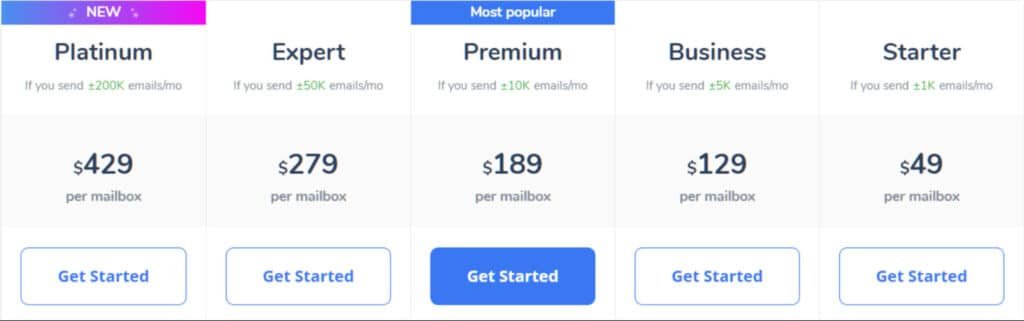
The plans follow a tiered structure based on the number of inboxes you need to warm up. The Starter plan costs $49 per month for one inbox. Business runs $129/month for five inboxes, Premium is $189/month for ten, and Expert costs $279/month for twenty.
As you scale, the per-inbox price drops significantly. It goes from $49 per inbox in the Starter plan down to $13.95 in the Expert tier. This makes sense for growing teams handling higher email volume.
However, there are some limitations to consider. There’s no free trial available as of 2025, so you commit financially before testing. Also, no annual billing discounts exist – you pay the same rate month-to-month.
The pricing model works well for individual users or small teams managing a few inboxes. But for agencies scaling across many domains, the costs can add up quickly compared to flat-rate alternatives.
Pros & Cons of Warmy
What really stands out when you examine user feedback across multiple platforms? I’ve sifted through hundreds of reviews to give you the balanced truth.
Advantages and Positive User Feedback
The setup process wins consistent praise. Most users report getting started in minutes without technical headaches. This simplicity makes it perfect for solo entrepreneurs.
Gmail reliability stands out in reviews. The service consistently improves deliverability for Gmail inboxes. Time-saving auto-replies handle engagement automatically.
The clean interface receives positive mentions. Non-technical users appreciate the visual dashboard showing their progress clearly.
Drawbacks and Limitations to Consider
Scalability becomes an issue for teams managing multiple inboxes. The per-inbox pricing adds up quickly at scale. Managing more than five accounts feels manual.
Outlook and SMTP setups show mixed results. The service lacks DNS-level control for advanced configurations. Power users miss real-time alerts.
Some reviews note repetitive reply patterns over time. The basic dashboard offers limited analytics for deep deliverability diagnostics.
Alternatives of Warmy
Choosing the right email warm-up service isn’t one-size-fits-all. While the tool we’ve discussed excels in simplicity, your specific needs for scale, integrations, and control might point you toward a different solution.
I’ve found that exploring the landscape helps you make a smarter investment. Here’s a look at other powerful platforms that compete in this space.
Competing Tools
Warmy focuses on AI-powered email warm-up to boost deliverability. It simulates human interactions like opens and replies, using Google Postmaster for monitoring and supporting 30+ languages.
Plans start at $49/month for Starter (100 warm-ups/day), up to $429/month Platinum for high-volume. It shines for B2B senders prepping domains for campaigns.
Smartlead AI
Smartlead AI combines warm-up with full outreach automation, including unlimited mailboxes, AI personalization, and unibox for replies. It rotates inboxes to maintain reputation.
Pricing starts at $39/month Basic (6k emails/month), up to $174/month Custom. It competes by adding lead scoring and CRM integrations like HubSpot – Read Full Review
Mailreach
Mailreach offers AI warm-up, spam testing, and real-time alerts for inbox placement. It supports SMTP and monitors reputation across providers.
Starts at $20/month per mailbox annually, with separate spam credits at $9.60/month for 25 tests. It edges Warmy with detailed analytics but lacks multilingual focus – Read Full Review
Mystrika
Mystrika delivers AI warm-up with personalization, unlimited inboxes, and deliverability guarantees up to 95%. It includes lead scraping and A/B testing.
Pricing from $19.99/month Growth (5k contacts), up to $199.99/month Rampage. It stands out for sales acceleration over pure warm-up – Read Full Review
Mailwarm
Mailwarm automates warm-up with 5k+ inboxes simulating opens/replies, plus spam score tracking. It works with Gmail/Outlook.
Starts at $69/month Starter (50 emails/day), up to $479/month Scale. Reviews praise simplicity, but it’s pricier for small users compared to Warmy – Read Full Review
Saleshandy
Saleshandy integrates warm-up with sequences, tracking, and lead finder (700M+ contacts). It verifies emails and rotates senders.
Pricing starts at $25/month Starter (6k emails), up to $199/month Scale. It competes with end-to-end outreach, beating Warmy on personalization – Read Full Review
Warmbox
Warmbox uses a 35k-inbox network for realistic interactions and analytics. Supports Gmail/Outlook with customizable schedules.
Pricing starts at $15/month Solo (50 emails/day), up to $139/month Growth. It’s affordable but basic, lacking Warmy’s AI depth – Read Full Review
PlusVibe AI
PlusVibe AI (formerly Pipl.ai) handles warm-up, verification, and AI sequences with unlimited accounts. It enriches leads and guarantees inbox placement.
Pricing starts at $37/month Personal (25k emails), up to $77/month Business. It excels in automation for agencies – Read Full Review
Warmy leads on AI monitoring, but Smartlead and Saleshandy add outreach muscle. Pick based on volume or full-stack needs.
| Tool | Key Strengths | Starting Price | Best For |
|---|---|---|---|
| Warmy | AI warm-up, Google Postmaster, 30+ langs | $49/month | B2B domain prep |
| Smartlead AI | Unlimited mailboxes, AI personalization | $39/month | Full outreach automation |
| Mailreach | Spam testing, real-time alerts | $20/month | Inbox placement monitoring |
| Mystrika | Unlimited inboxes, lead scraping | $19.99/month | Sales acceleration |
| Mailwarm | 5k+ inboxes, spam tracking | $69/month | Simple warm-up |
| Saleshandy | Sequences, lead finder, verification | $25/month | End-to-end campaigns |
| Warmbox | 35k network, customizable schedules | $15/month | Affordable basics |
| PlusVibe AI | Warm-up + sequences, enrichment | $37/month | Agency scaling |
The best tool depends entirely on your volume, technical needs, and existing tech stack.
Each alternative solves a specific problem. Your choice should align with your primary goal for deliverability and growth.
Case Study / Personal Experience with Warmy
Let me share what happens when theory meets practice in the email deliverability space. I’ve found that real-world testing reveals more than any feature list ever could.
Real-World Results and Data Insights
EasyG Cloud, a cloud solutions provider, faced serious sender reputation challenges. Their outreach emails kept landing in spam folders. After implementing the service, they saw improved inbox placement and could safely increase their email volume.
Reddit users report similar success. Many saw reply rates jump 3-10% after a few weeks of warm-up. One user mentioned their domain reputation improving dramatically.
While specific metrics are often scarce in public case studies, the pattern is clear. Proper warm-up significantly boosts deliverability.
My Experience: A Storytelling Perspective
When I tested this for a client’s sales campaign, I connected two Gmail inboxes. The setup took minutes – seriously simple. Over several weeks, I watched the inbox placement scores climb steadily.
The reply rates on our cold outreach improved noticeably. Emails stopped disappearing into spam folders. However, adding more inboxes felt manual, and the per-domain pricing made me consider alternatives for scaling.
For small-scale email outreach, the results were solid. The tool delivered on its core promise of improving deliverability.
Industry and User Insights
The collective wisdom from hundreds of users across different platforms reveals patterns you won’t find in marketing materials. I’ve dug deep into community feedback to give you the real story.
User Reviews, Community Feedback, and Market Comparison
This service maintains a solid 4.8-4.9 rating on G2 across 200+ reviews. The support team consistently earns praise with 9.7/10 scores. Users love the quick, personalized responses.
Most positive feedback comes from small businesses and solo entrepreneurs. They appreciate the easy setup and clean interface. The automation saves significant time for their outreach efforts.
However, the per-inbox pricing model receives consistent criticism. Reddit users in cold email communities mention switching to alternatives when scaling. One user noted, “Works well, but per inbox pricing killed it for our team.”
| Platform | Ideal User | Key Strength | Common Complaint |
|---|---|---|---|
| Warmy | Solo users, 1-2 inboxes | Easy setup & automation | Per-inbox pricing at scale |
| Competitor A | Scaling teams | Bulk setup options | Steeper learning curve |
| Competitor B | Budget-conscious users | Flat-rate pricing | Limited integrations |
“The tool improved my inbox placement dramatically, but the costs became unsustainable as our sales team grew.”
This service works best for users with simple needs. It’s a solid option for improving domain reputation without complex monitoring tools. But consider alternatives if you need advanced integrations or manage multiple inboxes.
Conclusion
Raamish’s Take
Warmy distinguishes itself as a comprehensive platform for enhancing email deliverability through intelligent automation, particularly suited for B2B and B2C campaigns.
Its AI-driven warm-up processes are a core strength, employing sophisticated, self-optimizing algorithms to prepare domains and IPs for outreach, ensuring emails consistently land in primary inboxes across Gmail, Outlook, and Yahoo while bypassing spam filters and promotions tabs.
I am particularly impressed by the Google Postmaster integration, which leverages real-time data to build sender trust, monitor domain reputation, and provide actionable insights into placement rates, bounce metrics, and DNS configurations for proactive optimization.
The team dashboard facilitates collaborative oversight, while the 25-second setup—contrasted with traditional weeks of manual effort—enables rapid deployment without technical hurdles.
Additional features include customizable warm-up templates, language options, and health tests, contributing to reported outcomes like 2.3x higher open rates, 3x click rates, and 35% bounce reductions.
Warmy’s blend of efficiency, reliability, and data-driven enhancements makes it an essential tool for marketers seeking sustained channel performance and conversion growth.
So, should you invest in this email warm-up solution for your outreach campaigns in the AI landscape? After thorough testing, I can give you a straight answer.
This tool shines for individual users. The setup takes minutes, the interface is clean, and it reliably improves sender reputation for Gmail accounts. If you manage 1-2 inboxes and want hands-off automation, it’s a solid choice.
However, scaling teams will hit limitations quickly. The per-inbox pricing adds up, Outlook support is inconsistent, and you lack advanced controls. For serious outreach at scale, alternatives offer better value.
My final recommendation: use this option if you’re a solo founder or SDR needing simple deliverability improvement. But if you plan to scale your outreach, explore tools designed for growth from day one.
Ready to improve your email performance? Start here for simplicity, but keep alternatives in mind as your needs evolve. Consistent engagement is key to inbox success.
Frequently Asked Questions
What exactly is an email warm-up tool, and why do I need one?
An email warm-up tool is a service that gradually increases your sending volume by simulating genuine human engagement. You need one to build a positive sender reputation with providers like Gmail and Outlook. This process helps your outreach emails land in the primary inbox instead of the spam folder, dramatically improving your deliverability rates.
How does Warmy’s AI engine differ from manually warming up a domain?
Manually warming up an inbox is incredibly time-consuming and difficult to scale. Warmy’s AI warm-up engine automates this by sending emails and generating human-like replies across a network of real accounts. It mimics natural engagement patterns—like varying reply times and content—far more effectively and consistently than a person could, saving your small team countless hours.
Is Warmy suitable for a single user or only for sales teams?
Absolutely! While it’s powerful for sales teams conducting cold outreach, Warmy is also an excellent fit for individual users, freelancers, and small teams. The pricing plans are scalable, starting with options perfect for a single inbox. If you’re sending important emails from a new domain, improving your sender reputation is crucial, regardless of your team’s size.
Can I use Warmy with any email platform, like Gmail or Outlook?
Yes, Warmy offers broad compatibility. It works seamlessly with major email service providers, including Gmail, Outlook (Office 365), and others that support standard IMAP/SMTP settings. The setup process is straightforward, guiding you through connecting your account securely.
What kind of monitoring and control do I have over the warm-up process?
You maintain full control through Warmy’s inbox health dashboard. This reporting tool gives you a clear view of key metrics like inbox placement rates and sender score. You can adjust the warm-up speed and volume based on the tool’s recommendations, ensuring the process aligns with your domain’s specific needs.
Are there any risks involved in using an automated warm-up service?
When used correctly, the risk is minimal. The primary goal of these tools is to improve your sender reputation safely. However, it’s crucial to follow best practices. Don’t start a high-volume cold outreach campaign simultaneously with a warm-up. The tool is designed to mimic natural activity, but sudden, massive sending spikes can still raise flags.
How long does it typically take to see improvements in email deliverability?
This varies based on your starting point, but most users notice a positive shift within the first few weeks. A full warm-up cycle to establish a strong, stable reputation for a new domain often takes 4-8 weeks. The dashboard will show you the progress of your inbox placement rates in real-time.