Are you drowning in slide decks?
I know the feeling. Spending hours on design, formatting, and finding the right visuals can drain the life out of any project. It’s frustrating when the tool itself becomes the biggest hurdle to sharing your brilliant ideas.
What if you could get that time back?
I was skeptical, too. That’s why I decided to put this AI presentation maker to the ultimate test. I bought the pro plan myself and created multiple decks from scratch. My goal was simple: to see if it could truly deliver professional results in seconds, or if it was just more hype.
This comprehensive Decktopus Review will give you the straight truth. We’ll dive into the core features, pricing, and my real-world testing results. You’ll get an honest look at the pros and the cons. By the end, you’ll know for certain if this tool is the solution you’ve been searching for.
Let’s jump in and see what this platform is really made of.
Key Takeaways: Decktopus Review
- This is a firsthand, paid evaluation of the AI presentation software.
- The tool aims to drastically cut down the time needed to create professional slides.
- We cover all essential aspects, including features, cost, and practical performance.
- The analysis is based on creating multiple real-world presentations.
- The goal is to provide a clear verdict on its value for your specific needs.
Decktopus Review: An Overview

Raamish’s Take
Decktopus revolutionizes presentation creation by combining intuitive design with powerful AI-driven features, making it an essential tool for professionals.
Its AI-powered slide generation is a standout, transforming simple prompts into fully structured presentations with tailored outlines, content, and visuals in minutes.
I’m particularly impressed by the drag-and-drop editor, which allows seamless customization of layouts, fonts, and images, alongside the ability to create and share branded company templates for consistent corporate identity.
The auto-generated images eliminate reliance on stock visuals, delivering bespoke graphics that enhance slide impact.
Features like dynamic Q&A sessions and personalized storytelling tools—including icebreakers and AI-crafted scripts—engage audiences effectively, while PDF-to-presentation conversion streamlines content repurposing.
Integration with Zapier automates workflows, and slide analytics provide actionable insights.
Decktopus’s ability to save 10 hours weekly, as reported by its 3 million+ users, and its rapid support response (<1 minute) make it a top choice for crafting polished, impactful presentations with minimal effort.
Introduction to Decktopus
What if your next presentation could build itself while you focus on the content? That’s the promise behind this AI-powered platform. I’ve tested it extensively, and the results might surprise you.
The tool positions itself as a modern solution for busy professionals. It targets people who need quality slides fast.
Positioning in the AI Landscape
This platform enters a crowded AI space dominated by giants like PowerPoint. It carves its niche by focusing purely on speed and automation. The AI handles design, layout, and even content suggestions.
For business professionals, this means less time formatting and more time presenting. The technology represents the next wave of creative automation tools.
Founders and Company Background
While specific founder details aren’t widely publicized, the company operates as a modern SaaS provider. They’ve built a dedicated team focused on presentation automation. The platform has gained steady traction since its launch.
Their approach centers on solving real pain points for presentation creators. The team understands what users actually need day-to-day.
Purpose and Endorsements
The core purpose is clear: eliminate presentation drudgery. This tool serves various industries from education to corporate training. Many small teams and solo entrepreneurs swear by its efficiency.
While specific corporate endorsements aren’t heavily promoted, the platform has organic adoption across sectors. Marketing teams, educators, and startups find particular value.
| Traditional Approach | AI-Powered Platform | Time Saved |
|---|---|---|
| Manual design from scratch | Automated layout generation | 60-70% |
| Content creation alone | AI-assisted content suggestions | 40-50% |
| Separate image sourcing | Built-in visual library | 30-40% |
| Formatting adjustments | Consistent styling automation | 50-60% |
The table above shows why this platform appeals to time-pressed users. It transforms presentation creation from a chore into a streamlined process.
What is Decktopus?
Ever stared at a blank slide, wondering where to even begin? I’ve been there too. This AI-powered platform tackles that exact frustration head-on.
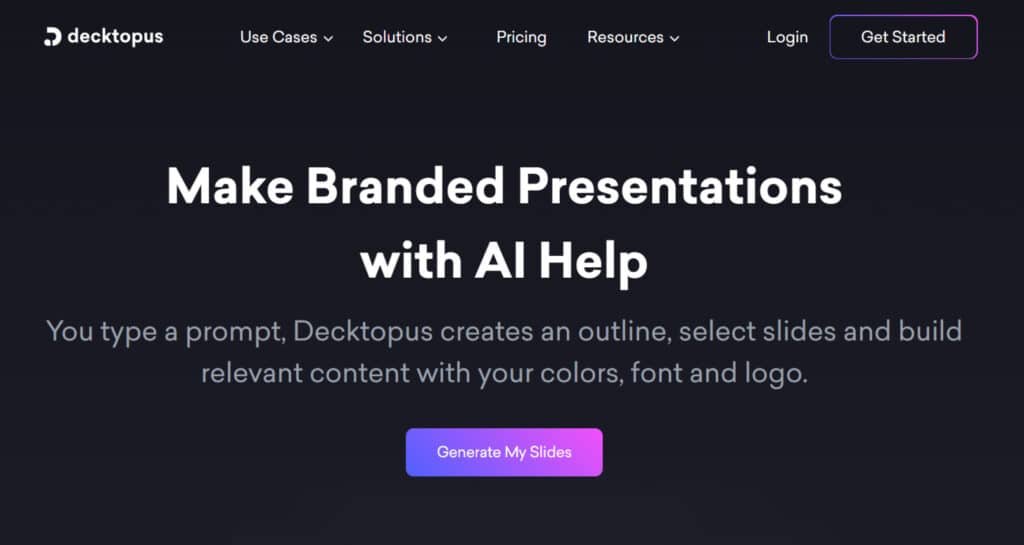
The magic happens when you simply type your topic. The system then works behind the scenes to build your entire presentation structure.
Inner Workings and AI Integration
Here’s how it works in practice. You provide a basic prompt like “Quarterly Marketing Report.” The AI analyzes your input and generates a complete outline. It selects appropriate layouts and even suggests relevant content.
The platform’s smart features include asking clarifying questions about your audience and goals. This ensures the final output matches your specific needs.
Benefits for Ideal Users
Busy professionals get the most value from this approach. Educators, marketers, and students can create polished presentations without design expertise. The automated design saves hours of manual formatting work.
You get a solid foundation that you can then customize. This makes it perfect for internal meetings or draft pitches where speed matters most.
| Creation Method | Best For | Time Estimate |
|---|---|---|
| AI Generation from Prompt | Starting from scratch | 2-5 minutes |
| PDF Import & Conversion | Existing content | 3-7 minutes |
| Blank Template Editing | Full customization | 10-15 minutes |
The table shows how different approaches suit various needs. Each method leverages the platform’s core features to streamline your workflow.
Best Features of Decktopus
The real strength of this platform lies in its thoughtfully designed features. They work together to handle the heavy lifting of presentation creation. I found four tools particularly powerful during my testing.
1. Core Creation Tools
This section highlights essential tools that streamline slide creation for efficient workflows.
1.1 One-Click AI Design for Instant Layouts
The one-click AI design generates a full deck by inputting a topic and answering simple questions. It structures slides with titles, bullet points, and visuals in minutes.
This features decktopus capability benefits users seeking quick professional results, reducing setup time for business presentations and allowing focus on content refinement.
1.2 Drag & Drop Editor
The drag-and-drop editor enables easy editing of presentations. Users create and share company templates with teams. It supports modifying text, swapping images, or adding charts through intuitive clicks.
This tool aids in final adjustments, ensuring polished outputs that align with business needs and enhance collaboration without technical barriers.
1.3 Regenerate Slide
If an AI-generated slide needs adjustment, the regenerate option produces new styles and ideas instantly. It explores variations to fit specific requirements.
Users gain flexibility in iterating designs, which helps in achieving optimal layouts faster and supports consistent quality across multiple projects.
1.4 Start with AI
This tool lets AI manage research, copywriting, and image generation. Users concentrate on delivery aspects. It automates foundational work, saving effort in initial stages and enabling creators to produce high-quality decks suited for various scenarios, including time-sensitive preparations.
1.5 Paste in Text
Pasting existing content transforms it into clean, designed slides immediately. It handles raw ideas efficiently. This function assists in repurposing materials, minimizing manual formatting and delivering ready-to-use slides that maintain professional standards.
2. Design and Customization
These options provide control over visual elements for branded and appealing decks.
2.1 Custom Layouts
Upload brand templates to apply consistent elements across presentations. It reinforces visual identity and messaging. This ensures uniformity in business materials, helping teams maintain a professional image and streamline approval processes.
2.2 Design Mode
Design mode offers drag-drop for layouts, font customization, image tweaks, and visual additions. It places full control in users’ hands. Creators achieve precise designs, which improves engagement and adaptability for diverse audience needs.
2.3 Auto Branding
Slides automatically adapt to logos, colors, and fonts. Options range from light to fully customized setups. It simplifies branding application, supporting business consistency and reducing errors in multi-deck environments.
2.4 Custom Templates
Define layouts, fonts, and colors once for reuse in all decks. It promotes a professional look without repetition. Users benefit from efficiency in recurring tasks, ensuring brand alignment and faster production cycles.
2.5 Image & Icon Finder for Visual Appeal
The image icon finder sources relevant options and generates AI images on demand. It eliminates search time for visuals. This enhances slide attractiveness, making content more engaging and visually supportive of key messages.
2.6 Say Goodbye to Stock Images
AI creates tailored images from prompts, avoiding generic stock. It produces stunning, context-specific visuals. Decks become more original and impactful, aiding in capturing attention during presentations.
3. Team and Workflow
Collaboration tools organize and integrate processes for group efficiency.
3.1 Organization Table
Manage decks, categorize by department, and oversee teams via one panel. It centralizes control. This structure supports smooth operations, helping large groups track progress and avoid overlaps.
3.2 Team Management
Categorize projects, monitor advancement, and facilitate teamwork. It drives collective success. Users experience improved coordination, which is vital for business environments requiring shared responsibilities.
3.3 Zapier Integration
Connect with preferred tools to automate workflows and sync presentations. It eliminates manual steps. Integration streamlines repetitive actions, boosting productivity in connected ecosystems.
4. Storytelling and Delivery
Enhance narrative and speaking elements for compelling deliveries.
4.1 AI-Generated Slide Notes and Content
The tool writes speaker notes automatically by analyzing content. It supplies customizable talking points. This preparation aid ensures confident presentations, providing structure that aligns with slide flow.
4.2 Optimize Audience Interaction
AI develops tailored Q&As for interactive sessions. It promotes engagement without effort. Users facilitate dynamic discussions, improving audience retention and feedback collection.
4.3 Refine Your Talk
Generate personalized icebreakers, hooks, and story structures. It adds natural progression. This refines delivery, making talks more relatable and effective in holding interest.
4.4 Craft Impactful Stories
Begin strongly, maintain themes, and create memorable experiences. It keeps audiences engaged throughout. Structured storytelling strengthens message delivery and leaves lasting impressions.
4.5 Shape Dynamic Scripts
Produce AI notes for smooth speaking. It elevates performance seamlessly. Users gain polished scripts, supporting flawless executions in high-stakes settings.
5. Quick Transformers
Convert existing files rapidly for immediate use.
5.1 Transform PDFs Instantly
Turn static PDFs into interactive presentations. It adds dynamism to documents. This conversion revitalizes old materials, enabling quick updates and broader applicability in modern formats.
Positive reviews highlight how these features save time and improve quality. Additional reviews emphasize ease of use and professional outcomes, confirming value for business applications.
Pricing Breakdown of Decktopus
When I first saw the pricing model, I’ll admit the credit system gave me pause. Unlike traditional subscription services, this platform uses a credit-based approach that requires some mental math. But after testing it thoroughly, I can help you understand exactly what you’re getting for your money.
Pro Plan
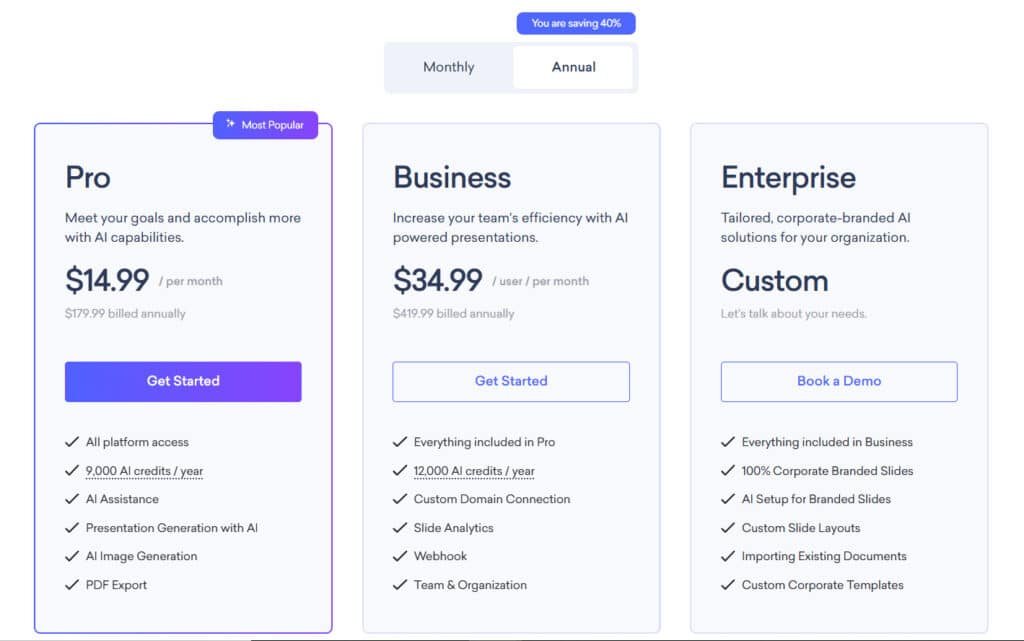
Kick off with Pro at $24.99/month or snag 40% off annually for $14.99/month ($179.99/year). Ideal for solo creators. Features: All platform access, 750 AI credits/month (or 9,000/year), AI Assistance, Presentation Generation with AI, AI Image Generation, PDF Export.
Business Plan
Scale up team productivity with Business at $49.99/user/month or annual $34.99/user/month ($419.99/year). Most popular pick. Features: Everything in Pro, 1,000 AI credits/month (or 12,000/year), Custom Domain Connection, Slide Analytics, Webhook, Team & Organization.
Enterprise Plan
Go custom with Enterprise—tailored quotes via demo. Perfect for corporate needs. Features: Everything in Business, 100% Corporate Branded Slides, AI Setup for Branded Slides, Custom Slide Layouts, Importing Existing Documents, Custom Corporate Templates.
| Plan | Monthly Price | Annual Price | Key Features | AI Credits |
| Pro | $24.99 | $179.99 | AI Generation, PDF Export | 750/mo |
| Business | $49.99/user | $419.99/year | Analytics, Team Tools | 1,000/mo |
| Enterprise | Custom | Custom | Full Branding, Imports | Unlimited |
Pros & Cons of Decktopus
Testing this platform revealed a clear divide between what it excels at and where it falls short. You’ll find genuine time savings mixed with creative limitations that might frustrate power users.
Advantages in Speed and Ease of Use
The pros are impressive for quick presentation needs. I created a 20-slide deck in under two minutes—something that would normally take me hours. The interface is intuitive enough for anyone to use without training.
You don’t need design skills to get professional results. The AI handles layouts automatically using their extensive templates library. PDF conversion is another huge time-saver for existing content.
Drawbacks Including Customization Limitations
However, the pros come with significant trade-offs. During testing, I experienced frustrating freezes when importing files. The platform sometimes felt sluggish when clicking buttons.
The AI-generated content often feels generic and requires substantial editing. Customization options are limited compared to professional tools. You’ll need design skills to make presentations truly unique.
| Strengths | Weaknesses | Impact Level |
|---|---|---|
| Rapid generation | Generic output | High |
| Easy to use | Export formatting issues | Medium |
| Quality templates | Limited customization | High |
| Saves time | Performance lag | Medium |
These limitations make me consider whether alternative tools might better suit specific needs. The balance between speed and quality depends entirely on your presentation requirements.
Alternatives to Decktopus
If you’ve found yourself wanting more customization or strategic depth, there’s a whole ecosystem of presentation tools worth considering. Different scenarios call for different approaches, and sometimes automated generation hits its limits.
Decktopus generates full presentations from a single prompt, with smart layouts, images, and speaker notes in minutes.
It’s a favorite for busy pros—free tier for basics, $14.99/month Pro for unlimited decks and custom branding. These five tools compete in AI-driven visuals and ease for slides.
Competitors To Decktopus
SlidesAI
SlidesAI works as a Google Slides add-on, turning text into polished decks with AI layouts and images. It auto-summarizes and supports 100+ languages—free for 3 presentations/month, $10/month Pro unlimited – Read Full Review
Visme
Visme combines AI image gen, templates, and data visualization for interactive decks. It includes animations and offline export—free tier, $29/month Pro for branding and analytics – Read Full Review
Simplified (Presentation Maker)
Simplified builds decks with AI copy, stock visuals, and one-click design from prompts. It integrates video and team collaboration—free basics, $30/month Pro unlimited AI generations – Read Full Review
Orshot (Presentation Template)
Orshot offers AI-enhanced templates with hyper-real visuals and lighting control for product-focused slides. Luxury brands get print-ready decks—$29/month Pro for advanced renders – Read Full Review
HeyGen (AI Presentation Maker)
HeyGen adds talking avatars and voiceovers to slides, creating video presentations from scripts. It supports 175+ languages—free trial, $29/month Creator for unlimited shorts – Read Full Review
Decktopus leads on prompt-to-deck speed, but HeyGen edges in video avatars while Visme wins on data viz. Choose based on static slides or interactive delivery.
| Tool | Key Strengths | Starting Price | Best For |
|---|---|---|---|
| Decktopus | Prompt-to-full deck, speaker notes | $14.99/month | Quick business pitches |
| SlidesAI | Google Slides add-on, 100+ languages | $10/month | Google Workspace users |
| Visme | Data viz, animations, offline export | $29/month | Interactive & branded decks |
| Simplified | AI copy + video, team collab | $30/month | All-in-one marketing teams |
| Orshot | Hyper-real templates, lighting control | $29/month | Product-focused luxury slides |
| HeyGen | Avatar video decks, 175+ languages | $29/month | Video presentations |
Comparative Analysis with Similar Tools
The key difference lies in the trade-off between speed and customization. Automated tools excel at rapid generation but often produce generic output requiring editing.
Professional services like SlidePeak deliver strategically crafted presentations with full brand alignment. Human expertise creates deeply tailored narratives that automated design can’t match.
Your choice depends on presentation purpose. For internal reports or drafts, automated presentation tool options work well. For high-stakes situations, professional services justify their higher cost through superior impact.
Case Study / Personal Experience with Decktopus
Putting theory to the test, I rolled up my sleeves to create actual presentations and see how the AI performed. My goal was to document the entire experience, from a blank screen to a finished deck.
My Experience with Using the AI Tool
I started with a prompt: “History of Computers.” The AI asked about my audience and purpose. I answered, and it generated a solid outline in seconds. After a quick edit, I selected a theme.
The generation took about two minutes. The result was a 20+ slide deck with coherent text and AI-generated images. The flow from early mechanics to modern tech was logical and impressive.
Real-World Presentation Examples
Editing was a breeze. I clicked any element to change it. When I needed a specific image of the Babbage Analytical Machine, the AI created it in 15 seconds. The quality of these images was surprisingly professional.
I also tested the PDF import. I uploaded a file containing an essay. After a brief initial freeze, it processed the content in 20 seconds. The AI then built a presentation that perfectly summarized my original document.
This experience confirmed the tool’s strength as a powerful starting point. You save immense time on the initial draft, but personalizing the final slide deck is still essential for a unique result.
Tips for Maximizing Your Presentations
Getting the most from this tool isn’t just about generation; it’s about smart refinement. I found that treating the AI output as a powerful first draft is the best way to think. Your personal touch transforms a good start into a great final product.
These tips will help you polish your work efficiently. They cover everything from quick edits to advanced team workflows.
Quick Edits and Template Customization
Click any element on a slide to edit it instantly. This simple action gives you full control. I always review the AI-generated text to match my own voice.
Use the “Create Tips” feature for quick suggestions on improving slide engagement. It’s a fantastic way to boost your creativity in seconds.
Don’t overlook the Elements tab. It lets you add videos, charts, and ratings for visual impact. Customizing your template with brand colors and logos early on saves time later.
| Editing Approach | Best For | Time Investment |
|---|---|---|
| Click-to-Edit Elements | Quick text and image swaps | 1-2 minutes |
| AI “Create Tips” Feature | Enhancing slide engagement | Under 30 seconds |
| Full Template Redesign | Brand alignment | 5-10 minutes |
Team Collaboration and Additional AI Tips
Real-time collaboration allows your whole team to work on a deck at once. It functions like Google Docs for slides. Connect the platform to Google Drive for smooth file management.
For a creativity boost, generate multiple versions of a presentation. Then, combine the best slides from each. This way, you create a hybrid deck stronger than any single AI output.
Remember the AI image generator. Describe what you need instead of searching stock sites. These practical tips ensure you leverage every feature effectively.
Industry Insights and User Feedback
Looking beyond my own testing, I wanted to see how this presentation software performs in the wild with diverse users and needs. The collective feedback reveals some fascinating patterns that might influence your decision.
Expert Opinions and Market Reception
Aggregated user reviews consistently highlight the platform’s speed and accessibility. Many users praise how it eliminates the intimidation of starting from scratch. This democratizes presentation creation for people without design backgrounds.
However, critical feedback reveals important limitations. Experienced users note that templates lack sufficient differentiation. Presentations can start looking similar, diminishing their impact when audiences see multiple decks from the same tool.
Export and formatting issues appear as recurring frustrations in user feedback. Teams collaborating across platforms or clients requesting PowerPoint files often encounter compatibility problems. The support experience varies significantly between subscription tiers.
Industry experts view this tool as valuable for specific contexts but not a replacement for custom design. As one presentation professional noted, “AI-generated decks work well for information delivery but struggle with persuasion and emotional impact.”
The consensus? This platform excels for volume and speed but shouldn’t be your only tool for high-stakes presentations. Many professionals eventually return to human designers for investor pitches and major proposals where quality directly affects outcomes.
Conclusion: Decktopus Review
Raamish’s Take
Decktopus revolutionizes presentation creation by combining intuitive design with powerful AI-driven features, making it an essential tool for professionals.
Its AI-powered slide generation is a standout, transforming simple prompts into fully structured presentations with tailored outlines, content, and visuals in minutes.
I’m particularly impressed by the drag-and-drop editor, which allows seamless customization of layouts, fonts, and images, alongside the ability to create and share branded company templates for consistent corporate identity.
The auto-generated images eliminate reliance on stock visuals, delivering bespoke graphics that enhance slide impact.
Features like dynamic Q&A sessions and personalized storytelling tools—including icebreakers and AI-crafted scripts—engage audiences effectively, while PDF-to-presentation conversion streamlines content repurposing.
Integration with Zapier automates workflows, and slide analytics provide actionable insights.
Decktopus’s ability to save 10 hours weekly, as reported by its 3 million+ users, and its rapid support response (<1 minute) make it a top choice for crafting polished, impactful presentations with minimal effort.
My comprehensive testing reveals that this tool occupies a unique middle ground in the presentation software landscape. It genuinely delivers professional slides in seconds, handling the heavy lifting of layout and design.
For internal team meetings, educational materials, or quick drafts, it’s incredibly valuable. The time savings are real. However, for high-stakes sales pitches or investor presentations, the customization limitations become apparent.
The pricing requires careful consideration—calculate whether your monthly presentation volume justifies the cost. Ask yourself key questions about your audience and frequency needs.
Final recommendation: This platform earns its place for speed-focused work but shouldn’t be your only tool. Try the free plan to get a personal touch on whether it fits your workflow. Use code ARTTURI for 10% off if you upgrade.
Frequently Asked Questions
Is Decktopus suitable for someone with no design skills?
Absolutely. That’s one of its biggest strengths. The AI handles the heavy lifting—layout, design, and content suggestions. You just need to provide the topic, and it generates a professional-looking presentation in minutes, no experience required.
How does the credit system work for AI-generated presentations?
Think of credits as fuel for the AI engine. Each time you use the AI to generate a new presentation from scratch, it consumes one credit. Your subscription plan determines how many credits you get per month, so it’s wise to plan your projects accordingly.
Can I upload my own images and branding into a Decktopus template?
Yes, you can. The drag-and-drop editor makes it simple to upload your logo, brand-specific images, and other custom elements. This allows you to maintain brand consistency while still benefiting from the AI’s initial design framework.
What kind of support can I expect if I run into issues?
Support varies by plan. The Pro plan typically offers priority support, meaning faster response times. All users have access to a help center, but for direct assistance, the higher-tier plans provide the best access to the support team.
Are the presentations created with Decktopus compatible with PowerPoint?
You can export your finished presentation as a PowerPoint file (PPTX). This is a crucial feature if you need to share the file with colleagues who use different software or make final, intricate edits in PowerPoint itself.
How does it compare to tools like Canva or Google Slides for business use?
Decktopus is focused on speed and AI-assisted creation, while tools like Canva offer more granular, manual design control. If your priority is creating a solid presentation foundation incredibly fast, Decktopus wins. For pixel-perfect, fully custom designs, you might still need a more traditional editor.