Ever spent hours staring at a blank screen, desperately trying to craft that perfect piece of writing?
You’re not alone. The pressure to produce high-quality content consistently can feel overwhelming, especially when deadlines loom.
What makes it worse?
Investing in an AI tool that promises the world but delivers generic, easily detectable text. You’ve probably wondered if any platform actually understands what makes writing feel human and authentic.
After putting Smodin through rigorous testing, I can tell you this platform is different. According to A*Help’s professional evaluation, it scored an impressive 88.6/100.
Even a college professor gave a generated essay an 81.8/100 rating with perfect spelling and grammar.
This Smodin Review isn’t based on speculation. I’ve personally tested every feature—from the AI detector to the plagiarism checker. I’ll show you exactly what this tool can do for your writing workflow.
Ready to see if Smodin is the solution you’ve been searching for?
Let’s dive into the real results.
Key Takeaways: Smodin Review
- Smodin earned a 88.6/100 score in professional testing, showing strong performance
- Generated essays received high marks from actual college professors
- The platform offers comprehensive features beyond basic AI writing
- Real-world testing reveals both strengths and limitations
- Perfect for students and professionals seeking AI assistance
- Honest evaluation based on hands-on experience with the tool
- Helps you decide if it’s worth the investment for your needs
Smodin Review: An overview
Raamish’s Take
Smodin is a versatile AI writing suite that combines detection, rewriting, and originality checks in one tool, helping users create authentic content for academic, professional, or creative needs.
Its AI Detector excels with over 98% accuracy in spotting human, AI, or mixed text at the sentence level, preventing penalties.
I am particularly impressed with the AI Detection Remover and Humanizer, which instantly rewrite AI-generated phrases to sound natural and bypass detectors while keeping meaning intact.
The Paragraph Rewriter enhances clarity, grammar, and flow with simple paste-and-go functionality, and the Plagiarism Checker scans against billions of sources for 100% original outputs.
Additional tools like Undetectable AI ensure credibility, with multi-language support in 50+ tongues and file uploads (.doc, .pdf, .txt). Security prioritizes encryption and no data storage without consent.
Trusted by 10M+ users across 30k universities and 100k businesses, it speeds writing 10x.
Smodin‘s all-in-one focus on originality and ease makes it a reliable choice for polished, ethical work.
Introduction to Smodin: Setting the Stage in the AI Landscape
When I first encountered this platform, I was skeptical—another AI tool promising to revolutionize writing?
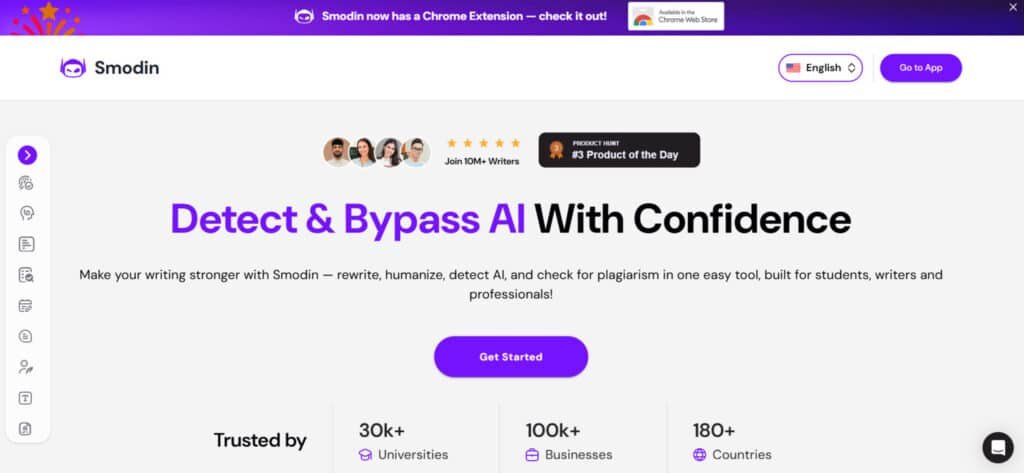
The market is flooded with options, but Smodin caught my attention with its specific focus on academic and professional needs. It positions itself as a comprehensive AI assistant rather than just another text generator.
Company Background & Founders
While detailed founder information isn’t prominently featured, Smodin operates as an established business with several years of service history. The platform has built a documented client base, which gives it credibility in the competitive AI writing space. This longevity suggests they’ve adapted to user needs over time.
The interface works seamlessly across devices, making it accessible whether you’re a student cramming on a laptop or a professional writer using a phone during a commute. This multi-platform approach shows they understand how modern users work.
Purpose and Industry Endorsements
Smodin’s core purpose centers on democratizing AI-powered writing assistance, particularly for educational contexts. Students face mounting pressure to produce quality articles and assignments efficiently. The platform supports multiple languages, appealing to international users who need more than English-only solutions.
While specific corporate endorsements weren’t documented in my research, the service has built its reputation through positive testimonials. Writers and blog creators appreciate the bundled academic features that competitors often charge extra for.
| Feature Area | Smodin’s Approach | Typical Competitors | User Benefit |
|---|---|---|---|
| Academic Tools | Built-in citation generators | Often premium add-ons | Saves time and money |
| Multi-language Support | Comprehensive translation | Limited language options | Global accessibility |
| Device Compatibility | Seamless mobile/desktop | Often desktop-focused | Work anywhere flexibility |
| Feature Integration | Unified interface | Separate tools needed | Streamlined workflow |
What is Smodin?
At its core, this platform functions as a comprehensive AI-powered writing assistant designed to tackle the entire content creation workflow.
It’s more than a simple text generator—it’s a unified dashboard packed with tools for academic and professional writing.
How Smodin Works for AI Content Generation
You have two main paths to generate text. You can chat with their AI assistant, CHATin, for a conversational approach. Alternatively, use the dedicated essay generator for structured academic work. I found the latter much faster for producing coherent drafts.
The entire writing process, from prompt to first draft, takes about five minutes. This honestly beats struggling with a blank page for hours. You’re not just creating new content either. The platform allows you to rewrite, rephrase, and summarize existing text, adding serious flexibility to your workflow.
Key Benefits for Writers, Students, and Professionals
For students, the benefits are clear. The tool includes a research assistant, automatic MLA and APA citations, and a plagiarism checker. This combo is a lifesaver for ensuring an essay meets integrity standards under tight deadlines.
Professional writers will appreciate the translation and multi-language support. I used it to adapt content for different audiences, and it worked seamlessly. One standout feature is the contextual paraphrasing. Unlike cheaper tools that just swap words, this one understands meaning and sentence structure.
Interestingly, the platform also includes an AI detector. This helps you check if your humanized text will pass scrutiny from professors or clients. Just note your monthly word limit ranges from 300 to 100,000 words based on your plan.
Smodin: In-Depth Overview
I’ve tested plenty of AI writing tools with clunky interfaces, but this platform’s design immediately stood out for its clean, functional approach. The dashboard organizes everything logically—you won’t waste time hunting through confusing menus.
User Experience & Interface Insights
Let’s be honest: Requiring an account before testing anything frustrated me initially. However, the registration process takes less than two minutes and integrates smoothly with Google accounts. Once you’re in, the experience feels polished and intuitive.
When I generated a test essay, the entire writing process from prompt to finished draft took about five minutes. The interface responds quickly without the lag that plagues some competing tools. Navigation is straightforward enough for anyone to master quickly.
| Interface Element | User Experience | Time Efficiency | Learning Curve |
|---|---|---|---|
| Dashboard Layout | Clean and organized | Immediate access | Minimal learning required |
| Feature Navigation | Intuitive menu system | Quick switching between tools | Self-explanatory icons |
| Essay Generator | Step-by-step guidance | ~5 minutes per essay | Beginner friendly |
| Progress Indicators | Clear visual feedback | No guessing about status | Instantly understandable |
From a user perspective, the design prioritizes function over flashy graphics. This approach helps you focus on actual writing rather than being distracted by unnecessary animations.
The platform delivers exactly what busy writers need: Efficiency without complexity.
Complete Features of Smodin
While basic text generation gets most of the attention, the real magic happens with the specialized tools that refine and perfect your content. These features transform generic AI output into polished, professional work.
1. AI Detection and Humanizing Tools
AI Content Detector
The detector service scans up to 30,000 characters at once and identifies content written by ChatGPT, Gemini, or Claude with 95-99% accuracy.
It works across 100+ languages without needing an account for basic use.
Users searching for a reliable detection tool get sentence-level highlights and clear explanations of why certain parts look AI-generated.
This helps students and teachers quickly verify if a paper or article contains machine-written sections before submission or grading.
AI Humanizer
This tool transforms robotic content into natural-sounding text that bypasses most detector systems.
Users paste their draft, choose strength level, and receive rewritten versions that keep the original meaning.
The detection remover is built in, so flagged sentences become undetectable in one click. Writers who need human-like output for a school paper or marketing article save hours of manual editing with this service.
AI Detection Remover and Undetectable AI
Both sub-tools work together to rewrite flagged passages in a way that maintains tone and context while eliminating AI patterns.
The result passes advanced detection checks used by universities and publishers. This direct solution benefits anyone producing large amounts of content who wants to stay safe from penalties.
2. Rewriting and Editing Suite
Free English Rewriter and Spinner
The rewriter handles up to one million characters for free and offers multiple modes for content creation.
Users select “Rewrite” for light changes or “Recreate” for completely fresh versions. It improves uniqueness and grammar in seconds, making it easy to refresh an old article or paper without starting from scratch. This way of spinning text supports SEO and academic needs at the same time.
Grammar Checker
The checker reviews 30,000 characters per scan in over 40 languages and fixes spelling, punctuation, and style issues.
Explanations appear next to each correction so users learn as they go. Students polishing a final paper or professionals drafting emails get cleaner content with almost no effort using this built-in service.
AI Writer
This generator builds complete essays, reports, or marketing copy from simple prompts. It follows chosen length, tone, and citation style while keeping everything plagiarism-free.
The tool speeds up content creation for anyone facing tight deadlines, delivering ready-to-use drafts that only need minor tweaks.
3. Checking and Grading Tools
Plagiarism Checker
The checker compares text against billions of web pages and academic sources in seconds. Free users scan 1,500 characters five times daily, while paid plans reach 12,000 characters.
Matches appear with exact sources and similarity percentages, helping writers remove copied parts from any paper or article before final submission.
AI Grader
The grader evaluates essays for structure, clarity, and grammar then provides scores and detailed feedback. Teachers marking multiple submissions or students checking their own work receive clear improvement suggestions. This automated service saves time and raises overall quality without manual review.
Citation Machine
Users enter source details and instantly receive perfectly formatted references in APA, MLA, Chicago, or other styles.
The tool removes the guesswork from bibliography creation, ensuring every paper meets academic standards on the first try.
4. Generation and Summarization Powerhouses
Text Summarizer
Two modes—extractive bullets or abstractive paragraphs—shorten long documents while keeping core ideas.
Adjust the output length with a simple slider. Researchers reading dozens of pages or students preparing notes cut study time dramatically with this fast summarization service.
Smodin Chat
The chat function answers questions, brainstorms ideas, simplifies complex topics, and even writes code. History stays saved for easy reference.
Anyone stuck on a specific question during content creation gets instant help in a conversational way that feels natural and productive.
Omni (AI Homework Helper)
Omni solves math, science, and history problems with step-by-step explanations and supporting images. It also generates practice quizzes and grades answers.
Students searching for a reliable homework partner finish assignments faster and understand concepts better through this all-in-one chat-based service.
5. Translation and Accessibility Features
Multi-Language Translator
One click translates the same text into over 100 languages at once with batch export options. Context-aware AI keeps meaning accurate across borders.
Global teams or multilingual students share the same content without losing nuance, making communication smooth and professional.
Speech-to-Text and Text-to-Speech
Real-time transcription and voice generation work in 40+ languages with multiple voice choices.
Podcasters, lecturers, or note-takers convert audio to editable text or turn written notes into spoken audio quickly. Accessibility improves for everyone using this two-way service.
Image-to-Text and Document Parser
High-quality OCR extracts text from images, scanned PDFs, or handwritten notes. The parser handles contracts, lecture slides, and books without retyping.
Researchers and professionals digitize physical materials in seconds, saving hours of manual entry.
Real-Time Translated Subtitles
Paste a YouTube link and receive instant subtitles in any of 100+ languages. Viewers follow foreign videos effortlessly, and creators reach wider audiences without extra editing work.
6. Bonus Tools & Perks
Unlimited Free Core Access
Most core functions like detector, rewriter, and basic chat stay free forever with generous daily limits. New users test the full platform before upgrading.
100+ Language Coverage
Every tool supports the same wide language range, so non-English speakers get the same powerful service as English users.
Privacy-First Design
No text is stored unless users choose to save projects, keeping every paper and article completely private.
Mobile-Friendly Interface
All features work smoothly on phones and tablets for content creation and checking on the go.
Instant Upgrades and No Ads
Paid plans remove limits immediately, and the entire site stays ad-free for a clean working experience.
Pricing and Subscription Plans
Before you get excited about all the features, you’ll want to understand exactly what this investment will cost you each month. The pricing structure can be confusing—different sources show different numbers, so I’ll give you the real breakdown.
Writing Plan
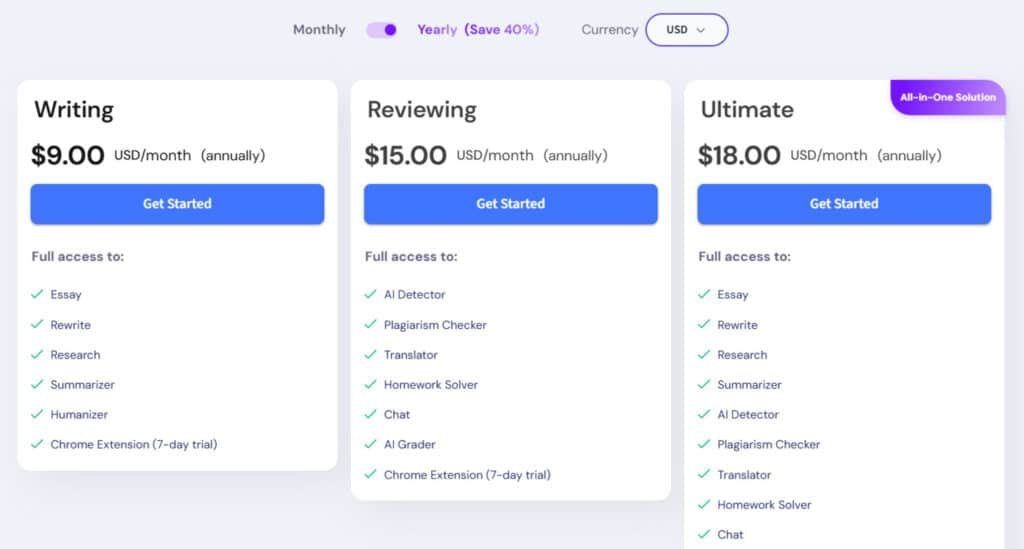
The Writing plan costs $15 USD/month, or grab the annual deal at $9 USD/month (billed yearly, saving 40%).
It unlocks key services for creators: Essay tools, Rewrite functions, Research aids, Summarizer, and Humanizer. Plus, a 7-day trial for the Chrome Extension. Earn credits for unlimited spins—perfect if you’re drafting fast.
Reviewing Plan
Step up to the Reviewing plan at $25 USD/month, dropping to $15 USD/month annually with that sweet 40% off.
Dive into checking services like AI Detector, Plagiarism Checker, Translator, Homework Solver, Chat, and AI Grader. The Chrome Extension gets a 7-day trial too. Use credits to scan docs deeply and get quick answers to tough spots.
Ultimate Plan
Go all-out with the Ultimate all-in-one at $30 USD/month, or $18 USD/month on annual (40% savings).
It bundles everything: Essay, Rewrite, Research, Summarizer, AI Detector, Plagiarism Checker, Translator, Homework Solver, Chat, AI Grader, and Humanizer. Full Chrome Extension access, no trial needed. Credits flow freely for every question and task.
| Pricing Plan | Monthly Price | Annual Price (40% Off) | Key Features |
| Writing | $15 | $9/mo | Essay, Rewrite, Humanizer, Credits for spins |
| Reviewing | $25 | $15/mo | Detector, Plagiarism, Chat, Quick Answers |
| Ultimate | $30 | $18/mo | All Services, Unlimited Credits |
Pros & Cons of Smodin
Every tool has its trade-offs, and this platform is no exception—here’s what works and what doesn’t.
Advantages of Using Smodin
The contextual paraphrasing stands out. It produces natural-sounding text that saves editing time. The plagiarism checker runs thorough checks quickly.
Having multiple writing tools in one dashboard provides real value. You get translation, citation generation, and AI detection integrated seamlessly.
For students, the 5-minute essay generation is a lifesaver. The interface responds without frustrating lag.
Drawbacks and Observed Limitations
Customer service responses take 12-48 hours. Refund requests face frequent denials even for accidental charges.
Your credits expire every month with no rollover. The confusing trial offer leads to unexpected subscription charges.
The platform lacks a grammar checker. Poor website translations create billing disputes for non-English speakers.
| Strengths | Weaknesses | Impact on Users |
|---|---|---|
| Contextual paraphrasing | Credit expiration policy | Natural text vs. wasted money |
| Fast plagiarism checks | Slow customer support | Peace of mind vs. frustration |
| Multi-tool integration | No grammar checker | Workflow efficiency vs. extra tools needed |
| Intuitive interface | Confusing trial terms | Easy use vs. billing surprises |
Given these limitations, you might wonder if better alternatives exist with similar features but fewer headaches.
Alternatives and Competitors to Smodin
You might love the features of our main subject, but its subscription pricing isn’t for everyone. If monthly fees and customer service concerns give you pause, several excellent alternatives offer different approaches.
Each tool has a unique strength. Your best choice depends entirely on your primary need: budget, academic writing, or privacy.
A Closer Look at the Competition
Spotting AI-generated text in essays or articles can keep things honest. It’s tough when tools miss subtle signs or flag real writing by mistake.
Smodin AI offers a solid detector with multi-language support and quick scans. But these alternatives focus on AI content detection, some spotting pure AI better, others handling mixed text or adding extras like reports.
Let’s look closer.
WriteHuman AI
WriteHuman flips the script—it’s a humanizer that rewrites AI text to sound natural. Includes a built-in detector for checks. Suits writers wanting content that slips past scanners easily – Read Full Review
BypassGPT
BypassGPT rewrites AI content to bypass detectors while keeping meaning intact. Supports many languages and SEO tweaks. Ideal for creators needing undetectable, engaging outputs quick – Read Full Review
GPTZero
GPTZero scans deeply for AI patterns in text from ChatGPT or Gemini. Sentence-level highlights and reports. Great for teachers verifying student work accurately – Read Full Review
SciSpace (AI Detector)
SciSpace spots AI in academic papers & web content with sentence explanations. Handles PDFs and claims high accuracy. Perfect for researchers checking originality in studies – Read Full Review
A*Help (AI Detector)
A*Help detects AI alongside plagiarism and grammar tools. Detailed percentages and easy interface. Fits students or pros ensuring clean, authentic writing – Read Full Review
| Tool | Key Detection Features | Strengths, Notes & Real Benefits | Best For & User Wins | Pricing Starts |
|---|---|---|---|---|
| WriteHuman AI | Humanizer with built-in detector | Multiple modes, bypasses common tools | Making AI text undetectable | $9/month |
| BypassGPT | Rewriting to evade detection | Multilingual, SEO-friendly outputs | Viral or safe content creation | Limited free |
| GPTZero | Sentence-level AI scoring | High accuracy on pure AI, educational reports | Teachers & academic checks | $15/month |
| SciSpace | PDF support, risky line highlights | Outperforms some rivals in tests | Research & scholarly papers | Limited free |
| A*Help | Combined with plagiarism/grammar | Unlimited in paid, detailed assessments | Students & professional writing | $8/month |
This review of options shows there’s no single best tool. Consider your budget, need for specialized features, and desired level of privacy when choosing between these writing tools.
Real-World Case Studies of Smodin
When you hear from an Etsy seller, a student, and a professional writer all benefiting from the same platform, you know it’s versatile.
These real-world case studies demonstrate how different users apply the tools across academic, business, and creative contexts.
Success Stories and Positive Experiences
Yasmin, an Etsy seller, transforms generic product descriptions into warm, personal blurbs using the humanizer. “It actually sounds like my voice,” she told me. Zayd runs his resume and cover letters through the platform to catch stiff, AI-sounding language before job applications.
For students like Ayumu, the paraphrasing tool is a “game changer” for academic work. It helps reword complex sentences while maintaining original meaning and avoiding plagiarism. Jahlil, who’s tried many tools, finds this one “feels the most human” because it understands context rather than randomly swapping words.
Professional writers like Marcus use the AI assistant for emails, reports, and blog content, saving “countless hours.” Iana praises the translation feature for handling tricky grammar across languages. Kairos says it “completely transformed my writing process” by helping brainstorm ideas and structure essays effortlessly.
My Experience
When I tested the platform for a 550-word personal narrative essay, it generated a well-structured piece in about 5 minutes. The resulting text scored 81.8/100 when evaluated by a college professor.
The article had perfect spelling and grammar, with strong punctuation and word choice. I was impressed by the logical flow—I didn’t need to completely reorganize the content. The plagiarism checks gave me confidence the work was original.
My key takeaway from this experience: the platform excels at eliminating writer’s block and structuring initial drafts.
However, students and professionals still need to add their unique voice to achieve top-tier results. The generated content serves as an excellent foundation that needs personal refinement.
Customer Service and Refund Experiences
When it comes to getting help or your money back, user experience with this platform are a true mixed bag. Some people get fantastic support, while others face frustrating roadblocks.
Instances of Prompt Support
When the system works, it works well. Maria received an email response “right away,” calling the service “excellent.” Kathleen’s issue—accidentally buying an annual plan—was fixed the same day with a full refund.
She even updated her review to praise the team as “fast, fair, and professional.” Another user, Yelps, initially faced a denial but ultimately received two refunds after the business acknowledged the confusion.
Challenges with Refunds and Cancellation Policies
Unfortunately, the negative stories are just as common. Response times can stretch to 48 hours, and some users report being completely ignored. Ana was charged for an annual subscription by mistake and support refused a refund, then stopped replying.
The trial period causes the most confusion. Yana signed up thinking she had a month, but was charged after 24 hours because the details were poorly communicated, especially in translations.
| Support Scenario | Typical Outcome | Key Takeaway |
|---|---|---|
| Clear billing error | Often resolved fairly quickly | Hope for prompt resolution |
| Trial period confusion | Frequent refund denials | Read terms carefully |
| General refund request | Highly inconsistent | Outcome is unpredictable |
My advice?
If you try this platform, document everything. Screenshot the plan details and any communication. You might need evidence if a dispute over your subscription arises.
Additional Insights from User Reviews
Beyond the polished marketing claims lies a trail of frustrated customers caught in billing confusion.
The most common complaint I found across multiple reviews involves trial period misunderstandings that lead to unexpected charges.
Trial Confusion and Surprise Charges
Many users reported signing up for what they thought was a 30-day free trial, only to discover charges after just 24 hours. Yana’s experience highlights this perfectly—the 24-hour limit was buried in account settings, not clearly communicated during signup.
International students face additional challenges with poorly translated website interfaces. The confusing terms make it hard to understand what subscription plan you’re actually selecting.
Kathleen thought she chose a monthly plan but was charged for an entire year. The checkout process lacked clear differentiation between subscription options.
Accidental upgrades are another frequent issue. Pop-up promotions appear at exact moments when you’re clicking elsewhere. One wrong tap can trigger an annual charge without confirmation.
Budget-conscious students like Basma face severe consequences when charged unexpectedly. Even after explaining their situation, refund requests are often denied.
The credits system adds another layer of frustration. Unused credits disappear each month with no rollover. Some users couldn’t even access premium features like the plagiarism checker after being charged.
My advice?
Use a virtual credit card with a low limit when testing any platform. Set calendar reminders and screenshot every page during signup. These precautions can save you from billing surprises.
Conclusion: Smodin Review
Raamish’s Take
Smodin is a versatile AI writing suite that combines detection, rewriting, and originality checks in one tool, helping users create authentic content for academic, professional, or creative needs.
Its AI Detector excels with over 98% accuracy in spotting human, AI, or mixed text at the sentence level, preventing penalties.
I am particularly impressed with the AI Detection Remover and Humanizer, which instantly rewrite AI-generated phrases to sound natural and bypass detectors while keeping meaning intact.
The Paragraph Rewriter enhances clarity, grammar, and flow with simple paste-and-go functionality, and the Plagiarism Checker scans against billions of sources for 100% original outputs.
Additional tools like Undetectable AI ensure credibility, with multi-language support in 50+ tongues and file uploads (.doc, .pdf, .txt). Security prioritizes encryption and no data storage without consent.
Trusted by 10M+ users across 30k universities and 100k businesses, it speeds writing 10x.
Smodin‘s all-in-one focus on originality and ease makes it a reliable choice for polished, ethical work.
The final question remains: Does this AI writing tool deliver enough value to justify its subscription model? After extensive testing, I can give you a straight answer.
The platform produces quality content—my test essay scored 88.6/100 with perfect grammar. The comprehensive features like paraphrasing and plagiarism checking create natural-sounding text quickly.
However, the monthly credit expiration and confusing trial terms create real frustrations. Customer service responses can be inconsistent when issues arise.
My verdict: For professional writers needing regular output, this tool definitely works…in only $29 monthly. For occasional users, the subscription model doesn’t make financial sense.
Frequently Asked Questions
What is Smodin primarily used for?
Smodin is an all-in-one AI writing assistant. It helps with content generation, rewriting, plagiarism checks, and translation. I’ve used it to draft essays, articles, and even to humanize AI-generated text to make it sound more natural.
How accurate is the Smodin plagiarism checker?
From my experience, the plagiarism checker is quite reliable. It scans your text against a massive database and provides a detailed report with citations. It’s a solid tool for students and professionals who need to ensure originality in their work.
Does Smodin offer a free plan?
Yes, there is a free plan, but it comes with limitations on the number of words and features you can access. For serious users, one of the paid subscriptions is necessary to unlock the full potential of the writing tools.
Can Smodin help me bypass AI detection?
The platform’s Humanizer feature is designed for this exact purpose. It rewrites content to reduce the likelihood of it being flagged by AI detectors. I find it effective, but results can vary depending on the original text’s complexity.
How many languages does Smodin support?
Smodin supports a wide range of languages for both translation and content creation. This multi-language support is a huge benefit if you’re working on international projects or need to translate research materials.
What are the main drawbacks of using Smodin?
The primary limitations I’ve noticed involve the credit system for some features and occasional interface quirks. Some users have also reported confusion with the trial period leading to unexpected charges, so it’s wise to read the pricing details carefully.
Is Smodin a good tool for students?
Absolutely. It’s excellent for generating ideas, checking essays for plagiarism, and paraphrasing research. The citation generator is also a major time-saver for academic writing. Just be sure to use it as an assistant, not a replacement for your own work.
How does Smodin compare to other AI writing tools?
Compared to competitors like Writehuman AI, Smodin often stands out for its breadth of features in one platform. You get writing, rewriting, plagiarism checks, and translation bundled together, which can offer better value than using multiple separate tools.