Are you tired of spending thousands on professional product photography that takes weeks to deliver?
I’ve been there too. The traditional photo shoot model is breaking down for online businesses that need to move fast and scale quickly.
It’s frustrating, isn’t it?
You have amazing products ready to launch, but you’re stuck waiting for photographers, models, and editing teams. The costs add up fast—often exceeding $1,000 per shoot—and the turnaround time kills your momentum.
That’s where specialized creative tools come in. This particular solution from WESHOP.COM LIMITED caught my attention because it’s built specifically for fashion and ecommerce brands.
It’s not just another generic image generator—it understands your unique product photography needs.
The app has earned impressive 4-5 star ratings on the Shopify App Store, with businesses across the US, UK, and Europe already using it successfully.
In this WeShop AI Review, We will explore how this creative studio can transform your visual content strategy.
Key Takeaways: WeShop AI Review
- Traditional product photography costs often exceed $1,000 with week-long turnaround times
- Specialized creative tools are revolutionizing ecommerce visual content creation
- This solution focuses specifically on fashion and clothing brand needs
- The app has strong ratings (4-5 stars) on the Shopify App Store
- Businesses across multiple countries are already successfully using this tool
- It eliminates the need for expensive professional photoshoots
- Perfect for fashion brands, jewelry sellers, and physical product stores
WeShop AI Review: An Overview

Raamish’s Take
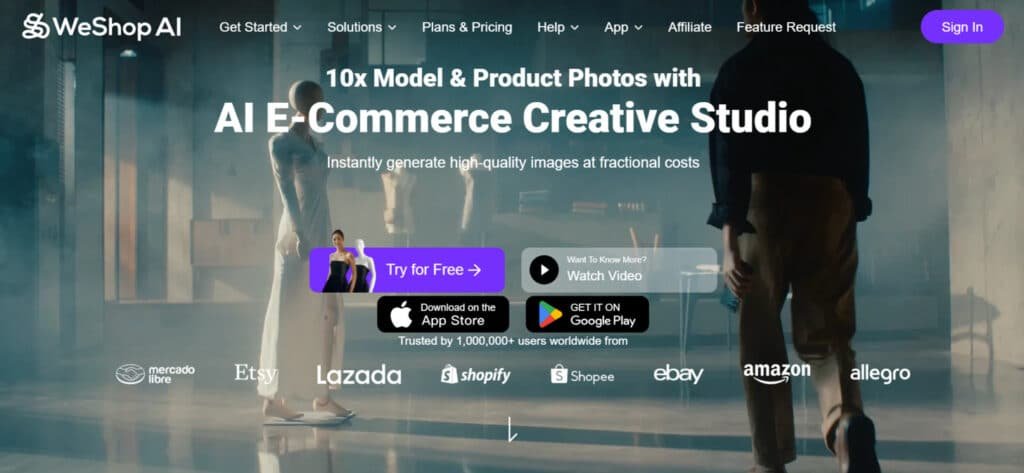
WeShop AI is a comprehensive e-commerce creative studio that leverages AI to produce professional model and product visuals 10x faster at fractional costs, trusted by over 1 million users on platforms like Shopify, Amazon, and Etsy for scaling global marketing without physical shoots.
Its AI Video Agent excels by transforming a single photo or text prompt into fully edited, platform-ready videos with automated cuts, effects, music, and pacing, plus flexible clip rearrangement for polished influencer-style content.
I am particularly impressed with the virtual try-on suite, supporting flat-lay, mannequin, or real-person inputs to generate realistic wearing effects in HD/4K while preserving fabric details, alongside model/background swapping from a worldwide library (including supermodels) with keyword search and smart market matching.
Additional tools include pose/outfit changes with daily trending updates (boosting testing efficiency 20x), AI inpainting for design repairs, product scene recognition across categories (bags, cosmetics, food) with lighting recommendations, and image expansion for custom platform fits (increasing click rates >50%).
Batch processing, background removal, upscaling, relighting, magic eraser, hand/feet fixer, and recoloring round out the all-in-one workflow.
WeShop AI‘s intelligent automation and vast asset library empower rapid, high-conversion asset creation, eliminating studio dependencies while adapting to local trends.
Introduction and Background
When traditional photoshoots started costing more than some products themselves, the market was ripe for disruption.
I’ve watched countless online stores struggle with this exact problem—amazing products held back by photography budgets that just didn’t make sense.
Company Overview and AI Landscape
WESHOP.COM LIMITED entered this space with a clear vision. They built their platform specifically for Shopify integration, understanding that ecommerce businesses need tools that work where they already operate. While general AI image tools dominated headlines, this company focused exclusively on product photography that converts.
The technology landscape in 2025-2026 saw AI image generation explode. But most solutions weren’t built for commercial use. This platform differentiates by understanding what online brands actually need—consistent, scalable visual content that drives sales.
Tool Purpose, Founding, and Endorsements
The founding team clearly understood the pain points of modern businesses. They created this tool to democratize professional product photography. Now, solopreneurs can compete visually with established brands.
Being featured on the Shopify App Store provides serious credibility. It means passing rigorous vetting standards. Brands across the US, UK, and Europe have adopted this technology successfully.
Customer support manager Jessie ensures relationships stay strong. The platform has gained traction among fashion and clothing brands seeking affordable alternatives. It’s proof that smart technology can solve real business problems.
What is WeShop AI?
Creating realistic product images and videos no longer requires expensive studio setups or professional photographers. This platform transforms basic product photos into professional model shots using advanced image generation technology.
The process starts with your product photo. You select from diverse virtual models and backgrounds. The system handles the complex compositing automatically.
Inner Workings and Innovative Technology
The technology behind this tool uses high-speed computing power similar to what drives advanced AI models. This enables rapid image generation in under 60 seconds.
What makes it innovative? The system understands product physics and lighting. It doesn’t just paste products onto models—it creates genuinely believable scenes with proper shadows and fabric draping.
Benefits for E-commerce and Visual Marketing
For online businesses, the advantages are substantial. You eliminate model casting costs, studio rentals, and editing time. The user-friendly interface means anyone can create professional images.
Marketing teams gain unlimited creative flexibility. Test different demographics and scenes without additional costs. Maintain brand consistency across your entire product catalog.
| Traditional Approach | Modern Solution | Time Savings | Cost Reduction |
|---|---|---|---|
| Professional photographer | Automated generation | Weeks to days | 90% less |
| Model casting sessions | 200+ virtual models | Eliminated entirely | 100% savings |
| Studio rental fees | Digital backgrounds | No setup time | $500-$2000 saved |
| Photo editing costs | Built-in processing | Hours to seconds | Editing fees eliminated |
Complete Features of WeShop AI
What truly sets this platform apart is how it democratizes high-quality product photography for businesses of all sizes. I’ve seen tools come and go, but the features here address real pain points.
1. AI Video Agent: Quick Videos from Pics or Prompts
The AI Video Agent turns a single product photo or simple text prompt into complete, ready-to-post videos in minutes. Users upload one image or describe the desired scene, and the system automatically generates a full video with smooth cuts, transitions, effects, filters, background music, and perfect pacing.
This feature supports full customization: change the prompt, reorder scenes, delete or add clips, and adjust branding elements on the fly. The entire process happens inside the WeShop apps, so no external editing software is needed.
For e-commerce sellers who need TikTok, Instagram Reels, or Amazon product videos daily, this is a game-changing way to produce high-converting video content without hiring videographers. The tool maintains consistent quality across every export, which directly improves click-through rating and conversion rating on listings.
Total control over details like length, aspect ratio, and voice-over options makes it ideal for scaling video ads fast.
2. One-Click Image Magic: Virtual Try-On and More
One-Click Image Magic lets users place clothing on realistic virtual models with a single click, starting from flat-lay photos, ghost mannequin shots, or existing model photos. The AI preserves fabric texture, shadows, folds, and lighting so the final result looks completely natural.
The system works across every clothing, accessories, shoes, and even cosmetics. It instantly generates downloadable HD or 4K photos ready for any marketplace.
Sellers on Shopify, Amazon, or Etsy can replace expensive photoshoots with this feature and still achieve professional-grade visuals.
The virtual try-on capability gives customers a clearer idea of fit and style, which boosts buyer confidence and reduces return rates. This one-click way of creating lifestyle photos saves both time and budget while delivering higher engagement on product pages.
3. Realistic Models and Versatile Scenes
The variety of virtual model options impressed me immediately. With 200+ diverse options covering different ethnicities, body types, and ages, you can represent your actual customers authentically. The system generates complete scene setups in under 50 seconds.
Over 100 background templates let you create everything from studio shots to lifestyle scenes. The customization options for lighting and colors ensure brand consistency across all your visuals.
| Traditional Method | This Platform | Time Saved |
|---|---|---|
| Hire models & photographer | 200+ virtual models | Days to minutes |
| Studio rental & setup | 100+ background templates | Hours eliminated |
| Professional editing | Built-in processing | 90% faster |
4. User-friendly Interface and Customization Options
The interface requires zero design experience—you upload a product photo, choose your preferences, and get professional results. The customization extends to creating your own branded models using face swap technology.
5. Swap Models & Backgrounds: Go Global, Stay Local
Swap Models & Backgrounds provides access to a massive, constantly updated library of AI-generated models and real agency-grade talent from around the world. Users search by ethnicity, age, body type, location, or keyword to find the perfect match for their target market.
One click swaps the original model or background while keeping lighting and perspective perfect. This works for both photos and video exports.
Brands selling internationally can create localized content for each region without multiple shoots.
The feature helps improve cultural relevance, which directly lifts conversion rating in new markets. Having thousands of diverse models available inside the same apps removes the biggest barrier to global scaling and keeps every campaign on-brand across countries.
6. Pose & Outfit Swaps: Ride the Trends
Pose & Outfit Swaps pulls from a daily-refreshed library of trending e-commerce scenes, viral poses, and seasonal outfits. The AI analyzes current top-performing listings and suggests matching poses or complete looks for any uploaded product.
Users can replicate viral styles instantly or mix elements to create fresh combinations. The system supports every clothing category and accessory type.
This feature lets sellers launch trend-based collections 20 times faster than traditional methods. Staying on top of trends increases visibility in marketplace algorithms and social feeds, driving higher click-through rating and sales velocity.
The automated recommendations remove guesswork and ensure every new drop feels current and desirable to shoppers.
7. AI Inpainting: Fix Designs Like a Pro
AI Inpainting allows precise editing by masking any unwanted area—logos, stains, wrinkles, or design flaws—and regenerating that section seamlessly. The tool understands fabric behavior, patterns, and lighting context to deliver flawless results.
Users can remove distractions, correct printing errors, or even change small design details without starting over. Changes apply to both photos video frames.
For manufacturers and print-on-demand stores, this feature drastically cuts revision time and waste. Perfect product photos lead to stronger customer trust and fewer returns. The ability to fix issues in seconds instead of days is often the difference between hitting a launch deadline or missing seasonal sales windows.
8. Edit & Transform Products: AI Product Tools
Edit & Transform Products automatically detects the uploaded item’s category, material, and key traits, then generates hundreds of lifestyle scenes from a curated trending library. The AI also recommends optimal lighting, angles, and complementary props.
It works for fashion, electronics, home goods, beauty—literally every e-commerce category. Batch processing is built in for large catalogs.
Sellers get polished, on-brand photos without hiring stylists or photographers. This all-in-one transformation is the fastest way to turn basic white-background shots into high-converting lifestyle images that marketplaces and social platforms reward with better visibility and higher conversion rating.
9. Expand Images One-Click: Fit Any Platform
Expand Images One-Click intelligently extends any photo to match platform-specific dimensions—Instagram square, Pinterest pin, YouTube thumbnail, Amazon A+ content, or custom sizes. The AI fills new areas naturally instead of just cropping or stretching.
Batch expansion and logo placement options are included. Tests show properly sized visuals can increase click-through rates by over 50 %.
This feature eliminates manual resizing in separate apps and ensures every asset looks professional across channels. Consistent, optimized photos strengthen brand perception and improve performance in paid ads, organic search, and marketplace rankings with almost zero extra effort.
Case Study: Helping a Client Unlock Sales with WeShop AI
Last month, I worked with a small fashion brand owner who was in exactly that spot. She sold trendy accessories and simple dresses on Shopify and Etsy. Her listings had basic hanger shots, and sales stayed flat despite good traffic.
Flat lays look okay, but customers scroll past without that “I want this” feeling.
Upon my recommendation, We jumped into WeShop AI together during our weekly call.
First, we uploaded her flat-lay images. The virtual try-on tool was a game-changer – it placed her pieces on realistic models from their massive library in seconds.
She picked diverse body types and ethnicities that matched her audience.
No more guessing how a necklace drapes or if a dress flows right. The model swap kept fabric textures and lighting natural, which beat tools like OnModel (too fake) and Botika (way too expensive).
Next, we played with pose changer and background swaps. One click turned plain studio shots into beachy, cozy, or urban scenes.
She tested trending outfit AI suggestions and generated 4K versions ready for Instagram and Pinterest. The whole process took under 30 minutes for a batch of 20 products – something that used to cost her hundreds and days with freelancers.
The results came quick. After updating 10 listings, her click-through rate climbed noticeably within a week.
Shoppers messaged saying the new visuals helped them “see themselves wearing it.”
Returns dropped a bit too because fit looked clearer. She told me it felt like finally having a pro photography team on demand without the budget hit.
From what I’ve seen in reviews (and her experience matches many on Shopify), folks love the largest AI model selection out there and how it saves time for solopreneurs.
Tools like this really help when you’re stretched thin. It levels things up for small brands that can’t afford big shoots.
If visuals are holding your client back, something like WeShop AI can shift that frustration into real growth. Worth testing if you’re in the same boat.
Pricing Plans and Cost Efficiency for WeShop AI
While specific plans vary, users report up to 90% cost savings compared to traditional photography. The credit-based system makes sense for different business sizes.
“We cut our visual content budget from $3,000 monthly to under $300 while increasing output tenfold.”
The value becomes clear when you compare a single professional shoot ($1,000+) versus a monthly subscription. You’ll see ROI after just a handful of product images.
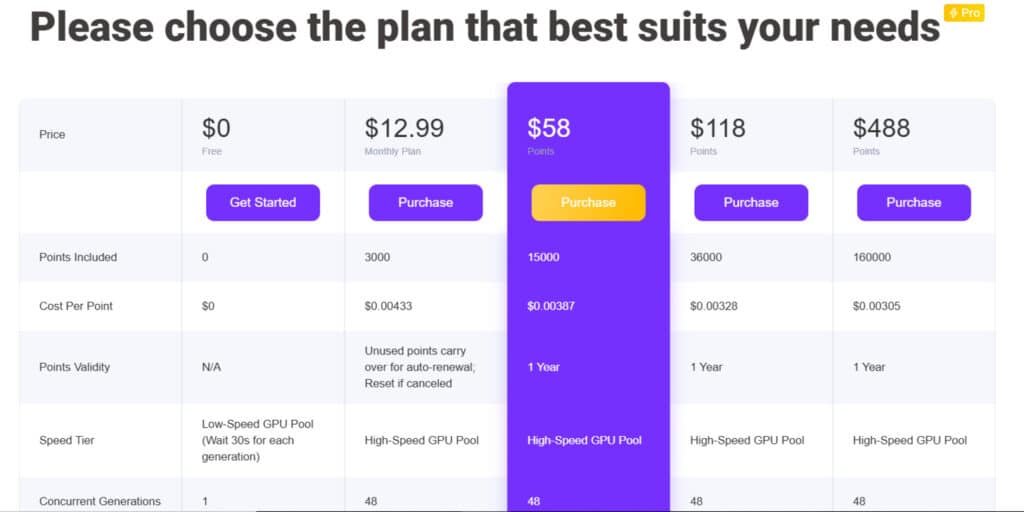
Free Plan
$0 forever. 0 points, low-speed GPU (30s wait), 1 concurrent, 512px preview only, watermarks, no commercial rights.
Monthly Plan
$12.99/month. 3000 points ($0.00433/point), high-speed GPU, 48 concurrent, 2048px, full commercial use, no watermark, API trial, priority support.
15K Points Pack
$58 one-time (1-year validity). Same pro features as Monthly but $0.00387/point and points never expire while active.
36K Points Pack
$118 one-time. Best mid-tier value at $0.00328/point, all pro perks included.
160K Points Pack
$488 one-time. Lowest rate $0.00305/point, ideal for heavy users or agencies.
| Plan | Price | Points | Cost/Point | Speed | Resolution | Best For |
| Free | $0 | 0 | – | Slow | 512px | Testing only |
| Monthly | $12.99 | 3K/mo | $0.00433 | Fast | 2048px | Regular sellers |
| 160K Pack | $488 | 160K | $0.00305 | Fast | 2048px | Agencies & high volume |
Pros & Cons of WeShop AI
What do actual businesses think after using this creative studio? The feedback tells an interesting story. I’ve sifted through dozens of real user experiences to give you the complete picture.
Pros and Drawbacks
Users consistently praise the massive model selection.
One store owner shared, “The model range is very good—there’s something for everyone.”
The quality of generated product images receives high marks, with many noting the realistic results.
Customer support gets frequent praise. Businesses appreciate the quick response time when technical issues arise. The value proposition is clear—significant cost savings compared to traditional photography.
However, the credit system frustrates some users. They get charged when the tool makes mistakes, like anatomical errors that require regeneration. The mobile app experience has a lower rating, with complaints about subscription cancellation difficulties.
| Strengths | Weaknesses | Impact on Business |
|---|---|---|
| 200+ diverse models | Credit charges for errors | Positive for representation |
| Quick customer support | Mobile app issues | Mixed user experience |
| Cost-effective solution | Anatomical inconsistencies | Overall value maintained |
Alternatives in the Market and Case Studies
If these drawbacks concern you, consider alternatives. Competitors offer different trade-offs in quality versus costs. Some focus on premium results, while others prioritize affordability.
If you’re running an e-commerce store and feeling the pinch of expensive photoshoots, endless editing, or videos that just don’t pop, I totally get it. Those costs add up fast, and you still need visuals that actually sell.
WeShop AI is a strong all-in-one ecommerce AI image & video studio — it turns one photo into lifelike models, dynamic videos, scene swaps, and more, all super fast and budget-friendly.
But maybe you’re hunting for something more specialized, cheaper per use, or with better virtual try-ons.
Competitors to WeShop AI
Here are some solid competitors in the current AI landscape that many sellers love for AI-powered e-commerce visuals.
Pic Copilot AI
Pic Copilot AI (from Alibaba) feels like a lifesaver for busy sellers. It packs 12 one-click tools — virtual try-ons on diverse models, background swaps, image/video enhancers, and ad generators.
Great for quick, sales-boosting visuals with real data-trained tweaks for higher click-throughs. If you need fast multilingual or holiday-themed content, this one saves real time — Read Review
Claid AI
Claid AI shines when you want pro-level polish without hassle. It enhances photos, removes backgrounds, generates realistic scenes, fixes lighting/colors, and upscales for sharp e-commerce shots.
Ideal for fixing user-generated or DIY images into brand-consistent quality. When your catalog looks messy, this tool brings calm and consistency — Read Review
Flair AI
Flair AI is like having a drag-and-drop virtual studio. Upload a product, stage scenes with props, add AI human models, generate photoshoots, and even short videos — all with strong brand matching.
Perfect for testing concepts or creating on-model fashion visuals fast. If creative control matters most, this feels empowering and fun — Read Review
HuHu AI
HuHu AI focuses heavily on fashion with top-notch virtual try-on. It turns flat-lays or mannequins into lifelike on-model photos/videos, supports diverse bodies/skin tones, and adds dynamic effects.
Super accurate for garment flow and details. When inclusivity and realism are your biggest headaches, this changes the game — Read Review
PicJam
PicJam keeps things simple and speedy for apparel sellers. It generates unlimited high-quality virtual model images from your photos, with lifestyle scenes and diverse styles.
Great for standing out on Amazon or Shopify without breaking the bank. If you want quick, eye-catching shots on repeat, this one delivers — Read Review
UWear AI
UWear AI offers flexible, pay-as-you-go credits for on-model magic. Turn flat-lays into realistic dressed models, tweak poses/backgrounds, and generate videos.
No subscriptions — just buy what you need. When you hate commitments and want control over spend, this feels freeing — Read Review
SellerPic
SellerPic is built for fast conversions. It enhances images, adds AI models/virtual try-ons, removes backgrounds, and turns photos into videos. Batch processing helps huge catalogs fly.
If boosting engagement without photographers is your goal, this tool brings serious relief — Read Review
Photo AI Studio
Photo AI Studio (often via tools like iFoto/Phot.AI) focuses on easy edits for e-commerce. Change clothes on models, swap backgrounds, enhance details, and create realistic try-ons.
Simple for beginners wanting pro results fast. When you need quick fixes to make listings pop, this one eases the stress — Read Review
| Tool | Main Strength | Best For | Biggest Drawback |
|---|---|---|---|
| WeShop AI | Full image-to-video studio with animations | All-in-one creative flow | Can feel feature-heavy for basics |
| Pic Copilot AI | One-click tools + sales-optimized edits | Fast ad visuals & try-ons | Tied to Alibaba ecosystem |
| Claid AI | Pro enhancement & scene generation | Fixing/polishing existing photos | Less focus on video |
| Flair AI | Drag-and-drop creative control | Branded photoshoots & models | Steeper for total beginners |
| HuHu AI | Ultra-realistic fashion try-on | Apparel inclusivity & accuracy | Fashion-focused only |
| PicJam | Unlimited quick model images | Apparel marketplaces fast | Limited advanced video |
| UWear AI | Pay-as-you-go credits, no subs | Flexible spending & on-model | Credits add up for heavy use |
| SellerPic | Batch + video from images | High-volume sellers | Occasional minor glitches |
| Photo AI Studio | Easy clothes/background swaps | Quick beginner edits | Less depth for complex scenes |
Conclusion: WeShop AI Review
Raamish’s Take
WeShop AI is a comprehensive e-commerce creative studio that leverages AI to produce professional model and product visuals 10x faster at fractional costs, trusted by over 1 million users on platforms like Shopify, Amazon, and Etsy for scaling global marketing without physical shoots.
Its AI Video Agent excels by transforming a single photo or text prompt into fully edited, platform-ready videos with automated cuts, effects, music, and pacing, plus flexible clip rearrangement for polished influencer-style content.
I am particularly impressed with the virtual try-on suite, supporting flat-lay, mannequin, or real-person inputs to generate realistic wearing effects in HD/4K while preserving fabric details, alongside model/background swapping from a worldwide library (including supermodels) with keyword search and smart market matching.
Additional tools include pose/outfit changes with daily trending updates (boosting testing efficiency 20x), AI inpainting for design repairs, product scene recognition across categories (bags, cosmetics, food) with lighting recommendations, and image expansion for custom platform fits (increasing click rates >50%).
Batch processing, background removal, upscaling, relighting, magic eraser, hand/feet fixer, and recoloring round out the all-in-one workflow.
WeShop AI‘s intelligent automation and vast asset library empower rapid, high-conversion asset creation, eliminating studio dependencies while adapting to local trends.
If you’re weighing your options for product photography, this comprehensive analysis should help clarify your path forward. The platform delivers professional-quality images at a fraction of traditional cost—90% savings with 50-second generation times.
This solution shines for small to medium businesses needing consistent visual content. The investment pays off quickly, especially if you manage multiple products. Fashion brands and jewelry sellers find particular value here.
My honest recommendation? WeShop AI offers exceptional value despite minor rendering quirks. The app integration works seamlessly for most users’ needs. Just be prepared for the credit system.
Start with a trial plan to test the quality yourself. See if the time savings justify your decision. The platform keeps improving, making now a great time to explore this creative tool.
Frequently Asked Questions
What kind of product images can I create with this tool?
You can generate high-quality visuals for your store, including photos with realistic models in various scenes, different background options, and even marketing videos. It’s designed to boost your product’s appeal without a traditional photoshoot.
How does the AI image generation technology work?
The platform uses advanced AI models to create visuals from your product details. You upload a photo, and the tool intelligently builds a new scene around it, handling colors, materials, and lighting to produce professional-grade output.
Is the interface difficult for someone new to AI tools?
Not at all. I found the user-friendly interface to be a major plus. It’s straightforward, with clear customization options that make the generation process simple, even if you have no prior experience with similar apps.
What are the main costs and pricing plans involved?
Pricing is typically subscription-based, offering different tiers. These plans often provide a set number of credits per month for image and video generation, making it a cost-effective solution compared to traditional product photography costs.
Can I use this tool to create marketing videos for my products?
A> Yes, video generation is one of its key capabilities. You can create short, engaging marketing videos to showcase your items, which adds significant value for social media and online store integration.
How does it compare to other alternatives like Canva or more advanced editing software?
While tools like Canva are great for general design, this platform is specifically tailored for e-commerce product visuals. Its AI-driven generation saves time compared to manual editing, focusing on automating the creation of appealing product photography.
What happens if I need customer support or have feedback on the generated images?
Most plans include support to help you get the most from the features. The technology also learns from user input over time, meaning your feedback can help improve the quality and accuracy of future visuals for your specific needs.