Does your team spend more time creating marketing visuals than actually marketing?
You’re not alone. The cycle is exhausting: brief designers, wait for drafts, request revisions, and hope it fits the brand. It’s slow, expensive, and frankly, a massive bottleneck for growth.
This is where the game changes. I’ve tested countless tools, and Orshot stands out by treating visual content as programmable infrastructure.
Created by DaSkrad, this isn’t just another design tool—it’s a developer-first platform built for scale. Imagine generating hundreds of branded assets through an API, not a painstaking manual process.
This hands-on Orshot Review is based on my real-world testing. I’ll break down exactly how this product works, its killer features, and who it’s truly for.
Let’s dive into whether it can finally free your team from the design grind.
Key Takeaways: Orshot Review
- Orshot tackles the major pain point of slow, expensive manual design work for marketing campaigns.
- It is an AI-powered platform that automates visual content creation at scale.
- The tool is built by DaSkrad and takes a unique, developer-first approach.
- This evaluation is based on personal, hands-on testing of the platform’s capabilities.
- The review will cover features, pricing, pros/cons, and ideal use cases.
- It is targeted at marketing teams, agencies, and developers needing to scale visual content efficiently.
Orshot Review: An Overview

Raamish’s Take
Orshot makes creating marketing visuals way easier with AI-powered templates. I like how you can import designs from Figma or Canva, tweak them in the Orshot Studio, and turn them into dynamic images or PDFs at scale.
No more manual edits for every social post or ad. Just set parameters like colors and fonts for brand consistency, then automate with Zapier or API. It’s great for pulling in AI-generated images that fit your content.
Developers get SDKs in Python and Node, plus dynamic URLs for quick renders. Teams at SitePixel switched from BannerBear for the faster support and features like compression controls. They’ve automated 77.9K assets from 241 templates already.
Ever dread churning out 3,000 visuals by hand? Orshot cuts time by 80%, letting you focus on ideas. Free tools like the certificate generator are a nice bonus too.
It’s reliable for high-output teams, with solid integrations and no failed render charges.
Introduction to Orshot
DaSkrad, the developer-centric company, built this platform with a clear mission. They saw teams drowning in manual visual content creation. Their goal was to turn it into programmable infrastructure.

Company Background and Founders
DaSkrad focuses on building infrastructure for modern marketing teams. I find their approach refreshing. They didn’t just make another design tool. They created a system to automate the entire workflow.
The founding vision was simple: eliminate the design bottleneck. They wanted content creation to be as scalable as code. This makes the platform perfect for agencies and SaaS businesses.
Position in the Current AI Landscape
This product isn’t a direct competitor to Canva. It’s the engine behind the scenes. Think of it as the backend for your brand‘s visuals. You generate hundreds of variations via API, not one-by-one manually.
It serves a specific need. E-commerce sites running A/B tests use it. So do social media teams managing multiple channels. The platform ensures consistency at scale.
Orshot’s Positioning vs. Traditional Tools
| Feature | Traditional Design Tools (e.g., Canva) | Orshot |
|---|---|---|
| Primary User | Graphic Designers, Marketers | Developers, Technical Teams |
| Core Function | Manual Design & Editing | Automated Generation & API-driven Workflows |
| Scalability | Limited by manual effort | Massively scalable through automation |
| Integration Focus | Asset export | Deep integrations with Zapier, Airtable, etc. |
Its strength lies in its integrations. It connects with tools like Zapier and Airtable. You can even import designs from Figma. This makes it a powerful connector in your tech stack.
What is Orshot?
The fundamental breakthrough here is treating visual content creation as programmable infrastructure.
Instead of manual design work, you build templates that function like APIs.
How Orshot Works
You start by creating or choosing a template from their extensive library. These cover everything from social media posts to product images. The magic happens when you parameterize elements like text, colors, and images.
Once your template is ready, you call it via API with your specific data. The platform instantly generates customized visuals in different sizes. This eliminates repetitive manual design work completely.
The integrated editor, Orshot Studio, gives you full control over your designs. You can import from Figma or create from scratch. The AI generator helps kickstart the process with text prompts.
Benefits for Marketers and Development Teams
For marketing teams, this means scaling content creation without hiring more designers. You maintain perfect brand consistency across all media. Campaign variations become effortless.
Developers get robust API support and SDKs for easy integration. Dynamic URL generation enables on-the-fly image creation. The white-label embed feature lets you customize the entire experience.
The workflows are streamlined from start to finish. You can go from signup to generating images via API in minutes. This transforms how teams approach visual content at scale.
Complete Features of Orshot
When testing the platform, I discovered several features that genuinely transform visual content workflows.
These aren’t just nice-to-haves—they’re the core features that make automation actually work in practice.
1. Orshot Studio
Drag-and-Drop Interface & Smart Alignment
Orshot Studio serves as the central design environment where users create and manage dynamic templates for image and PDF generation.
The drag-and-drop interface allows precise control over layers, fonts, and elements without requiring advanced training.
Live Website Embedding
Users can embed the entire Studio directly into their own website using a simple iframe code, enabling clients or team members to build templates in a live environment without leaving the host platform.
Workspace Organization & Multi-Page PDF Support
Workspaces keep projects organized, and the Studio automatically supports PDF multi-page layouts alongside single-page visuals.
This feature helps marketing teams maintain brand consistency across campaigns while reducing the need for separate design software.
Companies that embed Studio on their website often see faster onboarding because designers work in a familiar, live editor that connects directly to the PDF and image rendering pipeline.
The tool also includes smart stacking and alignment guides, making complex banners and PDFs easier to produce at scale.
2. Render Dynamic Images from Personalized Templates
Full Parameterization of Elements
Rendering dynamic images happens instantly through API calls or URL parameters, turning static designs into personalized assets.
Users parameterize text, colors, or background elements so every render adapts to new data.
Bulk & Live Rendering Capabilities
This capability powers bulk generation for e-commerce product shots, social banners, and promotional materials. The system delivers high-quality WebP or JPEG files optimized for website performance.
Real-Time Personalization Benefits
Marketers benefit from real-time personalization that updates live on product pages or email campaigns.
When connected to data sources, the renderer eliminates manual editing entirely, saving hours on repetitive tasks.
Businesses that need hundreds of unique variants for email newsletters or website listings rely on this feature to maintain speed and accuracy without additional software or training.
3. AI Template Generator
Prompt-Based Template Creation
The AI Template Generator creates complete, editable layouts in seconds from simple text prompts. Users describe the desired style, and the system produces ready-to-use templates that already respect brand guidelines stored in the assets library.
Brand-Consistent Outputs
This removes the blank-canvas problem and accelerates production for PDF documents, social posts, and videos thumbnails. The generator draws from the user’s uploaded brand assets to ensure every output stays on-brand without manual adjustments.
Fast-Start Generators for All Skill Levels
Teams with limited design training can produce professional results immediately.
Agencies handling multiple clients use this to spin up campaign-specific templates quickly, then convert them into dynamic PDF or image endpoints.
The speed and consistency make it ideal for anyone searching for fast-start generators that integrate seamlessly with the rest of the platform.
4. Signed URLs
Secure & Time-Limited Links
Signed URLs provide secure, time-limited links for sharing dynamic renders publicly without exposing API keys. Users append parameters to a signed link, and the system generates the final PDF or image on demand.
Expiration & Access Controls
Links can expire automatically or restrict access by IP, adding an extra layer of control.
Ideal for Email & Website Sharing
This method works perfectly for email campaigns, client previews, and live embeds on a website. Marketing teams distribute personalized PDF reports or promotional assets safely through email without worrying about unauthorized usage.
The feature supports high-volume distribution while keeping assets protected, making it valuable for enterprises that require secure sharing across platforms.
5. Bring Your Own Storage
Direct Routing to Custom Buckets
Bring Your Own Storage lets users route all rendered PDF files and images directly to AWS S3, Cloudflare R2, or any compatible bucket.
Compliance & Ownership Advantages
This eliminates dependency on third-party cloud storage and keeps data compliant with internal policies. Configuration takes minutes, and renders appear in the chosen storage location instantly.
Seamless Image Processing Integration
Companies handling sensitive PDF documents or large media libraries benefit from lower latency and full ownership.
The option integrates smoothly with existing image processing pipelines and reduces costs for teams already invested in their own infrastructure. It provides flexibility that most competing software solutions do not offer natively.
6. Brand Assets Library
Centralized Asset Storage
The Brand Assets Library centralizes logos, fonts, colors, and images in one accessible location. Every template and AI-generated design can pull directly from this library to maintain visual consistency.
Searchable & Taggable Assets
Users tag and search assets quickly, speeding up production across projects.
Multi-Brand Management
When creating PDF documents or campaign graphics, the library ensures brand rules are never broken. Teams that manage multiple brands switch between libraries effortlessly within the same account.
This centralized approach reduces errors and removes the need for scattered files across different software tools.
7. Team Collaboration
Real-Time Editing & Version History
Team collaboration features allow unlimited invites for designers, developers, and marketers depending on the plan. Real-time editing, comment threads, and role-based permissions keep workflows organized.
Instant View & Email Notifications
Members view changes instantly and receive notifications via email or in-app alerts. Version history prevents lost work, and workspace separation supports client-specific projects.
Scalable Collaboration Workflows
Agencies running parallel campaigns benefit from clear collaboration boundaries and fast feedback loops. The system scales from small teams to large enterprises without requiring external collaboration tools.
8. Image Generation API
Programmable Template Endpoints
The Image Generation API turns every template into a programmable endpoint. Developers send JSON payloads containing text, URLs, or data fields, and the API returns optimized images instantly.
Bulk & Compression Controls
It handles bulk requests efficiently and includes built-in compression controls.
Website & Email Automation
E-commerce platforms use this API to generate product visuals on the fly for website pages and email campaigns. The REST structure works with any programming language, and SDKs simplify implementation.
High-volume users appreciate the reliable performance and detailed render logs for monitoring usage.
9. PDF Generation API
Multi-Page Dynamic PDFs
The PDF Generation API creates multi-page documents with dynamic content using the same templating system. Each page can pull different data sets, making it suitable for invoices, reports, brochures, and marketing decks.
High-Resolution & Branded Output
The API supports complex layouts, embedded fonts, and high-resolution output.
End-to-End PDF Automation
Businesses automate entire PDF workflows from CRM data to final delivery with minimal code. The feature delivers consistent branding across all pages while handling large-scale generation without slowdowns.
10. Rest API for Figma Designs
Plugin-Based Import & Parameterization
The Rest API for Figma Designs imports files directly through the official plugin. Once imported, users parameterize layers and expose them as API endpoints.
Sync Between Tools
Changes made in Figma can sync back to Orshot templates when needed.
Bridge from Design to Production
Designers continue working in their preferred software while developers gain instant automation capabilities. This bridge eliminates duplicate work and speeds up the transition from design to production.
11. Automate Canva Designs with Rest API
Simple Import & Parameterization
Automating Canva designs follows the same import-and-parameterize process. Users export Canva files, tag dynamic elements, and generate images or PDFs via API calls.
Non-Technical Team Scaling
Non-technical teams keep using Canva for initial creation while unlocking automation for repetitive tasks.
Rapid Campaign Deployment
The approach supports rapid scaling of social media graphics, presentations, and marketing collateral.
12. Integrations Unleashed: Connect & Automate
- Zapier & Make.com – trigger PDF and image renders from forms, CRMs, or email events
- n8n & Pipedream – build complex no-code workflows for PDFs, videos thumbnails, and image pipelines
- Google Sheets & Airtable – bulk generation directly from rows with live previews
- Signed & Dynamic URLs – parameter-based rendering for website embeds and email attachments
- Figma Plugin – seamless import and sync for designers
- REST API & SDKs – full developer control with minimal training
- Raycast & Chrome Extension – quick captures into the generators flow
- MCP Server – prompt-based generation inside Claude or Cursor
- Webhooks – live updates when templates change or renders complete
These integrations tie every feature together, letting users automate entire content pipelines across website, email, PDF, and social channels with zero custom code in most cases.
Pricing Plans of Orshot
If you’re wondering how much this visual automation infrastructure will cost your team, the answer is surprisingly scalable. The platform treats pricing as infrastructure that grows with your business, not a one-size-fits-all subscription.
Overview of Pricing Tiers
There are four main tiers designed for different stages. The Starter plan begins at $30 monthly for solo developers. Each tier scales up render limits—that’s each time you generate new images via API.
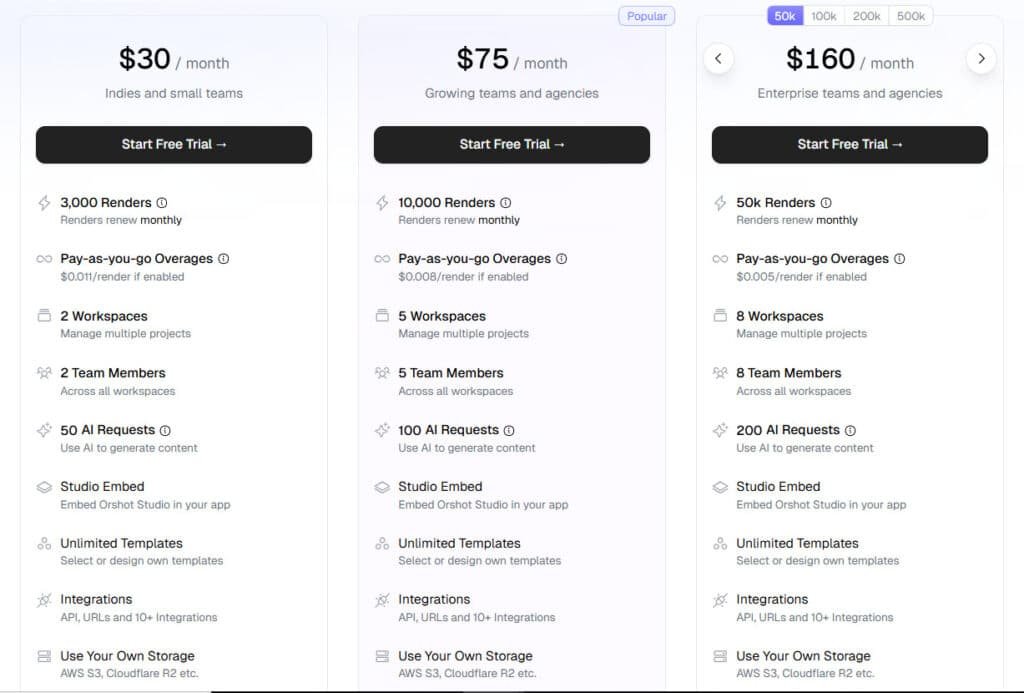
The Professional tier supports agencies with higher volume needs. Enterprise plans handle up to 100,000 renders monthly. This usage-based model means you pay for what you actually use.
Indies and Small Teams
$30/month or $300/year (save 20%) 3,000 renders/month (36,000/year) • 2 workspaces • 2 team members • 50 AI requests (600/year) • Studio Embed • Unlimited templates • Full integrations • Own storage • Regular support
Growing Teams & Agencies (Popular)
$75/month or $750/year (save 20%) 10,000 renders/month (120,000/year) • 5 workspaces • 5 team members • 100 AI requests (1,200/year) • Studio Embed • Unlimited templates • Full integrations • Own storage • Quick support
Enterprise Teams
$160/month or $1,600/year (save 20%) 50,000 renders/month (600,000/year) • 8 workspaces • 8 team members • 200 AI requests (2,400/year) • Studio Embed • Unlimited templates • Full integrations • Own storage • Priority support via DM
| Plan | Monthly Price | Renders/mo | Workspaces | Team Seats | AI Requests/mo | Support Level |
| Small Teams | $30 | 3k | 2 | 2 | 50 | Regular |
| Growing (Popular) | $75 | 10k | 5 | 5 | 100 | Quick |
| Enterprise | $160 | 50k | 8 | 8 | 200 | Priority + DM |
Pros & Cons of Orshot
After putting the platform through its paces, the balance of strengths and limitations became clear. This tool is powerful, but it’s not a magic wand for every team. Let’s break down what works brilliantly and where you might hit a snag.
I was genuinely impressed by several features. The developer-first design means you get robust APIs and SDKs that just work. The integrations with Zapier and Figma are a huge time-saver.
You can go from signup to a working API in minutes. The template library is extensive, and the brand consistency tools are top-notch. For teams needing to scale, it’s a strong feature set.
Key Advantages and Strengths
The biggest win is the automation. You turn design into a programmable asset. This is a game-changer for marketing at scale.
Dynamic URLs let you generate images on the fly. The white-label embed feature opens up enterprise options. Compared to other platforms, the value is strong.
Limitations and Areas for Improvement
No tool is perfect. The learning curve is real for non-technical users. The AI generator gives you a start, but you’ll need to refine templates.
The embed feature is still in beta. The pricing is usage-based, which can add up for huge volumes. These are points to consider.
Platform Strengths and Limitations at a Glance
| Aspect | Strengths | Limitations |
|---|---|---|
| User Focus | Excellent for developers and technical teams with robust APIs. | Steeper learning curve for pure marketers without technical support. |
| Core Automation | Powerful template system and Dynamic URLs for on-demand generation. | AI template generator often requires manual refinement for final use. |
| Integration Depth | Rich integrations with Zapier, Make, and Figma for wide connectivity. | Embed feature is in beta, so enterprise users may face early-adopter issues. |
| Setup Time | Extremely fast time-to-value; from signup to API generation in minutes. | Template library may not cover highly niche use cases, requiring custom work. |
| Cost Structure | Competitive pricing options compared to hiring designers. | Costs can scale with high-volume render usage, requiring budget planning. |
Understanding these pros and cons is key. If the limitations give you pause, it’s worth looking at the alternative tools available.
Alternatives to Orshot
Different teams have varying technical needs and budget constraints that might make other options more suitable.
While the platform we’ve discussed is powerful, your specific workflow might align better with established competitors or different approaches.
Overview of Competing Tools and Products
If you’re pushing out tons of marketing visuals and feeling the crunch of time or budget, I totally get it.
Orshot nails automated visual content generation for marketing — it turns templates (from Canva/Figma or AI prompts) into dynamic images, videos, and PDFs at scale, with API integrations for seamless workflows.
But if you want easier general design, e-commerce-specific staging, or pro enhancements, here are solid alternatives marketers rely on.
Visme
Visme packs templates for infographics, presentations, and social posts. Its AI helps generate charts and layouts quick. Great for non-designers needing polished brand content — Read Full Review
Pic Copilot AI
Pic Copilot AI speeds up e-commerce ads with one-click tools. It does virtual try-ons, background swaps, and enhancers. Perfect for fast, sales-focused product shots — Read Full Review
Phot AI
Phot AI creates full photoshoot-style images from prompts. It trains on your style for consistent marketing visuals. Ideal when you want custom, human-like photos without shoots — Read Full Review
Claid AI
Claid AI enhances and generates pro product scenes. It upscales, removes backgrounds, and fixes lighting automatically. Super for cleaning up catalog images at scale — Read Full Review
Flair AI
Flair AI offers drag-and-drop staged photoshoots. It adds props, models, and branded scenes easy. Handy for creative ad concepts that pop — Read Full Review
WeShop AI
WeShop AI turns products into lifestyle videos and on-model shots. It supports animations and quick edits. Best for dynamic e-commerce marketing — Read Full Review
Sellerpic
Sellerpic generates AI models and batch product images. It optimizes for listings with try-ons and videos. Awesome for boosting conversions fast — Read Full Review
| Tool | Main Strength | Best For | Biggest Drawback |
|---|---|---|---|
| Orshot | Template automation + API scaling | High-volume dynamic content | Steeper for non-devs |
| Visme | Infographics & easy templates | General marketing decks | Less product-focused |
| Pic Copilot AI | One-click e-com tools | Quick ad visuals | Tied to platform |
| Phot AI | Custom photoshoot styles | Personalized branding | Prompt-dependent quality |
| Claid AI | Enhancement & scene creation | Catalog polishing | Less video support |
| Flair AI | Drag-and-drop staging | Branded photoshoots | Learning curve |
| WeShop AI | Videos + on-model | Lifestyle e-com | Fashion-heavy |
| Sellerpic | Batch models & try-ons | Listing optimization | Newer features |
All deliver fast visuals, but none match Orshot’s dynamic template + API + PDF + signed URL combo at scale.
Integration and Scalability
What truly separates scalable automation solutions from basic tools is their ability to seamlessly connect with your entire tech ecosystem.
As your business grows, your visual content needs multiply exponentially—this platform is built to scale from startup to enterprise without hitting infrastructure limitations.
Seamless Integration with Third-Party Applications
The integration capabilities here are genuinely impressive. For developers, you get comprehensive REST apis with clear documentation and sdks for major programming languages. The command-line interface makes it perfect for automated workflows.
What I love is the no-code options. Zapier and Make connections let marketers trigger image generation from thousands of apps without writing code. The Figma import respects existing design workflows—your team doesn’t need to learn new tools.
The Airtable integration is particularly powerful. Use it as your content database and automatically generate visuals whenever records update. This works perfectly for product catalogs or team directories.
Scalability features include enterprise plans supporting 100,000 monthly renders, multiple workspaces for team organization, and role-based permissions. You can even use your own S3 bucket for assets storage. The white-label editor feature lets you embed the entire interface into your applications.
This approach maintains brand consistency across all designs. The template library supports the entire creation process, making it easy to scale your visual content production efficiently.
Case Study / Personal Experience with Orshot
Beyond the feature lists and technical specs, the most compelling evidence comes from businesses already using this solution. Let me show you how different teams achieve remarkable results.
Real-World Use Cases and Success Stories
E-commerce teams automate product image generation across hundreds of SKUs. One template creates variations for colors, sizes, and promotions. This replaces expensive photo shoots.
Agencies manage multiple client brands with perfect consistency. Separate workspaces organize assets for each client. Campaign variations scale without expanding the design team.
SaaS platforms embed certificate generation as a value-added feature. Social media teams create multi-platform assets from single API calls. The integrations make these workflows seamless.
My Personal Experience with Orshot
I’ll be honest—I’ve tested dozens of automation tools. Most promise more than they deliver. But this platform genuinely impressed me from the first login.
I signed up and tried the AI generator with “An ad image for Uneed Mega Launch Day.” The template needed refinement, but the Studio editor felt professional. I went from signup to working API-generated image in minutes.
This was the exact product I’d wanted to build myself.
After testing, I’m convinced I’ll never build it—it’s already there, and better than I imagined. If you’re ready to treat visuals as infrastructure, this is one of the best options today.
Conclusion: Should You Buy It?
Raamish’s Take
Orshot makes creating marketing visuals way easier with AI-powered templates. I like how you can import designs from Figma or Canva, tweak them in the Orshot Studio, and turn them into dynamic images or PDFs at scale.
No more manual edits for every social post or ad. Just set parameters like colors and fonts for brand consistency, then automate with Zapier or API. It’s great for pulling in AI-generated images that fit your content.
Developers get SDKs in Python and Node, plus dynamic URLs for quick renders. Teams at SitePixel switched from BannerBear for the faster support and features like compression controls. They’ve automated 77.9K assets from 241 templates already.
Ever dread churning out 3,000 visuals by hand? Orshot cuts time by 80%, letting you focus on ideas. Free tools like the certificate generator are a nice bonus too.
It’s reliable for high-output teams, with solid integrations and no failed render charges.
So, should your team invest in this solution? The answer depends entirely on your workflow needs. If you’re drowning in repetitive design work, Orshot delivers exactly what it promises.
This platform shines for e-commerce teams, agencies, and SaaS companies needing visual content at scale. The robust APIs and template system ensure perfect brand consistency across thousands of visuals.
The pricing makes sense if you’re currently spending heavily on manual creation. For pure designers wanting simple tools, stick with Canva. But for automation-focused teams, this product is compelling.
Ready to transform your marketing workflow?
Start with the free trial to test your specific use cases. The features genuinely deliver on scaling content without scaling your design team.
After my testing, I’m confident this is one of the best options for treating visuals as programmable infrastructure. Your schedule will thank you.
Frequently Asked Questions
What types of content can I create with Orshot?
You can generate thousands of on-brand visuals, including social media graphics, banners, and marketing assets. The platform uses your templates to automatically render images in different sizes, which is perfect for maintaining design consistency across campaigns.
How does the API work for developers?
The robust API and SDKs allow development teams to integrate visual generation directly into their own applications and workflows. You can trigger content creation programmatically, making it a powerful tool for automating design at scale.
Does Orshot integrate with tools like Figma or Canva?
Yes, it offers seamless integrations with popular design platforms. You can import your designs from Figma or Canva to use as templates, streamlining the entire content creation process from design to final asset generation.
Is there a free trial available?
Absolutely. You can start with a free trial to test the core features and interface. This lets you explore the automation workflows and see how it fits into your marketing stack before committing to a subscription.
Can I use my own brand assets and fonts?
Definitely. The platform includes a library where you can upload your brand kit—logos, colors, fonts. This ensures every piece of generated content automatically adheres to your brand guidelines, which is a huge time-saver.
What makes this tool different from other content generators?
Its strength lies in combining a user-friendly editor for marketers with powerful APIs for developers. This dual approach allows for both quick, manual creation and large-scale, automated workflows, which many competing platforms don’t handle as well.