
You’ve spent hours crafting the perfect cold email. You hit send, feeling hopeful. But then… silence. Your message vanished into the dreaded spam folder.
Sound familiar?
This is the frustrating reality for countless professionals trying to reach new customers.
I’ve been there too. Watching opportunities disappear before prospects even see your message is maddening. The problem isn’t your writing—it’s deliverability. Your emails simply aren’t reaching their destination.
That’s where platforms like MailReach enter the picture. After hearing constant buzz about this tool, I decided to test it myself. For two months, I ran it across multiple domains to see if it actually works or if it’s just more marketing hype.
With so many email warm-up services flooding the market, it’s genuinely confusing to separate what works from what doesn’t. This isn’t just theory—I’m sharing hands-on experience.
In this honest Mailreach Review, you’ll get a complete breakdown of features, pricing, real performance results, and how MailReach compares to alternatives.
By the end, you’ll know if it fits your outreach strategy. Ready to solve your spam problems?
Let’s dive in.
Key Takeaways: Mailreach Review
- Cold email deliverability remains a major challenge for outreach campaigns
- Proper inbox placement is crucial for campaign success rates
- Email warm-up tools can significantly improve deliverability
- Personal testing across multiple domains provides real-world insights
- Market comparison helps identify the right solution for specific needs
- Transparent pricing analysis ensures budget-friendly decisions
- Performance metrics reveal actual tool effectiveness beyond claims
Mailreach Review: An Overview

Raamish’s Take
MailReach is a specialized deliverability platform that prioritizes inbox placement through automated warm-up and precise spam testing, enabling B2B teams to achieve near-perfect email ROI—rated 4.9 on Capterra for its focused expertise where all-in-one tools often fall short.
Its Email Warmup excels by repairing and sustaining sender reputation via meaningful, human-like interactions across a high-reputation account network, with smart algorithms ensuring subtle, rule-compliant activity that avoids detection.
I am particularly impressed with the Spam Checker, offering manual or scheduled tests to track placement rates and identify triggers, complemented by the MailReach Co-Pilot AI assistant for instant, actionable content and setup optimizations.
Compatibility spans any SMTP provider (Gmail Workspace, Outlook 365, Zoho, SendGrid, Amazon SES, etc.), with domain/IP health checks (SPF, DKIM, DMARC, blacklist monitoring) and a reputation dashboard for ongoing vigilance.
Scalable for 1–100+ mailboxes, it supports initial 14-day warm-ups, campaign maintenance, and restoration in 90% of damaged cases.
MailReach‘s laser-focused, compliant automation guarantees emails land in primary inboxes, directly fueling meetings, deals, and hires without deliverability guesswork.
Introduction to Mailreach
In today’s crowded inbox environment, getting noticed requires more than just great content. Email providers have become incredibly sophisticated at filtering unwanted messages.
This creates a real challenge for professionals trying to reach new audiences.

Tool Fit in the Current AI Landscape
The current AI email landscape demands smart solutions. AI-powered tools are now essential for managing sender reputation and avoiding spam filters. This specialized platform fits perfectly into this new reality.
It’s not just about sending emails anymore—it’s about ensuring they actually land where they belong. As one industry expert noted,
“Deliverability is the foundation of successful outreach. Without it, even the best campaigns fail.”
Founders, Background, and Purpose
While specific founder details aren’t widely publicized, the platform was built to solve a critical problem. Cold emailers were facing an inbox placement crisis that threatened their outreach efforts.
The core purpose remains clear: Warm up email accounts, test spam placement, and monitor domain health. This ensures your outreach reaches real inboxes instead of spam folders.
User ratings across platforms tell a compelling story:
| Platform | Rating | Review Count |
|---|---|---|
| G2 | 4.7/5 | 42 reviews |
| Capterra | 5/5 | 22 reviews |
| Trustpilot | 3.6/5 | 4 reviews |
This mailreach review reveals it’s primarily used by B2B sales teams, cold email agencies, and growth marketers. These teams depend on reliable deliverability for revenue generation.
Remember—this isn’t an all-in-one outreach solution. It’s a specialized tool designed to work alongside your existing cold email infrastructure. The focus is purely on improving deliverability for your cold email campaigns.
What is MailReach?
Email deliverability tools exist because getting your messages seen is half the battle in outreach. I’ve learned this the hard way—crafting perfect emails that never reached their targets.
This platform tackles that exact problem head-on.
Inner Workings and Technology Behind the Tool
So how does it actually work?
The tool connects to your email account securely. Then it works quietly in the background, sending and receiving warm-up messages that mimic real human behavior.
It opens messages, replies naturally, and marks emails as important. This simulated engagement trains providers like Gmail and Outlook to trust your sender reputation. As one expert put it,
“A healthy sender reputation is your ticket to the inbox.”
Results aren’t instant—expect 2-4 weeks for noticeable inbox placement improvements. But the consistency pays off dramatically for your cold outreach efforts.
Benefits for Cold Emailers, Agencies, and B2B Teams
For individual users, the benefits are clear: higher placement rates and cleaner sender scores. Your campaigns actually reach people instead of spam folders.
Agencies and B2B teams get systematic domain management. You can warm up multiple accounts simultaneously. This scalability is crucial for serious cold outreach operations.
The platform fits into your workflow as a preparatory step. You use it before and during campaigns to maintain domain health. It’s not for sending emails—it’s for ensuring they land where intended.
Complete Features of Mailreach
A tool’s true worth is revealed not in its promises, but in the practical features it delivers day after day.
In this review, I’m breaking down the five core capabilities that genuinely impact your sender reputation and deliverability.
1. Core Deliverability Features: The Heart of Mailreach
The core deliverability section forms the foundation of Mailreach email warmup, directly targeting the factors that determine whether an email reaches real inboxes or gets lost in spam.
These tools work together to repair and maintain sender reputation, making them essential for anyone struggling with low delivery rates.
By addressing common issues like poor engagement signals and technical misconfigurations, this feature set helps users achieve consistent placement in primary inboxes across major providers.
Email Warmup (Warm-Up Engine: Simulating Real Inbox Behavior)
The warmup engine stands as the central feature of Mailreach email warmup. It automatically exchanges human-like email messages from connected accounts through a private network of over 20,000 high-reputation inboxes.
The system starts slowly and increases volume gradually over a minimum of 14 days, while performing actions such as replying, marking messages as important, and removing them from spam folders.
This process trains Gmail, Outlook, Microsoft, and other providers to recognize the sender as legitimate rather than a spam source.
Users who activate warmup before, during, and after campaigns typically maintain 90% or higher inbox placement rates.
The gradual approach prevents sudden spikes that trigger filters, allowing senders to build trust naturally and improve inbox delivery over time.
As one deliverability expert noted,
“Consistency is the currency of trust with email providers.”
Spam Checker (Inbox Placement Test)
The inbox placement tester provides detailed visibility into where test email messages actually land.
It sends copies to a network of 35+ real accounts across Gmail, Outlook, Yahoo, and other providers, then reports exact categories:
Primary, Promotions, Updates, or Spam. Results highlight specific content triggers causing issues, such as suspicious links, excessive capitalization, or spammy phrases.
Every plan includes at least 20 free test credits monthly, enabling regular checks without additional cost.
This feature allows users to refine templates and settings before full campaigns, directly helping them improve inbox rates and avoid costly mistakes that push legitimate email into junk folders.
Blacklist Monitoring and Domain Health Checks
Continuous blacklist monitoring scans major lists daily and checks authentication protocols including SPF, DKIM, and DMARC records.
If any issues appear, the system sends immediate alerts with step-by-step fix recommendations.
Early detection prevents server-level blocks that stop email delivery entirely. Users who resolve these technical problems quickly protect their domain reputation and ensure messages continue reaching inboxes without interruption.
SMTP Compatibility with Major Providers
Mailreach email warmup connects seamlessly to any SMTP provider, eliminating the need to switch existing infrastructure.
Setup requires only two minutes: add credentials, verify ownership, and start warming. Key supported providers include:
- Gmail Workspace and Google Cloud
- Outlook 365 and Microsoft Exchange
- Zoho Mail
- Brevo (formerly Sendinblue)
- SendGrid
- Mailgun
- Amazon SES
- Mailjet
- SparkPost
- Ionos
- OVH
- Any custom SMTP server
Users can adjust daily sending volume per account and scale across multiple team mailboxes from a single interface.
This broad compatibility means sales teams and agencies maintain their preferred email sending tools while adding powerful warmup capabilities that improve inbox placement across all platforms.
2. Personalization and AI Insights: Smarter Sends, Less Guesswork
These AI-driven tools analyze email content and sending patterns to prevent common deliverability issues before they occur.
By offering real-time guidance, they help users create messages that align with current provider rules and land in primary inboxes.
Co-Pilot AI Advisor
The AI advisor scans every email draft and provides instant suggestions such as shortening subject lines, reducing link count, or increasing personalization.
These recommendations adapt to current AI filter updates from Google and Microsoft, helping users avoid new spam triggers.
Applying the advice consistently raises inbox placement rates and reduces the risk of sudden drops.
Smart Replies and Human-Like Chats (Smart Replies & Positive Engagement)
During warmup, the system generates varied, natural-sounding replies and multi-turn conversations across the network.
Actions include opening messages, replying with context-aware content, and marking as important.
Although replies remain somewhat generic for safety, they create strong positive engagement signals that train providers to route future email to inboxes rather than promotions or spam.
Sender Reputation Scaling
Teams can warm up to 40+ mailboxes under one domain while setting individual volume limits and engagement rules.
The algorithm monitors dozens of parameters including send velocity, reply rates, and complaint levels to prevent reputation damage during growth.
This controlled scaling lets agencies expand outreach volume safely while maintaining high delivery to inboxes.
3. Data Quality and Verification: Clean Lists, No Bounces
Email Verifier
The verifier processes uploaded lists to remove invalid addresses, catch-all servers, role accounts, and disposable domains.
It checks syntax validity, MX records, and server responses to ensure every contact accepts mail. Keeping bounce rates below 1% protects overall reputation and prevents providers from marking the domain as low-quality.
Clean lists mean every email sent has a real chance of reaching an inbox, maximizing campaign effectiveness.
4. Analytics and Monitoring: Track Wins Like a Pro
The dashboard and tracking tools turn raw data into actionable insights, showing exactly how warmup affects performance metrics.
Deliverability Dashboard
The central dashboard displays real-time statistics including open rates, reply growth averages, inbox placement percentages, and estimated revenue impact from improved delivery.
Users filter views by domain, IP, or individual mailbox to identify top performers and spot problems quickly.
These visuals help teams demonstrate ROI from Mailreach email warmup to stakeholders.
Reputation Evolution Tracker
Daily graphs chart warmup progress from start to current state, with automatic alerts for any reputation dips.
The free spam-score checker works for any email address without login, allowing users to monitor prospects or competitors. This transparency helps maintain healthy sending habits over time.
Campaign ROI Insights
Detailed reports link warmup activity to concrete outcomes, such as moving from 35% to 92% inbox placement within two weeks. Metrics include reply rate increases and meeting bookings tied to better delivery, providing clear proof of value.
5. Integrations and Extras: Fits Your Stack Seamlessly
These supporting elements ensure Mailreach email warmup works within any existing workflow while maintaining maximum safety.
ESP Integrations
API access and native connections link warmup to popular outreach platforms including Instantly, Smartlead, Lemlist, and custom CRMs. Teams continue using their preferred sending tools while adding deliverability monitoring automatically.
Safety Nets
The network operates 100% within provider guidelines, with a track record of restoring damaged reputations in 90% of cases and zero reported network failures. This compliance removes risk when increasing email volume significantly.
Support Perks
Dedicated email and chat support responds quickly, with priority queues for Scale plan users. Regular platform updates address evolving spam filters, keeping every feature effective against the latest changes from Gmail, Outlook, and others.
Together, these comprehensive tools make Mailreach email warmup a complete solution for protecting and improving inbox placement across all major providers.
Pricing Plans of Mailreach
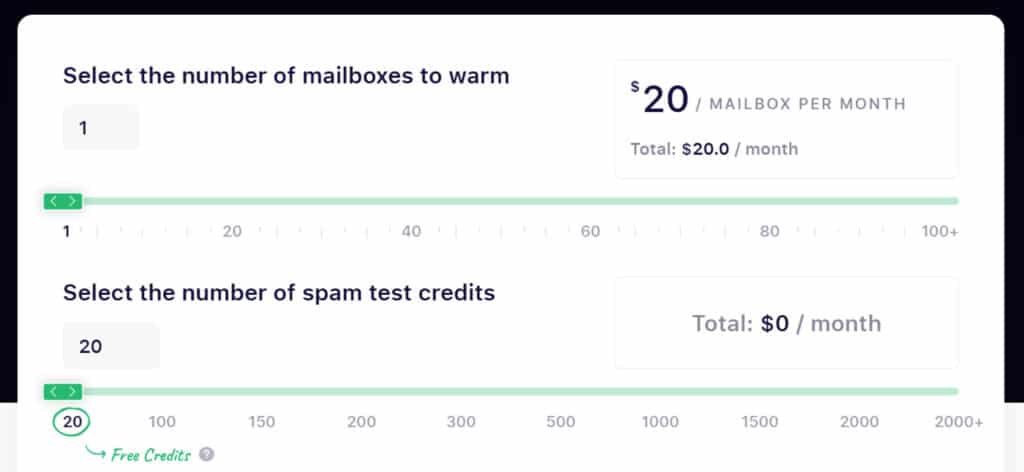
The All-in-One Warm-Up plan runs $19.50 per inbox each month. Pay annually and it drops to $15.60—a solid 20% savings. This includes the AI warm-up engine, health checks, and up to 100 daily warm-up emails.
For testing needs, the Spam Tester plan costs $210 monthly for 20 credits (scales up to $1,323 for 2,000+ credits annually with 20% off). You get spam test credits plus placement tracking and DNS monitoring.
The per-inbox model means costs add up quickly for multiple accounts.
| Plan Type | Monthly Cost | Annual Cost | Key Features | Best For |
| All-in-One Warm-Up | $19.50 per inbox | $15.60 per inbox | AI engine, 100 emails/day, health checks | Individual users |
| Spam Tester | $210 (20 credits) | $168 (20% off) | 20+ credits, placement tracking, alerts | Quality assurance |
| Enterprise | Custom | Custom | 100+ mailboxes, priority support | Agencies & teams |
Enterprise solutions offer custom pricing for scaling teams. You’ll need to contact sales for exact numbers if managing 100+ per inbox setups.
There’s no free trial for warm-up features—just a free spam test. This makes the initial commitment more significant than some competitors. While reasonable for 1-2 accounts, the cost scales steeply for larger operations.
Pros & Cons of Mailreach
Let’s cut through the marketing fluff and examine the actual strengths and weaknesses I discovered. I’m sharing what this platform genuinely does well and where it falls short based on my testing—no sugarcoating.
Key Advantages and Effective Deliverability
The platform excels at real inbox warm-up that mimics human behavior. It creates natural sending and engagement patterns that improve sender reputation over time. Most users see measurable deliverability improvements within 7-14 days.
Solid reporting provides actionable placement breakdowns and blacklist alerts. The AI-powered Co-Pilot helps automate warming logic, making it accessible for non-technical users. For its core purpose—warming accounts and monitoring deliverability—it delivers reliable results.
Drawbacks, Cost Concerns, and Setup Challenges
Now let’s address where this tool disappoints. The interface feels clunky and dated, especially when managing multiple accounts. There’s no campaign sending logic or reply flow control.
The cost structure stacks dangerously fast at $20-25 per inbox with no bundling. This becomes expensive for teams managing multiple domains. The initial setup can feel complex for non-technical users.
The most significant limitation is the limited B2B testing pool. With only ~18 professional inboxes, spam test accuracy suffers for serious emailers. User reviews confirm cost concerns and interface issues.
| Strengths | Weaknesses | Impact Level |
|---|---|---|
| Human-like warm-up behavior | Dated, slow interface | High |
| Fast deliverability improvements | No campaign sending features | Medium |
| Comprehensive reporting | Expensive per-inbox pricing | High |
| AI automation assistance | Complex initial setup | Medium |
If these drawbacks are deal-breakers for your use case, several strong alternatives offer similar or better results. Let’s explore them next.
Alternatives to Mailreach
The email warm-up market offers several compelling alternatives that approach deliverability from different angles. I’ve found that understanding these options helps you choose the right fit for your specific needs.
Overview of Competing Tools
If you’re exploring options beyond Mailreach email warmup, several solid competitors exist in the current digital landscape.
If you’re searching for tools to handle email warm-up, spam testing, and better deliverability, there are solid options beyond Mailreach.
These help build reputation so your emails reach inboxes more often. I get how spam issues can slow down outreach.
Let’s look at some good choices.
Smartlead AI
Smartlead offers unlimited AI warm-ups with human-like interactions. It includes inbox rotation and full outreach features. Great for scaling campaigns with strong placement. – Read Full Review
SalesHandy
SalesHandy bundles unlimited warm-up in its outreach platform. Simulates natural engagement and easy ramp-up. Ideal for teams wanting all-in-one tools. – Read Full Review
Warmy.io
Warmy.io uses AI for personalized warm-ups and health checks. Supports many languages with detailed dashboards. Suited for global senders needing monitoring. – Read Full Review
Mailwarm
Mailwarm provides simple auto-interactions and spam rescue. Tracks reputation with easy setup. Good for basic, reliable boosts. – Read Full Review
Warmbox.ai
Warmbox.ai features AI interactions in a large network. Custom strategies and blacklist checks. Best for flexible warm-up plans. – Read Full Review
PlusVibe.ai
PlusVibe.ai tailors AI warm-up with human signals. Unlimited accounts in outreach setup. Perfect for industry-specific personalization. – Read Full Review
Mystrika
Mystrika has a premium pool with AI automation. High guarantees and analytics. Strong for agencies scaling long-term. – Read Full Review
Reachinbox
Reachinbox delivers unlimited AI warm-ups with rotation. Unified inbox and personalization. Ideal for high-volume outreach. – Read Full Review
| Tool | Warm-Up Method | Unlimited Warm-Ups? | Key Extra Features | Starting Pricing | Best For |
|---|---|---|---|---|---|
| Mailreach | Real network, strategic interactions | No | Spam testing, alerts, diagnostics | $25 per inbox | Deep spam fixes & testing |
| Smartlead AI | AI human-like, rotation | Yes | Full outreach, personalization | $39 | Scaling full campaigns |
| SalesHandy | Unlimited simulation | Yes | All-in-one outreach, rotation | $25-$36 | Beginners & bundled tools |
| Warmy.io | AI personalization | No | Multilingual, health dashboard | $49 | Global detailed monitoring |
| Mailwarm | Auto daily interactions | No | Spam rescue, tracking | $69-$79 | Simple straightforward use |
| Warmbox.ai | AI network interactions | No | Custom plans, blacklist checks | $15 per inbox | Flexible strategies |
| PlusVibe.ai | Industry AI, human signals | Yes | Verification, advanced settings | $77 (business) | Personalized outreach |
| Mystrika | Premium AI pool | Yes | High guarantees, analytics | $19-$85/month or LTD | Agencies long-term |
| Reachinbox | Unlimited AI matching | Yes | Unified inbox, AI sequences | $69 LTD or monthly | High volume management |
Your pick depends on needs. Unlimited like Smartlead or Reachinbox help as you grow.
Want spam testing?
Mailreach leads there. These all improve deliverability for better lead connections.
Case Study / Personal Experience with Mailreach
Real-world results tell the true story, so I invested my own money to test this platform across seven different email accounts.
I didn’t just research from the outside—I connected domains at various reputation levels and tracked performance for two full months.
Real-World Results and Performance Insights
My testing revealed clear patterns. New email accounts showed positive inbox placement improvements after around 30 days. Older domains with mild deliverability issues recovered faster—within 2-3 weeks.
The investment totaled $273 for two months ($136.50 monthly). This demonstrates how costs accumulate even at modest scale. The platform’s spam testing feature provided valuable ESP-specific visibility across 35+ accounts.
My Experience: A Storytelling Approach
I started cautiously, connecting just two domains first. The no-free-trial policy made me hesitant to commit fully. Configuration felt slightly intimidating compared to some competitors.
Deliverability improvement requires patience. Around day 20-25, I noticed my sender reputation scores improving. Fewer emails hit spam folders during subsequent testing.
The key insight? Keeping warm-up running during active campaigns is crucial for maintaining domain reputation over time. This platform handles this well with customizable settings.
While MailReach delivered on its core promise, the cost-to-value ratio becomes questionable when managing multiple accounts. This experience led me to explore alternatives for better scaling economics.
Mailreach Review: In-Depth Analysis
Beyond my personal experiments, the collective wisdom of actual users reveals patterns worth understanding. I analyzed hundreds of reviews across multiple platforms to give you the complete picture.
User Feedback and Expert Insights
The aggregate ratings tell an interesting story. This platform scores 4.7/5 on G2 (42 reviews) and a perfect 5/5 on Capterra (22 reviews). Trustpilot shows more mixed sentiment at 3.6/5.
Users consistently praise the authentic warm-up process and measurable deliverability improvements. The automated setup requires minimal manual intervention, which users appreciate. Customer support receives strong marks across the board.
However, complaints center on the per-inbox pricing model. Many users find it expensive for teams managing multiple accounts. The absence of a free trial creates commitment anxiety. Non-technical users report setup complexity.
From my professional insights, the core technology delivers results. But the economic model and limited B2B testing accuracy are legitimate concerns for serious outreach campaigns.
The platform effectively improves inbox placement for outreach efforts. Yet scaling limitations explain why some users migrate to alternatives. These insights help you make informed decisions about your outreach strategy.
SMTP Compatibility and Security Insights
Connecting a third-party tool to your business email accounts naturally raises security questions. You’re right to be cautious—your domain’s reputation is priceless. I’ll break down exactly how this platform handles integration and why its approach is fundamentally safe.
Integration with Gmail, Outlook, and More
The platform connects seamlessly with major email providers like Gmail, Outlook, and Zoho. It also supports custom SMTP configurations. You don’t need to migrate your existing accounts or change your workflow.
The initial setup uses standard OAuth2 or SMTP/IMAP authentication. This is the same secure method other email tools use. While it might seem technical, the process is straightforward for most providers.
This tool operates using a controlled network of real inboxes. It simulates natural human engagement with your emails. There’s no spoofing or fake click manipulation that could alert email providers.
MailReach follows white-hat practices that build sender reputation gradually. It plays by the rules that Gmail and Outlook enforce. This isn’t a risky shortcut that could get your domain blacklisted.
Remember—the platform warms up your accounts, but you control the content. If you send spammy emails or skip proper DNS configuration, no tool can protect your reputation. Your practices ultimately determine your deliverability success.
Deliverability and Inbox Placement Explained
Ever wonder why some emails land directly in your main inbox while others vanish into spam oblivion?
The answer lies in your domain’s sender reputation—a hidden score email providers assign based on your sending behavior. This score determines your email deliverability and ultimately, whether your campaigns succeed or fail.
How It Improves Sender Reputation and Open Rates
The platform works by simulating real human email interactions. It sends messages, generates replies, and marks emails as important. This consistent activity trains algorithms to trust your domain.
Better placement means higher open rates. Emails reaching the primary inbox get 20-40% opens, while spam folder messages get zero visibility. The difference isn’t subtle—it’s campaign-breaking.
You’ll typically see improvements within 7-14 days. New domains need about 30 days, while established ones recover faster. The key is maintaining warm-up activity even during active sending to preserve your hard-earned reputation.
Conclusion: Mailreach Review
Raamish’s Take
MailReach is a specialized deliverability platform that prioritizes inbox placement through automated warm-up and precise spam testing, enabling B2B teams to achieve near-perfect email ROI—rated 4.9 on Capterra for its focused expertise where all-in-one tools often fall short.
Its Email Warmup excels by repairing and sustaining sender reputation via meaningful, human-like interactions across a high-reputation account network, with smart algorithms ensuring subtle, rule-compliant activity that avoids detection.
I am particularly impressed with the Spam Checker, offering manual or scheduled tests to track placement rates and identify triggers, complemented by the MailReach Co-Pilot AI assistant for instant, actionable content and setup optimizations.
Compatibility spans any SMTP provider (Gmail Workspace, Outlook 365, Zoho, SendGrid, Amazon SES, etc.), with domain/IP health checks (SPF, DKIM, DMARC, blacklist monitoring) and a reputation dashboard for ongoing vigilance.
Scalable for 1–100+ mailboxes, it supports initial 14-day warm-ups, campaign maintenance, and restoration in 90% of damaged cases.
MailReach‘s laser-focused, compliant automation guarantees emails land in primary inboxes, directly fueling meetings, deals, and hires without deliverability guesswork.
Making the final call on email tools comes down to one simple question: Does it solve your specific deliverability problem?
After thorough testing, I can confirm Mailreach effectively warms accounts using AI behavior and smart replies. It genuinely improves your inbox placement.
The platform connects seamlessly with Gmail and Outlook. You get real-time domain health alerts. But the $25-per-mailbox pricing adds up quickly when managing multiple accounts.
This specialized tool won’t send campaigns or handle reply workflows. Choose it if you’re a solo sender or small team with 1-5 accounts. For larger outreach operations, consider warmbox.ai for infrastructure control or smartlead’s complete cold outreach stack.
Test your current deliverability with free placement tools first. Then decide if a specialized solution or unified platform better fits your outreach strategy.
Frequently Asked Questions
How does Mailreach improve my email deliverability?
It uses a sophisticated warm-up engine to simulate real inbox behavior, gradually building your sender reputation with major providers like Gmail and Outlook. This process helps improve your inbox placement over time by generating positive engagement signals.
Can I use Mailreach for managing multiple email accounts?
Yes, the platform is designed for teams and agencies. You can manage several accounts from a single dashboard, making it efficient for handling campaigns across different domains or clients.
Is there a free trial or any free spam test credits available?
A> Mailreach offers a free trial that includes a limited number of spam test credits. This lets you test your domain’s health and inbox placement before committing to a paid plan.
What makes Mailreach different from other cold email tools like Lemwarm or Instantly?
Its standout feature is the combination of a robust warm-up engine with detailed inbox placement analysis. While alternatives focus on one aspect, Mailreach provides a more holistic approach to improving sender reputation and avoiding spam folders.
How technical is the setup process?
The setup is straightforward. You connect your SMTP settings (compatible with most major email providers), and the platform guides you through the initial configuration. Most users can get started within minutes, not hours.
What happens if my emails land in spam during the warm-up process?
The tool’s algorithms are designed to detect this and automatically adjust the sending patterns. It focuses on generating positive engagement to pull emails out of the spam folder and improve your overall domain reputation.
Is Mailreach suitable for small businesses or solo entrepreneurs?
Absolutely. While it’s powerful for agencies, the pricing plans are scalable. Solo users can benefit from the core features without paying for enterprise-level credits, making it cost-effective for smaller outreach campaigns.