Staring at a blank page in your standard word processor?
You’re not alone. Most writing applications treat novels like business reports. They lack the specialized features that book authors desperately need.
The frustration is real. Complex writing tools promise power but deliver confusion. You spend more time learning software than actually writing your story. This kills creative flow and productivity when you should be focused on your characters and plot.
That’s where this comprehensive assessment comes in. I’ve personally tested this online book writing application to see if it lives up to its “Scrivener without the learning curve” reputation. Created by Jacob Wright in 2017, this platform aims to be both powerful and accessible.
In this honest evaluation, you’ll discover whether this writing software fits your specific needs. We’ll explore features, pricing, and real-world usage.
Let’s dive into whether this tool can transform your writing process in the current AI landsscape.
Key Takeaways: Dabble Writer Review
- This assessment provides hands-on experience with the online book writing application
- We evaluate whether the platform balances power with user-friendliness
- The review covers current features, pricing, and practical usage scenarios
- Different writer needs are considered throughout the evaluation
- Personal testing from multiple perspectives ensures comprehensive insights
- The AI writing tool landscape is analyzed for context
- Guidance helps determine if this software matches your specific requirements
Dabble Writer Review: An Overview

Raamish’s Take
DabbleWriter earns its spot as a go-to tool for fiction writers by blending solid organization with a clean writing space that keeps the focus on your story.
What stands out is the Plot Grid, which lets you drag and drop scenes to map out acts and chapters visually—perfect for spotting pacing snags early without drowning in notes.
The Character Profiles and World-Building Bible keep backst
ories and settings consistent, pulling them up right in your manuscript so you never lose thread mid-draft.
I like how the Focus Mode with typewriter scrolling strips away distractions, pairing nicely with daily word count goals and NaNoWriMo tracking to build steady habits.
Multi-device sync means you can jot a scene on your phone and pick up on laptop seamlessly. Editing perks like Read-to-Me audio playback and in-context thesaurus catch those subtle flow issues that silent reading misses.
The community side adds real value too—DabbleU’s 400+ articles and Story Craft Cafe Podcast deliver practical tips from pros, while premium workshops offer live feedback.
Export options to Word or web make sharing beta reads a breeze, and co-authoring handles collabs without version chaos.
Overall, DabbleWriter streamlines the chaos of drafting into something manageable, helping you finish that book faster.
Introduction to Dabble Writer
While AI tools generate headlines, serious authors still face the challenge of structuring entire books. This platform carves its niche by focusing on what generative AI often ignores: The author’s creative workflow.
Fitting into the Current AI and Writing Landscape
In the current AI landscape, the buzz is all about AI writing assistants. But for long-form projects like a novel, you need more than content generation. You need organization. This software provides a dedicated, distraction-free environment for your book.
It differs fundamentally from AI tools. Instead of generating text, it helps you manage yours. Think plot lines, character arcs, and chapter outlines. The goal is to give you, the writer, complete control.
| Feature Focus | Dabble Writer | Typical AI Writing Assistant |
|---|---|---|
| Primary Function | Organization & Structure | Content Generation |
| Ideal For | Long-form books and novels | Short-form content & ideas |
| User Control | High – author directs the process | Variable – AI suggests content |
Founder’s Background and Company Insights
The creator, Jacob Wright, is a software programmer with a passion for writing. He experienced the frustration of complex writing software firsthand. In 2017, he decided to build a solution.
His vision was clear: Create a tool as powerful as Scrivener but without the steep learning curve. He combined technical skill with an author’s empathy. The result is software that feels intuitive from day one.
Purpose and Endorsements by Leading Companies
The core purpose is straightforward. It helps fiction and nonfiction authors stay organized and maintain focus. It tracks complex story elements across an entire manuscript.
You won’t find giant corporate logos endorsing it. Instead, it has built a strong, organic community of writers. These authors actively recommend it in online forums and writing groups. The platform has evolved consistently based on their direct feedback since its launch.
What is Dabble Writer?
Have you ever felt overwhelmed by the sheer scale of a book-length project?
This is where specialized writing software like Dabble steps in. It’s a cloud-based app designed from the ground up for authors tackling novels or complex nonfiction books.
How the Tool Operates
The beauty of this tool is its flexibility. You can access it through any web browser or download native apps for Windows and Mac. I find the automatic syncing between devices incredibly reliable. Your work is always saved in the cloud.
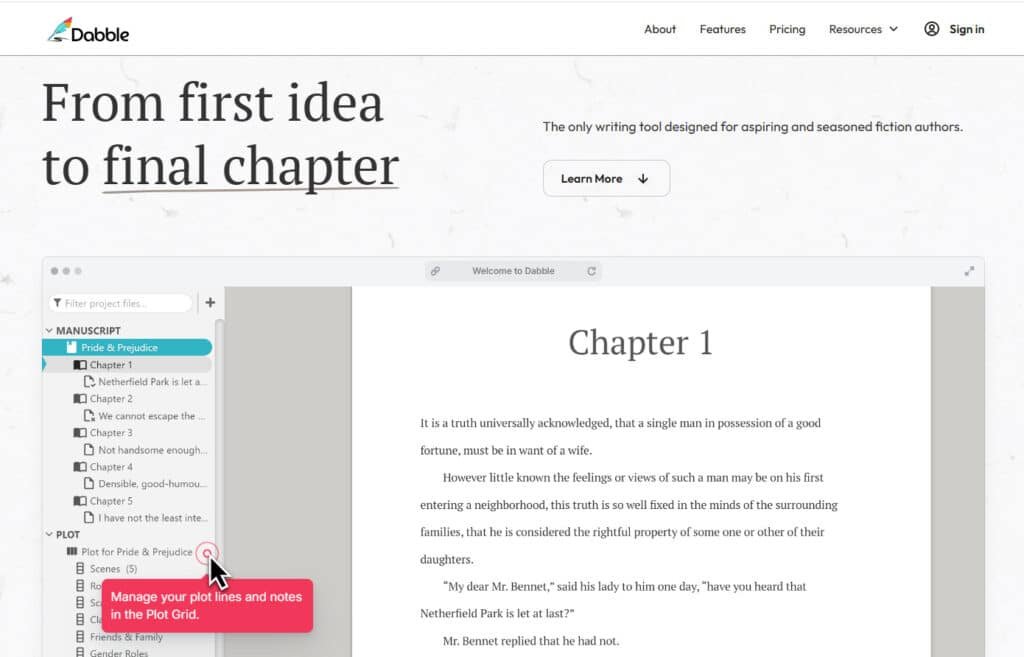
When you start a new project, the interface is brilliantly simple. Your manuscript sits in the center. A navigation panel on the left automatically organizes your writing into chapters and scenes. This creates a visual outline as you write, without any extra effort.
Benefits for Novelists and Nonfiction Authors
The core features provide distinct advantages depending on your genre. The system helps you maintain consistency and control over sprawling narratives or detailed arguments.
| User Type | Primary Benefit | Key Functionality |
|---|---|---|
| Novelists | Plot & Character Management | Easily track multiple story threads and manage large casts. Drag and drop to rearrange scenes effortlessly. |
| Nonfiction Authors | Research & Structure Organization | Keep notes, sources, and complex arguments neatly organized alongside your manuscript sections. |
This platform focuses purely on the creative and planning phases. It’s your partner in building the project, not in designing the final product for publication.
Complete Features of Dabble Writer
What truly makes this application stand out from basic word processors?
I’ve spent significant time testing its core features to see how they support the writing process. The platform is packed with thoughtful tools designed specifically for book-length projects.
Powerful Plot Grid and Scene Management
The Plot Grid is a game-changer for visual organizers. It displays your story scenes horizontally. Above them, you can add unlimited custom columns to track any element.
I used it to monitor character arcs and subplots side-by-side. Scene Cards automatically generate as you write. You can drag and drop them to rearrange your plot, which instantly updates your manuscript.
1. Plotting and Organization
Plot Grid
The Plot Grid turns abstract story structure into a visual board where every scene lives as a movable card.
Writers drag scenes across act lines, adjust chapter divisions, and instantly see if the pacing drags or rushes.
This option prevents writing a lot of dead-end material because structural flaws appear before a single scene is fully drafted.
For anyone tired of endless revisions, the grid saves hours by letting you rearrange the skeleton first.
Character Profiles
Full character profiles store backstory, physical details, motivations, and arc notes with image uploads.
Every time you jump to a new scene, the profile sidebar keeps traits consistent so characters never act out of established personality.
This eliminates the common problem of contradicting details across a 100k-word manuscript.
World-Building Tools
Dedicated world-building sections hold magic systems, cultures, maps, and settings rules that sync to every project.
Fantasy and sci-fi writers no longer pause mid-scene to hunt scattered notes; the lore stays one click away, keeping immersion intact.
Drag-and-Drop Organization
Drag-and-drop lets you split, merge, or reorder any scene or chapter in seconds.
Pantsers who discover structure late and plotters who refine early both benefit from this fluid option that supports any workflow without fighting the software.
Plot Labels and Story Notes
Color-coded plot labels and attached story notes tag foreshadowing, themes, or subplots.
Scanning a manuscript becomes visual instead of linear, so writers spot pacing gaps or unresolved threads across dozens of chapters in minutes instead of hours.
Series & Shared Worlds
Series tools link shared characters, settings, and lore across unlimited books. Trilogy and series authors maintain continuity without copying notes manually, reducing errors that frustrate readers in later volumes.
2. Writing and Editing
Modern Text Editor
The clean, modern text editor auto-handles chapter and scene numbering while displaying live word counts. Formatting stays manuscript-ready at all times, removing post-writing cleanup headaches.
Focus Mode
Focus Mode with typewriter scrolling centers only the current line and fades everything else. This distraction-free mode helps writers stay in deep creative mode for longer stretches, boosting daily output.
Daily Word Count Goals
Custom daily goals include progress rings and NaNoWriMo mode integration. Visual trackers motivate consistent writing and turn vague “write more” intentions into measurable wins.
Multi-Device Access
Full cloud sync across web, desktop, and mobile means you can add a bit to a scene on your phone and continue seamlessly on laptop. No more “where did I save that version” panic.
Dark Theme and Font Themes
Multiple dark mode options and font themes reduce eye fatigue during long sessions. Writers choose the exact look that keeps them comfortable for hours.
Sticky Notes and Comments
Sticky notes and inline comments sit directly beside paragraphs. Mark confusing scene transitions or flag dialogue that needs punch-up without breaking writing mode.
Text Highlighting
Color highlighting marks key passages for quick reference. Jump between highlighted scene moments during revision passes instead of endless scrolling.
Advanced Checks
Real-time spelling, grammar, and style checks run natively. Pair with Grammarly or ProWritingAid for deeper suggestions that catch repetition and passive voice early.
Read to Me
Text-to-speech reads the entire manuscript aloud. Hearing prose exposes clunky rhythm that silent reading misses, improving overall flow.
Find and Replace
Global find-and-replace hunts overused words across every scene and chapter. Eliminate crutches like “just” or “suddenly” in one sweep.
In-Context Thesaurus
Right-click thesaurus offers instant alternatives without leaving the editor. Upgrade word choice while staying in creative mode.
Co-Authoring
Real-time co-authoring shows multiple cursors and changes instantly. Writing partners edit the same chapter together, cutting version-control chaos.
3. Sharing, Export, and Publishing
Export Options
Multiple export option formats include perfectly formatted Word, PDF, Google Docs, and ePub-ready files. Submit to agents or upload to retailers without reformatting a bit.
Share to Web
One-click web sharing creates public or password-protected links. Beta readers comment directly on specific paragraphs instead of emailing giant files.
Writing Group Share and Beta Reader Workflow
Granular permissions let you share only certain chapters with specific readers. Manage large beta groups and track who said what without spreadsheets.
Editor Workflow
Professional editor workflows (rolling out fully) streamline developmental and line-edit handoffs. Keep feedback organized inside the same project.
Book Covers and Chapter Heading Images
Upload full covers and custom chapter art that display during writing and export. See your book looking real from draft one.
Images in Manuscript & Notes
Embed reference images directly beside scene descriptions. Visual writers keep inspiration visible while drafting.
Duplicate Projects
Duplicate entire manuscripts for alternate endings or major rewrites. Experiment freely without risking the main version.
Autosave and Backup
Offline-capable autosave plus cloud backup protects every bit written. Version history lets you roll back to any previous save instantly.
4. Learning and Community
DabbleU Library
Over 400 free in-app articles cover plot structure, character arcs, querying, and marketing. Writers find answers without leaving the tool or paying extra.
Story Craft Cafe Podcast
Weekly podcast episodes interview bestselling authors about process and mindset. Learn proven techniques while commuting or doing dishes.
Weekly Writing Sprints and Feedback Fridays
Live timed sprints and open feedback sessions build accountability. Finish thousands of words alongside other writers in real time.
Story Craft Cafe Community
Active forums connect thousands of novelists daily for critique swaps, encouragement, and resource sharing year-round.
Monthly Wordsmith Workshops (Premium)
Premium members attend small live workshops led by published authors. Get targeted craft lessons and Q&A every month.
Guest Sessions and Office Hours (Premium)
Bi-weekly office hours let writers ask pros specific questions about their manuscripts. Receive personalized advice that accelerates growth.
Deep-Dive Newsletters and Bonus Downloads (Premium)
Monthly premium newsletters plus plotting templates, revision checklists, and bonus courses arrive automatically. Members gain tools that shave weeks off drafting and editing timelines.
| Feature Category | Core Benefit | Key Function |
| Plotting & Structure | Visual story organization | Drag-and-drop scene management |
| Writing Environment | Minimize distractions | Auto-fading Focus Mode |
| Productivity | Maintain writing momentum | Dynamic goal tracking |
Beyond these highlights, you also get a built-in thesaurus, a “Read to Me” function, and ProWritingAid integration.
The Story Notes section is fantastic for world-building. It supports images and custom property lists for characters and locations.
Pricing Plans of Dabble Writer
Let’s talk numbers – understanding the cost of this writing platform is crucial for your budgeting decisions. The pricing follows a subscription model, which I actually appreciate for continuous updates.
Subscription Options and Annual Savings
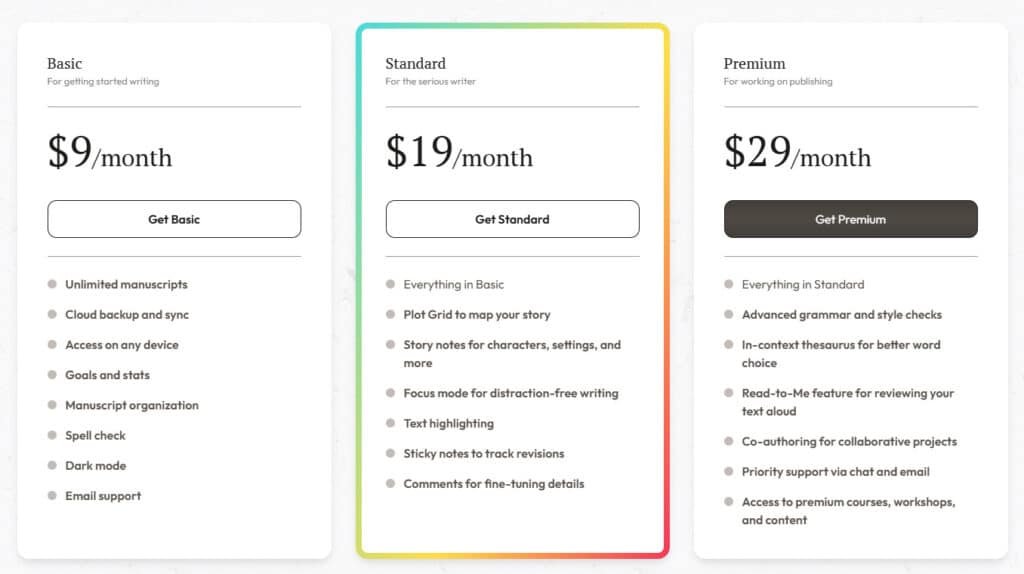
You get three subscription tiers to choose from. The Basic plan starts at $7 per month with annual billing – perfect for straightforward drafting.
The Standard option adds powerful tools like the Plot Grid and Focus Mode. Premium tops out at $23 monthly and includes advanced grammar checks.
| Plan Feature | Basic | Standard | Premium |
|---|---|---|---|
| Monthly Cost (Annual) | $9 | $19 | $29 |
| Key Tools | Manuscript organization | Plot Grid + Notes | ProWritingAid + Co-authoring |
| Best For | Basic drafting | Serious novelists | Professional teams |
Life Time Access

Pay once and unlock all Premium features forever only at $699 — no subscriptions, unlimited updates, and every future Premium tool included.
It’s like paying for just 2 years of the monthly plan but owning Dabble for life.
Perfect for committed novelists who want the full suite without recurring bills. Start with the free trial, then grab lifetime access and write without limits.
Pros & Cons of Dabble Writer
Every writing tool involves trade-offs between functionality and practical considerations. After extensive testing, I found this platform excels in specific areas while showing limitations in others.
Advantages: Usability, Organization, and Flexibility
The strongest benefit is immediate usability. You can start writing within minutes rather than spending hours learning complex software. The interface feels intuitive from day one.
Organization capabilities are exceptional for complex projects. The visual Plot Grid prevents plot holes in multi-character stories. You maintain clarity across entire manuscripts.
Customization options let you structure notes exactly how your mind works. Automatic cloud saving provides peace of mind—your work is always secure and synced across devices.
| Strength Area | Key Benefit | Practical Impact |
|---|---|---|
| Usability | Minimal learning curve | Start writing immediately |
| Organization | Visual plot management | Prevent story inconsistencies |
| Flexibility | Customizable workspace | Adapt to your thinking style |
Drawbacks: Subscription Model and Limited Formatting Options
The subscription model costs more long-term than one-time purchase alternatives. Monthly fees accumulate significantly over years of use.
Import limitations require copy-paste from other writing tools rather than direct file import. Formatting transfers reasonably well but requires manual adjustment.
The most significant limitation is lacking built-in book formatting. You’ll need separate tools for publication-ready files, adding steps to your publishing workflow.
These drawbacks matter less for traditionally published authors but require consideration for indie publishers. The platform’s strengths might outweigh these limitations depending on your specific needs.
Alternatives to Dable Writer
Before committing to any platform, it’s wise to survey the competitive field of writing software. Different authors have unique workflows and budgets. The “best” tool depends entirely on your specific needs.
Competing Writing Software Option
If you’re using DabbleWriter to organize plots, track goals, and write your novel in the cloud, you might want tools that offer similar help or more AI features.
These AI writing and book generation platforms support beginners and pros alike, with tools for characters, outlines, and full drafts.
I know writer’s block hits hard sometimes. You need something that keeps you motivated and flowing. Here are some great options that make storytelling easier.
Sudowrite
Sudowrite shines as an AI partner for fiction writers. It expands scenes, rewrites passages, and brainstorms ideas in your style. Many authors use its Describe and Story Engine to add depth fast. Perfect for overcoming stuck spots in novels. – Read Full Review
BookWizard
BookWizard generates full books from prompts, including outlines and chapters. It handles fiction or nonfiction with custom styles. Users love how it speeds up from idea to draft. Great for quick complete manuscripts. – Read Full Review
Squilber
Squilber (Squibler) offers AI smart writer for generating text, plus planning boards and goals. It organizes elements like characters and plots. Writers praise the unlimited AI in pro for long projects. Ideal for structured novel building. – Read Full Review
Novelist AI
Novelist AI (NovelAI) creates stories with custom models and image generation. It focuses on creative narratives and anime styles. Strong memory keeps consistency across chapters. Suited for immersive fiction worlds. – Read Full Review
Simplified (AI Book Writer)
Simplified includes an AI book writer in its all-in-one platform. It generates chapters and long-form content easily. Ties into design tools for covers too. Good for authors handling marketing as well. – Read Full Review
MaxAI (AI Book Writer)
MaxAI provides one-click book creation with chapters and intros. Browser-based for quick access. Generates detailed content fast. Handy for brainstorming full structures. – Read Full Review
WordVice
WordVice focuses on AI proofreading and paraphrasing for polished writing. It checks grammar, style, and clarity. Academic lean but useful for clean manuscripts. Best for final revisions. – Read Full Review
| Tool | Key Features | AI Generation Level | Starting Pricing | Best For |
|---|---|---|---|---|
| DabbleWriter | Cloud plotting, goals, focus mode | Low (no heavy AI) | $10-20/month | Simple organization |
| Sudowrite | Scene expand, rewrite, brainstorm | High | $19-29/month | Creative fiction boosts |
| BookWizard | Full book from prompt | Very High | $10-29/month | Complete manuscripts |
| Squilber (Squibler) | Smart writer, elements, unlimited AI | High | Free / $16-20/month | Structured planning |
| Novelist AI (NovelAI) | Storyteller, images, custom models | High | $10-25/month | Immersive narratives |
| Simplified | Book writer + design tools | Medium | Free / $20+ | All-in-one content |
| MaxAI | One-click books, chapters | High | Free / premium | Quick structures |
| WordVice | Proofread, paraphrase, summarize | Medium (editing) | Free / $20/month | Polishing drafts |
Your best pick depends on needs. Heavy AI for drafts? Sudowrite or BookWizard.
Want organization too? Squilber.
These tools help turn ideas into finished books smoother.
Case Study / Personal Experience with Dabble Writer
Beyond the features and pricing lies the real question: does this actually work for writers?
I’ve gathered real user feedback and tested it extensively myself to give you the unvarnished truth.
Real-World Results and Improvements in Workflow
Users consistently report transformative impacts on their writing process. One author told me, “This product gives me so much flexibility and peace of mind. Just knowing if my computer goes belly up that my work is safe is an enormous thing.”
The cloud backup feature provides security that’s hard to overstate. Writers working on complex book projects especially appreciate the organizational tools.
One novelist shared how the Plot Grid “may have blown my mind. I have never been so excited about outlining in my life.” This visual approach to plotting helps track multiple character arcs and subplots across the entire story.
Writers use color-coded Ribbons to track point-of-view shifts and icon overlays to mark scenes needing revision. These small features add up to significant workflow improvements.
My Experience: A Writer’s Journey
I started my writing journey frustrated with Google Docs. My manuscripts became unwieldy as they grew. I needed dedicated tools for book-length projects.
When I tried the free trial, the clean interface felt intuitive immediately. Within minutes, I was writing instead of learning complex software.
The Plot Grid revelation was immediate. I could see my entire story structure at a glance. Moving chapters became simple drag-and-drop operations.
Focus mode became my secret weapon for hitting daily word count goals. The story notes section kept my character profiles and research organized.
While I needed separate formatting tools for publishing, the writing process itself became dramatically more efficient. The subscription cost proved worthwhile for my productivity gains.
Conclusion: Dabble Writer Review
Raamish’s Take
DabbleWriter earns its spot as a go-to tool for fiction writers by blending solid organization with a clean writing space that keeps the focus on your story.
What stands out is the Plot Grid, which lets you drag and drop scenes to map out acts and chapters visually—perfect for spotting pacing snags early without drowning in notes.
The Character Profiles and World-Building Bible keep backst
ories and settings consistent, pulling them up right in your manuscript so you never lose thread mid-draft.
I like how the Focus Mode with typewriter scrolling strips away distractions, pairing nicely with daily word count goals and NaNoWriMo tracking to build steady habits.
Multi-device sync means you can jot a scene on your phone and pick up on laptop seamlessly. Editing perks like Read-to-Me audio playback and in-context thesaurus catch those subtle flow issues that silent reading misses.
The community side adds real value too—DabbleU’s 400+ articles and Story Craft Cafe Podcast deliver practical tips from pros, while premium workshops offer live feedback.
Export options to Word or web make sharing beta reads a breeze, and co-authoring handles collabs without version chaos.
Overall, DabbleWriter streamlines the chaos of drafting into something manageable, helping you finish that book faster.
So, should you invest in this writing software?
For authors wrestling with complex book projects, the answer leans heavily toward yes. Its intuitive design gets you writing immediately, a huge win over tools with steep learning curves.
The standout feature remains the visual Plot Grid for plotting and character tracking. This tool excels at organizing your manuscript, chapter by chapter. It’s perfect for managing sprawling storylines.
Just remember the subscription model. While the pricing is fair, it’s a long-term cost. You’ll also need separate formatting software for publishing.
My final recommendation? Take the free trial for a spin. See if its workflow fits your creative process. The right writing tool can make all the difference.
Frequently Asked Questions
Is there a free version of this writing software?
There isn’t a permanent free version, but they offer a very generous 14-day free trial. You get full access to all features without needing a credit card. It’s a great way to test the interface and see if the plot grid and scene management tools work for your project.
How does the subscription pricing work?
The tool uses a subscription model with monthly or annual payment options. Opting for the annual plan gives you significant savings. You can check their website for the most current pricing tiers, which are structured to fit different author goals.
Can I use it offline?
Yes! This is a key feature. While it’s primarily an online app, it has an offline mode. Your work syncs automatically once you’re back online. This is perfect for writing on the go without worrying about an internet connection.
What file formats can I export my manuscript to?
You can export your text to standard formats like DOCX (for Microsoft Word) and PDF. The formatting options are straightforward, making it easy to prepare your manuscript for editors, agents, or self-publishing platforms.
Is it good for plotting and organizing a complex novel?
Absolutely. The plot grid feature is a standout. It lets you visually organize scenes, track character arcs, and manage your entire story structure in one place. It’s a huge time-saver for authors who do a lot of plotting.
How does the goal tracking feature work?
You can set daily or project-wide word count goals. The software tracks your progress and gives you a clear visual of how you’re doing. It’s a simple but effective motivator to keep you writing consistently.
Are my files secure in the cloud?
Your projects are stored securely in the cloud with automatic saving. This means you never have to worry about losing your work due to a computer crash. You can also access your book from any device.
How does it compare to Scrivener?
It’s often seen as a more modern and streamlined alternative to Scrivener. The interface is cleaner and more intuitive, especially for new users. While Scrivener has deeper formatting power, this app excels in usability and its unique plotting tools.