Does studying a new language feel like a chore? You’re not alone. Many learners hit a wall with traditional apps that feel disconnected from real life. It’s frustrating when you can’t understand your favorite shows or have a natural conversation.
I’ve tested countless language learning tools, searching for something better. That’s why I was so intrigued by this new AI-powered extension. It promises a truly immersive experience by using real-world video content. This tool feels different from anything else on the market.
In this honest breakdown, I’ll share my hands-on experience. You’ll get a clear look at the features, pricing, and how it performs in daily use. Let’s find out if this is the solution you’ve been searching for.
Key Takeaways: Trancy Review
- This tool uses real videos for a more engaging learning experience.
- It’s an AI-powered browser extension, not just another app.
- The approach is designed to help you understand native speakers.
- I tested it personally to provide genuine insights.
- This review covers features, cost, and real-world performance.
- It aims to solve the problem of boring, ineffective study methods.
Trancy Review: An Overview
Introduction to Trancy
Imagine learning a language not from a textbook, but by watching your favorite Netflix series with intelligent, interactive subtitles. This is the core idea behind a new generation of AI-powered tools. They leverage the content you already consume for fun or education.
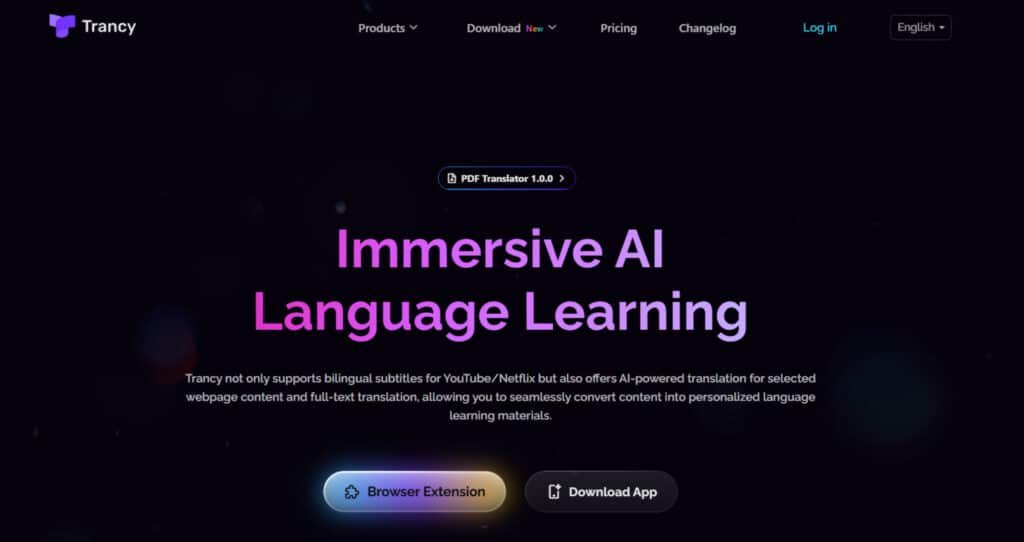
I’ve noticed a clear trend moving away from traditional apps. The focus is now on immersive, content-based learning. This approach uses platforms like YouTube and Netflix that people use daily.
How Trancy Fits in the Current AI Landscape
Trancy emerged directly from this shift. It positions itself alongside tools like Language Reactor. Its goal is to make understanding native speakers easier and more natural.
The tool uses multiple AI engines, including OpenAI and DeepL, for its translation services. This ensures high-quality, context-aware translation of video dialogue and text.
Background and Founding Insights
The developer and publisher is L2D LIMITED. You can find their extension on the Chrome Web Store, Microsoft Edge Add-ons, and as an iOS app. This wide availability makes it accessible across different devices.
Their philosophy is centered on keeping language learning accessible. Premium user fees help cover costs for third-party AI services and data centers. This model allows them to keep the basic version free for everyone.
Purpose and Endorsements by Companies
The core purpose is simple: combine AI translation technology with real video content. It works across major streaming and educational platforms to create a seamless learning experience.
Supported Platforms for Immersive Learning
| Entertainment Platforms | Educational Platforms | Browser Availability |
|---|---|---|
| YouTube, Netflix, Disney+ | TED, Coursera, Udemy, edX | Chrome, Microsoft Edge |
The tool has gained positive recognition within the language learning community. User testimonials and store ratings often highlight its effectiveness for practical skill development.
What is Trancy?
What if every video you watched could become an interactive language lesson? That’s the promise behind this innovative browser extension. It transforms your regular viewing experience into a powerful learning tool.
I’ve found it bridges the gap between passive entertainment and active skill development. The approach feels remarkably natural compared to traditional methods.
Inner Workings and Core Functionality
Once installed, the extension adds a small icon to your video player. Clicking it activates bilingual subtitles that display both languages simultaneously. The interface creates a clean, theater-style viewing experience.
The tool supports content across major platforms like YouTube and Netflix. It works by overlaying interactive subtitles that respond to your interactions.
Supported Languages for Immersive Learning
| Asian Languages | European Languages | American Languages |
|---|---|---|
| Chinese, Japanese, Korean | English, French, German, Italian, Portuguese, Spanish | English, Spanish, Portuguese |
Benefits for Language Learners
The real magic happens when you hover over individual words. Instant definitions appear, eliminating the need to pause and search separately. This seamless integration saves significant time during watching videos.
You’re learning from authentic native-speaker content rather than artificial scenarios. The translation quality benefits from multiple AI engines working together.
For web content, the tool offers hover-to-translate functionality. This dual approach makes the entire web your classroom. The experience feels genuinely immersive rather than forced.
Building vocabulary becomes effortless as you engage with content you already enjoy. Your brain naturally connects sounds with meanings in your target language.
Best Features of Trancy
The true power of this tool lies in its ability to transform passive viewing into an active, engaging language session. Its features are designed to make you think and participate, not just watch.
1. Core Video and Subtitle Features
Trancy’s video tools make watching content feel less overwhelming, helping you enjoy learning without constant confusion.
Bilingual Subtitles and Video Integration
This feature shows clean bilingual subtitles with the original and translated text side-by-side, so you can easily switch tracks with a click. It works smoothly on YouTube Netflix, HBO Max, Disney+, TED, edX, Coursera, Udemy, and more. You can save new words or sentences instantly. If you often miss details in foreign videos, this helps by letting you follow along naturally, building understanding and vocabulary without frustration.
Viewing Modes
Theater mode keeps the full video playing with subtitles, while reading mode shrinks the video and enlarges subtitle text for focused study. This benefits you by allowing a relaxed watch or deep dive into meanings, making it easier to grasp stories or lessons at your own pace.
AI Subtitle Transcription
For YouTube videos without built-in subtitles, this AI creates accurate ones quickly. If you’ve skipped videos because they lacked captions, this opens up new content, helping you learn from more sources and feel more included in global discussions.
Smart Sentence Segmentation
It uses smart processing to break subtitles into clear sentences, improving how they translate and make sense. This reduces confusion from jumbled words, so you can follow ideas smoothly and remember them better.
Speed Playback Adjustment
You can slow down or speed up the video as needed. If fast speech makes you anxious, slowing it helps you catch every word, building listening skills gradually and boosting your comfort.
Word Highlighting and Bookmarking
New words in subtitles get highlighted, and you can bookmark word sentence easily. This gently reminds you of what to learn, turning everyday viewing into a personal study aid without extra effort.
Subtitle Exporting
Download bilingual subtitles anytime for offline use. Perfect if you travel or have spotty internet—it keeps your learning going, so you never lose progress.
AI Video Summarization
This creates short overviews of videos, highlighting key points. If long content feels daunting, summaries give you a quick start, helping you decide what to watch fully and saving time while keeping you motivated.
These features together make videos your ally, helping you overcome isolation in learning by turning fun watching into confident growth.
2. Interactive Practice Modes and Exercises
Practice becomes playful and supportive, addressing the worry of not knowing where to start.
Interactive Practice Mode and Activity Options
Press a shortcut like ‘P’ to turn subtitles into exercises: speaking with feedback, listening quizzes, fill-in-the-blanks, dictation, shadowing, and more. It auto-generates them, saving you time. If creating your own drills feels tiring, this does it for you, making practice enjoyable and helping you improve skills steadily.
Video Exercises
These include listening, speaking, shadowing, and follow-along from real video content. They help bridge the gap between watching and doing, so you gain real-world fluency without feeling pressured.
3. AI-Powered Conversational Practice
This feels like chatting with a patient friend, easing fears of speaking alone.
AI-Powered Chatbot Conversations (AI Talk)
The AI starts natural talks based on video topics, letting you customize scenarios. If real conversations scare you, this safe space builds your thinking and speaking in the language, growing your confidence gently over time.
4. Webpage and Translation Features
Reading online becomes less intimidating, opening doors to new knowledge.
Immersive Web Translation
Hover or click for translations on web pages like news or forums. It breaks language walls, so you explore freely without constant dictionary lookups.
Text Selection Translation
Select text for instant translations and word adds to your list. This highlights unknown words, helping you learn passively while reading.
Custom Translation Engines
Choose from engines like Google or DeepL for best accuracy. If one doesn’t click, switching ensures clear understanding.
PDF Bilingual Translation
Translate up to thousands of pages monthly into editable bilingual formats. For heavy readers, this makes long pages approachable, turning study sessions into smooth, productive experiences.
5. Vocabulary and Grammar Tools
These act as your quiet guide, making tough parts feel manageable.
AI Word Lookup and Explainer
Get simple definitions and examples for any word. If a word stumps you, this explains it kindly, helping you remember and use it confidently.
AI Grammar Analysis and Sentence Decomposition
It breaks down sentences to show how they work. This eases grammar worries, letting you understand structures without overwhelm.
AI Part-of-Speech Tagging
Labels parts like nouns or verbs in context. Knowing these parts clarifies sentences, building a strong foundation step by step.
Vocabulary Book and Flashcards
Save and review words in flashcards. This organizes your learning, so you revisit easily and see progress that motivates you.
6. Speaking and Listening Practice
Practice here feels supportive, helping you speak up without judgment.
Lifelike Text-to-Speech
Hear natural voices say words. If pronunciation feels tricky, this models it clearly, improving your ear and voice gently.
Speech Recognition and Pronunciation Evaluation
Speak into the mic for feedback. This kindly points out improvements, building your accuracy and reducing self-doubt.
AI Speaking Coach and Shadowing Training
Follow along with scoring for fluency. It encourages repetition, helping you sound natural and feel ready for real talks.
7. Customization and User Interface Options
Tailor it to fit you, making learning feel welcoming.
Customizable User Interface Options
Change subtitle fonts, colors, sizes, or switch engines mid-use. Themes and mobile access let you practice saved content anywhere. If defaults don’t suit, these options make sessions comfortable, supporting your unique style and keeping you engaged longer.
8. Additional Functionalities
These extras wrap everything in convenience, like a helpful hand.
Learning Center and Decks
Group videos and sentences into decks for review or sharing. This organizes your journey, making group learning fun and solo practice easy.
External Dictionary Integration
Link to dictionaries for deeper info. When you need more, this provides it quickly.
Keyboard Shortcuts
Quick keys for tools speed things up. This saves effort, letting you focus on learning.
AI Learning Assistant
Offers tips during sessions. It’s like having a coach always there to guide.
Multi-Language Support
Learn up to 10 languages at once. This flexibility grows with you, broadening your world without limits.
While a few small quirks exist, the core innovation and time-saving benefits are undeniable.
Pricing Plans for Trancy
Let’s talk numbers – how much does this immersive learning experience actually cost? The good news is you can test the core functionality completely free. This gives you enough time to see if it fits your workflow before spending a dime.
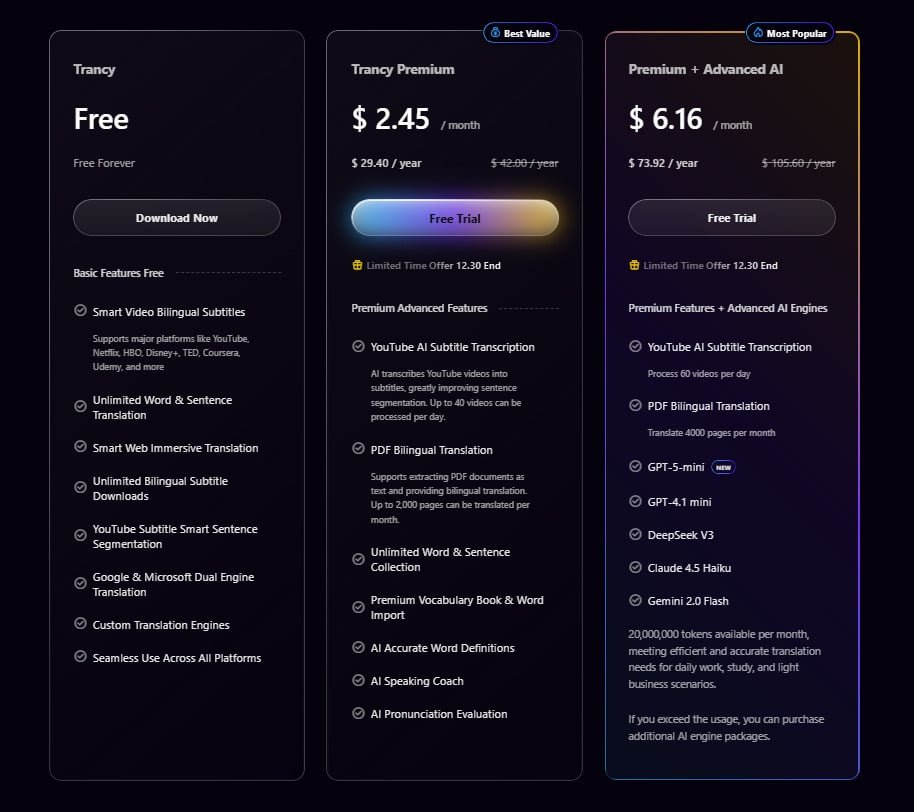
Pricing Plans for Trancy
Trancy Premium
Monthly: $2.45/month; Annual: $29.40/year (regular $42.00/year).
Includes all Free features plus YouTube AI subtitle transcription (up to 40 videos/day), PDF bilingual translation (up to 2,000 pages/month), unlimited word & sentence collection, premium vocabulary book & import, AI accurate definitions, AI speaking coach, and pronunciation evaluation.
Premium + Advanced AI
Monthly: $6.16/month; Annual: $73.92/year (regular $105.60/year).
Includes all Premium features plus higher limits (60 videos/day transcription, 4,000 pages/month PDF), advanced models (GPT-5-mini, GPT-4.1 mini, DeepSeek V3, Claude 4.5 Haiku, Gemini 2.0 Flash), and 20,000,000 tokens/month (extra packages available).
| Plan | Monthly | Annual | AI Transcription (videos/day) | PDF Pages/Month | Advanced AI Models |
| Free | Free | Free | None | 50 | No |
| Premium | $2.45 | $29.40 | 40 | 2,000 | No |
| Premium + Advanced AI | $6.16 | $73.92 | 60 | 4,000 | Yes |
Free Plan versus Premium Features
The free version includes bilingual subtitles, video integration, and limited vocabulary saving. It’s a solid starting point for casual users. When you’re ready to level up, the premium option unlocks powerful features.
Premium removes saving limits and gives unlimited practice access. You also get enhanced translation quality and AI-powered explanations. Speaking practice with pronunciation evaluation becomes available too.
Breakdown of Costs and Subscription Tiers
The pricing philosophy is straightforward. As the developers explain, premium features require payments to third-party providers like OpenAI. Premium users help cover these costs while keeping the core tool free.
Current rates are positioned as affordable – just a few bucks monthly. I recommend checking the in-product pricing panel for exact numbers. The platform adjusted rates in late 2024, so third-party sites may show outdated info.
If you use this tool consistently, the premium cost is a no-brainer. It’s significantly cheaper than traditional language apps. The try-before-you-buy approach lets you confirm it works for your learning style.
Pros & Cons of Trancy
No tool is perfect, and understanding both the strengths and limitations helps you make the right choice. After extensive testing, I’ve identified what really works and where there’s room for improvement.
Advantages of Using This Tool
The extension shines in several key areas that make language learning genuinely enjoyable:
- Easy setup – you’re learning within minutes of installation
- Works across YouTube, Netflix, and educational platforms
- Automatic activity generation saves hours of manual work
- AI chatbot provides surprisingly natural conversation practice
- Free tier offers substantial value for beginners
The bilingual subtitles are particularly impressive – clean, readable, and customizable. If you’re a visual learner who enjoys video content, this approach delivers real value.
Drawbacks and Areas for Improvement
Now let’s talk about where this experience could be better. Some limitations I noticed:
- AdBlock incompatibility can be frustrating
- Robot voice in vocabulary review loses native speaker nuance
- Mobile app is limited to practice only
- Internet dependency limits offline learning
Most issues are minor growing pains typical of newer extensions. The core translation and subtitle functionality remains solid.
If any of these drawbacks concern you, the next section explores alternative tools that might better suit your needs.
Alternatives to Trancy
Different learners have different needs, which is why comparing alternatives can reveal the perfect fit. No single tool works for everyone—your choice depends on your specific learning style and platform preferences.
Comparing with Language Reactor
Language Reactor stands as the veteran option with high community familiarity. This browser extension focuses specifically on YouTube and Netflix with polished dual subtitles.
If you primarily watch these two platforms on desktop, Language Reactor offers a straightforward solution. However, it lacks the broader web translation and automatic practice features of other tools.
Evaluating Other Similar Tools like InterSub
InterSub serves as the “integrator’s choice” for learners using spaced-repetition systems. It supports multiple platforms including YouTube, Netflix, and educational sites.
The key advantage is Anki synchronization for vocabulary building. While it offers strong translation support, it doesn’t include AI conversation practice.
Language Learning Extension Comparison
| Tool | Platform Support | Key Features | Best For |
|---|---|---|---|
| Language Reactor | YouTube, Netflix | Dual subtitles, pop-up dictionary | Focused YouTube/Netflix users |
| InterSub | Multiple platforms + MOOCs | Anki sync, hover translations | Anki integration seekers |
| Edimakor | Content creation | Video editing with translation | Content creators |
Choose based on your workflow: all-in-one convenience, focused platform depth, or existing tool integration. Each extension serves different learning approaches effectively.
Case Study / Personal Experience with Trancy
I decided to put this extension through a rigorous month-long trial to see if the hype matched reality. The results surprised even me – this isn’t just another language tool.
Real-World Results and Impact on Learning
After four weeks of consistent use, my vocabulary retention skyrocketed. I saved over 180 new words and completed 45+ practice sessions. The automatic activities from video subtitles made learning feel effortless.
My 4-Week Progress Tracking
| Skill Area | Before Usage | After 4 Weeks |
|---|---|---|
| Vocabulary Recognition | 65% comprehension | 85% comprehension |
| Listening Speed | Struggled with native pace | Comfortable with natural speech |
| Speaking Confidence | Hesitant conversations | Fluid sentence formation |
My Experience Using Trancy
I started with Spanish content on YouTube Netflix, watching 20-minute daily sessions. The bilingual subtitles immediately helped me grasp context. My breakthrough came when I naturally used phrases from a show during a real conversation.
The AI chatbot became my favorite practice mode – it felt like chatting with a native speaker. While the robot voice for vocabulary review wasn’t perfect, the overall experience kept me engaged. Learning became part of my entertainment time rather than separate study sessions.
Conclusion
After testing this innovative approach extensively, the verdict is clear: this extension delivers a uniquely effective way to learn. It masterfully turns passive watching into active language learning across YouTube, Netflix, and other platforms.
The standout features are the seamless bilingual subtitles and the AI that auto-generates practice. The tool saves you time while using authentic content. The free tier is genuinely useful, and the premium option is affordable for serious users.
Minor quirks exist, like AdBlock issues, but they don’t overshadow the core benefits. Choose Trancy if you want an all-in-one solution that works across the web.
My final recommendation? Install the extension and try the free version on a few videos. You’ll quickly see if it transforms your routine. The best language learning tool is the one you enjoy using consistently.
Frequently Asked Questions
What exactly is Trancy, and how does it work?
Trancy is a browser extension and app that turns videos from platforms like YouTube and Netflix into interactive language lessons. It overlays bilingual subtitles, provides instant word and sentence translations, and offers practice activities to help you learn while watching content.
Is there a free version of Trancy available?
Yes, Trancy offers a free plan that gives you access to basic features like bilingual subtitles. To unlock advanced tools like the AI chatbot, speaking practice, and unlimited word saves, you’ll need to subscribe to their Premium plan.
How does Trancy compare to other tools like Language Reactor?
While both are browser extensions for language learning, I find Trancy offers a more immersive experience. Its AI-powered features, like the conversational chatbot and a wider range of interactive practice modes, often provide a more structured path from passive watching to active learning compared to some alternatives.
Can I use Trancy on any video platform?
Primarily, it’s designed for major streaming platforms like YouTube, Netflix, and Disney+. The extension works directly within your browser, making it easy to activate subtitles and learning tools on supported sites. It’s always a good idea to check their official site for the most current list of compatible platforms.
What languages does Trancy support for learning?
Trancy supports a impressive number of languages for translation and learning. You can learn from content in dozens of languages, with popular options including English, Spanish, French, German, Japanese, and Korean. The target language you choose dictates the translations and practice activities.
Does the interactive practice mode really help with speaking skills?
From my experience, absolutely. The practice mode goes beyond vocabulary. It includes activities where you can shadow speakers for pronunciation and even engage in conversations with the AI chatbot. This active recall and speaking practice is crucial for moving from understanding words to actually using them.