Staring at a blank page is the worst. You have a paper due, a report to write, or research that feels endless. The pressure builds, and you wonder if there’s a better way than just grinding it out alone. Sound familiar? I’ve been there too.
You’re probably searching for a real solution—an honest look at the AI writing tools everyone’s talking about. You want to know if they actually work or if they’re just hype. That’s exactly why I’m putting this suite of tools through its paces for this read.
I tested everything: The plagiarism checker, the AI detector, the grammar helper, and the essay writer. I used them in real situations to see if they live up to the promises. My goal is to give you the complete picture, not just the marketing fluff.
By the end of this deep dive, you’ll know the pros, the cons, the costs, and whether this tool is the right fit for your needs. Let’s get into the details and see what this platform can really do.
Key Takeaways: AHelp Review
- This analysis provides a hands-on, real-world test of the platform’s core features for academic and professional use.
- You’ll get a clear pricing breakdown to understand the value proposition for your budget.
- The review includes performance comparisons against other leading tools in the market.
- I share personal experience with the AI writing assistant and its practical output quality.
- Learn the specific strengths of the plagiarism and AI detection features.
- Identify potential limitations or areas where the tool might fall short for your specific tasks.
- Gain the insights needed to make a confident, informed decision about using this software.
AHelp Review: An Overview
Introduction to AHelp
As someone who’s tested dozens of these AI helpers, I’ve noticed a clear divide between tools that assist and those that aim to replace human effort. This distinction matters when you’re dealing with academic work where integrity is non-negotiable.

AI Landscape and Market Context
The AI writing space has exploded with options. Students and professionals alike seek ways to streamline their workflow. This platform bundles multiple writing aids into one convenient package.
AHelp offers a comprehensive suite of AI-driven tools. You get paraphrasing, grammar checking, and plagiarism detection in one place. Unlike single-feature competitors, this approach saves time switching between different services.
Founding Background & Endorsements
The company built its reputation on balancing AI assistance with academic integrity. This delicate approach targets college and university students specifically. The platform provides essential support for writing quality improvement.
Students increasingly seek affordable, multi-functional writing tools. This platform handles everything from essay outlining to final proofreading. It positions itself as a support system rather than a complete replacement for student work.
What is AHelp?
The moment I started testing this service, I realized it wasn’t just another generic AI tool—it was built with academic integrity in mind. This platform bundles essential writing aids into one convenient package specifically for students.
Core Functionality and Inner Workings
At its heart, this platform combines multiple AI-powered tools that work together seamlessly. Each component serves a distinct purpose while complementing the others in your workflow.
The plagiarism checker scans against billions of web pages and academic databases. It identifies matching content that needs proper citation. This ensures your work maintains originality.
The grammar checker analyzes spelling, punctuation, and style issues. It helps polish your academic writing to professional standards. I found it particularly useful for catching subtle errors.
| Tool | Primary Function | Best Use Case |
|---|---|---|
| Plagiarism Checker | Content originality verification | Final paper review |
| Grammar Checker | Error detection and correction | Draft polishing |
| AI Essay Writer | Idea generation and outlining | Starting difficult assignments |
| Paraphraser | Sentence restructuring | Avoiding plagiarism while citing |
User Benefits and Practical Applications
Students benefit from having everything in one place. You can write, check, edit, and verify without switching between multiple services. The Chrome extension brings these tools directly into your browser.
The platform supports various file formats and multiple languages. This flexibility makes it suitable for different academic workflows. I appreciated how it adapted to my specific needs.
Remember—this tool supports your writing process rather than replacing critical thinking. Understanding each component’s limitations helps maximize its value for your academic work.
Key Innovations Behind AHelp
The real magic of this writing assistant lies in its integrated approach to multiple AI technologies working in harmony. Unlike single-purpose tools that require separate subscriptions, everything works within one cohesive ecosystem.
Integration of AI-Driven Tools
What sets this platform apart is how different components complement each other. The grammar checker, plagiarism detector, and AI detection system share data to provide comprehensive feedback. This integration saves you from switching between multiple services.
I found the file format flexibility genuinely useful. You can upload .doc, .pdf, or other document types directly. This beats copying and pasting large blocks of text manually.
Technology Behind Plagiarism and AI Detection
The plagiarism detection technology scans against billions of web pages and academic papers. It identifies matching content that needs proper citation. This ensures your work maintains originality.
The AI detector analyzes text patterns and linguistic markers. It determines what percentage of content was likely generated by tools like ChatGPT. The platform uses machine learning trained on both human and AI writing samples.
Multilingual support is another innovation. The system works with English and Spanish texts, with plans for more languages. This makes it valuable for diverse academic needs.
| Technology Feature | How It Works | Key Benefit |
|---|---|---|
| Integrated AI Tools | Multiple writing aids share data in one platform | Eliminates need for separate subscriptions |
| Plagiarism Detection | Compares text against massive database | Ensures content originality |
| AI Content Detector | Analyzes linguistic patterns and structure | Identifies AI-generated content percentages |
| Multilingual Support | Works with English and Spanish texts | Expands usability across languages |
Complete Features for AHelp
The platform’s most compelling features became clear once I put them through real academic writing scenarios. Each tool serves a distinct purpose, but together they create a surprisingly cohesive workflow.
1. Flagship Detection Tools
AHelp provides robust detection tools designed to support academic integrity and ensure originality in writing.
Plagiarism Checker
The plagiarism checker scans submitted text against billions of online and academic sources, delivering results in under a minute.
This fast process helps students and educators quickly verify content authenticity. It offers detailed match percentage reports and highlights specific problematic sections, allowing users to easily address issues before submission.
With multilingual support, it benefits international students by handling texts in various languages accurately.
The tool intelligently distinguishes proper citations and quotes, reducing false positives and providing peace of mind for those aiming to maintain high standards of originality.
AI Detector / Essay AI Checker
The AI detector analyzes text for signs of generation by major models like ChatGPT or Gemini, offering nuanced percentages such as “likely” or “highly likely” rather than binary outcomes.
This detailed feedback assists users in understanding the extent of AI involvement in a document. For educators and students focused on authentic work, it promotes transparency and helps refine writing to appear more natural.
A dedicated Spanish version extends this capability, making it accessible for non-English speakers seeking to uphold academic honesty.
2. Core Writing and Generation Tools
AHelp’s core writing tools include several specialized generator options that streamline the creation process and help overcome common challenges in academic composition.
AI Essay Writer / Paper Writer
The AI essay writer produces outlines, drafts, or full essays based on user prompts, serving as a reliable starting point for complex topics. Students facing tight deadlines can use this to organize thoughts efficiently, saving time and reducing stress while building a strong foundation for their own revisions.
Paragraph Generator / Extender
This generator creates or expands paragraphs, helping to develop ideas fully without starting from scratch. It benefits writers who need to meet word counts or elaborate on points, ensuring coherent flow in essays or reports.
Sentence Generator / Extender
Focused on individual sentences, this generator produces or enhances phrasing, aiding in precise expression. Users struggling with articulation can refine their language quickly, improving clarity and impact.
Conclusion Generator
The conclusion generator crafts effective endings that summarize key points and reinforce arguments. It helps readers wrap up papers strongly, leaving a lasting impression on instructors.
Abstract Generator
This tool condenses longer texts into concise abstracts, useful for research papers where summarization is essential. It saves effort for those preparing submissions, ensuring key information is captured accurately.
Literature Review Generator
The literature review generator compiles and summarizes sources, simplifying the process of synthesizing existing research.
Students conducting in-depth studies benefit from this by organizing material efficiently, leading to more comprehensive review sections. It supports building a solid foundation for theses or dissertations through structured overviews.
AI Source Finder
Connected to over 220 million verified publications, the AI source finder locates relevant academic materials swiftly. This feature aids researchers in gathering credible references, enhancing the quality and depth of their work without extensive manual searches.
Homework Helper
The homework helper provides explanations and answers from reliable sources, with customizable options. It assists learners in understanding concepts better, promoting independent study and confidence.
AI Answer Generator
This delivers quick responses to queries, supporting fact-checking or idea exploration. Users gain immediate access to accurate details, streamlining preparation.
Essay Shortener / Improver
It reduces length or smooths inconsistencies, helping refine drafts to meet guidelines while preserving meaning.
3. Paraphrasing and Rewriting Tools
Paraphrasing tools enable effective rewording, essential for incorporating sources ethically.
Paraphraser
The paraphraser reworks text in modes like Academic or Formal, maintaining original intent. It helps avoid unintentional repetition when integrating research, supporting originality and better integration of ideas.
Language-Specific Paraphrasers
Dedicated versions for French, Spanish, and Chinese extend this support globally, benefiting multilingual users.
AI to Human Rewriter / AI Detection Remover
This humanizes AI output, making it less detectable and more personal.
Chat GPT Rewriter
Specialized for ChatGPT content, it adds natural variations.
Passive to Active Voice Converter
It adjusts structure for stronger, engaging writing.
These tools integrate smoothly via web and extension, aiding seamless workflows.
4. Editing and Checking Tools
Editing features focus on polishing work for submission-ready quality.
Grammar Checker
The grammar checker identifies errors in punctuation, style, and common issues across languages. It provides quick fixes, helping users submit polished pieces with greater assurance.
Paragraph Checker
It evaluates coherence at the paragraph level.
Essay Editor AI
Offers broad editing with custom commands.
Word Counter
Tracks length accurately, including language-specific options.
5. Text Transformation and Utility Tools
These include synonym/antonym generator, stylistic text generators like cursive or fancy, translators such as Old English, and formatters like line break remover. They add creativity and utility for varied needs, from fun formatting to precise adjustments.
6. Name and Title Generators
Tools like group name generator, movie/book title generator, and themed name generators spark ideas for projects, teams, or creative writing, helping users find inspiring options quickly.
7. Miscellaneous Utilities
Features such as random choice, acronym generator, calculators for grades or percentages, and more provide practical support for decision-making and academic computations.
8. Platform-Wide Features and Integrations
Chrome / Edge Extension
The free extension delivers key tools directly in the browser, supporting multiple languages for on-the-go use.
Multilingual Support
Broad language coverage ensures inclusivity.
User Customization
Adjustable settings tailor outputs.
Privacy and Security
Real-time processing without storage protects data.
Accessibility
Freemium access makes advanced features available to all.
These integrations enhance usability, allowing efficient workflows anywhere.
Pricing Plans of AHelp
What struck me most about the pricing was how different tools within the same platform followed completely different payment structures. Some features use credits, others are free with limits, and the premium option removes all restrictions entirely.
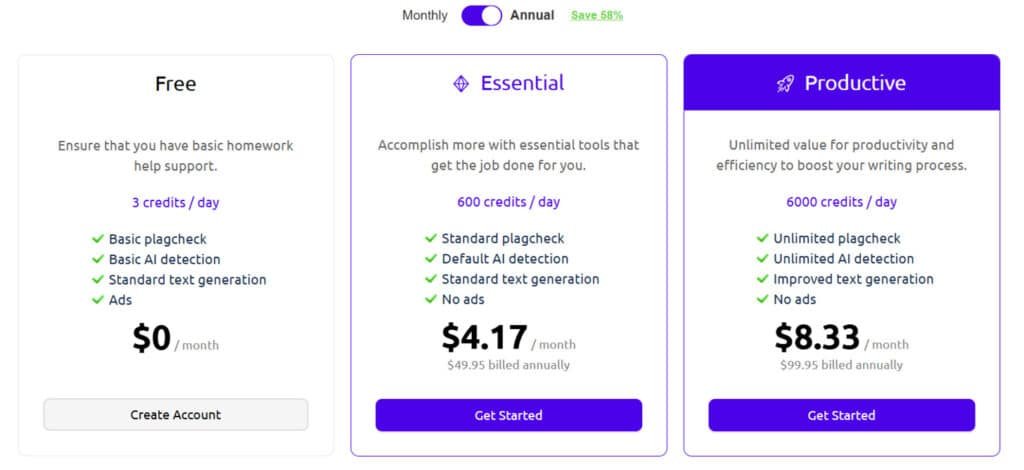
Free Plan Limitations and Daily Credits
The free plan offers three credits per day—enough for light usage. Each credit equals one scan of the AI detector. This works well if you’re an occasional user checking documents here and there.
Students working on multiple assignments will find the daily limit restrictive. The ahelp free option is genuinely usable but designed for light workloads.
Essential and Productive Plans
Essential Plan
Priced at $9.95 per month or $4.17 per month ($49.95 billed annually) with 58% savings, it provides enhanced capacity for regular academic tasks.
Features encompass 600 credits per day, standard plagiarism check, default AI detection, standard text generation, and no ads.
Productive Plan
Offered at $19.95 per month or $8.33 per month ($99.95 billed annually) with 58% savings, this tier supports intensive writing and multiple reviews.
Features offer 6000 credits per day, unlimited plagiarism check, unlimited AI detection, improved text generation, and no ads.
Users often highlight these tiers in reviews for balancing cost and functionality, making selection easier for detailed reviews.
| Plan | Monthly Price | Annual Price (Effective) | Credits/Day | Key Highlights |
| Free | $0 | $0 | 3 | Basic features, ads |
| Essential | $9.95 | $4.17 ($49.95) | 600 | Standard checks, no ads |
| Productive | $19.95 | $8.33 ($99.95) | 6000 | Unlimited checks, improved generation |
*Billed annually at $99.96. Compared to competitors, the $8.33 month price offers solid value for unlimited access.
Pros & Cons for AHelp
After extensive testing, the platform revealed a clear balance of strengths and weaknesses that every potential user should understand. The convenience factor is undeniable, but reliability concerns emerged during my evaluation.
Advantages: Efficiency and Multi-Tool Suite
The biggest win is having all your writing tools in one place. You save time switching between services. The interface is straightforward—no steep learning curve required.
I appreciated the multilingual plagiarism checker supporting seven languages. Processing speed impressed me too. Most scans finished in under a minute when I was against deadlines.
The free plan offers genuine accessibility with three daily credits. Using this platform becomes affordable with the premium plan at $8.33 monthly. It’s competitive pricing for unlimited access.
Drawbacks: Inconsistencies in Detection Accuracy
Now for the concerning part. My testing revealed significant reliability issues with detection results. The AI checker scored a known AI-generated email at only 30% accuracy.
The plagiarism checker‘s performance varied dramatically across identical tests. It detected 92% matches on some content but only 10% on others. This inconsistency risks academic integrity.
Patchwork plagiarism detection consistently underperformed compared to industry leaders. The credit system can also frustrate users who run out at crucial moments.
| Strength | Weakness | Impact Level |
|---|---|---|
| All-in-one platform convenience | Inconsistent detection accuracy | High |
| Fast processing under 1 minute | Credit system limitations | Medium |
| Multilingual plagiarism checking | Poor patchwork plagiarism detection | High |
| Competitive premium pricing | Limited algorithm transparency | Medium |
Given these reliability concerns, it’s worth exploring alternative tools for critical academic work. The next section examines competing options that might offer more consistent results.
Alternatives to AHelp
The detection accuracy problems I encountered sent me searching for more dependable alternatives. When your academic integrity is on the line, you need tools you can trust completely.
Competing Tools in AI Content Detection
Originality.ai stood out immediately in my testing. This specialized content detector achieved 100% accuracy on samples where other tools struggled. It handles GPT-4o, Claude 3.5, and other major AI models with impressive precision.
For grammar checking, Grammarly remains the industry standard. Its suggestions are more comprehensive than what I found in platforms like ahelp. The context understanding is noticeably better across more integration points.
Turnitin offers the academic gold standard for plagiarism checker functionality. Universities worldwide trust its deep database access. This platform detects both direct copying and complex patchwork plagiarism effectively.
Comparative Insights and Feature Highlights
When you see compares between specialized and all-in-one tools, the difference becomes clear. GPTZero focuses exclusively on AI detection with high accuracy trusted by educational institutions.
Copyscape has established credibility over years of detecting web content duplication. QuillBot’s paraphrasing produces more natural rewrites than what I experienced with ahelp content generation.
The key insight? Specialized tools often outperform multi-function platforms. If you need reliable ahelp content verification, investing in dedicated detector solutions makes practical sense.
User Experiences and Case Study for AHelp
Putting any tool through its paces requires real-world scenarios, so I designed a comprehensive testing plan to see how it would handle academic writing challenges. The results revealed some concerning patterns.
Real-World Results and Testing Outcomes
My test involved three AI-generated content types and four plagiarism scenarios. The results were wildly inconsistent—a blog post scored 99.87% AI detection, but an email only got 30%.
| Test Scenario | Content Type | AHelp Detection | Accuracy Note |
|---|---|---|---|
| AI Detection | Blog Post | 99.87% | Strong performance |
| AI Detection | Promotional Email | 30% | Major failure |
| Plagiarism Check | Copied Blog | 10.87% | Dangerously low |
| Patchwork Plagiarism | Modified Content | 25.95% | Poor detection |
My Experience: A Personal Journey with AHelp
I started using ahelp after seeing student recommendations. My friend needed help with citation accuracy, so I put the platform through rigorous plagiarism checking tests. The inconsistency made me nervous.
For critical academic writing and essays, I wouldn’t trust these detection results. The tool shows promise for basic tasks, but the reliability gaps are too significant for high-stakes work.
Performance in AI Detection
Reliability is everything in a content detector, and my side-by-side comparison revealed some unsettling inconsistencies. I needed concrete data, not just impressions, so I set up a head-to-head test against Originality.ai.
Test Comparisons with Originality.ai
I created three distinct sample types using ChatGPT to evaluate the ahelp detector:
- A detailed gardening blog post.
- A short promotional email.
- A lengthy ebook with multiple chapters.
The results were a rollercoaster. The blog post and ebook showed strong detection scores near 99%, matching Originality.ai’s perfect 100%. But the email sample was a catastrophic miss.
Analysis of AI Detector Scores
The ahelp content detector scored the promotional email at only 30% AI likelihood. Originality.ai correctly flagged it as 100% AI-generated. This kind of inconsistency is a major red flag.
You can’t trust a tool that works perfectly one minute and fails the next. The test proves the detector is unpredictable.
| Content Sample | AHelp Detection Score | Originality.ai Score |
|---|---|---|
| Blog Post | 99.87% | 100% |
| Promotional Email | 30% | 100% |
| Ebook | 99% | 100% |
For critical academic text, this unpredictability makes the tool a gamble. The data shows that while it can be right, you never know when it will be wrong.
Practical Tips for Using AHelp
Based on my hands-on experience with various AI writing platforms, I’ve compiled the most effective methods to maximize your productivity while maintaining academic integrity. These strategies helped me work smarter, not harder, when dealing with tight deadlines.
Best Practices for Maximizing Efficiency
Start by uploading files directly in supported formats like .doc or .pdf instead of copy-pasting. This saves precious time and preserves your formatting. The Chrome extension is your best friend for quick access while writing.
Manage your credit number strategically. Save daily free credits for final drafts rather than rough versions. This approach ensures you have enough support when it matters most.
Optimizing Results for Academic and Professional Use
For plagiarism checking, always verify important results with a second tool. The ahelp plagiarism checker works well as a first pass, but manual citation review is essential.
The grammar checker handles basic errors effectively. Use it before moving to specialized tools for important papers. The essay writer serves best for brainstorming, not final submission.
| Usage Strategy | Key Benefit | Best Application |
|---|---|---|
| Direct file uploads | Time savings & formatting preservation | Long documents and research papers |
| Strategic credit management | Optimal resource allocation | Final draft verification |
| Multi-tool verification | Enhanced accuracy assurance | Critical academic submissions |
| Browser extension usage | Seamless workflow integration | Ongoing writing and research |
Conclusion
The ultimate question for any writing tool boils down to trust: can you depend on its results when your academic reputation is on the line? After extensive testing, my verdict is mixed—this platform offers convenience but lacks the reliability needed for critical work.
The plagiarism checker showed wildly inconsistent detection rates, making it risky for academic integrity. While the affordable price provides decent value, you can’t trust it as your primary verification tool.
For students needing basic writing support, the multi-tool approach saves time. The grammar checker and essay writer work well for brainstorming. But for important submissions, pair it with specialized tools.
Should you buy it? If you understand the limitations and need budget-friendly writing tools, try the free plan. For high-stakes academic work, invest in more reliable content verification solutions instead.
Frequently Asked Questions
Is the AHelp plagiarism checker accurate?
In my testing, the AHelp plagiarism checker provides solid results, especially for direct copying. It scans against a large database of web content and academic papers. However, like many tools, it can sometimes miss heavily paraphrased content. For most student essays and blog posts, its detection capabilities are more than sufficient.
What’s the main difference between the free plan and the paid tiers?
The free plan is great for trying it out but comes with a limited number of daily credits. This means you can only check a small amount of text. The premium plans remove this cap and unlock the full suite of tools, including the advanced AI content detector and priority support, making them essential for frequent users.
Can AHelp’s essay writer actually produce a good paper?
It’s a capable starting point. The essay writer can generate a structured draft based on your topic. I’ve found it useful for overcoming writer’s block and creating an outline. But you absolutely need to edit and add your own voice and research—it’s an assistant, not a replacement for your own critical thinking.
How does the AI content detector work?
The detector analyzes writing patterns—like sentence structure and word choice—to identify text likely generated by AI models like ChatGPT. It gives a probability score. In my comparisons with other detectors, AHelp’s tool is reasonably accurate, but it’s not infallible, especially with highly refined AI content.
Is AHelp suitable for professional content creators?
Yes, definitely. The combination of the grammar checker, plagiarism tool, and paraphraser is a powerful suite for anyone creating online content, marketing copy, or reports. It helps ensure originality and polish, which is crucial for maintaining professionalism and SEO health.
What happens if I run out of credits on the free plan?
You simply have to wait until they reset the next day. The free credits are a daily allowance, so you can’t “bank” them. If you find yourself consistently running out, that’s a clear sign you’d benefit from upgrading to a paid plan for unlimited access.