If you’d told me a year ago that I’d be slicing up hour-long webinars into Instagram-ready clips in minutes, I would’ve laughed. Like many creators, I was drowning in footage—endless recordings sitting on my hard drive while social media platforms demanded fresh content daily.
The struggle is real. You record amazing long-form content, but turning it into engaging shorts feels like a second full-time job. Hours spent hunting for highlights, adding captions, and formatting for different platforms—it’s enough to make anyone want to quit creating altogether.
That’s when my team discovered something that changed everything. We uploaded a recent panel discussion and watched as the system automatically picked the best moments and formatted them perfectly for social media. The manual work vanished, replaced by intelligent automation.
This powerful editing tool transforms raw footage into scroll-stopping content without the usual headaches. It understands what makes content engaging and handles the technical heavy lifting so you can focus on creating.
In this hands-on AI Video Cut Review, I’ll share exactly how this technology performed with real content, what features stood out, and whether it’s worth your investment in the competitive AI landscape. Let’s dive into how it actually works.
Key Takeaways: AI Video Cut Review
- Transform long recordings into social-ready clips in minutes, not hours
- Automatically identifies engaging highlights from your footage
- Formats content specifically for different platforms like Instagram and TikTok
- Reduces the manual editing workload significantly
- Helps maintain consistent content output without burnout
- Ideal for creators drowning in video backlogs
- Tested with real panel discussion content for authentic results
AI Video Cut Review: An Overview
Introduction to AI Video Cut
My journey into automated editing began when I realized my team was spending more time cutting videos than creating them. The video editing market today is exploding with tools promising to fix this exact problem.
This particular tool enters a crowded space, but it carves out a specific niche. It focuses squarely on transforming long recordings into social-ready shorts. This is a huge need for users right now.
Positioning in the Current AI Landscape
The shift from manual clipping to AI-assisted workflows is undeniable. It’s democratizing professional-level editing. This platform sits alongside other tools but distinguishes itself with a sharp focus on virality and platform-specific formatting.
For content creators and editors, this isn’t just a nice-to-have anymore. It’s becoming essential for keeping up with demand.
Company Background and Purpose
The company behind this software built it with a clear mission. They saw creators, marketers, and businesses struggling with video repurposing. Their goal was to remove that bottleneck entirely.
The core purpose is simple but powerful: automatically find the most engaging moments in any long video. This makes the entire video editing process faster and far more efficient. It’s designed for anyone who needs to produce quality shorts quickly.
What is AI Video Cut?
The moment this platform transformed my lengthy podcast recording into bite-sized, engaging content without any manual clipping, I understood why automated editing is revolutionizing content creation. This isn’t just another editing tool—it’s a smart system that does the heavy lifting for you.
How the Tool Works
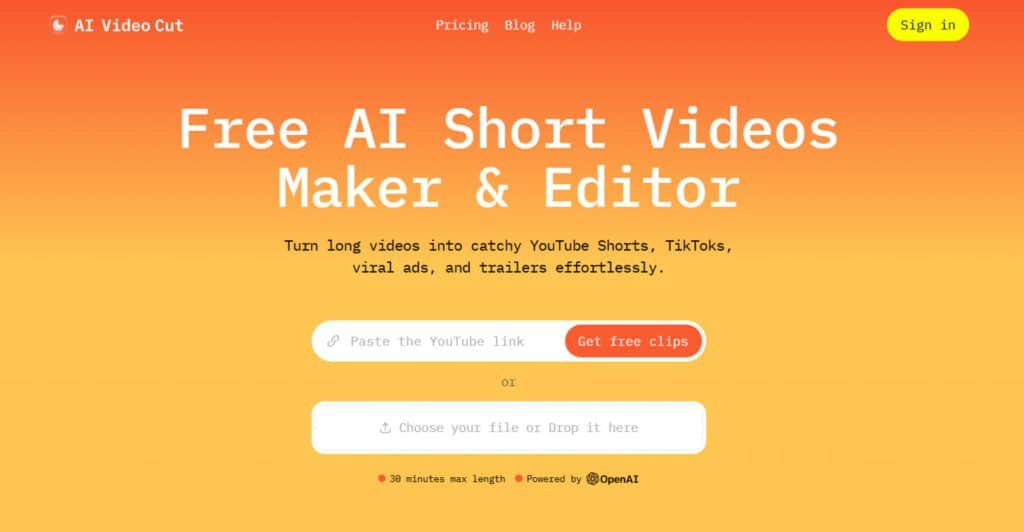
Here’s the magic: you upload your long recording or paste a YouTube link. The system transcribes everything and scans for engaging moments. It looks for excitement, audience reactions, and key points.
The interface guides you through simple prompts like “highlights” or “testimonial.” In about 15-20 minutes, you get polished clips ready for social media. No technical skills needed—the platform handles the complex work.
Benefits for Content Creators and Marketers
For creators, this saves hours of tedious editing time. Instead of searching through footage, you get multiple platform-ready clips quickly. It’s like having a professional editor working for you.
Marketers can repurpose one webinar into dozens of social media posts. This maximizes your content investment and keeps your audience engaged across all platforms.
| Feature | Traditional Editing | AI Video Cut | Time Saved |
|---|---|---|---|
| Clip Identification | Manual scanning | Automatic detection | 2-3 hours |
| Platform Formatting | Manual adjustments | Auto-optimization | 1-2 hours |
| Caption Generation | Typing manually | Auto-transcription | 30-60 minutes |
The best part? It works with videos in any language. This makes it perfect for international teams and diverse audiences. Your content creation process becomes faster and more efficient.
Complete Features of AI Video Cut
What truly separates this platform from the crowded field of editing tools is its thoughtful combination of powerful automation and user-friendly customization. The standout features address the biggest pain points head-on.
1. Content Creation and AI-Driven Editing
This core category transforms long videos into viral-ready shorts using intelligent automation. The tools built into AI Video Cut allow creators to achieve professional results with minimal manual effort.
Ready-to-Use Prompts
The platform provides a rich library of pre-built prompts that instantly generate tailored clips. Users select from viral clips, trailers, product highlights, testimonials, or instructional segments.
These editor prompts eliminate guesswork, enabling even beginners to produce platform-optimized content in seconds. This video editing solution saves hours compared to traditional timelines.
Custom Prompts
For unique needs, the editor supports fully customizable text instructions. Users describe desired tone, length, or focus, and the AI executes precise cuts.
This flexibility gives complete creative control while maintaining the ease of automated processing, making advanced video editing accessible to all skill levels.
Effortless Video Editing
After generation, the transcript-based editor lets users refine edits directly in text form. Remove filler words, adjust pacing, or clean captions with simple clicks.
This intuitive approach turns complex video editing into a straightforward task, delivering polished results without learning curves.
Video Regeneration
The system allows up to five regenerations per video using different prompts or caption styles. Users experiment with variations until the perfect clip emerges, all without re-uploading.
This iterative feature maximizes output quality and creative options from a single source.
Hashtag and Description Generator
Every clip includes auto-generated hashtags and SEO descriptions. These tools boost discoverability across platforms, helping content rank higher in feeds. The ease of having ready-to-post metadata removes another barrier in the publishing workflow.
2. Video Processing and Enhancement
Advanced AI handles technical details automatically, ensuring every output looks professional regardless of the original footage quality.
Smart Crop and Face Detection
The editor uses face-tracking technology to keep speakers perfectly framed throughout the clip. Dynamic cropping follows movement naturally, producing clean vertical or horizontal compositions. This eliminates manual reframing and guarantees engaging visuals on mobile devices.
Accurate Transcripts
Supporting 100 languages, the transcription engine delivers near-perfect accuracy. These transcripts power all subsequent edits and caption placement, forming the backbone of the entire video editing process. Multilingual access opens the platform to global creators and audiences.
Video Captions
Multiple caption styles enhance silent viewing, crucial for social media consumption. Users choose from animated, minimalist, or bold designs that match brand aesthetics. This feature significantly increases watch time and engagement metrics.
Flexible Clip Length
Output duration adapts to 7, 15, or 25 transcript phrases, aligning perfectly with platform algorithms. Creators fine-tune length for maximum retention without trial-and-error exports.
Adaptable Aspect Ratios
Seamless switching between 9:16, 16:9, 1:1, or original ratios ensures perfect formatting for any destination. The tools handle all resizing and reframing automatically, saving considerable time in multi-platform publishing.
Output Quality and File Download Format
All exports maintain Full HD resolution in MP4 format. This universal compatibility and high-quality standard make the clips immediately ready for upload across all social channels.
3. Input and Upload Capabilities
Flexibility in source material removes common workflow bottlenecks that plague other tools.
Upload Sources
Direct integration supports local files, YouTube links, Zoom recordings, Twitch streams, Instagram, Facebook, Reddit, and more. This broad compatibility means creators work within their existing ecosystems without extra downloads or conversions.
File Size and Length Limits
Paid plans accommodate videos up to 3 hours and 4GB, covering webinars, podcasts, interviews, and live streams. Higher tiers provide substantial processing minutes that refresh monthly, supporting consistent content schedules.
Multilingual Support
Native processing in any language expands the tool‘s utility for international teams, educators, and businesses targeting diverse markets. Automatic detection and transcription remove language as a barrier to entry.
4. Platform Optimization and Export
The final stage focuses on getting content seen by the right audience quickly.
Social Media Optimization
Clips are crafted with platform-specific best practices in mind: vertical orientation, hook-first structure, and caption placement optimized for each network. This built-in intelligence increases organic reach potential.
Direct Publishing Integration
Preview and share directly to YouTube Shorts, TikTok, Instagram Reels, and X. The streamlined workflow from upload to post represents significant time savings for busy creators.
Usage Tracking
Transparent dashboards display remaining minutes and storage, helping users plan content calendars effectively around available resources.
5. Upcoming Features
The roadmap introduces Branded Videos, enabling users to automatically overlay custom logos, watermarks, and end-cards on all exported clips for instant brand consistency.
The Telegram Bot will allow direct video uploads, prompt-based clipping, and instant downloads within Telegram chats, delivering full AI Video Cut functionality without leaving the messenger and dramatically speeding up mobile workflows.
6. Additional Tools and Resources
AI Video Cut integrates 18 dedicated sub-tools under a single platform:
- AI Video Editor & Trimmer: Transcript-based editing, silence removal, unlimited refinements (paid).
- Caption Generator: Animated/multiple styles, auto-sync, 100-language support.
- Clip Maker: Prompt-driven viral segment extraction with face-tracking.
- Platform Creators: Instagram Reels (9:16 auto-crop), YouTube Shorts (hook-first), TikTok Generator (trend-ready edits), X Video Tools (square/horizontal optimization).
- Niche Makers: E-Commerce Video Maker (product highlights + CTAs), Podcast Clip Maker (quotable moments with speaker focus).
- Free Alternatives: Full-featured replacements for Opus Clip, Klap, Submagic, Vizard AI, 2short.ai, VEED, and Wisecut with zero-cost entry and watermark-free upgrades.
- Supporting Resources: Direct imports from YouTube, Zoom, Twitch, Reddit, Instagram, Facebook; 4GB/3-hour file limits (paid); auto hashtag & SEO description generator; multilingual transcription engine; real-time usage dashboard for minutes/storage tracking; one-click plan management and regeneration controls.
All tools share the same AI core, processing quotas, and export pipeline for seamless, unified workflows.
7. Use Cases
The platform serves distinct professional needs with targeted efficiency.
Content Creators
Rapid repurposing of long-form YouTube videos into daily shorts maintains channel momentum without burnout.
Digital Marketers
Quick generation of product ads, testimonials, and promotional trailers accelerates campaign launches.
Social Media Managers
Batch processing and consistent branding across platforms streamline multi-account management.
E-Commerce Businesses
Transforming product demonstrations into shoppable short videos drives direct conversions.
Event Planners and Educators
Creating highlight reels from webinars or lectures extends content lifespan and reach.
Podcasters
Automated extraction of quotable moments fuels social promotion and audience growth.
These combined features position AI Video Cut as a complete video editing solution that delivers professional results with remarkable ease, making high-volume short-form production sustainable for any creator or team.
Pricing Plans of AI Video Cut
Let’s get straight to what matters most for many creators: how much this platform actually costs. The pricing structure is refreshingly transparent, with options that scale from casual testing to professional production.

Plan Overview and Cost Breakdown
Free Plan
$0 forever. One-time 50 minutes processing for testing the editor.
- Includes watermark
- 30 min/2GB max per videos
- 14-day storage
- Limited editing
Starter Plan
Monthly: $12/month (150 min/month) Annual (Christmas Sale): $6/month ($72/year, 1800 min total) No watermark, unlimited editing, access to full editor for longer videos (2h/4GB), 6-month storage.
Pro Plan
Monthly: $18/month (300 min/month) Annual (Christmas Sale): $8.25/month ($99/year, 3600 min total) Ideal for heavy users creating dozens of videos monthly with max limits (3h/4GB).
| Plan | Monthly | Annual (Sale) | Minutes | Max Video Length | Watermark |
| Free | $0 | – | 50 (one-time) | 30 min | Yes |
| Starter | $12 | $6/mo | 150 Minutes/mo | 2 hours | No |
| Pro | $18 | $8.25/mo | 300 Minutes/mo | 3 hours | No |
The value becomes clear when you calculate cost per minute. At just 6 cents per minute for the Pro plan, it’s significantly cheaper than manual editing.
Features across Free, Starter, and Pro Plans
The Free plan gives you 50 minutes to experiment. You get basic prompts and SD quality exports. It’s perfect for testing the waters.
Starter unlocks all prompts and HD quality. For $12 monthly, you get 150 minutes – enough for most individual creators. The watermark disappears too.
Pro doubles the processing time to 300 minutes. It handles 3-hour videos, making it ideal for agencies. As one satisfied user noted,
“The ROI is immediate when you consider the hours saved each month.”
All plans let you sign in with Google. No credit card required to start. This product understands that users need to experience the value firsthand.
Pros & Cons of AI Video Cut
No tool is perfect, and this platform has its share of advantages alongside some considerations to keep in mind. After extensive testing, I’ve identified what makes this product shine and where you might need workarounds.
Advantages of Using AI Video Cut
The time savings are incredible. This tool automates the tedious process of scrubbing through footage. It handles multi-platform optimization and identifies engaging moments automatically.
Accurate transcription and speaker detection would cost significantly more if outsourced. The bulk generation feature lets teams produce dozens of clips from single videos. The regeneration capability allows for A/B testing without re-uploading.
This product excels at removing repetitive tasks from videos editing. It lets creators focus on strategy rather than mechanical clip extraction.
Drawbacks and Alternative Options
The free tier has limitations—serious users need paid plans for HD quality. Being cloud-based means no offline editing capability. The automated cuts sometimes lack the narrative flow human editors craft.
For maximum creative control, consider traditional software like Adobe Premiere Pro. Eddie AI Editor offers desktop functionality at $25/month. It focuses on interview editing with automated logging.
This platform works best as part of a content workflow rather than a complete replacement. Editors may still fine-tune clips for perfect storytelling flow.
Case Study and Personal Experience with AI Video Cut
I’ll never forget the day our social media calendar went from empty to overflowing in under an hour. Our team was drowning in a backlog of raw footage that needed repurposing across multiple platforms.
Real-World Results and Impact on Workflow
The transformation was immediate. What used to take a skilled editor 4-6 hours of focused editing now takes about 25 minutes. The process is simple: upload, select prompts, and receive multiple platform-ready clips.
We tested with a 45-minute webinar and generated engaging content in minutes. The time savings freed our team for creative work instead of mechanical clipping. International videos processed smoothly with accurate transcription.
My Personal Experience with the Tool
I was skeptical at first—I’ve seen plenty of automated tools promise the moon. But uploading that panel discussion changed everything. The system identified highlights and formatted perfect social media clips without manual work.
The “aha moment” came when previewing the generated content. It actually captured the most engaging moments. This product didn’t just save time—it transformed our entire team workflow from bottleneck to competitive advantage.
Conclusion
The question every creator should ask themselves: is manual editing still the best use of your limited time in today’s fast-paced content landscape? After extensive testing, my answer is clear.
If you regularly produce long-form content like webinars or podcasts, this platform is absolutely worth trying. The time savings are substantial—transforming hours of manual work into minutes of automated processing. You get polished clips ready for social media without the frustration.
The free tier lets you test the tool risk-free with your actual footage. Based on my team’s experience, it delivers real results. If you’re drowning in videos backlog today, this product will likely pay for itself quickly.
Start with the free version and see how it transforms your content creation workflow. The future of efficient editing is here, and it’s empowering creators to focus on what matters most—telling great stories.
Frequently Asked Questions
Is there a free plan available?
Yes! The platform offers a Free plan that gives you a taste of its core features. You can process up to 30 minutes of footage per month, which is perfect for testing the editor or handling small, occasional projects without any financial commitment.
What video formats can I upload?
The tool supports a wide range of common file types, including MP4, MOV, and AVI. This flexibility means you can work with footage from your smartphone, DSLR camera, or screen recordings without needing to convert files first, saving you valuable time.
How accurate is the automatic transcription?
From my testing, the transcription feature is impressively accurate, especially with clear audio. It’s a huge time-saver for creating captions for social media clips. For the best results, I recommend using a good microphone when recording your original content.
Can I create clips for different social media platforms?
Absolutely. One of my favorite features is the multi-aspect ratio support. With a few clicks, you can export your finished clip in vertical (9:16), square (1:1), or horizontal (16:9) formats, making it ready for TikTok, Instagram, YouTube, and more.
How does the speaker detection work?
The smart technology automatically identifies when different people are speaking in your footage. It then suggests clips based on these segments. This is fantastic for quickly isolating key moments from interviews, podcasts, or panel discussions without manual scrubbing.
What are the main limitations of the free version?
The main restrictions are the monthly processing time limit (30 minutes) and watermarked exports. To remove the watermark and unlock unlimited processing, you’ll need to upgrade to a paid Starter or Pro plan, which is essential for professional use.
Is this tool suitable for complete beginners?
Yes, the interface is very intuitive. I found the learning curve to be almost non-existent. If you can upload a file and type a text prompt, you can start creating. It’s designed to simplify the editing process, not complicate it.
How does the AI clipping with prompts function?
You simply type what you’re looking for—like “find moments of laughter” or “highlight the product demo.” The system then scans your video’s transcription and audio/visual cues to find and suggest those exact clips. It feels like having a smart assistant do the hard work for you.