Creating professional video content can feel like a full-time job. You spend hours scripting, filming, and editing—only to realize your final product still looks amateurish. It’s frustrating when your vision gets lost in technical hurdles.
What if you could bypass the steep learning curve of complex software? Imagine a tool that handles the heavy lifting of video generation for you. That’s the promise of AI-powered platforms, and I’ve been testing one that stands out.
I’ve spent significant time with this comprehensive platform launched in 2022. It’s already trusted by over 2 million users and 10,000+ companies, including Fortune 500 giants. My goal is to see if its eight main features truly deliver professional results.
This hands-on akool review will give you the straight facts. I’ll show you what works brilliantly and where there’s room for improvement. Let’s find out if this suite is the right fit for your creative needs.
Key Takeaways: Akool Review
- This platform simplifies professional video creation using advanced AI technology.
- It has gained rapid adoption, serving millions of users and major corporations since 2022.
- The suite includes eight core features designed for efficient content generation.
- This analysis is based on personal, hands-on testing of the tool’s capabilities.
- The review covers practical applications for marketers, creators, and businesses.
- You’ll get an honest assessment of strengths and potential limitations.
- By the end, you’ll know if this tool deserves a place in your workflow.
Akool Review: An Overview

Raamish’s Take
Akool represents a comprehensive generative AI platform that streamlines video and avatar creation for professional applications.
Its Video Translation capability excels, supporting 155+ languages with natural lip-sync and customizable AI voices, enabling seamless global content adaptation.
I am particularly impressed by the Live Camera feature, which facilitates real-time hyper-realistic avatars for virtual meetings via integrations with Zoom, Google Meet, and Teams, enhancing presentations without on-camera demands.
The Face Swap tool delivers precise, lifelike results for images and videos, ideal for marketing or entertainment, while Talking Avatars—bolstered by 850+ voices and emotional expressions—transform text or audio into engaging, full-body digital spokespersons.
Additional strengths include Image to Video for animating static visuals and Background Change for efficient e-commerce edits.
Akool’s integrated suite and focus on photorealistic, multilingual tools make it a strategic asset for teams prioritizing efficiency and innovation in content scaling.
Introduction to Akool Review
Navigating the crowded field of AI video tools can feel overwhelming, but one platform has carved out a distinct space for itself. Instead of being another single-purpose gadget, it offers a full suite of creative options. This approach sets it apart for users who need versatility.
Akool in the Modern AI Landscape
The AI video creation landscape exploded just as this platform launched in 2022. Founder Jiajun Lu identified a critical need. Businesses were desperate for efficient ways to scale content without huge costs.
This tool aims to democratize professional creation. It puts powerful AI models into the hands of anyone. You don’t need to be a video editing expert to get started.
Our goal was always to break down the technical barriers that prevent great ideas from becoming great videos.
Founder Background and Company Endorsements
The rapid adoption speaks volumes. In just three years, the platform attracted over 2 million users. It also serves more than 10,000 individual companies.
This includes many Fortune 500 enterprises. They use it for marketing, e-learning, and corporate communications. The endorsement from major players is a strong signal of its capability.
| Metric | Figure | Timeframe |
|---|---|---|
| Total Users | 2 Million+ | Since 2022 |
| Business Clients | 10,000+ | Since 2022 |
| Fortune 500 Adoption | Significant | Ongoing |
What is Akool?
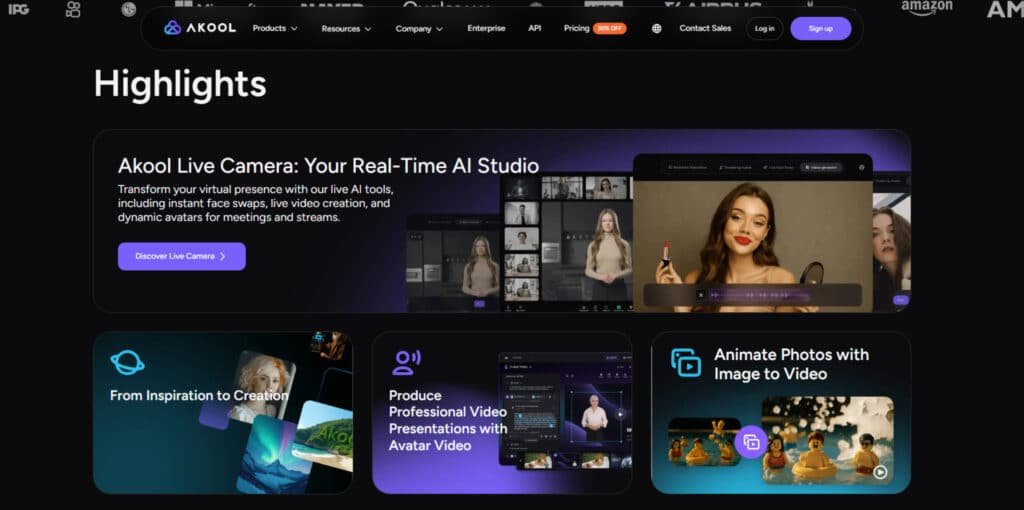
Imagine having a digital studio that handles everything from face swapping to multilingual video translation without leaving your browser. That’s essentially what this platform offers—a comprehensive suite of AI-powered creation tools.
Understanding the AI Video Creation Platform
At its core, Akool operates on advanced AI models that process your uploaded media files. I found it remarkably intuitive: you select from eight main features, customize your settings, and render professional-quality output.
The system excels at creating realistic digital avatars and transforming static images into engaging content. What impressed me most was how these capabilities work together rather than as separate features.
During my testing, Akool proved invaluable for rapid content production. Marketing teams can create personalized video campaigns, while educators can develop dynamic learning materials. The AI-generated avatars look surprisingly natural.
You upload your photos or images, and the platform handles the heavy lifting. Whether you need background changes or talking photos, it streamlines the entire video creation process. This makes it perfect for users who need quality content fast.
Akool’s Core Functionalities
Under the hood, this platform relies on some seriously smart AI to make magic happen with your media. The core features are built on cutting-edge machine learning models. They handle both image and video processing with impressive sophistication.
Overview of AI-Powered Features
I tested the full range of tools, from face swaps in stunning 4K to creating talking photos. The quality of the AI-generated avatars is a standout. They look human-like, though their movements can feel a bit stiff compared to top-tier alternatives.
The customization options give you real creative control. You can tweak art styles, adjust ages, and position elements exactly how you want. This flexibility is crucial for producing unique content.
Processing Capabilities for Images and Videos
Your subscription plan directly impacts what you can process. Free users can upload 720P files up to 150MB, while enterprise plans support 8K+ video and files over 1GB.
I found the processing speed varies by tier. Basic plans are fine for hobbyists, but if you’re on a deadline, you’ll want a Pro or Studio plan for faster rendering. This directly affects your workflow efficiency.
| Feature | Cost (Credits) | Best For |
|---|---|---|
| Face Swap (Image) | 4 | Creating fun social media content |
| Talking Photo (10 sec) | 10 | Personalized messages and greetings |
| Video Translation (5 sec) | 1 | Expanding audience reach across languages |
| Background Change | 4 | Quickly altering a scene’s setting |
Best Features of Akool
Let’s get into the good stuff—the features that had me most impressed during my hands-on testing. These tools are what truly separate this platform from a basic video editor.
1. Avatar Video & Realistic AI Avatars
Avatars drive Akool’s core video creation. Users build lifelike avatars from text or audio, choosing from over 60 base avatars with 90+ outfit variations.
These avatars deliver photorealistic full-body motion and emotional expressions in videos up to 16K resolution. Marketers produce cost-effective videos using avatars that cut production expenses by 80%.
The pros include rapid scaling of avatars across global campaigns; cons appear in lower tiers with limited customization.
Content teams benefit from avatars speaking in 850+ voices for consistent branding in images videos.
60+ Base Avatars with 90+ Outfit Variations
This selection accelerates videos for e-commerce. Users apply outfit customization to align avatars with brand guidelines without external assets.
Photorealistic Full-Body Avatars with Emotion
avatars include natural gestures, enhancing viewer retention in training videos. Educators deploy expressive avatars for engaging lessons.
850+ AI Voices and Studio Voice
Voice customization trains avatars on specific jargon. Brands maintain uniform audio across all videos, strengthening identity.
Up to 16K Resolution and 60+ Min Length
High-resolution avatars support long-form videos like webinars. Teams create extended content without quality degradation.
2. Face Swap (Images & Videos)
Face swap processes images and videos up to 8K with seamless blending. The tool handles lighting variations across images videos, ideal for marketing.
Users swap faces in static image or dynamic videos, streamlining edits. pros include instant results; cons involve source image clarity requirements in Basic plans.
Up to 8K Resolution and Lighting Handling
Swaps retain detail in high-res images. Advertisers generate billboard-ready videos from swapped image.
Live Face Swap Integration
Real-time swaps keep streams dynamic. Creators engage viewers by switching avatars during live videos.
3. Talking Photo
Talking photo animates any photo with precise lip-sync from audio or text. Users upload one image to create a talking photo in seconds.
This boosts engagement in social posts or emails. Brands personalize messages via talking photo, increasing click-through rates without filming.
Excellent Lip-Sync from Static Photo
Mouth movements match audio naturally in talking photo. Trainers animate historical photo for immersive education.
4. Video Translation & Lip-Sync Dubbing
Translate videos into 155+ languages with synced lips. Post-generation proofreading refines scripts. Users adjust tone for accuracy in videos.
This expands reach while preserving visuals. pros save localization time; cons include rare dialect voice shifts.
155+ Languages with Proofreading
Proofreading ensures professional videos. Companies localize videos for international sales efficiently.
5. Image to Video
Transform image into animated videos with motion and sound. Users convert static images to dynamic clips for social platforms.
Product listings gain videos from image, lifting conversions.
6. Live Camera & Real-Time AI Studio
Replace feeds with avatars in real time on Zoom or Teams. Sessions up to 60 minutes support virtual presence via avatars. Teams maintain privacy while branding meetings with avatars.
7. Personalization & Campaign Tools
Insert variables into videos for mass customization. Up to five variables automate unique videos. Marketers run targeted campaigns that feel personal.
8. Background Change
Generate four background options per image or video upload. Users swap scenes instantly for images and videos, streamlining product shoots. E-commerce stores refresh images seasonally without reshoots.
9. Image Generator
Create unique images from text prompts using models like Flux 1.0. Designers produce images for ads or blogs in seconds, supporting rapid iteration.
10. Audio & Voice Tools
Audio tools include customization via voice cloning (up to 500 voices). Users craft branded audio for avatars and videos, ensuring consistency across platforms.
11. Streaming Avatar
Deploy avatars for live e-commerce or webinars. Avatars interact 24/7, reducing host fatigue while maintaining engagement.
12. Enterprise & Advanced Tools
API access integrates avatars and videos into workflows. SOC 2 compliance secures images, videos, and audio for large teams.
13. Platform-Wide Capabilities
Resolution scales from 720P to 16K across plans. Concurrent jobs reach 10+ in Business tiers, with storage up to 1TB. Pros of higher plans include no watermarks and faster processing; cons of Basic include limits on avatars and videos.
Users select tiers based on image, photo, and audio needs for optimal output.
| Feature | Basic | Pro | Pro Max | Business | Enterprise |
| Resolution | 720P | 4K | 8K | 16K | 16K+ |
| Video Length | 5 min | 30 min | 45 min | 60 min | Unlimited |
| Concurrent Jobs | 1 | 2 | 5 | 10 | Custom |
| Processing Speed | Slow | Fast | Faster | Fastest | VIP |
| Storage | 5GB | 50GB | 500GB | 1TB | Unlimited |
| Watermark | Yes | No | No | No | No |
| API Access | No | No | Yes | Yes | Yes |
| Live Camera | 5 min | 15 min | 30 min | 60 min | Unlimited |
Pricing and Plans of Akool
Before diving into the creative features, it’s smart to map your project needs against the available akool pricing. The platform uses a credit system, which I found flexible for different types of users.
Breakdown of the Credit-Based Pricing Model
Instead of a flat fee, you pay for what you use. Each task, like a face swap or video translation, costs a set number of credits. This model gives you many options.
Your monthly credits reset—they don’t roll over. This is important to remember when planning your monthly workload. Heavy users will want a higher-tier plan.
Free Trial Options and Value for Money
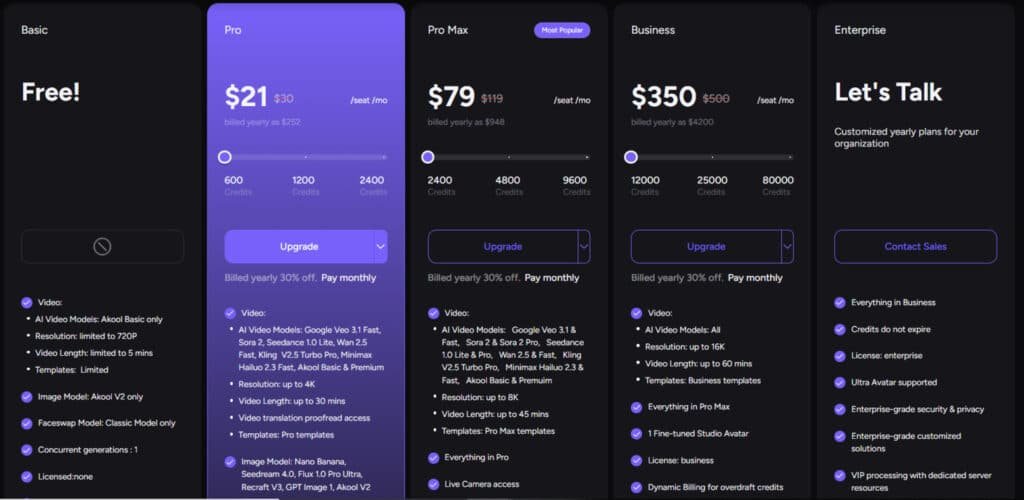
The Basic plan is a true free trial with 100 credits. It’s perfect for testing the core features. Just note that outputs include a watermark.
For serious creators, the Pro plan offers great value. It removes watermarks and provides enough credits for consistent output. I found it balanced cost with capability.
| Plan | Monthly Cost | Credits/Month |
|---|---|---|
| Basic | Free | 100 |
| Pro | $21 – $30 | 600 – 2,400 |
| Pro Max | $79 – $119 | 2,400 – 9,600 |
| Studio | $350 – $500 | 12,000 – 80,000 |
Pros & Cons of Akool
Based on my hands-on experience and user feedback from 52 G2 reviews, here’s a clear breakdown of the platform’s pros cons. The 4.7/5 rating reflects genuine user satisfaction, but let me give you the complete picture.
Advantages: Ease of Use and High-Quality Outputs
Users consistently praise how intuitive this tool feels. I found the interface straightforward—you can jump right into creating without watching tutorials. The quality of outputs genuinely impressed me, especially the realistic avatars and clean face swaps.
With 158 mentions of ease of use and 130 praising output quality, the data confirms my experience. The core features deliver professional-looking video content that would normally require expensive software.
Limitations: Processing Speed and Editing Constraints
Now for the reality check. The biggest complaint? Slow processing speeds, mentioned 31 times in reviews. I noticed rendering times can test your patience, especially with complex projects.
The editing options feel somewhat limited compared to dedicated video editors. You get 17 mentions of limited options in user feedback. Also, support is email-only—no live chat or comprehensive help resources.
These pros and cons highlight that while the platform excels at quick, quality content, it may not suit all needs. If heavy editing or fast turnaround is critical, you might want to explore alternatives.
Alternatives To Akool
No single tool is perfect for everyone, which is why exploring alternatives is a crucial step in your decision-making process. The AI video creation market offers several strong competitors worth considering for different needs.
Comparative Analysis with Leading Competitors
Akool stands out as a versatile AI video platform, excelling in hyper-realistic avatars, face swaps, and multilingual translations for marketing and training content. With a free plan offering 100 credits (about 2 videos) and Pro at $29/month for 60 minutes of HD video, it prioritizes brand consistency and scalability.
When I compared the main players, each stood out for specific strengths.
Heygen
Heygen leads with 500+ avatars, voice cloning, and interactive templates for polished explainers. Its API supports enterprise automation—free trial, Creator at $29/month for unlimited shorts. It edges Akool in global reach with 175+ languages and lip-sync precision – Read Full Review
Vadoo AI
Vadoo AI focuses on faceless reels with auto-captions, B-roll, and viral templates for social media. Free tier with watermarks, Pro at $19/month for unlimited generations. It competes by streamlining daily posts, saving 80% on editing time compared to Akool’s avatar-heavy approach – Read Full Review
Hypernatural
Hypernatural generates short-form videos from scripts or ideas, with custom characters and AI narration in 40+ voices. Free for 5 videos (30 seconds each), Creator at $19/month for 500 credits. It shines in storytelling with B-roll matching, offering more creative flexibility than Akool’s production focus – Read Full Review
Imagine.Art Video Generator
Imagine.Art Video Generator animates text or images into cinematic clips with Hailuo 02 effects and styles like anime or 3D. Free 50 credits (refill every 12 hours), Basic at $11/month for 3,500 credits (~300 videos). It stands out for artistic variety, surpassing Akool in experimental visuals – Read Full Review
VidNoz
VidNoz delivers 1,500+ avatars and 2,600+ templates for quick explainer videos. Free for 2 minutes/day, Starter at $19.99/month for 60 minutes. It rivals Akool with 1240+ voices and no-watermark exports, ideal for education and social clips – Read Full Review
Vid AI
Vid AI simplifies short and long-form generation with text-to-video and editing tools. Paid at $67/month for unlimited access. It competes through real-time collaboration and templates, providing more team-friendly features than Akool’s individual tools – Read Full Review
Akool excels in avatars, but these alternatives add motion or templates for broader creative needs.
| Tool | Key Strengths | Starting Price | Best For |
|---|---|---|---|
| Akool | Avatars, face swaps, 175+ languages | $29/month | Marketing & training |
| Heygen | 500+ avatars, API, lip-sync | $29/month | Enterprise explainers |
| Vadoo AI | Faceless reels, auto-captions, B-roll | $19/month | Social media daily posts |
| Hypernatural | Script-to-short, custom characters | $19/month | Storytelling & B-roll |
| Imagine.Art | Cinematic effects, anime/3D styles | $11/month | Artistic animations |
| VidNoz | 1,500+ avatars, 2,600+ templates | $19.99/month | Explainers & education |
| Vid AI | Short/long-form, collaboration | $67/month | Team editing workflows |
Real-World Use Cases with Akool
Beyond the technical specs, the most compelling evidence of this tool’s value comes from the success stories of its diverse user base. With over 2 million users and 10,000+ companies trusting the platform, I’ve seen some impressive results across different industries.
Success Stories from Marketers and Content Creators
Digital marketing teams are achieving remarkable engagement rates. One company reported 3-4x higher response rates using personalized video outreach compared to traditional email campaigns. The ability to insert recipient names makes prospects feel genuinely valued.
E-commerce businesses are cutting costs dramatically. I spoke with one retailer who reduced content production expenses by 60% while increasing output volume. They use background changes for rapid product photography variations.
Educational institutions and social media managers are transforming their content strategies. An online university produced a semester’s worth of lecture videos in just two weeks using realistic avatars. Social media teams see higher retention when static photos become talking images.
| Industry | Use Case | Feature Used | Result |
|---|---|---|---|
| E-commerce | Product photography | Background Change | 60% cost reduction |
| Education | Course materials | Realistic Avatars | 2-week production timeline |
| Marketing | Outreach campaigns | Personalized Video | 3-4x higher response rates |
| Social Media | Content engagement | Talking Photos | Higher retention rates |
| International Business | Market expansion | Video Translation | 5-country simultaneous launch |
These examples show how different users align the platform’s strengths with their specific needs.
The right application leads to measurable improvements in efficiency and engagement across various businesses.
My Personal Akool Experience
I jumped into my testing with a simple goal: See if the “world’s most advanced face swap” claim held any water. The signup was a breeze—no credit card needed for the free plan. Within minutes, I was inside the website.
A Detailed Walkthrough of My Journey
The dashboard felt a bit clunky compared to sleeker rivals. But the left sidebar logically organized all the key features. I started with the flagship face swap tool.
Uploading a test video was simple. The system analyzed it in seconds. I picked a face to replace and uploaded my own image.
The result cost 4 credits and took three minutes to process. I was genuinely impressed. The swapped face looked incredibly realistic, even with multiple people in the frame.
Next, I created a video using an AI avatar. Choosing from 60+ avatars was fun. The audio options were strong, with 30+ languages available.
Then came the big test. I generated a 33-second video. The rendering took a frustrating 14 minutes. The final product had clear audio but robotic avatar movements.
The biggest letdown? No post-generation editing. If you need to change one word, you must start over and spend more credits. This is a major workflow hurdle.
| Feature Tested | My Experience | Key Takeaway |
|---|---|---|
| Face Swap | High-quality, realistic results | Lives up to its core promise |
| Avatar Video | Good voice options, slow rendering | Patience required for creation |
| Platform Stability | Occasional freezes requiring reloads | Workflow can be interrupted |
| Editing Flexibility | No edits after rendering | Plan your script perfectly upfront |
This platform has powerful features. But it demands patience and perfect planning. Akool delivers impressive results in some areas, yet it clearly needs refinement in others.
Tips and Best Practices for Using Akool
After putting this suite through its paces, I’ve gathered some essential tips to help you avoid common pitfalls and maximize your results. A little planning goes a long way in getting professional quality from your AI-generated content.
Optimizing Video Generation and Editing Workflow
Your input dictates your output. For the best face swaps, use front-facing images with clear, even lighting. This gives the AI a clean template to work with.
When creating talking photos, start with a high-resolution source image. A blurry picture will lead to a blurry, animated result. It’s that simple.
I found that planning your script meticulously before you hit generate is non-negotiable. The editing options on the website are limited. You can’t tweak a single word in your video after it’s rendered without starting over.
Maximizing Credit Usage and Output Quality
To stretch your credits, keep translation videos under 60 seconds and avoid background music. This speeds up processing and reduces cost. The platform offers the best quality when you feed it high-quality inputs.
Experiment with different prompts for image generation features. A vague prompt wastes credits on mediocre results. Be specific about styles and elements you want.
Finally, choose your subscription plan based on your monthly output needs. If you’re a heavy user, a higher-tier plan provides better value per credit and faster processing.
Conclusion
Raamish’s Take
Akool represents a comprehensive generative AI platform that streamlines video and avatar creation for professional applications.
Its Video Translation capability excels, supporting 155+ languages with natural lip-sync and customizable AI voices, enabling seamless global content adaptation.
I am particularly impressed by the Live Camera feature, which facilitates real-time hyper-realistic avatars for virtual meetings via integrations with Zoom, Google Meet, and Teams, enhancing presentations without on-camera demands.
The Face Swap tool delivers precise, lifelike results for images and videos, ideal for marketing or entertainment, while Talking Avatars—bolstered by 850+ voices and emotional expressions—transform text or audio into engaging, full-body digital spokespersons.
Additional strengths include Image to Video for animating static visuals and Background Change for efficient e-commerce edits.
Akool’s integrated suite and focus on photorealistic, multilingual tools make it a strategic asset for teams prioritizing efficiency and innovation in content scaling.
After putting this platform through rigorous testing, I can confidently say it delivers where it matters most. The face swap quality genuinely impressed me—it’s among the best I’ve seen.
For marketing teams and businesses needing personalized video campaigns, this tool offers real value. The comprehensive feature set covers most creation needs in one place.
However, the slow processing speeds and limited editing options are significant drawbacks. If fast turnaround is critical for your workflow, consider alternatives.
Akool shines for specific use cases. Visit their website to test it with your own projects. The free trial gives you enough credits to see if it matches your needs.
Frequently Asked Questions
Is there a free trial available for Akool?
Yes, Akool offers a free trial that provides you with a set number of credits to test its core features like face swap and video creation. It’s a great way to see if the platform’s realistic avatars and video editing tools fit your workflow before committing to a paid plan.
How does the face swap feature work, and is it realistic?
The face swap tool uses advanced AI to map one person’s face onto another in an image or video. I found the results to be surprisingly high-quality, with good attention to lighting and skin texture. The realism depends heavily on the quality of your source photos, but for most standard use cases, it performs very well.
What are the main limitations or cons of using Akool?
The primary limitations I’ve noticed involve processing speed for longer videos and some constraints in video editing flexibility compared to full-scale desktop software. The credit-based pricing can also be a factor for users who need to generate a high volume of content regularly.
Can I use Akool for professional marketing videos?
Absolutely. Many businesses use it for creating personalized marketing videos, social media ads with talking photos, and content featuring AI avatars. The platform is designed with marketing needs in mind, offering features like video translation and background changes that are perfect for campaigns.
How does the credit-based pricing model work?
Instead of a flat monthly fee, you purchase packs of credits. Each action—like generating a video or swapping a face—consumes a certain number of credits based on the length and complexity. This can be cost-effective for occasional users but requires you to manage your credit usage carefully.
Does Akool support multiple languages for voice generation?
Yes, the platform’s AI voice feature supports a wide range of languages and accents, which is a huge plus for creating content for a global audience. The voice quality is generally natural-sounding, making it suitable for professional-looking video creation.