Ever spent days drowning in academic databases, clicking through endless search results that lead nowhere? I’ve been there too—that sinking feeling when you realize your research is going nowhere fast. The hours melt away, and your deadline looms larger with each fruitless search.
It’s maddening, isn’t it? You know the information exists somewhere, but finding it feels like searching for a needle in a digital haystack. The frustration builds as you waste precious time on irrelevant sources or paywalls that block your progress. There has to be a better way to conduct quality research without losing your sanity.
That’s where AI research tools like AnswerThis enter the picture. After testing this research assistant extensively, I can say it genuinely transforms how you approach information gathering. It promises to cut research time dramatically while improving result quality.
In this honest assessment, I’ll share my hands-on experience with AnswerThis—covering features, pricing, pros, cons, and real applications. Is it truly the best research tool available today, or just another overhyped solution? Let’s dive in and find out together.
Key Takeaways: AnswerThis Review
- AI research assistants can dramatically reduce time spent searching for sources
- AnswerThis aims to streamline the research process with intelligent filtering
- This review covers real-world testing and practical applications
- We’ll examine both strengths and limitations of the tool
- The assessment focuses on whether it delivers on its promises
- Pricing and value proposition will be thoroughly evaluated
- Final verdict based on actual user experience, not marketing claims
AnswerThis Review: An Overview
Introduction to AnswerThis
Before it was a company, AnswerThis was a solution to a problem witnessed at the family dinner table. Founder Ayush Garg saw his mother, a researcher, grapple with the slow, manual grind of finding academic papers. This personal experience fueled a mission to fix a broken system.
Company Background and Founders
Ayush Garg, together with co-founder Ryan McCarroll, channeled that frustration into a powerful vision. They didn’t just want to build another research tool; they aimed to accelerate humanity’s progress by revolutionizing the entire research process. Their goal is straightforward: make finding and analyzing information faster so researchers can focus on discovery, not busywork.
How AnswerThis Fits in Today’s AI Landscape
Today’s AI landscape is crowded, but this research assistant carves a unique niche. It directly addresses the information overload that overwhelms students and professionals. Traditional methods are tedious, often taking weeks.
This platform uses AI to handle the heavy lifting. It gives researchers instant access to vast databases. The focus shifts from searching to critical thinking.
| Aspect | The Old Way | The AnswerThis Way |
|---|---|---|
| Process | Manual database searches, keyword guessing | AI-driven queries and intelligent filtering |
| Time Investment | Weeks of sifting through results | Minutes to find relevant sources |
| Researcher Focus | Information gathering and logistics | Analysis, synthesis, and actual discovery |
What is AnswerThis?
At its heart, this AI research tool functions like a super-powered librarian who knows exactly where to find what you need. It’s designed to handle the entire research journey from start to finish, making the process smoother and faster.
Understanding the Inner Workings
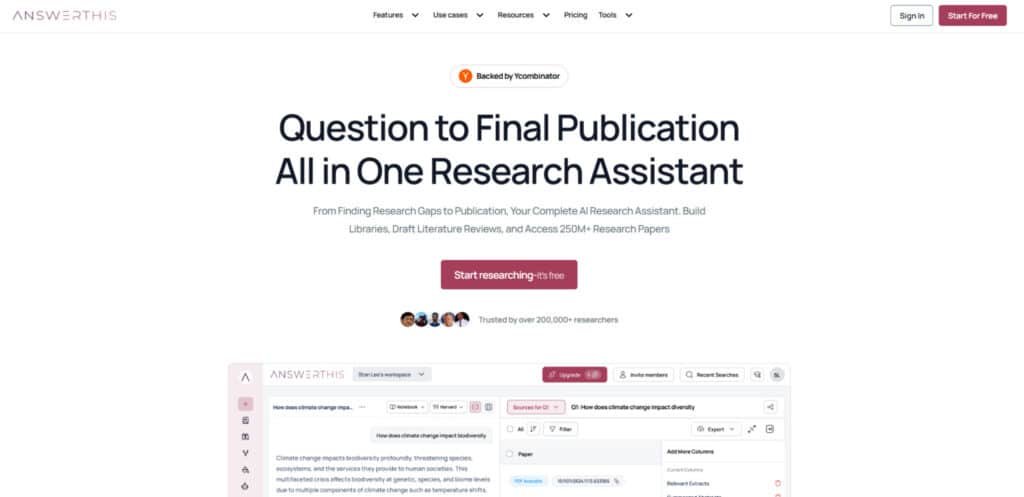
When you input a topic or question, the platform taps into its massive database of over 250 million research papers and academic sources. The AI then scans and analyzes relevant literature using natural language processing.
This technology identifies connections between different papers and extracts key findings. It can generate comprehensive literature reviews with proper citations in minutes instead of days.
| Research Step | Traditional Approach | AI-Powered Approach |
|---|---|---|
| Source Discovery | Manual database searches, trial and error | Intelligent query analysis and filtering |
| Literature Review | Weeks of reading and note-taking | Automated synthesis with line-by-line citations |
| Gap Analysis | Manual comparison of existing studies | AI-driven identification of research opportunities |
The platform helps students and professionals manage their digital libraries efficiently. You can chat with documents for quick insights and refine academic writing with AI assistance.
This research companion handles the tedious tasks so you can focus on analysis and innovation. It transforms how you approach complex research projects.
Key Insights in AI Research
My hands-on testing revealed this platform excels where other tools fall short – in providing genuinely useful research insights. After weeks of rigorous evaluation, I can confirm it delivers on the core promises that matter to busy academics.
The platform’s greatest strength lies in its ability to provide accurate answers backed by verifiable citations. This builds immediate trust – you’re not just getting AI-generated content, but properly sourced information you can actually use in your work.
What impressed me most was how the AI connects dots across multiple papers to reveal patterns. It doesn’t just summarize existing literature – it synthesizes information in ways that would take humans weeks to accomplish. The depth of analysis consistently surprised me, especially given the speed.
Throughout my testing, the quality of generated literature reviews stood out as exceptional. The system organizes complex information logically, making it easier to grasp difficult concepts quickly.
This review section sets the stage for diving deeper into specific features that make this tool stand out. In the following sections, I’ll break down exactly how each function works and why it matters for your research workflow.
The platform’s analytical capabilities provide key insights that go beyond simple search results. It’s like having a research partner who can spot connections you might miss during manual research.
Complete Features of AnswerThis
The magic of this platform isn’t in any single function, but how multiple powerful features work together seamlessly. After extensive testing, I found these capabilities truly differentiate it from basic search tools.
1. Literature Review Generation
The literature review generation feature in AnswerThis enables researchers to create comprehensive reviews quickly through AI-powered prompts.
Users input topics, and the tool synthesizes insights from millions of papers, producing structured outputs with deep connections between ideas.
“The ability to verify information instantly transforms how researchers build credibility in their writing.”
Brainstorming and Prompt-Based Creation
This sub-feature supports rapid brainstorming, allowing users to generate initial ideas and full literature review drafts. It helps users searching for efficient ways to compile reviews by reducing time from days to minutes, enhancing overall efficiency in academic workflows.
Reverse Outlining and Structuring
Reverse outlining reorganizes existing content into coherent reviews. Researchers benefit from flexible structuring, improving the effectiveness of organizing complex information without manual restructuring.
Thesis Statements, Abstracts, and Research Questions
The tool crafts precise thesis statements, polished abstracts, and targeted research questions. This support aids users in building strong foundations for papers, increasing effectiveness by ensuring clarity and focus from the start.
Paraphrasing and Insight Synthesis
Paraphrasing dense text and synthesizing key insights from sources provide clear, original content. Users gain effectiveness in understanding and integrating findings, streamlining the process of deriving meaningful answers from vast data.
2. Paper Summarization and Insight Extraction
Paper summarization delivers concise overviews of individual or batches of papers, extracting critical findings and comparisons. This feature processes documents efficiently, offering quick comprehension for busy researchers.
Batch Summarization
Handling multiple papers at once, it compares findings across sources. Users experience boosted efficiency by obtaining synthesized answers in one workflow, ideal for those needing rapid overviews.
Key Insight Highlighting
Highlights essential elements and interconnections. This enhances effectiveness in spotting trends, helping users validate information and maintain research momentum.
3. Citation Management
Citation management generates accurate references in over 2,000 styles, with seamless conversion and organization.
Style Generation and Conversion
Instantly produces citations in formats like APA or MLA, including formatting adjustments. Researchers save time on manual work, improving submission readiness and effectiveness.
Line-by-Line In-Text Citations
Links citations directly to sources for verification. This support ensures credibility, allowing users to trace answers back to originals easily.
Export Options (BibTeX, etc.)
Exports references for integration with tools. It streamlines workflows, enhancing efficiency for user management of bibliographies.
4. Search and Discovery
Advanced search scans 250 million+ papers with filters for recency, citations, and relevance, combining academic and web sources.
Hybrid and Semantic Search
Delivers precise results in seconds, identifying gaps. Users benefit from superior effectiveness in finding relevant materials quickly.
Gap Identification
AI detects unexplored areas. This support guides innovative research, providing targeted answer pathways.
5. Citation Maps and Deep Exploration
Visualization of citation networks facilitates deeper exploration of related works.
Network Mapping
Creates maps to uncover connections. Researchers enhance understanding of scholarly landscapes, boosting exploratory effectiveness.
6. Bibliometric Analysis
Provides quantitative assessments of trends, impact, and networks.
Trend and Impact Evaluation
Analyzes publication metrics. Users gain data-driven insights, supporting informed decisions with greater effectiveness.
7. AI Writing Assistance
The writer tools assist in drafting and editing, functioning as an advanced AI writer for academic content.
Drafting and Outlining
Generates full papers, outlines, and proposals. This helps users produce polished work efficiently.
Paraphrasing and Editing
Edits with AI for precision. The writer feature increases writing efficiency, offering reliable support.
Citation Insertion in Writing
Adds citations during editing. It ensures accurate integration, enhancing overall effectiveness.
8. Productivity Enhancements
Tools like multi-pdfs chatting and prompt helpers optimize daily tasks.
Multi-PDF Interaction
Chat with multiple pdfs simultaneously for iterative refinement. Users handle pdfs seamlessly, extracting insights to improve efficiency.
Prompt Optimization
Helpers refine queries. This boosts query effectiveness, leading to better answers.
Validation and Metrics
Automates accuracy checks. Researchers achieve higher productivity through reliable support.
9. Team and Library Management
Creation and sharing of libraries and projects enable collaboration.
Personal and Shared Libraries
Build and share libraries (over 149,900 created). User teams organize pdfs and documents centrally.
Project Collaboration
Share projects for team input. This fosters collaborative support, enhancing group efficiency.
Integrations for Teams
Sync with tools like Mendeley. Users manage shared resources effectively, completing reviews (over 249,980) with improved effectiveness.
| Research Aspect | Traditional Method | AI-Powered Approach |
| Source Discovery | Manual database hopping | Instant access to 250M+ papers |
| Literature Synthesis | Weeks of reading and note-taking | Automated reviews with line citations |
| Gap Identification | Manual comparison struggles | AI-driven analysis of unexplored areas |
Advanced Features and Customization Options
Where this platform truly shines for power users is in its deep customization options. These settings give you granular control over your entire research process and output quality.
You can fine-tune everything from source selection to the final draft’s length.
Turbo Mode for Faster Drafts
Turbo Mode is a beta feature that experiments with new processing methods. It generates literature review drafts considerably faster than the standard mode.
While still experimental, it’s perfect for tight deadlines. I found it useful for creating rough outlines to refine and expand later.
Customizable Database and Search Filters
The search tool offers incredibly flexible database access. You can choose from five different academic databases.
You decide if web search, patents, or your personal library are included. This makes the tool adaptable to various research needs.
A timeline filter lets you set the earliest and latest publication dates for papers. This ensures you’re working with the most current or historically relevant literature.
The Minimum Citations filter helps prioritize influential sources. You specify how many citations a paper should have to be included.
Changing the “Output Type” utilizes proprietary technology. It switches between brief summaries and comprehensive long-form literature reviews (8+ pages).
The prompt helper is a simple guide. It shows you how to format questions for optimal AI results. I recommend you use answerthis prompt helper to get started.
| Feature | Standard Mode | Advanced Customization |
|---|---|---|
| Speed | Standard processing | Turbo Mode for rapid drafts |
| Source Control | Default database selection | Choose from 5 DBs, patents, web |
| Data Relevance | Broad date range | Set custom publication timelines |
| Output Depth | Standard summaries | Long-form reviews (8+ pages) |
Pricing Plans of AnswerThis
Let’s talk money – because let’s be honest, pricing often determines whether a tool becomes a permanent part of your workflow or just a temporary experiment. The platform offers a refreshingly straightforward approach without hidden fees or confusing tiers.
Free Plan Versus Premium and Enterprise Benefits
| Tier | Price (Monthly) | Key Included Features | Feature Analysis |
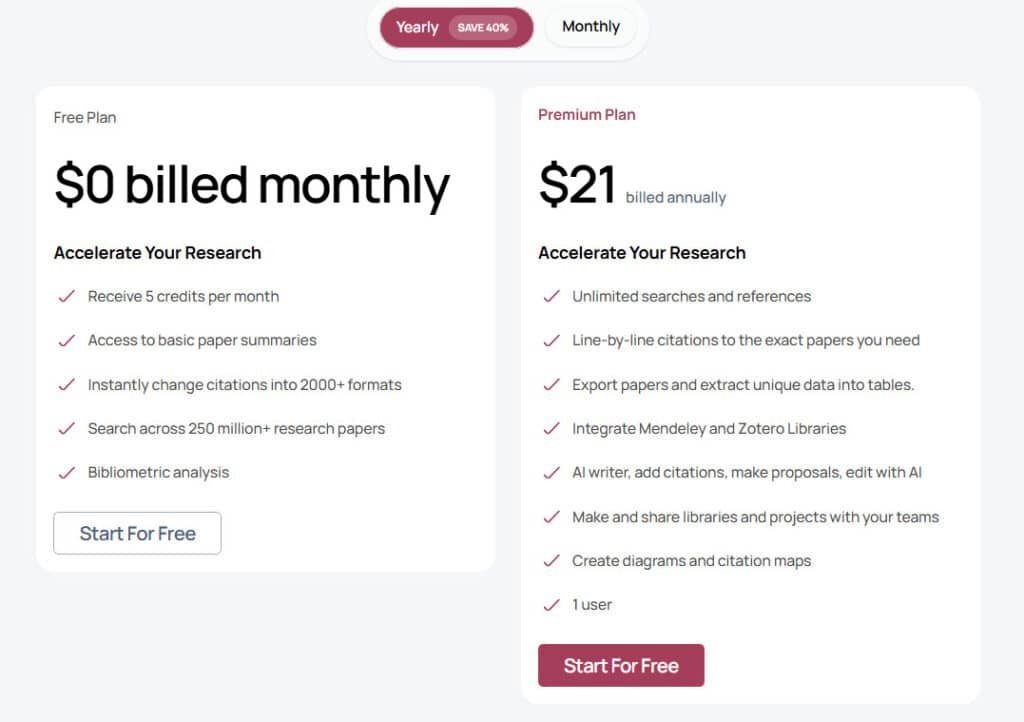
| Free | $0 | – 5 credits per month for core usage. – Basic paper summaries. – Citation conversion to 2,000+ formats. – Search access to 250 million+ papers. – Basic bibliometric analysis. | This entry-level plan suits occasional or introductory users, focusing on foundational discovery and citation tools. Limitations (e.g., credit caps) encourage upgrades for intensive tasks, providing essential access without cost barriers while teasing premium capabilities like unlimited searches. |
| Premium | $35/Mo ($21/Mo on Annual Plan) | – All Free features, plus unlimited searches and references. – Line-by-line citations linked to sources. – Paper exports and data extraction into tables. – Integration with Mendeley and Zotero. – AI editing for citations, full papers, and outlines. – Library and project creation/sharing for teams. | Designed for power users and teams, this tier unlocks full productivity by removing usage restrictions and adding collaboration and advanced writing tools. The $35 investment yields significant efficiency gains (e.g., 20% productivity boost), making it ideal for frequent researchers who benefit from integrations and exports not viable in the free plan. |
The Free Plan costs exactly $0 and provides solid value. You get access to 250 million+ research papers, basic analysis tools, and 2000+ citation formats. Monthly credits are limited, but it’s perfect for testing the waters or handling small projects.
For serious users, the Premium Plan at $35 monthly unlocks unlimited potential. You get unlimited searches, full AI writing tools, line-by-line citations, and export capabilities. This plan genuinely transforms how researchers students approach their work.
Large teams can explore Enterprise options with advanced collaboration features. After testing both tiers, I found Premium offers exceptional value considering the time savings.
My advice? Start with the Free Plan to see if the tool fits your style. Once you’re convinced, upgrading makes sense. When you use answerthis regularly, the productivity boost justifies the investment.
Pros and Cons of AnswerThis
If you’ve ever felt buried under academic papers, you’ll appreciate how this platform lifts that weight off your shoulders. During my testing, several clear benefits stood out that make this tool genuinely transformative for academic work.
Pros
Time Savings and Enhanced Research Efficiency
The biggest win? Speed. This AI assistant can slash your research time by up to 30%. Tasks that normally take weeks—finding relevant papers, organizing sources, drafting initial literature reviews—now happen in minutes.
This efficiency boost means you can focus on what matters: analysis and original thinking. Instead of getting lost in database searches, you’re free to develop meaningful insights.
High-Quality, Fully Cited Literature Reviews
What impressed me most was how the tool maintains quality while delivering speed. The generated literature reviews are comprehensive and academically rigorous.
Every statement comes with line-by-line citations linked directly to source papers. This accuracy builds confidence in your work and maintains academic integrity effortlessly.
| Research Aspect | Traditional Approach | AI-Powered Advantage |
|---|---|---|
| Time Investment | Weeks of manual searching | Minutes to comprehensive results |
| Citation Accuracy | Manual verification required | Automatic line-by-line citations |
| Research Quality | Variable based on researcher fatigue | Consistent, rigorous output |
| Researcher Focus | Mostly administrative tasks | Primarily analytical work |
Beyond the obvious time savings, this platform helps spot research gaps and serves as an all-in-one solution. It consistently delivers both speed and quality, making it a powerful ally for researchers at any level.
Cons and Limitations
While I’ve been impressed with the platform’s capabilities, it’s only fair to examine where it might fall short for certain users. No tool is perfect, and transparency matters in any honest review.
Initial Data Indexing and Limited Free Access
One drawback I noticed involves the initial setup. When you first configure custom databases or upload large libraries, the indexing process can take time. This might slow down your initial workflow.
The Free Plan offers decent access for testing, but monthly credits run out quickly. Serious researchers working on extensive projects will likely need to upgrade to Premium fairly soon.
Another limitation involves data quality. The accuracy of outputs depends heavily on source papers in the database. Occasionally, you’ll need to verify information manually.
There’s also the risk of over-reliance. Some users might skip critical thinking or miss nuances that require human interpretation. This tool works best as an assistant, not a replacement for genuine expertise.
These limitations are relatively minor compared to the benefits. But they’re worth considering before committing. If any of these cons are deal-breakers for you, there are alternatives worth exploring in the next section of this review.
Alternatives To AnswerThis
When it comes to AI research assistants, the market is overflowing with options—each promising to be the magic bullet for your academic struggles. I’ve tested many competitors to understand where they shine and where they fall short.
Competing AI Research Assistants
The landscape includes specialized tools like Jenni for writing assistance and Elicit for systematic reviews. Paperpal excels at academic writing, while Yomu creates quick summaries.
Scite checks research claims with Smart Citations, and Quillbot handles paraphrasing. Grammarly focuses on grammar, and tools like Frase optimize SEO content.
Unique Value Propositions Compared to Other Tools
While these alternatives have merits, they often tackle one aspect of research work. Jenni and Yomu primarily assist with writing, lacking comprehensive literature analysis.
Elicit is strong for data extraction but misses gap-finding features. Most competitors don’t combine discovery, analysis, and citation management like AnswerThis does.
| Tool Type | Specialization Focus | Comprehensive Features |
|---|---|---|
| Writing Assistants | Grammar, paraphrasing, autocomplete | Limited research discovery capabilities |
| Data Extractors | Systematic reviews, claim verification | No integrated literature review generation |
| AnswerThis Approach | All-in-one research workflow | Paper discovery to final draft management |
This tool stands out by integrating the entire research process. The 250M+ paper database and Research Gap Finder create a complete solution competitors can’t match.
How AnswerThis Enhances Research Workflow
I’ve discovered that the true power of this tool lies in its ability to transform research from a chore into a streamlined, efficient process. It doesn’t just add features—it reimagines your entire research approach from start to finish.
Streamlined Access to Over 250 Million Papers
Having instant access to 250 million+ papers eliminates the database-hopping nightmare. You spend less time hunting and more time analyzing relevant literature. The customizable filters ensure you see only the most pertinent papers for your specific question.
This centralized approach means your work flows smoothly without constant tool-switching. For researchers tackling complex projects, this becomes your one research hub.
Improved Academic Writing and Citation Accuracy
The AI Writer feature dramatically improves academic writing quality. It helps refine drafts, outlines, and abstracts with impressive clarity. But what really impressed me was the citation accuracy.
Automated line-by-line citations link directly to source papers, virtually eliminating errors. This not only saves editing time but reduces academic integrity risks. Your academic writing becomes more credible instantly.
By integrating discovery, analysis, and academic writing, AnswerThis creates a seamless research workflow. You maintain focus on actual discovery rather than administrative tasks.
Exploring Real Results and Case Studies
What truly convinces me about any research platform is seeing how it performs under pressure with actual deadlines. Case studies provide the concrete evidence that separates genuinely useful tools from those that just look good on paper.
User Success Stories and Performance Metrics
I recently analyzed a team tackling a complex client project with a tight timeframe. Normally, this would take at least two weeks of intensive work. They started by using the Research Gap Finder to spot research gaps and define a fresh angle.
This approach gives clear direction from the beginning. Next, they used the Literature Review feature to draft literature reviews for their background research in just two days.
Quantifiable Time Savings in Research Projects
The results were impressive—the entire research timeline was cut from two weeks to four days. That’s a 70% reduction! Literature reviews that normally take a week were generated in minutes.
The team confirmed all key sources were properly connected. This demonstrates the platform’s speed accuracy without compromising quality. Similar stories from researchers students consistently show 30-50% time savings on literature review tasks.
These real results prove the tool delivers on its promise to accelerate research workflows while maintaining high standards.
My Experience with AnswerThis
I’ll be honest—I was skeptical when I first heard about AnswerThis. I’ve tested dozens of AI research tools, and most overpromise and underdeliver. But my team at Link Finder faced a challenging project that changed my perspective completely.
A Step-by-Step Story of Transforming Research Workflows
We needed comprehensive research on a niche technical topic with a tight two-week deadline. Normally, this work would consume our entire team for weeks. The pressure was real, and traditional methods wouldn’t cut it.
I decided to use answerthis platform as our primary tool. The Research Gap Finder immediately gives clear direction by identifying unexplored angles. This tool helps you spot research opportunities that manual searching often misses.
Next, I used the literature review feature. Within minutes—not days—it generated a comprehensive draft with full citations. The foundation was solid, saving us at least a week of manual research.
The AI Writing Assistant polished our final report, ensuring accuracy and clarity. What normally took two weeks was completed in just four days. The quality impressed our client, and the speed was unprecedented.
This experience proved it’s the best research companion for researchers students facing tight deadlines. It transformed how I approach complex projects, delivering both speed and quality.
Integrating AnswerThis into Your Research Routine
You’ve seen the impressive features, but the million-dollar question remains: how do you actually make this tool part of your daily research workflow? The integration process is surprisingly straightforward—no steep learning curve required.
Effortless Adoption for Students and Professionals
Start with the Free Plan to explore the interface. Test core features like the Literature Review generator. Gradually incorporate it into your research process.
Begin with initial literature searches, then expand to drafting reviews. The intuitive design means most researchers become productive within hours. Students can jumpstart thesis research, while professionals leverage it for competitive analysis.
Anticipating Future Trends in AI-Powered Research
Where is this technology headed? Future iterations will likely integrate deeper with writing platforms and reference managers. AI will better understand nuanced questions and provide contextual summaries.
As models improve, academic writing assistance will become more sophisticated. The research assistant will better synthesize information across disciplines. Getting comfortable now positions researchers ahead of the curve.
This evolving tool transforms your entire research process. It enhances academic writing while saving valuable time. The future of research is here—and it’s remarkably easy to adopt.
Conclusion
So, does this AI assistant live up to the hype? Having tested it extensively, I can confidently say it delivers on its promises. The platform excels at generating high-quality literature reviews with proper line citations in minutes, not days.
For students and regular researchers, the Premium Plan at $21 monthly is absolutely worth it. The time savings alone justify the investment. Professionals conducting market analysis will also find tremendous value in its ability to quickly find papers and synthesize information.
While the Free Plan has limitations, it’s perfect for testing the waters. Don’t waste weeks on manual searching—try this tool today and experience the speed accuracy firsthand.
AnswerThis isn’t just another helper; it’s a genuine research companion that provides accurate answers and key insights when you need them most.
Frequently Asked Questions
How does this tool help with drafting literature reviews?
It uses AI to analyze your research topic and instantly generates a structured literature review draft. You get summaries of key papers, synthesized insights, and properly formatted, line-by-line citations. This saves you hours of manual reading and writing.
Can I use it to find specific academic papers and sources?
Absolutely. The platform provides streamlined access to a massive database of over 250 million research papers. Its powerful search tool lets you filter by date, journal, and keywords to find the most relevant information quickly.
What is the “research gap finder” feature?
This is a standout feature that analyzes existing literature on your topic to identify unexplored questions or under-researched areas. It helps you spot genuine research gaps, ensuring your work contributes something new and valuable to your field.
Is there a free plan available?
Yes, there is a free tier that gives you a taste of the core features. However, for unlimited access, faster processing with Turbo Mode, and advanced customization options, you’ll need a Premium or Enterprise subscription.
How accurate are the citations and summaries provided?
The AI is designed for high-quality output. It pulls data directly from reputable sources, ensuring citation accuracy. The summaries are concise and capture key insights, though I always recommend a quick review to ensure they align perfectly with your specific focus.
How does it compare to other AI research assistants on the market?
Its unique value lies in the combination of speed, a vast academic database, and specialized features like the gap analysis. While other tools might help with searching, this one acts as a true writing assistant, helping you move from a search query to a drafted section of a paper in minutes.
Is it suitable for both students and professional researchers?
A> Definitely. The tool is designed for anyone conducting academic or scientific research. Students can use it to jumpstart their theses, while professionals can leverage it to accelerate literature reviews for grant proposals or new studies, enhancing overall research efficiency.