Have you ever stared at a room and felt completely stuck?
You know it needs a fresh look, but you have no idea where to start. Maybe you’ve tried sketching ideas or scrolling through endless inspiration photos, only to feel more overwhelmed. This frustration is real, and it’s a problem many homeowners and design enthusiasts face.
It’s easy to get lost in the sea of options. You wonder if a new layout will work or if that color you love will look terrible in your lighting. The fear of making a costly mistake can paralyze your creativity.
This is where modern technology promises a lifeline, but does it deliver?
I’ve spent time testing a new application in the graphics & design space to find out. This hands-on evaluation will give you the straight facts.
In this Archi AI Review, I’ll show you how this platform performs, from generating concepts to the final, realistic renders. You’ll see if it can truly simplify the process of visualizing changes to your space.
My goal is to help you make a smart decision. By the end of this article, you’ll know if this is the right solution for your project.
Let’s dive into the details and see what this tool can really do for your interior design ambitions.
Key Takeaways: Archi AI Review
- This is a practical look at a new app for visualizing home design changes.
- The evaluation covers real performance, not just promised features.
- Learn who can benefit most from using this type of platform.
- Get an honest breakdown of strengths and potential limitations.
- Discover if it’s a worthwhile addition to your creative toolkit.
Archi AI Review: An Overview

Raamish’s Take
Archi.AI is a pioneering AI-driven design platform that transforms uploaded photos of any interior or exterior space into photorealistic renderings in seconds, empowering professionals and homeowners to explore unlimited concepts without traditional modeling delays or costs.
Its instant generation workflow excels through a streamlined three-step process: upload an image, complete a brief style/preference form, and receive tailored designs that precisely adapt to the original layout, lighting, and architecture.
I am particularly impressed with the advanced AI model, which produces natural, creative outcomes across diverse rooms—living areas, bedrooms, kitchens, bathrooms, dining spaces—and exterior facades, far surpassing conventional software’s time-intensive 3D builds.
Additional strengths include commercial licensing, watermark-free outputs, and real-time visualization for iterative refinement, enabling cost-effective decision-making before physical changes. Pro tiers unlock faster, higher-quality renders and full tool access, with no credit card needed for initial trials.
Archi.AI‘s speed, realism, and accessibility democratize professional-grade design, accelerating projects from ideation to execution with minimal expertise required.
Introduction to Archi AI
In current AI landscape, the promise of artificial intelligence transforming our homes is everywhere, yet few tools deliver on accessibility for the average person.
This platform carves its niche by being mobile-first and incredibly straightforward. It’s designed for speed, letting you visualize changes without a steep learning curve.

Positioning in the Current AI Landscape
The digital design space is crowded. Many applications target professionals with complex software. This tool is different.
It specifically serves homeowners, renters, and real estate agents who need quick, realistic visualizations. I’ve noticed it prioritizes immediate results over intricate controls.
Company Background and Founders
This application is a product of D’ANDA INC. While detailed founder bios aren’t front-and-center, the company’s mission is clear. They built a tool to democratize interior design. The goal was to make professional-level visualization available to anyone with a smartphone.
It effectively serves three key groups: People planning renovations, renters testing ideas, and agents staging listings quickly. This focus on practical, everyday use cases is its core strength.
Purpose of the Tool and Its Industry Endorsements
The purpose is simple. You upload a room photo, pick a style, and get a photorealistic render in seconds. This process saves immense time and helps with early project planning.
The industry is taking note. Behavioral science experts have included it in studies evaluating design apps. One professional designer I came across noted a key trend:
Clients are using these platforms as starting points for the design process. They bring these ideas to us, which is great for initial inspiration. However, for complex decisions involving building codes or nuanced aesthetics, professional guidance remains essential.
This feedback highlights the reality. Such a tool is a powerful aid for visualization and informed decisions, but it’s a partner in the process, not a replacement for expert knowledge on complex projects.
What is Archi AI?
The technology behind this application processes your space through advanced neural networks trained on thousands of design images. It’s essentially a visualization platform that turns ordinary room photos into professional interior concepts.
Inner Workings and Innovative Technology
This tool uses next-generation generative design models to create photorealistic renders. You simply upload an image, select from over 20 styles, and get professional-quality results in seconds.
The platform goes beyond basic filters by analyzing your room’s actual dimensions and lighting. It creates renders that look like they were shot by a professional photographer.
| Step | Action | Result |
|---|---|---|
| 1 | Upload room photo | AI analyzes space and lighting |
| 2 | Select design style | Neural network processes choice |
| 3 | Generate render | Photorealistic design concept |
Benefits for Designers, Architects, and Homeowners
For professionals, this tool saves significant time during client meetings. You can show multiple concepts without hours of manual work.
Homeowners benefit from experimenting with styles before committing to purchases. The furniture shopping integration lets you bring designs to life with real products.
During testing, I found the speed impressive for initial concepts. However, the lack of robust editing capabilities can be limiting when you want to tweak specific elements.
The minimal learning curve makes it accessible for everyone. If you can use social media apps, you can master this platform quickly.
Complete Features of Archi AI
What separates a good design application from a great one are the features that bridge imagination and reality. After testing this platform extensively, I found several standout capabilities that make it worth considering for your projects.
1. Instant Photo-Realistic Renders
The core strength of this app lies in delivering hyper-realistic interior design visuals within seconds using advanced data processing.
Professional designers and homeowners searching for a fast interior design generator appreciate how it analyzes uploaded photo data – lighting, proportions, materials – to create thousands of lifelike variations instantly, eliminating slow traditional rendering tools from day one.
Drag-and-drop upload
Users simply drop any room or exterior photo into the app for immediate processing.
Seconds-fast generation
Complete interior design concepts appear faster than most designers can sketch a single layout.
Thousands of unique variations from one image
A single upload powers endless design ideas built on real-world data patterns.
Natural lighting, textures, and details that look like real photos
Shadows, reflections, and material accuracy provide full confidence for actual interior design implementation.
2. Virtual Staging
One of the most powerful tools inside the app for real estate agents and sellers. Empty properties instantly become warm, fully furnished homes that increase perceived value and sell faster according to every professional review.
One-click staging
Vacant rooms fill with perfectly scaled furniture and decor in seconds.
Style-matched furniture
Pulls from massive data libraries aligned with current interior design trends.
Shoppable items
Every piece in the render links directly to real products available for purchase.
Perfect for real estate listings
Creates compelling interior design visuals that shorten market time and justify higher asking prices.
3. Preference-Driven Design Wizard
This smart questionnaire gathers user data to deliver truly personalized results. The app transforms basic inputs into custom interior design solutions that feel made by experienced designers.
Short customizable form
Completed in under a minute yet captures style, color palette, and functional requirements accurately.
Style options (cozy, modern, minimalist, etc.)
Offers trending choices that match what designers recommend today.
Personal must-haves (plants, big sofa, storage, etc.)
Ensures practical elements appear in every generated interior design option.
Tailored suggestions for your lifestyle
Uses collected data to prioritize layouts that work for real daily living.
4. Living Room Designer
Dedicated module inside the app creates complete living room designs using uploaded photo data and user preferences. It delivers professional-grade arrangements that balance comfort, flow, and style seamlessly.
Cozy family setups
Optimizes seating clusters and traffic paths for everyday family use.
Entertainment-focused layouts
Positions TVs, sound systems, and seating for the best viewing experience.
Open-concept variations
Shows smooth connections to kitchens or dining areas without visual clutter.
Furniture arrangement ideas
Provides multiple proven configurations that top designers use in high-end projects.
5. Bedroom Designer
Generates peaceful, functional bedroom designs that improve sleep quality and maximize storage. The app reads spatial data to create restful environments tailored to individual needs.
Sleep-optimized layouts
Places beds for optimal natural light, airflow, and minimal disturbance.
Storage solutions
Integrates built-in wardrobes, under-bed options, and clever hidden storage.
Mood lighting ideas
Suggests layered lighting systems for reading, relaxation, or morning routines.
Relaxed or luxurious styles
Delivers everything from serene minimalist retreats to plush hotel-inspired bedrooms.
6. Kitchen Designer
Handles the most complex room in any home with precision. This tool creates efficient kitchen layouts that professional designers praise for balancing beauty and real-world functionality.
Functional layouts
Automatically builds efficient work triangles between sink, stove, and refrigerator.
Smart storage integration
Maximizes cabinet space with pull-outs, corner solutions, and appliance garages.
Island vs. no-island options
Shows clear comparisons so users choose the best kitchen configuration.
Material and color matching
Uses uploaded photo data to recommend finishes that flow perfectly with existing elements.
7. Bathroom Designer
Transforms ordinary bathrooms into spa-like retreats using accurate spatial data. The app delivers relaxation-focused designs that feel premium while staying practical.
Relaxation-focused designs
Prioritizes soft color palettes, ambient lighting, and calming material choices.
Shower vs. tub options
Visualizes both configurations clearly to support informed renovation decisions.
Vanity and storage ideas
Creates smart solutions for towels, toiletries, and daily essentials in tight spaces.
Luxury or minimalist vibes
Offers high-end marble finishes or clean, Scandinavian-inspired simplicity.
8. Dining Room Designer
Creates inviting dining spaces perfectly scaled to household size and entertaining style inside the app.
Table size and seating options
Automatically adjusts to exact room dimensions and guest capacity needs.
Formal vs. casual setups
Shows elegant chandelier lighting or relaxed everyday atmospheres instantly.
Lighting and ambiance control
Recommends fixtures and layers that create the ideal dining mood.
Buffet or open-shelf ideas
Balances closed storage with open display for both function and style.
9. Exterior Designer
Extends the powerful app beyond interiors to complete home exterior transformations and landscaping makeovers.
Curb appeal upgrades
Modernizes outdated facades with contemporary materials and clean lines.
Material changes
Tests brick, wood siding, stone, or sleek metal panels realistically.
Landscape and lighting ideas
Adds plants, pathways, and outdoor lighting for complete street presence.
Day/night previews
Shows exactly how the home appears in sunlight or evening illumination.
10. Real-Time Visualization
Allows instant comparison and refinement of multiple concepts directly in the app.
Preview multiple concepts
View several interior design directions simultaneously for faster decisions.
Compare side-by-side
Spot subtle differences in layout, color, and furniture placement immediately.
Iterate endlessly without cost
Refine the perfect interior design vision before spending on materials.
11. High-Resolution Exports
Delivers professional-quality files ready for presentations or contractor use.
Full HD and 4K options
Crisp detail suitable for large prints or detailed client reviews.
Commercial license included
Legal for paid client work and marketing materials.
No watermarks
Clean, polished images with zero branding overlay.
Ready for presentations or printing
Meets agency, builder, and publication standards without extra editing.
12. Unlimited Design Variations
Removes all creative restrictions in higher plans for maximum exploration.
No creative limits
Generate as many versions as needed without hitting caps.
Explore wild or subtle changes
Test safe updates or completely bold redesign directions.
Perfect for client presentations
Designers deliver extensive option sets that impress and close deals faster.
13. My Designs Dashboard
Central organization hub keeps every project accessible inside the app.
View past renders
Quickly revisit and reference previous designs anytime.
Re-edit old projects
Update or refresh saved work months later with ease.
Easy file management
One-click organization, downloading, and sharing capabilities.
Inspiration gallery access
Browse thousands of community-generated designs for fresh ideas.
14. Shop the Look
Turns virtual designs into reality with direct purchasing integration.
Direct shopping links
Click any furniture piece to visit the exact product page.
Real products from brands
Features actual inventory from major retailers and manufacturers.
Seamless from render to reality
Shortens the gap between inspiration and completed rooms dramatically.
15. Commercial License
Full legal rights included in Pro and Unlimited plans for business use.
Sell designs
Monetize generated images as part of paid service offerings.
Use in marketing
Perfect for social media, brochures, or website portfolios.
No attribution required
Complete ownership of all outputs for professional applications.
Pricing Plans of Archi AI
Let’s talk dollars and sense—how much does this design tool actually cost?
The good news is the initial barrier is low. You can download the app for free, which is perfect for a quick test drive.
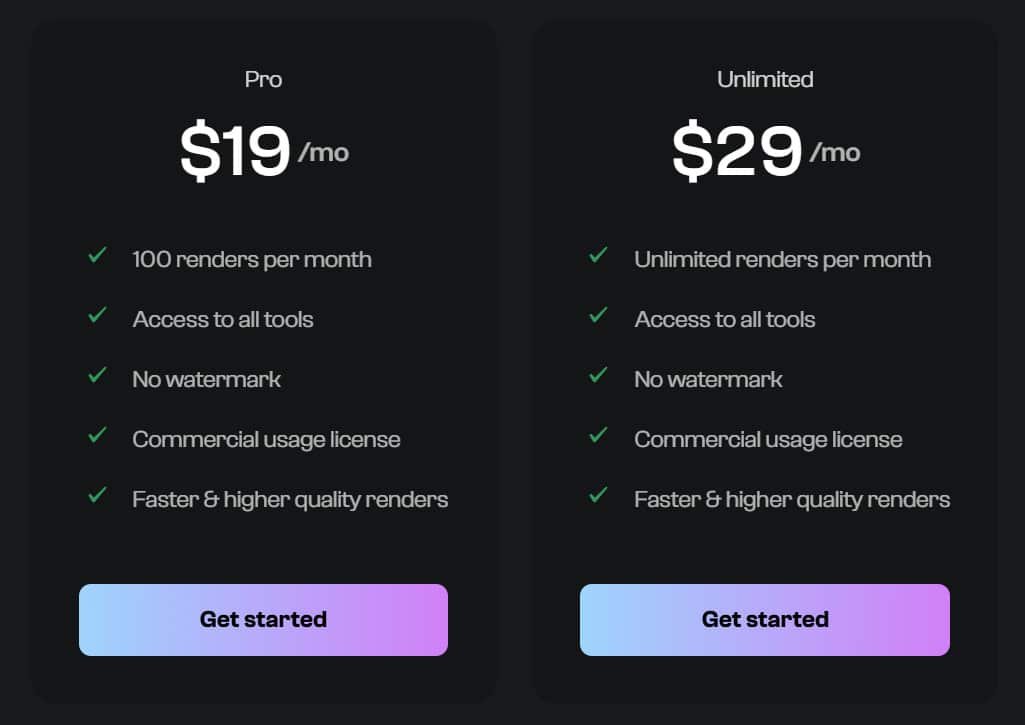
Overview of Cost and Subscription Plans
Pro Plan
$19/month (or $190/year – saves ~16%) 100 renders per month • Full access to all tools • No watermark • Commercial usage license • Faster & higher quality renders
Unlimited Plan
$29/month (or $290/year – saves ~16%) Unlimited renders per month • Full access to all tools • No watermark • Commercial usage license • Faster & higher quality renders
| Feature | Pro ($19/mo) | Unlimited ($29/mo) |
| Renders/month | 100 | Unlimited |
| All Tools Access | Yes | Yes |
| No Watermark | Yes | Yes |
| Commercial License | Yes | Yes |
| Best for | Hobbyists & occasional use | Pros & heavy users |
Value for Money for Both Professionals and Beginners
Is it worth the price? That depends entirely on you. The value changes dramatically based on your needs.
| User Type | Primary Need | Value Calculation |
|---|---|---|
| Professionals | Speed, client presentations | A $50/month plan is a steal if it saves hours of manual work per project. It pays for itself quickly. |
| Homeowners/Beginners | One-time project planning | The free tier might suffice. Or, pay for one month to explore all your options, then cancel. |
For most people tackling a single home project, the value is strong. You get a powerful interior design product without a huge upfront cost. Just be honest about how much time you’ll really use it.
Pros & Cons of Archi AI
Every design tool has its trade-offs, and this one is no exception. After extensive testing, I’ve identified clear strengths and limitations that will help you decide if it fits your project needs.
Pros: Advantages and the Added Creative Freedom
The photorealistic rendering quality genuinely impressed me. The output looks like professional photography, not computer-generated images. This gives you confidence in the visual results before making real changes.
Speed is another major advantage. You get complete room transformations in seconds, not hours. With over 20 style options, the tool offers tremendous creative freedom for exploring different interior design approaches.
The user-friendly interface makes it accessible to everyone. You don’t need technical skills to generate beautiful design concepts. This ability to quickly visualize changes to your space is incredibly valuable.
Cons: Drawbacks and Limitations Compared to Human Expertise
However, the limitations become apparent when you need finer control. The editing capabilities after generation are quite basic. You can’t easily tweak specific elements like furniture placement or individual colors.
Occasional inconsistencies in the AI’s output can be frustrating. More importantly, this product can’t account for building codes or technical requirements that professional designers handle routinely.
While excellent for inspiration, it serves as a starting point rather than a complete solution. This leads us to consider other industry alternatives that might better suit specific needs.
Alternatives to ArchiAI
If the previous platform doesn’t align perfectly with your project requirements, several compelling alternatives exist. The digital design landscape offers specialized solutions for different needs and skill levels.
Competing Interior Design Tools in the Market
If you’re looking for AI-powered platforms to generate realistic interior and exterior photos, there are great options beyond Archi AI.
These tools help AI interior designers visualize renovations quickly and make decisions easier. I know planning a tool renovation can feel tricky sometimes. You want something reliable that saves time. Here are solid choices for interior designers.
AI HomeDesign
AI HomeDesign shines when it comes to virtual staging, especially for real estate photos. It removes unwanted items fast and adds furniture that looks real.
Many users love how it turns empty rooms into inviting spaces in minutes. Perfect for quick property makeovers that impress buyers. – Read Full Review
Collov AI
Collov AI stands out with photorealistic designs that feel almost human-made. You get options for revisions until it’s just right, and it handles different room types well.
Interior designers often use it for client presentations because the results look professional and polished. Ideal choice for stunning, detailed work. – Read Full Review
REImagineHomeAI
REImagineHomeAI is a strong pick for virtual renovations, including landscaping and decluttering. It changes walls, floors, and even exteriors smoothly.
Users say it’s the best tool renovation for big transformations without hiring contractors first. Great for seeing the full potential of a space. – Read Full Review
HomeDesignsAI
HomeDesignsAI gives you over 75+ styles to play with, covering interiors, exteriors, and gardens. It even links to shoppable furniture so you can buy what you see.
Creative folks rave about trying wild ideas safely. Awesome for brainstorming fresh looks. – Read Full Review
MyRoomDesigner
MyRoomDesigner makes applying themes super easy with built-in mood boards and cost estimates. You upload a photo and watch it transform step by step.
It’s helpful for tracking budgets while designing. Suited well for personal touches without guesswork. – Read Full Review
Virtual Staging AI
Virtual Staging AI offers one-click magic that stages rooms in seconds. Unlimited tweaks mean you can experiment freely. Realtors depend on it for fast listings that sell quicker. Strong and speedy for busy pros. – Read Full Review
InstantDecoAI
InstantDecoAI lets you generate unlimited designs plus cool video walkthroughs. Features like day-to-dusk edits add that extra wow.
People use it for dynamic client pitches that stand out. Good pick for visuals that move. – Read Full Review
Easy-peasy AI
Easy-peasy AI guides you through refinements step by step, ending with 3D tours. It’s interactive and fun to use.
Perfect for an engaging tool renovation process from start to finish. Many find it simple yet powerful. – Read Full Review
| Tool | Key Features | Starting Pricing | Best For |
|---|---|---|---|
| Archi AI | Photo-like renders, custom styles | $19/month | Quick personal/exterior designs |
| AI HomeDesign | Virtual staging, item removal | $10/month | Real estate enhancements |
| Collov AI | Photorealistic, revisions | $16-50/month | Professional staging |
| REImagineHomeAI | Renovation, landscaping | $14/month | Full space transformations |
| HomeDesignsAI | 75+ styles, shoppable | $27/month | Variety & gardens |
| MyRoomDesigner | Themes, mood boards, costs | $5-10/month | Easy themes |
| Virtual Staging AI | One-click, fast revisions | $16/month | Realtor listings |
| InstantDecoAI | Unlimited, video creation | $39/month | Videos & unlimited |
| Easy-peasy AI | Step refinement, 3D tours | $5/month | Interactive designs |
The bottom line: identify your primary need—whether it’s space planning, shopping integration, or renovation organization—before choosing which platform deserves your investment.
Each tool has distinct strengths that cater to different project requirements.
Case Study / Personal Experience with Archi AI
Putting this platform to the test revealed both its impressive capabilities and practical limitations. Real-world usage shows exactly where it fits in the design process.
Real-World Results and Design Transformations
I recently spoke with a professional interior designer about a client’s condo project. The homeowner had spent hours using similar tools for space planning and color schemes.
She achieved beautiful renders but lacked confidence in the final design. As she explained:
“The tool helped me explore ideas, but I realized I still needed a professional to make sure everything actually works together. It was a great starting point, but not a great ending point.”
This case highlights the tool’s role in visualization versus complete execution.
| Design Aspect | Tool Capability | Professional Value |
|---|---|---|
| Initial Concepts | Excellent for quick visualization | Fast inspiration for client meetings |
| Color Schemes | Multiple style options | Nuanced color theory application |
| Space Planning | Basic layout suggestions | Technical requirements and flow |
| Budget Reality | Product suggestions only | Realistic cost projections |
My Personal Experience
Testing this application on my own living room was enlightening. The speed of transformation amazed me—seconds instead of hours.
However, I quickly hit limitations when trying to tweak specific elements. The tool excels at broad strokes but struggles with fine details that make a design feel personal.
For quick visualization during early planning phases, it’s incredibly valuable. But for complex projects requiring technical expertise, professional guidance remains essential.
Conclusion: Archi AI Review
Raamish’s Take
Archi.AI is a pioneering AI-driven design platform that transforms uploaded photos of any interior or exterior space into photorealistic renderings in seconds, empowering professionals and homeowners to explore unlimited concepts without traditional modeling delays or costs.
Its instant generation workflow excels through a streamlined three-step process: upload an image, complete a brief style/preference form, and receive tailored designs that precisely adapt to the original layout, lighting, and architecture.
I am particularly impressed with the advanced AI model, which produces natural, creative outcomes across diverse rooms—living areas, bedrooms, kitchens, bathrooms, dining spaces—and exterior facades, far surpassing conventional software’s time-intensive 3D builds.
Additional strengths include commercial licensing, watermark-free outputs, and real-time visualization for iterative refinement, enabling cost-effective decision-making before physical changes. Pro tiers unlock faster, higher-quality renders and full tool access, with no credit card needed for initial trials.
Archi.AI‘s speed, realism, and accessibility democratize professional-grade design, accelerating projects from ideation to execution with minimal expertise required.
So, should this design tool earn a spot in your creative arsenal? Based on my testing, the answer depends entirely on your specific needs. This Archi AI review reveals a platform that excels at rapid visualization but knows its boundaries.
For homeowners exploring interior updates, it’s fantastic. Real estate agents will love the staging speed. Professionals can use it for client concepts, but it won’t replace expert software. If you need detailed control, look elsewhere.
My final recommendation? Try the free version first. If the AI-generated results inspire you, the subscription offers solid value. The future of design includes tools like this—they empower creativity without replacing human expertise.
Ready to transform your space? Download Archi AI and see those quick visualizations for yourself. Test it with your actual rooms and decide if it’s the right fit for your next project.
Frequently Asked Questions
Is Archi AI suitable for complete beginners with no design experience?
Absolutely. I found the platform incredibly intuitive. You don’t need any background in architecture or interior design to start generating ideas. The tool guides you through the process, making it perfect for homeowners planning a renovation who want to visualize possibilities before making big decisions.
How accurate are the photorealistic renders compared to the final result?
The visualization quality is impressive, but it’s a starting point, not a guarantee. The renders give you a highly realistic feel for space, color, and lighting. However, real-life factors like exact paint shades and specific product availability can vary. Use it as a powerful guide for your project planning.
Can I use this tool for exterior design or just interior spaces?
Yes, it handles both! While many people focus on room makeovers, the generative design capabilities extend to building exteriors. This is a huge benefit for architects and anyone considering a home addition or facade renovation, allowing you to test different materials and styles quickly.
What’s the biggest advantage for professional designers and architects?
Speed and client communication. The ability to produce multiple high-quality options in minutes dramatically accelerates the design process. It’s a fantastic tool for presenting ideas to clients, helping them visualize the end product and collaborate more effectively, which saves everyone time.
Are the furniture and decor items shown in the renders available to purchase?
This is a key feature. Many of the items are sourced from real brands, and the platform often provides links or sourcing information. This bridges the gap between visualization and reality, making it easier to turn your AI-generated design into a tangible space.
How does the generative AI handle unique room shapes or challenging layouts?
It performs surprisingly well. You can upload a photo of any room, no matter how odd the shape. The AI analyzes the space and generates layouts that work within your existing constraints. It’s smart about placing furniture in a functional way, which is great for solving tricky planning problems.