You need fast, reliable image creation that feels professional — but many generators trade control for speed or produce inconsistent results.
I get it. You’ve wasted time tweaking prompts and still end up with blurry faces, odd poses, or backgrounds that need hours of cleanup. That kills momentum when you’re on a deadline.
In this Artsmart.ai Review I dig into a web-based creativity platform (apps + API) that promises modes from Standard to Hyper Realistic and tools like PosePerfect, Inpainting, Upscale, and Background Remover.
I’ll show how this image generator helps you create high-quality images and visuals — from quick concept art to photo-accurate renders — and when to use each mode for best results.
Stick with me for a full walkthrough: landscape, inner workings, features, pricing, pros/cons, alternatives, a real case study, and my recommendation.
Let’s dive in.
Key Takeaways: Artsmart.ai Review
- I wrote this comprehensive review to help you decide if this art generator fits your workflow.
- The platform balances speed and realism with practical tools for creators.
- Pricing uses credits—1 credit = 1 image—so cost per image matters.
- I’ll compare competitors and share hands-on tips and settings that work.
- By the end, you’ll know if this tool matches your budget, timeline, and quality needs.
Artsmart.ai Review: An Overview
Raamish’s Take
ArtSmart AI offers a user-friendly AI image generator that’s a budget win.
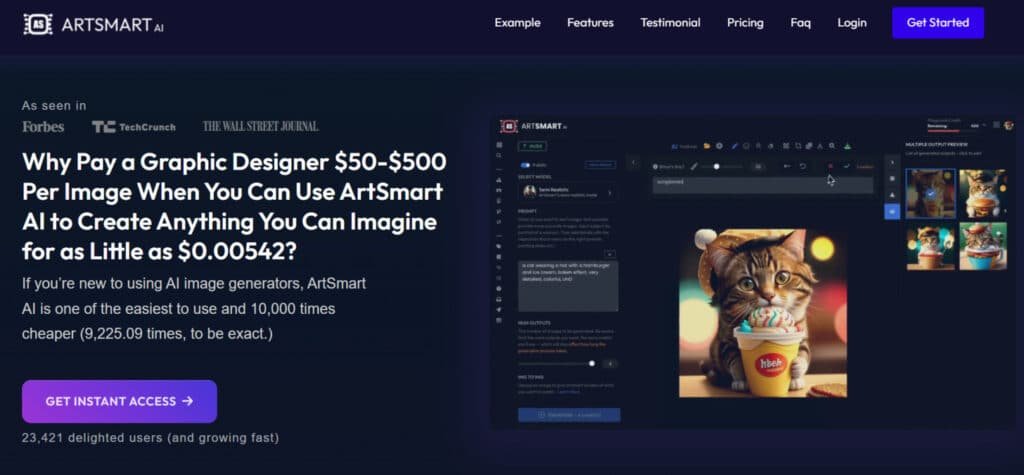
It turns text prompts into custom images—like a aesthetic images for social media or a sci-fi character—for as low as $0.00542 per pic, skipping pricey designers or stock sites.
The PosePerfect and Inpainting tools stand out, letting you tweak poses or edit objects easily, even for beginners. Users like Christine Brunner praise its speed for cohesive designs.
With 23,421 users and features like upscaling to high-res, it beats Midjourney for quick, affordable output.
Ever waste hours hunting photos? Artsmart AI pumps out a month’s worth of visuals in hours, perfect for bloggers or small businesses. Backed by Forbes nods, it’s a solid creative boost.
Overall, it’s a reliable pick for fast, tailored images.
Introduction to Artsmart.ai
Think of it as a web-first visual workshop that turns prompts and photo inputs into campaign-ready images. I’ve used the platform for quick mockups and client assets, and it shines when time matters.
Where it fits in today’s landscape
This art generator sits with the top tools built on artificial intelligence, focused on speed-to-quality. It’s less about experimental tricks and more about predictable, production-ready output.
The platform covers a broad range of needs — thumbnails, hero shots, ads, and product media — so teams can ship visuals without juggling multiple apps.
Who created it and who uses it
The product comes from a company focused on professional visual workflows and offers web, mobile, and API access. Its audience includes content creators, small businesses, marketers, educators, nonprofits, and artists.
“We built a tool for creators who need reliable, fast images that require minimal cleanup.”
In short: it’s built to cut costs vs. hiring designers and to give users a clear path from prompt to polished design.
What is Artsmart.ai?
At its core, this product turns simple prompts or photos into production-ready visuals. I’ve used it to speed concepting and to produce final assets without the usual back-and-forth. It blends several modern approaches so the output looks intentional, not accidental.
Inner Workings: From Text-to-Image to Photo-Accurate Renders
This image generator combines machine learning, computer vision, GAN-like methods, NLP, and image processing to interpret your prompt and render pixels that match intent.
You write a text image prompt or upload a reference photo. The system parses meaning with NLP, maps composition with vision models, and synthesizes detail via advanced models and algorithms.
Modes (Standard, Semi Realistic, Realistic, Hyper Realistic) let you trade speed for fidelity. Tools like inpainting, outpainting, background remover, and upscaling let you refine ai-generated images without leaving the app.
How It Benefits Ideal Users Across Use Cases
For marketers and ecommerce teams, it speeds campaign production and reduces photoshoot costs. Creators and digital art professionals get rapid iterations and controlled styles.
Artists and designers use it as a concept engine—quick variations, camera presets, and consistent compositions to explore ideas.
Educators and solo creators can create high-quality visuals for presentations or socials without hiring a studio. In short: the process stays consistent across modes so you can scale from quick comps to photo-accurate renders with minimal rework.
Quick takeaway: it hides technical complexity so you focus on results—clean images, faster.
- Turn prompts or photos into finished art using modern algorithms and models.
- Iterate with precision using inpainting and upscaling.
- Support for creators, marketers, artists, and educators who need to create high-quality images quickly.
Artsmart.ai Review
My testing shows the system balances speed and fidelity in ways many tools promise but rarely achieve. The playground workflow feels focused—pick a mode, tweak a few controls, and generate. That simplicity saves time when a client deadline looms.
I find the interface intuitive: clear steps, helpful defaults, and prompt helpers that cut drafting time. For portraits and product photos, realistic images look strong straight out of the generator; Hyper Realistic adds fine facial detail and texture when you need polish.
Quality holds up against larger competitors for everyday marketing art, and value per image is excellent once you learn the right modes. Where it stumbles is rare edge cases—complex hands or reflective chaos can need extra passes.
“Support was responsive and practical when I hit a stalled job.”
- Fast, reliable workflow for most use cases.
- Great value and consistent output for portraits and product shots.
- Plan a small buffer for busy periods and niche edge cases.
Best Features of Artsmart.Ai
This toolset shines because it bundles practical features that speed creation and keep results consistent. I’ll walk through the standout parts and how to use them on real projects.
1. AI Tools
ArtSmart’s AI tools stand out among art generators, offering robust features for seamless image generation.
This section covers core functionalities that empower users to produce high-quality visuals efficiently.
Artsmart tools benefit readers seeking quick content creation, such as marketers needing custom graphics without hiring designers, saving time and costs.
Among image generators in the market, this art generator excels with its user-friendly interface, allowing even beginners to explore art creation without steep learning curves.
1.1 Text to Image
The text to image generator converts descriptive prompts into vivid art. Users input ideas, and the tool generates matching visuals, ideal for bloggers creating blog headers.
This feature helps readers with search intent for fast prototyping, enhancing creativity by turning concepts into shareable content in minutes.
As one of the top art generators, it simplifies text-based workflows for consistent results.
1.2 Image to Image
This image generator refines uploaded photos into stylized versions. By applying art effects, it supports e-commerce sellers adapting product shots.
Readers searching for editing options find value here, as it streamlines workflows, reducing reliance on complex software.
Pros of this tool include its integration with other generators, boosting overall image generation efficiency.
1.3 Image to Prompt
Reverse engineering visuals, this tool analyzes images to craft descriptive text. Graphic designers use it to replicate styles, aiding consistency across projects.
For those querying prompt optimization, it boosts efficiency, allowing precise recreation of desired art elements. This feature sets ArtSmart apart from standard generators, offering reverse art analysis for advanced users.
1.4 Inpainting
Inpainting lets users brush over areas to add or erase elements seamlessly. Photographers fix imperfections effortlessly.
This feature assists readers in post-production tasks, minimizing edits and focusing on core image generation. Pros include seamless blending, making it a go-to for fine-tuning outputs in art generators.
1.5 Outpainting
Extend canvases beyond edges with outpainting, perfect for landscape expansions. Artists build panoramic scenes quickly.
Searchers for boundary-pushing tools gain from this, enabling larger compositions without starting over. It enhances creativity in generators, ideal for expansive art projects.
1.6 Face Enhance
Enhance facial details for sharper portraits using this tool. Social media managers polish profile pics.
It helps readers intent on professional headshots, delivering polished results that elevate personal branding. Among art generators, this ensures high-fidelity faces for user profiles.
1.7 Image Upscaler
Upscale low-res files to high-definition with AI precision. Web developers improve site assets. This feature aids those seeking quality upgrades, ensuring crisp visuals for digital platforms. It complements image generator capabilities in ArtSmart’s suite.
1.8 Background Remover
Instantly strip backgrounds from subjects. Marketers isolate elements for ads. Readers looking for clean composites benefit, speeding up collage creation. This tool streamlines prep work for content in generators.
1.9 Pose Copycat
Extract and apply poses from reference images. Character designers maintain accuracy. It supports animators querying pose transfer, fostering realistic art outputs. Pros lie in its precision for dynamic styles.
1.10 Pose Perfect
Manipulate skeletons for custom poses. Game developers control figures precisely. This tool helps readers in animation searches, refining movements for engaging narratives. It empowers users in art generator pose control.
1.11 Tunes: Create Your AI Avatars
Generate avatars in five minutes for profiles. Influencers create branded icons. Search intent for quick personalization finds utility here, enhancing online presence. This feature adds fun to generators for social art.
2. Prompt Styles
Prompt styles in ArtSmart refine art generator outputs, providing options for tailored aesthetics.
These features cater to users exploring diverse expressions, helping creators match visions to trends efficiently. The user-friendly interface makes applying styles intuitive, a key pro over clunky generators.
2.1 Camera Setup
Adjust virtual lenses for depth effects. Photographers simulate gear without costs. Readers searching simulation tools use this to experiment freely. It expands text prompt versatility in art generators.
2.2 Camera Angles
Set dynamic viewpoints like overhead shots. Filmmakers preview compositions. It aids visual planners, optimizing scene setups. This style option enhances cinematic art in generators.
2.3 Time & Weather
Incorporate dawn fog or stormy nights. Storytellers set moods instantly. This feature supports atmospheric content, ideal for narrative builders. Pros include mood-setting for immersive image generation.
2.4 Painting Style
Apply watercolor or oil styles to digital art. Illustrators blend techniques. Searchers for hybrid mediums gain versatility. It bridges traditional and AI generators seamlessly.
2.5 Artist
Emulate masters like Van Gogh. Aspiring painters homage influences. It inspires creativity, connecting historical art to modern generators. Readers value this for authentic style replication.
3. Generation Modes
Generation modes offer varied realism levels in image generators, balancing art and photorealism.
These features suit people from hobbyists to pros, enabling adaptive image generation for specific needs. ArtSmart’s interface shines here, with easy mode switches among generators.
3.1 Standard
Balanced mode for everyday visuals. Casual users start here. It simplifies entry for beginners querying basic tools. A solid baseline for art generator newcomers.
3.2 Semi Realistic
Blend fantasy with reality. Comic creators stylize characters. Readers intent on illustrative work find balanced options. This mode fuels creative generators for comics.
3.3 Photo Realistic
Mimic camera captures closely. Advertisers produce lifelike ads. This mode elevates commercial content. Pros for marketing art generators.
3.4 Realistic
Detail natural scenes accurately. Documentarians verify authenticity. It helps factual visualizers. Reliable for docu-styles in generators.
3.5 Hyper Realistic
Ultra-detailed, near-indistinguishable outputs. Fine art collectors seek immersion. Pros use it for gallery-level pieces. Pushes image generator boundaries.
4. Other Features
Supporting features enhance usability in this art generator, with a user-friendly interface streamlining tasks. They benefit users managing workflows, from storage to integration. These tools make ArtSmart a top choice among generators for user efficiency.
4.1 Preset Management
Save prompt templates for reuse. Frequent creators organize libraries. It saves time for repetitive image generation. Essential for art pros.
4.2 Image Explorer
Browse and tag outputs easily. Teams collaborate on selections. Readers searching organization tools stay productive. Boosts content management in generators.
4.3 Profile Showcase
Display portfolios publicly. Freelancers attract clients. This builds visibility for creative pros. Showcases art from image generators.
4.4 Multiple Image Generation
Batch-produce variations. Marketers test campaigns fast. Efficiency aids high-volume needs. Scales generators for bulk art.
4.5 ArtSmart API
Integrate into apps for custom flows. Developers embed generators. It scales art production programmatically. A pro for tech-savvy users.
4.6 Extended Tune Storage
Store custom models securely. Enterprises archive tunes. Large teams query storage solutions here. Supports advanced styles in generators.
5. Branding, Workflow & Integrations
Use the AI Logo Maker and Tunes (AI avatars) to create consistent brand assets. Collections, Image Explorer, and Profile Showcase keep assets organized.
Schedule and auto-share posts to social networks, and connect via the ArtSmart API to scale image generation across apps and teams.
“These tools cut the back-and-forth—faster approvals, cleaner assets, and fewer retakes.”
| Feature | What it Does | When to Use |
|---|---|---|
| Playground Modes | Switchable fidelity (Standard to Hyper Realistic) | Drafts to final renders |
| PosePerfect / Copycat | Controls human posture and reference poses | Portraits, lifestyle photos |
| Upscaler & Background Remover | Enhances detail and isolates subjects | Print, ecommerce, and compositing |
6. Upcoming Features
Upcoming features promise expanded capabilities, keeping ArtSmart ahead in art generator. These innovations address evolving demands, helping forward-thinking users stay competitive. The user-friendly interface will integrate them smoothly, a clear pro for future generators.
6.1 Logo Generation
Prompt shapes and text for branded logos. Startups design identities swiftly. Readers seeking branding tools prototype options rapidly. Enhances logo art in image generators.
6.2 Pose Gallery
Access pose databases for controls. Sculptors reference accurately. It streamlines character design searches. Expands pose styles across generators.
6.3 Hyper Real 2.0
Indistinguishable photo-like art. Photographers push boundaries. This advances hyper-detailed content creation. Next-level image generation for pros.
Pricing plans of Artsmart.Ai
Let’s break down what each subscription gives you and how much it costs per image. Below is a clear summary so you can match credits to your workload and budget.
Basic Plan
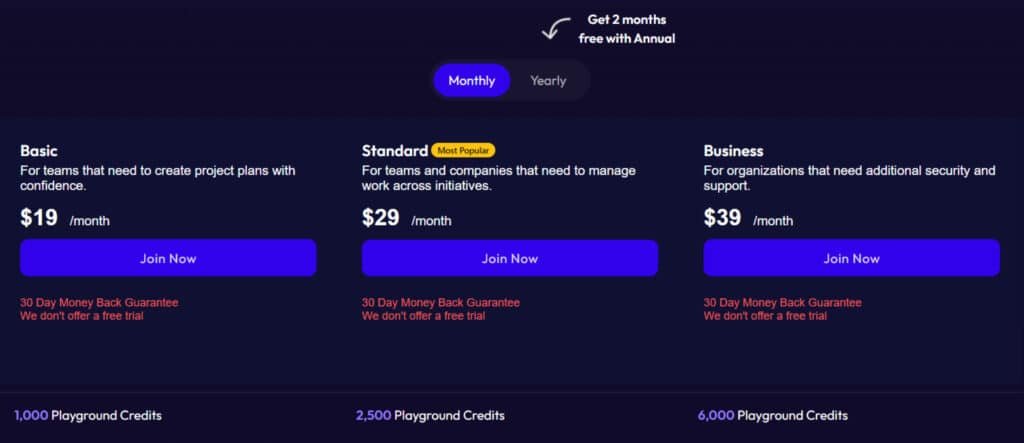
$19/month ($16 /month or $192 /year on Annual Plan (2 months free with Annual))
1,000 credits and full core tools. Includes Text-to-Image, Image-to-Image, inpainting/outpainting, Face Enhance, Upscale, Background Remover, pose tools, style controls, and multiple modes.
Standard Plan
$29/month ($24.50 /month or $294 /year on Annual Plan (2 months free with Annual))
2,500 credits, plus API access and extended Tune storage — ideal if you want to integrate generation into apps or collaborate at scale.
Business Plan
$39/month ($32.50 /month or $390 /year on Annual Plan (2 months free with Annual))
6,000 credits and added support for higher throughput and service needs. Best for teams producing many images each month.
- Credit model: 1 credit = 1 image — simple and predictable. Choose lower-fidelity modes for drafts to save credits and reserve high-fidelity for finals.
- Annual savings: Pay yearly and get two months free across plans — a solid value if you commit to regular art production.
- Guarantee & payments: Payments via Stripe. There’s a true 30-day money-back guarantee for new users.
- Data: User data stored on US servers. No free plan currently — factor a month-to-month trial into your comparison.
My take: Start with Basic if you’re testing cadence. Upgrade to Standard for API needs, and move to Business when monthly images rise and you want priority support.
| Plan | Monthly Cost | Credits |
|---|---|---|
| Basic | $16 / month | 1,000 |
| Standard | $24.50 / month | 2,500 |
| Business | $32.50 / month | 6,000 |
Pros & Cons of Artsmart.Ai
Here’s a quick, honest look at what this generator does well—and where it trips up. I ran focused tests across portraits, products, and scenes to see what the system delivers in real workflows.
Pros
- High-quality realistic images: Semi and Hyper Real modes produce client-ready output for portraits and ecommerce.
- Intuitive interface: Fewer clicks to good results—so you save time on iterations.
- Mobile + web access: Work on a phone, tablet, or desktop without losing fidelity.
- All-in-one tools: Background removal, upscaling, and pose controls live together—less app switching.
- Affiliate program & 30-day refund: Gives upside and a safe window to test at scale.
Cons
- No free plan: You need a paid month to evaluate—use the refund window wisely.
- Internet-dependent performance: Peak-hour slowdowns can affect tight deadlines.
- Edge cases: Occasional doppelgangers or geometry quirks require extra inpainting work.
Summary: If you value speed, consistent image quality, and consolidated art tools, this platform is a strong choice. Be mindful of bandwidth and plan selection. Next up: alternatives to consider if those cons matter to you.
Alternatives to Artsmart.Ai
When you want options, test a few competitors to see which fits your budget and style. I’ve used these to fill gaps—free credits, different models, or pay-as-you-go pricing can be a big win.
Artsmart.Ai delivers solid playground-style generation with pose controls and inpainting, but these four competitors push realism, consistency, or creative depth further—perfect if you’re chasing pro-grade visuals.
GetImg.Ai masters character consistency across scenes, trained LoRAs, and API access. Brands building series or stories love it—100 images free, then $9/month unlimited.
Imagine.Art offers 70+ fine-tuned styles, animation tools, remix features, and strong text rendering. Artists experimenting daily thrive here; generous free tier + $7/month pro.
Flux.Ai runs cutting-edge Flux Pro/Dev models for hyper-realistic photos and precise prompt following. Speed + detail make it a Midjourney killer; starts at $10/month.
Artspace focuses on upscale, face restore, and massive batch tools with commercial rights. Agencies handling stock or prints scale effortlessly—free basics, $19/month pro.
Need playful edits or photoreal mastery? These beat Artsmart on quality and workflow.
| Tool | Key Strengths | Starting Price | Best For |
|---|---|---|---|
| Artsmart.Ai | Pose copy, inpaint, playground fun | $19/month | Casual creators & quick experiments |
| GetImg.Ai | Character consistency, LoRAs, API | $9/month | Series, branding & stories |
| Imagine.Art | 70+ styles, animation, remix, text rendering | $7/month | Artists & style exploration |
| Flux.Ai | Flux Pro realism, lightning speed, accuracy | $10/month | Photoreal pros & high detail |
| Artspace | Upscale, face fix, massive batches, rights | $19/month | Agencies & commercial stock |
Remember to check pricing, models, and refund policies (including any 30-day money-back guarantee) before you commit.
Who Is Artsmart.ai Best For?
Not every creator needs a heavyweight studio—some need a fast, dependable tool that fits tight schedules. I’ve seen this help many users who need consistent results without long learning curves.
Ideal audiences include content creators who publish often and need thumbnails, blog art, and ads with repeatable style. Small business owners benefit from quick product shots using the Background Remover and Upscaler.
- Designers who want a concept engine—pose tools and style controls speed moodboards and comps.
- Educators & students who need polished visuals for presentations without heavy costs.
- Nonprofits that stretch budgets—Collections and scheduled posts optimize reach on social media.
- Hobbyists & artists experimenting with styles—move from rough idea to refined image fast.
- Ecommerce teams & marketers who need consistent banner crops and portrait lighting.
- Dev teams building apps—grab the API and extended Tune storage on the Standard plan for programmatic creation.
“Start with the Basic plan to validate your monthly image cadence, then upgrade when need grows.”
Tip: If you value predictable outputs over endless tweaking, the product’s features and presets match a steady creation pace.
How Artsmart.ai Works Behind the Scenes
Here’s a simple look at the technology that turns a prompt into a finished piece of art. The system uses a small, focused technology stack so you get predictable results without getting lost in settings.
The Tech Stack
Machine learning, computer vision, GAN-inspired synthesis, NLP, and image processing combine to read your intent and build pixels that match it. These algorithms map composition, texture, and lighting so the output feels deliberate.
Models & Modes
Different models power Standard, Semi Realistic, and Hyper Realistic modes. Pick a mode based on speed or fidelity—faster drafts use lighter models; finals use higher-capacity ones.
Prompt-to-Image Workflow
Start with a text image prompt or upload a photo reference. Choose a mode and hit generate. The image generator runs a short process to synthesize an image and returns a base result you can refine.
Refinement Loop & Style Controls
Iterate with inpainting, outpainting, and Face Enhance to fix details. Use Upscale for print-ready output. Camera presets, time & weather, and painting style adjust background, depth, and texture in fewer passes.
Data, Security, and Payments
User files and settings are stored on US-based servers for compliance and procurement needs. Checkout uses Stripe, so card details aren’t stored on the platform—standard SaaS security you can trust.
Practical takeaway: the blend of models and tools speeds image generation while keeping control in your hands—short, iterative prompts plus targeted edits get the best results.
Case Study / Personal Experience
I needed a complete set of images—hero banner, close-ups, and social cuts—under one hour, so I ran a focused test. The goal: lifelike humans, photo‑real ecommerce shots, and ready-to-post media for social channels.
Real-World Results: Lifelike Humans, Photo-Real E‑commerce Shots, and Social Media Visuals
Project: lifestyle portraits and product photos for a landing page plus matching social media crops.
Setup: I started in Standard mode for fast drafts, moved to Semi Realistic for hero frames, and used Hyper Realistic for close-up details. This saved time and preserved quality when it mattered.
My Experience: Switching from MidJourney to the playground and Pose Controls
I found switching from MidJourney helpful—fewer mode choices reduced guesswork. PosePerfect and Pose Copycat locked posture and gaze so I got more usable images per batch.
- Fixes: two passes of inpainting plus Face Enhance removed small facial glitches.
- Backgrounds: Background Remover + custom gradient gave consistent product cutouts; outpainting widened hero banners for headline space.
- Workflow: I queued assets to publish, which saved me time as a one-person team handling copy and media.
“Using a light-touch process—mode switch, pose control, and inpaint when needed—delivered brand-ready results the same day.”
| Step | Action | Result |
|---|---|---|
| Drafts | Standard mode, quick iterations | Fast composition checks, low credit use |
| Hero shots | Semi Realistic, PosePerfect | Clean posture, usable banner images |
| Close-ups | Hyper Realistic + Face Enhance | Sharp detail, print-ready after upscaling |
One stuck render during peak hours—retry fixed it. Two portraits showed faint doppelganger shadows; a quick inpaint cleared them.
Using Artsmart with this process cut delivery time and kept image quality high. For artists and creators who value speed, these tools make tight deadlines manageable.
Conclusion
Raamish’s Take
ArtSmart AI offers a user-friendly AI image generator that’s a budget win.
It turns text prompts into custom images—like a aesthetic images for social media or a sci-fi character—for as low as $0.00542 per pic, skipping pricey designers or stock sites.
The PosePerfect and Inpainting tools stand out, letting you tweak poses or edit objects easily, even for beginners. Users like Christine Brunner praise its speed for cohesive designs.
With 23,421 users and features like upscaling to high-res, it beats Midjourney for quick, affordable output.
Ever waste hours hunting photos? Artsmart AI pumps out a month’s worth of visuals in hours, perfect for bloggers or small businesses. Backed by Forbes nods, it’s a solid creative boost.
Overall, it’s a reliable pick for fast, tailored images.
Ready to decide?
This closing note tells you who should buy, why it works, and the next step to test it yourself.
I recommend artsmart if you want an art generator that helps you create high-quality visuals fast. I found the image generator best for portraits, product shots, and banner scenes—pose tools and inpainting cut retries and speed delivery.
Pick a pricing plan that matches cadence: Basic for solo creators, Standard for API needs, Business for volume. The platform stores data in the US, checks out via Stripe, and backs purchases with a 30-day money-back guarantee.
Start a real deliverable this week—use Semi Realistic for drafts, Hyper Realistic for hero shots, save presets, and generate images to judge fit. If you’re using Artsmart, this test usually seals the deal.
Frequently Asked Questions
What types of images can I generate with Artsmart.ai?
You can create a broad range of images — from hyper-realistic photos and editorial-style portraits to stylized digital art and product shots. The image generator offers generation modes (Standard, Semi Realistic, Hyper Realistic), pose tools, inpainting/outpainting, and style controls like camera setup, angles, time of day, and painting style to tune output for social media, e-commerce, or concept art.
How accurate are the human likeness and posing tools?
The PosePerfect and Pose Copycat features are built to produce convincing human poses and facial alignment. In my experience, they cut down manual retouching — especially when combined with the face-enhance and inpainting tools — though very specific or celebrity likenesses may still need iterative prompts or reference images for best results.
What editing tools are included after generation?
The editing suite includes inpainting, outpainting, face enhance, background remover, and an image upscaler. These let you refine composition, extend canvases, improve facial detail, remove backgrounds for product shots, and boost resolution for print or high-res socials.
Can I upload a photo and turn it into a new image?
Yes — the platform supports image-to-image workflows. You can upload a source photo, use Image to Prompt to generate starter prompts, and apply styles or pose adjustments to transform the original into new creative outputs while preserving key elements.
What does the playground offer for iterative creation?
The playground is where you experiment with prompts, presets, and generation modes. It supports quick iterations across Standard, Semi Realistic, and Hyper Realistic settings, and includes tune storage so you can save and reuse parameter combinations that work for your projects.
Is there an API for teams and apps?
Yes — there’s an ArtSmart API for integration with apps, workflows, and team environments. It supports programmatic image generation, making it practical for agencies, developers, or e-commerce platforms that need automated visuals.
What are the pricing tiers and what do they include?
Pricing typically includes a Basic Plan (around $16/month for 1,000 playground credits), Standard Plan (~$24.50/month for 2,500 credits plus API access and extended tune storage), and Business Plan (~$32.50/month for 6,000 credits and priority support). Annual billing reduces cost per credit, and a 30-day money-back guarantee is offered for new subscribers.
Is there a free plan or trial?
There’s no permanent free plan — most users test via a paid plan with the 30-day money-back guarantee or limited trial credits when available. If you’re evaluating long-term use, the Standard plan balances credits and API access for most creators.
How does credit usage work?
Credits are consumed when you generate images in the playground or via the API. Higher-resolution or hyper-realistic renders usually cost more credits than quick previews. Annual plans often provide better credit value per dollar.
How good are results for e-commerce product photography?
Results are strong for product shots — clean backgrounds, consistent lighting, and realistic rendering make the tool useful for catalogs and social ads. Combine background remover, upscaler, and preset camera setups for polished outputs that cut studio time and cost.
How safe is my data and payment information?
The service stores data in the US and uses Stripe for payment processing. That setup generally offers standard security practices — encryption in transit and established payment compliance — but always review the provider’s privacy policy for specifics on retention and usage of uploaded images.
Are there workflows for social sharing and scheduling?
Yes — the tool includes automation features like scheduling and auto-share to social platforms. That helps streamline publishing visuals directly from the platform without exporting and manually posting every time.
Can I create branding assets like logos and avatars?
You can — there are AI Logo Maker and AI Avatars (Tunes) features aimed at rapid branding and avatar creation. They’re handy for quick mockups, though complex brand identity work may still benefit from a designer’s touch for final deliverables.
How does the platform compare to alternatives like DALL·E 2 or Midjourney?
It leans toward photo-accurate and production-ready imagery, with pose controls and an editing suite that some alternatives lack out of the box. DALL·E 2 excels at creative prompts; Midjourney is great for stylized art. Choose based on whether you prioritize realism and workflow tools (this platform) or more experimental stylistic outputs (others).
Are there limits on commercial use of generated images?
Generated images are generally cleared for commercial use under the platform’s terms, but licensing details can vary. I recommend checking the terms of service and any model-usage clauses — especially if you plan to sell images or use likenesses that might raise copyright or rights-of-publicity questions.
What file formats and resolutions are available?
You can export common formats (JPEG, PNG) and choose resolution options, including upscaler-assisted high-res exports for print. The exact max resolution may depend on your subscription tier and credit cost per render.
How steep is the learning curve for new users?
The interface is fairly intuitive; presets and Image to Prompt help beginners get results fast. That said, learning to craft precise prompts and combine pose/editing tools benefits from a few practice sessions — I saw meaningful quality improvements after a handful of projects.
Does it support team collaboration and asset management?
Yes — features like Collections, Image Explorer, and Profile Showcase help teams organize assets, share presets, and maintain a consistent visual library across projects and contributors.
What should I watch out for before subscribing?
Consider internet dependence (cloud processing), credit burn rates for high-res images, and absence of a free tier. If you need offline or fully free solutions, platforms with local models or different pricing may suit better.