That moment of panic hits right before the needle touches your skin. You’ve spent weeks searching for the perfect design, but suddenly you’re not sure.
Is this really the right tattoo?
Will you regret it in five years?
I’ve been there too.
The search for meaningful body art can feel overwhelming. Scrolling through endless Pinterest boards, trying to explain your vision to artists, hoping they’ll understand.
It’s frustrating when you can’t find exactly what speaks to you.
This specialized tool changes everything. Unlike general art generators, it focuses exclusively on tattoo designs. The technology creates custom artwork based on your preferences, giving you confidence before the permanent ink.
I tested this platform extensively for this BlackInk AI Review. You’ll see real examples and honest pros and cons. Publications like Inked Magazine have recognized its value for good reason.
Whether you’re planning your first piece or exploring cover-up options, this review covers everything from features to pricing.
Key Takeaways: BlackInk AI Review
- Specialized tool designed specifically for tattoo creation
- Reduces anxiety around permanent body art decisions
- Generates multiple design options based on your preferences
- Helps visualize ideas before committing to ink
- Recognized by industry publications for its innovation
- Suitable for first-timers and experienced tattoo enthusiasts alike
- Provides peace of mind through extensive customization options
BlackInk AI Review: An Overview
Raamish’s Take
BlackInk AI is a straightforward tool that makes tattoo design simple and fast, turning your ideas into custom artwork in seconds without needing drawing skills.
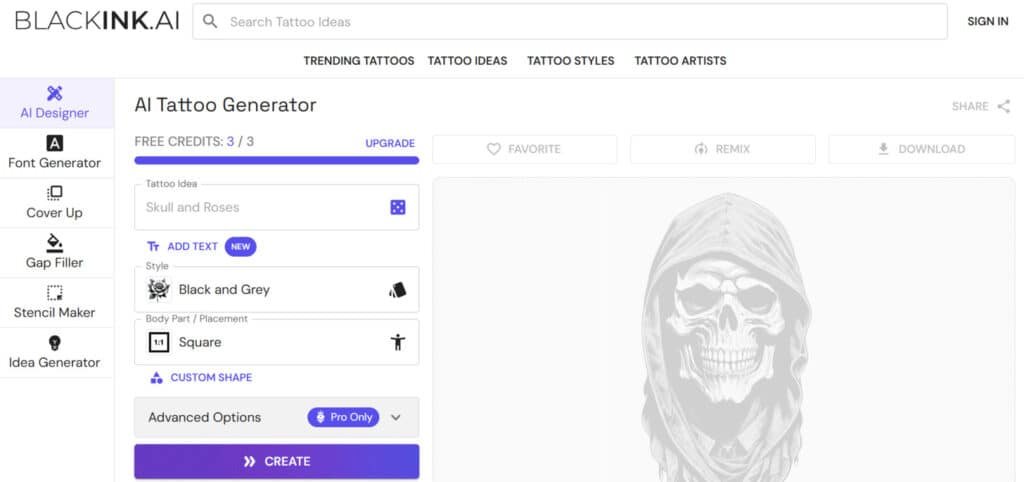
Its AI tattoo generator is a standout, where you describe your concept in words, pick a style like minimalist or traditional, adjust complexity, colors, and placement (like arm or back), and get unique designs ready to print.
I’m really impressed with the stencil maker, which converts any image or generated design into a clean, printable stencil for easy tattooing, plus the remix feature that lets you tweak and create variations quickly.
Other cool parts include a flash tattoo library with over 100,000 community ideas for inspiration, text and font tools for personalized quotes, and high-res downloads up to 4K for pro results. It also offers private saving to keep designs secure and body placement previews to see how it’ll look on skin.
BlackInk AI‘s ease and speed save tons of time over sketching or hunting ideas online, making it great for sparking creativity or collaborating with artists.
Introduction to BlackInk AI
The tattoo industry’s traditional process often leaves people second-guessing their permanent decisions. I’ve seen friends go through multiple artist consultations, sketch revisions, and that final leap of faith. It’s stressful when you’re committing something to your skin forever.
How It Fits into Today’s AI Landscape
In the current AI landscape, AI image generation exploded with tools like MidJourney and DALL-E creating stunning visuals. However, most platforms serve general art purposes. This specialized tool carved out a unique niche focusing exclusively on tattoo creation.
The technology understands tattoo-specific requirements that generic generators miss. It considers line weight, placement considerations, and style authenticity. This specialization makes it valuable for users seeking meaningful body art.
Company Background & Endorsements
BlackInk.ai uses advanced V2 AI trained specifically on tattoo aesthetics. The platform positions itself as “tattoo anxiety relief” rather than another art generator. This focus on peace of mind before permanent ink sets it apart.
Respected publications like Inked Magazine and The Information have recognized its innovation. This endorsement validates its credibility within the tattoo community. The platform serves first-timers, enthusiasts, and people seeking cover-up designs alike.
Having tested various AI tools, I appreciate how this one saves time and reduces uncertainty. It gives you confidence before making that permanent commitment.
What is BlackInk AI?
Imagine describing your dream tattoo in words and seeing it come to life in seconds. This web-based generator transforms text prompts into professional tattoo concepts almost instantly. I’ve found it remarkably efficient for exploring different artistic directions before committing to permanent ink.
Inner Workings of the Tool
The process begins with your creative input. You type a description like “Japanese-style dragon” or “minimalist mountain range.” The platform then generates 2-4 unique design options based on your preferences.
What makes this tool special is its tattoo-specific training. Unlike general art generators, it understands line weight, shading techniques, and how designs work on skin. The technology considers how artwork translates to different body placements and ages over time.
Customization options let you adjust complexity levels, color schemes, and line thickness. Each generated image is unique, even with identical prompts, ensuring personalization.
Benefits for Tattoo Enthusiasts
This approach significantly reduces tattoo anxiety. You can explore multiple styles quickly without costly artist consultations. The visualization helps build confidence before making permanent decisions.
The tool serves various users effectively. First-timers get clear visualization help. Experienced collectors discover fresh ideas. Those seeking cover-up solutions find tailored options.
| Traditional Process | AI-Assisted Approach | Key Advantage |
|---|---|---|
| Multiple artist consultations | Instant design generation | Time savings |
| Limited sketch revisions | Unlimited variations | Creative freedom |
| Higher consultation costs | Lower initial investment | Cost efficiency |
| Uncertain final result | Clear visualization | Confidence building |
Complete Features of BlackInk AI
Moving beyond simple image generation, the tool’s most impressive aspects are features tailored specifically for body art.
I found that each capability addresses a real pain point in the tattoo planning process.
1. AI Tattoo Generator (Text-to-Tattoo Design)
The AI tattoo generator serves as the foundation for creating custom tattoos through simple text inputs.
Allows users to enter prompts such as “geometric wolf” and receive 2-4 unique images in approximately 10 seconds.
This generator interprets tattoo-specific language, delivering accurate outputs for styles like “fine line” or “bold traditional.”
It produces four images per generation, with free access showing one while Pro unlocks all. For those who want a specific tattoo design, this feature streamlines the process by transforming vague ideas into visual concepts quickly.
Users searching for efficient tattoo design tools benefit from reduced time spent brainstorming, as the generator handles variations automatically.
This helps in exploring multiple tattoo options without manual sketching, ensuring the final image aligns with the intended idea. The speed and precision make it ideal for refining a tattoo want before consulting an artist, providing ready-to-use images that enhance decision-making.
Overall, it supports seamless tattoo design creation for various body placements.
2. Wide Style Selection & Customization
Wide style selection & customization offers an extensive library for crafting personalized tattoos.
The range includes authentic Japanese, watercolor, and minimalist options, each preserving true characteristics.
Allows users to modify complexity and line weight directly. With over 50 styles available, including realism, tribal, dotwork, and neo-traditional, it covers diverse tattoo preferences. Colors and saturation adjustments further refine the image.
Those who want a tailored tattoo design find this essential, as it prevents generic outputs. Readers seeking versatile tattoos gain from the ability to mix elements, producing unique images that match individual tastes.
This customization ensures every tattoo idea evolves into a distinct image, aiding in visualization. It helps by offering control over details, resulting in tattoos that feel authentic.
The feature supports creating images for any tattoo want, making the design process adaptable. High user reviews highlight its role in achieving professional-level tattoos without advanced skills.
3. Templates by Placement (Body Placement Matching)
Templates by placement, known as body placement matching, optimizes tattoos for specific anatomy.
It generates designs suited to areas like forearms or shoulders, considering curvature for natural flow.
This smart tool covers forearm, full sleeve, half sleeve, thigh, hand, shoulder, wrist, band, back, calf, chest, sternum, finger, and ankle placements. Aspect ratios and custom shapes integrate automatically.
For anyone who want a tattoo design that fits perfectly, this reduces anatomical mismatches. Readers exploring tattoos benefit from previews that show how the image wraps around the body, minimizing regrets.
It aids in planning tattoos by providing accurate images tailored to placement, enhancing overall satisfaction. The feature helps visualize the final tattoo idea in context, supporting better choices.
This ensures tattoos look balanced on skin, turning abstract ideas into practical images. It streamlines the journey from tattoo want to execution.
4. Detail & Complexity Controls
Detail & complexity controls provide sliders to adjust tattoo intricacy levels. Options include simple for clean outlines, medium for added shading, and complex for hyper-detailed realism.
Line weight and saturation tweaks offer further precision. This empowers fine-tuning of every image generated.
Users who want control over their tattoo design appreciate the granularity, avoiding overly busy or sparse tattoos. For searchers focused on custom tattoos, it delivers images that match exact specifications.
The controls help by scaling details to suit skin area or personal style, producing versatile tattoos. This feature refines any tattoo idea into polished images, ensuring the output meets expectations.
It supports creating tattoos that range from minimalist to elaborate, aiding in achieving the desired image. Overall, it enhances tattoo customization for optimal results.
5. Image-to-Stencil Conversion (Stencil Converter)
Image-to-stencil conversion transforms uploaded photos into clean, tattoo-ready stencils. The converter processes any image, generating printable outlines privately.
It supports remixing for hundreds of variations. Ideal for cover-ups or personal artwork, it bridges digital ideas to physical application.
Users needing practical tattoos find this invaluable, as it prepares images for artists directly. The tool helps by converting rough image inputs into professional stencils, saving preparation time.
This feature ensures tattoos start from accurate bases, enhancing transfer quality. For those with an existing image they want as a tattoo, it provides seamless transitions. It produces reliable images for tattoo design, making the process efficient.
User reviews praise its accuracy in handling complex image details for tattoos.
6. Coverup & Gap Filler
Coverup & gap filler tools create solutions for existing tattoos. For coverups, outline the area to receive blending suggestions that conceal old ink.
Gap fillers involve drawing spaces for themed infusions like florals or geometrics. This integrates new elements without clashing. Searchers dealing with regrettable tattoos benefit from targeted images that refresh their canvas.
The features help by generating seamless tattoo design options, improving overall aesthetics. It turns problematic tattoos into cohesive pieces using smart image overlays.
For a tattoo want involving repairs, it offers practical ideas. This ensures tattoos evolve positively, providing images that enhance without starting over.
It supports filling voids in larger tattoos effectively.
7. Font Generator (Built-In for Text Tats)
Font generator integrates text into tattoos with over 100 options, including cursive scripts, bold gothics, and clean sans-serif.
It curves letters to match body contours automatically. This built-in tool works within designs for quotes, names, or dates. Users incorporating words into tattoos gain from precise image previews. The generator helps by ensuring text fits naturally, avoiding distortions in the final tattoo.
It refines any tattoo idea with meaningful elements, producing balanced images. For symbolic tattoos, it delivers customizable image outputs.
This feature aids in creating personalized tattoos that convey messages clearly. It enhances tattoo design by merging typography seamlessly.
8. Idea Generator & Browsing
Idea generator & browsing supplies inspiration through trending and filtered tattoos.
Trending includes Oni Mask, Ladybug, Peacock, Godzilla, Joker, Berserk, plus Birds, Scripts, Butterfly, Western, Nature, Minimalistic. Featured showcases like Icarus Falling or Dragon with Red Spider Lily. Filters cover gender, body parts, themes (Skull, Space), symbols (Anxiety, Strength), floral, animals, celestial, and unique styles (Aztec, Egyptian).
Remix or save community images. This sparks ideas for new tattoos, helping readers overcome creative blocks. It provides diverse images to browse, refining the tattoo want. The tool aids in discovering fitting tattoo design through categorized images.
It supports exploring tattoos broadly, leading to informed choices.
9. Pro Extras for That Extra Edge
Pro extras unlock advanced capabilities for superior tattoos. Includes 4x super resolution downloads for crisp images.
Unlimited access removes generation limits. All images unlock during browsing. Mobile-friendly with beta AR previews. These elevate tattoo design quality.
Pricing Plans for BlackInk AI
I’ve found that transparent pricing eliminates one of the biggest anxieties in the tattoo planning process. The platform offers a clear path from testing to full access.
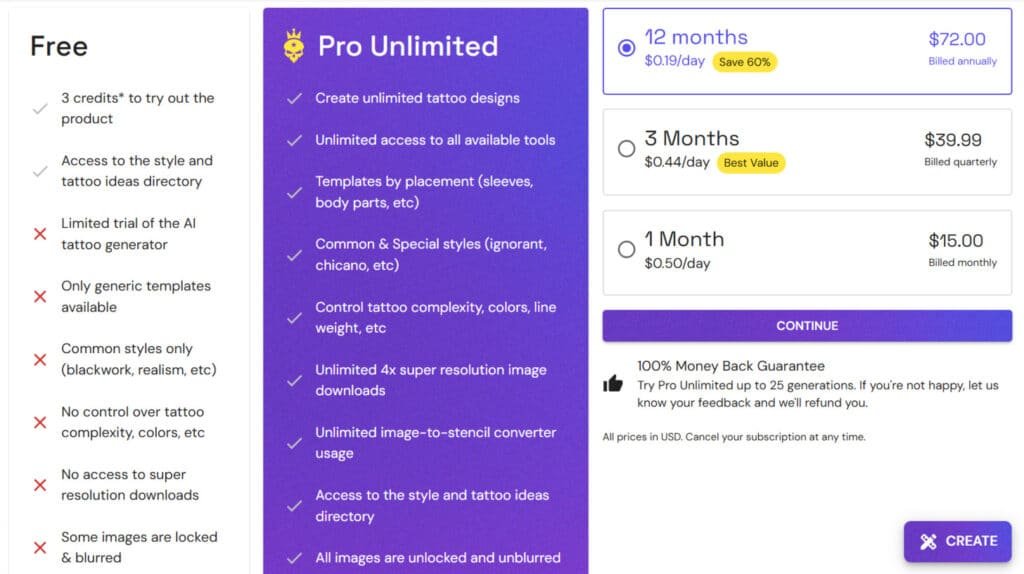
Free Trial and Starter Credits
New users get 3-5 free credits to test the platform. No payment information is required for this trial. Each credit generates 2-4 design variations.
This gives you enough time to create multiple concepts. The free trial includes basic style access but limits resolution and advanced features.
Pro Unlimited Subscription Options
The pro unlimited plan offers three subscription options. Monthly costs $15 ($0.50/day). Quarterly is $39.99 ($0.44/day). Annual saves 60% at $72 ($0.19/day).
Pro members get unlimited tattoo designs, high-resolution downloads, and full feature access. There’s a 100% money-back guarantee for up to 25 generations.
| Plan Type | Cost | Daily Rate | Best For |
|---|---|---|---|
| Monthly | $15/month | $0.50/day | Short-term projects |
| Quarterly | $39.99/3 months | $0.44/day | Regular users |
| Annual | $72/year | $0.19/day | Serious enthusiasts |
Pros & Cons of BlackInk AI
Every tool has its strengths and weaknesses, and this tattoo generator is no exception. After extensive testing, I’ve identified clear advantages and some limitations worth considering before you commit.
Advantages of Using This Tattoo Tool
The specialization is this platform’s greatest strength. Unlike generic art generators, it understands tattoo-specific requirements like how designs age on skin and appropriate line weights. This focus delivers quality results that feel authentic to the art form.
Speed is another major benefit. You can generate multiple design variations in about 10 seconds—faster than scheduling a single artist consultation. The features like body placement matching and stencil conversion bridge the gap between digital concepts and actual tattooing.
Drawbacks and Limitations
The main limitation is its niche focus. This tool offers zero value if you’re not interested in tattoos. The free trial provides only 3-5 credits, which might not be enough to fully evaluate the tool‘s capabilities across different styles.
While the AI produces professional-looking designs, it can’t replace an artist’s creative vision. Some users report occasional unpredictability where prompts yield unexpected results. There’s also no community platform for sharing inspiration.
| Key Advantages | Notable Limitations | Impact on Users |
|---|---|---|
| Tattoo-specific specialization | Extremely niche application | Perfect for enthusiasts, irrelevant for others |
| 10-second generation speed | Limited free trial credits | Quick ideation but brief testing period |
| Professional quality output | Less variety than human artists | Great starting point but not final artwork |
| Practical tattoo features | No community sharing options | Private tool without social inspiration |
While this platform excels in its specific niche, users seeking different capabilities or price points should consider alternatives we’ll explore next.
Alternatives To BlackInk AI
Before committing to any single platform, I always recommend checking out the competitive landscape. Several tools can create tattoo-style artwork, but they approach the task from different angles.
Comparisons with Alternative AI Tattoo Generators
Getting that perfect tattoo idea can take forever. I’ve felt the frustration—scrolling endlessly, not quite nailing the vision in your head.
BlackInk AI makes custom designs quick with unique prompts and try-ons. But if you’re hunting better AI tattoo design generation, especially with tools for image video editing or seamless integration into creative workflows, these stand out.
They blend text-to-tattoo magic with extras like previews and edits. Here’s a straightforward look.
Ink Studio AI
Ink Studio turns prompts into pro-level designs with styles, negative prompts, and virtual try-ons. Handles image-to-tattoo conversions too. Great for experimenting with placement and getting stencil-ready outputs – Read Full Review
Getimg.AI (AI Tattoo Generator)
Getimg.AI creates tattoos from text, plus realistic skin previews by uploading photos. Strong image video editing features like variations and color tweaks. Fits creators needing seamless integration with other art tools – Read Full Review
Imagine.Art (AI Tattoo Generator)
Imagine.Art generates detailed tattoos across styles, with easy refinements. Part of a bigger suite for broader visuals. Useful for quick ideas and tying into image video projects smoothly – Read Full Review
Phot.AI (AI Tattoo Generator)
Phot.AI crafts custom ink from descriptions, focusing on aesthetic and traditional vibes. Excels in photo enhancements and object tweaks. Perfect for realistic mocks with image video editing capabilities – Read Full Review
Simplified (AI Tattoo Generator)
Simplified offers high-res designs tailored to body parts and preferences. All-in-one for branding or merch visuals. Good seamless integration for teams handling multiple image video tasks – Read Full Review
| Tool | Key Focus | Best For | Pricing Starts |
|---|---|---|---|
| Ink Studio AI | Styles & virtual try-ons | Detailed planning | $14.99/week |
| Getimg.AI | Skin previews & variations | Realistic visualization | $12/month |
| Imagine.Art | Broad style generation | Quick creative sparks | $10/month |
| Phot.AI | Custom aesthetic designs | Photo-based mocks | Paid plans |
| Simplified | High-res personalized ink | Team & merch visuals | $9/month |
I recommend the specialized tool for focused tattoo design work. Choose Imagine.Art if you want broader creative control. GetImg.AI suits budget-conscious technical users, while Ink Studio AI works well for multi-purpose design projects.
Case Study / Personal Experience with BlackInk AI
The true measure of a design tool comes from hands-on testing with actual tattoo concepts you’d consider getting inked. I put this platform through rigorous evaluation to see if it delivers professional-quality results worth the subscription.
Real-World Results and Hands-On Testing
My testing methodology involved creating multiple tattoo designs across different styles and body placements. I started with a complex Japanese-style “dragon flying” concept for shoulder placement.
The generation time impressed me—about 10 seconds for four unique variations. The quality exceeded expectations with clean linework and authentic Japanese tattoo aesthetics.
Next, I tested a minimalist mountain scene for forearm placement. The results showed proper understanding of negative space and proportions optimized for body curvature.
My Personal Experience with the Tool
I’ll be honest—I was initially skeptical. Using my free credits, I generated a geometric compass design I’d been considering for months. Seeing professional variations in seconds was genuinely exciting.
The three free credits disappeared quickly as each generation sparked new ideas. I upgraded to the Pro plan to continue exploring different styles and placements thoroughly.
| Test Design | Generation Time | Result Quality | Practical Usefulness |
|---|---|---|---|
| Japanese Dragon | ~10 seconds | Professional tattoo aesthetics | Artist-ready designs |
| Minimalist Mountains | ~10 seconds | Clean lines, proper spacing | Body-optimized proportions |
| Geometric Compass | ~10 seconds | Precise symmetry | Ready for refinement |
Conclusion
Raamish’s Take
BlackInk AI is a straightforward tool that makes tattoo design simple and fast, turning your ideas into custom artwork in seconds without needing drawing skills.
Its AI tattoo generator is a standout, where you describe your concept in words, pick a style like minimalist or traditional, adjust complexity, colors, and placement (like arm or back), and get unique designs ready to print.
I’m really impressed with the stencil maker, which converts any image or generated design into a clean, printable stencil for easy tattooing, plus the remix feature that lets you tweak and create variations quickly.
Other cool parts include a flash tattoo library with over 100,000 community ideas for inspiration, text and font tools for personalized quotes, and high-res downloads up to 4K for pro results. It also offers private saving to keep designs secure and body placement previews to see how it’ll look on skin.
BlackInk AI‘s ease and speed save tons of time over sketching or hunting ideas online, making it great for sparking creativity or collaborating with artists.
After putting this specialized platform through its paces, I can confidently say it delivers exactly what it promises. BlackInk AI excels at its core mission: helping you visualize tattoo designs before making that permanent decision.
The tool‘s features like body placement matching and fast generation time provide real value. You get professional-quality results in authentic styles. The transparent pricing plan with money-back guarantee makes it worth trying.
Is it perfect? No—it’s extremely niche. But if you have a tattoo idea and want confidence before the ink, this generator is absolutely worth the investment. New users should start with the free credits to test the options.
I give BlackInk AI 9.3 out of 10 stars. It solves tattoo anxiety exceptionally well. Claim your free credits today and explore your designs with confidence!
Frequently Asked Questions
Does BlackInk AI offer a free trial?
Yes, you get a few free credits to test the art generator. It lets you create a couple of tattoo designs without paying. This is great for seeing if the tool fits your style before committing to a subscription plan.
What tattoo styles can I generate?
The platform offers a huge range of styles. You can create everything from classic American traditional and delicate linework to bold watercolor and geometric patterns. The style selection is one of its strongest features.
How long does it take to generate a design?
It’s incredibly fast. After you enter your prompts and preferences, the generator delivers results in under 30 seconds. You get multiple image options to choose from, saving you a ton of time.
Can I use it for tattoo cover-up ideas?
Absolutely. The image-to-stencil tool is perfect for this. You can upload a picture of your existing ink, and the AI will generate design options that effectively cover it up while creating a new, cohesive piece of art.
What’s the difference between the free credits and the Pro Unlimited plan?
The free trial gives you limited access with a small number of credits. The Pro Unlimited subscription removes all limits, giving you unlimited downloads, higher image resolution, and access to all advanced tools and features.
How accurate are the body placement suggestions?
The body placement matching feature is surprisingly helpful. It shows you how your chosen design will look on different parts of the body, like your forearm or back. This gives you a much better idea of the final result than just seeing the design alone.
Are the generated designs unique?
Yes, the AI creates original artwork based on your specific input. While you might see similar elements, the combination of your prompts, style choices, and customization options ensures your design is one-of-a-kind.