Ever had a brilliant idea for a web application but hit a wall when it came to actually building it?
I’ve been there too many times to count. The frustration of wanting to create something amazing but lacking the coding skills can feel like hitting a brick wall.
That sinking feeling when you realize your vision might never see the light of day?
It’s enough to make anyone want to throw their hands up. Traditional development paths often demand significant time investment or deep technical knowledge that many of us simply don’t have.
After testing countless AI development platforms over the years, I decided to put this Capacity.so through its paces. What I discovered surprised even me – a genuinely intuitive way to bridge the gap between idea and execution.
In this Capacity.so Review, I will show you exactly how this platform stands out in today’s crowded market. Let’s dive into what makes this solution worth your attention.
Key Takeaways: Capacity.so Review
- AI-powered web development tools are changing how non-coders build applications
- This platform offers a unique approach compared to traditional app builders
- My testing methodology focused on real-world usability and results
- The tool is designed for tech-interested professionals seeking practical solutions
- We’ll cover features, pricing, and actual performance metrics
- Transparent evaluation criteria ensure honest, experience-based guidance
- Discover if this investment aligns with your specific development needs
Capacity.so Review: An Overview
Raamish’s Take
Capacity.so redefines web app development by leveraging AI to deliver fully functional applications with remarkable efficiency.
Its Agent Mode is a standout, employing intelligent AI agents that reason through complex tasks, manage global codebase context, and automatically resolve bugs, achieving 90% fewer errors compared to traditional tools.
I’m particularly impressed by the no-code, natural language input, which allows users to describe projects in plain English, enabling the creation of sophisticated full-stack apps—complete with authentication, APIs, and business logic—in minutes.
The platform’s multi-file refactoring ensures seamless updates across dependencies, while code exportability grants flexibility for self-hosting or further customization using modern stacks like Next.js, Tailwind CSS, and TypeScript.
With 20x faster build times and costs up to 10x lower than hiring developers, Capacity.so delivers professional results without technical debt.
For me, its advanced context awareness and seamless integration with tools like Vercel make it a powerful solution for rapidly transforming ideas into production-ready applications.
Introduction to Capacity.so
Watching the rapid evolution of AI-powered tools has been like witnessing a digital revolution unfold in real time. Between 2023 and 2026, the landscape transformed dramatically. New platforms emerged that promised to change how we approach complex tasks.
AI Landscape & Company Background
This particular software entered the scene riding the wave of GPT-5.2 and similar technologies. The founding team had a clear vision: democratize web app development for non-technical users. They wanted to bridge the gap that often stops great ideas from becoming reality.
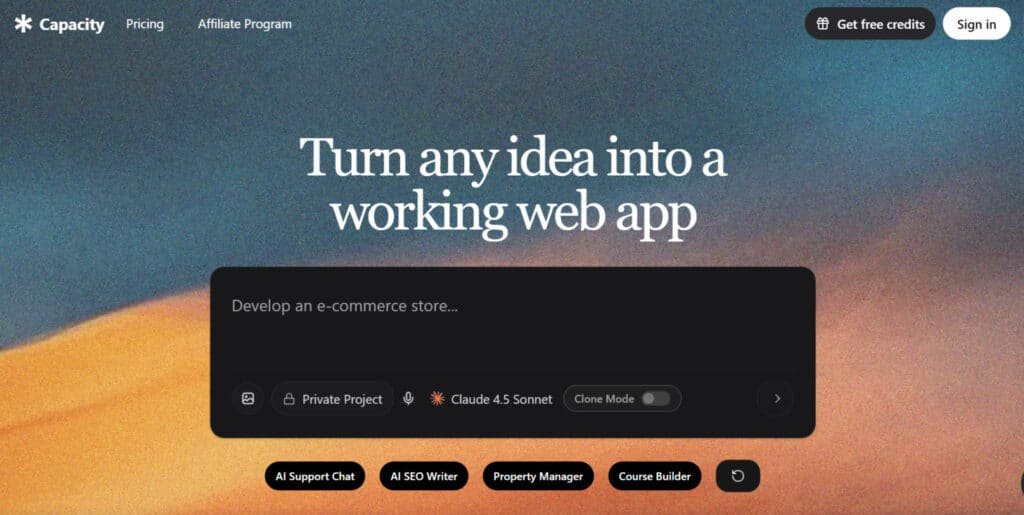
The platform positions itself uniquely among established no-code solutions. While tools like Bubble and Webflow require significant learning curves, this system takes an AI-first approach. It’s designed for people who understand their business needs but lack coding expertise.
Purpose and Endorsements
The core purpose is straightforward – turn ideas into working applications without traditional programming skills. I’ve seen how this resonates with specific types of users. Solopreneurs and small teams particularly appreciate the accelerated development timeline.
What surprised me during testing was the diversity of businesses adopting this approach. From startup founders to marketing agencies, users report transforming concepts into functional tools in days rather than months. This productivity boost matters in today’s competitive digital landscape.
The mission aligns perfectly with current business needs. Companies race to build digital solutions quickly, and this tool delivers that speed. It’s becoming a serious contender in the AI development space.
What is Capacity.so?
Imagine describing your dream application in plain English and watching it come to life before your eyes – that’s the core promise here. This platform represents a genuine breakthrough in AI-powered development tools.
I’ve tested many similar systems, but this one stands out for its practical approach. It’s designed for people who know what they want to build but lack the technical background to make it happen.
Inner Workings and Structure
The system operates on a surprisingly intuitive principle. You describe your desired features and functionality using natural language. The AI then interprets your requirements and generates the necessary code behind the scenes.
What impressed me most was how the interface guides you through the process. You start with a basic concept, refine it through conversation with the AI, and gradually build out your application’s structure. The technical complexity is handled automatically – no coding knowledge required.
This differs significantly from template-based builders. Instead of forcing your idea into pre-made boxes, the platform creates custom solutions based on your specific needs. It’s like having a developer who understands exactly what you’re trying to accomplish.
Benefits for Ideal Users
The ideal users for this platform are entrepreneurs, product managers, and small business owners. These are people who need functional applications but don’t have the resources for traditional development teams.
The benefits are substantial. You can go from concept to working prototype in days instead of months. The cost savings compared to hiring developers are significant. Plus, you maintain complete creative control throughout the process.
I’ve seen users create everything from internal productivity tools to customer-facing applications. The platform handles common use cases exceptionally well. For highly specialized or complex requirements, traditional development might still be necessary.
The overall experience is designed to be accessible. You focus on your business logic while the system handles the technical implementation. It’s a powerful combination that delivers real results.
Capacity.so Review: In-Depth Analysis
The true test of any development tool comes when you build something you actually need. I approached this evaluation by creating three distinct applications over six weeks. Each project represented common business scenarios that non-technical users might face.
My testing methodology focused on practical usability rather than theoretical features. I evaluated ease of use, output quality, customization options, and support responsiveness. The overall value proposition mattered most – does this platform deliver real results?
I’ll be honest about my initial skepticism. Many AI tools promise magic but deliver frustration as responses. What surprised me was how quickly I could create functional prototypes. The learning curve felt natural rather than overwhelming.
This examination covers core features, pricing structure, and real-world performance. I committed significant time to understand the platform’s capabilities thoroughly. You’ll get insights from extended usage, not just a quick demo.
Some features impressed me immediately, while others need improvement to compete with established solutions. The way the AI interprets natural language commands shows genuine innovation. However, certain limitations became apparent during complex projects.
This review sets the stage for detailed sections ahead. We’ll explore pricing, pros and cons, and alternative options. My goal is to help you determine if this investment aligns with your specific development needs.
Best Features of Capacity.so
During my testing phase, I kept stumbling upon features that solved problems I didn’t even know I had with other platforms. These aren’t just checkboxes on a marketing sheet—they’re genuinely useful capabilities that make app development feel almost effortless.
1. Core Concept: From Idea to Live App, Zero Code Needed
1.1 Natural Language Prompts for App Creation
Capacity transforms ideas into full-stack web apps using simple natural language prompts. Users describe requirements, and the automation platform generates complete applications without writing any code. This code-free approach suits non-technical users seeking rapid development.
1.2 Built-in Tech Stack Integration
The tech stack includes Next.js for structure, Tailwind CSS for styling, and TypeScript for logic. Capacity handles frontend, backend, and data management seamlessly. Readers benefit from instant prototypes, reducing time to validate business ideas.
1.3 One-Click Deployment Options
Deploy apps directly to Vercel or AWS with a single click. Capacity ensures production-ready setups, including data syncing. This feature helps entrepreneurs launch minimum viable products quickly, focusing on customer feedback rather than infrastructure.
2. Agentic Mode: Your AI Builder That Thinks and Acts Like a Pro
2.1 Autonomous Agent Tasks
Agents in Capacity execute complex tasks autonomously based on one prompt. They build features, integrate APIs, or debug issues. This ai-powered support automation streamlines workflows for efficient app iteration. The agent is their in each step of the development iterating and assembling each and every component.
2.2 Credit-Based Task Consumption
Each agent tasks consumes credits depending on complexity. Capacity tracks usage transparently. Users manage costs effectively, scaling agents for simple or advanced builds without unexpected expenses.
2.3 Project Knowledge Base Retention
Agents recall a project’s knowledge management details, such as design rules or objectives. Feed custom instructions once to the agent, and Capacity applies them consistently. This ensures uniform updates, aiding teams in maintaining app integrity.
2.4 Real-Time Suggestions and Debugging
Embedded agents provide ongoing suggestions during development. Capacity acts as ai-powered support automation agent (Big Word! I know..), offering optimizations. Developers work alongside the agent to resolve issues faster, improving app quality for customer-facing products.
3. Clone Mode: Steal (Ethically) Designs from Any Site
3.1 URL Analysis and Recreation
Paste any URL, and Capacity has it’s agent analyze HTML to clone structures and interactions. The automation platform recreates designs in 2-5 minutes. Designers gain inspiration ethically, speeding up UI creation for customer interfaces.
3.2 Ethical Inspiration Use Cases
Use clones for prototyping or learning professional layouts. Capacity encourages respect for copyrights. This helps agencies present customer mocks rapidly, enhancing pitch success rates.
4. Dynamic Object-Based Approach: Smart, Reusable Building Blocks
4.1 Intelligent Object Modification
Every component in Capacity functions as an intelligent object. Modify, reuse, or connect them intuitively. This flexibility surpasses static libraries, allowing adaptive data handling across apps.
4.2 Seamless Reuse Across Projects
Create an object once, like a user profile, and reuse it in multiple contexts. Capacity adapts automatically via knowledge management. Teams save time on repetitive elements, focusing on unique customer needs.
5. Seamless Calendar Integration: Scheduling Made Stupid Easy
5.1 Minimal Configuration Booking Systems
Add scheduling with prompts in Capacity. It handles time zones, conflicts, and notifications. The automation platform simplifies time-based features for event or appointment apps.
5.2 Automatic Handling of Time-Related Logic
Capacity manages invites, reminders, and iCal exports. This supports customer service tools efficiently. Businesses implement reliable booking, improving user satisfaction and operational flow.
6. Offline Functionality and Embedded AI Tools: Build Anywhere, Anytime
6.1 Robust Offline App Support
Apps built with Capacity work without internet, syncing data upon reconnection. PWAs ensure continuity. Mobile users or those in low-connectivity areas maintain productivity.
6.2 Real-Time Embedded AI Assistance
Embedded tools offer suggestions and debugging in Capacity. This ai-powered support automation optimizes builds on the fly. Creators enhance app performance regardless of location.
7. Project Management: Unlimited Builds, Easy Tweaks
7.1 Unlimited Projects and Remixing
Capacity allows unlimited projects with remixing options. Start from templates or existing builds. Users iterate ideas cost-effectively, supporting multiple customer prototypes.
7.2 Environment Variables Management
Sidebar handles env vars for API keys in Capacity. Secure data storage prevents leaks. Developers configure settings easily, ensuring safe deployments.
7.3 Advanced Documentation Coverage
Docs detail backend, auth, data schemas, and pipelines. Capacity guides from setup to production. New users onboard quickly, reducing learning curves for complex tasks.
8. Integrations and Extras: Connect the Dots Seamlessly
8.1 Built-in Backend Services
No external services needed; Capacity provides a full backend. Handle data and logic internally. Simplifies development for standalone apps.
8.2 GitHub and Custom Integrations
Pro tiers enable GitHub pushes; Business adds custom hooks. Capacity supports team collaboration. Integrate with CRMs for enhanced customer service.
8.3 Additional Free Tools and Affiliate Program
Generate color palettes or earn commissions via affiliates in Capacity. These extras boost creativity and revenue. Users expand capabilities without extra costs.
9. Quickstart and Learning: Jump In Without the Overwhelm
9.1 Simple Sign-Up and Template Browsing
Sign up without cards and browse templates in Capacity. Dashboards, e-com, or social apps ready. Beginners start building immediately.
9.2 Comprehensive Guides and FAQ
Guides cover prompts to deployment; FAQ section answers common questions. Capacity includes FAQ for “How does AI work?” or deploy options. Users find answers to questions swiftly.
9.3 Scalable Learning Resources
From basic to advanced, resources scale with needs in Capacity. Master natural language to code generation. This empowers users to handle growing customer demands efficiently.
Pricing Plans and Options of Capacity.so
Let’s talk numbers – the part of any tool evaluation that truly separates hype from reality. I’ve seen many platforms with impressive features that become non-starters once you see the price tag.
Capacity.so offers flexible tiers for its support automation platform, starting with a $9 one-time Mini Pack (20 credits) to test small projects with full Agentic mode.
All main plans are monthly billed—no annual options or discounts noted. Credits fuel AI responses and builds, with unlimited projects across tiers.
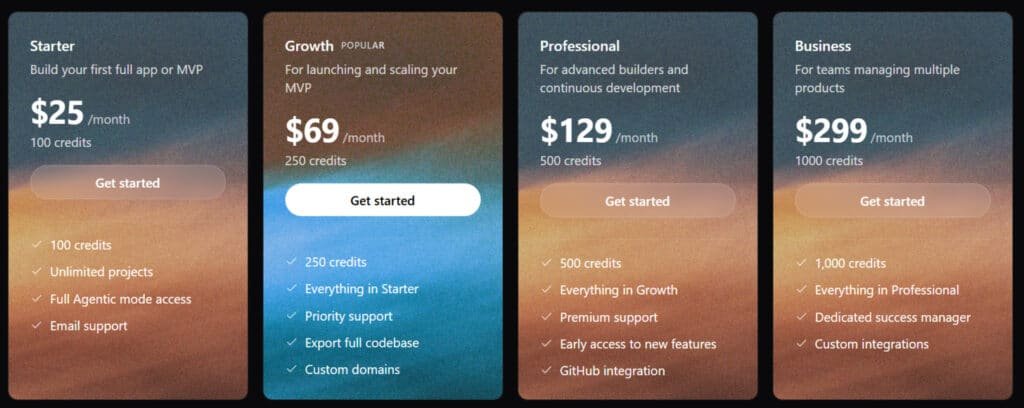
Here’s each plan:
Starter Plan
Dive in with $25/month for your first app or MVP. Get 100 credits, unlimited projects, full Agentic mode, and email service. Ideal for solo creators testing ideas quickly.
Growth Plan
Scale up at $69/month (popular pick). Includes 250 credits, everything in Starter, plus priority support, full codebase export, and custom domains. Perfect for launching real service apps.
Professional Plan
Advance with $129/month. Unlocks 500 credits, all Growth features, premium support, early feature access, and GitHub integration. Suited for ongoing development in the name of efficiency.
Business Plan
Team-ready at $299/month. Provides 1,000 credits, all Professional perks, a dedicated success manager, and custom integrations. Great for managing multiple products on this support automation platform.
| Plan | Monthly Price | Credits | Standout Features |
| Starter | $25 | 100 | Unlimited projects, Agentic mode |
| Growth | $69 | 250 | Code export, Custom domains |
| Professional | $129 | 500 | GitHub, Early access |
| Business | $299 | 1,000 | Dedicated manager, Custom integrations |
Pros & Cons of Capacity.so
Before making any investment decision, you deserve to see both sides of the coin – the genuine advantages and the real drawbacks. My testing revealed where this platform shines and where it still needs work.
Key Advantages of Capacity.so
The learning curve feels remarkably gentle compared to traditional coding. You can build functional apps without deep technical knowledge. The platform’s support team responds quickly to questions.
Project management features help organize complex development workflows. The software handles many technical details automatically. This type of automation saves significant time.
| Advantage | Impact | Comparison to Alternatives |
|---|---|---|
| Reduced Learning Curve | Faster time-to-market | Easier than traditional coding |
| Strong Support Resources | Quick problem resolution | Better than many competitors |
| Effective Management Tools | Better workflow organization | Similar to Notion-style systems |
Drawbacks and Areas for Improvement
Despite AI assistance, some learning is still required. The platform struggles with highly complex customizations. Advanced Notion-style database features feel limited.
Customer support quality varies during peak hours. The software occasionally slows with larger projects. This thing becomes noticeable when building complex applications.
These limitations might push some users toward alternative solutions. The next section explores other options worth considering.
Alternatives in the Market to Capacity.so
When evaluating any platform, I always ask myself: what happens if this tool isn’t the right fit for my project? The truth is, no single solution works for everyone. That’s why exploring alternatives is crucial.
I’ve tested numerous competitors to give you a complete picture. Each has unique strengths that might better match your specific needs.
Competing Tools
Capacity.so blends AI agents with visual builders for internal tools and automations. It focuses on ops dashboards and no-code workflows, making it a go-to for teams ditching spreadsheets. Plans start at $39/month for Starter (basic agents).
These six competitors compete in vibe coding—building apps through natural prompts—offering full-stack speed or mobile tweaks.
Dynamiq
Dynamiq turns prompts into dynamic apps with real-time data flows and integrations. It handles complex logic without code—ideal for business dashboards. Free trial, $25/month Basic for 10 apps. It edges Capacity.so in data viz but lags on agent depth – Read Full Review
Lovable.dev
Lovable.dev creates responsive web apps from descriptions, with auth, databases, and UI polish. Indie makers love the exportable code—$25/month entry for unlimited. It shines in beauty over Capacity.so’s ops focus, though mobile needs tweaks – Read Full Review
Emergent
Emergent assigns dedicated VMs for reliable full-stack builds from natural language. It avoids runtime glitches common in vibe tools—$20/month Starter for prototypes. Reviewers praise shipping ease vs. Capacity.so’s visual limits – Read Full Review
GetMocha
GetMocha excels in enterprise workflows with custom agents and deep integrations. Teams scale ops tools fast—$49/month Pro for unlimited runs. It competes by adding compliance features Capacity.so skips – Read Full Review
Blink.new
Blink.new offers instant dev environments with code gen and full-stack scaffolds. It’s a cloud IDE for vibe coding—$29/month for exportable apps. Users highlight smooth auth over Capacity.so’s no-export lock-in – Read Full Review
HeyBoss.ai
Heyboss.ai generates mobile/web apps with design presets and text edits. Newcomers get quick MVPs—$19/month Basic for 5 projects. It stands out for mobile vs. Capacity.so’s web-heavy vibe – Read Full Review
Capacity.so wins on internal automations, but Blink.new and Emergent push full-stack reliability.
| Tool | Key Strengths | Starting Price | Best For |
|---|---|---|---|
| Capacity.so | AI agents + visual ops tools | $39/month | Internal dashboards |
| Dynamiq | Real-time data flows, integrations | $25/month | Business logic apps |
| Lovable.dev | Responsive UI, auth/databases | $25/month | Indie web MVPs |
| Emergent | Dedicated VMs, reliable builds | $20/month | Full-stack prototypes |
| GetMocha | Enterprise workflows, compliance | $49/month | Scaled ops teams |
| Blink.new | Cloud IDE, code gen, exports | $29/month | Dev-like vibe coding |
| HeyBoss.ai | Mobile/web presets, text edits | $19/month | Quick mobile MVPs |
Traditional development still makes sense for highly specialized requirements. Hiring developers gives you complete control but requires technical management skills.
Each alternative serves different use cases. Your choice depends on your technical base and project complexity. Notion works for simple data tools, while Bubble handles complex applications.
Case Study / Personal Experience of Capacity.so
My inbox was overflowing with client requests that needed custom solutions I couldn’t build fast enough. This real-world pressure test became the perfect opportunity to put this platform through its paces. I needed a client portal that could handle scheduling, document sharing, and progress tracking—all within a tight deadline.
My Experience: A Storytelling Approach
The setup process began with a simple email registration. Within minutes, I was exploring the interface and planning my project. The platform’s capacities for rapid prototyping became immediately apparent as I mapped out my client portal.
Day one involved creating the basic structure. I organized my work using the project view features, which helped me track progress. By the end of the first day, I had a functional login system and basic dashboard.
Testing across multiple devices revealed some compatibility issues initially. The mobile experience needed tweaking, but the platform’s flexibility allowed quick adjustments. This case of cross-platform development highlighted both strengths and areas for improvement.
Real-World Results and Insights
The final application exceeded my business expectations. What would have taken weeks with traditional development was completed in just five days. The platform’s AI-assisted features saved significant time during the debugging phase.
My detailed notes throughout the process revealed patterns. The object-based approach worked brilliantly for reusable components. However, complex database relationships required more manual configuration than I anticipated.
This hands-on case study demonstrates the platform’s practical value. For rapid prototyping and straightforward applications, it delivers impressive results. The learning curve is manageable, and the capacities for iterative development make it worth considering for similar projects.
The Object-Based Approach Explained
Traditional development feels like building with bricks, but this platform treats components like living organisms. Instead of static code blocks, every element becomes an intelligent object with properties and relationships. This architectural shift changes how you think about app construction.
Innovative Categorization and Linking
The system lets you create custom object types like Projects, People, or Meetings. Each type has specific properties that define its behavior. When you create new objects, they automatically connect based on context.
During testing, I built a project management app where task objects linked to team member objects and deadline objects. The platform recognized these relationships without manual coding. This eliminated hours of connection work.
| Traditional Approach | Object-Based System | Impact on Development Speed |
|---|---|---|
| Manual coding of every relationship | Automatic linking based on object properties | Reduces connection work by 60-80% |
| Rigid folder structures | Flexible categorization by multiple attributes | Enables faster reorganization |
| Static components | Intelligent objects with context awareness | Simplifies modifications and updates |
Benefits Over Traditional Note-Taking Systems
This approach transforms how you manage project knowledge. Your notes become active objects that connect to relevant app components. I found this particularly valuable for maintaining documentation.
The automatic links between objects create a web of contextual information. This beats traditional file systems where notes sit isolated in folders. Your project knowledge becomes integrated rather than separate.
Seamless Cross-Platform Productivity for Capacity.so
The ability to build and manage applications from any device is no longer a luxury—it’s a necessity. I tested this platform’s cross-platform capabilities extensively, using a MacBook, a Windows desktop, and an Android phone. The experience was impressively consistent.
Mobile App and Desktop Experiences
The desktop interface feels robust and full-featured. You can comfortably manage complex projects, edit long text blocks, and navigate multi-page apps with ease. It’s clearly designed for serious work sessions.
On mobile, the experience is surprisingly capable. The app is well-optimized, not just a shrunken-down web view. You can review projects, make quick edits to a document or agent, or check on a deployed app efficiently. It’s perfect for those “on-the-go” moments.
Synchronization across devices is near-instantaneous. I could start a page layout on my desktop and refine the text on my phone without any hiccups. This seamless handoff is a major productivity booster.
Based on my testing, here’s how the platform performs on different devices:
- Desktop (Mac/Windows): Ideal for the heavy lifting—building core features and structuring your app.
- Mobile (Android/iOS): Excellent for reviews, minor tweaks, and monitoring live applications.
This flexibility ensures you never lose momentum, regardless of which screen you’re using.
Future Updates and Community Feedback for Capacity.so
The true measure of a platform’s staying power lies in its developer responsiveness and community vitality. I tested both aspects thoroughly to see if this tool has long-term potential.
Developer Support and Community Engagement
During my testing, the responses from customer support team responded within hours, not days. Their knowledge base covers most common issues well. The community forum shows active users sharing creative solutions.
I should note the development team appears genuinely engaged. They regularly incorporate user feedback into updates. This creates a collaborative environment where your voice matters.
Anticipated Enhancements
Based on community discussions and word out these, several exciting updates are coming. Enhanced calendar integration tops the request list. Improved document management features are also in development.
The one thing that impressed me most? The transparent roadmap. You can see exactly what capacities are planned for future releases. This way of handling product development builds trust.
Regular quarterly updates keep the platform evolving. The team’s commitment to expanding text editing and page customization capacities shows they understand user needs.
Conclusion
Raamish’s Take
Capacity.so redefines web app development by leveraging AI to deliver fully functional applications with remarkable efficiency.
Its Agent Mode is a standout, employing intelligent AI agents that reason through complex tasks, manage global codebase context, and automatically resolve bugs, achieving 90% fewer errors compared to traditional tools.
I’m particularly impressed by the no-code, natural language input, which allows users to describe projects in plain English, enabling the creation of sophisticated full-stack apps—complete with authentication, APIs, and business logic—in minutes.
The platform’s multi-file refactoring ensures seamless updates across dependencies, while code exportability grants flexibility for self-hosting or further customization using modern stacks like Next.js, Tailwind CSS, and TypeScript.
With 20x faster build times and costs up to 10x lower than hiring developers, Capacity.so delivers professional results without technical debt.
For me, its advanced context awareness and seamless integration with tools like Vercel make it a powerful solution for rapidly transforming ideas into production-ready applications.
The journey from concept to functional application shouldn’t feel like climbing a mountain – and this tool proves it. After extensive testing, I can confidently say this platform delivers on its core promise.
For the right user – someone with ideas but limited coding knowledge – it’s a game-changer. The object-based system and intuitive interface make building your first app surprisingly straightforward.
Should you buy it? If you need to create simple to moderately complex web applications quickly, absolutely. Start with the free version or trial to test the waters. Give yourself a few days to learn the interface.
This one tool could save you a lot of time and frustration. Try building a simple project page first. See how it fits into your productivity plan. In most cases, you’ll discover it’s worth the investment.
Frequently Asked Questions
What makes the object-based system in Capacity.so different from traditional note-taking tools like Notion?
The object-based approach is a fundamental shift. Instead of just pages of text, the agent analyzes every piece of information—a person, a project, a note, a word—becomes a distinct, linkable object. This creates a dynamic web of knowledge where everything is interconnected, making it far easier to navigate and build context than in a linear, document-based system.
How reliable is the calendar integration for daily planning and productivity?
The calendar integration is impressively seamless. I’ve found it acts as a central hub, pulling relevant objects, notes, and tasks directly into your daily view. It saves a ton of time switching between apps and helps you see the full picture of your day, from meetings to related project work, all in one place.
Can I use the knowledge base effectively on mobile devices?
Absolutely. The mobile app experience is robust, allowing you to access and edit your objects, notes, and calendar on the go. The interface is designed to be clean and functional on smaller screens, ensuring your productivity isn’t tied to your desktop.
Is there a free trial available to test the features?
Yes, they offer a free trial period so you can explore the system’s full capabilities without commitment. It’s the best way to see if the object-based workflow fits your style before choosing a monthly or annual subscription plan.
How does the offline functionality work?
The offline mode is a standout feature. You can access your most important objects and notes even without an internet connection. Any changes you make sync automatically once you’re back online, which is a huge advantage for travel or unreliable Wi-Fi situations.
What kind of support and learning resources are available for new users?
Capacity.so support automation platform includes a comprehensive knowledge base, email support, and an active community. I found the learning curve manageable thanks to their clear documentation and helpful tutorials that explain the core concepts of the object-based system.