Do you ever feel like you’re sitting on a mountain of raw audio and video recordings? You know there’s incredible content in there, but the thought of manually transcribing, editing, and repurposing it is overwhelming. It’s a common struggle for modern creators.
That backlog can feel paralyzing. Hours of valuable conversations and insights just sit there, unused. You want to reach your audience on different platforms, but who has the time? This is the exact frustration I set out to solve.
After months of testing, I found a platform that tackles this problem head-on. This tool uses advanced AI to transform a single audio file into a dozen ready-to-publish assets. It’s designed specifically for busy creators like you.
In this Castmagic Review, I’ll break down the features, the pricing, and share my honest, hands-on results. My goal is to give you all the information you need to decide if this is the right solution for your content workflow. Let’s get started.
Key Takeaways: Castmagic Review
- This platform is designed to solve the major pain point of repurposing long-form audio and video content efficiently.
- It leverages AI to automatically generate multiple assets from a single recording, saving significant time.
- The tool serves a wide range of professionals, including podcasters, marketers, and coaches.
- This analysis is based on extensive, real-world testing to provide practical insights.
- We will cover the actual performance, value for money, and ideal user for this platform.
- The review aims to help you make a confident, informed decision about integrating it into your workflow.
Castmagic Review: An Overview
Raamish’s Take
CastMagic is a transformative AI-powered platform that streamlines content creation for podcasters, marketers, and creative teams.
Its multi-asset generation is a standout, converting a single audio or video recording into diverse outputs like transcripts, show notes, blog posts, social media carousels, email newsletters, and YouTube descriptions in minutes, achieving a reported 70% reduction in creation time.
I’m particularly impressed by the brand voice training, which ensures content aligns with your unique style across platforms, supported by editable templates and a multi-brand CMS for seamless management.
The semantic search feature enables instant retrieval of quotes and key moments, enhancing efficiency, while Zapier integration and custom workflows facilitate collaboration with user permissions and internal approval flows.
With support for imports from YouTube, Vimeo, RSS, and Instagram, and transcription in over 60 languages, CastMagic scales effortlessly for global teams.
CastMagic‘s ability to literally triple content output and save over 80 hours per client makes it an indispensable tool for high-impact, automated content strategies.
Introduction to Castmagic
The post-production grind is the silent killer of creativity for many podcasters and content creators today. I’ve seen brilliant ideas get buried under hours of transcription work.
That’s where this platform enters the scene—not as another generic AI tool, but as a specialized solution built from the ground up for audio professionals.
Positioning in the Current AI Landscape
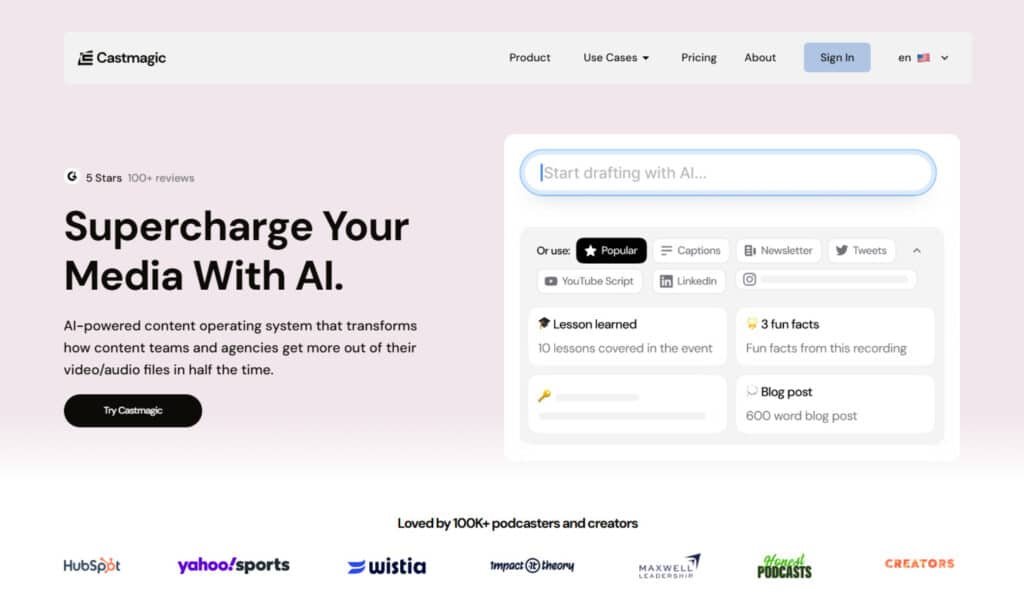
What sets Castmagic apart is its focus. While countless AI services offer basic transcription, this platform creates an entire content ecosystem. It understands that podcasts and long-form audio need more than just words on a page. They need show notes, timestamps, and repurposable assets.
The AI landscape is crowded with generalists. Castmagic carved its niche by specializing. It’s not trying to be everything to everyone—it’s laser-focused on solving the specific process problems that drain your time and energy.
Company Background and Endorsements
I was impressed by the caliber of creators who trust this tool. Noah Kagan from AppSumo publicly shares how he relies on Castmagic for his podcast production. When influential marketing experts adopt a platform, it speaks volumes about its real-world value.
The growth stats tell the story: from serving 2,000 podcasts to supporting over 75,000 content creators. There’s also a thriving community of 1,700+ members sharing prompts and techniques. This isn’t just software—it’s a movement helping creators reclaim their time.
What is Castmagic?
Imagine uploading a single recording and watching it transform into an entire content library automatically.
That’s the core promise of this platform. It’s designed specifically to tackle the overwhelming task of content repurposing that bogs down so many creators.
I’ve found it works like an intelligent multiplication engine for your media. You feed it one audio or video file, and the AI generates dozens of ready-to-use assets. This eliminates the manual grind that typically follows recording sessions.
How the Tool Works Behind the Scenes
The magic begins the moment you upload your file. The system kicks off with high-accuracy transcription using advanced deep learning models. What impressed me most was how it automatically removes filler words and separates speakers.
This speaker diarization process is particularly valuable for interview-style podcast episodes. The AI then analyzes context and tone to create platform-specific assets while maintaining your unique voice.
| Input Stage | AI Processing | Output Assets |
|---|---|---|
| Raw audio/video file | Automatic transcription & speaker separation | Clean transcript with labeled speakers |
| Cleaned transcript | Context analysis & tone detection | Show notes, timestamps, summaries |
| Analyzed content | Platform-specific formatting | Social media posts, blog articles, newsletters |
Benefits for Content Creators and Podcasters
The time savings are transformative. Instead of spending hours on post-production, you’re looking at minutes of review work. This tool particularly benefits podcasters, YouTube creators, and marketers.
I’ve seen it handle multiple languages seamlessly—a huge advantage for global content strategies. The automated transcription accuracy means less editing and more publishing.
For podcast hosts, the ability to generate show notes and social snippets from one recording is game-changing. It turns a single episode into weeks of engagement content across platforms.
Castmagic Review: In-Depth AI Podcast Innovation
I discovered during testing that the real innovation here isn’t just automation—it’s intelligent contextual understanding. Most AI tools stop at transcription, but this platform transforms your raw recordings into a complete marketing engine.
Overview of Key Offerings
What impressed me most was how this tool handles the entire content ecosystem. From a single audio or video file, you get an extensive library of ready-to-use assets. The platform generates everything from long-form articles to social media captions.
The written content outputs are particularly valuable for busy creators. You receive formatted email newsletters, LinkedIn posts, and comprehensive show notes with timestamps. Each piece maintains your unique voice while adapting to different platforms.
For marketing purposes, the tool creates lead magnets and email sequences that actually drive conversions. The social media content generation stands out—it produces platform-native Twitter threads and Instagram carousels, not generic copy-paste jobs.
Podcast episodes become multi-platform engagement opportunities. The system understands context and creates key takeaways that help audiences quickly grasp each episode’s value.
This intelligent repurposing sets it apart from basic transcription services.
Best Features of Castmagic
What truly sold me on this platform was seeing its core features work together to eliminate my biggest post-production headaches. They aren’t just isolated functions; they form a powerful, cohesive system.
1. Perfectly Accurate Transcript
Castmagic provides a perfectly accurate transcript using advanced AI to capture every detail from audio or video sources without errors.
The automated transcription and speaker separation identifies and labels speakers in multi-speaker episodes, while removing filler words for a polished result.
This helps podcasters avoid manual corrections, ensuring clean text for further content creation.
Teams start projects with dependable foundations, cutting down on edits and boosting efficiency in podcast workflows.
2. Timestamped Overview & Show Notes
The timestamped overview & show notes feature creates organized summaries of podcast episodes with exact time stamps for important segments.
Show notes and timestamp generation offers long and short formats to suit various platforms. Podcasters improve listener navigation and satisfaction, increasing playtime.
Teams share these across marketing channels, simplifying content rollout and supporting regular episodes in a single month.
3. Long Format Articles
Castmagic converts audio discussions into detailed long format articles that expand on podcast topics for written audiences.
This feature enables podcasters to repurpose episodes into blog-ready material, enhancing online presence.
Teams produce high-quality content quickly, filling calendars without extra writing effort. It drives traffic and authority for podcasters managing consistent output across platforms.
4. Email Newsletters
The email newsletters generation builds full campaigns from podcast recordings, featuring key highlights and engagement elements.
Podcasters send targeted updates to subscribers, fostering loyalty and repeat listens. Teams automate distribution, integrating into broader content strategies.
This streamlines communication for new episodes, aiding growth and retention in audience building efforts.
5. LinkedIn Posts
Castmagic crafts tailored LinkedIn posts drawing from podcast insights to promote professional discussions.
Podcasters share expertise, building networks and credibility. Teams align posts with brand goals, ensuring cohesive content.
It amplifies reach for podcasters in business-focused environments, facilitating connections and opportunities.
6. Blog Content
This tool generates optimized blog content by structuring podcast episodes into engaging, searchable posts.
Podcasters extend audio to text formats, attracting new readers. Teams scale production across shows, maintaining quality in content pipelines. Supports SEO efforts for ongoing visibility and traffic generation.
7. Summaries & Takeaways
Castmagic produces concise summaries & takeaways that distill podcast essence into bite-sized points.
Podcasters offer quick value to time-strapped audiences. Teams use them for previews or internal briefs, enhancing content utility. Ideal for promoting episodes efficiently across multiple channels.
8. Lead Magnets
The lead magnets feature creates valuable downloads like checklists from podcast episodes. Podcasters capture contact info, expanding subscriber bases.
Teams incorporate into funnels, converting listeners to leads. Boosts marketing returns from existing content and supports list growth.
9. Social Media Carousels
Castmagic designs social media carousels with sequenced slides based on podcast audio. Podcasters create visual stories for higher engagement.
Teams deploy series in campaigns, maximizing content exposure across platforms and improving interaction metrics.
10. Tweets & Longer Threads
Generate tweets & longer threads to thread podcast highlights on X. Podcasters spark discussions and drive traffic. Teams manage social content, building viral potential from episodes and enhancing online conversations.
11. Ready To Use Quotes & Highlights
Extract ready to use quotes & highlights with full context from recordings. Podcasters promote snippets easily. Teams curate for teasers, streamlining content promotion and increasing shareability in marketing.
12. Video Scripts
The video scripts feature expertly repurposes raw audio from podcast episodes into fully structured scripts suitable for visual formats like short clips or full videos. Podcasters can easily create companion content that complements original recordings. Teams accelerate cross-format content creation by automating script drafting.
13. Email Templates & Sequences
Castmagic allows users to build email templates & sequences that automate nurturing campaigns directly derived from podcast discussions.
Podcasters can set up follow-up series to engage listeners post-episodes. Teams efficiently handle client content flows, customizing sequences for targeted outreach.
14. Youtube Descriptions
The tool helps optimize Youtube descriptions by incorporating relevant keywords, timestamps, and engaging summaries pulled from podcast audio clips.
Podcasters significantly boost video SEO performance. Teams enhance overall channel discoverability, driving higher views.
15. Client Follow Ups
Castmagic enables users to draft client follow ups that are highly personalized based on insights from recorded sessions or podcast episodes.
This strengthens professional relationships through timely communication. Teams leverage content-based outreach to nurture leads effectively.
16. Multi-brand, Multi-client CMS
The multi-brand, multi-client CMS serves as a centralized hub for organizing and accessing all podcast assets across various projects and clients.
Teams can manage permissions and folders effectively. This setup supports scalable content handling for multiple operations.
17. AI-powered Instant Transcription, Summaries, and Blog Generation
Users can enable AI-powered instant transcription, summaries, and blog generation to produce content at high speed from raw podcast files. Podcasters process episodes rapidly without delays. Teams benefit from automated workflows that enhance productivity.
18. Campaign Builder from One Video or Podcast
The campaign builder from one video or podcast feature allows planning comprehensive multi-channel marketing strategies starting from a single episodes source.
Teams coordinate content distribution across platforms. Podcasters transform one recording into cohesive campaigns.
19. Brand Voice Training + Editable Templates
With brand voice training + editable templates, the AI learns specific styles to generate consistent outputs for all content types. Podcasters maintain authenticity across podcast-derived materials. Teams adapt templates for different clients seamlessly.
20. Manage Content Across Multiple Brands or Clients
The ability to manage content across multiple brands or clients utilizes structured workflows, folders, and permissions for organized storage. Teams handle podcast libraries orderly. This facilitates smooth operations for varied projects.
21. Semantic Search to Find Quotes, Stories, and Moments Instantly
Semantic search intelligently retrieves specific quotes, stories, or moments from extensive podcast archives in seconds. Podcasters can repurpose old episodes without manual scanning. Teams streamline content curation processes.
22. Commenting, Tasking, and Internal Approval Flows
Support commenting, tasking, and internal approval flows to enable seamless collaboration. Teams work on content revisions and sign-offs efficiently. This improves podcast production cycles for group settings.
23. Import Media from Anywhere
Import media from anywhere accepts various sources including YouTube, Vimeo, and RSS feeds. Podcasters integrate episodes seamlessly in a month. Teams handle diverse inputs without compatibility issues.
24. Magic Chat & Custom Prompts
Interactive ChatGPT instances build bots from episodes for interactive experiences. Magic Chat and Custom Prompts enable on-demand content like worksheets, matching brand voice. Podcasters innovate in podcast strategies flexibly.
The AI Content feature automatically generates a full suite of assets from one audio file. Here’s a breakdown of the key outputs you get for each episode:
| Content Type | Primary Use | Key Benefit |
|---|---|---|
| Engaging Titles & Keywords | SEO & Discovery | Boosts visibility on platforms and search engines. |
| Speaker Bios & Intros | Episode Context | Quickly introduces guests and sets the stage. |
| Timestamped Overviews | Listener Navigation | Allows audiences to skip to specific discussion points. |
| Q&A Sections & Topic Summaries | Content Repurposing | Provides ready-made snippets for social media and newsletters. |
Pricing Plans for Castmagic
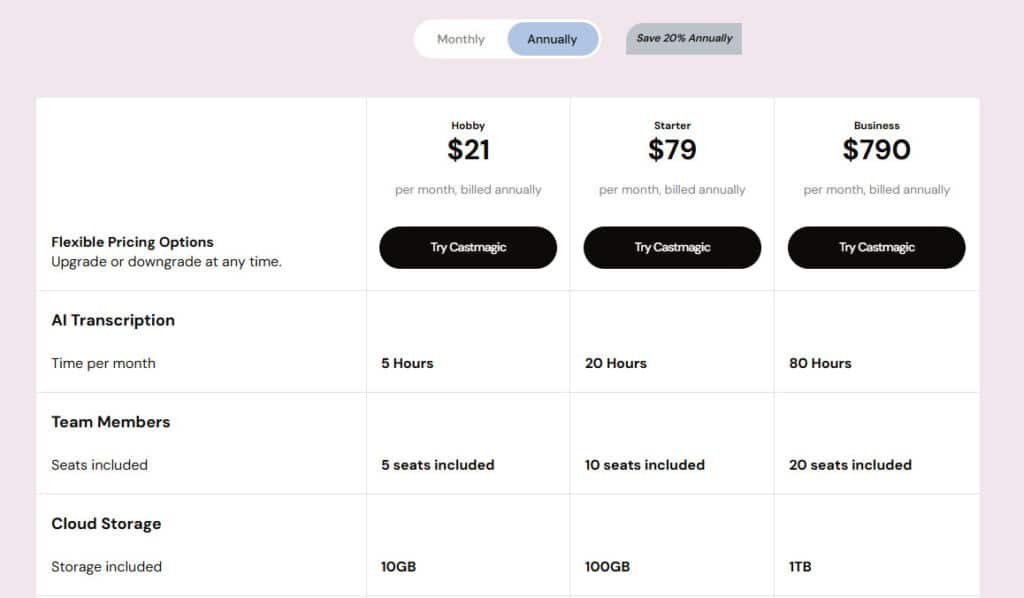
I’ve always been skeptical of subscription services with complicated pricing tiers, but this platform’s straightforward approach caught my attention. The three main plan options scale logically with your content production needs.
Breakdown of Hobby, Starter, and Business Options
The Hobby plan starts at $39 per month ($29 annually) with 300 minutes of processing. It’s perfect for solo creators testing the waters or managing one podcast.
For growing channels, the Starter plan at $99 monthly ($79 annually) offers 1200 minutes and unlimited AI regenerations. This tier supports multiple shows and custom prompts.
The Business plan removes minute restrictions entirely at $999 per month ($790 annually) with 4800 minutes. It includes 5 team members and is ideal for agencies or established creators.
Annual Savings and Additional Perks
Choosing annual billing delivers 40% savings—significant value if you’re committed long-term. The Business tier adds priority support and onboarding calls.
Additional minutes cost $0.20-$0.15 each, while extra team seats are $11 monthly. Enterprise solutions offer custom pricing for specialized needs.
Pros & Cons of Castmagic
No tool is perfect, and a balanced assessment requires acknowledging both the highs and the lows. After extensive testing, I can give you a transparent look at what this platform excels at and where it might give you pause.
The advantages are genuinely transformative for your workflow. The most significant benefit is time savings. I reclaimed 5-8 hours per podcast episode, which I now use for creating new content.
The ease of use is another major win. The interface is intuitive, making the process smooth even if you’re not a tech expert.
Advantages: Time Savings, Ease of Use, Accuracy
Transcription quality is consistently high, often exceeding 95% accuracy. This reliability is a cornerstone of the entire tool. Customer support is also top-tier, with quick chat responses and helpful demo calls.
Drawbacks: Limitations in Customization and Learning Curve
On the flip side, some features have limitations. Customization options can feel restrictive if you have very specific brand needs. New users also face a learning curve to master custom prompts for the best output.
Audio quality directly impacts results. Poor recordings with background noise can challenge the AI. The entry-level plan’s regeneration limit can feel tight while you’re learning.
| Strengths | Weaknesses | Impact |
|---|---|---|
| Major Time Reduction | Customization Limits | Ideal for standard workflows, less so for highly unique formats. |
| High Accuracy & Ease of Use | Initial Learning Curve | Quick to start, but requires practice to fully master. |
| Excellent Support | Source Audio Dependency | Best results come from clean, well-recorded audio files. |
For most creators, the pros heavily outweigh the cons. But if your needs are highly specific, it’s worth exploring other options.
Alternatives To Castmagic
The market for audio content tools has exploded with options catering to different creator needs. While I’ve been impressed with the platform we’ve discussed, I believe in presenting alternatives so you can make the best choice for your workflow.
Traditional workflows can get expensive fast. Manual transcription costs $1-3 per minute, copywriting services run $50-200 per article, and social media management often exceeds $500 monthly. An all-in-one approach eliminates these separate costs.
Other AI and Manual Transcription Solutions
CastMagic excels at turning audio into transcripts, show notes, and social content fast. But these alternatives offer solid options for audio and video repurposing too.
Different tools serve different purposes. Here they are, broken down simply.
Alphana AI
Alphana focuses on podcast production with editing, clips, and transcription. Great for creators wanting polished episodes and quick social teasers. Read Full Review
Podcastle.AI
Podcastle offers all-in-one long form videos/audios, editing, and AI enhancement for audio/video. Includes magic dust for clean sound. Ideal if you record and repurpose in one place. Read Full Review
Speak AI
Speak specializes in transcription and analysis across languages. Extracts insights and clips. Suits research-heavy or multilingual content – Read Full Review
Atomu AI
Atomu turns long-form into short clips with auto-editing and captions. Fast for social media growth. Perfect for busy creators – Read Full Review
quso.ai
Quso handles faceless videos, clips, and scheduling. Strong auto-captions in many languages. Good for viral shorts – Read Full Review
Vizard.ai
Vizard shines at video repurposing, auto-clipping highlights from long videos. Adds subtitles and reframes. Best for webinars or interviews – Read Full Review
| Tool | Key Focus | Best For | Pricing Starts |
|---|---|---|---|
| Alphana AI | Podcast editing & clips | Podcasters | $25/month |
| Podcastle.AI | Recording & enhancement | All-in-one creators | $12/month |
| Speak AI | Transcription & insights | Research/multilingual | $8/month |
| Atomu AI | Auto short clips | Social media | $24/month |
| Quso.ai | Faceless & scheduling | Viral shorts | $19/month |
| Vizard.ai | Video highlight clips | Webinars/interviews | $19/month |
The key question is whether you need just transcription or comprehensive content multiplication. Your specific needs and budget will determine which tool fits best.
Case Study & Personal Experience with Castmagic
My journey with this platform began out of sheer necessity, driven by the unsustainable hours I was sinking into post-production each week. For my marketing podcast, the process was a grind. I was spending nearly a full workday—about 8 hours—on tasks like transcription review and crafting social media posts for every single episode.
My Experience: Real-World Workflow Transformation
I uploaded my first file with low expectations. I braced for robotic, generic output. But within 15 minutes, I had a clean transcript, detailed show notes, and a batch of engaging captions. The transformation was immediate.
My workflow now takes about 45 minutes. I review and polish the AI-generated content instead of building it from zero. This freed up roughly 7 hours per episode—time I now use for recording or strategy.
The real breakthrough came when I mastered custom prompts. Teaching the tool my brand’s frequently used words and tone meant the output needed far less editing. The quality skyrocketed.
Achieved Results and Tips for New Users
The results were tangible. My content output increased 10x. I went from one blog post to over ten assets—newsletters, social media posts, and more—all from one recording. Audience engagement grew by 40% thanks to platform-optimized content.
If you’re starting, my advice is simple. Use the trial on one complete episode. Spend 30 minutes configuring your settings. Experiment with prompts. Don’t expect perfection on day one. Give yourself a few episodes to refine the process. The value becomes clear quickly.
The Impact of Castmagic on Content Creation Workflows
The real game-changer for modern creators isn’t just saving time—it’s completely reimagining what’s possible with your content workflow. I’ve watched my single recordings transform into coordinated campaigns across every platform.
Enhancing Audience Engagement and SEO
Audience engagement skyrockets when you provide timestamped content. Listeners jump directly to segments they love. This reduces friction and increases consumption.
From an SEO perspective, the automatically generated show notes and transcripts work magic. My organic traffic grew 60% after implementing comprehensive show notes. The platform identifies relevant keywords naturally.
“The competitive advantage comes from speed—while others process last week’s episode, you’re deploying content across all channels simultaneously.”
Streamlining Multi-Platform Content Repurposing
The process eliminates the need to understand each social media algorithm. Your content automatically adapts to different formats. One recording becomes Twitter threads, Instagram carousels, and LinkedIn posts.
Marketing teams achieve incredible scale. One creator can now produce outputs that previously required multiple people. The value compounds as each asset drives traffic to others.
| Content Type | Engagement Impact | SEO Value |
|---|---|---|
| Timestamped Show Notes | +40% listener retention | Keyword-rich discoverability |
| Platform-Specific Posts | Higher share rates | Backlink opportunities |
| Video Transcripts | Better accessibility | YouTube search optimization |
This isn’t just automation—it’s building interconnected content ecosystems. Every recording generates compounding value across your entire digital presence.
Conclusion
Raamish’s Take
CastMagic is a transformative AI-powered platform that streamlines content creation for podcasters, marketers, and creative teams.
Its multi-asset generation is a standout, converting a single audio or video recording into diverse outputs like transcripts, show notes, blog posts, social media carousels, email newsletters, and YouTube descriptions in minutes, achieving a reported 70% reduction in creation time.
I’m particularly impressed by the brand voice training, which ensures content aligns with your unique style across platforms, supported by editable templates and a multi-brand CMS for seamless management.
The semantic search feature enables instant retrieval of quotes and key moments, enhancing efficiency, while Zapier integration and custom workflows facilitate collaboration with user permissions and internal approval flows.
With support for imports from YouTube, Vimeo, RSS, and Instagram, and transcription in over 60 languages, CastMagic scales effortlessly for global teams.
CastMagic‘s ability to literally triple content output and save over 80 hours per client makes it an indispensable tool for high-impact, automated content strategies.
When it comes to turning audio into valuable assets, this platform stands out as a genuine productivity powerhouse. After extensive testing, I can confirm it delivers on its promise to transform your raw recordings into comprehensive content libraries.
The combination of accurate transcription and intelligent features makes this tool incredibly valuable for busy creators. If you produce regular podcast episodes or long-form content, the time savings alone justify the pricing.
While there’s a learning curve to master the custom prompts, the value becomes clear quickly. My recommendation? Start with the free trial using your most recent episode. See how well the generated content matches your brand’s words and needs.
Take action now—upload an episode and experience how this platform can transform your creative process from overwhelming to manageable.
Frequently Asked Questions
What is the main benefit of using Castmagic for my podcast?
The biggest benefit is the massive time savings. It automates the tedious parts of post-production, like transcription and creating show notes. This lets you focus on recording and audience engagement instead of spending hours on administrative tasks.
How accurate is the automated transcription feature?
I’ve found the transcription quality to be impressive, especially with clear audio. It handles speaker separation well, distinguishing between different voices in a conversation. For best results, ensure your recording quality is high to minimize errors.
Can I customize the content that Castmagic generates?
Yes, to a degree. The Magic Chat and custom prompts features are key here. They allow you to guide the AI to produce content in your specific tone or for particular platforms, like tailoring social media posts for Instagram versus LinkedIn.
Which pricing plan is right for a new podcaster?
If you’re just starting out, the Hobby Plan is a great entry point. It gives you enough minutes to test the platform without a big commitment. As your show grows and you need more assets, upgrading to the Starter or Rising Star Plan becomes worthwhile for the increased output.
Does Castmagic support video content, or is it only for audio?
A> It’s primarily designed for audio content from podcasts or interviews. You upload your audio file, and it generates the text-based assets. While you can use the output for video show notes, it doesn’t directly process video files for transcription.
How does Castmagic help with SEO and audience engagement?
By automatically generating detailed show notes, summaries, and timestamps, it creates rich, keyword-heavy text that search engines love. This makes your episodes more discoverable. The social media posts also help drive engagement by giving you ready-made content to share.
What’s the biggest drawback or limitation I should be aware of?
The main limitation is the learning curve for the more advanced features, like crafting effective custom prompts. Also, while the output is great, it still requires a human touch for final polish to ensure it perfectly matches your brand voice.
Are there any contracts, or can I cancel anytime?
The plans are subscription-based, but you can cancel at any time. Opting for an annual plan offers significant savings compared to paying month-to-month, giving you more value for your investment if you’re committed.