You need fast, high-quality content for marketing, but manual writing steals your time and drains resources. You’ve tried AI tools that promise speed but deliver bland drafts or content flagged by detectors.
I tested this tool to see if it really speeds up workflows without sacrificing quality. I wanted clear answers on ease of use, real-world features, and whether the content holds up in SEO and detection tests.
The platform proved capable—strong templates, long-form article generation, and useful workflow aids. My hands-on testing gave concrete scores (Ease 9.5/10, Features 9.7/10, Speed 9.4/10) and showed where edits matter.
In this Copymatic review will walk you through what it does well, where it struggles, pricing, who benefits, and practical tips to protect content authenticity. Ready to decide faster?
Let’s dive in.
Key Takeaways: Copymatic Review
- Speed and usability: Great for rapid drafts and workflows.
- Quality: Good outputs but often need human edits for polish.
- Features: Strong template set and long-form tools.
- SEO & detection: Some AI flags appeared—mitigation needed.
- Best for: Agencies, freelancers, and SMBs seeking volume and ROI.
Copymatic Review: An Overview
Raamish’s Take
Copymatic is a versatile AI-powered writing tool designed to streamline content creation for businesses and creators.
It leverages GPT AI Model technology to produce unique, SEO-optimized, and plagiarism-free content in seconds, from blog posts to social media ads and eCommerce product descriptions.
I’m impressed by its ability to generate 1,000+ word articles from a simple prompt, making it a time-saver for content marketers.
The Chrome extension with 80+ writing tools, including the CopyChat AI assistant, lets you create content directly in your browser, which is a game-changer for efficiency.
Features like grammar checks, sentence rewriters, and tone adjustments ensure polished, conversion-focused copy.
With support for multiple languages (English, Spanish, French, German, Hindi, and more), it’s ideal for global reach.
It offers a WordPress plugin which simplifies publishing, and automatic keyword research plus SEO recommendations help boost organic traffic.
Copymatic’s low 2% plagiarism rate ensures originality, making it a reliable choice for professional content creation.
Introduction to Copymatic: Where It Fits in Today’s AI Content Landscape
As content demand grows, AI platforms step in to keep quality and speed aligned.
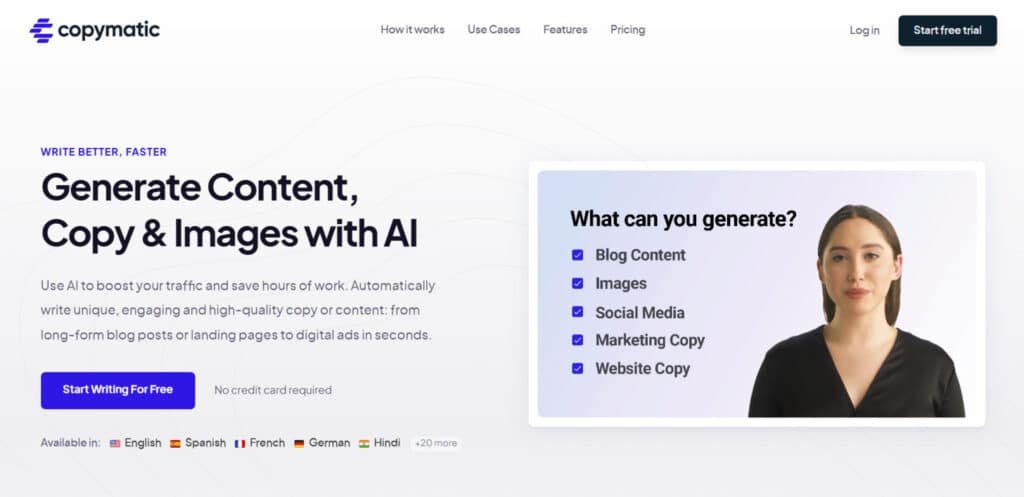
I’ve tested the platform to see how it sits in a crowded AI market. This is a practical, production-focused offering with 80+ tools for blogs, ads, landing pages, metadata, SEO ideas, testimonials, and an image generator. It targets small businesses, entrepreneurs, and lean marketing teams that need steady output without large budgets.
Why AI-powered content matters now
AI-powered content is table stakes: search favors fresh, frequent posts and teams must scale without hiring full editorial staffs. The platform helps you generate structured drafts fast—then refine for brand voice and accuracy.
Background and positioning of the platform
This platform positions itself as a practical, cost-conscious tool for creators and businesses. In my testing, onboarding had clear prompts and the reported ease score (9/10) matched the experience. Speed and feature depth scored 8/10.
Who endorses and uses it
- Freelancers and agencies handling multiple clients.
- Small marketing teams that need volume without overhead.
- Entrepreneurs who want quick, SEO-aware drafts to edit.
“It’s built for practical production rather than research-heavy thought leadership.”
| Audience | Primary Need | Benefit |
|---|---|---|
| Freelancers | Fast drafts | Save time on outlines and first drafts |
| SMBs | Consistent posts | Unlimited words at low cost |
| Agencies | Multi-format output | Switch between blogs, ads, and pages |
What Is Copymatic?
At its core, the product is a prompt-driven engine that produces structured content for multiple formats.
Copymatic is an AI content generator and writing tool that turns short briefs into long-form drafts—blogs, landing pages, ads, and more.
The platform runs transformer-based models and NLP pipelines to interpret your outline and produce coherent content. That back-end lets the generator map intent to structure fast, so you spend less time on blank pages.
Benefits at a glance:
- Speed: Create long-form writing in minutes, not hours.
- Scale: Unlimited words per plan—batch content without quotas.
- SEO-readiness: Keyword ideas and on-page cues help align draft text to search intent.
- Workflow: One place to draft, edit, check originality, and export—so the user can stay focused.
The built-in plagiarism checks and originality safeguards support quality control. In practice, I find it covers about 80% of everyday needs for SMBs and agencies—giving you momentum while leaving editorial judgment where it matters.
Best Features of Copymatic
I found several features that save time and raise baseline quality for routine content tasks.
1. Core Content Generation
Copymatic offers a robust set of tools designed to streamline content creation, making it a top choice for businesses seeking efficient, high-quality output. These features enable users to produce diverse types content quickly, from blog posts to ads, saving time and boosting productivity for those searching for a reliable writing tool.
1.1 AI Content Writer
The AI Content Writer transforms brief inputs into detailed, SEO-optimized articles exceeding 1,000 words. It generates elements like titles, intros, outlines, and conclusions, ensuring text is unique and plagiarism-free. This tool is ideal for bloggers and marketers aiming to scale content production without sacrificing quality, helping readers achieve consistent output.
1.2 Copy Generation Tools
With over 50 specialized writing tools, Copymatic offers solutions for social media ads, landing pages, and more. These tools produce human-like text in seconds, perfect for users needing quick, engaging copy. Readers benefit from versatile options that cater to various marketing needs, enhancing campaign efficiency.
1.3 Image Generation
This feature creates AI-powered images alongside text, complemented by stock image integration. It’s valuable for readers seeking visually appealing content to pair with their copy, streamlining design processes and ensuring cohesive branding for websites or social media.
1.4 Autopilot Projects
Autopilot automates content workflows, with 1, 3, or 10 projects depending on the plan. It handles research to publishing, saving time for users managing multiple campaigns. Readers with high-volume needs find this tool simplifies large-scale content strategies, improving efficiency.
2. AI Customization and Optimization
Copymatic’s customization features allow precise control over content tone and style, ensuring alignment with business goals. These tools optimize output for search engines and conversions, helping readers create impactful content that ranks well and drives results.
2.1 Powered by GPT
Using GPT-3, Copymatic delivers natural, creative text. This advanced AI ensures content feels human-crafted, benefiting readers who need authentic copy for their audience, enhancing trust and engagement.
2.2 Powerful Settings
Adjustable creativity and tone settings let users tailor content to specific needs. Readers can craft copy that matches their brand voice, making this feature essential for personalized marketing strategies.
2.3 Optimized for Conversions
Trained for high-conversion output, this feature creates attention-grabbing content. Readers seeking to boost sales or engagement find this writing tool effective for driving measurable outcomes.
2.4 Automatic Keyword Research
The tool identifies SEO keywords automatically, simplifying optimization. Readers benefit from content that ranks higher, increasing organic traffic without manual research.
2.5 AI SEO Recommendations
AI-driven suggestions enhance content discoverability through better linking and structure. This helps readers improve search rankings, attracting more visitors to their sites.
2.6 Rank Tracking
Monitoring content performance in search results, this feature aids readers in refining SEO strategies, ensuring their content remains competitive and visible.
2.7 Content Scheduling
Automated scheduling streamlines publishing across platforms. Readers managing busy content calendars save time, ensuring consistent posting without manual effort.
3. Editing and Quality Assurance
Copymatic ensures polished content with editing tools, critical for maintaining professionalism. These features help readers deliver error-free, original content that builds trust.
3.1 Grammar Check
This tool scans and corrects grammar, rewriting for clarity. Readers benefit from professional text, avoiding errors that could undermine credibility with their audience.
3.2 Sentence Rewriter
The rewriter transforms sentences uniquely, enhancing readability. Readers seeking fresh, clear content find this useful for refining drafts and avoiding repetition.
4. Integration and Accessibility
Copymatic integrates seamlessly with workflows, offering tools to enhance accessibility. These features help readers incorporate AI writing tools into their existing systems efficiently.
4.1 AI Chrome Extension
With 80+ tools, including CopyChat, the extension enables content creation anywhere online. Readers can write directly in browsers, streamlining tasks across platforms.
4.2 WordPress Plugin
One-click article imports to WordPress save time for bloggers. Readers benefit from quick publishing, reducing manual work and speeding up content deployment.
4.3 API Access
Paid members access all tools via API, enabling programmatic content creation. This helps developers or businesses automate high-quality output for large projects.
4.4 Automatic Publishing
Direct publishing to platforms simplifies workflows. Readers with tight schedules find this efficient for maintaining consistent content delivery.
4.5 Internal & External Linking
Automated linking suggestions boost SEO and navigation. Readers improve site structure and rankings, attracting more traffic with minimal effort.
5. Additional Capabilities
Copymatic offers unique features to enhance content creation, addressing diverse reader needs. These tools ensure originality and flexibility, supporting global and SEO-focused strategies.
5.1 Plagiarism-Free Guarantee
With a 2% plagiarism rate, content is highly original. Readers can trust their output is unique, avoiding penalties and building credibility.
5.2 Multi-Language Support
Available in English, Spanish, French, German, and Hindi, this feature helps readers target global audiences, expanding their reach.
5.3 Video Integration
Supports embedded videos (browser-dependent), aiding readers in creating rich multimedia content for enhanced engagement.
5.4 Backlink Discounts
Tiered discounts (10-20%) on backlinks boost SEO. Readers investing in link-building benefit from cost savings, improving site authority.
| Features | What it does | Best for |
| Long-form generator | Creates SEO-ready drafts from an outline | Blog and article production |
| Template library | 80–100+ prebuilt tools for multiple formats | Quick campaigns and repurposing |
| Media tools | Image and text-to-speech generators | Social media and multimedia content |
Pro tip: Pair built-in SEO ideas with your own keyword list to keep content on‑brand while saving time.
Pricing Plans for Copymatic
Pricing is straightforward—three tiers that map to solo creators, small teams, and enterprise needs.
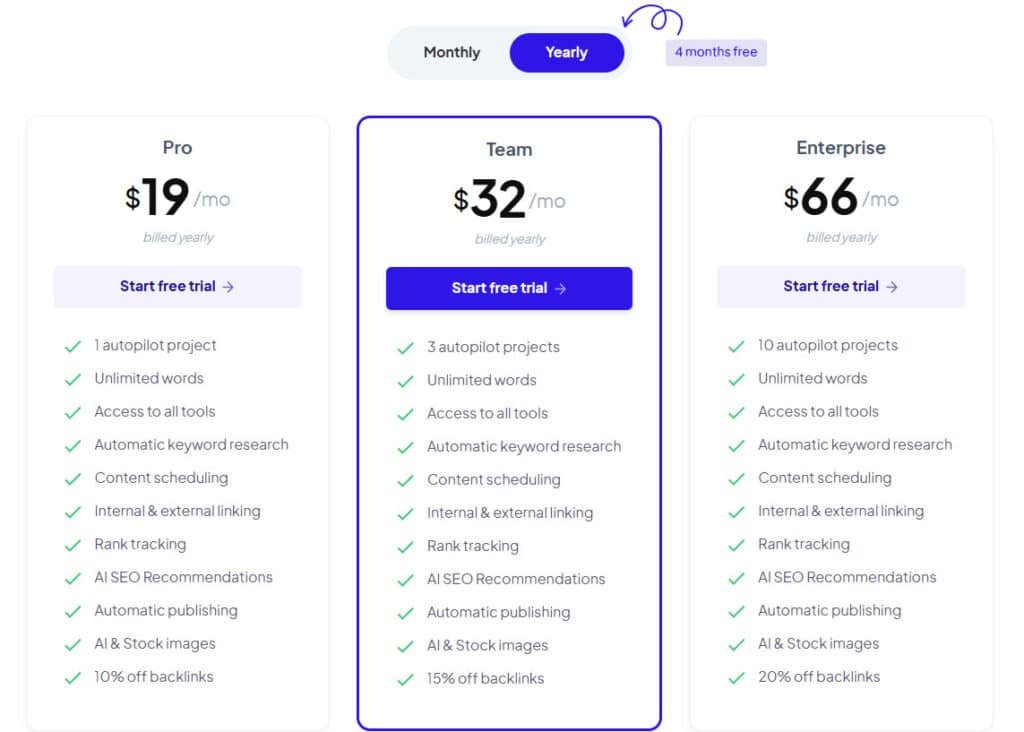
I find the value proposition centers on unlimited words and predictable costs. That makes budgeting simple when your content output varies month to month.
- Pro — $29/month or $19/month in Annual plan (4 Months Free): 1 seat, unlimited words, unlimited chat, access to all tools, unlimited projects. Best option for solo creators focused on steady content production.
- Team — $49/month or $32/month in Annual plan (4 Months Free): 5 seats, collaboration features, the same unlimited limits and multi‑language support—ideal for small businesses or agencies coordinating several content pipelines.
- Enterprise — $99/month or $66/month in Annual plan (4 Months Free) : 25 seats, governance and shared workflows for scaling teams with heavy content operations.
Every plan includes a plagiarism checker, 25+ languages, and unlimited access to the platform’s full range of tools. Free trials and referral credits let a user test long‑form, SEO helpers, TTS, and image generation before committing.
My take: The key selling point is unlimited words—no per‑word overages. That predictable pricing and broad feature set make the tool easy to scale as your content needs grow.
Pros & Cons of Copymatic
Let’s run through the practical advantages and the real limitations I encountered.
- Affordable, unlimited content across plans—predictable costs make scaling easier.
- 80+ features and templates for blogs, ads, landing pages, images, and TTS—versatile coverage.
- High ease of onboarding: fast from prompt to draft, with solid long‑form structure for editing.
- Built-in writing aids—SEO ideas, outlines, and plagiarism checks speed quality control.
Cons:
- Outputs are flagged by major detectors (Originality.ai, Undetectable AI)—you’ll need a human pass.
- Occasional repetitiveness and generic phrasing—requires editorial polish for voice and depth.
- Technical accuracy can slip in niche, highly specialized topics.
- Advanced template customization can feel clunky; the rewriter sometimes splits paragraphs oddly.
| Aspect | Strength | Weakness |
|---|---|---|
| Scale | Unlimited output | Needs edits for nuance |
| Features | Wide toolset | Some UX friction |
| Quality | Good draft structure | Detector flags possible |
I find it a practical tool for a writer’s daily content needs, with clear caveats on detection and niche depth.
If those cons are deal-breakers, alternatives are coming next in this review. I’ll also show prompt and editing tips to mitigate most issues in the workflow section.
Copymatic: Who Will Get the Most Value?
If you need steady output without a big team, this tool targets repeatable content workflows.
Content marketers and digital agencies benefit from batch sprints and calendar-driven publishing. You can standardize formats, speed up briefs, and produce social posts and landing pages quickly. The platform’s capabilities shine when volume and consistency matter.
Small businesses and entrepreneurs get the most when time and budget are tight. Produce emails, ads, and sales pages fast—then tweak voice and facts. Unlimited words across plans remove throttling and keep campaigns moving.
Freelance writers overcome writer block with outline templates and idea prompts. I’ve used those prompts to jump past blank pages and meet client deadlines without losing quality.
“Great for repeatable campaign content—fast first drafts, then you add depth.”
| User | Main need | Why it helps |
|---|---|---|
| Marketing teams / agencies | Batch output and consistency | Standard templates, collaboration tier |
| Small businesses / entrepreneurs | Fast pages and ads | Low cost, unlimited words, quick drafts |
| Freelance writers | Beat writer block and meet deadlines | Structured prompts and multi-format drafts |
How Copymatic Works and Tips for Better Results
Treat the generator as a drafting partner, not a final author. Start by choosing the right tool, then feed a short brief with audience, tone, and must-have points.
From prompts to polished drafts:
- Pick a tool, add specifics, and generate sections. Iterate until the content flows.
- For long-form writing, create the intro and each H2 separately, then stitch for cohesion.
Prompt engineering and outline-first strategy
Use an outline-first approach: let the system build a skeleton, then expand headings into paragraphs. Clear prompts (audience, goal, tone) cut cleanup time.
Editing, fact-checking, and brand voice tuning
Always validate facts and add sources. Adjust the copy to your brand voice — provide sample phrases and banned words to nudge output to the right level of polish.
“Batch similar pages in one session — I find it reduces edits and keeps quality consistent.”
| Step | Action | Benefit |
|---|---|---|
| Tool selection | Choose format (blog, ad, meta) | Fits structure to goal |
| Prompting | Audience, tone, must-includes | Reduces rewrite time |
| Editing | Fact-check, voice tuning | Publishable content |
Types of Content You Can Create
One prompt can seed several formats—saving time when you need coordinated copy. I use that approach to turn a single brief into multiple publishable assets.
Core outputs include blog posts, landing pages, and product descriptions. The article generator gives structure—headings, intros, and suggested word flow—so you edit less and ship faster.
Campaign assets cover social media posts, ad copy, and email sequences. You can draft multi-touch flows quickly and keep messaging consistent across channels.
The platform also drafts video scripts, hero sections, FAQs, and benefit blocks. It produces metadata (titles and descriptions), keyword ideas, and testimonial drafts. Use the image generator and TTS to add visuals and audio without leaving the same tool.
| Format | What it creates | Best use |
|---|---|---|
| Blog posts | Full drafts with headings and SEO cues | Website copy, SEO articles and long-form content |
| Campaign assets | Social posts, ads, email sequences | Multi-channel marketing |
| On-page sections & metadata | Hero text, FAQs, meta titles/descriptions | Website launches and refreshes |
- Repurposing: Turn one long-form piece into threads, carousels, or reels with minimal extra text work.
- Accessibility: TTS converts key content into audio for broader media reach.
Performance, Quality, and AI Detection Considerations
In practice, speed and structure are strengths—but detection and polish define final usability.
Readability, speed, and coherence:
I found that long-form drafts keep a steady tone and logical headings across a 1,000-word article. Sections flow well and the outline-first approach prevents drift.
Drafts arrive fast, but the last 20% of editing—tone, nuance, and factual checks—takes the most time. That work raises the overall quality.
Originality.ai and detection realities
Detection tools flagged generated text consistently—Originality.ai showed high AI scores and other detectors echoed that result. Assume ai-generated content will need human revision to reduce flagging.
Built-in checks help catch accidental overlaps, but they don’t remove the need to address plagiarism concerns or detector signals.
“Add unique data, quotes, and specific examples to push content beyond template output.”
- Mitigation: Insert proprietary insights, varied sentence rhythm, and named sources.
- Watch repetition: Prompt with specifics to avoid duplicated text in long sections.
- UX note: Advanced template tweaks may need extra minutes for layout and tone control.
| Area | Observed strength | Action to Improve results |
|---|---|---|
| Readability | Logical headings, steady flow | Minor edits for voice and transitions |
| Accuracy | Generally sound facts | Verify names, stats, and dates |
| Detection | High AI flags | Add original quotes and unique data |
| Final quality | Good baseline | Layer expert commentary to raise level |
Bottom line: the platform’s capabilities deliver quick, coherent drafts useful for routine publishing. You get strong baseline content, but the best results come when you add human edits to lift the writing and reduce detector flags.
Copymatic for SEO and Content Marketing
A solid workflow pairs automated drafts with tight editorial rules to protect quality. Use the platform’s keyword ideas, outlines, and on-page prompts as scaffolding—not the final article.
Scale your SEO content by batching briefs into multiple blog posts per sprint—unlimited words remove throttles. But don’t rely on generation alone; edit intros, add expert context, and tighten the copy to keep it high-value.
Using keyword ideas and on-page guidance effectively
- Use keyword ideas to map topic clusters, then feed those clusters into outlines for complete topical coverage.
- Follow on-page prompts for headers, internal links, and metadata to reduce manual SEO checks.
- Standardize formats for your marketing calendar (problem/solution, listicles) to speed reviews.
- Repurpose long-form into snippets for social and email to maximize production capabilities without extra time.
“I’ve seen the best wins when teams pair the tool with a clear SEO strategy and editorial guardrails.”
| Goal | Action | Result |
|---|---|---|
| Scale posts | Batch briefs + unlimited words | More published articles per month |
| Maintain quality | Edit intros, add data and voices | High-quality content that ranks |
| Measure & refine | Track rankings, CTR, conversions | Better prompts and higher ROI |
Small businesses can realistically ship pillar pages and supporting posts within a month if they combine automated drafts with an editorial checklist. Balance quantity with clear differentiation—your perspective keeps similar drafts from sounding the same.
Alternatives to Copymatic
Choosing the right stack depends on whether you prioritize depth, budget, or visuals.
I looked across several competing platforms to show where each one shines. Below I summarize strengths and how they differ from each other.
- Neuraltext — Wide range of features and stronger research aids. A good option if you need deeper briefs and keyword mapping, though it can be pricier.
- BrainpodAI — Balanced for marketing templates plus image generation. Useful when you want a mix of copy and visuals from one generator.
- NEURONWriter — Focused on writing and SEO. Great for topical clusters, outlines, and long-form planning.
- RightBlogger — A robust generalist tool with mature workflows and community templates—good for teams that want flexibility.
- Marketsy — Fast at sales-focused content and landing pages; often needs fewer edits for ads and hooks.
- Rytr — Budget-friendly choice that produces solid drafts for basic needs.
- GetImg.AI — Best-in-class image generator to pair with any writing platforms for stronger visuals.
- Agility Writer (formerly Content at Scale) — Excels at research-heavy, long-form articles; costs more per article but rivals human depth.
| Product | Strength | Best use |
|---|---|---|
| Neuraltext | Research tools, keyword mapping | SEO briefs and detailed outlines |
| RightBlogger | Marketing templates + images | Campaigns needing visuals |
| NEURONWriter | Writing + SEO focus | Topical clusters and pillar pages |
| Brainpod AI | Flexible workflows, community | Teams and agencies needing variety |
| Agility Writer | Research-heavy long-form | Authority articles and deep dives |
How to choose: Pick by use case—scale vs. depth, image needs, or budget. I recommend pairing a strong writing tool with MidJourney or a research-centric option for coverage that needs real expertise.
Use a hybrid stack—one for drafting and one for visuals or research—to get the best balance of speed and accuracy.
Case Study / Personal Experience
I ran a timed experiment: outline to long-form draft, to measure practical time savings.
Real-world results: from outline to 1,000+ word blog post
I started with a seed keyword and approved an outline in one pass. The tool produced a 1,100-word article in minutes with a steady tone and clear H2s.
The initial draft gave a solid backbone—strong intros, clean subheads, and a concise summary. An estimated SEO score surfaced a missing keyword variant before publishing, which saved a late fix.
My experience: what impressed me and what needed manual edits
What impressed me: the draft is a great starting point for quick blog posts. I spent ~25 minutes refining the copy, adding brand voice, and inserting internal links.
What needed work: repetitive phrasing appeared in two sections — I regenerated those paragraphs and merged the best content. A detector flagged AI, so I added a case example and a cited stat to lift perceived quality.
Net results: the experiment saved roughly 60–70% of the time compared with writing from scratch — meaningful for a solo writer or small team.
- Generated structure and flow: excellent for fast publishing.
- Manual edits (voice, facts, links): required ~25 minutes.
- Imagery: replaced in-app suggestions with branded images for better fit.
Bottom line: as a drafting engine it delivered usable content fast; human editing made the final writing publish-ready.
Conclusion
Raamish’s Take
Copymatic is a versatile AI-powered writing tool designed to streamline content creation for businesses and creators.
It leverages GPT AI Model technology to produce unique, SEO-optimized, and plagiarism-free content in seconds, from blog posts to social media ads and eCommerce product descriptions.
I’m impressed by its ability to generate 1,000+ word articles from a simple prompt, making it a time-saver for content marketers.
The Chrome extension with 80+ writing tools, including the CopyChat AI assistant, lets you create content directly in your browser, which is a game-changer for efficiency.
Features like grammar checks, sentence rewriters, and tone adjustments ensure polished, conversion-focused copy.
With support for multiple languages (English, Spanish, French, German, Hindi, and more), it’s ideal for global reach.
It offers a WordPress plugin which simplifies publishing, and automatic keyword research plus SEO recommendations help boost organic traffic.
Copymatic’s low 2% plagiarism rate ensures originality, making it a reliable choice for professional content creation.
After using the platform across several projects, I can sum up when it genuinely saves time and when it demands more work.
Short verdict: This is a dependable drafting tool for fast, structured content. For a $19–$66 price range, the value is strong thanks to unlimited words and 80+ templates.
The main caveats are clear: detectors may flag generated text, and generic phrasing appears at times. You must plan a light editorial pass to achieve high-quality content and to meet niche accuracy needs.
- Best fit: SMBs, agencies, and solo creators who want to scale content for business outcomes.
- Not ideal: Highly technical or compliance-heavy projects without expert review.
- Recommendation: Start with the trial, test one campaign workflow, then scale if it saves you time.
“If your priority is speed and volume with reasonable polish, this is a practical option to accelerate publishing.”
Final step: Try the trial, pair the drafts with a brief editorial process, and use analytics to refine what works. This Copymatic review leans toward a yes for teams focused on shipping more without hiring extra staff.
Frequently Asked Questions
What types of content can I create with the platform?
You can generate long-form blog posts, landing pages, product descriptions, social media posts, ad copy, email sequences, video scripts, and website metadata. The tool also offers templates and SEO helpers to speed up outlines and on-page sections.
Is the content SEO-ready straight out of the generator?
The output is SEO-friendly at a draft level — you get keyword ideas, suggested outlines, and on-page cues. I find you usually need one round of human editing for keyword placement, internal linking, and to tune for search intent before publishing.
Does it include plagiarism checking and originality safeguards?
Yes — there’s an integrated plagiarism checker to flag copied passages. Still, I recommend running final drafts through a dedicated checker (like Copyscape or Grammarly) for extra assurance, especially for commercial or high-stakes content.
Can teams collaborate on projects and share work?
Collaboration is supported via the Team and Enterprise plans (multiple seats, shared access, and basic collaboration features). For complex workflows you may need external project management tools alongside it.
How good is the multilingual output?
Multilingual generation covers many common languages and produces usable drafts quickly. Quality varies by language and topic depth — I advise native review for nuance, idioms, and localization.
Will using the tool trigger AI-detection systems?
AI-detection tools may flag generated text depending on editing and prompt strategy. If you thoroughly edit for voice, facts, and structure, detection likelihood drops. For sensitive use-cases, manual rewriting and fact-checking are essential.
Are there templates for ads, emails, and social media?
Yes — the platform includes an extensive template library (80–100+ tools) covering ads, email sequences, social posts, and more. Templates accelerate generation and help overcome writer’s block.
Does it come with image and audio features?
It offers an AI image generator for blog visuals and social posts plus text-to-speech for voiceovers. These features are handy for multimedia content, though you may prefer specialized tools (e.g., MidJourney for premium images) for advanced needs.
What pricing tiers exist and what do they include?
Typical tiers include a Pro plan for solo creators, a Team plan with multiple seats and collaboration, and an Enterprise plan for larger groups. Trials or free credits are usually available so you can test capabilities before subscribing.
How fast can I get a publishable article?
You can produce a solid first draft in minutes. Realistically, expect to spend additional time (30–90 minutes) editing, fact-checking, and optimizing for SEO to reach publishable quality for competitive topics.
Is the platform suitable for freelance writers and agencies?
Yes — content marketers, freelance writers, and agencies benefit most from speed and scalability. It helps overcome writer’s block and speeds up ideation, but expert editing remains key for quality work and client-specific voice.
Are free trials or referral incentives available?
Most offerings include free credits or trial access and sometimes referral incentives to try features before buying. These let you test long-form generation, templates, and SEO helpers without immediate cost.
What are common limitations I should expect?
Limits include occasional factual errors, surface-level expertise for highly technical niches, and variability across languages. The AI is best used as a drafting assistant — final quality depends on human editing and domain knowledge.
How do I get better results from the content generator?
Use prompt engineering and an outline-first strategy, provide clear brand voice examples, and iterate on outputs. Combine AI drafts with manual editing, fact-checking, and SEO tweaks for the best outcomes.
How does it compare to other tools like Jasper or Copy.ai?
It competes on price, templates, and speed. Tools like Jasper may offer advanced workflows or integrations, while others focus on niche strengths (images, research). I suggest testing a few to see which fits your workflow and quality standards.
Can I use the generated content commercially?
Yes — generated content is typically licensed for commercial use, but you should review the platform’s terms of service and ensure originality (via plagiarism checks) before commercial publication.