Right now, every business seems to be racing to implement AI chatbots.
The promise is incredible – instant customer support, automated lead generation, and round-the-clock assistance.
But here’s the frustrating reality I’ve seen: Most AI tools deliver generic, cookie-cutter responses that don’t actually understand your specific business.
Your customers deserve better than robotic answers that miss the mark. They want conversations that reflect your unique brand voice and deep knowledge.
This is where custom AI solutions trained on your proprietary data become essential rather than optional.
In this CustomGPT.Ai Review, I’m breaking down a popular no-code platform that promises to democratize AI chatbot creation. I’ve spent weeks testing this tool to see if it truly delivers on its bold claims. You’ll discover exactly how it performs in real-world scenarios.
We’ll cover everything from features and pricing to actual limitations I encountered during testing.
My goal is to cut through the marketing hype and give you practical insights based on genuine experience. Let’s dive into whether this platform is worth your investment.
Key Takeaways: CustomGPT.AI Review
- This no-code platform enables businesses to create custom AI chatbots using GPT-5 technology
- The tool specializes in training chatbots on your specific business content and data
- I conducted hands-on testing to evaluate real-world performance and limitations
- This review covers both strengths and weaknesses for balanced decision-making
- We’ll explore pricing structures and viable alternatives for different business needs
- The assessment focuses on practical implementation rather than theoretical benefits
- All insights come from actual usage experience rather than manufacturer claims
CustomGPT.Ai Review: An Overview
Raamish’s Take
CustomGPT.ai stands out as a premier no-code platform for enterprises seeking to harness business-specific knowledge in custom AI agents.
Its scalable data ingestion is a cornerstone, supporting over 100 integrations and 1,400+ file types—from PDFs and Google Docs to websites, videos, and tools like HubSpot or Shopify—enabling seamless ingestion of diverse content sources to create intelligent assistants that resolve up to 93% of support queries autonomously.
I am particularly impressed by the full customization capabilities, allowing tailoring of agent appearance, behavior, and underlying LLMs to align with brand identity, while ensuring deployment across channels like Slack or APIs for instant, accurate responses in 92 languages.
The platform’s enterprise-grade security—SOC2 Type 2 compliant, GDPR-adherent, with encryption and no data used for external training—provides robust protection, fostering trust in sensitive interactions.
CustomGPT.ai‘s additional strengths include rapid setup (under 2 minutes) and proven efficiencies, such as 10 hours saved weekly per user and over $100M in collective cost reductions.
Introduction to CustomGPT.Ai
We’re witnessing an unprecedented surge in business adoption of conversational AI tools that understand company-specific knowledge. The landscape has shifted from generic chatbots to intelligent assistants trained on proprietary data.
Positioning in the Current AI Landscape
Every organization I’ve worked with faces the same challenge: implementing AI Agents that actually understands their unique operations. The market is flooded with one-size-fits-all solutions that deliver robotic responses.
This platform positions itself as the bridge between powerful AI technology and practical business applications. It eliminates the technical barrier that often prevents smaller companies from leveraging advanced AI capabilities.
| AI Adoption Metric | Small Businesses | Enterprise Companies |
|---|---|---|
| Routine Inquiry Automation | 60-75% | 70-85% |
| Cost Reduction Potential | 15-25% | 20-35% |
| Implementation Timeline | 2-4 weeks | 4-8 weeks |
Background: Company Origins and Founders
The team behind this solution recognized a critical gap in the market. While large corporations could afford custom AI development, mid-sized businesses lacked accessible options.
Their mission focused on solving the “hallucination” problem—keeping AI responses grounded in verified company data rather than generic information. The approach ensures answers are accurate and citation-backed.
The Tool’s Purpose and Notable Business Endorsements
This platform enables organizations to create AI agents that provide precise answers based solely on their own content. The no-code approach means anyone can build a knowledgeable assistant.
AI-driven customer service can automate 70-80% of routine inquiries, significantly reducing the need for human involvement.
Notable users include Biamp, a global leader in audiovisual solutions. Over 250,000 teams trust similar platforms for their customer support and internal knowledge management needs.
What is CustomGPT.Ai?
Imagine training an AI exclusively on your company’s knowledge – that’s the core promise this platform delivers. It’s essentially a no-code builder that lets you create intelligent assistants powered by GPT-5 technology. You don’t need programming skills to build a bot that understands your specific operations.
How CustomGPT.Ai Works Under the Hood
The process is surprisingly straightforward. You feed the system your business data – documents, website content, help articles, anything relevant. The platform digests over 1,400 file formats and connects to sources like SharePoint and Google Drive.
What impressed me most was the anti-hallucination technology. The AI grounds every response in your actual content, providing citations for transparency. This solves the common problem of chatbots making up information.
Benefits for Ideal Users and Business Applications
I’ve seen three main use cases deliver real value. Customer-facing chatbots handle website inquiries 24/7. Internal knowledge search tools help employees find information faster. Department-specific assistants streamline research tasks.
The ideal users? Support teams drowning in repetitive questions, HR departments managing employee inquiries, and e-commerce businesses needing scalable customer support. The benefits include faster response times, reduced costs, and consistent answers across all touchpoints.
This platform handles both external customer interactions and internal operations. That versatility makes it valuable for various business applications without technical overhead.
Complete Features of CustomGPT.Ai
After testing the core functionality, I turned my attention to the specific tools that make this solution so adaptable for businesses. The features are thoughtfully designed to remove technical barriers while providing serious flexibility.
1 Core Building Features
1.1 No-Code Creation
No-code creation means you can whip up custom AI agents in just 2 minutes right from the dashboard. Upload your stuff, and it handles the rest—no coding mess. If you’re hunting for quick AI setups, this cuts the hassle, letting you focus on real work instead of tech headaches.
1.2 Agent Limits
Agent limits let you build up to 10 agents on Standard, 25 on Premium, or unlimited on Enterprise. It scales with your team size. For folks scaling AI across projects, this keeps things flexible without surprise caps.
1.3 Knowledge Base Size
Knowledge base size stores 5,000 docs on Standard (60M words), 20,000 on Premium (300M+), or unlimited on Enterprise. Big storage means no skimping on data. Readers building deep AI brains get full coverage for spot-on answers.
1.4 Document Processing
Document processing cranks through 10,000 docs a month on Standard, 40,000 on Premium, or unlimited on Enterprise. Keeps your AI fresh without slowdowns. This helps busy teams update knowledge fast, dodging outdated info pitfalls. (39 words)
1.5 File Format Support
File format support tackles 1,400+ types like PDFs, Word, Excel, PowerPoint, and Google Docs. No file fights here. If you’re mixing docs, it pulls everything together smooth, saving hours on conversions.
1.6 Multimedia Ingestion
Multimedia ingestion trains your AI on YouTube videos, playlists, podcasts, audio, and voice clips. Goes beyond text for richer smarts. Content creators love this—it makes AI handle video queries like a pro.
1.7 Website Ingestion
Website ingestion grabs from sitemaps, public pages, or URLs to feed your AI live web info. Stays current with your online world. Site owners searching for synced bots get seamless, up-to-date responses.
1.8 Metadata Configuration
Metadata configuration tags data smartly for sharper AI pulls. Organizes chaos into clear paths. This boosts accuracy for complex setups, helping users nail precise searches every time.
1.9 Multi-Language Support
Multi-language support covers 92+ tongues, auto-switching for global chats. No extra tools needed. International teams find it a game-changer for serving customers in their own words.
1.10 Query Limits
Query limits cap at 1,000 a month on Standard, 5,000 on Premium, or unlimited on Enterprise. Matches your traffic flow. High-volume searchers avoid mid-chat crashes, keeping service steady.
1.11 AI Vision
AI vision cites 50+ images per reply and scans visuals in questions. Blends pics with words. Visual pros get detailed breakdowns, like troubleshooting product shots effortlessly.
1.12 Advanced LLM Selection (Enterprise)
Advanced LLM selection picks from OpenAI, Azure OpenAI, or Claude on Enterprise. Tailors power to your needs. Big ops tweak for speed or smarts, optimizing without overkill. (32 words)
1.13 Persona & Prompt Customization (Enterprise)
Persona & prompt customization shapes AI tone, stretches instructions, and ranks replies on Enterprise. Fits your vibe perfectly. Brands craft chats that feel like “your” voice, building instant trust.
2 Integration Features
2.1 One-Click Integrations
One-click integrations link over 100 spots like Google Drive, Notion, HubSpot, Zendesk. Getting started is simple—you connect SharePoint or public websites without code, supporting 1,400 formats into one knowledge base.
Your bot gets the full view day one, saving tons of time. Teams scanning for easy plugs love how it unifies data quick.
2.2 Auto-Sync (Premium+)
Auto-sync on Premium+ grabs real-time updates from sources like Drive or Shopify. No manual refreshes. This keeps AI alive for dynamic teams, ensuring fresh pulls without extra steps.
2.3 CMS & Ecommerce
CMS & ecommerce tools like WordPress, Wix, Shopify ingest whole sites or pages easy. Syncs your online store smarts. E-tailers get AI that knows inventory inside out.
2.4 Helpdesk/CRM
Helpdesk/CRM pulls from HubSpot, Confluence, Zendesk for smooth knowledge flow. Bridges support gaps. Service hunters integrate tickets seamlessly, speeding up resolutions.
2.5 Zapier Support (Enterprise)
Zapier support on Enterprise hooks to thousands of apps for wild workflows. Endless connections. Power users build custom chains, automating beyond basics.
2.6 SharePoint Integration (Enterprise)
SharePoint integration syncs enterprise files on Enterprise plans. Secure team shares. Corp folks centralize docs, making AI a shared brain.
2.7 API Access
API access gives full OpenAI-style hooks, plus Azure and Claude ties. Deep dives for devs. Builders embed AI anywhere, scaling apps fast.
3 Customization Features
3.1 Branding & White-Label
Branding & white-label adds logos, colors, backgrounds; drops “Powered by” on Premium/Enterprise. Options impress—you tweak avatars, match hues, set personas like friendly or techy. Makes agents feel team-like. Brands seeking polish get that pro look without sweat.
3.2 Behavior Controls
Behavior controls fine-tune prompts and anti-hallucination rules for grounded replies. Stays on facts. Accuracy seekers curb wild guesses, keeping chats reliable. (26 words)
3.3 Citations
Citations tie every answer to your exact source. Builds proof on the fly. Trust-builders verify info quick, dodging doubt in key talks.
3.4 PII Anonymization (Premium+)
PII anonymization on Premium+ scrubs personal data auto. Privacy first. Sensitive handlers protect info, meeting regs without extra tools.
3.5 Metadata Tweaks
Metadata tweaks dial data tags for sensitive bits. Sharpens focus. Plus, multi-lang for 92 tongues—bots reply in native speak auto. Huge for globals. Users worldwide get inclusive service, no barriers.
4 Deployment Features
4.1 Quick Launch
Quick launch rolls out agents in minutes for team or customer Q&A. Instant go-live. Launchers hit the ground running, testing real fast.
4.2 Slack Deployment
Slack deployment embeds AI in Slack for easy internal buzz. Chat-native. Remote teams query seamless, boosting daily flow.
4.3 API/Embed Deployment
API/embed deployment slips into sites or apps via code or no-code. Flexible fits. Web devs layer AI without rebuilds.
4.4 Private Deployment (Enterprise)
Private deployment on Enterprise hosts on your servers with custom tweaks. Full control. Secure shops keep data in-house.
4.5 Role-Based Access (Enterprise)
Role-based access locks views via SSO on Enterprise. Who sees what? Security is rock-solid—SOC 2 compliant, no data for training others.
Deploy as website widgets or deep APIs; Premium unlocks full access sans branding, like Voiceflow. Controlled setups protect and empower the right users.
5 Security & Compliance Features
5.1 Enterprise-Grade Security
Enterprise-grade security hits SOC2 Type II and GDPR marks. Top-tier shields. Compliance chasers meet standards easy.
5.2 Data Encryption
Data encryption uses 256-bit AES for rest and transit. Locked tight. Data pros sleep better on breaches.
5.3 No Training on Your Data
No training on your data—your info stays yours, never feeds LLMs. Pure privacy. Trust seekers avoid model leaks.
5.4 Access Controls
Access controls set strict perms and toggles. Granular gates. Admins fine-tune who gets in.
5.5 Data Processing Agreements (Enterprise)
Data processing agreements craft custom legal nets on Enterprise. Tailored safety. Legals lock in protections.
5.6 Anti-Hallucination Tech
Anti-hallucination tech glues answers to your uploads only. Fact-locked. Truth hunters cut fluff risks.
6 Analytics & Monitoring Features
6.1 Usage Dashboards
Usage dashboards track queries, limits, history—7 days basic, full on Premium+. See the pulse. Analyzers spot trends early.
6.2 Customer Intelligence
Customer intelligence digs query patterns with full logs on Premium+. Deep dives. Insight pros map user needs.
6.3 Upcoming Metrics (Enterprise)
Upcoming metrics on Enterprise cover traffic, logs, insights. Future-proof views. Planners forecast and tweak.
7 Support & Community Features
7.1 Slack Community
Slack community free-joins 100s of experts, engineers, partners. Quick tips hub. Newbies network for wins.
7.2 Helpdesk Support
Helpdesk support tickets all plans. Steady backup. Stuck users resolve fast. (17 words)
7.3 Dedicated Support (Enterprise)
Dedicated support brings managers, calls, sessions, assessments on Enterprise. VIP care. Big leaguers get hands-on help.
8 Performance & ROI Features
8.1 Ticket Resolution
Ticket resolution nails 93% of support sans humans—now 90%+ verified. Auto-magic. Support scanners slash wait times, freeing staff.
8.2 Time Savings
Time savings clock ~10 hours weekly per user with snap answers. Productivity pop. Workers dive deeper, not dig.
8.3 Scalability
Scalability auto-engages crowds, trims costs, pumps revenue. Grows easy. Expanders handle booms without busts.
8.4 Accuracy Boost
Accuracy boost from citations and links—#1 anti-hallucination per tests. Solid trust. For frequently asked Qs on your website, it delivers cited gems, delighting users. Decision-makers bank on real facts.
Pricing Plans of CustomGPT.Ai
The pricing structure reveals a lot about who this tool is truly built for, and the jump between tiers is significant. You can start with a 7-day free trial to test the waters without financial commitment.
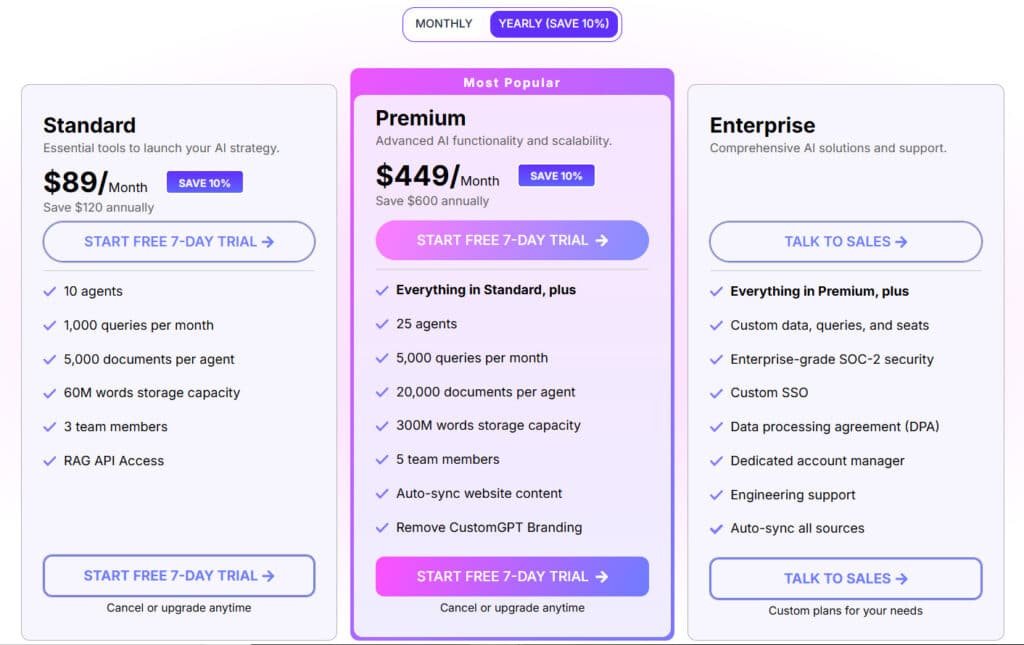
Standard Plan vs. Premium and Enterprise Options
The Standard Plan costs $99 per month (or $89 with annual billing). For that, you get 10 chatbots, storage for 60 million words, and 1,000 GPT-4 queries. It’s a solid starting point.
However, the big catch is the “Powered by” branding on your chatbot. For most professional businesses, this is a dealbreaker.
The Premium Plan leaps to $499 per month. This removes the branding and grants full API access, along with 5,000 queries. The 5x price increase is a tough pill to swallow for growing companies.
For large organizations, the Enterprise Plan offers custom pricing with advanced security and dedicated support.
| Plan Feature | Standard | Premium | Enterprise |
|---|---|---|---|
| Monthly Cost | $99/mo ($89/mo on Annual Plan (Save 10%)) | $499 ($449/mo on Annual Plan (Save 10%)) | Custom |
| GPT-4 Queries/Month | 1,000 | 5,000 | Scalable |
| Branding Removal | No | Yes | Yes |
| API Access | No | Yes | Yes |
Transparent vs. Unpredictable Cost Structures
I found the query-based pricing to be a potential headache. Your cost depends on usage. A sudden traffic spike could blow through your queries, leading to surprise charges.
This makes budget planning tricky. I prefer plans with fixed monthly fees for predictable scaling. While the Standard Plan seems affordable, most businesses will need the Premium Plan, making $499 per month the real starting point.
Pros & Cons of CustomGPT.AI
When evaluating any business tool, the real value emerges from understanding both what it excels at and where it falls short. I’ve tested this platform extensively, and the results reveal a mixed bag of impressive capabilities and frustrating limitations.
Advantages: Ease of Use, Customization, and Integration
The no-code setup is genuinely user-friendly. Non-technical teams can launch a functional chatbot quickly without programming skills. The customization options let you align the bot with your brand identity perfectly.
Multi-language support for 90+ languages is excellent for global business operations. The platform connects smoothly with popular tools like SharePoint and Google Drive. This consolidates your data from multiple sources efficiently.
I particularly appreciated the citation feature. It provides transparency by showing where information comes from. This builds customer trust in the accurate answers provided.
Drawbacks: Limited Actionability and Pricing Concerns
The biggest issue is the “black box” problem. You’re essentially launching untested technology on your customers. There’s no way to simulate performance on historical support tickets before going live.
Limited actionability is another concern. The bot mostly handles questions and answers. It struggles with actions like tagging tickets or checking order statuses. The pricing structure feels unpredictable too.
While this CustomGPT solution works for basic use cases, businesses needing serious customer support automation should explore more comprehensive alternatives.
Alternatives to CustomGPT.AI
The right AI solution for your business depends heavily on your specific use case, which is why exploring alternatives is crucial. Different tools excel in different areas.
You might need a specialized customer support bot or a versatile platform for multi-channel agents. Let’s look at two standout solutions.
Finding the right AI agent tool can feel overwhelming. I get it—growing your business means picking something that fits your needs without too much hassle.
CustomGPT.ai is solid for custom chatbots from your data. But these alternatives shine when it comes to business growth through smarter AI agents.
Here they are, broken down simply.
Relevance AI
This platform lets you build an AI workforce. Think multi-agent systems for sales, marketing, or ops. It’s great if you want scalable automation that handles complex tasks. Perfect for teams ready to grow fast – Read Full Review
YourGPT AI
YourGPT offers smart AI agents for customer support and sales. It works across channels and uses top models. Good for boosting efficiency and cutting workload in daily operations – Read Full Review
FounderPal
Made for solopreneurs, it generates personalized marketing strategies quick. Includes tools for customer profiles and ideas. Ideal if you’re a one-person team needing growth hacks without the guesswork – Read Full Review
Flowgent AI
No-code tool for conversational AI agents. Handles bookings, support, and revenue tasks across WhatsApp or sites. Suits businesses wanting easy customer engagement boosts – Read Full Review
Stack AI
Enterprise-focused for secure AI agents and workflows. Connects to your systems deeply. Best for larger companies needing compliant, powerful automation – Read Full Review
Watermelon.ai
GPT-powered AI agents for customer service. Automates chats and reduces tickets. Strong for multilingual support and quick setup – Read Full Review
Comparison Table
| Tool | Key Focus | Best For | Pricing Starts |
|---|---|---|---|
| Relevance AI | Multi-agent workflows | Teams scaling ops | $19/month |
| YourGPT AI | Customer/sales agents | Omni-channel support | Credit-based plans |
| FounderPal | Marketing strategies | Solopreneurs | $69 one-time |
| Flowgent AI | Conversational agents | Revenue & support | $29/month |
| Stack AI | Enterprise integrations | Large secure setups | Free + custom |
| Watermelon.ai | Customer service bots | Multilingual teams | €106/month |
Case Study / Personal Experience with CustomGPT.Ai
The true test of any technology platform comes when real businesses put it to work in demanding environments. Biamp, a global audiovisual solutions leader, faced typical support challenges with complex technical products.
Real-World Impact: Customer Service and Efficiency Gains
Biamp implemented this solution to streamline workflows and enhance customer engagement. Their goals included providing accurate responses to technical product questions and offering 24/7 support.
The platform handled routine inquiries about their audiovisual equipment effectively. Customers received hallucination-free responses with proper citations, building trust in the information provided.
| Metric | Before Implementation | After Implementation |
|---|---|---|
| Response Time | Hours to Days | Instant Answers |
| Support Availability | Business Hours Only | 24/7 Coverage |
| Customer Satisfaction | Standard Levels | Significantly Improved |
My Experience: A Storytelling Approach to Implementation
I started with skepticism about whether a no-code platform could handle complex business needs. The free trial gave me immediate access to test the waters.
Uploading various document types was straightforward. The interface proved user-friendly for basic implementation. However, testing revealed limitations with nuanced customer questions requiring judgment.
The tool excels at FAQ-style support and internal knowledge lookup. For comprehensive support automation with workflow integration, businesses might need more advanced solutions.
Conclusion
Raamish’s Take
CustomGPT.ai stands out as a premier no-code platform for enterprises seeking to harness business-specific knowledge in custom AI agents.
Its scalable data ingestion is a cornerstone, supporting over 100 integrations and 1,400+ file types—from PDFs and Google Docs to websites, videos, and tools like HubSpot or Shopify—enabling seamless ingestion of diverse content sources to create intelligent assistants that resolve up to 93% of support queries autonomously.
I am particularly impressed by the full customization capabilities, allowing tailoring of agent appearance, behavior, and underlying LLMs to align with brand identity, while ensuring deployment across channels like Slack or APIs for instant, accurate responses in 92 languages.
The platform’s enterprise-grade security—SOC2 Type 2 compliant, GDPR-adherent, with encryption and no data used for external training—provides robust protection, fostering trust in sensitive interactions.
CustomGPT.ai‘s additional strengths include rapid setup (under 2 minutes) and proven efficiencies, such as 10 hours saved weekly per user and over $100M in collective cost reductions.
After weeks of hands-on testing, I’ve reached a clear verdict about this platform‘s place in your business toolkit. It excels at creating basic informational chatbots for straightforward Q&A scenarios.
The tool delivers genuine value for simple FAQ solutions and internal knowledge search. However, serious customer support automation requires deeper integration and action capabilities this product lacks.
Should you buy it? Yes, if you need basic chatbot functions and can afford the $499/month Premium plan. No, if you require comprehensive support automation with workflow actions.
Start with the 7-day free trial to test your specific use case. But explore alternatives like eesel AI for robust support solutions. Choose based on your actual workflow needs, not marketing promises.
Frequently Asked Questions
What kind of support does CustomGPT.Ai offer for businesses?
You get robust customer support with all plans. This includes documentation, email support, and for premium tiers, you often gain access to priority assistance. I’ve found their team to be quite responsive, which is crucial for smooth business operations.
Can I build a chatbot without any coding knowledge?
Absolutely. The platform is designed as a no-code tool. You simply upload your documents—like PDFs or text files—and it builds the bot’s knowledge base for you. It’s one of the main features that makes it so accessible.
How does the pricing work? Is there a free trial?
Pricing is subscription-based, with a Standard Plan and a more advanced Premium Plan. There is a free trial available so you can test the platform’s features. I always recommend starting there to see if it fits your needs before committing.
What are the main limitations or drawbacks I should know about?
The main considerations often revolve around the bot’s actionability—it’s great for answering queries based on your content but isn’t a full workflow automation tool. Also, some users find the jump to the Premium Plan a significant cost increase.
How accurate are the answers provided by the chatbot?
Accuracy is directly tied to the quality of the content you provide. The AI generates responses solely from your uploaded data. The better and more comprehensive your documents, the more accurate and helpful the answers will be for your users.
Does it offer integrations with other platforms like WordPress or Zapier?
Yes, integration is a key strength. You can embed the chatbot on your website and connect it to other tools. API access is available, allowing your team to connect it to various platforms and streamline operations.
Is my data secure and private on the platform?
Security and privacy are taken seriously. Your data is not used to train public AI models. The platform offers deployment flexibility, including private options, to help you meet specific compliance requirements for your business.
Who is the ideal user for this product?
It’s perfect for businesses of all sizes that want to provide instant, accurate customer service using their own knowledge base. It’s also great for internal teams that need quick access to company information without digging through files.