Feeling overwhelmed by the idea of building a website? You’re not alone. The thought of coding, complex design software, and hefty price tags stops many great ideas in their tracks. It’s frustrating when a technical barrier stands between you and your online presence.
I tested this website builder to see if it lives up to the hype. My goal is to give you a clear, honest look. Is it the right tool for your web project?
This builder promises a clean, modern website without the headaches. It’s designed for speed and simplicity. I’ll share exactly who it’s perfect for—and who might need a more advanced solution.
Let’s dive into this hands-on Dorik Review and see if it’s the solution you’ve been searching for.
Key Takeaways: Dorik Review
- This platform tackles the big hurdles of cost and technical skill for creating a site.
- I signed up and tested it myself to provide a genuine, experience-based assessment.
- Get a quick upfront verdict to see if this review matches your specific needs.
- Ideal for freelancers, solopreneurs, and content creators; less so for large online stores.
- Understand how it fits into the current landscape of AI and no-code tools.
- The core value is creating professional sites quickly and affordably.
Dorik Review: An Overview
Raamish’s Take
Dorik simplifies website creation, making it accessible for beginners while offering robust tools for professionals.
Its AI-powered website generation is a standout, allowing users to input a prompt like “build a coffee shop website” and receive a fully functional site with AI-generated text and images in minutes, no coding required.
I’m impressed by the no-code drag-and-drop builder, paired with 110+ templates and 250+ UI blocks, which enable rapid customization to match any vision.
The white-label CMS is a game-changer for agencies, offering branded dashboards, client billing, and the ability to build blogs or directories.
Additionally, the Airtable integration transforms data into dynamic layouts like job boards or shops, with real-time updates ensuring seamless management.
Features like unlimited storage and bandwidth, native SEO tools, and payment integrations (Stripe, PayPal) enhance scalability and functionality.
Dorik’s blend of intuitive design, AI-driven efficiency, and agency-focused tools makes it ideal for creating professional websites effortlessly.
Introduction to Dorik: Setting the Stage in the AI Website Building Landscape
When technical barriers block creative ambitions, innovative solutions often arise to bridge the gap. That’s exactly what happened in 2020 when this platform emerged from Middletown, Delaware.
Company Background and Founding Story
The founders recognized two major pain points for people wanting to create a website: high costs and technical complexity. They built this website builder to remove both obstacles simultaneously.
No HTML, PHP, or CSS skills are required—making website creation accessible to everyone. The mission was clear from day one: democratize web design.
How Dorik Fits in the Current AI and No-Code Trends
This builder entered a competitive space dominated by established players. It positions itself as a smart alternative for today’s demanding market.
Businesses today want rapid deployment and cost efficiency. This platform delivers both while eliminating dependency on developers.
| Feature | Dorik | SITE123 | ButternutAI |
|---|---|---|---|
| AI Generation | Yes | Yes | Yes |
| No-Code Editing | Full control | Limited | Basic |
| Built-in Hosting | Included | Extra cost | Included |
| White-label Options | Agency plans | No | No |
“The timing couldn’t be better—AI-powered design is now a mainstream expectation, not a luxury feature.”
Freelancers, solopreneurs, and agencies managing client sites are choosing this website builder for its balanced approach. It combines AI generation with traditional template flexibility.
The website builders market continues evolving rapidly. This builder stands out by addressing real user needs without requiring any coding knowledge.
What is Dorik? Unveiling the Platform’s Inner Workings
Let’s peel back the layers and see what makes this website builder tick, from its AI brain to its user-friendly hands. It’s an all-in-one platform designed for one primary goal: getting a professional website live, fast.
The Technology Behind Dorik
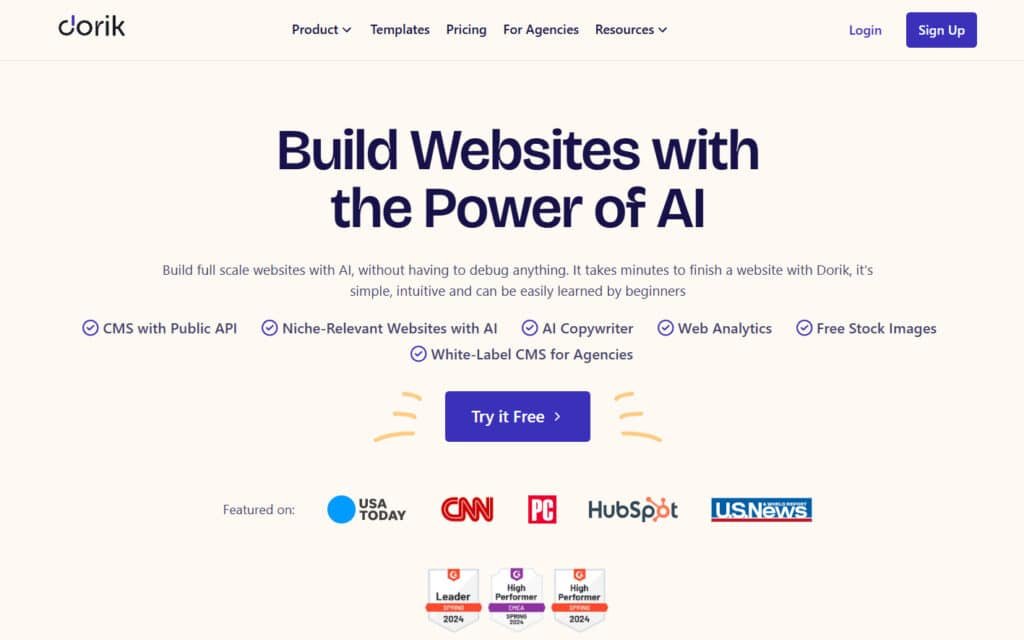
The magic starts with its AI. You describe your project, and advanced algorithms get to work. I find it impressive that it uses models like GPT-4 for text and DALL-E 3 for images.
This tech generates complete layouts, copy, and visuals from a simple prompt. But it’s not just about AI. You have three solid paths to build: AI generation, 80+ pre-designed templates, or a blank canvas with 250+ drag-and-drop UI blocks.
“The real genius is blending AI speed with traditional customization—you get a head start without losing creative control.”
Under the hood, the platform includes built-in hosting and a global CDN. This ensures your site loads quickly for everyone. SSL certificates are automatic, making your website secure by default.
Key Benefits for Ideal Users
So, who wins big with these features? Freelancers can whip up a portfolio in an afternoon. Agencies love the white-label CMS for managing client websites under their own brand.
Content creators benefit from built-in membership tools and paywalls. Solopreneurs can test a business idea with a functional website without a developer.
The integrated blogging platform and SEO tools mean you don’t need extra plugins. Direct Airtable integration is a bonus for data-driven projects. This builder truly covers the essentials.
Complete Features of Dorik
After spending time with the platform, several capabilities stood out as genuinely game-changing for web creation. The features go beyond basic building to offer professional-grade tools anyone can master quickly.
1. Website Generation
Dorik’s website generation enables users to create a complete multi-page site by simply entering a textual prompt, such as one for a coffeeshop.
The AI technology delivers an instant layout with structure, design, and initial content. Among website builders, this feature accelerates the process to minutes, allowing users to bypass traditional setup time.
For readers comparing website builders, it provides ease in launching a functional website quickly, helping customer acquisition through ready pages that can be refined in the editor.
This feature integrates with other tools, ensuring the generated website supports team collaboration from the start.
2. AI-Generated Contents (Text & Images)
The AI produces compelling content with text and images via prompts, completing page elements in two steps. This streamlines content creation for the entire site.
In website builders like Dorik, users gain ease by auto-filling pages with relevant images and text. Users searching for efficient content tools benefit as it saves effort on customer-facing web elements, making site polish achievable without external service.
The feature enhances blog content too, supporting consistent data presentation across the website.
3. Niche-Relevant Websites with AI
AI tailors website designs to industries like e-commerce or portfolios, ensuring sector-specific relevance.
This feature in website builders offers users targeted options for their site. It helps readers build a website that aligns with customer needs, improving engagement on niche pages.
The customization provides ease for agencies creating multiple sites, integrating seamlessly with the cms for dynamic content. Overall, it positions the website competitively in web searches.
4. Build Website in Any Language
Dorik supports generating websites in various languages, facilitating global site development. Users of website builders can reach international customers without language barriers.
This feature aids readers in expanding site accessibility, enhancing content for diverse users. It works with the editor to localize pages, offering ease in multilingual cms management.
The website becomes a versatile tool for team projects targeting worldwide audiences.
5. AI Copywriter
An integrated AI copywriter generates SEO-optimized text for pages, blog posts, and materials.
In website builders, this feature equips users with high-quality content automatically. Readers benefit by optimizing page text for better rankings, attracting more customers to the site.
It complements data-driven content, providing ease in maintaining fresh blog entries within the cms.
6. Drag & Drop Builder
The intuitive drag-and-drop builder allows users to assemble websites without code, enabling rapid modifications.
This core of website builders promotes ease in site construction. For readers, it simplifies editing pages in the editor, supporting team input in real time.
The feature integrates with cms for seamless content updates, making website management efficient.
7. Templates
Access over 110 professional templates as starting points for quick site development across categories.
Website builders provide these for users to launch websites faster. Readers gain from pre-built structures, reducing design time and ensuring responsive pages.
It offers ease for agencies, with templates compatible in the editor and cms.
8. 250+ UI Blocks
A library of over 250 pre-built UI components like headers and galleries accelerates design and consistency.
In website builders, users customize pages easily with these blocks. This feature helps readers build cohesive sites, enhancing customer experience through uniform content. It supports team workflows in the editor.
9. Custom Fields & Collections
Create dynamic data structures for managing products or directories without coding. Website builders use this for flexible cms content.
Users organize site data efficiently, improving page functionality for customers. The feature provides ease in blog and directory sites.
10. Advanced Customization
Full control over styling, layouts, and functionality with real-time previews and responsive adjustments.
Users of website builders achieve precise site tweaks in the editor. This aids readers in tailoring pages to customer preferences, ensuring mobile-friendly websites.
11. CMS with Public API
A white-label cms exposes data via public API for external integrations. In website builders, it enables headless setups. Readers connect site data to apps, enhancing cms versatility for team use.
12. Built-in Blogging Platform
Create and manage blog posts with SEO tools and scheduling for Google rankings. Website builders include this for content growth. Readers build audience through blog pages, driving customer traffic to the site.
13. Membership Feature
Supports registration, login, and role-based access up to 10,000 members per plan. Users gate content in website builders. This helps readers secure pages for exclusive customer access.
14. Forms
Add contact or subscription forms connected to Zapier or MailChimp for data collection. In website builders, it automates customer interactions on pages. Readers capture leads efficiently via the cms.
15. Password Protected Pages
Secure pages with passwords for controlled access like client previews. Website builders offer this for private site sections. It aids readers in sharing drafts with team or customers.
16. Build with Airtable Data
Integrate Airtable to display dynamic content in grids or job boards. Users create data-driven sites in website builders. Readers present real-time data on pages for customer use.
17. Beautiful Layouts for Data
Multiple visualization options like grids or carousels with filtering for Airtable data. This enhances site content in website builders. Readers improve page usability for users.
18. Realtime Update
Synchronize site content instantly with Airtable changes. In website builders, it keeps data current. Readers maintain accurate pages without manual effort.
19. Reliable Hosting & CDN
Hosting on AWS and DigitalOcean with global cdn for speed. Website builders ensure reliable site performance. Readers benefit from fast-loading pages.
20. Free SSL/HTTPS
Automatic Let’s Encrypt certificates for secure connections. All sites in website builders gain encryption. This protects customer data on every page.
21. Unlimited Storage & Bandwidth
No limits on uploads or traffic in paid plans. Website builders scale sites cost-effectively per month. Readers handle growth without constraints.
22. Native SEO
Tools for meta tags, URLs, and sitemaps optimize visibility. In website builders, it boosts site rankings. Readers attract more users to pages.
23. Web Analytics
Track behavior, traffic, and engagement across pages. Website builders provide insights into site performance. Readers understand customer interactions on web elements.
24. Payment Integration
No-code connections to PayPal, Stripe, Gumroad for transactions. Users monetize sites in website builder. This enables customer payments directly.
25. Team Collaboration
Multiple users edit simultaneously with roles in website builders. Readers facilitate team input on site pages and cms.
26. User Analytics
Measure visitor interactions to inform decisions. In website builder, it refines content based on data. Readers optimize site for users.
27. White-Label CMS for Agencies
Brand cms with logos and colors for clients. Agencies use website builder for custom dashboards. Users can manage customer sites professionally for marketing purposes.
28. Dedicated Dashboard for Clients
Personalized branded interface for independent management. In website builder, agencies empower customers. Readers streamline client site oversight.
29. Client Billing
Invoice and collect payments from dashboard. Website builders aid agencies in workflows. Readers handle customer billing efficiently.
30. White Label Documentation
Customizable branded help resources. Agencies support clients via website builders. Readers provide tailored guidance for site use.
31. AI Code Export
Export clean HTML/CSS/JS with media for AI sites. In website builders, it allows migration. Readers develop further outside the platform.
32. Free Stock Images
Library of royalty-free images for site visuals. Website builders enhance content without sourcing. Readers enrich pages easily.
33. Custom Domain
Connect personal domains simply. All users in website builders brand their site. Readers establish a professional presence.
34. Documentation
Extensive guides for setup and customization. Website builders support users learning the cms and editor. Readers master features quickly.
35. Live Chat Support
Real-time assistance via chat or email. In website builders, it resolves issues for team and users. Readers get prompt help.
36. Online Forum
Community space for discussions and support. Website builders foster peer help among users. Readers share site knowledge.
37. Public Roadmap
Tracks upcoming features and releases. Users of website builders stay informed on global cdn enhancements. Readers plan site upgrades.
Pricing Plans and Affordable Options
When it comes to pricing, this platform offers one of the most generous free tiers I’ve seen. You can actually build and test properly before committing any money. The structure is clear and scales logically as your needs grow.
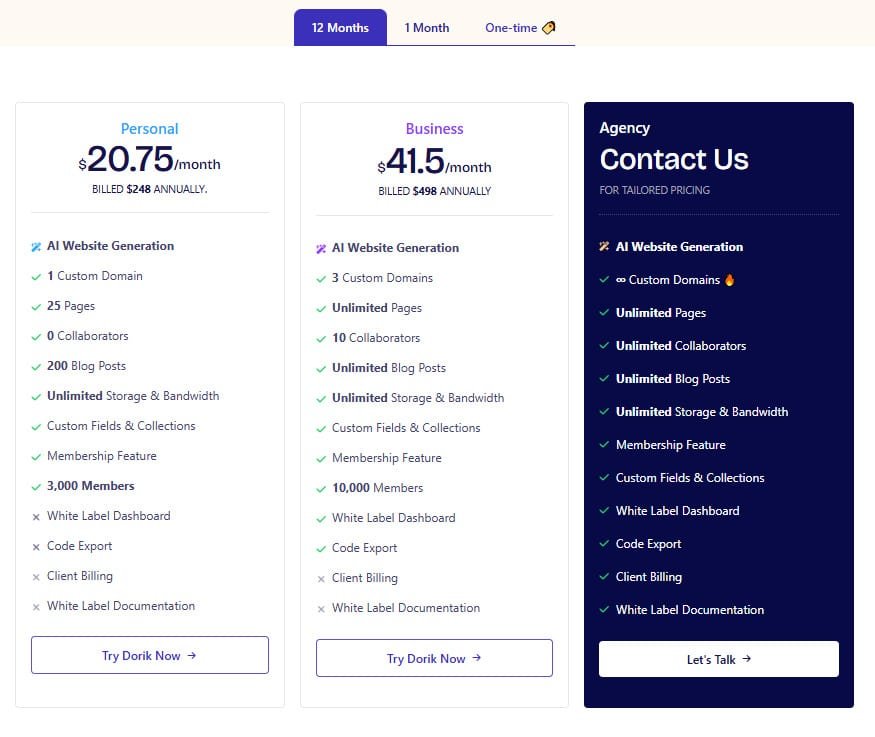
Personal Plan
The Personal plan offers flexible pricing with $29/month on monthly billing or $20.75/month billed $248 annually, alongside a one-time lifetime option at $349 for a single website.
Includes AI Website Generation, 1 Custom Domain, 25 Pages, 0 Collaborators, 200 Blog Posts, Unlimited Storage & Bandwidth, Custom Fields & Collections, Membership Feature, 3,000 Members, White Label Dashboard, Code Export, Client Billing, White Label Documentation, Add additional websites for $199 (One Time Payment).
Business Plan
The Business plan provides $59/month on monthly billing or $41.5/month billed $498 annually, with a one-time lifetime bundle at $749 for three websites.
Includes AI Website Generation, 3 Custom Domains (3-10 on monthly), Unlimited Pages, 10 Collaborators, Unlimited Blog Posts, Unlimited Storage & Bandwidth, Custom Fields & Collections, Membership Feature, 10,000 Members, White Label Dashboard, Code Export (15 Per Month on lifetime), Client Billing, White Label Documentation, Add additional websites for $149 (One Time Payment).
Agency Plan
The Agency plan requires contact for tailored pricing, available across monthly, annual, and one-time billing structures with highly discounted rates.
Includes AI Website Generation, ∞ Custom Domains, Unlimited Pages, Unlimited Collaborators, Unlimited Blog Posts, Unlimited Storage & Bandwidth, Membership Feature, Custom Fields & Collections, White Label Dashboard, Code Export, Client Billing, White Label Documentation.
| Feature / Plan | Personal | Business | Agency |
| Monthly Billing | $29/month | $59/month | Contact for custom |
| Annual Billing | $20.75/month ($248/year) | $41.5/month ($498/year) | Contact for custom |
| One-Time Lifetime | $349 (1 site) | $749 (3 sites) | Contact for custom |
| Custom Domains | 1 | 3 (monthly: 3–10) | Unlimited 🔥 |
| Pages | 25 | Unlimited | Unlimited |
| Collaborators | 0 | 10 | Unlimited |
| Blog Posts | 200 | Unlimited | Unlimited |
| Members (Membership) | 3,000 | 10,000 | Unlimited |
| Code Export | Unlimited | 15/month (lifetime) | Unlimited |
| Best For | Solo creators | Growing teams & multi-sites | Agencies & high-volume |
Pros & Cons – In-Depth Look at Advantages and Drawbacks
No platform is perfect, but understanding the trade-offs helps you make an informed decision about whether this builder fits your specific needs. After pushing its limits, I found both impressive strengths and important limitations worth considering.
Key Advantages and Standout Benefits
The drag-and-drop interface genuinely impressed me. Building complex pages felt intuitive, even for beginners. The AI generation consistently understood my prompts, creating solid starting points.
Affordability stands out as a major win. Getting AI website generation, white-label CMS, and membership tools for $39 monthly represents exceptional value. The export feature prevents vendor lock-in—a rare option most builders intentionally omit.
Notable Drawbacks and Limitations
Template options feel restrictive despite the 80+ selection. You can’t switch templates after choosing, and font limitations restrict design flexibility. The editor occasionally loads slowly, especially on startup.
Ecommerce capabilities are basic at best. This isn’t Shopify—you’ll need elsewhere for comprehensive product pages and inventory management. Third-party integrations are limited compared to more established platforms.
| Strengths | Weaknesses | Impact Level |
|---|---|---|
| User-friendly interface | Limited template variety | Medium |
| AI-powered generation | Basic ecommerce features | High for online stores |
| Affordable pricing | Occasional performance issues | Low to Medium |
| Export code feature | Limited design control | Medium for advanced users |
| 24/7 chat support | Restricted third-party integrations | Medium for complex projects |
While Dorik excels for portfolios, marketing and content sites, its limitations become apparent for complex ecommerce or heavily customized projects.
The support team responds well, but being a smaller company means capacity constraints during peak times.
Alternatives to Dorik – Exploring Competing Website Builders
Choosing the right website builder feels like navigating a crowded marketplace—each promising the moon but delivering different results. I’ve tested them all to help you find your perfect match.
Comparisons with Other No-Code Platforms
Dorik AI stands out as a powerful Dorik website builder that generates full sites from simple prompts, with drag-drop editing, hosting, and CMS in one.
Dorik offers free custom domains on paid plans and unlimited pages—starting at $10/month for Pro. I built a portfolio last week; live in 5 minutes without code. These seven tools deliver similar AI-driven site creation with unique twists.
Readdy AI
Readdy AI creates responsive sites from text descriptions, adding e-com and blogs fast. No-code pros love the speed—$19/month Starter – Read Full Review
Hostinger AI Website Builder
Hostinger AI Website Builder builds sites in under a minute with hosting included, plus AI heatmaps for optimization. Budget favorite—$2.99/month with hosting – Read Full Review
Butternut AI
Butternut AI generates complete sites from prompts, with SEO and mobile tweaks baked in. Solopreneurs launch quick—$20/month Pro – Read Full Review
PineApple Builder
PineApple Builder focuses on e-com stores with AI product pages and payments. Shopify alternative—$29/first year – Read Full Review
UseArticle
UseArticle crafts landing pages and blogs from descriptions, with built-in forms and analytics. Marketers convert fast—$9/month Basic – Read Full Review
SITE123
SITE123 offers AI-assisted templates and 24/7 support for beginners. Free plan available, $12.80/month Premium for custom domain – Read Full Review
Lindo AI
Lindo AI builds multi-page sites with SEO tools and stock images included. Agencies scale clients—$15/month Starter – Read Full Review
While Dorik website builder excels in flexibility and CMS, these alternatives shine for e-com focus or ultra-low pricing.
| Tool | Key Strengths | Starting Price | Best For |
|---|---|---|---|
| Dorik AI | Prompt-to-site, CMS, unlimited pages | $10/month | Portfolios & blogs |
| Readdy AI | Text-to-responsive, e-com add-ons | $19/month | Quick launches |
| Hostinger AI Builder | Under-1-min build, hosting + heatmaps | $2.99/month | Budget sites |
| Butternut AI | Full sites, SEO/mobile baked in | $20/month | Solopreneurs |
| PineApple Builder | E-com stores, payments | $29/year 1 | Online shops |
| UseArticle | Landing pages, forms/analytics | $9/month | Lead gen |
| SITE123 | Templates, 24/7 support, free plan | Free / $12.80/mo | Beginners |
| Lindo AI | Multi-page, stock images, SEO | $15/month | Agencies & clients |
Highlighting Unique Selling Points and Competitor Gaps
Shopify excels at ecommerce but costs significantly more. Webflow offers superior design control but requires more technical knowledge. Carrd is budget-friendly but limited to simple landing pages.
“The sweet spot? This platform balances AI power with simplicity—perfect when you need professional results without the complexity.”
For video creators, specialized services like Uscreen make more sense. This builder provides the ideal middle ground between simple tools and complex enterprise solutions. You get professional websites without coding knowledge.
Case Study / Personal Experience – Real-World Insights
My hands-on experience began with a simple goal: build a professional portfolio in under three hours. I signed up for the free trial—the process took under a minute—and immediately faced the AI generator versus template decision.
The dashboard felt clean and intuitive, which surprised me given the platform’s power.
My Experience: A Storytelling Approach
I chose the AI route for my fictional designer’s website. My prompt detailed a modern portfolio with gallery sections, client testimonials, and a contact page. The generation took about 90 seconds. When the initial site appeared, I was genuinely impressed by how accurately it interpreted my requirements.
The design used complementary colors and modern fonts. The layout included all the sections I requested. Swapping AI-generated images for custom ones was straightforward. I adjusted colors to match a specific brand palette using the drag-and-drop editor.
Adding new sections with UI blocks felt natural. The entire customization process flowed smoothly. I encountered minor limitations—wanting a third font option wasn’t possible.
But overall, the editor responded well even with image-heavy pages.
Results and Practical Outcomes
My completed website looked professional and loaded in under two seconds. Mobile responsiveness worked perfectly across devices. The blogging functionality felt surprisingly robust for a builder platform.
From sign-up to publishable site took approximately 2.5 hours. Traditional development would have taken weeks. The content structure made sense, and the template provided a solid foundation. This experience demonstrated genuine time savings without sacrificing quality.
User Experience and Integrations – Ease of Use and Extendability
The real test of any platform isn’t just what it can do, but how easily you can do it. I found the interface refreshingly straightforward. You can get started immediately by clicking any element to edit text or replace an image.
Drag-and-Drop Editing and Template Customization
The drag-and-drop editor makes building intuitive. Select from hundreds of UI blocks to add galleries, forms, or columns. Customizing templates is simple—adjust colors, fonts, and spacing globally for consistent branding.
I particularly liked the Navigator tool. It shows your site’s structural hierarchy clearly. This helps when working with complex layouts. You can also switch viewports to check responsiveness across devices instantly.
Third-Party Integrations and Support Resources
Extending functionality is straightforward with various integrations. Connect Google Analytics for insights or payment processors like Stripe. Most connections require just an API key paste.
The support team provides multiple resources. You get 24/7 chat, detailed documentation, and video tutorials. This platform maintains excellent uptime, ensuring your custom domain stays accessible.
Even without prior experience, you can build a functional website quickly. The learning curve is remarkably low. Everything works smoothly without coding knowledge required.
Conclusion – Should You Buy It?
Raamish’s Take
Dorik simplifies website creation, making it accessible for beginners while offering robust tools for professionals.
Its AI-powered website generation is a standout, allowing users to input a prompt like “build a coffee shop website” and receive a fully functional site with AI-generated text and images in minutes, no coding required.
I’m impressed by the no-code drag-and-drop builder, paired with 110+ templates and 250+ UI blocks, which enable rapid customization to match any vision.
The white-label CMS is a game-changer for agencies, offering branded dashboards, client billing, and the ability to build blogs or directories.
Additionally, the Airtable integration transforms data into dynamic layouts like job boards or shops, with real-time updates ensuring seamless management.
Features like unlimited storage and bandwidth, native SEO tools, and payment integrations (Stripe, PayPal) enhance scalability and functionality.
Dorik’s blend of intuitive design, AI-driven efficiency, and agency-focused tools makes it ideal for creating professional websites effortlessly.
The verdict is in: This platform excels at making professional website creation accessible to non-technical users. After extensive testing, I can confidently recommend it for specific use cases.
Dorik delivers exceptional value if you’re a freelancer building portfolio sites, an agency needing white-label client management, or a creator launching membership content. The AI generation and drag-and-drop blocks save hours of work.
However, look elsewhere for complex ecommerce or advanced SEO projects. The limitations in template variety and design control are acceptable trade-offs for the target audience.
Start with the free tier to test the interface. The $15/month Personal plan offers serious value. If you want a clean, modern website without coding headaches, this service delivers.
My final take? This website builder solves real problems simply and affordably. Sign up today and see if it’s the right tool for your next project.
Frequently Asked Questions
Is Dorik really a no-code website builder?
Absolutely. I’ve built sites with it without touching a single line of code. The platform uses a visual, drag-and-drop interface and AI tools like the website generator. You assemble pages using pre-built UI blocks, making it perfect for entrepreneurs and creators who want a professional site without the technical hassle.
What’s the catch with the free plan?
The free tier is surprisingly generous, but it does have limitations. Your site will have a Dorik subdomain (like yoursitename.dorik.io) and display a small “Made with Dorik” branding. For a custom domain and to remove that branding, you’ll need to upgrade to a paid plan starting at the Personal tier.
Can I use my own domain name with Dorik?
Yes, you can connect a custom domain, but it’s a feature reserved for the premium plans. The Personal plan and above allow you to connect one custom domain, which is essential for building a professional brand identity for your business.
How good are the SEO tools?
The inbuilt SEO features are solid for a no-code platform. You get easy access to edit meta titles, descriptions, and Open Graph tags for each page. For most small businesses and portfolio sites, these tools are sufficient to get you started with basic search engine optimization.
Does Dorik support e-commerce or online stores?
Not natively. This is a key point to understand. Dorik is fantastic for portfolios, blogs, membership site & marketing, but it doesn’t have built-in shopping cart functionality. You’d need to integrate a third-party service like Gumroad or Lemon Squeezy to sell products.
What kind of support can I expect?
Support varies by plan. The free tier offers community support, while paid plans get email support. I’ve found their response times to be reasonable. The higher-tier Business and Agency plans include priority support, which is crucial if you’re building sites for clients.
How does the AI website generator work?
You simply describe the type of site you want (e.g., “a marketing site for a freelance photographer”), and the AI creates a complete, multi-page website structure with relevant content and images in minutes. It’s a huge time-saver, though you’ll still want to customize the text and images to make it your own.