Does this platform truly make content creation as simple as its name suggests?
I decided to find out. After spending significant time testing it hands-on, I’m here to give you the real story.
This isn’t based on secondhand information. It’s my personal experience with this All-In-One Tool. I put it through its paces to see if it meets the high expectations of today’s creators.
In this Easy-Peasy.AI review will break down exactly why—covering features, pricing, pros, cons, and my honest take.
You’ll get a clear picture of its capabilities. We’ll look at everything from blog writing to image generation. My goal is to help you decide if this is the right tool for your needs.
Let’s dive into the details and see what this platform can really do.
Key Takeaways: Easy-Peasy.AI Review
- This is a firsthand, comprehensive evaluation based on personal testing.
- The platform received an overall rating of 9.3/10 in this assessment.
- The review covers features, pricing, real-world use, and potential drawbacks.
- Content produced by the tool can be detected by AI content scanners.
- The platform is noted for its user-friendly interface and variety of templates.
- The final conclusion suggests the tool is worth trying for yourself.
Easy-Peasy.AI Review: An Overview

Raamish’s Take
Easy-Peasy.AI is a comprehensive all-in-one platform that combines multiple AI tools into a single workspace, helping users create content, visuals, and audio faster without switching apps.
Its MARKY chat stands out, offering a personalized AI companion powered by models like GPT-4, Claude 3 Opus, Google Gemini, and Mistral, with real-time data access, file uploads, diverse prompts, and chat personas for empathetic, privacy-focused interactions.
I’m really impressed with the no-code AI bots, which let you train custom assistants on your data and embed them on websites or share via URL for tasks like customer support or lead generation.
The text-to-speech converts text to natural speech in 40+ languages, while audio transcription handles summarization, notes, and summaries.
For visuals, the AI image generator creates real photos or art, photo studio edits and transforms images, video generator builds high quality clips from text or images, and interior design tool brainstorms room ideas affordably.
With 200+ templates for blogs, emails, social posts, or resumes, it speeds up writing 10x.
Easy-Peasy.AI‘s integration and unlimited access to its features make it a practical choice for streamlining creative workflows without hassle without purchasing multiple AI Tools..
Introduction to Easy-Peasy.AI
The AI tools market has exploded with options, making it challenging to identify truly comprehensive solutions. This platform caught my attention because it promises to handle multiple content formats in one place.
How It Fits in the Current AI Landscape
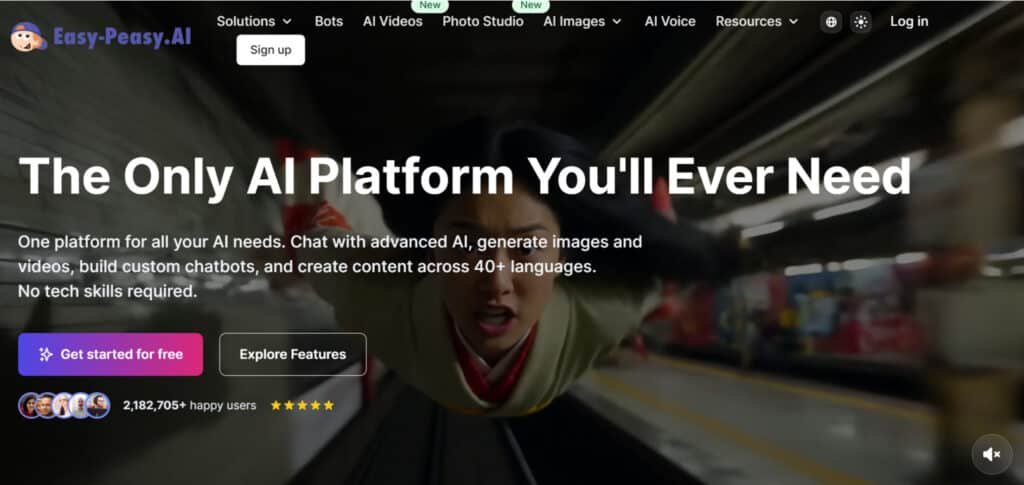
In this current digital landscape, new tools launch constantly. Few offer genuine all-in-one solutions. This platform positions itself as a versatile assistant for content creation across different formats, From social media posts to interior designing.
It combines writing, image generation, and audio tools. This approach saves time for marketers who juggle multiple platforms.
Company Background and Founders
While specific founder information isn’t widely publicized, the platform has built credibility through its user-focused design. The team clearly understands content marketing needs.
They’ve prioritized creating a secure, reliable tool that professionals can trust with their work.
Purpose and User Endorsements
The core purpose is simple: accelerate content creation without sacrificing quality. I found it particularly useful for social media posts and blog writing.
Small businesses and individual creators appreciate having everything in one user-friendly interface. The templates provide helpful starting points.
| Content Need | Platform Capability | User Benefit |
|---|---|---|
| Blog Writing | AI-powered content generation | Saves research and drafting time |
| Social Media Content | Template library with 200+ options | Quick, professional-looking posts |
| Multilingual Projects | Support for 35+ languages | Global team collaboration |
| Visual Content | Integrated image creation tools | No need for separate design software |
During my testing, the experience felt designed for real workflows. It’s not just feature dumping—it’s thoughtful organization. The customer support responds promptly to user questions.
While it may lack the brand recognition of some competitors, the platform delivers genuine value. It understands what users actually need to create quality content efficiently.
What is Easy-Peasy.AI?
At its core, this tool is designed to be a marketer’s Swiss Army knife for content. It brings several powerful features under one roof.
Inner Workings and Functionality
This platform runs on advanced language models. You pick from over 200 templates for different needs, like blog posts or social media captions.
The process is straightforward. You input your topic and preferences. The system then generates the output in seconds.
I found the interface incredibly intuitive. It guides you step-by-step, making complex creation tasks feel simple.
- Writing assistance for blogs and emails
- Image generation for custom artwork
- Audio transcription and text-to-speech tools
It truly functions as a central hub for your entire workflow.
Benefits for Content Marketing Professionals
For professionals, the biggest benefit is time savings. You can rapidly produce first drafts and overcome creative blocks.
The ability to create text, images, and audio in one place is a game-changer. It eliminates the friction of switching between different apps.
This tool helps maintain consistent content quality, even under tight deadlines. It’s an asset for any marketing team.
Complete Features of Easy-Peasy.AI
The real power of this content platform lies in its diverse feature set that addresses multiple creation needs. I found it genuinely covers the full spectrum from ideation to final production.
1. Marky: Your Go-To AI Chat Buddy
Marky stands out as a versatile chat companion in this review of Easy-Peasy.AI. It powers conversations using advanced models like GPT-5.2, Claude 4 Sonnet, Google Gemini, and Mistral. This feature enables natural, engaging interactions for users seeking efficient AI assistance.
One key aspect is personalized chats that adapt to user needs, creating empathetic responses without robotic tones. Readers searching for reliable chat tools will find this helpful for brainstorming ideas or solving problems quickly, saving time in daily work.
The prompt library offers a wide range of starters to kickstart sessions. This supports creative work flows, allowing users to generate content or answers instantly. For team collaboration, it streamlines idea sharing in group settings.
Privacy remains a priority, with data locked down securely. This builds trust for businesses using the service. Overall, Marky enhances productivity by handling complex queries, making it a core feature in Easy-Peasy.AI reviews.
In multi-user scenarios, the team can benefit from shared sessions. It pulls live data or switches personas for focused tasks. This versatility aids professionals in various fields, improving efficiency in work processes.
2. Custom Chatbots: Build Your Own AI Sidekick
Custom Chatbots allow users to create tailored AI assistants trained on specific data. This feature in Easy-Peasy.AI supports embedding bots on websites or apps for customer support and lead generation.
Support for 80+ languages ensures global accessibility. Readers looking for multilingual service will appreciate how this expands reach, helping businesses connect with diverse audiences effectively.
Agentic smarts include running Python code, web searches, or sending emails. This automates tasks, reducing manual work for teams. The team can deploy bots to handle routine inquiries, freeing time for strategic efforts.
Integrations with WhatsApp, Telegram, Slack, Zapier, and Google Calendar connect seamlessly. This boosts workflow in team environments, making the service more valuable.
Whitelabel mode lets users add their logo, removing Easy-Peasy.AI branding. Businesses gain a professional look, enhancing client trust.
The build process is straightforward: add data, customize appearance, select models like OpenAI or Anthropic, test, and deploy via URL or HTML. This user-friendly approach helps readers prototype quickly, scaling operations without coding expertise.
In reviews, this feature shines for its flexibility in customer service roles.
3. AI Video Generator: From Pic to Motion Magic
The AI Video Generator transforms static images into dynamic talking videos with precise lip-sync. This feature appeals to creators needing quick visual content in Easy-Peasy.AI reviews.
Styles include hyper-realistic, cyberpunk, dreamy fantasy, or seasonal themes. Users describe scenes, and the tool produces clips in minutes. This speeds up social media or ad creation, aiding marketing work.
Voice sync ensures natural speech from subjects. No equipment required for professional results, helping readers produce engaging videos efficiently.
This generator benefits content marketers by turning portraits into scroll-stopping clips. It simplifies production, reducing costs and time in work flows.
For team projects, it enables rapid prototyping of demos. The service supports TikTok hooks or product showcases, enhancing online presence.
In reviews, users praise its ease for non-experts. Overall, it streamlines video work, making high-quality output accessible.
4. AI Photo Generator (aka Photo Studio): Snap Without the Camera
AI Photo Generator, or Photo Studio, creates 4K professional photos from selfies. Over 40 themed packs, with 71 more unlockable, produce 10 unique shots each. This feature stands out in Easy-Peasy.AI for visual building.
Themes range from old money elegance to cyberpunk neon or Y2K metallic. Custom prompts adjust poses, lighting, and outfits. Readers seeking profile upgrades benefit from studio-quality results without shoots.
This helps in dating profiles, cosplay, or passport photos. It saves money and effort for professional needs.
Commercial use is encouraged with original outputs. Team members can generate consistent branding visuals quickly.
The service overlaps with headshots for LinkedIn or resumes. It elevates online profiles, supporting career work.
In reviews, this generator is noted for versatility across uses.
5. Text-to-Speech: Voices That Sound Human
Text-to-Speech converts text to audio in 50+ languages with 400+ premium voices. Voice cloning in 29 languages requires minimal samples. This feature enhances audio production in Easy-Peasy.AI reviews.
Voices like Adam Stone (British radio style), Adeline (American narrator), Jeff (deep audiobook), or Android X (robotic) offer variety. Accents include American and British.
This aids TikTok videos or podcasts, producing crisp outputs. Readers gain efficient narration tools, streamlining content work.
For team narration projects, it ensures consistent quality. The service supports multi-languages needs globally.
In reviews, cloning accuracy is highlighted for personalization.
6. Easy-Peasy.AI Templates: Streamlined Content Creation
Easy-Peasy.AI offers over 200 proven templates spanning 100+ use cases, making it a versatile tool for efficient content generation. Categories include emails, blog posts, social media captions, resumes, and more. Users select a template, input details, and receive polished output quickly.
This feature supports 35+ languages, enabling global accessibility and multilingual projects. Customization options allow tailoring to specific styles, enhancing consistency in professional work.
For marketing teams or individual creators, these templates reduce drafting time significantly, boosting productivity.
The platform’s intuitive design ensures seamless integration into workflows, delivering high-quality results without complexity. Ideal for overcoming creative blocks in diverse applications.
7. AI Audio Transcription: From Sound to Script
AI Audio Transcription processes files into text with summaries. Enhanced in higher plans for accuracy. This feature automates note-taking in reviews.
It pulls key points, aiding podcasters or meetings. Readers save typing time, focusing on analysis.
For team reviews, it generates quick insights. The service handles interviews seamlessly.
8. Long-Form Content: Build Big Pieces Easy
Long-Form Content auto-fills sections with buttons or “+++”. Ties into templates. This feature supports essays or reports in Easy-Peasy.AI review.
It maintains flow, reducing blanks. Readers build depth without burnout.
Team projects gain structure. The service speeds large work.
9. AI Interior Design Generator: Room Revamps in a Flash
AI Interior Design Generator uses room pics for style swaps like modern to boho. This feature provides instant visuals in reviews.
It previews changes, aiding decisions. Readers revamp spaces affordably.
Team designers prototype fast. The service cuts shopping errors.
10. AI Professional Headshots: Profile Pics Perfected
AI Professional Headshots generate studio looks from selfies. Varied poses and expressions. This feature overlaps Photo Studio in Easy-Peasy.AI review.
It levels up LinkedIn or sites. Users can avoid photoshoot costs.
Team branding stays consistent. The service supports career work.
11. Other Quick Tools in the Mix
Other tools include AI Images for fast art generator and Brand Voices for audio tweaks in higher tiers. This extends the service in reviews.
AI Images create intuitive visuals. Readers enhance projects quickly.
Brand Voices customize tones. Team audio work benefits from personalization.
All integrate under one platform with secure payments. This all-in-one approach aids diverse needs.
Pricing Options of Easy-Peasy.AI
Budget considerations play a crucial role in selecting any software platform, and this content tool offers surprisingly flexible options.
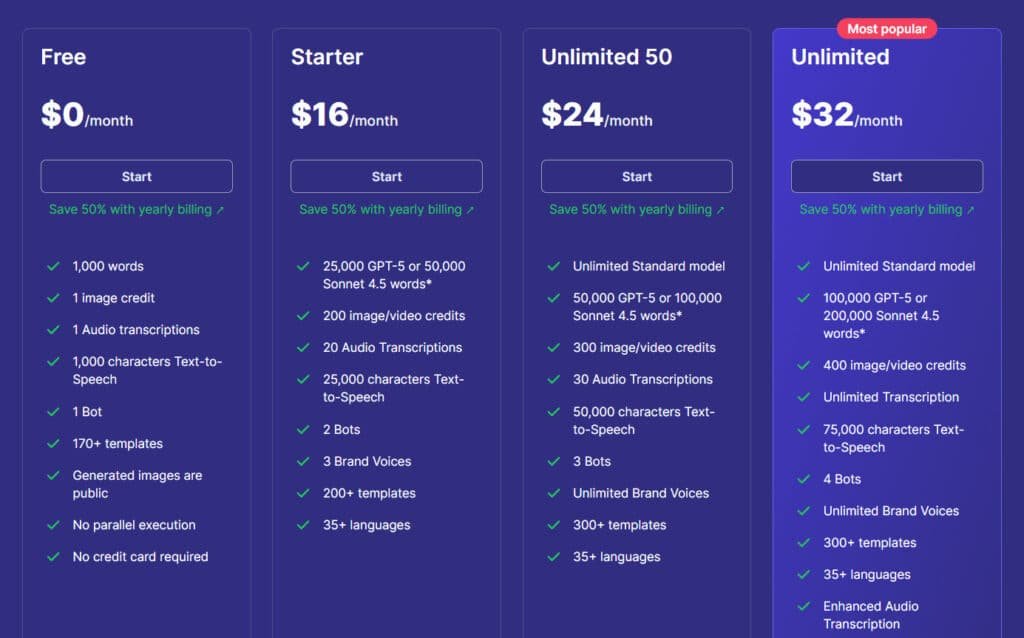
Diving into Easy-Peasy.AI‘s pricing plans, I’ve crunched the tiers based on that screenshot. It’s straightforward: start free, scale up as needed.
Monthly hits harder, but annual slashes costs by 50%—smart for long-haulers. Here’s the full scoop, tier by tier.
Starter Plan
Starter runs $16/month (or $8/month billed yearly, saving $96 from $192). Great for light users testing bots.
Features: 25,000 GPT-5/50,000 Sonnet 4.5 words*, 200 image/video credits, 20 audio transcriptions, 25,000 TTS characters, 2 bots, 3 brand voices, 200+ templates, 35+ languages.
Unlimited 50 Plan
Unlimited 50 plan costs $24/month (or $12/month billed yearly, down $144 from $288). Balances unlimited basics with extras.
Features: Unlimited standard model, 50,000 GPT-5/100,000 Sonnet 4.5 words*, 300 image/video credits, 30 audio transcriptions, 50,000 TTS characters, 3 bots, unlimited brand voices, 300+ templates, 35+ languages.
Unlimited Plan
The most popular Unlimited plan is $32/month (or $16.50/month billed yearly, saving $186 from $384). Loaded for pros.
Features: Unlimited standard model, 100,000 GPT-5/200,000 Sonnet 4.5 words*, 400 image/video credits, unlimited transcription, 75,000 TTS characters, 4 bots, unlimited brand voices, 300+ templates, 35+ languages, enhanced audio transcription, API access, newest features, priority support.
| Plan | Monthly Price | Annual Price (50% Off) | Key Features Highlight |
| Free | $0 | $0 | 1K words, 170+ templates |
| Starter | $16 | $96 | 25K words, 2 bots, 200+ templates |
| Unlimited 50 | $24 | $144 | Unlimited std, 50K words, 300+ templates |
| Unlimited | $32 | $198 | Unlimited all, API, priority support |
Free Trial and Value for Money
The ongoing free trial lets you properly evaluate the platform. You get real features without pressure or credit card requirements.
Paid plans include a 30-day money-back guarantee. This risk-free trial period ensures the tool meets your specific needs.
Considering the diverse features—from text and images to audio speech and transcription—the value proposition is strong. The pricing beats many single-purpose competitors.
Pros & Cons of Easy-Peasy.AI
Let’s get straight to the point: This platform excels in user-friendliness and versatility, but it’s not without its quirks. My testing highlighted a clear set of strengths and a few areas where your expectations might need adjusting.
Advantages: User-Friendly Interface & Versatility
The interface is a major win. You can start creating content within minutes, even if you’re new to these tools. It’s that intuitive.
Versatility is perhaps its biggest advantage. With over 200 templates, writing aids, image generation, and audio features in one place, it saves you significant time. The pricing starts fairly, and multi-language support is a boon for global users.
Drawbacks and Areas for Improvement
However, some features have limits. The image creation output can be confusing compared to dedicated art tools. More critically, the text output is easily detectable by AI scanners.
This means you must edit for authenticity. The platform also leans logical, sometimes missing emotional nuance. While customer support is available, my experience found it good, not great.
| Strengths | Considerations |
|---|---|
| Extremely intuitive interface | AI-generated content requires human editing |
| All-in-one content hub | Image generation is functional but not standout |
| Fair pricing and solid free plan | Can lack emotional depth for certain needs |
If these limitations are deal-breakers for your specific needs, several quality alternatives exist. We’ll explore them next to help you find the perfect fit.
Alternatives to Easy-Peasy.AI
Juggling multiple AI apps for writing, images, and more can drain your energy fast. One dashboard for everything?
That’s the dream.
Easy-Peasy.AI packs generators for text, images, and markup into a simple spot. But these competitors shine brighter as all-in-one AI content platforms, blending chat, creation, and extras seamlessly.
Here’s a closer look.
Hix AI
Hix bundles over 120 writing tools with chat, bypassers, and extensions. Supports GPT-5.2 and Claude access. Suits marketers crafting emails, posts, or long articles quick – Read Full Review
GlobalGPT
GlobalGPT accesses advanced models like GPT-5.2, Claude, and video tools in one hub. Includes agents and real-time search. Ideal for creators needing text, images, and cinematic clips without switching – Read Full Review
Magai
Magai connects 50+ models like Gemini and Llama with personas and team folders. No limits on generation. Perfect for pros collaborating on content or brainstorming ideas – Read Full Review
Galaxy AI
Galaxy claims 3000+ tools for chat, images, video, and audio. Affordable entry point. Fits experimenters exploring broad AI features fast – Read Full Review
Monica AI
Monica integrates top models for writing, summaries, art, and translation. Browser extension magic. Great for daily tasks like rephrasing or summarizing on the go – Read Full Review
Simplified
Simplified combines design, video editing, AI writing, and social scheduling. Templates galore. Suits teams building graphics, posts, and campaigns in one flow – Read Full Review
Krater AI
Krater merges copy, images, audio, and chat tools affordably. Streamlines workflows. Handy for entrepreneurs handling varied content needs solo – Read Full Review
| Tool | Key Content Features | Strengths & Notes | Best For | Pricing Starts |
|---|---|---|---|---|
| Hix AI | 120+ writing tools, chat models, bypass, extensions | Modular plans; strong for SEO & emails | Marketers & writers | $9/month |
| GlobalGPT | Multi-models (GPT-5, Claude), video gen, agents | Broad advanced access; real-time features | Video & research heavy users | $12/month |
| Magai | 50+ models, personas, unlimited gen, collaboration | Team-friendly; no rate limits | Professionals & teams | $19/month |
| Galaxy AI | 3000+ tools, chat, image/video/audio | Huge variety; credit-based usage | Experimenters & broad needs | $15/month |
| Monica AI | Multi-model chat, writing, art, translation | Extension integration; productivity focus | Everyday assistants | $9/month |
| Simplified | AI writer, design, video editor, social planner | Templates & collaboration; visual heavy | Designers & social teams | $15/month |
| Krater AI | Copywriting, images, audio, chat suite | Affordable consolidation; simple interface | Entrepreneurs & solos | $9/month |
The best choice depends on your specific content creation requirements. Testing multiple options during free trials helps identify the perfect fit for your workflow.
Conclusion: Easy-Peasy.AI Review
Raamish’s Take
Easy-Peasy.AI is a comprehensive all-in-one platform that combines multiple AI tools into a single workspace, helping users create content, visuals, and audio faster without switching apps.
Its MARKY chat stands out, offering a personalized AI companion powered by models like GPT-4, Claude 3 Opus, Google Gemini, and Mistral, with real-time data access, file uploads, diverse prompts, and chat personas for empathetic, privacy-focused interactions.
I’m really impressed with the no-code AI bots, which let you train custom assistants on your data and embed them on websites or share via URL for tasks like customer support or lead generation.
The text-to-speech converts text to natural speech in 40+ languages, while audio transcription handles summarization, notes, and summaries.
For visuals, the AI image generator creates real photos or art, photo studio edits and transforms images, video generator builds high quality clips from text or images, and interior design tool brainstorms room ideas affordably.
With 200+ templates for blogs, emails, social posts, or resumes, it speeds up writing 10x.
Easy-Peasy.AI‘s integration and unlimited access to its features make it a practical choice for streamlining creative workflows without hassle without purchasing multiple AI Tools..
Based on my hands-on experience, this tool earns its place as a valuable addition to any content creator’s toolkit. It delivers exactly what busy professionals need: A streamlined way to handle multiple content formats in one place.
The platform shines with its intuitive interface and extensive templates library. While some features require human editing for authenticity, the time savings are undeniable. My testing confirms it meets most needs efficiently.
If you juggle various creation tasks and value workflow efficiency over perfection, this solution fits perfectly. The fair pricing and risk-free trial make testing straightforward.
Create your free account today—with no credit card required, you can verify if it meets your expectations. I’d love to hear your thoughts and answer any questions about your experience!
Frequently Asked Questions
Is there a free trial available?
Yes, you can start with a free trial that gives you a solid feel for the platform’s capabilities without any upfront commitment. It’s a great way to test the features and see if it fits your workflow before choosing a paid plan.
How good is the AI image generator?
The image generator is surprisingly capable, especially for creating graphics for blogs and social media. I’ve found it handles custom commands well, though for highly specific or complex artistic styles, you might still need a dedicated tool like Midjourney.
Can it transcribe audio files accurately?
The audio transcription tool works well for clear speech in standard audio formats. It’s fantastic for turning interviews or voice notes into text quickly. Background noise or heavy accents can sometimes reduce accuracy, so it’s wise to review the output.
What kind of customer support can I expect?
Support is responsive, primarily through email. They also have a helpful knowledge base. While there’s no 24/7 live chat, I’ve found they address questions thoroughly and in a timely manner.
Are the 200+ templates actually useful?
Absolutely. The template library is one of its strongest assets. From blog outlines to ad copy and social media posts, the templates provide a fantastic starting point that saves a ton of time, especially when you’re facing writer’s block.
How does it compare to alternatives like Jasper?
This platform stands out with its all-in-one approach, bundling writing, images, and audio tools. Jasper might have a edge in pure long-form writing quality for some users, but if you need a versatile toolkit in one place, this offers better value.
Is the user interface easy to navigate?
The interface is very user-friendly and intuitive. You won’t waste time figuring out where things are. The clean design makes the content creation process smooth, even for beginners.