Are you tired of spending hours on tedious post-production tasks? You know the drill—slogging through interview footage, searching for the perfect soundbite, and syncing audio. It’s a creative drain that keeps you from the real work: storytelling.
The video editing landscape is changing fast. The AI video market is exploding, projected to grow from $3.86 billion to over $42 billion by 2033. Post-production is feeling the most immediate impact. This is where Eddie AI enters the scene.
Launched in October 2024 by the team behind the trusted SimonSaysAI, this new tool is built for professionals. Founders Shamir Allibhai and Alex Terekhov designed it specifically for documentary filmmakers, corporate producers, and creators drowning in interview-heavy video.
Think of it as your personal assistant editor. It’s not here to replace you but to handle the grunt work. I’ve used it in real projects, and I’m here to give you a straightforward, hands-on review. Let’s dive into how it works.
Key Takeaways: Eddie AI Review
- The AI video editing market is experiencing massive growth, creating new tools for professionals.
- Eddie AI is designed as an assistant, not a replacement, for human editors.
- It specifically targets the challenges of editing long-form, interview-heavy content.
- The tool comes from a credible team with a proven track record in AI for media.
- Its primary goal is to save editors time on repetitive tasks, freeing them for creative work.
- This evaluation is based on practical, real-world use of the software.
Eddie AI Review: An Overview
Introduction to Eddie AI
The editing room has become ground zero for artificial intelligence’s quiet revolution in film production. While cameras get fancier and lenses sharper, the real transformation is happening behind the scenes. I’ve seen firsthand how tools are evolving to tackle the most tedious parts of the job.
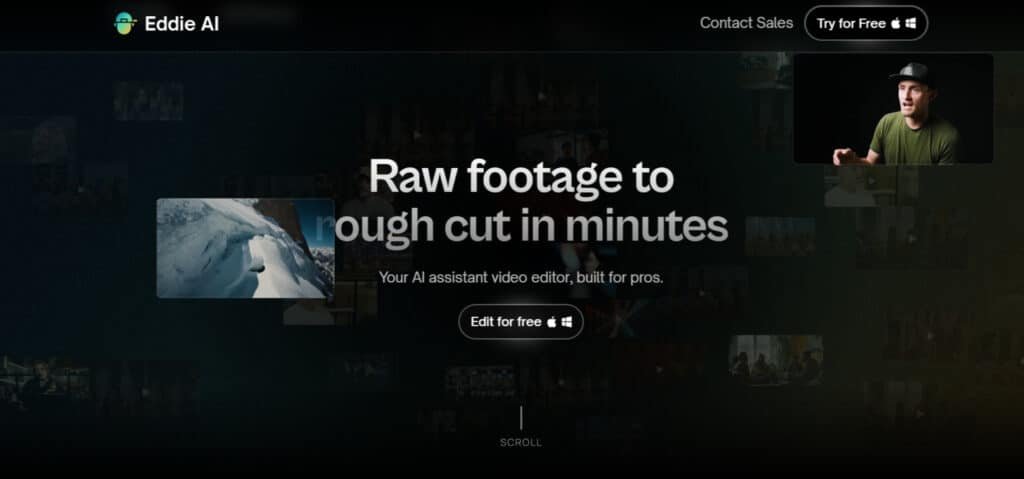
AI’s Impact on Video Editing in the Modern Landscape
Post-production workflows are feeling the AI impact most immediately. Think about the hours spent logging footage, transcribing interviews, and organizing clips. These tasks are essential but creatively draining.
Removing filler words and assembling rough cuts can consume days of an editor’s time. The irony? Most professionals entered this field for storytelling, not administrative work. This is where intelligent assistance changes everything.
Founders, Company Background, and Purpose
The team behind this tool isn’t new to the game. Shamir Allibhai and Alex Terekhov previously built SimonSaysAI, establishing serious credibility in professional editing circles. They understand what working editors actually need.
Their latest creation serves as a de facto assistant editor. It’s designed specifically for documentary filmmakers, corporate producers, and creators drowning in interview-heavy content. The purpose is clear: handle the grunt work so professionals can focus on craft.
Industry Adoption and Real-World Endorsements
This isn’t some fringe movement. Major platforms like Premiere Pro and DaVinci Resolve are already integrating AI features. The industry is clearly moving toward assisted workflows.
Professional editors are increasingly embracing these tools within their established systems. The approach complements rather than replaces traditional non-linear editing workflows. It represents a whole new way to manage video editing workloads through conversational, prompt-based assistance.
What is Eddie AI?
The real magic happens when technology understands not just what you’re saying, but what you’re trying to create. This tool acts as your creative co-pilot, designed specifically for dialogue-heavy projects that typically eat up hours of manual work.
I’ve found it transforms how you approach interview-heavy content. Instead of being buried in administrative tasks, you can focus on the storytelling that matters most.
Inner Workings and AI-Powered Editing Process
This assistant works by deeply analyzing your footage’s context. It transcribes everything, identifies key topics, and even recognizes emotional cues in conversations. The system understands the full narrative arc of your material.
You interact through natural language commands rather than complex menus. Ask for a “3-minute edit focusing on customer testimonials” or “find the best quotes about innovation.” The platform delivers rough cuts in seconds, complete with filler words removed.
Benefits for Professional Editors and Content Creators
For professional editors, this means reclaiming 10+ hours monthly on tedious prep work. You get to focus on creative decisions rather than mechanical tasks. The tool handles the heavy lifting of organization and assembly.
Content creators benefit from faster turnaround times and easy iteration. You can quickly generate multiple versions—long-form pieces and social media cutdowns—from the same source material. This flexibility is game-changing for client work.
| Traditional Workflow | AI-Assisted Approach | Time Saved |
|---|---|---|
| Manual transcription & logging | Automatic analysis & organization | 3-5 hours |
| Clicking through timeline clips | Conversational commands | 2-3 hours |
| Manual rough cut assembly | Instant edit generation | 4-6 hours |
| Multiple content versions | Quick iterations from same footage | 2-4 hours |
I’ve tested countless video editing assistants, but few understand the editor’s mindset like this platform does. The features aren’t just flashy additions—they’re practical solutions to real workflow headaches.
Complete Features Of Eddie AI
The conversational interface feels like ChatGPT for your footage. You type commands like “create a 2-minute cut about sustainability” and get results in seconds. The system even proposes narrative frameworks before you start editing.
What impressed me most was the intelligent logging. It transcribes dialogue, removes filler words, and organizes clips by topic. The computer vision generates rich descriptions like “woman laughing during sunset beach scene” instead of generic tags.
1. Core Editing Magic
This video editor handles the main tasks in editing footage. It speeds up workflows for creators who need fast results.
Rough Cuts in Minutes
The rough cut tool takes raw footage and builds a first draft quickly. Users get a solid rough cut without manual trimming.
This helps editors save time on long videos. It lets them focus on creative parts sooner.
For anyone searching for an AI video editor, this feature turns hours of work into minutes. It benefits podcasters or filmmakers by delivering editable drafts fast.
A&B Roll Logging
A&B roll logging sorts main shots and supporting visuals automatically. The video editor organizes clips into clear sections.
This section setup makes it easy to find footage. Editors can jump to refinements without searching through everything. Users looking to edit video efficiently will find this useful. It streamlines organization and reduces frustration in large projects.
Scripted Edits
Scripted edits follow a written guide to assemble clips. The tool syncs dialogue and visuals based on the script.
This ensures structured stories stay on track. It supports narrative-driven content like interviews or talks.
For users who edit video with scripts, this feature maintains accuracy. It helps build coherent film projects without missing beats.
Multicam Podcast Support
Multicam support syncs multiple camera angles for podcasts. It picks best takes and builds seamless timelines.
This works well for group discussions or remote recordings. The video editor handles synced or separate tracks.
Creators producing podcast videos benefit from quick assembly. It cuts down manual syncing time significantly.
2. Quick Content Tools
These tools focus on fast creation of shareable content. They turn long form into short, engaging pieces.
Social Clips Generator
The social clips tool extracts highlights from longer videos. It spots key moments and adds captions for platforms.
This generator creates ready-to-post reels or shorts. Users get multiple clips with little effort.
For content makers, this speeds up social media output. It helps reach audiences faster without extra editing.
Searching for a video editor to make clips? This feature boosts productivity and keeps feeds active.
Talk to Transcript
Talk to transcript lets users chat with the video text. Simple prompts guide edits like cutting fluff or finding sections.
This natural interaction feels like directing an assistant. It locates specific parts quickly. Editors gain precise control over videos. It makes refining transcripts straightforward and efficient.
This tool aids those who want to edit based on spoken content. It improves accuracy in dialogue-heavy footage.
3. Seamless Integrations and Setup
Integration keeps Eddie in existing workflows. It connects without disrupting tools users already know.
Desktop App Vibes
The desktop app runs on Mac or Windows with GPU power. It processes footage locally for speed.
This setup avoids cloud delays. Users work offline after loading files. For professional setups, this ensures reliable performance. It handles demanding tasks without interruptions.
Plug into Your Faves
It integrates with Premiere Pro, DaVinci Resolve, and Final Cut Pro. Export timelines directly to these editors.
This seamless transfer means no rework. Finish rough work in Eddie then polish elsewhere. Users searching for compatible AI tools benefit here. It fits into pro pipelines smoothly.
This feature supports film makers who use major software. It enhances flexibility across platforms.
4. Pro Perks and Smarts
Pro features add scale and trust to the video editor. They support heavy use and real-world application.
Unlimited Exports
Most plans allow unlimited MP4 exports. Free tier has light branding that’s easy to remove.
This means no limits on output. Creators export as needed without restrictions. It helps frequent editors produce more videos. Unlimited access removes barriers to sharing work.
For those building portfolios, this perk enables consistent delivery. It supports growth without extra costs.
Trusted by Many
Over 30,000 editors and filmmakers use it. This shows reliability in professional settings.
Real users trust it for daily workflows. It handles various project types effectively. Users can rely on proven performance. It gives confidence when choosing an AI tool.
This trust factor benefits new users exploring options. It indicates quality for serious editing.
Free Testing Mode
Start with free access to test features. Move to paid only for advanced needs.
This low-risk entry lets users try before committing. Explore tools without upfront payment. It helps decide if it fits specific ideas. Testing reveals practical value quickly.
For searchers comparing tools, this mode provides hands-on experience. It aids informed choices.
Pricing Plans of Eddie AI
Let’s talk numbers—because a great tool means nothing if the pricing doesn’t work for your business. The platform uses a straightforward tiered model. This lets you choose a plan that matches your output.
Subscription Options and Cost Breakdown
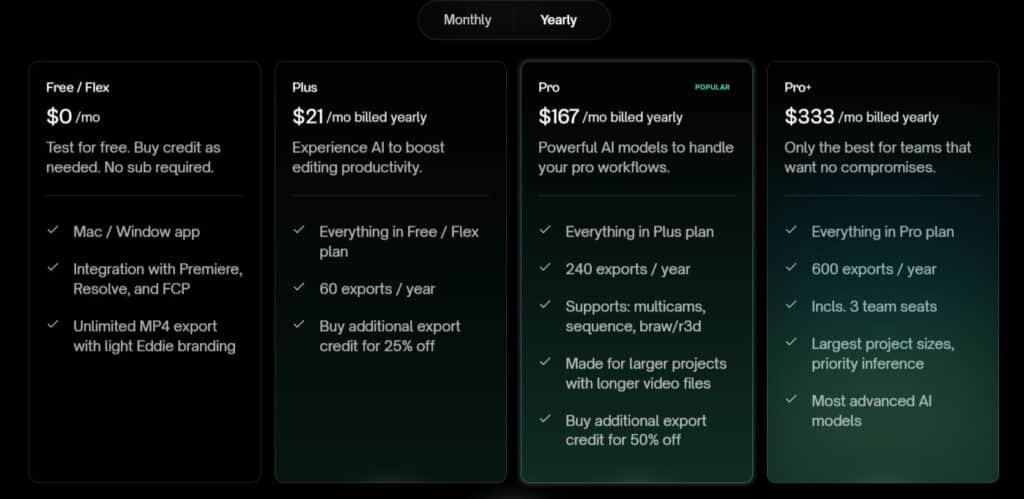
Eddie AI keeps pricing simple with monthly and annual options. Annual saves you cash upfront. Here’s the breakdown.
Free / Flex
$0/mo – forever free, or billed yearly same.
Test everything. Mac/Windows app. Integrations with Premiere, Resolve, FCP. Unlimited MP4 exports (light branding).
Plus
$25/mo or $21/mo (billed yearly).
Everything in Free. 5 exports/mo (or 60/year). Extra credits 25% off.
Pro (Popular)
$199/mo or $167/mo (billed yearly).
Everything in Plus. 20 exports/mo (240/year). Supports multicam, sequences, BRAW/R3D. Handles bigger files. Extra credits 50% off.
Pro+
$399/mo or $333/mo (billed yearly).
Everything in Pro. 50 exports/mo (600/year). 3 team seats. Largest projects, priority speed, top AI models.
| Plan | Monthly | Annual (per mo) | Exports (mo/yr) | Key Extras |
| Free/Flex | $0 | $0 | Unlimited* | Basic integrations |
| Plus | $25 | $21 | 5 / 60 | Discounted extras |
| Pro | $199 | $167 | 20 / 240 | Multicam + pro formats |
| Pro+ | $399 | $333 | 50 / 600 | Teams + priority power |
Flexible Payment and Export Credit Models
Not on a monthly schedule? The Pay-As-You-Go option is a lifesaver. You buy export credits as needed. This is ideal for gig-based work.
This flexibility is key. You aren’t locked into a subscription if your projects slow down. For editors who bill by the hour, the time saved can easily cover the cost.
My recommendation? Start with the Free Plan. Complete one video from start to finish. See how it fits your workflow before you commit.
Pros & Cons of Eddie AI
Based on my experience and feedback from fellow professionals, here’s an honest breakdown of what works and what doesn’t. This balanced assessment comes from real-world testing across multiple projects.
Advantages: Efficiency, Integration, and Intuitive Use
The time savings are undeniable. This platform genuinely saves 10+ hours monthly on tedious prep work like logging footage and creating rough cuts. The integration with professional editing software is seamless—one-click export to Premiere Pro or DaVinci Resolve.
Once you master the conversational interface, rapid iteration becomes second nature. The system lowers technical barriers while maintaining consistency across projects. By removing friction, it allows more time for creative storytelling.
Drawbacks: Limited Advanced Editing and Subscription Constraints
However, the initial drafts can feel clunky. As filmmaker Darren Durlach noted, results sometimes appear as “strange, disjointed sequences” lacking narrative flow. The technology currently serves as an interesting assistant rather than a trusted partner for high-stakes work.
The system lacks human creative judgment and emotional nuance. For complex visual effects or detailed color grading, you’ll need traditional software. Subscription costs may not suit every budget, especially for occasional users.
Since this isn’t the only tool available, let’s explore how alternatives compare for different workflow needs.
Alternatives and Personal Experience
When exploring the AI video editing landscape, it’s crucial to understand how different tools serve distinct purposes. Each platform excels in specific areas of the content creation workflow.
Competing AI Tools and Comparative Insights
Descript pioneered text-based editing—you edit video by editing transcripts. It’s phenomenal for podcasters removing filler words. Their Underlord feature offers similar capabilities.
Runway ML focuses on generative creation. It creates new content from scratch using text-to-video generation. This tool specializes in complex visual effects rather than assembling existing footage.
These platforms complement rather than compete. Professionals might use all three: Runway for abstract visuals, this platform for interview assembly, then Final Cut Pro for polishing.
| Tool | Primary Strength | Best For |
|---|---|---|
| Descript | Text-based editing | Podcast cleanup, transcript work |
| Runway ML | Generative AI effects | Creating new visual content |
| This Platform | Interview assembly | Rough cuts, multicam projects |
Real-World Case Study and Iterative Editing Experience
I tested with 30 minutes of two-camera interview footage. My first prompt requested a 2-minute summary about AI challenges. The system delivered a sequence in 30 seconds.
The initial cut felt disjointed—confirming that first drafts need refinement. But the conversational refinement proved powerful. I typed follow-up prompts like “condense while keeping key points.”
Each change generated in seconds. Adding B-roll was as simple as prompting “include office collaboration shots.” The export to DaVinci Resolve preserved all multicam angles and markers perfectly.
This iterative approach felt like directing an assistant rather than manual editing. The seamless handoff meant I could immediately begin creative polishing in my preferred video editor.
Conclusion
The ultimate question for any professional is whether a new platform genuinely enhances their workflow or just adds complexity. After my testing, I believe this tool delivers on its core promise: it’s a legitimate assistant that reclaims hours of your time.
It excels at the grunt work of video editing—logging footage, removing filler words, and assembling initial rough cuts. The conversational interface and seamless jump to Premiere Pro or DaVinci Resolve are standout features. Remember, first drafts need your creative touch; it’s an assistant, not a replacement.
Should you buy it? If you regularly handle interview-heavy content and bill for your time, the investment is easily justified. The time saved on projects pays for itself.
Start with the Free Plan. Upload some footage and see how the conversational edit approach fits your process. Embrace this way of working to focus on what you do best—telling great stories.
Frequently Asked Questions
What types of videos is Eddie AI best suited for?
It excels with content that has a clear narrative, like interviews, vlogs, and social media clips. The AI analyzes spoken words to identify key moments, making it less ideal for purely visual projects like music videos. I’ve found it dramatically cuts down the time spent on talking-head footage and rough cuts.
Can I use Eddie AI with my existing video editing software like Final Cut Pro or DaVinci Resolve?
Absolutely. This is one of its strongest features. You export a rough cut from Eddie, complete with your selected clips on a timeline, and then import that XML file directly into your preferred professional editor like Adobe Premiere, Final Cut Pro, or DaVinci Resolve for fine-tuning and color grading.
How accurate is the AI at removing filler words and creating smooth cuts?
The accuracy is impressive for a first pass. It reliably catches common filler words like “um” and “ah.” However, you’ll still want to review the edit. The AI provides a fantastic foundation, but a human editor’s touch is needed to catch nuanced pauses and ensure the final flow feels natural.
Is there a limit to the video length I can edit with this tool?
Your processing capacity is tied to your subscription plan through a system of export credits. Each plan offers a monthly allotment, which dictates the total minutes of footage you can process. It’s designed to be scalable for individual creators and larger teams with different project volumes.
How does the conversational editing interface actually work?
Instead of manually scrubbing through timelines, you type prompts like “find the clip where I talk about pricing” or “cut out all the pauses.” The AI then searches the transcript and makes the edits for you. It feels like having a conversation with your footage, which is a huge shift from traditional editing workflows.
What are the main drawbacks compared to a full-featured editor like Premiere Pro?
Eddie is an assistant, not a replacement. It focuses on the initial selection and rough assembly of clips. You won’t find advanced features for color correction, complex transitions, or audio mixing within the platform. Its power is in speeding up the tedious first stage of editing.