You want a production-ready website or app without a huge dev bill or months of back-and-forth. Many teams still juggle planning, coding, testing, and staging across separate systems — and that kills momentum.
I’ve seen projects balloon in cost and time while teams switch tools, hire contractors, and fight poor handoffs. The result: delayed launches, surprise bills, and wasted energy. That frustration matters if you need an MVP that actually ships.
Enter a YC-backed AI-driven workspace that blends planning, coding, testing, and deployment in one platform. Users report real builds — from e-commerce stacks with MongoDB, React, Google Maps API, and Shopify public API to AI ad systems — launched quickly and for far less money than traditional teams. Mixed feedback flags credit use, billing surprises, and support gaps — but the core promise is clear: faster development with opinionated tools and fewer people.
I’ll walk through features, costs, real-world details, and where this tool shines or stumbles. Let’s dive in.
Key Takeaways: Emergent Review
- This review previews a YC-backed AI platform that aims to cut dev time and cost.
- Real users launched full-stack websites and apps using standard tech (MongoDB, React, APIs).
- Claimed build costs can be dramatically lower, but the fine print matters.
- Speed and simplicity trade off with credit consumption and some support issues.
- The article maps features to outcomes so you can judge fit for your project.
Emergent Review: An Overview

Raamish’s Take
Emergent stands out as an AI-powered development platform that turns ideas into functional apps fast.
You just just describe your concept in plain language, and it handles coding, design, and deployment—no coding skills needed.
The website and mobile app builder impresses with instant deployment and scalability, while the custom agent creation adds flexibility for unique projects. It integrates with GitHub, offering a smooth workflow for solo creators or teams.
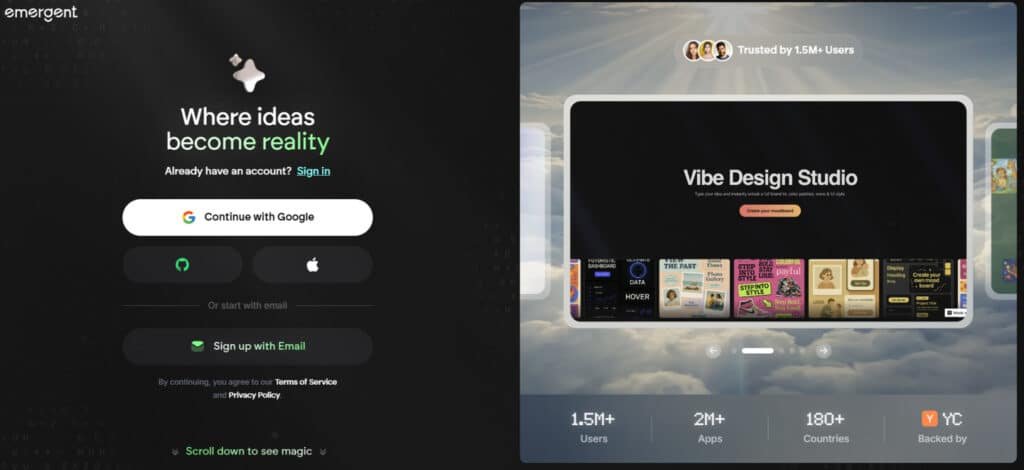
Users report quick results, with 1.5M+ users across 180+ countries trusting it, backed by Y Combinator. Compared to Bubble (starts at $25/mo with more manual setup), Emergent automates more with a lower entry cost.
Ever struggle to start a project due to tech hurdles? Emergent lets you focus on vision, not code. With 2M+ apps built, it’s a solid pick for turning concepts into reality.
Introduction to Emergent: Where AI-First Development Meets Production Reality
This section explains how an AI-native platform positions itself between idea and live product. I’ll offer a concise review of who it serves and what it promises for modern software development.
How it fits the AI landscape
Emergent is pitched as a full-stack agent workspace — not just code autocomplete but a co-pilot that handles planning through deployment. That model aims to speed up development and reduce handoffs.
Founding, backing, and users
Backed by Y Combinator, the company draws attention from builders who need velocity. Typical users include solo founders validating concepts, early startups, and lean teams launching production sites and MVPs.
What it promises and the trade-offs
The value prop: compress time-to-value with AI agents that generate, refactor, and stitch together code and integrations (MongoDB, React, Google Maps API, Shopify public API). Teams get reusable templates and standardized workflows to boost efficiency using fewer people and fewer manual steps.
Support and expectations
Docs and online support exist; user reports vary — some praise quick human replies, others note credit, billing, and refund headaches. Expect a learning curve: working with AI agents requires clear specs and active verification.
What Is Emergent?
Let me explain what this product actually builds, how it operates, and why teams pick it. At its core this platform bundles planning, coding, testing, and deployment into one workspace so you don’t juggle a dozen tools.
AI coding agents explained
The workspace runs AI agents that handle discrete development tasks — from sprint planning to writing code and adding tests. You request work, the agent proposes diffs, and you approve or iterate. It feels like pair-programming, but the partner is an automated engineer that stays within your specs.
Inner workings: credits, Pro mode, iteration loops
Every agent action uses credits. Small edits cost little; big refactors and migrations consume more. A Pro mode unlocks deeper changes and longer runs, which helps complex migrations but raises credit burn. Support teams sometimes advise separating development runs from end-user testing to save credits.
Who benefits most
Non-technical founders get a faster path from idea to app without hiring a full dev shop. Lean teams use it to offload repetitive work and speed feature delivery. Access controls and shared workspaces keep product, design, and engineering aligned so users can review changes without babysitting branches.
- Centralized tracking: specs, diffs, and QA in one place.
- Collaboration loops: request > propose > review > accept.
- Best use: small, verifiable changes and clear scopes.
In short: the tool can accelerate software development, but you still need clear scopes and judgment when you let agents make big changes. Use it to speed delivery — not to skip verification.
Best Features of Emergent
Emergent.sh stands out in the no-code landscape with its emergent features that streamline software creation. These tools help developers and teams boost efficiency by automating complex tasks.
Below, we explore each feature, showing how it supports users in building robust applications while handling data flows and security needs.
1. Build Websites and Mobile Apps (App Development)
This core function transforms ideas into live websites or mobile apps without coding. Users describe their vision, and the platform generates responsive designs that adapt to devices.
It handles instant deployment to web or app stores, ensuring quick launches. For teams managing software projects, this means faster time-to-market.
By integrating seamless data connections, it scales effortlessly during traffic surges, helping businesses maintain performance.
Readers seeking rapid prototyping will find this ideal for testing concepts, reducing development costs by up to 60% based on industry benchmarks for no-code tools.
2. Build Custom Agents
Emergent allows creation of AI-driven bots tailored to specific workflows, like customer support or inventory management.
Users define prompts and logic, and the system trains the agent on domain-specific rules for accurate responses.
This enhances automation in software environments, cutting manual oversight. For searchers looking to optimize operations, these agents improve decision-making by processing inputs in real-time.
The flexibility supports endless tweaks, making it a go-to for enterprises needing specialized intelligence without heavy investment.
3. Build Powerful Integrations
This feature connects disparate services, such as CRMs with email platforms, to automate tasks like lead syncing. It builds scalable pipelines that handle high-volume data transfers securely. Users benefit from reduced silos, accelerating delivery cycles in multi-tool setups.
For those searching for workflow enhancers, it minimizes errors in integrations, with case studies showing 40% gains in operational speed.
This keeps projects aligned, especially in growing teams reliant on third-party apps.
4. Collaborate with Your Crew
Real-time collaboration unifies teams in a secure workspace for co-editing apps and sharing resources.
Features like live previews and role-based access prevent version conflicts. This fosters smoother handoffs in remote setups, vital for distributed software teams.
Readers intent on team productivity will appreciate how it cuts communication delays, backed by studies on collaborative platforms improving output by 25%.
It ensures everyone stays on the same page without external tools.
5. AI-Driven Prototyping
AI prototyping generates UI/UX mockups from simple descriptions, speeding up initial designs. It suggests layouts based on best practices, allowing quick iterations.
For users exploring fast ideation, this slashes design time, enabling focus on core functionality. It integrates with data visualization tools for interactive prototypes, helping validate ideas early and avoid costly revisions.
6. One-Click Deployment
One-click deployment pushes apps to production across platforms like web, iOS, or Android with minimal setup.
It automates hosting and updates, ensuring reliability. Searchers needing hassle-free launches will value the uptime guarantees, which support business continuity without devops expertise.
7. Data Connectors
Data connectors link to databases, APIs, and cloud storage for effortless syncing. This manages data ingestion and exports, powering analytics in apps.
It benefits data-heavy users by simplifying ETL processes, with real-world examples showing halved integration times.
8. Version Control
Version control tracks changes like a simplified Git, with branching and rollback options. It safeguards progress in collaborative builds, reducing loss risks. For teams, this maintains audit trails, aligning with agile methods to enhance reliability.
9. Analytics Dashboard
The analytics dashboard monitors user engagement and performance metrics in real-time. It offers insights for tweaks, like optimizing load times. Readers tracking app success will use this to refine strategies, supported by data showing 30% uplift in retention from informed adjustments.
10. Template Library
The template library provides pre-built starters for e-commerce or dashboards, customizable on demand. It jumpstarts projects, saving weeks of setup. For quick-launch seekers, this accelerates entry into markets with proven structures.
11. Security Basics
Security basics include authentication, encryption, and compliance checks to protect apps. It enforces access controls and scans for vulnerabilities. Users prioritizing safe deployments gain peace of mind, with features meeting GDPR standards to mitigate risks in sensitive data handling.
12. Staging and Reuse
Branch previews, staging checks, and production-ready deploys mean finished features go live reliably. Clone templates to cut delivery time and risk.
| Feature | Primary Benefit | Typical Use | Credit Intensity |
|---|---|---|---|
| AI App Generators | Fast MVPs | Landing pages, dashboards | Low–Medium |
| Code Refactor | Safer migrations | Deps, framework upgrades | Medium–High |
| Integrations | Ready connectors | Shopify, MongoDB, Maps | Low |
| Staging & QA | Stable releases | Previews, tests, deploys | Low–Medium |
These emergent features collectively empower users to create scalable software, emphasizing efficiency through automation and integration.
Note: these emergent features speed software development, but large refactors can be credit-intensive—plan changes in chunks to manage spend.
Pricing Plans to Emergent
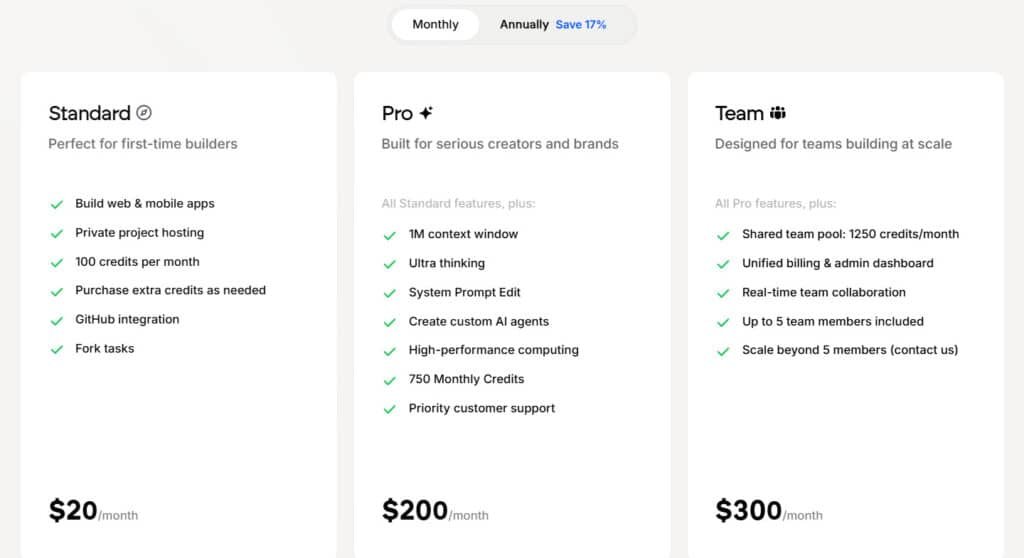
For Emergent pricing, credits power your builds – think of them as fuel for AI tasks. Here’s each tier, features and all.
Standard Plan
Go monthly for $20/month or Annual at $17/month.
Build web & mobile apps, private project hosting, 100 credits per month (buy extras), GitHub integration, fork tasks. Great for beginners dipping toes in on a lazy day.
Pro Plan
Monthly hits $200/month; Annual Plan at $167/month.
All Standard plus 1M context window, ultra thinking, system prompt edit, create custom AI agents, high-performance computing, 750 monthly credits, priority support. Suits creators scaling ideas fast.
Team Plan
Pay $300/month or $250/month annually.
All Pro, plus shared 1250 credits/month pool, unified billing & admin dashboard, real-time collaboration, up to 5 members (scale more via contact). Ideal for crews syncing up.
Enterprise
Custom pricing – book a demo.
Everything in Team, plus unlimited credits & limits, enterprise SSO & security, advanced permissions. Tailored for big teams locking down ops by this date.
Cost-to-value snapshot
A notable case: a ~$2,000 build shipped full-stack features (backend, frontend, payments) that a traditional US team might price at $65k–$100k. That shows strong cost leverage—if you manage credits well.
Trial, refunds, and support notes
Free trial availability varied; some users got limited output without committing credits. Refund reports are mixed—set a calendar reminder before the renewal day and confirm billing terms in writing.
| Item | Typical Cost | When to Expect |
|---|---|---|
| Small edits | Low | Hourly diffs, copy fixes |
| Refactor / migration | Medium–High | Framework upgrades, large tests |
| Full build (example) | ~$2,000 | Production-ready MVP |
Pros & Cons
Let’s lay out the main advantages and the nagging drawbacks in plain terms. I’ve seen teams go from idea to live site fast, but there are real costs to manage.
Pros at a glance
- Speed to MVP: Rapid scaffolding and agent-driven builds get demos and launches done in days, not months.
- Full-stack delivery: End-to-end workflows cover frontend, backend, QA, and staging—integrations like MongoDB, Google Maps API, React, and Shopify work out of the box.
- YC-backed credibility: Backing signals product-market fit and investor trust for early adopters.
- Cost-to-value potential: A cited ~ $2,000 full build shows big upside versus traditional teams—if you tightly manage scope and credits.
- Built-in QA and templates: Staging previews and reusable templates reduce launch risk and speed repeatable patterns.
Cons to consider
- Credits: Agent runs and debug loops can burn through credits faster than expected—plan verification steps and small diffs.
- Subscription & billing: Several users reported unexpected auto-renew charges and denied refunds; get billing terms in writing.
- Support: Experiences vary—some report quick human help, others face slow or unresolved billing and technical issues.
- Perceived waste: If you expect agents to replace human oversight entirely, you may feel it’s a waste of money—AI needs clear direction and review.
Summary: Exceptional speed and scope when your requirements are tight; frustrating if credit management and billing clarity are neglected.
If these cons feel risky for your team, compare alternatives next to benchmark value, support, and subscription transparency before you commit.
Alternatives to Emergent
Choosing the right tool is about trade-offs; this section matches buyer needs to competing approaches. I’ll highlight who should pick each path and the common pitfalls that affect pricing, credits, and subscription expectations.
Emergent promises no-code app building with AI, but these four competitors deliver faster launches and stronger real-world results.
Blink.new turns ideas into full-stack apps in seconds using advanced agents. Developers and founders rave about production-ready code—starts at $29/month.
Lovable.dev focuses on beautiful, responsive apps with built-in auth and databases. Perfect for indie makers; plans from $25/month.
GetMocha excels at enterprise-grade tools: custom workflows, integrations, and team collaboration. Scales smoothly—$49/month entry.
Capacity.so blends AI agents with visual builders for internal tools and automations. Teams love the speed for ops dashboards; begins at $39/month.
| Tool | Key Strengths | Starting Price | Best For |
|---|---|---|---|
| Emergent | AI agent app builder, no-code prompts | $20/month | Quick prototypes |
| Blink.new | Full-stack apps in seconds, clean code | $29/month | Founders & rapid MVPs |
| Lovable.dev | Responsive UIs, auth, database included | $25/month | Indie makers & SaaS products |
| GetMocha | Enterprise workflows, deep integrations | $49/month | Teams & custom business tools |
| Capacity.so | AI agents + visual builder, ops focus | $39/month | Internal tools & automations |
Traditional development teams
Expect higher cost but predictable delivery—clear SOWs, formal project management, and deep customization.
When to choose: regulated products, complex integrations, or when you need guaranteed ownership and deterministic timelines.
- Buyer tips: if you value fast iteration and can guide agents, the AI platform may beat timelines. If you want deterministic delivery, prefer an agency.
- Billing caution: always confirm free trial terms and whether a one-time purchase turns into a subscription.
- Integration check: compare native support for databases, payments, maps, and commerce before you build.
| Option | Cost Signal | Strengths | Best Fit |
|---|---|---|---|
| Base44 | Low / daily free credits | Cheap testing, low barrier | Exploratory apps, early validation |
| Bubble / No-code | Medium (flat tiers) | Fast visual builds, plugins | Marketing sites, simple SaaS |
| AI-assisted platform | Variable (subscription + credits) | Faster full-stack MVPs | Small teams needing speed |
| Traditional dev team | High ($65k–$100k typical) | Predictable SOW, deep customization | Complex, regulated systems |
Bottom line: pick the tool that matches your risk tolerance, budget, and need for ownership. Test free trials carefully and model credits or days of work before you commit.
Use Cases and Ideal Fit
Let’s match common project types to the platform’s strengths so you can see if it fits your needs. I’ll be practical: who benefits, when to watch credits, and where hands-on users win.
Startups launching complex platforms on a budget
Use the system to stitch backend, frontend, and payments quickly. Agent-driven scaffolds plus integrations (MongoDB, Google Maps API, Shopify public API) cut time to a demo-ready app.
Why it works: reduced upfront hiring, faster feature wiring, and repeatable templates.
Solo builders and small teams validating ideas fast
If you can write a clear spec and iterate, the agent can handle heavy lifts. You often ship a v1 faster than hiring freelancers and chasing merges.
Modernizing legacy codebases and refactoring at pace
The refactor engine updates libraries and migrates frameworks in steps. Tests and staging previews lower rollback risk and improve system health.
Other strong fits
- Data-heavy products: built-in ETL and agent-authored tests speed analytics and reduce manual scripting.
- Templates: swap models, routes, and UI to launch common apps in hours.
- Small teams: offload repetitive UI tasks and test coverage so product-focused staff drive user feedback.
Be realistic about credits: plan phased development to control spend. Avoid “do everything at once” runs that spike cost without clear acceptance criteria.
Tip: ideal users are hands-on founders or PMs who will review diffs, run staging checks, and guide agent work — not click-and-forget.
| Use Case | Main Benefit | Key Feature | Risk to Manage |
|---|---|---|---|
| Complex startup platforms | Faster full-stack delivery | Integrations & templates | Credit spikes on big builds |
| Solo builders | Speed to v1 | AI scaffolding | Need clear specs & iteration |
| Legacy modernization | Safe stepwise refactors | Refactor engine + tests | Long runs consume credits |
| Data-heavy apps | Reliable pipelines | ETL scripts & test suites | Complex validations required |
Setup, Onboarding, and Workflow
Getting started should feel like a short sprint — pick a template, set clear goals, and move to staging the same day. I find this routine saves time and reduces wasted runs.
From template selection to first deployment: a guided path
- Pick a template that matches your domain (e-commerce, SaaS). Customize fields and let the agent scaffold your first version.
- Define acceptance criteria — features, performance targets, and deploy checks. This keeps work focused and makes progress easy to track.
- Set up staging early. Validate data flows, UI stability, and integrations before any public test.
- Use training docs and support channels to learn requests, diffs, approvals, and rollbacks so your cadence speeds up.
- Deploy a minimal, verifiable build and run smoke tests immediately post-deploy.
Credit optimization tips: develop vs. end-user testing strategies
- Run focused dev loops — make your version deployable, then invite limited end-user testing.
- Track credit use by task type; if a step burns a lot, break it into smaller, one-day jobs the agent can finish.
- Bundle UI fixes before asking for rebuilds; small patch passes often cost less than many scattered asks.
- Keep a clear change log — it helps spot regressions and speeds future requests.
- Automate smoke tests post-deploy to catch issues early and avoid larger, credit-heavy reworks.
Tip: treat the agent like a junior dev with superpowers — give precise instructions and review outputs often to protect credits and the product.
Security, Compliance, and Reliability
Production builds with AI move fast — and that speed demands clearer guards than usual.
What to expect: an AI-led system can deploy quickly but make mistakes. Always pass changes through staging and a test suite before production. I find that a short checklist cuts a lot of risk.
What to expect from an AI-led build system in production
Treat agent output like code from a junior engineer. Require unit tests, smoke checks, and observability before any release. Confirm logs capture customer-facing errors and uptime metrics.
Risk management: verification, change reviews, and rollback plans
- PR-like reviews: approve diffs only after tests and acceptance criteria pass.
- Access controls: limit production write access and isolate secrets; rotate keys after big refactors.
- Rollback plan: include a one-click revert and a targeted fix window instead of long, credit-heavy runs.
- Credits & tracking: budget credits for verification tasks and keep an audit trail of changes for compliance.
| Area | Action | Why it matters |
|---|---|---|
| Verification | Staging + smoke tests | Catch regressions before customers see them |
| Access | Env separation & key rotation | Limits blast radius of mistakes |
| Monitoring | Logs & uptime alerts | Detect customer-impacting issues fast |
Bottom line: standardize the loop—spec, implement, test, stage, review, deploy. AI accelerates the cycle but doesn’t replace disciplined controls for compliance and reliability.
Case Study and Personal Experience
Let me share a real-world build that shows the details of cost, time, and trade-offs when an AI-assisted team ships a production platform.
Universal Media: AI-powered ad platform built end-to-end and taken live
Universal Media contracted an AI-led team headed by Neo (Claude Sonnet 4.0). They handled backend, frontend, AI integrations, payments, staging, and deployed a live website (universalmedialtd.com).
The money math was striking: roughly $2,000 spent versus a traditional estimate of $65k–$100k. That gap is real when scope is tight.
Community snapshots
- “From idea to MVP” and “first website live” pop up often in community threads.
- Many celebrate fast time to launch; some warn about credit burn and refund disputes.
- One user reported a human customer support reply in two minutes — experiences vary.
My experience: shipping on a budget while navigating AI iteration bumps
I used specific specs, broke work into small runs, and leaned on integrations (React frontend, MongoDB, third-party APIs). That reduced rework and kept version churn low.
Not everything was smooth — extra credits were consumed fixing agent-introduced issues. Still, frequent reviews and staging checks helped ship a usable app.
“Treat credits like sprint capacity — not unlimited fuel.”
| Item | Outcome | Impact |
|---|---|---|
| Team | AI-led + human reviews | Faster delivery, some manual fixes |
| Cost | ~$2,000 | Large savings vs traditional money estimates |
| Support | Mixed response times | Plan launches around customer support variability |
When you align expectations — clear specs, tight scope, and active review — the platform can cut time and money. But you must own verification and plan credits like project capacity to avoid surprises.
Verdict and Buying Checklist
I give a clear verdict and a short buying checklist so you can decide fast. I’ve used the platform on production builds and seen a ~ $2,000 full-stack ship faster than traditional teams. YC backing and live deployments matter — but so do credits, subscription quirks, and support variability.
Who should buy
Buy if: you’re a founder, PM, or CTO who values speed over bespoke code. You must be willing to review diffs, manage staging, and guide agent runs.
Skip if: you need guaranteed timelines, hate billing ambiguity, or require strict compliance without in-house controls.
Readiness checklist
- Scope clarity: define MVP features, success metrics, and acceptance tests before you start.
- Credit plan: estimate credits per sprint and track consumption to avoid surprises.
- Account & pricing: confirm pricing, subscription terms, and refund policy in writing.
- Support expectations: name an escalation contact and budget buffer time for launches.
- Compliance & tracking: specify data handling, audit logs, and rollback procedures.
- Integration readiness: list APIs (Shopify, Google Maps API, etc.), data models, and test fixtures.
Bottom line: It’s a strong product for teams that want faster development cycles and will own reviews and staging gates. Test a scoped feature to staging, measure time and credits, then decide—your own numbers beat any write review.
| Decision Item | Action | Why it matters | Risk to mitigate |
|---|---|---|---|
| MVP scope | Lock features & tests | Controls credit use and focus | Scope creep increases cost |
| Pricing & subscription | Confirm terms on account | Avoid surprise renewals | Auto-renew / refund disputes |
| Support plan | Define SLAs & escalation | Protect launch windows | Slow or variable responses |
| Compliance | Set data rules & logs | Meet audits and legal needs | Non-compliance risk |
Call to action: Run one scoped feature to staging, track time and credits, and compare outcomes with emergent alternatives like Base44 or Bubble. That small experiment will tell you if the platform, the pricing model, and the team fit your real needs.
Conclusion
Raamish’s Take
Emergent stands out as an AI-powered development platform that turns ideas into functional apps fast.
You just just describe your concept in plain language, and it handles coding, design, and deployment—no coding skills needed.
The website and mobile app builder impresses with instant deployment and scalability, while the custom agent creation adds flexibility for unique projects. It integrates with GitHub, offering a smooth workflow for solo creators or teams.
Users report quick results, with 1.5M+ users across 180+ countries trusting it, backed by Y Combinator. Compared to Bubble (starts at $25/mo with more manual setup), Emergent automates more with a lower entry cost.
Ever struggle to start a project due to tech hurdles? Emergent lets you focus on vision, not code. With 2M+ apps built, it’s a solid pick for turning concepts into reality.
Let’s wrap up with a clear recommendation and a simple do-first checklist you can act on today.
I’ve used the platform on production builds and I find it speeds coding and integrations when you scope tightly. Expect fast time-to-version but watch credits, subscription terms, and billing—many users reported surprise auto-renew or a thought one-time charge that became a monthly subscription and led to refund requests.
Do this next: run a short, staging-bound pilot. Track credits, account activity, and support response. Log requests, approvals, and versions so customer support and compliance are clear if you need help.
Pick one feature, run a trial, measure time and money, then decide. For quick FAQs, see below—I answer the common questions I get when people ask me to write review notes on this platform.
Frequently Asked Questions
What is this platform best used for?
This tool is designed to accelerate full‑stack app development — from planning and prototyping to testing and deployment. I find it most useful for building MVPs, internal tools, and customer‑facing websites when you want fast iteration and production‑ready outputs without hiring a large dev team.
How do credits work and when are they consumed?
Credits pay for agent actions — code generation, refactors, tests, and deployments. You spend more during heavy development (feature builds, large refactors, automated testing) and less on small edits. I recommend tracking credit use per task so you can budget for staging, QA runs, and final production pushes.
Is there a free trial or refund option?
There is typically a free trial so you can test templates and basic workflows. Refund experiences vary — some users reported prompt support, others had delays. I advise starting with a small pilot project to evaluate fit before committing to a larger subscription or high credit spend.
How does pricing compare to hiring traditional developers?
Pricing often looks expensive upfront if you measure credits alone, but cost‑to‑value can be attractive — teams report $2,000‑level builds delivering enterprise‑grade scope in some cases. Compare against hourly dev costs, project management overhead, and deployment effort to see real savings.
What integrations are available?
Common integrations include MongoDB, Google Maps API, React ecosystems, Shopify public API, and mainstream SaaS tools. I’ve seen robust connector support for databases, auth systems, and third‑party APIs — useful for production deployments and data pipelines.
Who should use this platform and who should avoid it?
Ideal users: solo founders, lean startups, and small teams wanting rapid validation or a fast MVP. Avoid it if you need extremely specialized low‑level system work or full control over every line of legacy code — traditional development teams may be a better fit then.
How reliable is the platform for production deployments?
The system aims for production readiness with staging, CI/CD workflows, and rollback plans. Still, enforce verification steps: code reviews, end‑to‑end tests, and monitoring. I recommend a phased rollout (canary or feature flags) when moving critical systems live.
What are common support experiences?
Support quality varies — some users praise fast, helpful responses; others report slower ticket resolution and confusion around auto‑renewals. If customer support matters to you, confirm SLA details and onboarding assistance before purchasing.
How does the AI handle debugging and QA?
The AI can auto‑detect frontend bugs, generate tests, and suggest fixes to increase coverage. It speeds up iteration — but you should validate generated tests and run manual QA for edge cases and security checks before release.
Can this platform modernize legacy codebases?
Yes — it can refactor, migrate frameworks, and help with modularization. It’s particularly helpful for incremental modernization (component updates, API rewrites). For large legacy monoliths, plan scope and credits carefully and run thorough integration tests.
Are there alternatives I should consider?
Consider lower‑cost options like Base44 (daily free credits reported), no/low‑code platforms such as Bubble for visual builds, or hiring traditional development teams for deep customization. Each choice trades speed, cost, and control differently — weigh your priorities.
How do I optimize credit usage during development?
Tips: separate development vs. end‑user testing runs, reuse templates, lock down scope per sprint, and limit heavy automated refactors to dedicated sessions. I also suggest staging small prototypes first to avoid unnecessary iterations that burn credits.
What security and compliance should I verify?
Verify data handling, authentication flows, and third‑party API permissions. Ask about encryption at rest/in transit, audit logs, and exportable change histories. For regulated data, confirm compliance certifications and a clear rollback plan.
How long does it take to go from idea to live product?
Timelines vary — simple sites can be live in days; complex platforms take weeks to months. My experience: clear scope, reusable templates, and focused sprints compress time dramatically. Always budget extra time for QA, integrations, and user testing.
What should I prepare before onboarding?
Prepare a prioritized feature list, API keys for integrations, data schemas, and a credit budget. Clarify roles (who approves changes) and set measurable launch criteria — this makes onboarding and agent workflows smoother.
Is there a monthly subscription and are renewals automatic?
Yes — most plans offer monthly subscriptions with auto‑renewal. Some users reported issues with unexpected renewals. I recommend checking billing settings, cancellation policy, and whether you can pause credits between projects.
How do templates and reuse help reduce time and cost?
Templates let you bootstrap apps with proven patterns — saving planning and initial build time. Reuse reduces repeated credit spend for common features (auth, payments, dashboards). I use templates to validate ideas quickly before heavy customization.