Does the thought of showing your face on camera make you want to hide? You’re not alone. Many talented creators have incredible ideas but freeze up at the idea of being on screen. This single hurdle stops countless channels before they even start.
It’s frustrating, right? You see the demand for online content exploding, but traditional production feels like a huge, personal barrier. What if you could build a successful channel entirely based on your ideas and voice—without ever needing to be on camera? This is the powerful shift happening right now.
I’ve tested the tools making this possible. In the current digital landscape, AI-driven automation is the game-changer. It handles the heavy lifting of content creation, letting you focus on your message. This review dives deep into one platform designed specifically for this new era of video production.
We’ll explore how it turns your concepts into polished video content effortlessly.
In this Faceless.Video Review, You’ll get my honest take on its features, pricing, and the real results you can expect. Ready to see how automated creation can unlock your potential? Let’s dive in.
Key Takeaways: Faceless.Video Review
- Faceless content is a major trend, allowing creators to build channels without appearing on camera.
- AI automation is revolutionizing video production by simplifying the creation process.
- These AI tools are pivotal for creators due to market growth and platform changes.
- This review provides a comprehensive look at features, pricing, and real-world performance.
- Understanding the pros and cons is essential before investing in any new platform.
- The tool addresses common pain points like privacy concerns and production complexity.
Faceless.Video Review: An Overview
Introduction to Faceless.Video Review
The AI video market’s explosive growth from $3.86 billion to a projected $42.29 billion isn’t just numbers – it’s a revolution creators can’t ignore. I’ve watched this space evolve, and the timing for automated content tools has never been better.
AI Landscape Integration and Innovation
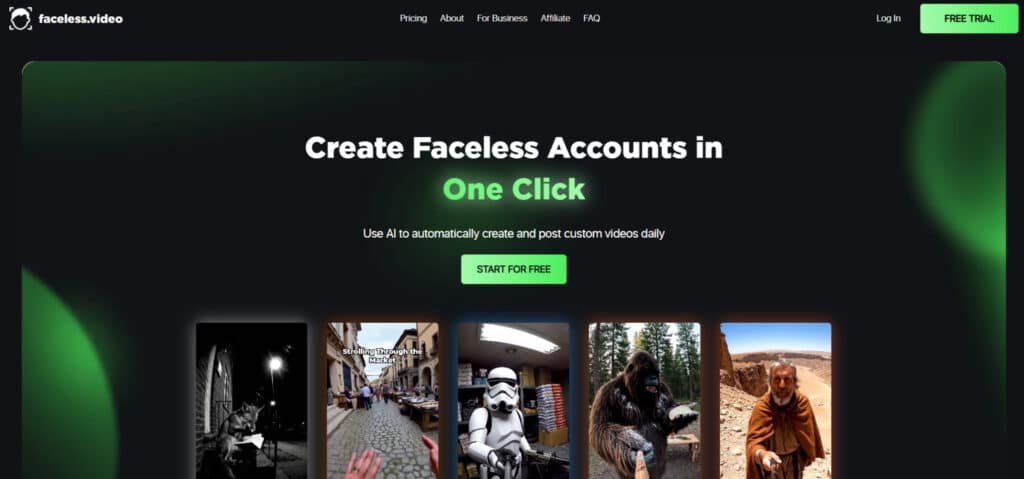
This platform enters a market growing at 32.2% annually. That’s serious momentum. It positions itself where automation meets the growing demand for camera-free solutions. The technology handles everything from story discovery to final edits.
What impressed me most is how it streamlines the entire workflow. Traditional video production often requires hours of manual work. This tool cuts that down significantly. It’s designed for creators who want to focus on ideas rather than production headaches.
Company Background and Endorsements
The story behind this platform is relatable. Founders Jacob and Alex were content creators themselves. They struggled with the time-intensive nature of producing faceless media. Their solution? Build an automated system that handles the heavy lifting.
Their mission resonates with real pain points. From solo YouTubers to marketing agencies, users appreciate the streamlined approach. The platform serves various needs while maintaining quality content output. It’s becoming a go-to for efficient media creation.
This review will show you how it stands out in a crowded field. The founders’ hands-on experience translates into practical features that actually work. You’ll see why it’s gaining traction among serious content producers.
What is Faceless.Video?
Imagine having a personal video production team that works 24/7 without coffee breaks or overtime pay. That’s essentially what this platform delivers. It’s an AI-powered service that handles your entire content creation workflow from start to finish.
Inside the AI-Powered Content Creation Process
The automation process begins with topic selection. You choose your themes and preferences, then the system takes over. The AI finds relevant stories, generates scripts, and creates professional voiceovers.
Next, it assembles HD videos using stock footage and automated editing. The final step involves posting directly to your connected social accounts. This entire video creation process happens without manual intervention.
| Aspect | Traditional Process | AI Automated Process |
|---|---|---|
| Time Investment | 3-8 hours per video | Minutes of setup |
| Human Involvement | Constant supervision | Initial configuration only |
| Consistency | Variable quality | Uniform output |
| Scalability | Limited by resources | Virtually unlimited |
Benefits for Content Creators and Businesses
This service particularly helps three types of users. Solo creators can build channels without camera anxiety. Businesses get marketing videos without hiring expensive teams.
Social media influencers maintain active channels while focusing on other projects. The platform’s ai-driven content approach transforms hours of work into automated efficiency. Users regain time for strategy rather than tedious production tasks.
Best Features of Faceless.Video
After spending weeks with this tool, I discovered three standout features that transform content production from a chore to a breeze. These automation tools handle the heavy lifting while giving you creative control where it matters most.
1. Core Automation and Workflow
Automated Video Creation and Posting
Faceless.Video transforms simple text into fully produced videos that post automatically to TikTok and YouTube.
Users connect their account once, set the desired posting frequency, and the service handles every step from video creation to publishing.
This eliminates daily manual work and ensures consistent content flow, helping creators build audience momentum without constant oversight.
Autopilot Mode
The autopilot system runs 24/7, generating and uploading videos even while the user sleeps. After initial setup on the website, the platform operates independently, making it ideal for anyone seeking a truly hands-off way to grow channels and generate passive revenue through regular posting.
Series Setup
Users can define ongoing series around specific themes, and Faceless.Video automatically produces connected videos that maintain narrative continuity. This feature strengthens viewer retention and signals to algorithms that the account delivers reliable content, boosting discoverability across platforms.
Three-Click Channel Setup
The entire onboarding process requires just three steps on the website: connect the account, choose a niche, and activate automation. This streamlined approach allows even complete beginners to launch professional-looking videos within minutes, removing technical barriers that stop most people from starting.
2. Content Generation Capabilities
AI Script and Voiceover Generation
The platform’s AI writes complete, natural-sounding script content from basic theme prompts and pairs it with high-quality voice narration. Creators receive ready-to-use script material that feels human-written, saving hours of research and writing while maintaining engaging storytelling across all videos.
Text-to-Video Conversion
Any text input instantly becomes a polished short-form video optimized for TikTok and YouTube. The service handles every element of video creation, delivering results that look professional without requiring editing skills from the user.
Visual Element Integration
Royalty-free stock footage and AI-generated visuals are automatically selected and synced to match the script. This ensures every video has relevant, eye-catching visuals that keep viewers watching longer, directly improving engagement metrics.
Voiceover and Audio Synthesis
Advanced voice synthesis produces narration that avoids robotic tones entirely. Combined with background music and effects, the audio layer makes videos feel premium and increases completion rates, which platforms reward with better reach.
Caption and Subtitle Generation
Dynamic captions, subtitles, and trending hashtags are added automatically to every video. These elements improve accessibility and algorithmic performance, helping videos appear in more feeds and reach wider audiences.
3. Automated Editing and Posting
Automated Editing
Faceless.Video assembles HD videos by perfectly syncing stock footage with voice and script timing. The entire editing process happens without user input, producing clean, professional results that rival manually edited content in a fraction of the time.
Scheduling and Publishing
Users set posting frequency—daily, multiple times per day, or custom—and the service publishes directly to connected channels. This reliable scheduling keeps the account active consistently, which is one of the most important factors for growth in the industry.
4. Customization and Branding Options
Customization Options
Creators retain full control by reviewing drafts and editing script or elements before publishing. This balance of automation and oversight ensures videos align perfectly with the desired style while still benefiting from the speed of the service.
Branding Controls
Series maintain consistent styling, fonts, colors, and pacing across all videos. This unified look strengthens brand recognition and builds trust with viewers who return for familiar content format.
Frequency and Scheduling Controls
Posting schedules can be adjusted anytime from the dashboard. Whether scaling to multiple posts per day or pausing during testing, users have flexible control that adapts to changing brand strategy.
Content Personalization
Custom prompts and script inputs allow tailored content while still leveraging automation. This feature helps creators stand out in competitive niches within the industry.
Download and Export for Branding
Every video can be downloaded in HD for use in ads, stories, or other platforms. This extends brand consistency beyond TikTok and YouTube, maximizing the value of each piece of content created month after month.
5. Integration and Export
Social Media Integration
One-click connections enable direct posting to TikTok and YouTube accounts. The seamless integration reduces setup time and ensures reliable delivery of videos without third-party delays.
Export Functionality
High-quality MP4 downloads provide flexibility for repurposing content across additional platforms, giving creators more options to expand reach using the same automated workflow.
Analytics and Feedback Loop
Basic performance data from published videos feeds back into the system, allowing users to refine future prompts based on real results and continuously improve output quality.
6. User Interface and Experience
Intuitive Dashboard
The clean, button-driven interface displays upcoming videos, active series, and posting calendars in one place. New users quickly understand the entire process without confusion.
Onboarding Tutorials
Step-by-step guidance and tooltips ensure fast mastery of all features, reducing the learning curve dramatically.
Support Resources
Email-based customer support and community forums provide assistance whenever needed, helping users resolve issues quickly and maintain consistent video output.
7. Performance and Quality
Video Specifications
All videos render in HD at optimal short-form lengths with fast processing times. This technical quality meets platform standards and contributes to higher engagement rates.
Scalability
The system supports multiple channels and high-volume production, making it suitable as creators grow from testing to earning thousands per month through monetized videos.
Reliability Notes
While visuals occasionally feel generic with basic prompts, detailed input produces highly specific results.
The consistent delivery and natural voice quality set a strong standard in the automated video creation industry, with customer support available to optimize outcomes.
Pricing Plans of Faceless.Video
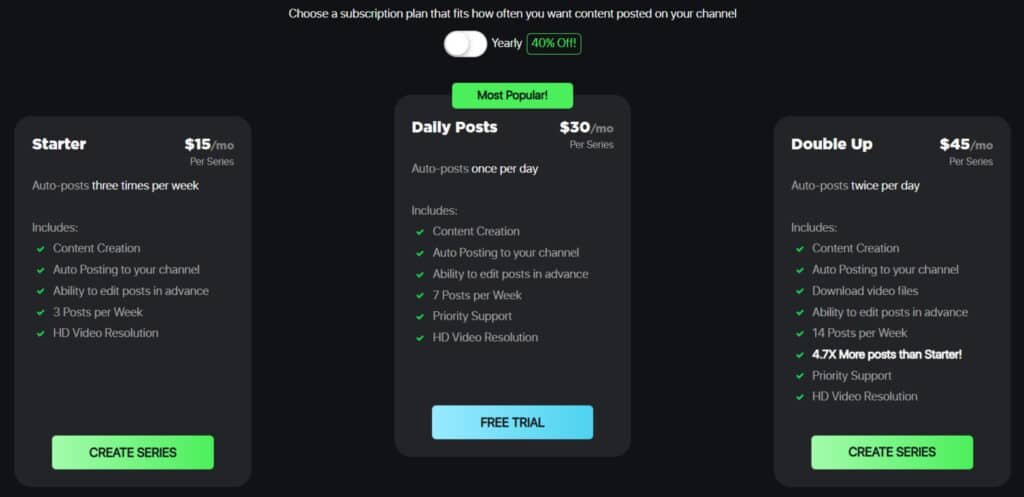
Let’s talk numbers – understanding the cost breakdown is crucial before committing to any content automation platform. I’ve found their approach to pricing refreshingly transparent. You get three clear tiers that scale with your production needs.
The plans work on a monthly or annual basis, with yearly subscriptions offering significant savings. This flexibility helps creators at different stages find their perfect fit.
Subscription Tiers and Plan Details
| Plan Name | Monthly Price | Key Features and Limitations | Discounts/Promotions |
| Free Trial | $0 (initial access) | – 1-3 sample videos for testing. – Basic automation setup. – Limited to one channel; watermarked outputs. – Expires after 7 days or limited credits; auto-converts to Starter unless canceled. | – Promoted as “risk-free start,” but users report auto-billing issues—recommend immediate cancellation post-trial. – No ongoing promotions noted. |
| Starter | ~$15/month ($9/month on Annual Plan) | – 3 posts per week. – Full text-to-video, voiceovers, captions, and TikTok auto-posting. – 1 channel support; basic analytics. – ~50-100 minutes of generation credits/month. – Suitable for beginners testing passive income potential. | – Occasional 20% off first month via affiliate links (lifetime 20% commission for referrers). – Annual equivalent: ~$144/year (implied 20% savings, unconfirmed). |
| Pro/Growth | ~$29/month ($18/month on Annual Plan) | – 7-10 posts per week (daily option). – All Starter features plus series automation, custom prompts, and unlimited minor edits. – 2-5 channels; enhanced analytics and priority support. – ~200-300 minutes of credits/month. – Ideal for scaling engagement and monetization. | – Bundle promotions with add-on credits (e.g., buy 100 extra minutes for $10). – Referral program: Earn 20% lifetime commission on referred users’ payments. |
| Enterprise/Custom | ~$49+/month ($27/month on Annual Plan)(custom quote) | – Unlimited posts and channels. – Advanced customization (e.g., API access, white-labeling). – Dedicated support, custom integrations, and unlimited credits. – Full ownership of outputs; tailored for agencies or high-volume creators. | – Negotiable annual discounts (up to 25% for 12-month commitments). – No standard promotions; volume-based incentives for teams. |
*With 50% annual discount. Traditional video production can cost over $1,000 per video! These pricing plans represent massive savings.
Remember – each subscription covers one content series. Managing multiple channels requires separate plans. Choose based on your weekly content needs and growth ambitions.
Pros & Cons of Faceless.Video
No platform is perfect, and understanding both sides of the coin is essential before diving in. I’ve tested this automated system thoroughly, and here’s my honest breakdown of what works and what doesn’t.
Advantages: Time-Saving and Scalability
The biggest win is time savings. Traditional video production can eat up 3-8 hours per piece. This automation cuts that to minutes of setup.
Scalability works beautifully. Upgrade your plan to increase posting frequency across multiple channels. No need for extra staff or equipment as you grow.
The system handles content creation, scheduling, and uploading automatically. This “set and forget” approach maintains consistent quality while freeing your time.
Drawbacks: Limited Creative Control and Platform Risks
However, automation means less direct control. Even with theme selection, AI-created content might not match your exact vision.
Maintaining brand voice can be tricky. The system sometimes produces scripts with inconsistent tone.
Platform dependency is real. Technical issues or rule changes on social platforms can disrupt your content flow. One user reported:
Today, YouTube deleted my account just because of these AI videos.
Originality concerns and billing issues round out the challenges. These factors make exploring alternatives worthwhile.
Alternatives to Faceless.Video
I’ve tested multiple platforms in this space, and each brings unique strengths to different types of creators. While the main platform offers solid automation, you might prefer tools that give you more creative control or specialize in specific content styles.
Overview of Competing AI Video Tools
StoryShort AI stands out with its versatile approach to content creation. It transforms simple prompts into engaging media across various styles. The platform integrates advanced voice technology from OpenAI and ElevenLabs.
InVideo AI excels with its massive library of 16 million stock assets. This tool creates professional-looking video content in minutes from text prompts. The interface is incredibly beginner-friendly.
Synthesia specializes in realistic AI avatars with precise lip-syncing. It’s perfect for corporate training or multilingual content creation. The platform supports voiceovers in 120+ languages.
Lumen5 focuses on repurposing existing written content into video format. It’s ideal for bloggers and content marketers. The tool requires no advanced editing skills.
Wave.video offers an all-in-one solution with editing, recording, and streaming features. Starting at just $12 monthly, it’s one of the most affordable tools like these. The workflow suits both beginners and professionals.
Other notable platforms include Runway for cinematic content and Pictory for blog-to-video conversion. Each tool serves different content creation needs with distinct features.
Case Study / Personal Experience with Faceless.Video
Nothing reveals a platform’s true capabilities like hands-on testing across multiple content cycles. I dedicated 30 days to running a motivational stories channel using this automated service. My goal was to measure real performance beyond the marketing claims.
My Personal Journey Using the Platform
Setup was surprisingly straightforward. I selected my niche, connected my YouTube and TikTok accounts, and set the system to post three times weekly. The AI began generating scripts about historical figures overcoming adversity.
Within days, I had my first automated video live. The time savings were immediate—no scripting or editing sessions. But the content felt generic compared to manually created pieces.
Real-World Results and Content Outcomes
My test channel gained modest traction. Views were consistent but engagement was lower than expected. Comments occasionally questioned the authenticity, suggesting users detected the automation.
This contrasts sharply with success stories like one creator who monetized in 45 days. Their secret? High-value niche focus and treating each video as a long-term asset, not mass-produced content.
| Success Metric | Successful Channels | Unsuccessful Channels |
|---|---|---|
| Audience Retention | >60% watch time | – |
| Engagement Rate | >5% likes/comments | – |
| Click-Through Rate | >8% from impressions | – |
The sobering reality? Data shows 99% of automated channels fail from poor strategy, not the format itself. One Trustpilot user reported account deletion specifically for AI-generated content.
For creators considering this path, focus on these metrics rather than upload volume. Your audience responds to quality, not quantity, across all social media platforms.
Tips for Maximizing Faceless.Video Efficiency
The real magic happens when you combine AI efficiency with human strategy. I’ve learned that treating automation as your production assistant—not your replacement—yields the best results. You focus on big-picture decisions while the system handles tedious tasks.
Optimizing AI-Generated Content
Always review your content before it posts. I catch awkward edits and mismatched visuals during quality checks. Keep themes simple and specific for coherent video output.
Use the dashboard to edit videos by refining scripts and swapping stock footage. This ensures each piece meets your standards before reaching your audience.
Integrating with Social Media and Branding Strategies
Download video files to repurpose across email marketing and paid ads. This expands your social media reach beyond just TikTok and YouTube.
Since viewers can’t connect with your face, they must connect with your brand. Maintain consistent colors, fonts, and visual style across all content.
Best Practices for Content Customization
Experiment with different themes to discover what resonates. The platform’s flexibility lets you test ideas quickly without massive production investment.
Focus on key metrics: audience retention, engagement rates, and click-through performance. Active community engagement builds relationships that overcome the “distance” of automated content.
Faceless.Video in the Current AI Video Market
Looking at the current landscape, it’s clear that AI-driven tools are reshaping the economics of video production for businesses of all sizes. The market’s explosive growth from $3.86 billion to a projected $42.29 billion by 2030 signals a fundamental shift in how we approach content creation.
Market Trends and Future Outlook
I see three key trends defining this space. Advanced models like OpenAI’s Sora are moving from simple generation to realistic simulation. Hyper-personalization allows brands to create tailored storytelling at scale.
The “AI Slop” backlash is real though. Platforms like YouTube are tightening policies against low-quality automated content. This directly impacts creators using these tools for mass production.
Businesses report cutting video production costs by 58% while boosting productivity 47%. These numbers make automated solutions impossible to ignore for efficient content creation.
Comparing Automation with Traditional Video Production
The trade-offs are significant. Traditional methods cost over $1,000 per video with complete creative control. Human-made videos feel personal and emotionally resonant.
Automated platforms like this tool deliver HD-quality social media content in minutes. You sacrifice some customization for massive time savings in production.
The smart approach? Use automation for routine social media videos. Reserve traditional methods for premium campaigns requiring distinctive storytelling. This hybrid strategy maximizes both efficiency and quality in your content creation workflow.
Conclusion: Should You Buy It?
Making the final call on any content creation tool requires weighing real benefits against genuine risks. After my testing, I believe this service works best for creators who need regular TikTok and YouTube posts without showing their face.
The automation saves significant time on routine production. However, the generic stock-based output lacks the polish of professional work. Your business must decide if efficiency outweighs customization.
I recommend a hybrid strategy. Use this platform for maintaining consistent social media presence. Reserve traditional methods for projects needing distinctive storytelling. This approach balances volume with quality.
If you proceed, always review content before posting and track audience engagement closely. The real value comes from strategic integration, not blind automation. Test carefully and focus on providing genuine value to your viewers.
Frequently Asked Questions
Is Faceless.Video suitable for complete beginners with no video editing experience?
Absolutely. I found the platform incredibly beginner-friendly. The AI-driven content creation process handles the heavy lifting—writing scripts, generating voiceovers, and assembling clips. You just provide the topic, and it builds the video for you. It’s designed for users who want to create social media posts without learning complex editing software.
Can I use my own branding and customize the videos generated by the AI?
Yes, customization is a key strength. You can upload your logo, select brand colors, and even choose from different voiceover styles to match your channel’s identity. While the automation does a lot, you still have options to tweak the final product before it goes live on platforms like YouTube or TikTok.
How does the automated posting feature work, and which platforms does it support?
The service can automatically publish your finished videos to connected social media channels. It currently supports major platforms, streamlining your content strategy. You set the schedule, and it handles the upload, saving you a significant amount of time in your video production workflow.
What are the main limitations or issues I should be aware of before subscribing?
The primary drawback is limited creative control. The AI makes most of the decisions, so if you’re a creator who loves hands-on editing, you might find it restrictive. Also, the quality of the stock footage and AI voiceovers is good but may not match a professionally produced video. It’s a trade-off for speed and scalability.
How does the pricing compare to hiring an editor or using other video creation tools?
The subscription plans are generally more affordable than hiring a freelance editor. When I compared it to other AI tools, the pricing is competitive for the level of automation offered. It’s a cost-effective solution for businesses and creators who need to produce a high volume of content consistently.
Does the platform help with generating engaging video scripts for my audience?
Definitely. The AI script generation is one of its best features. You input a keyword or topic, and it produces a coherent, engaging script. I’ve used it for various niches, and it does a solid job structuring content that resonates with viewers, which is a huge time-saver in the content creation process.