Have you ever had a brilliant idea for an app but hit a wall because you can’t write a single line of code?
That frustration is real. You’re not alone in feeling that the world of software development seems locked behind a technical gate.
Traditional development tools often demand a huge investment of time and money. Or, they force you to patch together a dozen different services. This fragmented process kills momentum and turns a creative spark into a logistical nightmare.
That’s exactly why this platform caught my eye. I’ve been testing AI-powered builders for years, and when this product became Product Hunt’s product of the week, I knew it was something special. It promises a genuine all-in-one solution.
What makes it different?
It’s not just about avoiding code. It’s about having every essential tool—like databases, user authentication, and hosting—built directly into the platform. This integrated approach is a game-changer.
Over 75,000 users are already building applications with it, moving it from a promising idea to a proven tool.
In this Mocha Review, I’ll break down my experience. I tested its core features, pricing, and compared it to alternatives. My goal is to give you the honest insights you need to decide if this is the right tool to bring your app idea to life.
Ready to see how it works?
Let’s dive straight in.
Key Takeaways: Mocha Review
- The platform eliminates the need for coding skills to create functional software.
- It offers an integrated suite of tools, including databases and hosting, in one place.
- Gained significant validation by being named Product Hunt’s product of the week.
- Trusted by a large community of over 75,000 active users.
- The review provides a practical, experience-based evaluation of its features and value.
Mocha Review: An Overview

Raamish’s Take
Mocha redefines AI app building with its seamless vibe coding system, letting you describe ideas in plain English and watch functional websites or apps come alive without any traditional coding.
I value how it handles the full stack—from prompt-based creation that scaffolds layouts and logic in minutes, to a no-code workflow that guides planning, debugging, and iteration for quick MVPs.
The design and UI tools stand out, auto-generating responsive themes and integrating assets effortlessly, while the full-stack backend covers secure authentication, databases, and Stripe payments right out of the gate.
What sets it apart is the all-in-one platform integration, bundling hosting, custom domains, and code exports so you avoid tool-juggling hassles common in fragmented setups.
Rapid prototyping via real-time chat lets you refine sites on the fly, and extras like CRM syncs or AI utilities add polish for production-ready apps.
For deployment, one-click publishing removes barriers, and the optional code editor gives developers a tweak-friendly layer.
Overall, Mocha excels at turning non-tech visions into robust tools efficiently, making it a smart pick for fast, frustration-free development.
Introduction to Mocha
The story behind this platform begins with a simple observation: While AI was making developers faster, it wasn’t helping non-coders build software at all. This insight drove the creation of something truly different in the app development space.
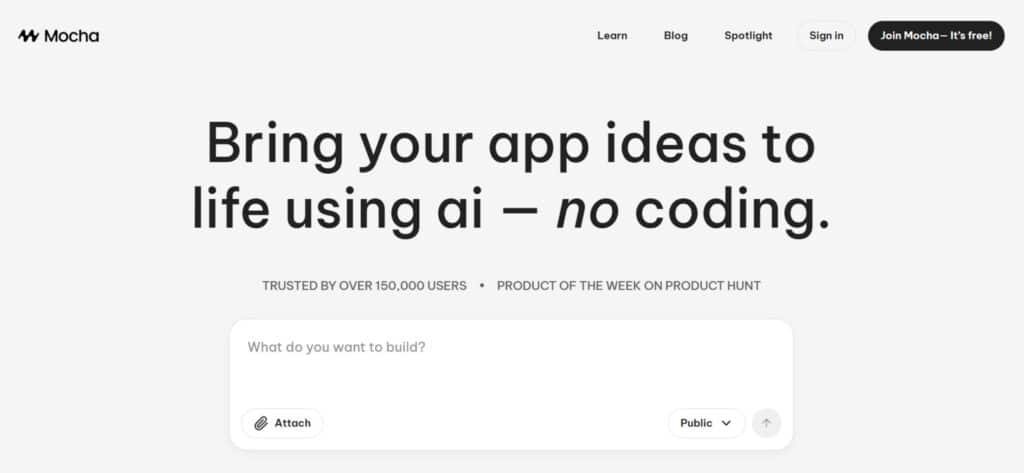
Company Background and Founders
Axilla, Inc. launched in 2024 with a clear mission. They wanted to democratize app creation for entrepreneurs who lacked technical skills. The founders recognized that traditional development tools were leaving too many great ideas on the table.
What impressed me was their holistic approach. Instead of just focusing on code generation, they built a complete ecosystem. This platform handles everything from databases to authentication and hosting.
Position in the Current AI Landscape
In today’s AI landscape dominated by coding assistants, this product stands apart. It’s not competing with tools like GitHub Copilot. Instead, it serves a completely different audience: non-technical founders and small business owners.
The validation speaks volumes. Becoming Product Hunt’s product of the week with 751 upvotes isn’t easy. It shows real traction and community approval. Over 75,000 users have already adopted this builder for their projects.
This platform fills a critical gap. It empowers startups and businesses to build applications without the traditional development hurdles. The integrated approach saves significant time and reduces complexity.
What is Mocha?
What separates this tool from typical no-code platforms is its generative AI engine that crafts unique solutions rather than recycling templates.
I found this approach refreshing after testing countless cookie-cutter builders that limit creativity.
Core Technology and Inner Workings
The platform combines advanced language models with pre-built infrastructure components. When you describe your application idea in plain language, the AI analyzes your requirements and generates a complete architecture.
This includes automatic provisioning of database systems, authentication, file storage, and hosting. Unlike template-based builders, it creates custom designs tailored to your specific needs. The real-time iteration capability lets you see changes instantly.
| Aspect | Traditional Development | AI-Powered Platform |
|---|---|---|
| Time to First Prototype | Weeks to Months | Hours |
| Technical Knowledge Required | Extensive Coding Skills | Basic Description Skills |
| Infrastructure Setup | Manual Configuration | Automatic Provisioning |
| Design Flexibility | Custom but Time-Consuming | AI-Generated & Customizable |
Benefits for Entrepreneurs and Developers
For entrepreneurs, the speed to market is incredible. You can transform an idea into fully functional software in hours instead of months. The platform eliminates technical barriers that often stall business innovation.
Developers benefit too—it’s perfect for rapid prototyping. The AI generates production-quality starter code that you can export and customize. It’s like having an assistant who builds your initial architecture while you focus on refinement.
The built-in infrastructure means every application comes with proper data management, secure authentication, and scalable hosting. This comprehensive approach supports everything from simple websites to complex enterprise tools.
Complete Features & Innovation of Mocha
What impressed me most during my testing wasn’t any single feature, but how seamlessly everything works together in one cohesive environment.
After evaluating countless builders, this platform stands out by integrating the essential features that actually matter for launching real applications.
1. Prompt-Based Creation
The foundation of Mocha revolves around prompt-based creation that lets anyone build a full website or app using natural language.
Users simply type a prompt like “create a booking site for my yoga studio” and Mocha instantly understands the request.
This vibe coding approach removes traditional coding barriers, making website development accessible to non-developers.
The system interprets prompts in natural language, generates clean code behind the scenes, and delivers a working site in minutes.
With prompt-based creation, developers searching for fast website solutions gain immediate access to professional results without learning complex coding or hiring a developer.
Discuss Mode
Discuss Mode starts every project by turning vague ideas into structured plans through conversational prompts.
Mocha asks clarifying questions and produces a detailed Product Requirements Document automatically.
This ensures the final website or app matches the exact vision before any coding begins, saving hours of rework for users who want precise control using only vibe coding.
Step-by-Step Scaffolding
Mocha breaks large prompts into manageable phases, generating code incrementally. Each step builds on the previous one, so the site evolves logically.
This structured vibe coding method keeps projects organized and prevents overwhelming beginners who are new to coding or website creation.
2. No-Code Workflow
The no-code workflow in Mocha provides a complete guided path from idea to launched website. Every stage uses vibe coding principles so users never write traditional code. This workflow is ideal for creating business-ready sites quickly and maintains full control through simple prompt adjustments.
Plan Phase
During the Plan Phase, Mocha suggests features based on the initial prompt and refines them through chat. It recommends layouts, user flows, and functionality that fit the described website type, helping developers build smarter sites faster.
Scaffold Phase
Scaffold Phase instantly generates pages, navigation, and core structure. Mocha assembles the entire site skeleton using the refined prompt, giving users a functional starting point in seconds instead of days of manual coding.
Debug Phase
The built-in Debug Phase scans the generated site in real time and fixes issues automatically. Mocha explains problems in plain natural language and applies corrections through vibe coding, ensuring the website stays stable without requiring a developer.
Iterate Phase
Iteration happens through new prompts that modify existing elements instantly. Users can refine content, layout, or logic on a live site using only conversational vibe coding, making updates feel effortless.
3. Design and UI Tools
Mocha handles all visual design through prompt-driven tools so every website looks professional from day one. Developers get polished, responsive sites without design software or coding knowledge.
Custom Themes
Describe a color scheme or style in a prompt and Mocha applies matching themes across the entire site. This vibe coding method delivers branded results that feel custom-built.
Responsive Design
Every website created in Mocha automatically adapts to mobile, tablet, and desktop screens. The platform handles all breakpoints through its vibe coding model, saving users from manual responsive coding.
Asset Integration
Upload logos or images once, and Mocha places them correctly throughout the site. The model understands content placement via natural language instructions.
4. Full-Stack Backend
Mocha includes complete backend functionality so every website has secure data handling without external services or coding.
Authentication
Secure login systems appear with one prompt. Mocha sets up email/password or Google Authentication automatically, giving instant user access control.
Database Management
Built-in databases store and organize all site data through an intuitive dashboard. Separate development and production environments follow best practices, removing the need for separate platforms or developer setup.
Payments Integration
Connect Stripe for subscriptions or one-time payments using a single prompt. Mocha handles the entire integration securely.
AI Utilities
Add chatbots, recommendations, or smart forms through simple prompts. The model embeds advanced functionality into any website without extra coding.
5. All-in-One Platform Integration
Mocha combines database, authentication, hosting, and deployment into one unified system. This eliminates fragmented workflows common on other platforms.
Developers avoid managing multiple services, reducing complexity and launch time dramatically when building a website or app with vibe coding.
6. Deployment and Hosting
Launch any site with one click on Mocha’s fast, scalable hosting. The platform manages servers, SSL, and performance automatically.
Built-In Hosting
Every website runs on optimized infrastructure that scales with traffic. No separate hosting account or coding required.
Custom Domains
Connect personal domains instantly for professional branding across all sites built with Mocha.
Code Export
Download clean, production-ready code at any time. Users who later want full control can move the site elsewhere while keeping the vibe coding foundation.
7. Integrations
Mocha connects natively to popular tools, extending website capabilities without custom coding.
CRM Sync
Push form submissions or user data directly to systems like HubSpot.
Calendar Tools
Sync bookings with Google Calendar through simple prompt setup.
E-Commerce Add-Ons
Expand payment features with inventory tracking or shipping calculations.
8. Rapid Prototyping and Real-Time Iteration
Mocha turns ideas into working websites in hours using vibe coding. Real-time chat with reasoning allows constant refinement through conversational prompts, delivering speed that traditional coding or other platforms cannot match.
9. Advanced Editing
Power users gain optional access to a full code editor inside Mocha. View and modify generated code directly when needed.
Code Editor
The integrated editor supports tweaks while preserving vibe coding changes made via prompt.
Custom Logic
Add specialized rules or third-party scripts through the editor without breaking the main site flow.
10. Community and Support
The Mocha community offers weekly Spotlight contests where users share websites and win credits. Priority support channels and an active blog keep everyone updated on new vibe coding techniques and Mocha features.
| Feature Category | Traditional Approach | AI-Powered Solution |
| Authentication Setup | Manual OAuth configuration | Automatic Google integration |
| Database Environments | Manual separation required | Automatic dev/prod creation |
| Prototyping Speed | Weeks to months | Hours to days |
| Design Implementation | Requires design skills | AI-generated modern design |
The Mocha application builder supports everything from simple websites to complex saas platforms.
Over 75,000 users trust this approach for their app development needs.
It’s a genuine rapid prototyping powerhouse that delivers production-ready apps without the traditional code barriers.
Pricing Plans of Mocha
I’ve seen many promising tools fail at the pricing page, so let’s see how this one stacks up. The pricing model is refreshingly straightforward with four clear tiers.
You won’t find hidden infrastructure fees or surprise charges here.
Subscription Tiers and Feature Breakdown
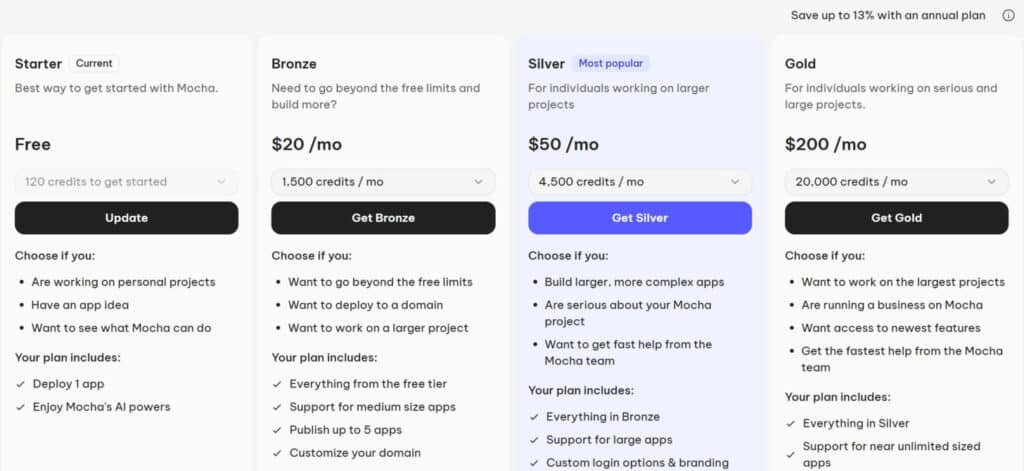
The Starter plan is completely free – you get 120 credits and can build one app. It’s perfect for testing the waters.
The Bronze tier costs $20 monthly with 1,500 credits and supports up to five apps.
For growing businesses, the Silver tier offers 4,500 credits and 15 apps for $50 per month.
The Gold tier at $200 monthly provides 25,000 credits and 25 apps for serious development work. Each plan includes all core features.
| Plan | Price | Credits/mo | Max Apps | Domain | Watermark | Custom Login/Branding | Priority Support | Early Access |
|---|---|---|---|---|---|---|---|---|
| Starter | Free | 120 | 1 | No | Yes | No | No | No |
| Bronze | $20/mo | 1,500 | 5 | Yes | No | No | No | No |
| Silver | $50/mo | 4,500 | 15 | Yes | No | Yes | Yes | No |
| Gold | $200/mo | 20,000 | 25 | Yes | No | Yes | Yes (fastest) | Yes |
Cost Analysis and Value Proposition
What impressed me is the generous free trial. You can start building immediately without providing credit card information. This shows confidence in the product.
For small projects, the free tier offers real value. The Bronze plan hits the sweet spot for most users. The credit system is fair – you only pay for what you use beyond the included limits.
Compared to hiring developers, even the Gold tier saves significant time and money. The platform scales with your business needs without forcing expensive jumps between plans.
Pros & Cons: Getting the Most Out of Mocha
Let’s cut through the hype and look at what really works—and what doesn’t—with this platform. After testing it extensively, I found some genuinely impressive benefits alongside a few limitations worth knowing.
Advantages and Standout Benefits
The all-in-one integration is a game-changer. You get everything from database management to hosting in one place. This eliminates the need to juggle multiple services.
Google authentication works seamlessly out of the box. No complex setup or configuration required. The platform handles everything automatically.
- Speed: You can go from idea to functional app in hours, not weeks
- Code export: You own what you build and can customize it
- Separate development and production environments
- Built-in hosting scales automatically
Potential Drawbacks and Limitations
Like any tool, there are limitations. The vibe coding approach works well for standard applications but might struggle with highly specialized needs.
- Learning curve for complex projects
- Limited customization compared to hand-coded software
- Dependent on platform updates and changes
Despite these limitations, the platform delivers solid value. It’s particularly strong for rapid prototyping and MVP development. Now, let’s see how it compares to alternatives.
Alternatives & Competitor Insights for Mocha
The no-code app builder space is crowded, and honestly, some tools feel like they’re all doing the same thing.
After testing several, I found key differences that matter for your project’s success. Understanding the landscape helps you pick the right tool.
Overview of Competing No-Code App Builders
If you are looking for alternatives to Mocha as an AI-powered no-code app builder that supports vibe coding, several excellent platforms allow you to create applications simply by describing your ideas in natural language.
These tools make it easier to turn concepts into working apps without writing code. I understand how important it is to find the right tool that fits your workflow and helps bring ideas to life quickly. Here are some strong options worth considering.
Lovable
Lovable uses a chat-based interface to build full-stack applications with clean, editable code. It integrates well with databases like Supabase and supports GitHub exports.
Many users appreciate the balance between AI speed and manual control. Great for projects where you want production-ready results. – Read Full Review
Emergent
Emergent stands out with multi-agent AI that plans, codes, debugs, and deploys apps on its own. It handles complex features like authentication and scaling smoothly.
Ideal if you need autonomy for advanced applications without constant guidance. – Read Full Review
Capacity.so
Capacity.so generates React apps styled with Tailwind and connected to APIs based on your descriptions. It focuses on structured prompts for accurate outcomes.
Perfect when you want high-quality, maintainable front-end code. – Read Full Review
Blink.new
Blink.new creates complete apps including database, authentication, and hosting in one go. It even fixes bugs automatically during the process.
Excellent choice for rapidly launching functional prototypes or MVPs. – Read Full Review
HeyBoss AI
HeyBoss AI builds apps and websites with built-in CRM, payment systems, and SEO features. It supports ongoing updates through simple instructions.
Well-suited for business owners who need marketing tools alongside the app. – Read Full Review
| Tool | Key Features | Unlimited Builds? | Extra Strengths | Starting Pricing | Best For |
|---|---|---|---|---|---|
| Mocha | Natural language to full-stack apps | Limited | Integrated visuals and backend | Free tier / $15+ | Rapid prototyping |
| Lovable | Chat/agent mode, code export | No | Supabase/GitHub integration | $25/month | Editable production apps |
| Emergent | Multi-agent autonomy, full deployment | Varies | Complex logic and scaling | Credit-based / beta | Autonomous advanced builds |
| Capacity.so | React/Tailwind generation | Trial | Spec-first accuracy | $29+/month | High-quality web apps |
| Blink.new | Built-in DB/auth, auto-fixing | Credit-based | Fast MVP with hosting | $20+/month | Quick functional launches |
| HeyBoss AI | CRM/payments/SEO included | Trial | Business tools and updates | $20+/month | Marketing-focused sites/apps |
For rapid prototyping a complete saas product, the integrated platform is superior. If you only need a basic website, a simpler app builder might suffice.
Choose based on how much support you want from one site.
Case Study & Personal Experience with Mocha
Building an expense tracker from scratch seemed like the perfect test for this AI platform’s capabilities. I wanted to see if it could truly deliver on the promise of rapid app development without the usual technical headaches.
Step-by-Step App Building Experience
I started by describing my expense tracker idea in plain language. The vibe coding feature immediately impressed me. Within minutes, the platform generated a complete application structure.
The database integration worked seamlessly. It automatically created tables for expenses and categories. Google authentication was handled without complex setup – a huge time saver.
I focused on the user interface. The design was professional right out of the gate. The platform created forms for expense entry and real-time analytics.
Real-World Outcomes and Lessons Learned
The entire project took minutes, not hours. The app deployed successfully on the first try. No debugging was needed.
What surprised me most was the storage and data management. The platform handled everything from database queries to user information securely.
This experience showed me that AI-powered development is genuinely accessible. You can build functional software without writing a line of code. The features worked together seamlessly.
The website looked professional. The page layouts were responsive. This product delivers real value for users wanting to create custom applications quickly.
Conclusion: Mocha Review
Raamish’s Take
Mocha redefines AI app building with its seamless vibe coding system, letting you describe ideas in plain English and watch functional websites or apps come alive without any traditional coding.
I value how it handles the full stack—from prompt-based creation that scaffolds layouts and logic in minutes, to a no-code workflow that guides planning, debugging, and iteration for quick MVPs.
The design and UI tools stand out, auto-generating responsive themes and integrating assets effortlessly, while the full-stack backend covers secure authentication, databases, and Stripe payments right out of the gate.
What sets it apart is the all-in-one platform integration, bundling hosting, custom domains, and code exports so you avoid tool-juggling hassles common in fragmented setups.
Rapid prototyping via real-time chat lets you refine sites on the fly, and extras like CRM syncs or AI utilities add polish for production-ready apps.
For deployment, one-click publishing removes barriers, and the optional code editor gives developers a tweak-friendly layer.
Overall, Mocha excels at turning non-tech visions into robust tools efficiently, making it a smart pick for fast, frustration-free development.
Mocha stands out as the ultimate vibe coding platform that levels the playing field.
Whether you’re a seasoned developer hunting for lightning-fast prototyping or a complete non-techie ready to launch your first website, app, or SaaS product, Mocha delivers professional results with zero traditional coding required.
From stunning sites built in hours to scalable full-stack applications complete with auth, payments, and hosting, everything happens through simple prompts. Stop dreaming about your idea (start building it today).
Join thousands already shipping with Mocha and turn your vision into reality faster than ever.
Start Building Now-At Mocha!
Frequently Asked Questions
Is Mocha a true no-code platform, or do I need any programming knowledge?
It’s genuinely no-code. You build fully functional applications using a visual, drag-and-drop interface and natural language prompts. I didn’t write a single line of code to create a working prototype. The platform handles all the backend development for you.
How does the AI component actually work in the app builder?
The AI acts like a super-powered assistant. You describe what you want—like “a login page with Google authentication”—and the vibe coding tool generates the functional components. It dramatically speeds up the development process by translating your intent into working software.
What kind of applications can I realistically build with this tool?
You can build a wide range of data-driven applications. Think internal business tools, customer portals, simple CRUD (Create, Read, Update, Delete) apps, and rapid prototypes for SaaS startups. It’s ideal for projects that require a database, user management, and a clean interface.
Is there a free trial, and what are the limitations?
Yes, there is a free trial that gives you full access to the platform’s core features. This is perfect for testing your idea without commitment. The main limitations usually involve usage caps, like the number of active users or database storage, which are lifted in the paid subscription tiers.
How does it handle data storage and hosting?
It’s an all-in-one solution. Your app’s database management and hosting are included within the platform. You don’t need to set up or manage external servers. This simplifies deployment and keeps everything integrated, which I found incredibly convenient.
Can I export the code if I want to move my project later?
This is a key consideration. As a no-code builder, the primary output is a functioning application on the Mocha platform, not exportable source code. If your long-term strategy requires full ownership of the codebase, this might be a limitation to weigh against the speed of development.
How steep is the learning curve for a complete beginner?
The learning curve is surprisingly gentle. If you can articulate what you want your app to do, you can build it. The interface is intuitive, and the AI handles the complex parts. You’ll be most successful if you have a clear plan for your application’s pages and data structure before you start.