Does the thought of building a professional website or app make you break into a cold sweat?
You’re not alone. Most small business owners and entrepreneurs face the same nightmare: hiring developers can cost over $20,000 and take months.
That financial and time barrier is incredibly frustrating. It can feel like your great idea is stuck forever. But what if you could create a functional digital product in under 15 minutes, with zero technical skills?
I’ve tested the platform that promises exactly that. This tool uses advanced automation to act as your personal “AI CEO,” handling the complex parts for you. It’s designed to turn your vision into a live website builder or application quickly.
My goal here is simple. I want to give you a completely honest, hands-on look at this platform. We’ll dive into its features, pricing, and what real users are saying. Let’s find out if it’s the right solution for your projects.
Key Takeaways: HeyBoss AI Review
- This platform enables creation of websites and apps without any coding knowledge.
- Traditional development is often prohibitively expensive and slow for small businesses.
- The tool leverages AI automation to significantly speed up the building process.
- This analysis is based on practical testing and aggregated user feedback.
- We will examine the pros, cons, and overall value to help you make an informed decision.
HeyBoss AI Review: An Overview
Introduction to HeyBoss AI
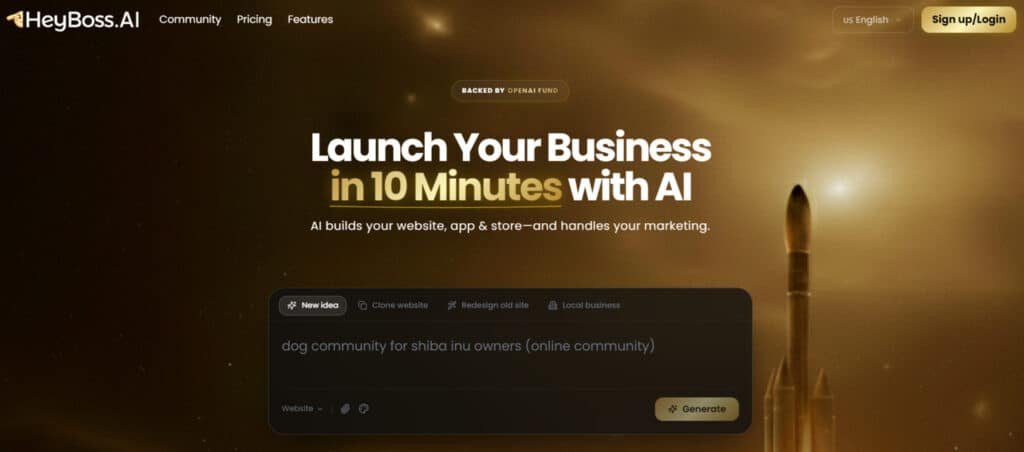
Traditional website builders require you to drag, drop, and design everything manually. This platform takes a completely different approach. You describe what you want, and the system handles the heavy lifting.
Position in the Current AI Landscape
The no-code movement is exploding in the current AI digital landscape. This tool stands alongside established builders like Wix and Squarespace. Yet it carves its own niche through conversational AI.
Instead of complex interfaces, you have a simple chat-based process. This makes digital creation accessible to everyone. The technology foundation comes from OpenAI, ensuring sophisticated language understanding.
Founders, Company Background & Endorsements
Founded in 2025 and based in the United States, this company targets a diverse audience. Small businesses, freelancers, and even government organizations use it. The core purpose is eliminating barriers to digital development.
User feedback shows strong satisfaction. One verified user noted:
“I’ve used Wix, Squarespace, and now this platform. The difference here is you don’t really ‘build.’ You describe, and it puts things together.”
| Platform Type | Interface Style | Learning Curve | Best For |
|---|---|---|---|
| Traditional Builders (Wix/Squarespace) | Drag-and-Drop | Moderate | Visual Designers |
| Advanced Platforms (Webflow) | Visual Coding | Steep | Technical Users |
| Conversational AI Builders | Text-Based | Minimal | Non-Technical Users |
What is HeyBoss AI?
Picture this: you describe what you want in plain English, and minutes later, you have a working website or app. That’s the core promise of this platform. It acts as your personal engineering team, eliminating the need for traditional coding skills.
Inner Workings and No-Code Approach
I found the “vibe coding” approach fascinating. Instead of complex interfaces, you simply chat with an AI CEO. This virtual leader asks strategic questions about your business goals and target audience.
The system then assembles a full AI team—designer, developer, marketer, and copywriter. They collaborate to generate custom code, create designs, and write compelling content. Everything happens through simple text conversations.
What amazed me was the speed. Functional websites typically appear in 9-15 minutes. The platform handles technical SEO, hosting, and even payment integration automatically.
Benefits for Non-Coders and Businesses
For non-technical users, this is revolutionary. You bypass the steep learning curve of traditional website builders. No more struggling with drag-and-drop interfaces or hiring expensive developers.
Businesses get rapid time-to-market at a fraction of typical development costs. The built-in SEO optimization means your site is search-ready immediately. You can create everything from e-commerce stores to landing pages without technical headaches.
The all-in-one nature impressed me most. Hosting, payments, and design happen seamlessly in one platform. It truly democratizes digital creation for everyone.
Best Features of HeyBoss AI
What separates this platform from competitors is its holistic approach to digital creation. Every feature serves a specific business purpose rather than just technical execution.
| Feature Category | Key Benefit | Time Savings | Best For |
| AI CEO Guidance | Strategic business alignment | Eliminates planning phase | Vision-focused users |
| Personalized Customization | Tailored functionality | Reduces configuration time | Specific business needs |
| AI Design Team | Professional quality output | 9-15 minute development | Time-sensitive projects |
| Integrated SEO & Hosting | Launch-ready sites | No technical setup required | Non-technical users |
1. All-in-One Platform
HeyBoss AI packs everything into one spot. It swaps out tons of separate tools and apps for a single platform.
This cuts your costs way down and speeds things up big time. You get an AI sidekick ready around the clock.
Users love this for simplifying life. No more jumping between apps or paying for extras.
Build a full website or even an app without the usual mess. It handles setup and running smooth.
This feature saves cash and time on management. Perfect for solo folks or small teams launching fast.
You avoid subscription overload. Focus stays on growing instead of tech fixes. Many find it drops monthly bills while boosting output.
2. Idea & Creation
HeyBoss AI has this cool Idea & Creation section packed with tools to get your project started quick and easy. You can spark new ideas and build content without the usual hassle. It’s great for anyone who wants to jump from thinking to doing fast.
Advise Mode
In Advise Mode, the AI gives you tips tailored just for your business setup. It checks what you’re working on and suggests smart steps ahead. This helps users avoid guessing games and make solid plans quicker.
Template Remix
Template Remix lets the AI change pro templates to match exactly what you need. Start with a good base, add your twists, and it’s ready in minutes. Perfect for whipping up a custom landing page or full site without starting from nothing.
E-book Creator
The E-book Creator turns your chats into complete professional e-books. Just talk through ideas, and the AI does the heavy lifting on writing and design. Users find this handy for creating shareable stuff like guides or reports super fast.
On top of that, powerful agents make this section even better. These agents are like expert helpers for specific tasks, handling everything from full plans to content creation.
They deliver quick generation of high-quality work, like names, visuals, or strategies. Users searching for fast starts benefit a lot here – agents cut down time on custom landing pages or new projects. It turns fuzzy ideas into clear, ready-to-use outputs.
This builds content efficient and keeps your momentum going strong. Many users say it feels like having a team on call.
3. Core Capabilities
The Core Capabilities of HeyBoss AI incorporate essential built-in functions that effectively replace numerous external apps, ensuring seamless operation across various business aspects.
These integrated elements centralize critical operations, minimizing the reliance on disparate services and enhancing overall efficiency in management and execution.
Built-in Database
The Built-in Database offers a powerful and user-friendly system for storing and managing data, serving as an alternative to platforms like Airtable or Notion. It provides structured organization and easy access within the platform.
Built-in Payments
Built-in Payments enable immediate acceptance of transactions without requiring complex configurations or third-party dependencies, functioning similarly to streamlined alternatives for Gumroad or Payhip.
Secure User Authentication
Secure user authentication and account management are embedded directly, eliminating the need for external solutions such as Firebase Auth.
Built-in CRM
The Built-in CRM captures leads, facilitates AI-powered email delivery, and supports personalized batch messaging, effectively substituting for tools like Typeform, Google Forms, or Mailchimp.
Built-in Admin Dashboard
A comprehensive Built-in Admin Dashboard provides monitoring, analytics, and control over business operations in a unified interface.
Built-in Content Storage
Unlimited cloud-based Built-in Content Storage organizes files, images, and documents, rendering separate services like Dropbox unnecessary.
Built-in Email
Built-in Email supports automated campaigns and transactional messaging, reducing dependence on external automation platforms.
Built-in AI Art Generation
Advanced Built-in AI Art Generation produces custom images and graphics, comparable to leading tools like Midjourney or DALL·E.
Workspaces
Workspaces facilitate team collaboration and project management in shared environments.
Upgraded AI Engine
The Upgraded AI Engine, powered by Claude Sonnet 4.5, delivers faster and more capable performance across tasks.
Built-in Web Search
Built-in Web Search automates information gathering and research directly within the platform.
4. Creative & Design
Creative & Design features in HeyBoss AI empower users to construct visually appealing elements and content without necessitating advanced design expertise. These tools prioritize intuitive processes that yield professional outcomes, making high-quality creation accessible to a broader audience.
Visual Editor
The Visual Editor employs an intuitive drag-and-drop interface to design websites and individual page layouts, offering functionality akin to established builders like Squarespace or Wix.
Website Cloner
Website Cloner utilizes AI to recreate any existing design instantaneously, bypassing manual reconstruction efforts.
AI Designer
AI Designer automatically generates professional branding, logos, and related assets.
AI Content Writer
AI Content Writer produces compelling copy, blog posts, and marketing materials, serving as an efficient substitute for freelance services.
Design Styles
Design Styles simplifies the selection of aesthetics, domain connections, and publishing procedures.
Sites come out mobile-friendly and attractive. Great for stores, portfolios, or blogs. It pulls in more visitors with better looks. Launch polished spots without delays or help from others. This levels things up for small teams or solo builders.
5. Growth & Analytics
Growth & Analytics tools supply detailed insights through analytics to inform strategic advancements and optimize performance metrics.
Auto-SEO
Auto-SEO applies AI to enhance content visibility on search engines by implementing fundamental optimization practices.
Analytics Dashboard
The Analytics Dashboard consolidates views of user behavior, performance indicators, and business metrics.
Google & Facebook Pixel Tracking
Integrated tracking monitors advertisement efficacy and conversions on major platforms.
Google Analytics Integration
Seamless connection to Google Analytics provides access to advanced data analysis.
Upgraded CRM
The Upgraded CRM improves contact management with AI-assisted personalization and messaging.
Spot trends fast with integrated tracking. This boosts traffic and sales down the line. Helps focus on winners and fix what’s not.
6. Hosting & Infra
Hosting & Infra takes care of the backend so your stuff stays online safe and speedy.
Custom Domains
Connect your domain with auto setup help.
Domain Purchasing
Buy new domains right inside.
Hosting & Storage
Unlimited fast hosting and space.
Security & SSL
Strong protection and auto certs.
Users run websites without tech worries. Focus goes to content creation instead. Supports smooth app or site running. Cuts downtime and setup issues way down. Scales reliable as you grow bigger.
7. Integrations
Hook up to other services seamless. Here’s a quick table of the main ones and extras:
| Category | Integrations Examples | How It Helps Users |
| Calendar | Cal.com style bookings | Direct appointments on your site |
| Social Media Pixels | All major platforms | Track and retarget easy |
| Scrapers | Amazon, Google, Instagram, LinkedIn, Twitter | Pull data auto for insights |
| AI APIs | GPT-5, Gemini, Claude 4.5, Llama 3, ElevenLabs | Advanced generation in one spot |
| Video Embeds | YouTube, TikTok, Vimeo, etc. | Add media smooth |
| Forms | Typeform, Google Forms | Collect info better |
| Payments | Stripe, PayPal | More ways to get paid |
| Marketing | HubSpot, Mailchimp, Pixels | Run campaigns tied in |
| Social Media | Instagram, Facebook, Pinterest | Connect posts direct |
| Productivity | Notion, Figma, Loom | Team tools linked |
| Scheduling | Calendly, Google Calendar | Bookings flow natural |
| Audio | Spotify, SoundCloud | Embed sounds easy |
This expands your project without code. Readers add features like voice or scraping fast. Makes the platform fit more needs perfectly.
8. Free Tools
Start with these no-cost options. Table below lists ’em all:
| Free Tool | What It Does | Benefit for Users |
| Business Name Generator | Brainstorms catchy names | Kick off branding quick |
| Business Plan Generator | Builds full plans | Structure ideas solid |
| Blog Post Generator | Makes ready articles | Content starts easy |
| Ebook Generator | Creates full e-books | Publish fast without work |
| Market Research | Gathers trends and info | Informed decisions |
| Social Media Content | Generates posts and captions | Keep feeds active |
| Visual Design Generator | Makes graphics and designs | Visuals for landing or sites |
These tools let readers test content generation free. Lowers start barriers for websites or ideas. Great entry to see value before committing.
Pricing and Plans of HeyBoss AI
Let’s tackle the question that’s probably top of mind right now: what will this solution actually cost you? I’ve dug into the pricing structure to give you the straight facts.
Breakdown of the Free Trial and Paid Subscriptions
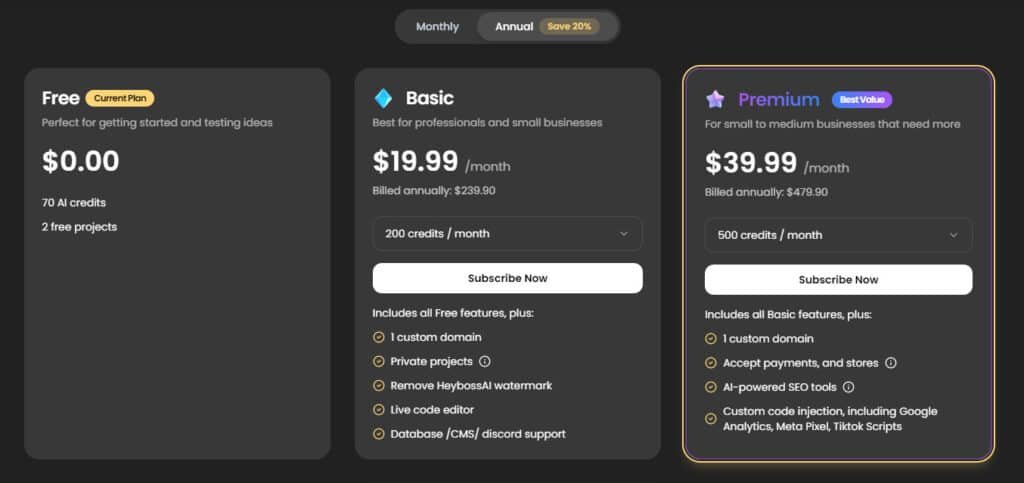
Free Plan $0.00 (no change monthly or annual) Perfect for testing ideas with 70 AI credits and 2 free projects. Great starting point, but limited.
Basic Plan $24.99/month or $19.99/month (billed annually at $239.90 – save 20%) Includes 1 custom domain, private projects, remove watermark, live code editor, database/CMS/Discord support.
Premium Plan $49.99/month or $39.99/month (billed annually at $479.90) Adds payments & stores, AI-powered SEO tools, custom code injection (Google Analytics, Meta Pixel, TikTok scripts).
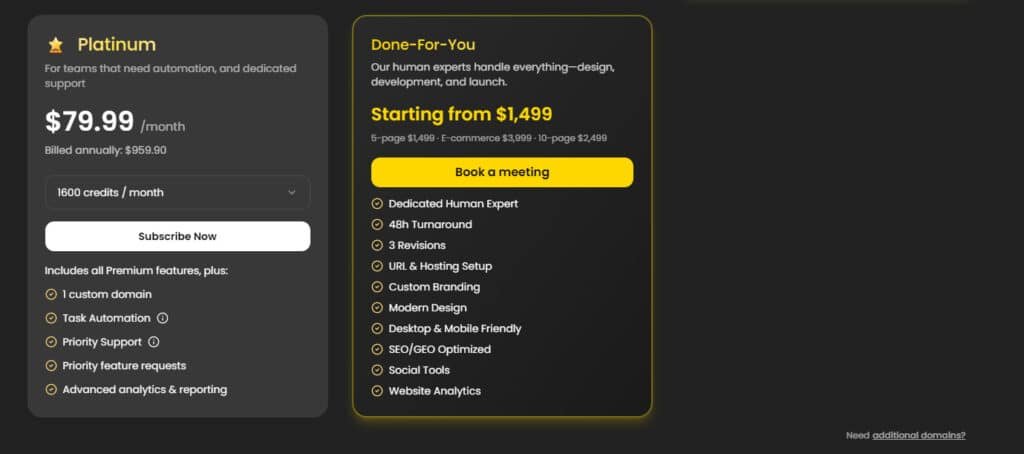
Platinum Plan $99.99/month or $79.99/month (billed annually at $959.90) Everything in Premium plus task automation, priority support, priority feature requests, advanced analytics & reporting.
Done-For-You Service Starts at $1,499 (one-time) Human experts build your site – 5-page $1,499, 10-page $2,499, e-commerce $3,999. Includes custom branding, SEO, mobile-friendly design, analytics.
| Pricing Plan | Monthly | Annual (Save 20%) | Key Highlights |
| Free | $0 | $0 | 70 credits, 2 projects |
| Basic | $24.99 | $19.99 | Custom domain, no watermark |
| Premium | $49.99 | $39.99 | Payments, AI SEO, code injection |
| Platinum | $99.99 | $79.99 | Automation, priority support |
| Done-For-You | From $1,499 | – | Full human-built landing page |
Value Proposition Compared to Traditional Development
Here’s where the value becomes clear. Traditional agency development typically costs $20,000+ and takes months. This solution delivers similar quality in under 15 minutes.
Even with subscription pricing, you save thousands. For small business owners, getting an e-commerce store live quickly has real monetary value.
| Development Method | Average Cost | Time to Launch | Technical Skill Required |
|---|---|---|---|
| Agency Development | $20,000+ | Weeks to Months | Professional Team |
| Traditional DIY Builders | Monthly Fees | Hours to Days | Moderate Learning Curve |
| AI-Powered Platform | Subscription Pricing | 9-15 Minutes | Zero Coding Needed |
Pros & Cons of HeyBoss AI
No tool is perfect for everyone, and this one has some clear winners along with a few areas that need consideration. Based on my testing and user feedback, here’s the honest breakdown.
Key Advantages: Speed, Cost-Effectiveness, and Ease of Use
The speed is genuinely impressive. You can create a functional website in under 15 minutes versus months with traditional development. This platform delivers professional results at a fraction of typical agency costs.
The easy use factor stands out. With a perfect 5.0/5.0 rating for simplicity, non-technical users can navigate the process effortlessly. Built-in SEO optimization means your site is search-ready immediately.
One user captured it well:
“It’s efficient and easy to navigate, has some pretty cool features.”
Drawbacks and Considerations for Advanced Users
Advanced developers seeking total control over every line of code may feel constrained. The conversational “vibe coding” approach isn’t for everyone.
While usually fast, some users note it “can take some time sometimes.” The quality ceiling feels more like “good enough to launch” rather than pixel-perfect enterprise standards.
If you need deep customization or specific design control, this builder has limitations. The experience prioritizes speed and accessibility over advanced feature integration.
Depending on your specific needs, other platforms might offer better support for complex projects. Let’s explore those alternatives next.
Alternatives and Personal Experience
Before committing to any solution, I always compare it with other available options. This helps you understand the real value proposition and where each tool shines.
Comparing with Competing No-Code Platforms
The landscape offers several strong alternatives. Wix provides extensive templates with drag-and-drop flexibility. Squarespace focuses on beautiful, design-forward templates.
Webflow appeals to advanced users who want visual code editing. Rosebud AI stands out with full code visibility and integrated asset generation tools.
The key difference lies in control versus automation. Traditional builders offer hands-on design control. This platform prioritizes speed through conversational creation.
| Platform | Primary Approach | Best For | Learning Curve |
|---|---|---|---|
| Wix/Squarespace | Drag-and-Drop Templates | Visual Design Control | Moderate |
| Webflow | Visual Code Editing | Advanced Customization | Steep |
| Rosebud AI | Code Visibility & Assets | Collaborative Projects | Medium |
| This Solution | Conversational Automation | Speed & Simplicity | Minimal |
Real-World Case Study and Personal Insights
I tested the platform by creating a coaching website. The AI CEO asked strategic questions about my target audience and services.
Within 18 minutes, I had a functional site with booking integration and course sales. The copy was surprisingly professional and SEO-ready.
The experience felt refreshing compared to hours spent fiddling with traditional builders. For rapid deployment, this approach delivers impressive results.
Conclusion
The big question remains: does this tool actually solve the website creation headache for non-technical users? Based on my testing, the answer is a resounding yes for the right audience.
This platform delivers professional websites in under 20 minutes with zero coding. The AI CEO guidance and built-in SEO make it perfect for entrepreneurs, small businesses, and freelancers.
Advanced developers might prefer more control, but for most users, the value is undeniable. You get quality results at a fraction of traditional development costs.
The free trial eliminates risk entirely. I recommend trying it yourself—visit their site, gather your business details, and set aside 15 minutes.
The barrier to digital creation has never been lower. Share your experiences below if you give it a shot!
Frequently Asked Questions
Is HeyBoss AI really suitable for someone with zero coding experience?
Absolutely. I’ve tested it myself, and the platform is built specifically for non-coders. The interface uses simple drag-and-drop actions and plain English commands. You describe what you want, and the AI handles the technical heavy lifting, making the entire process of building a site or app feel intuitive.
How does the AI-powered design actually work?
It’s like having a professional designer on autopilot. You provide a basic idea or select a style, and the AI generates a complete, visually coherent layout. It chooses color schemes, fonts, and element placement based on proven design principles. This saves you hours of trial and error, delivering a polished look in minutes.
What kind of e-commerce features and payment integrations does it support?
The builder includes robust tools for creating an online store. You can easily set up product pages, manage inventory, and integrate with popular payment processors like Stripe and PayPal. This means you can start accepting payments securely without needing a separate e-commerce development team.
Can I use my own domain name, and what about website hosting?
Yes, you have full control. The platform provides seamless integration for connecting your custom domain. Hosting is included in the subscription plans, which simplifies everything. You won’t need to manage a separate hosting service—it’s all bundled for a streamlined experience.
How effective are the built-in SEO tools for getting my site found on Google?
The integrated SEO features are surprisingly powerful for a no-code tool. They guide you through optimizing page titles, meta descriptions, and alt text for images. While it won’t replace a dedicated SEO expert for highly competitive niches, it gives your site a strong foundation for search engine visibility right out of the gate.
What happens if I need help? What customer support options are available?
Support is a key part of the package. You get access to a responsive help desk and a knowledge base. There’s also an active user community where you can share tips and get advice from other builders. I found the support team to be helpful for solving technical questions quickly.
Are there any limitations I should be aware of before committing?
The main consideration is for highly complex, custom functionality. While it’s fantastic for most business websites, blogs, and online stores, if you need very specific, advanced features that require custom code, you might hit a ceiling. For probably 90% of users, though, the feature set is more than sufficient.