
Ever stared at a blank room and felt completely stuck?
You have a vision for your home, but translating that dream into a concrete plan is the real challenge. It’s frustrating, time-consuming, and often ends with costly mistakes.
This is where modern technology steps in. The process of home design is being revolutionized by artificial intelligence. I’ve tested numerous platforms, and one tool stands out for simplifying this entire ordeal.
In this hands-on review, I’m breaking down HomeDesigns AI. I’ll show you how this powerful software turns complex design tasks into a surprisingly intuitive experience. We’ll explore its features, pricing, and see if it truly delivers on its promises for your next project.
Get ready for an honest look at what works and what doesn’t. Let’s dive in and see if this is the solution you’ve been searching for.
Key Takeaways: HomeDesigns AI Review
- This review provides a comprehensive, tested analysis of the HomeDesigns AI platform.
- Understand how AI is transforming the interior and exterior design process for homeowners and pros.
- Gain insights into the key features that make this tool user-friendly and powerful.
- Learn about the realistic benefits and potential limitations I discovered during testing.
- Get a clear picture of the value proposition and who this tool is best suited for in current AI landscape.
HomeDesigns AI Review: An Overview

Raamish’s Take
HomeDesigns AI is a powerful AI platform that reimagines interiors, exteriors, gardens, patios, and terraces in under 30 seconds, serving over 2.26 million users across 170 countries with photorealistic transformations.
Its Beautiful Redesign mode delivers professional makeovers in 80+ styles like Modern or Scandinavian, while Creative Redesign rearranges furniture or shifts perspectives for unique ideas.
I am particularly impressed with the Fill Spaces tool, which furnishes empty or under-construction rooms instantly, and Design Transfer, applying inspiration images to your photo for custom aesthetics.
Additional features include Texture/Color Swap for material testing, Furniture Finder with shoppable links, Sky Colors for mood shifts, and Repurpose Rooms to convert spaces like bedrooms into offices. It supports sketches, high-quality downloads, and unlimited ideas on higher plans.
HomeDesigns AI‘s vast style library and fast rendering save days on concepts, making pro-level design accessible without expertise.
Introduction to HomeDesigns AI
Traditional interior design services often come with sticker shock and lengthy timelines. I’ve seen clients hesitate for months because they couldn’t justify the expense.
This frustration sparked a technological revolution in how we approach our living spaces.

AI Landscape and Market Trends
The design software market has exploded with intelligent tools. These platforms use advanced algorithms to generate stunning home layouts in minutes rather than weeks. The trend is clear: accessibility is winning.
| Traditional Design Services | AI-Powered Tools | Key Difference |
|---|---|---|
| Weeks of consultation | Instant visualizations | Time efficiency |
| High professional fees | Affordable subscriptions | Cost democratization |
| Limited revision rounds | Unlimited ideas | Creative freedom |
This shift benefits everyone from interior designers seeking efficiency to professionals in real estate needing quick staging solutions. The technology has become surprisingly intuitive.
Company Background and Purpose
The platform emerged from a simple observation: great home design shouldn’t require deep pockets. The founders combined architectural expertise with tech innovation.
Our mission is to put professional-grade design tools in everyone’s hands, not just trained experts.
They built this software specifically to bridge the gap between aspiration and execution. Today, contractors, architects, and DIY enthusiasts alike use it to transform spaces quickly.
What is HomeDesigns AI?
Let’s cut to the chase: what exactly is this platform, and how does it function in simple terms? At its heart, it’s a cloud-based software that acts as a creative partner for your house projects. I find it bridges the gap between a vague idea and a clear visual plan.
The interface is built for clarity. It welcomes everyone from first-time users to seasoned design professionals.
How the Platform Works
The process is refreshingly straightforward. You start by uploading a photo of your room. Then, you tell the system your preferences—like a favorite color or a desired style (think modern or rustic).
This input is the fuel. The platform’s algorithms then generate multiple design variations for your space. You get several unique layouts to explore in moments.
Benefits for Homeowners and Designers
The advantages differ significantly depending on your goals. For a homeowner, it’s about empowerment and experimentation. For a professional, it’s a powerful time-saving tool.
| Benefit | Homeowners | Professional Designers |
|---|---|---|
| Cost Efficiency | Avoids high consultation fees | Reduces initial concept development time |
| Creative Freedom | Experiment with dozens of ideas risk-free | Quickly present multiple options to clients |
| Accessibility | No technical skills needed; intuitive features | Focus expertise on refinement, not basic layouts |
This design approach puts you in control. You guide the process from a simple input to a finished room concept that matches your style.
AI Technology and Algorithms Behind the Tool
The real magic of this platform isn’t just in what you see, but in how it thinks. I discovered that sophisticated algorithms power every design suggestion you receive. These aren’t random placements – they’re intelligent calculations.
What impressed me most is how the system learns. The machine learning algorithms have trained on thousands of professionally designed spaces. They understand spatial relationships and traffic flow patterns that human designers use daily.
When you upload a photo, computer vision technology kicks in. It analyzes your room architecture – identifying walls, windows, and existing furniture. This contextual understanding ensures the suggestions actually work in your space.
Your input becomes the guiding force. The system factors in your preferred style and aesthetic preferences. It then generates options that are both beautiful and practical for your specific room.
Behind the scenes, two types of artificial intelligence work together. Generative AI creates new design concepts, while discriminative AI evaluates which layouts work best. This combination delivers those stunning realistic visualizations that respect your space’s limitations.
The technology continuously learns from user feedback. As more people use the platform, the algorithms become smarter. Your input today helps improve suggestions for everyone tomorrow.
complete Features of HomeDesignsAI
During my hands-on testing, three specific features stood out as genuine game-changers for home design projects. These aren’t just flashy additions—they’re practical tools that solve real problems I’ve encountered.
1. Core Magic: Instant Transformations That Spark Ideas
HomeDesigns AI delivers instant results by letting users upload any input photo of a house, living room, or outdoor area. The app processes the input in seconds and generates multiple home designs that respect the original architecture.
This core system serves as the main entry point for every type of project, from small living spaces to full homes.
AI-Generated Room Designs
Users provide a simple input image and select from over 80 style options or describe a custom style. The app returns complete home designs with new layouts while preserving key elements of the house.
This type of transformation works across every type of room, making it easy to visualize updated living room setups or entire homes.
Redesign Modes Galore
Six specialized modes cover every type of request: Magic for full changes, Beautiful for premium type themes, Creative for unique arrangements, Intuitive for guided feedback, Fill Spaces for empty areas, and Sky Colors for exterior type adjustments. Each mode accepts the same input and delivers tailored home designs in seconds.
Chat with AI Buddy
The built-in chat accepts natural feedback like “make the living room brighter” and instantly applies changes to the current input. This interactive feedback loop refines every type of design without starting over.
Repurpose on a Dime
Convert any type of space—bedroom to office, garage to gym—using one input photo. The app reimagines the house layout for the new type while keeping structural reality intact.
2. Pro Tools: The Heavy Hitters (Professional Plan Only)
These integrate with core modes like Magic Redesign and Fill Spaces, letting you chain input photos into pro-level outputs. Real estate agents stage homes faster, architects visualize builds, and homeowners get accurate quotes – all without design skills.
It includes 2,000 designs/month, 100+ style and space type options, and a commercial license for pros.
Virtual Staging (1-Click)
Upload an empty input photo and the app fills the living room or any type of space with photorealistic furniture. Real estate agents use this type of staging to make vacant homes sell faster, boosting listings by 73% more views. It pairs with Object Detection for seamless swaps.
Generate Videos
Turn static images into smooth walkthrough videos of house transformations, like furniture flows or exterior shifts. Clients see the full living vibe in motion, helping realtors close deals quicker. Pros integrate it with 3D Floorplans for animated tours that wow buyers.
2D to 3D Floorplans
Submit hand-drawn or digital plans as input. The app builds interactive 3D models of the entire house layout for any type of renovation, reducing planning time for builders and spotting issues early.
Remove Furniture (1-Click)
Clear unwanted items from the input images instantly, creating clean canvases for new home designs. Homeowners declutter for fresh starts; agents prep vacant homes in seconds, saving hours on edits.
Image to 3D Object
Convert a single product photo into a 3D model that can be placed in any type of scene inside the house. Designers craft custom assets, like turning a lamp pic into a rotatable piece for living room mocks.
Budget Estimator
After generating home designs, the app calculates rough costs for materials and product selections shown in the living room or other areas, pulling from real prices. Contractors quote accurately, helping homeowners budget renos without surprises.
Business Ideas & Modes
Commercial account users access restaurant, office, and retail type modes plus API integration for custom workflows. Teams generate tailored home designs for clients, like hotel lobbies, scaling ideas for workshops or listings.
Team Seats
One Professional account supports up to five users collaborating on the same input files and home designs, with shared feedback. Agencies cut miscommunications, letting remote pros tweak house projects in real time.
Object Detection Plus
Enhanced detection identifies every type of product and surface for precise feedback-based editing, tagging 100+ items with replacement suggestions. Pros refine living room details spot-on, enhancing photorealism across homes.
3. Smart Tweaks: Fine-Tune Like a Designer
These controls work on every type of input across all account levels, letting you layer feedback for perfect home designs.
Color & Texture Swaps
Replace wall colors or materials with one click, testing endless combinations on the same input.
Design Transfer
Apply the style from any inspiration images directly onto your house or living room photo.
Environment Vibes
Adjust lighting, season, or time of day to see how the living space feels under different conditions.
Basic Object Detection
The app spots furniture and decor in the original input, offering instant replacement suggestions and product links.
4. Realistic 3D Visualization
Go beyond flat images with full immersion, helping users confirm home designs before committing.
Immersive 3D Walkthroughs
Explore redesigned homes from every angle, confirming furniture scale in the living room or any type of area before buying.
Video Walkthroughs
Export animated tours that showcase the complete house transformation for clients or personal review.
Virtual Staging & 1-Click Furniture Removal
Combine both tools to present vacant homes as move-in ready or clear clutter from existing input photos.
5. Extensive Material and Product Libraries
Every design connects to real-world shopping, grounding home designs in practical choices.
Thousands of Real Materials and Decor
Choose from an expansive library covering every type of finish and product needed for accurate home designs.
Direct “Buy Now” Links
Click any item in the rendered living room or house to purchase the exact product shown.
Under-Construction Mode
Visualize unfinished homes by uploading progress photos as input and seeing finished type options overlaid.
The range covers various price points and style preferences. This ensures your design vision translates into achievable reality.
6. Interior Design Capabilities
Where this tool really impressed me was in its dedicated interior design features. These aren’t just generic tools—they’re specifically crafted to help you visualize and organize your home transformation.
Tailored Design Suggestions
The personalized suggestions go beyond generic templates. The platform analyzes your specific room dimensions, existing furniture, and lighting conditions.
You can specify particular requirements like needing space for a large TV or wanting a reading nook. The system incorporates these constraints into its design ideas. This transforms vague concepts into concrete plans with specific layouts and colors.
These interior-focused tools help you move from inspiration to actionable plans while maintaining your personal style throughout the process.
7. Exterior Design Innovations
What surprised me most during testing was how effectively the platform handles outdoor spaces. It’s not just about interior rooms—this tool transforms your entire property’s appearance. The exterior design capabilities are genuinely impressive.
I tested everything from simple landscaping to complete facade renovations. The system understands that exterior design follows different principles than interior work. It considers house architecture, neighborhood context, and maintenance requirements.
You can experiment with countless combinations. Try different paint colors, roofing materials, and window options. The visualization shows how these choices transform your home‘s curb appeal.
| Exterior Element | Customization Options | Real-World Impact |
|---|---|---|
| House Facade | Paint colors, siding materials, architectural details | Transforms curb appeal and property value |
| Landscaping | Plant selections, hardscaping, maintenance levels | Creates cohesive outdoor living spaces |
| Architectural Style | Modern, traditional, rustic variations | Ensures design consistency throughout property |
One user completely redesigned their xeriscaped front yard using these tools. The results were so striking that neighbors asked to photograph the transformation. That’s the kind of real-world impact this platform delivers.
The exterior visualization prevents costly mistakes. You’ll see how that perfect paint sample looks on your entire house before committing. The system ensures your landscaping matches your home’s architectural style.
These options make exterior renovations much less daunting. You can test different approaches risk-free. The platform helps you create a cohesive design that enhances your entire property.
Pricing and Subscription Plans
Let’s address the financial elephant in the room – how much does this design platform actually cost, and is it worth it?
I’ve learned that even the most impressive features need to justify their price tag for different types of users.
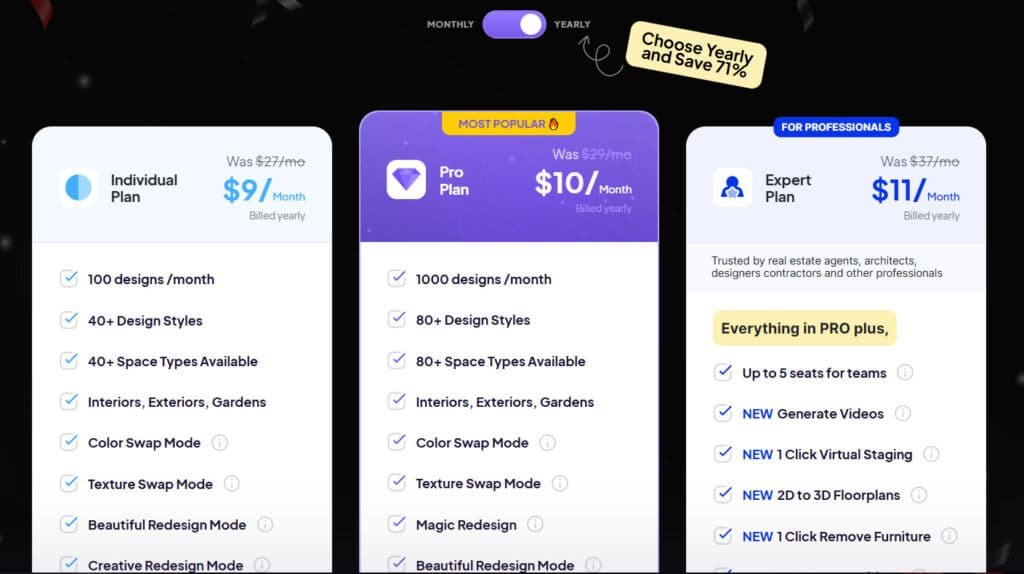
Individual Plan
Monthly: $17/mo | Annual: $9/mo (billed yearly, save big) 100 designs/month, 40+ styles & space types, interiors/exteriors/gardens, all core redesign modes, Color/Texture Swap, Furniture Finder, Design Transfer, AI Object Detection. Great starter account for casual users.
Pro Plan (Most Popular)
Monthly: $19/mo | Annual: $10/mo (billed yearly) 1,000 designs/month, 80+ styles & space types, everything in Individual. Ideal for heavy personal use or light interior design side gigs.
Expert Plan (For Professionals)
Monthly: $24/mo | Annual: $11/mo (billed yearly) 2,000 designs/month, 100+ styles/space types, team seats (up to 5), Generate Videos, 1-Click Staging/Remove, 2D-3D Floorplans, Image to 3D Object, Budget Estimator, Business Ideas, Object Detection Plus, Commercial License. Built for pros who need fast client feedback loops.
| Plan | Monthly | Annual | Designs/mo | Styles | Team | Video/Staging | Price vs Features |
| Individual | $17 | $9 | 100 | 40+ | No | No | Budget entry |
| Pro | $19 | $10 | 1,000 | 80+ | No | No | Best value |
| Expert | $24 | $11 | 2,000 | 100+ | Yes | Yes | Pro powerhouse |
Pros and Cons of HomeDesignsAI
No tool is perfect, and I believe in giving you the complete picture before you commit. After extensive testing, I’ve identified clear strengths and weaknesses that will help you decide if this platform fits your needs.
Advantages of Using the Platform
The platform’s user-friendly interface stands out immediately. You can start creating without any prior design experience. The system truly saves time by generating multiple style options from your basic input.
Realistic visualizations help you see potential results before buying materials. This prevents costly mistakes and gives confidence in your choices. The personalized approach means users get tailored suggestions rather than generic templates.
| Benefit | Impact | Best For |
|---|---|---|
| Saves Time | Minutes vs. days of planning | Busy homeowners |
| Cost-Effective | Fraction of designer fees | Budget-conscious users |
| Personalized Results | Tailored to your input | Specific project needs |
Drawbacks and Areas for Improvement
However, I did encounter some limitations. The learning curve increases with complex projects. Some features require higher subscription tiers, which can frustrate budget-minded users.
The cancellation process requires emailing support rather than self-service. This creates unnecessary friction according to user feedback. Mobile functionality also remains limited compared to desktop performance.
| Challenge | User Experience | Workaround |
|---|---|---|
| Advanced Feature Access | Limited in basic plans | Test during trial period |
| Mobile Limitations | Best on desktop | Plan computer sessions |
| Cancellation Process | Email required | Document communication |
Understanding these pros and cons helps set realistic expectations. Now let’s compare this platform with other options available.
Alternatives in the Home Design Market
Before you commit to any platform, it’s smart to know what else is out there in the home design landscape. I’ve tested several competing tools to give you a clear comparison.
Competing AI Tools
If you’re feeling the pressure of turning empty or outdated homes into something clients instantly love, I totally get how exhausting that can be.
AI HomeDesign is a solid choice for fast virtual staging, item removal, bulk edits, and realistic interior/exterior redesigns — it helps real estate pros create appealing visuals quickly.
But maybe you want more styles, better realism, or simpler controls. Here are reliable alternatives many agents and designers turn to.
Collov AI
Collov AI stands out with photorealistic staging and shoppable furniture links. It handles diverse styles beautifully and gives buyers a clear “this could be mine” feeling. Perfect when you want listings to convert faster — Read Full Review
HomeDesignsAI
HomeDesignsAI offers 75+ styles for interiors, exteriors, and gardens. It generates endless fresh ideas in seconds, giving you tons of creative freedom. Great for brainstorming without running out of options — Read Full Review
MyRoomDesigner
MyRoomDesigner keeps everything dead simple. Upload a photo, pick a style, and apply changes — no complicated menus. Ideal for beginners who just want quick, clean transformations — Read Full Review
REImagineHomeAI
REImagineHomeAI excels at decluttering, full redesigns, and exterior makeovers. It turns messy or empty spaces into polished, sell-ready rooms fast. When you need to depersonalize homes quickly, this one delivers — Read Full Review
Virtual Staging AI
Virtual Staging AI focuses on affordable, one-click staging. It fills empty rooms with realistic furniture in multiple styles. Super handy for budget-conscious agents on tight deadlines — Read Full Review
InstantDecoAI
InstantDecoAI gives fast pro-level staging with a free trial option. It works well for various room types and delivers solid results quickly. Perfect when you want quality without committing upfront — Read Full Review
Archi AI
Archi AI is built for precision and high-resolution renders. It handles detailed redesigns from photos or sketches. Best for architects or pros who need top-tier visual quality — Read Full Review
Easy-peasy AI
Easy-peasy AI lives up to its name — super straightforward. Pick a room type and style, get instant design ideas with minimal effort. Great for casual users or fast everyday tweaks — Read Full Review
| Tool | Main Strength | Best For | Biggest Drawback |
|---|---|---|---|
| AI HomeDesign | Bulk edits + item removal | Managing multiple listings | Fewer unique style options |
| Collov AI | Photorealistic + shoppable items | High-converting listings | Credit-based cost |
| HomeDesignsAI | 75+ styles & unlimited generations | Creative exploration | Can feel option-heavy |
| REImagineHomeAI | Declutter + full redesigns | Depersonalizing spaces | Credit limits for heavy users |
| Virtual Staging AI | Fast affordable one-click staging | Budget agents | Less deep customization |
| InstantDecoAI | Quick pro results + free trial | Testing before paying | Credit system |
| Archi AI | High-res detailed renders | Professional architectural work | Steeper learning curve |
| Easy-peasy AI | Ultra-simple interface | Casual quick makeovers | Basic features only |
Traditional interior designers remain an option for personalized service. However, their hourly rates ($100-500+) and appointment limitations contrast sharply with software solutions.
Key Differentiators
What sets platforms apart is their approach to automation versus control. Some software requires significant time investment for manual layout creation.
Others generate instant suggestions but lack customization features. The ideal balance—quick AI generation with extensive refinement options—is what professionals and homeowners really need.
Specialized home design platforms understand architectural constraints better than general AI tools. This ensures your visions work in actual spaces rather than remaining abstract concepts.
Customer Success Stories
I’ve always believed that customer stories reveal more about a tool’s true value than any feature list ever could. The feedback from actual users shows how this platform performs in real design scenarios.
Before & After Transformation Examples
One professional remodeler with over a decade of experience now uses the platform daily. He’s created more than 1,000 images for client projects. His feedback specifically praised the Magic Redesign feature as the best house design tool he’s found.
A homeowner completely transformed their xeriscaped front yard using the platform. The results were so impressive that neighbors asked to photograph the finished yard. Some even requested design services for their own properties.
An architect shared how the tool adds realism to computer renderings quickly. It generates photorealistic imagery for client presentations in minutes instead of hours. This saves significant time for professionals.
What stands out in this feedback is the variety of successful use cases. Both experienced designers and complete beginners achieve remarkable results. The platform helps translate creative ideas into tangible room and house transformations.
Users consistently highlight specific features that made the difference. Magic Redesign for complete room makeovers, Sketch to Render for conceptual ideas, and Virtual Staging for empty spaces all receive positive mentions. The Design Critique feature also helps users understand what works in their home designs.
Customer service gets special recognition too. Users mentioned team members Steven and Raluca by name for their responsive, helpful support. This specific feedback suggests genuine care rather than scripted responses.
Personal Experience and Case Study
I decided to put this design tool to the ultimate test by tackling a room I’d been avoiding for years. My guest bedroom had become a chaotic storage space that desperately needed transformation. This real-world project would show me how the platform handled actual challenges.
My Experience with the Tool
Starting was surprisingly simple. I took a smartphone photo of the cluttered room and uploaded it to the platform. My initial input was selecting “modern minimalist” as my preferred style – I wanted a clean, calming space for guests.
Within thirty seconds, the system generated four complete design concepts. Each respected the room‘s actual dimensions while suggesting new furniture arrangements and color schemes. The ideas felt cohesive rather than random collections.
I experimented with different style preferences like Scandinavian and coastal to see various directions. This helped clarify what I actually wanted versus what I thought I wanted. The platform responded to each input with tailored suggestions.
Real-World Results Achieved
Using one generated design as my blueprint, I identified similar furniture within my budget. The weekend transformation brought remarkable results. My guest bedroom went from cluttered chaos to a functional, attractive space.
The total project cost came in about 40% lower than a local designer’s consultation quote alone. Guests now compliment the space, and it actually serves its purpose in our household life.
| Before the Project | After Implementation | Key Improvements |
|---|---|---|
| Cluttered storage space | Functional guest bedroom | Space utilization |
| No clear design direction | Cohesive style throughout | Aesthetic consistency |
| Avoided using the room | Regularly used by guests | Practical functionality |
The platform didn’t deliver perfection – I adjusted some furniture sizes and modified colors slightly. But it provided the creative direction and confidence I needed. This experience taught me to view the tool as a collaborative partner rather than expecting instant perfection.
User Interface and Ease of Use
Navigating a new software tool shouldn’t feel like solving a puzzle, and thankfully, this one doesn’t. The user-friendly interface welcomes you with a clean, organized dashboard that puts everything within easy reach.
I found the layout immediately intuitive. You see clear options to start new projects, continue existing work, or access helpful templates. There are no hidden menus or confusing navigation paths.
Navigation and Interactive Tutorials
The drag-and-drop functionality works exactly as you’d hope. Moving furniture, changing wall colors, and adjusting layouts feels natural—like arranging items in real life. The system responds quickly to your input with minimal lag.
Contextual tutorials appear when you first use new features. They offer quick tips without forcing lengthy training sessions. This learning-by-doing approach keeps the creative flow moving forward.
Feedback on User Experience
From collected feedback, beginners consistently praise how easy the platform is to master. More advanced users sometimes request additional keyboard shortcuts for efficiency.
The navigation between different tools follows logical groupings. You can switch between 2D layouts, 3D visualizations, and product catalogs without getting lost.
One limitation noted in feedback: the mobile experience isn’t as polished as the desktop version. This makes sense given the complexity of design tools, but it does limit on-the-go project work.
Design Accuracy and Realism
The true test of any design tool comes down to one simple question: Does this look real?
I’ve found that realistic visualizations are crucial—without accuracy, you’re just looking at pretty pictures rather than practical plans for your room.
Major architectural elements impress me most. Walls, windows, and overall proportions are generally respected in the visualizations. You can virtually walk through your redesigned space and understand spatial relationships.
However, I need to be honest about limitations. Some users report odd details—like two sinks where a stove should be. The system sometimes removes fixed features that should stay.
Your input quality dramatically affects results. Vague instructions produce generic designs. Specific prompts yield design concepts that match your vision and style preferences.
Lighting and shadows are generally realistic. This helps you see how natural light interacts with your chosen colors throughout the day. It brings the design to life.
View these visualizations as starting points rather than perfect blueprints. They capture the overall aesthetic beautifully. Then refine based on your actual room dimensions and house layout.
The platform works best for complete room transformations. For small changes like paint colors, simpler tools might suffice. But for full room makeovers, the accuracy is genuinely helpful for your house projects.
Innovative Design Tools and Add-Ons
Beyond the basic layout tools, I discovered some genuinely clever features that take this platform from useful to indispensable. These advanced tools expand what you can accomplish with your initial input, offering creative directions I hadn’t expected.
The standout feature remains Magic Redesign. With one click, it completely transforms your room according to your chosen style. It applies your aesthetic preference across every element of the design, from furniture to decor.
I experimented with Sketch to Render, uploading rough drawings that became photorealistic designs. Virtual Staging proved invaluable for empty spaces, helping visualize potential without physical staging costs.
The Design Critique tool acts like a personal consultant. It analyzes your room and offers specific feedback based on design principles. Creative Redesign lets you push boundaries with unconventional style combinations.
Video generation creates short walkthroughs of your designed space. VR and AR integration lets you view designs in your actual environment through smartphones or compatible headsets.
Some advanced features like conversational AI require premium upgrades. This feels like a missed opportunity for broader accessibility. Still, these additional tools significantly enhance the core features.
Conclusion: HomeDesigns AI Review
Raamish’s Take
HomeDesigns AI is a powerful AI platform that reimagines interiors, exteriors, gardens, patios, and terraces in under 30 seconds, serving over 2.26 million users across 170 countries with photorealistic transformations.
Its Beautiful Redesign mode delivers professional makeovers in 80+ styles like Modern or Scandinavian, while Creative Redesign rearranges furniture or shifts perspectives for unique ideas.
I am particularly impressed with the Fill Spaces tool, which furnishes empty or under-construction rooms instantly, and Design Transfer, applying inspiration images to your photo for custom aesthetics.
Additional features include Texture/Color Swap for material testing, Furniture Finder with shoppable links, Sky Colors for mood shifts, and Repurpose Rooms to convert spaces like bedrooms into offices. It supports sketches, high-quality downloads, and unlimited ideas on higher plans.
HomeDesigns AI‘s vast style library and fast rendering save days on concepts, making pro-level design accessible without expertise.
The verdict is in: this tool represents a significant leap forward for anyone serious about home transformation. After extensive testing, I can confidently say it delivers impressive design capabilities that benefit both homeowners and professionals.
The platform truly saves time while providing quality interior and exterior suggestions. Whether you’re tackling a single room or entire home project, the intuitive interface makes complex design accessible.
My recommendation? If you want to bring your vision to life without expensive consultations, HomeDesigns AI is worth exploring. Start with the free trial to see if its approach matches your style and needs.
Don’t let perfectionism stall your progress. This tool provides the inspiration and confidence to transform spaces that reflect your unique taste.
Frequently Asked Questions
How accurate are the design suggestions and realistic visualizations?
The tool’s artificial intelligence algorithms are quite impressive. I found the suggestions for color schemes and furniture layouts to be surprisingly on-point for my style. The realistic visualizations bring your ideas to life with convincing textures and lighting, giving you a clear picture before you commit to any purchases.
Is this platform suitable for professional interior designers, or just for homeowners?
A> It’s designed for both! Professionals can use it to quickly generate concepts and present options to clients, saving valuable time. Homeowners get access to tools that were once reserved for experts, making it easier to tackle a design project with confidence. The user-friendly interface bridges the gap between DIY and pro-level work.
What kind of design styles and preferences can the software accommodate?
You’ll find a wide range of styles, from modern and minimalist to rustic and traditional. The AI is trained on a vast library of materials, decor items, and furniture, allowing it to tailor suggestions to your specific input. Whether you’re looking for bold colors or subtle textures, the platform offers plenty of options to match your vision.
Can I use it for exterior design, or is it only for interior spaces?
Yes, it includes exterior design innovations! You can experiment with different facades, landscaping ideas, and outdoor features. This holistic approach is great for planning a full-house project, ensuring your interior and exterior designs complement each other perfectly.
How does the tool’s pricing compare to hiring a traditional interior designer?
The subscription plans are significantly more affordable than hiring a professional designer. You get a powerful set of features for a fraction of the cost, making high-quality design accessible. It’s excellent value for money, especially if you enjoy being hands-on with the creative process.