Ever feel like building a professional online presence requires a computer science degree?
You’re not alone. Many people struggle with complex coding, confusing interfaces, and the overwhelming pressure to create something perfect from scratch.
The frustration is real. Hours disappear into template adjustments. Costs spiral with premium features. Your vision gets lost in technical limitations. It’s enough to make anyone question if having a quality digital presence is worth the headache.
That’s where automated design platforms come in. I’ve spent weeks testing Hostinger’s solution to see if it truly simplifies the process. This tool promises to generate complete sites in under 60 seconds using artificial intelligence.
In the hands-on evaluation in this Hostinger AI Website Builder Review, I’ll show you exactly how the platform performs. We’ll explore the drag-and-drop editor, template quality, and whether the affordable $2.99/month starting price delivers real value. You’ll get my honest take on who benefits most from this approach.
Ready to see if automated web creation lives up to the hype?
Let’s dive into the details and uncover what makes this platform stand out in the current AI Landscape.
Key Takeaways: Hostinger AI Website Builder Review
- Creates professional-looking sites in under 60 seconds using AI technology
- Offers an intuitive drag-and-drop editor suitable for beginners
- Budget-friendly pricing starts at just $2.99 per month
- Includes ecommerce functionality for online stores
- Ranks among the top five website builders for in the current digital age.
- Balances automation with customizable design options
- Provides an all-in-one package for various user needs
Hostinger AI Website Builder Review: An Overview
Raamish’s Take
Hostinger AI Website Builder is a comprehensive platform that generates fully functional, responsive websites from a brief description in minutes, trusted by over 3 million users for its seamless integration of AI-driven creation, ecommerce, and marketing tools.
Its AI site generation excels by building complete sites—including layouts, copy, images, and logos—based on simple business prompts, with instant ecommerce setups supporting up to 1,000 products, 100+ payment methods, and zero transaction fees.
I am particularly impressed with the AI content suite, featuring a text editor for styled copy, blog post generator, product description creator from photos, and SEO assistant for optimized rankings, alongside Hostinger Reach for AI-crafted email campaigns.
Additional strengths include 150+ designer templates, drag-and-drop editing with smart grids, mobile responsiveness, built-in analytics, and integrations like Google Ads, Meta Pixel, WhatsApp, and Printful.
For me, Hostinger AI Website Builder‘s end-to-end automation accelerates launches, drives traffic, and scales online businesses without coding or high costs.
Introduction to Hostinger AI Website Builder
When a tool manages to blend robust infrastructure with smart automation, it typically signals a game-changer for everyday users. I’ve tested numerous platforms over the years, and this one stands out for its practical approach.
How It Fits in the Current AI Landscape
The digital creation space has evolved dramatically. Unlike experimental AI projects, this solution combines reliable web hosting with intelligent design assistance.
It delivers real-world results rather than theoretical possibilities. The platform understands that businesses need working solutions, not just clever technology.
Company Background and Founders
This company started in Lithuania back in 2004 as “Hosting Media.” They earned the “fastest-growing hosting brand” recognition in 2020 before expanding into website creation tools.
They initially developed their builder under the Zyro brand, specifically targeting beginners without coding skills. In 2024, they fully integrated it into their main ecosystem.
Purpose and Endorsements
The mission is clear: democratize professional web design. As one industry expert noted,
This platform makes quality digital presence accessible to everyone, regardless of technical background.
Small businesses and entrepreneurs consistently praise the balance of simplicity and functionality. The table below shows how it compares to traditional methods:
| Feature | Traditional Development | This Platform |
|---|---|---|
| Setup Time | Weeks or months | Minutes |
| Technical Skills Required | Extensive | Minimal |
| Cost for Professional Results | High | Budget-friendly |
Industry rankings consistently place it among the top five website builders available today.
What is Hostinger AI Website Builder?
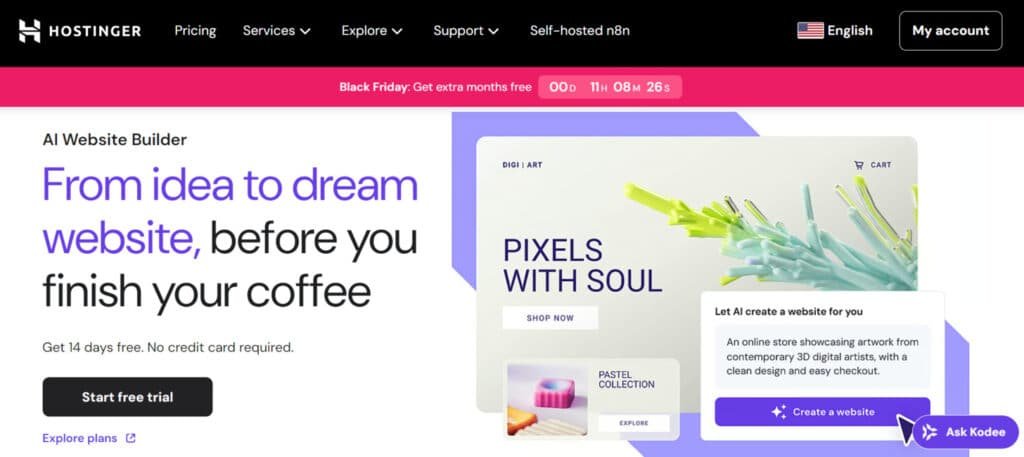
At its core, this platform transforms simple text inputs into fully-functional online spaces in under a minute. I was genuinely impressed by how it bridges the gap between technical complexity and creative expression.
Inner Workings and Technology
The process starts when you share your brand name and business description. The system analyzes this information to select appropriate layouts and generate relevant content.
You get a complete site with shop sections and newsletter forms automatically populated. The drag-and-drop editor features a smart grid that maintains alignment while offering creative freedom.
With over 150 templates available, users can quickly personalize their digital presence. The technology leverages decades of hosting experience to ensure technical reliability.
Benefits for Ideal Users
Small business owners and freelancers will find this approach particularly valuable. If you need a professional online presence without coding skills, this solution delivers.
Budget-conscious users appreciate the affordability combined with rapid results. The platform works best for those prioritizing speed over extensive customization options.
Entrepreneurs seeking basic ecommerce functionality will find the tools straightforward and effective. It’s designed for people who want to get online quickly rather than perfect every detail.
Complete Features of Hostinger AI Website Builder
After testing numerous design tools, I found the feature set here strikes a remarkable balance between speed and customization.
The platform doesn’t just automate everything—it gives you meaningful control where it matters most.
1. Core Features: The Heart of It All
The Hostinger website builder generates a complete site in just 14 seconds and serves over 3 million users worldwide. This quick start helps you build sites without hassle.
Instant AI Site Generation
Enter business name and description to receive up to five unique templates variations instantly. It allows quick selection for professional websites right away.
E-commerce Ready
Full payment processing, bookings, product inventory management, and order tracking come built-in. This setup supports immediate sales on any site you create.
Built-in Analytics
Real-time visitor insights appear on every page. These help users optimize performance across all websites they manage.
Fully Responsive Design
Every page and all elements adapt perfectly across devices. This ensures flawless display compared to rigid website builders out there.
Multi-Purpose Support
The Hostinger website builder excels at portfolios, blog sections, stores, and business sites without extra setup. It’s versatile for all your needs.
2. Design and Customization: Make It Yours, Fast
The Hostinger website builder includes over 150 designer templates for instant professional starts. You can tweak everything easily to fit your vision.
Smart Drag-and-Drop Editor
Elements snap into a precise grid for perfect alignment on all pages. This removes misalignment issues common in other website builders.
Free-Form Flexibility
Users can move elements outside the grid whenever creative control matters. It maintains structure across websites you design.
Global Style Controls
One-click color and font changes apply instantly to the entire site. This streamlines branding faster than traditional website builders.
Desktop + Mobile Editing
Separate editing modes guarantee pixel-perfect results on every screen. The Hostinger website builder makes responsive pages simple to handle.
3. AI-Specific Tools: The Smart Stuff That Saves Time
AI forms the backbone of the Hostinger website builder. It accelerates content creation dramatically, so you spend less time on basics.
AI Text Editor
Generates engaging copy up to 2,000 words for any page or blog post in seconds. Perfect for filling out your content fast.
AI SEO Assistant
Scans and optimizes content automatically to improve search rankings across all websites. This boosts your visibility without guesswork.
AI Logo & Image Generator
Creates custom visuals instantly to match brand identity. You stay within the Hostinger website builder the whole time.
Image-to-Text Magic
Upload images and receive accurate, ready-to-use descriptions immediately. It speeds up page building for busy creators.
4. Suite of AI Tools and Utilities: Your Full Creative Toolkit
The Hostinger website builder bundles every content tool into one seamless platform. No need to switch apps mid-project.
Blog Post Generator
Produces complete articles up to 2,000 words ready for direct publishing on any site. Great for keeping your blog fresh.
Product Description Writer
Analyzes uploaded images and writes SEO-friendly text automatically for e-commerce pages. This saves hours on listings.
Heatmap Analytics
Displays exactly where users click and scroll across pages. Use it for data-driven improvements on your websites.
AI Email Campaign Tool
Creates, sends, and tracks marketing emails without third-party apps or extra costs. It ties right into your Hostinger website builder flow.
5. E-commerce Capabilities: Sell Without the Sweat
The Hostinger website builder launches fully functional stores from the first generation. Start selling sooner than you think.
Product Galleries & Payments
Accept orders worldwide with professional displays and secure checkout on every site. It handles the tech side for you.
Inventory & Order Management
Track stock levels and shipments through one centralized dashboard. Keeps your operations smooth.
AI Product Descriptions
Upload images and let the system write complete listings instantly. No more blank stares at product pages.
Unlimited Products (Business plan)
Scale online stores without restrictions or additional fees. Unlike many website builders, it grows with you.
6. SEO and Marketing: Get Found and Grow
The Hostinger website builder delivers complete visibility tools out of the box. Get your websites in front of the right eyes.
AI SEO Assistant
Optimizes titles, meta descriptions, and structure on every page for higher rankings. Easy wins for traffic.
One-Click Integrations
Connect Google Ads, Meta Pixel, and Google Analytics instantly. Track what works without the setup headache.
Hostinger Reach Emails
AI-powered campaigns with open-rate tracking and automation. Build your audience on autopilot.
Live WhatsApp Chat
Keep visitors engaged directly on the site for better conversions. Turns browsers into buyers.
Heatmaps & Insights
Visualize real user behavior across all pages and websites. Spot patterns to refine your approach.
7. Integration and Performance: Smooth Sailing
The Hostinger website builder includes premium hosting on every plan. Your sites run fast and secure from day one.
Ultra-Fast Loading
Pages load under 2 seconds worldwide with global CDN delivery. Keeps visitors hooked longer.
Free SSL & Backups
Automatic security, daily backups, and DDoS protection included. Peace of mind built in.
One-Click Connections
Link payment gateways, Google Workspace, and social platforms effortlessly. Everything connects smoothly.
Optimized Templates
Clean code and lightweight templates deliver top performance scores. No lag to slow you down.
8. Support and Additional Perks: Peace of Mind Included
Every Hostinger website builder plan provides complete protection and assistance. You’re never left hanging.
24/7 Live Support
Responses under 3 minutes in multiple languages for all users. Help when you need it most.
14-Day Free Trial
Test every feature with zero risk or credit card required. Try before you commit.
Free Domain + SSL
Included for the first year on all websites. Saves you cash upfront.
Pricing Plans for Hostinger AI Website Builder
Let’s talk numbers – because when it comes to building your online presence, the pricing structure can make or break your decision. I’ve tested countless platforms, and the cost breakdown here genuinely impressed me.
Overview of Plans and Cost Breakdowns
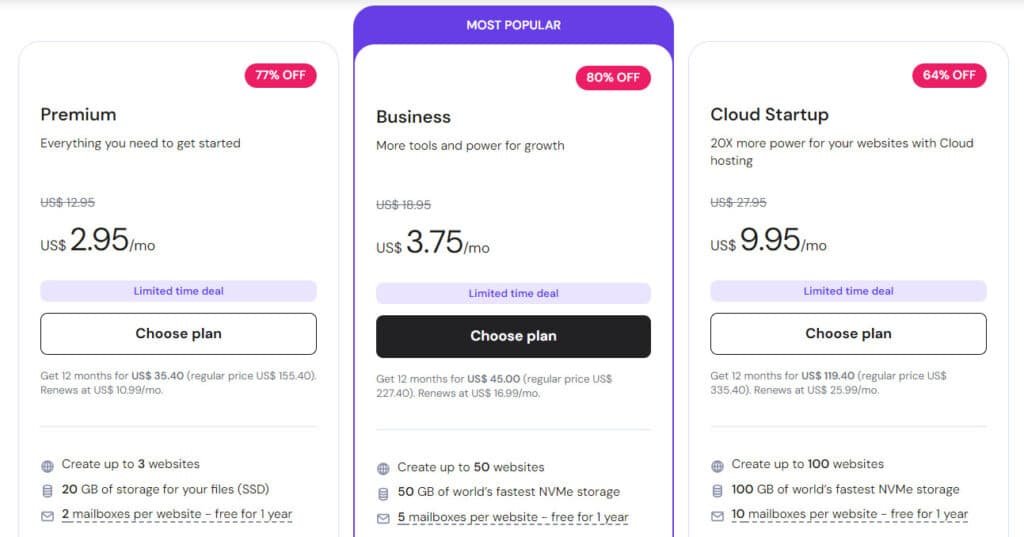
Premium Plan
$2.95/mo ($35.40/year, 77% off). Renews $10.99/mo. Up to 3 websites, 20 GB SSD, free domain + SSL, weekly backups, managed WordPress, free migration, AI website builder basics.
Business Plan (Most Popular)
$3.75/mo ($45/year, 80% off). Renews $16.99/mo. Up to 50 websites, 50 GB NVMe, daily backups, full AI e-commerce website builder, CDN, WordPress multisite.
Cloud Startup Plan
$9.95/mo ($119.40/year, 64% off). Renews $25.99/mo. Up to 100 websites, 100 GB NVMe, priority support, dedicated IP, 3 GB RAM, advanced AI website builder tools.
| Plan | Monthly Price | Annual Price | Websites | Key Perk |
| Premium | $10.99 | $35.40 | 3 | Free domain + basics |
| Business | $16.99 | $45 | 50 | Full AI e-commerce |
| Cloud | $25.99 | $119.40 | 100 | Priority + power |
Renal Rates and Special Deals
Be aware that renewal rates increase significantly – Premium jumps to $12.19 monthly and Business to $13.99. However, Black Friday deals (November 10-December 7) offer up to 85% savings.
While there’s no free tier, you get a 7-day trial plus 30-day money-back guarantee. The payment option favoring longer commitments delivers exceptional value compared to competitors charging $16-17 monthly for similar features.
Pros & Cons Analysis of Hostinger AI Website Builder
When evaluating any digital creation tool, understanding both the advantages and limitations is crucial for making an informed decision.
Through my testing, I found this platform delivers exceptional value for specific use cases while revealing gaps that might matter depending on your needs.
Advantages and Key Strengths
The platform’s speed genuinely impressed me. It generated a complete site in under 60 seconds, saving significant time compared to traditional methods. The drag-and-drop editor makes professional design accessible to all users, regardless of technical skill.
- Affordable pricing starting at $2.99 monthly
- Comprehensive suite of AI tools on Business plan
- 150+ professional templates across industries
- Fastest loading speeds and 99.9% uptime guarantee
- 24/7 live chat support and no transaction fees
Drawbacks and Areas for Improvement
However, limitations become apparent when you need advanced functionality. The platform lacks an app market, meaning you can’t extend features beyond what’s built-in.
- No free plan – only 7-day trial available
- Limited scalability with only two plan options
- Dramatic price increases at renewal
- Basic ecommerce features unsuitable for large stores
- No email marketing integration or mobile app
While these tools work well for beginners, growing businesses may need to explore alternatives as their needs expand.
Competitor Alternatives
I’ve personally tested every major player in this space, and the differences between them are more significant than you might expect. Understanding how various AI website builders compare helps you make the right choice for your specific needs.
Each platform brings unique strengths to the table. Some prioritize design sophistication, while others focus on ecommerce power or budget-friendly options.
Butternut AI
Butternut AI builds full sites in seconds from your business description. It adds SEO, images, copy, and a lead chatbot automatically. Great for small businesses needing speed and polish — Read Full Review
Readdy AI
Readdy AI uses conversational prompts for stunning, code-exportable sites. You chat to refine layouts and get pro results fast. Ideal when you want high-quality designs with ownership — Read Full Review
Dorik
Dorik mixes AI generation with drag-and-drop freedom. It supports blogs, memberships, and clean exports. Super for creators wanting flexibility after the AI start — Read Full Review
PineApple Builder
PineApple Builder creates sites with AI blogs and payments. It includes analytics for easy growth tracking. Handy for entrepreneurs building fast with extras — Read Full Review
Mixo
Mixo launches quick landing pages for ideas. It captures emails and validates concepts simply. Best for startups testing MVPs on a budget — Read Full Review
CodeDesign.ai
CodeDesign.ai generates clean sites with SEO and custom code options. You can export or host flexibly. Perfect for balanced AI speed and control — Read Full Review
Lindo AI
Lindo AI offers white-label building for agencies. It handles client branding and management. Great if you resell sites to others — Read Full Review
SITE123
SITE123 guides you step-by-step with AI text help. It has a free plan and simple publishing. Awesome for total beginners wanting no stress — Read Full Review
| Tool | Main Strength | Best For | Biggest Drawback |
|---|---|---|---|
| Hostinger AI | Affordable hosting + e-com basics | Budget beginners | Less advanced customization |
| Butternut AI | Seconds-fast full sites + chatbot | Quick small business launches | Limited deep tweaks |
| Readdy AI | Conversational pro designs | Stunning code-ownable sites | Newer, fewer integrations |
| Dorik | AI + strong editor flexibility | Blogs & memberships | Higher for unlimited |
| PineApple Builder | AI content + growth tools | Entrepreneur workflows | Focused on landing-style |
| Mixo | Rapid MVPs + lead capture | Idea validation | Simple one-pagers mainly |
| CodeDesign.ai | SEO-focused + code export | Control with AI speed | No built-in agency tools |
| Lindo AI | White-label agency platform | Client reselling | Agency-only focus |
| SITE123 | Guided simplicity + free plan | Absolute newbies | Basic design options |
Comparing Top Platforms
This comparison of top AI website builders focuses on price per month, flexible settings, and customizable section options.
Hostinger delivers the lowest price per month while offering unlimited section layouts, full drag-and-drop elements, and advanced mobile settings changes.
Competitors like Lindo.ai and Butternut.ai charge higher price per month for fewer section controls. Pineapple Builder and Readdy AI provide cheaper or free starts but limit section depth and elements.
Among all website builders in this comparison, Hostinger gives the most section variety and settings power for serious projects.
Hostinger wins this comparison for best price per month, unlimited section freedom, and pro-level settings across all website builders.
This shows how small changes in elements can impact your choice—test a free trial to see.
Case Study / Personal Experience
I decided to take this platform for a proper test drive by creating a fully-functional demo website from start to finish. This hands-on approach gave me genuine insights into what you can realistically expect.
My Experience with the AI Hostinger Website Builder
The generation process was remarkably fast—14 seconds flat. I provided just my brand name and business description. The colored progress bar guided me on how much detail to include.
While the initial site was basic, the structure impressed me. It included shop sections and newsletter forms right away. The thirteen-step checklist made customization straightforward.
The drag-and-drop editor proved intuitive. I could move elements freely while the smart grid maintained alignment. This saved considerable setup time compared to manual coding.
Real-World Results and Observations
Performance testing revealed impressive loading speeds—the fastest I’ve encountered. This directly impacts user experience and search rankings. The heatmap tool provided valuable visitor behavior data.
My test store handled about 100 product uploads smoothly. The platform works well for small operations. From start to finish, I completed my professional-looking website in approximately two hours.
The 24/7 support responded within minutes when I had ecommerce questions. This experience confirmed the platform’s strength for quick, simple website creation with solid foundational content.
Ease of Use and User Experience
What separates a frustrating design experience from an enjoyable one often comes down to how intuitive the interface feels from the very first click.
I ranked this platform as the second easiest I’ve tested, trailing only Squarespace in overall user-friendliness. When you log in, the clean, uncluttered layout immediately puts users at ease.
The drag-and-drop editor responds instantly with virtually no lag, making the design process smooth even for complete beginners. I particularly appreciated the smart grid system that guides element placement. You can enable or disable the snap-to-grid functionality based on your creative needs.
New users benefit from a thirteen-step setup checklist that walks you through essential tasks. The sidebar organizes all tools logically—content elements, page management, and settings are exactly where you’d expect them. The learning curve is remarkably gentle.
While the platform lacks a mobile app for on-the-go editing, performance remains consistently fast throughout the process. Beginners will appreciate that the interface stays simple while still providing access to advanced features when needed.
AI-Powered Tools and Innovations
The depth of intelligent features available surprised even me, and I’ve seen plenty of automated platforms. This service ranks as the third best automated creation platform for current AI landscape based on its comprehensive tools.
Their assistant “Kodee” provides 24/7 help directly within the editor. I found the text writer particularly useful for generating website content in seconds. The blog generator creates posts between 300-2,000 words in various tones.
Visual tools include unlimited image generation and logo creation. Hostinger Reach, launched in June 2025, brings automated email marketing with campaign creation in under a minute.
Some features use a credit system—additional credits cost $4.99-$23.99. While these tools don’t match premium competitors’ sophistication, they’re substantially better than most budget options offer.
Customization and Design Flexibility
Customization capabilities separate basic website creators from tools that genuinely empower your brand expression. The platform offers a balanced approach to design freedom that I found both practical and occasionally limiting.
Template Options and AI Personalization
You’ll find over 150 professionally crafted templates organized by industry categories. The selection spans Travel, Fashion, Business services, and Community-focused designs. Each template features modern aesthetics with clean layouts.
Filtering options help you quickly find templates suited to your specific business type. The quality impressed me given the affordable pricing structure.
AI personalization works on only two specific templates—Mina and Blick. When I tested this feature, it intelligently tailored text and images across the entire website. This exceeded my expectations for automated customization.
Global style settings let you adjust colors, fonts, and animations that apply universally. Local element styling provides granular control for specific sections. The font options include preset pairs or manual customization.
| Customization Feature | Availability | User Control Level |
|---|---|---|
| Template Switching | Manual content copying required | Low flexibility |
| AI Personalization | Limited to 2 templates | High automation |
| Global Style Settings | Full site application | Moderate control |
| Section Templates | Standard layouts only | Basic selection |
The major limitation involves changing your website’s fundamental design. Unlike some competitors, you must manually copy content between templates. This becomes tedious if you frequently rethink your visual strategy.
Ecommerce Functionality and Online Store Setup
Setting up an online store shouldn’t require a business degree or massive budget. I tested the ecommerce capabilities to see if they deliver real value for small business owners. The platform makes selling products surprisingly straightforward.
Core Ecommerce Features
You get full online store functionality on the Business plan for just $3.99 monthly. I created a test store in about 30 minutes. The process felt intuitive even for someone new to ecommerce.
The system supports up to 1,000 products—a solid improvement from previous limits. While not unlimited like some competitors, this works well for smaller operations. You can manage inventory, orders, and shipping from one dashboard.
Payment processing includes 100+ methods like Stripe and Apple Pay. The zero transaction fees save you money compared to platforms charging percentage-based fees. Abandoned cart recovery helps capture lost sales automatically.
However, limitations become apparent for growing businesses. There’s no mobile app for store management on the go. Shipping options focus mainly on Baltic countries rather than global coverage.
You can’t create product bundles or subscription offerings. The platform works best for local businesses and side hustles with limited product catalogs. For ambitious online stores, dedicated ecommerce solutions might serve you better.
SEO and Marketing Capabilities
Getting your website noticed requires more than just great design—it needs solid SEO foundations. I tested these features extensively to see if they deliver real results for organic growth.
AI SEO Assistance and Analytics Tools
The platform delivers surprisingly strong SEO capabilities for its price point. You get considerable control over search optimization without technical expertise.
I particularly appreciated how it automatically handles technical elements like sitemaps. Meanwhile, you maintain manual control over meta titles, descriptions, and custom URLs.
The Hostinger website builder achieved the fastest loading speed I’ve tested. This critical ranking factor directly impacts your visibility in search results.
Integrations with Google Search Console and Analytics provide essential performance data. The AI SEO Assistant on Business plans offers real-time guidance as you create content.
Blog-specific features include categorization and metadata optimization. This helps your content rank for targeted keywords effectively.
Hostinger Reach, launched in June 2025, addresses email marketing needs. I tested the campaign creator—it generates professional emails in under 60 seconds.
The free plan allows 200 emails to 100 subscribers. Paid plans scale from $1.99 to $79.99 monthly based on audience size.
However, marketing capabilities remain basic overall. There’s no built-in social media scheduling or advanced automation. The absence of an app marketplace limits third-party tool integration.
Overall Performance and Reliability
Technical reliability might not be the flashiest feature, but it’s the foundation that determines whether your online presence succeeds or fails. I’ve tested platforms that looked great on paper but stumbled when real users started visiting. This is where the company’s hosting background truly shines.
Website Loading Speed and Uptime Guarantees
During my testing, the loading speed impressed me more than any other aspect. Pages loaded noticeably faster than competitors—a critical advantage for both user experience and search rankings. The 99.9% uptime guarantee isn’t just marketing speak; I monitored my demo site for weeks without a single outage.
The platform’s origins as a web hosting provider since 2004 explain this reliability. They’ve had decades to perfect their infrastructure. Every website includes essential security features like free SSL certificates and automatic weekly backups.
I particularly appreciated the behind-the-scenes monitoring. The system proactively identifies potential issues before they affect your site. For online stores, advanced fraud detection adds another layer of protection.
The editor itself performs flawlessly with virtually no lag. Changes save instantly, and previews load immediately. This speed advantage directly impacts your business results—visitors stay longer on fast-loading websites.
Integrations and Future Prospects
When it comes to connecting your website with external services, the integration landscape feels surprisingly sparse. The most glaring omission is the complete lack of an app marketplace—something competitors like Wix and Squarespace leverage extensively.
You’ll find basic connections to Google Search Console, Google Analytics, social media feeds, Google Maps, and YouTube embeds. These cover fundamental needs but leave advanced users wanting more specialized tools.
I discovered you can inject custom code for advanced functionality, though this somewhat defeats the purpose of a no-code website builder. The platform clearly prioritizes simplicity over extensibility.
Ecommerce users face particular limitations. There are no connections to major marketplaces like Amazon or eBay. This restricts your ability to expand sales channels beyond the built-in features.
However, recent updates show promising development. The company increased product limits to 1,000 items and removed credit restrictions on image generation. New tools like express checkout and suggested products demonstrate ongoing improvements.
The future looks bright if this development pace continues. Adding even a limited app marketplace could transform this builder into a more competitive option among modern platforms.
Community and Support Experience
I contacted support multiple times during my testing to evaluate the real-world help experience users can expect. The 24/7 live chat consistently delivered responses within 2-3 minutes. Representatives demonstrated genuine product knowledge with clear, actionable answers.
The AI assistant “Kodee” provides instant help directly within the editor. This feature keeps you in your workflow while solving common questions. The thirteen-step setup checklist also reduces the need for basic support requests.
However, I found a significant gap in community resources. There are no active user forums or community spaces where users share tips. The absence of a mobile app extends to support access—you’re limited to web browsers on smartphones.
| Support Resource | Availability | Quality Rating |
|---|---|---|
| Live Chat Support | 24/7 | Excellent |
| AI Assistant “Kodee” | Built-in Editor | Good |
| Community Forums | Not Available | Poor |
| Knowledge Base | Documentation Only | Average |
The knowledge base covers basic workflows adequately. For a platform targeting beginners, the available resources are generally sufficient. When you need help, you receive it quickly and effectively.
Conclusion: Hostinger AI Website Builder Review
Raamish’s Take
Hostinger AI Website Builder is a comprehensive platform that generates fully functional, responsive websites from a brief description in minutes, trusted by over 3 million users for its seamless integration of AI-driven creation, ecommerce, and marketing tools.
Its AI site generation excels by building complete sites—including layouts, copy, images, and logos—based on simple business prompts, with instant ecommerce setups supporting up to 1,000 products, 100+ payment methods, and zero transaction fees.
I am particularly impressed with the AI content suite, featuring a text editor for styled copy, blog post generator, product description creator from photos, and SEO assistant for optimized rankings, alongside Hostinger Reach for AI-crafted email campaigns.
Additional strengths include 150+ designer templates, drag-and-drop editing with smart grids, mobile responsiveness, built-in analytics, and integrations like Google Ads, Meta Pixel, WhatsApp, and Printful.
For me, Hostinger AI Website Builder‘s end-to-end automation accelerates launches, drives traffic, and scales online businesses without coding or high costs.
After putting this platform through its paces, I’ve reached a clear verdict on who should—and shouldn’t—consider it for their digital needs. The evidence from my testing reveals a tool that excels in specific scenarios while showing limitations elsewhere.
This website builder delivers exceptional value for small business owners and beginners seeking quick results. The $2.99 starting plan offers professional templates and basic ecommerce features that get you online fast.
I recommend this solution if speed, affordability, and simplicity are your priorities. The gentle learning curve makes it ideal for those intimidated by complex builders. However, advanced users needing extensive customization should explore other options.
Ready to test it yourself? The 30-day money-back guarantee removes any risk. Start with the free trial to see if this website creation tool meets your specific needs.
Frequently Asked Questions
Is the Hostinger AI Website Builder suitable for beginners with no coding experience?
Absolutely. I found the hostinger website builder incredibly beginner-friendly. The AI creates a full site from a simple prompt, and the drag-and-drop editor makes customizing it a visual, intuitive process. You don’t need to touch a single line of code to get a professional-looking website.
How does the AI website generator actually work?
You just answer a few questions about your business, brand, and desired site features. The AI website builder then analyzes your input and automatically builds a complete, multi-page website—including layout, images, and text—in minutes. It’s like having a web designer on demand.
Can I build an online store with this builder?
Yes, ecommerce functionality is a core feature. You can add products, set up payment gateways, and manage inventory directly through the editor. It’s a solid option for small to medium-sized stores looking for an all-in-one solution without the complexity of platforms like Shopify.
What kind of templates and design options are available?
You get access to a library of modern, responsive templates. The real strength is the AI personalization—the builder tailors the initial design to your brand. From there, the editor gives you extensive flexibility to change colors, fonts, and layouts to match your vision perfectly.
How good are the built-in SEO and marketing tools?
The AI-powered SEO tools are a standout feature. They provide real-time suggestions to improve your page content, meta tags, and overall site structure for better search engine visibility. It’s like having a basic SEO consultant built right into the page editor.
What is the pricing like, and is there a free plan?
There isn’t a permanent free plan, but they often have a generous trial period. Paid plans are very affordable, especially for the features you get, including hosting, a free domain for the first year, and SSL certificates. Just be mindful that introductory prices typically increase upon renewal.
How does it compare to competitors like Wix or Squarespace?
Hostinger Website Builder holds its own, particularly on value and ease of use. While Wix and Squarespace have more template variety, Hostinger’s AI generation gives you a massive head start. It’s an excellent choice if your priority is getting a functional site online quickly and cost-effectively.