
You want fast, realistic, and controllable tattoo previews before you commit — but general image tools give fuzzy placement, awkward scale, and designs that don’t read well on skin.
Interest: I find that wasted time and surprise costs are the two worst parts of planning a tattoo. You test vague generators, then face sticker shock from your artist or mismatch on placement. That frustration makes the whole process feel risky.
Desire: Enter this platform as a focused solution: it promises prompt-driven tattoo generation, on-body virtual try-on, image-to-tattoo conversion, and handy calculators for pricing, size, and removal. I’ve tested prompts, styles, and on-body previews — and you get clearer control over design fidelity and placement than with broad image tools.
Action: In this article I’ll walk through founders, purpose, features, pricing tiers, pros and cons, real-world tests, and alternatives so you can decide with facts — not hype. Ready to see if this platform fits your next piece? Let’s dive in.
Key Takeaways: Ink Studio AI Review
- This article gives a hands-on look at realistic tattoo previews and cost planning.
- The platform focuses on on-skin fidelity, placement, and prompt control.
- Core features include generator, virtual try-on, image conversion, and calculators.
- Pricing uses access passes; expect short-term unlimited generations during access.
- I test real prompts and comparisons so you can pick the right tool for your needs.
Ink Studio AI Review: An Overview
Raamish’s Take
InkStudio AI takes the lead as the #1 AI tattoo generator, crafting unique designs in minutes without artist delays.
The platform allows you to to describe your vision of the tattoo (exactly as you want it), pick styles like neo-traditional or realism, and download high-quality sketches.
The platform shines with image-to-tattoo conversion, turning photos into art, and a virtual try-on tool to preview on your skin with adjustable placement. AI prompt optimizer refines ideas into detailed designs, while multiple styles and instant creation cater to all tastes, trusted by 26,949+ users.
Ever wanted a tattoo designed exactly as you want without visiting the parlor? Ink Studio AI delivers professional-grade art fast, cutting traditional costs significantly.
Introduction to Ink Studio AI
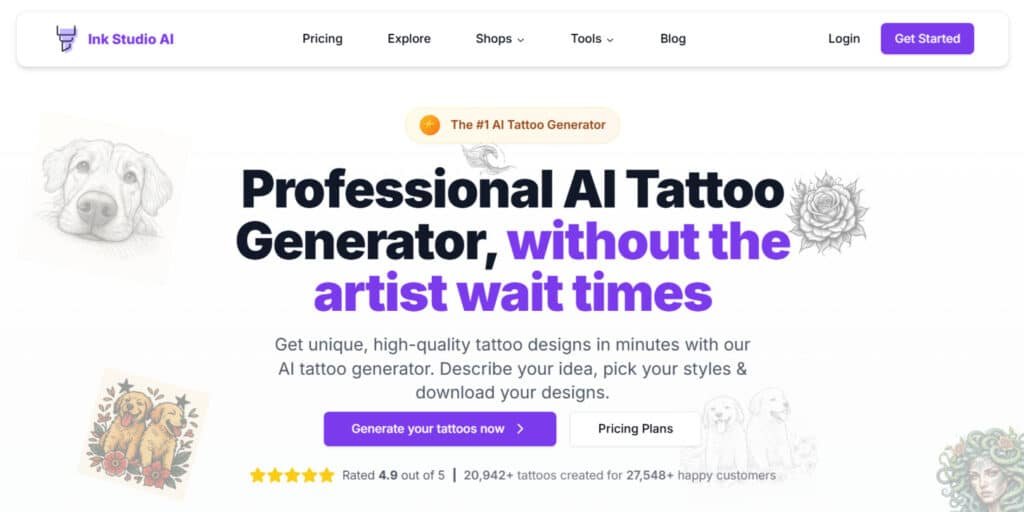
The best AI tattoo generator tool do one thing well: Show you how a design will live on your skin, not just as a flat image. I find that this platform sits squarely in that category — it focuses on on-body previews, precise sizing, and planning tools that reduce surprises at the shop.
Where it fits in the AI landscape
Specialized players now outperform generic generators when the goal is a real-world tattoo. This web-based tool is commonly listed among the year’s top makers for realistic previews and planning helpers.
It competes with broader studios like Imagine Art and Getimg.ai but leans deeper into tattoo-specific steps — size, price, removal and font previews.
Origins, mission, and who’s using it today
Mission: Democratize custom designs, speed up previews, and bring cost clarity so you book appointments with confidence.
“Make custom tattoo ideas easy to generate, preview, and cost — so you go to your appointment confident, not guessing.”
Who uses it? First-timers get a confidence boost. Collectors iterate concepts fast. Tattoo artists use quick concept boards before stencils. The interface keeps things approachable — you move from an idea to on-skin images without juggling apps.
- Strength: realistic on-body images and planning tools.
- Use cases: auditioning placements, sizing for life, and preparing for consults.
What is Ink Studio AI?
This tool turns a short text prompt into tattoo-ready artwork you can size, tweak, and preview on your own skin. At a high level, it’s a text-to-image generator built for tattoos rather than general art. You describe the idea, pick a style and color palette, then refine with negative prompts to avoid unwanted elements.
How the tattoo generator works under the hood
The pipeline is straightforward: a text prompt enters the model, which outputs multiple designs optimized for linework, shading, and skin contrast. Controls let you tune style, color, and detail level.
- Prompt → generation: precise text yields stencil-ready options.
- Negative prompts: filter out clutter or unwanted motifs.
- Virtual Try-On: upload an image, paint the target area, and render the design to check placement and scale.
- Image to Tattoo: convert sketches or photos into clean tattoo concepts for direct use or further edits.
Who benefits most: tattoo artists, first-timers, and collectors
I find the tool helps three groups especially. Artists draft concepts quickly and present variations to clients without redrawing stencils. First-timers gain confidence by seeing how a piece sits on skin before booking. Collectors iterate dozens of designs fast, keeping consistent style and scale across sessions.
Practical takeaway: combine generation, virtual try-on, and calculators and you get a workflow that spans idea to logistics—rare for general-purpose image tools.
Ink Studio AI Review
When speed, realistic placement, and fine control matter, this platform shortens the gap between idea and on-skin proof. I ran prompt tests, tried the virtual try-on, and measured how fast usable outputs appear. The focus here is practical: quick iterations that actually guide a tattoo session.
Speed, realism, and control versus general image tools
Generations usually arrive in seconds, fast enough to try several directions during one session. That pace matters when you tweak line weight or shading.
The virtual try-on boosts realism by mapping designs to skin tone and curvature. Seeing images on your body beats guessing from a flat mockup.
Control is strong: negative prompts let you ban backgrounds or heavy shading so the final concept reads cleaner for an artist.
Why it stands out among custom tattoo design platforms
Compared with broad image models, this tattoo generator uses default settings tailored for skin — less cleanup, fewer edits. Pricing that allows unlimited generations during access windows speeds iteration further.
Practical note: results are fast and largely usable, but check line fidelity up close before passing files to a shop.
- Quick iterations: useful when refining a delicate design.
- Real-world previews: help both client and artist decide placement confidently.
- End-to-end planning: size, price, and removal tools make it more than a simple generator.
Best Features of Ink Studio AI
Below I break down the key features that turn a quick idea into a shop-ready concept. I explain what each tool does, how to use it, and the practical benefit so you can move from idea to appointment without guessing.
1. Core Design Generation Tools
1.1 AI Tattoo Generator
The AI tattoo generator stands as a cornerstone feature, transforming user input into multiple tattoo designs.
By entering a description with subject, style, and size details, users receive stencil-friendly outputs in minutes.
Negative prompts like “no background” refine results, reducing artist prep time. This tool benefits readers seeking custom tattoo designs by providing fast, high-quality options ready for professional use, streamlining the design process.
1.2 Image to Tattoo Converter
This feature expertly converts uploaded photos, sketches, or personal images into polished tattoo designs using the advanced Neural Studio Pro AI technology.
Users can upload a reference image—such as a pet or a cherished memory—select a style like “fine line” or “soft shading,” and provide additional instructions to refine the outcome. A drag-to-compare slider allows for before-and-after visualization, ensuring accuracy.
If you are looking to adapt existing visuals into tattoo designs, you can benefit from substantial time savings and receive outputs tailored for professional tattoo artists, enhancing the personalization process.
1.3 Tattoo Idea Generator
The tattoo idea generator fosters creativity by producing diverse tattoo ideas from simple keyword inputs, such as “heron, reeds, sunrise.”
It features a swipeable gallery showcasing a range of AI-generated examples, including skull, compass, medusa, flower, Viking, flaming rose, and wave tattoos.
This tool integrates seamlessly with the main generator for further customization.
Users exploring new tattoo ideas gain a rich source of inspiration, enabling them to experiment with concepts and develop unique tattoos that align with their vision.
2. Customization and Optimization Tools
2.1 AI Prompt Optimizer
The AI Prompt Optimizer elevates basic user inputs into detailed, style-aware prompts to enhance tattoo designs.
With one-click optimization, it automatically incorporates artistic elements and ensures compatibility with selected styles, leveraging a demo video to illustrate its real-time enhancement.
This feature benefits readers aiming for precise, high-quality tattoos by improving the accuracy and creativity of their initial ideas, making it an essential tool for refining outputs.
2.2 Multiple Tattoo Styles Selection
This option provides access to over 10 distinct styles, including Neo-Traditional, Black and Gray, Watercolor, Traditional, New School, Realism, Dotwork, Geometric, Tribal, Japanese, 3D, Surreal, and Minimal, for generating tattoo designs.
Users can choose colored or grayscale variations and use negative prompts to exclude unwanted elements like specific motifs.
If you are seeking variety in tattoos, you can benefit from the flexibility to match their preferences, ensuring a broad range of stylistic possibilities.
2.3 Text Tattoo Support (Tattoo Font Generator)
Designed for text-based tattoos, this tool generates tattoo designs with custom fonts, offering previews to prevent lettering regret.
Users input their text and select styles, with integration into the main generator for combining with imagery.
Anyone planning text-focused tattoos gain access to tailored, professional-quality designs, enhancing the accuracy of their final artwork.
2.4 Complete Customization Options
This feature allows users to fine-tune tattoo designs post-generation, adjusting size, rotation, placement, and offering unlimited iterations with a personal AI designer.
Anyone looking to perfect their tattoos before committing benefit from extensive control, ensuring the design meets exact specifications and personal standards.
3. Preview and Simulation Tools
3.1 Try Tattoo (3D) / Virtual Try-On Tool
The Try Tattoo (3D) feature uses AI to map tattoo designs onto user-uploaded photos, providing a 3D preview that adjusts for scale and angle.
Users brush target areas like the forearm or chest, enter a prompt, and generate results, with drag-to-compare sliders for visualization.
If you are using tattoo try-ons, you can confirm placement and curvature, aiding pre-booking decisions and reducing the risk of dissatisfaction.
3.2 Tattoo Size Calculator
This tool calculates optimal dimensions for tattoos based on body placement, design complexity, and style, integrating with preview features for accuracy.
Readers planning tattoo sizes benefit from proportional, distortion-free designs, ensuring a harmonious fit on the skin.
4. Planning and Estimation Tools
4.1 Tattoo Price Calculator
This calculator estimates costs for tattoos by considering factors like size, style, location, and regional artist rates, providing a detailed breakdown.
Users budgeting for tattoo designs gain realistic ranges, facilitating informed financial planning for their next session.
4.2 Tattoo Removal Cost Calculator
Assessing removal costs for tattoos based on size, color density, and required sessions, this tool supports decision-making.
Users considering removal options benefit from accurate cost projections, aiding in long-term tattoo management.
4.3 Tattoo Size Calculator
Reiterating dimension calculations, this tool uses inputs like size, placement, style, detail level, artist tier, and region to determine tattoo sizes. Readers seeking the best tattoo outcomes gain precise sizing, ensuring optimal results.
5. User Experience and Accessibility Features
5.1 Design Saving and History
Saves tattoo designs for revisiting and comparison, with batch generation tips. Readers tracking multiple tattoos benefit from organized workflows.
5.2 High-Resolution Downloads
Offering print-ready tattoo designs in professional quality, this ensures compatibility with artist tools. Users needing high-quality files for tattoos gain reliable outputs for seamless application.
5.3 24/7 Availability and Instant Generation
Delivers tattoo designs in seconds using advanced AI. Users seeking instant tattoo idea access benefit from constant availability.
5.4 Free Trial Access
Offers 1 free tattoo generator trial. Users testing the platform can explore tattoo ideas without commitment.
6. Additional Platform Benefits
6.1 Cost-Effective and Unlimited Iterations
Enables unlimited tattoo designs within access periods. Users save on traditional costs while refining tattoos.
6.2 Priority Support
Provides assistance for tattoo designs queries. Users with questions receive expert guidance.
6.3 No Subscriptions Model
Uses one-time payments for tattoo access. Users prefer flexible, secure payment options.
Quick takeaway: Combine the generator, try-on, and calculators and you get a full planning workflow—fast, practical, and budget-aware.
| Feature | What it does | How to use | Benefit |
|---|---|---|---|
| AI Tattoo Generator | Text-to-design conversion | Prompt + style + negative prompts | Stencil-ready designs fast |
| Virtual Try-On | On-body preview | Upload photo, brush area, generate | Confirms scale and angle |
| Image to Tattoo | Convert sketches/photos | Upload ref, choose style, refine | Useable artist-ready files |
| Calculators | Price, removal, size estimates | Input size, placement, region, artist level | Realistic budgeting and planning |
Pricing Plans of Ink Studio AI
Pricing centers on time-limited access passes rather than a rolling subscription. I find this model works well if you want intensive, short bursts of work — or a longer window for big projects.
Access-pass model
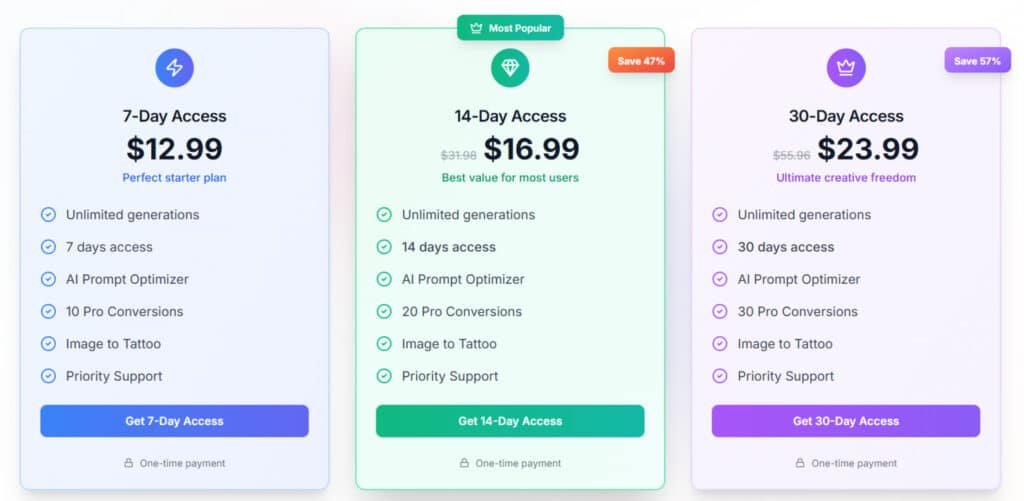
The product sells passes that unlock unlimited generations during the access period. There are no per-image credits to track, so you can experiment freely.
Pricing options
Common tiers are 7-day, 14-day, and 30-day passes. Listed prices vary by page and region, so expect occasional promos.
| Pass | Typical Price | Alt listing price | Best for |
|---|---|---|---|
| 7-Day Access | $16.99 | Weekly $12.99 | Single tattoo or quick shortlist |
| 14-Day Access | $23.99 | 2 Weeks $16.99 | Small sleeves, more iteration |
| 30-Day Access | $39.99 | Monthly $23.99 | Large projects, slow testing |
- Unlimited generations during access lets you refine prompts and try placements without worrying about credits.
- Several sources note saved designs remain in your account after access ends—useful for later consults.
- Commercial-readiness is reported by pro users, but always check in-app license details before shop use.
- Tip: batch references and prompt templates, then run a focused pass to maximize value.
Ease of Use and Workflow
A quick signup and a tidy interface get you from concept to on-body mock in very little time. Sign in with email or Google, pick the generator, and enter a short text prompt. You’ll be drafting within minutes—no steep learning curve.
Onboarding and first-run experience
The onboarding walks you step-by-step: enter a prompt, choose a style, add negative prompts, then generate. The Virtual Try-On is one click away—upload a photo, brush the target area, and the app maps images to skin.
Prompting best practices
For consistent results define subject, style, and finish: “fine line heron, black and gray, soft shading, minimal background.” Use negative prompts like “no heavy background,” “no color wash,” and “no bold outlines” to reduce clutter.
Iterate in small steps—change one variable per generation. Most renders appear in seconds, so you can A/B test line weight, shading, or framing fast.
Tip: Use Try-On early; scale and placement often steer the final design more than small edits.
| Step | Action | Why it helps |
|---|---|---|
| Sign up | Email or Google | Fast access; saves your work |
| Draft | Enter prompt + style | Generates stencil-ready options |
| Try-On | Upload photo, brush area | Checks scale and curvature |
| Edit | Prompt tweaks, negative prompts | Refines results without restarting |
Design Quality and Styles with Ink Studio AI
Seeing a design on skin changes how you judge line weight, shading, and negative space. I find on-body previews make style choices obvious fast—what looks crisp on-screen can blur on a curved forearm, and tiny dots may vanish at normal viewing distance.
From minimalist and dotwork to Japanese and realism
The platform covers many tattoo styles: minimalist, dotwork, Japanese, traditional, and realism. You can push a concept through several styles to compare how motifs translate for different placements.
For bold traditional pieces, contrast and silhouette usually read well. For realism and fine dotwork, generate multiple angles and sizes to confirm details survive skin texture and movement.
Linework fidelity, shading, and print-ready resolution
Linework fidelity is solid for most designs, but always zoom in. Delicate lines and micro-details deserve an artist’s pass before they become a stencil.
Shading tends to land clean for black-and-gray work. Color pieces need Try-On checks from multiple angles so you can see how tones wrap on curves. High-resolution downloads are available; they provide clear images for printouts and stencils—confirm your artist’s preferred DPI and file type first.
Tip: If you’re aiming for heavy detail (fine Japanese patterns or photorealism), generate several close variants and bring the best ones to your pro so they can combine elements and adapt line weight for skin.
- Style coverage is broad—good for testing your aesthetic in context.
- Zoom and vet line fidelity; hand off micro-detail to a trained artist.
- Use high-res downloads for print and stencil prep, and check resolution guidelines with your shop.
Pros & Cons of Ink Studio AI
I find that seeing a design on skin makes the whole project less risky and more fun. The right preview can change your mind in minutes—before you sit in the artist’s chair.
Pros
- Virtual Try-On delivers realistic previews, so you stop guessing and start deciding with confidence.
- Calculators (price, removal, size) make planning practical—no more surprise budgets or awkward fits.
- Unlimited generations during an access period encourage exploration—great when you need several design directions.
- Non-expiring designs let you revisit favorites after your pass ends, which is handy for slow projects.
- Tattoo-focused defaults and options outperform general tools for on-skin clarity and flow, saving artist prep time.
Cons
- The advertised “3 free generations” trial can be inconsistent—don’t rely on it for a tight deadline.
- Public pricing varies by page and region; check in-app options to avoid surprises.
- If your goal is heavy photo-style compositing or custom model training, some alternatives produce stronger results.
Quick takeaway: the platform is strong for realistic previews and planning, but verify trial terms and current pricing. If those limits bother you, the next section lists alternatives that specialize in broader image pipelines and custom training.
| Aspect | Why it matters | Practical note |
|---|---|---|
| Virtual Try-On | Shows scale, angle, and flow on skin | Use early to steer final placement |
| Calculators | Predicts cost and size trade-offs | Enter artist level and region for realism |
| Access Passes | Unlimited generations during the period | Batch work during a pass to save time |
Alternatives to Ink Studio AI
Not every generator fits every need; some shine with presets, others with pro training or simple unlimited edits.
Quick guide: pick a platform by what you want to do first—preset styles, model training, or quick idea testing.
Imagine Art
Best when: you want a full browser studio with broad controls and multiple media types.
Access: tiered pricing. Strength: rich style controls and variety. Constraint: steeper learning curve than single-purpose tools.
Phot.AI
Best when: you like predefined aesthetics (Colored Tattoo, Sketch) and fast pipelines.
Access: monthly plans. Strength: quick presets for defined looks. Constraint: less depth for custom model training.
Getimg.ai
Best when: you need pro-grade generation and model training for consistent outputs.
Access: free 100 credits/month, Pro/Team plans. Strength: trainer (10–20 images, ~1450 credits) for style consistency. Constraint: credits-based workflow requires planning.
BlackInk AI
Best when: you need fast, budget-friendly outputs and high-quality downloads.
Access: free credits, weekly/monthly/annual plans. Strength: 4K downloads on paid tiers. Constraint: modest preset variety versus larger studios.
TattoosAI
Best when: you want simple flows and unlimited revisions until the concept clicks.
Access: monthly or yearly passes. Strength: iterative ease. Constraint: fewer advanced editing controls.
Vondy, Artguru AI, Tattoo AI, and Canva
Best when: you want convenient idea testing inside simple editors or a familiar design suite.
Access: free trials or credits; Canva adds Pro/Teams. Strength: quick images and layout exports. Constraint: limited tattoo-specific tools like calculators or on-body mapping.
Fit guidance: choose Imagine Art or Phot.AI for presets and style breadth; choose Getimg.ai if you need model training and consistency; pick TattoosAI or Artguru for fast iterations and budget downloads. Choose the platform in this article when on-body realism, calculators, and tattoo-first workflows matter most.
| Competitor | Access Model | Strength | When to choose |
|---|---|---|---|
| Imagine Art | Pricing tiers | Rich style controls, multi-studio | Large projects, varied media |
| Phot.AI | Monthly plans | Preset aesthetics (Colored, Sketch) | Fast, defined looks |
| Getimg.ai | Free credits + Pro/Team | Model trainer (~1450 credits), pro tools | Consistent brand/style generation |
| TattoosAI | Monthly/Yearly | Unlimited revisions, simple flows | Iterative concept work |
| BlackInk | Free credits; paid plans | Budget-friendly, 4K downloads | Clean exports on a budget |
Case Study / Personal Experience with Ink Studio AI
I turned a simple idea into on-body images in under an hour. I began with a short text prompt: “black-and-gray heron with reeds, fine line, soft shading, minimal background.” The first generation gave me usable options right away.
Real-world test: quick iterations
In about minutes I ran 5–6 iterations, nudging line weight and using negative notes to strip clutter. Each pass took seconds to under a minute, so edits felt immediate.
My experience: try-on and cost checks
The Virtual Try-On changed the game — seeing how the piece wrapped my forearm made scale and tilt obvious. One result read well; another looked too busy on-skin.
“I used the Size and Price calculators to confirm dimensions and regional quotes — the estimates matched local studio ranges.”
What I exported for my artist: one file for overall composition and one focused on line/shading for stencil work. The generator got me about 90% there; a pro will finish the last 10% during inking and editing.
- Total time: under an hour (draft → try-on → calculators).
- If this were a larger piece, I’d use a 14-day pass to iterate calmly before booking.
Who Should Choose Ink Studio AI?
Pick this tool when you need rapid mockups that show exactly how a motif sits on your body. I’ve used it for quick concepting and the on-skin previews save time and second-guessing.
First-timers benefit from realistic images that show scale and placement. You can try several tattoo ideas and see which fits before you book.
Collectors use the access-pass rhythm to batch runs, test multiple styles, and refine larger projects across sessions. It’s efficient when you’re juggling many compositions.
Tattoo artists can align with clients fast: show placement options, price impacts, and font choices during a consult. The Font Generator helps avoid lettering regret by previewing size and legibility.
For cover-up planning, the Virtual Try-On helps you audition shapes and coverage conceptually—then pair the result with a trusted artist for technical execution.
“If you want preset-heavy aesthetics or model training, pick Imagine Art or Getimg.ai; for quick, tattoo-first workflows and planning tools, this tool wins.”
Quick decision guide
- Choose here for fast tattoo ideas and on-skin previews, lettering tests, and cost sizing.
- Choose others (Imagine Art / Getimg.ai) if you need heavy presets or custom model training.
- Use simple editors (Artguru, BlackInk, Canva) for budget browsing—but expect fewer planning tools.
| User | Best use | Key feature | When to pick another |
|---|---|---|---|
| First-timers | Confirm placement | Virtual Try-On | Need advanced preset aesthetics |
| Collectors | Batch concepting | Access-pass unlimited runs | Require model training |
| Tattoo artists | Client alignment | Font & Price calculators | Want complex compositing tools |
| Cover-up planners | Shape audition | On-skin previews | Need in-studio technical planning |
Conclusion
Raamish’s Take
InkStudio AI takes the lead as the #1 AI tattoo generator, crafting unique designs in minutes without artist delays.
The platform allows you to to describe your vision of the tattoo (exactly as you want it), pick styles like neo-traditional or realism, and download high-quality sketches.
The platform shines with image-to-tattoo conversion, turning photos into art, and a virtual try-on tool to preview on your skin with adjustable placement. AI prompt optimizer refines ideas into detailed designs, while multiple styles and instant creation cater to all tastes, trusted by 26,949+ users.
Ever wanted a tattoo designed exactly as you want without visiting the parlor? Ink Studio AI delivers professional-grade art fast, cutting traditional costs significantly.
Realistic previews, practical calculators, and unlimited generations during an access window make planning your next tattoo simple and fast.
I recommend this tool when you want clear on-skin mockups and honest pricing before you book. The access-pass (no continuous subscription) model rewards focused sprints—perfect for turning scattered tattoo ideas into a confident shortlist.
Collect references, craft 2–3 prompt templates, then start a 7- or 14-day pass. Generate until you have the best custom tattoo designs, download high-res images, and bring them to your artist for final linework and flow.
Ready to move from idea to skin? Try ink studio now and see your future tattoo come to life in minutes.
Frequently Asked Questions
What is Ink Studio AI and how does the tattoo generator work?
Ink Studio AI is a web-based tattoo design platform that uses generative models to create custom tattoo images from text prompts, photos, or sketches. You enter keywords, choose a style (realism, dotwork, Japanese, lettering, etc.), set color and size preferences, and the generator produces several design options. Behind the scenes it combines image synthesis and style-conditioning to prioritize linework fidelity and shading suitable for tattoo transfer.
Who benefits most from using this tool—artists, clients, or hobbyists?
All three groups benefit, but in different ways. Tattoo artists get fast concept iterations, print-ready files, and sizing tools for placement planning. Clients and first-timers use virtual try-on and idea generators to explore options before booking. Collectors and design-curious users appreciate non-expiring downloads and the ability to refine a concept quickly.
How realistic and tattoo-ready are the generated designs?
Results vary by prompt quality and selected style, but the platform emphasizes linework fidelity and print-ready resolution. For best tattoo-ready output, request high-contrast linework, specify needle-style (single-needle, bold lines), and use the Image-to-Tattoo converter on sketches or photos for accurate stencils.
Can I convert my photo or sketch into a tattoo-ready design?
Yes. The Image-to-Tattoo feature accepts photos and hand-drawn sketches, then refines outlines, adjusts contrast, and offers variations in shading and color palettes so you can produce a design an artist can trace or adapt.
Does the platform offer virtual try-on to see how a tattoo would look on my body?
It does. Virtual Try-On maps designs onto realistic body previews so you can test placement, scale, and curvature. This helps you visualize the final result and adjust size or orientation before committing to a session.
What pricing model does the service use and are there subscriptions?
The platform primarily uses an access-pass model rather than a traditional subscription—buy a pass (weekly, bi-weekly, or monthly) and generate unlimited designs while the pass is active. Pricing tiers in 2025 typically include short access windows to suit one-off projects or ongoing design work.
Are generated designs commercial-ready and do I own the files?
Most passes include non-expiring downloads that you can use for personal tattoos; commercial rights depend on the specific plan. Check the terms for commercial-readiness if you plan to sell flash or use designs in a business context.
How many generations or edits can I make per session?
With an active access pass you can generate many variations—practically unlimited during the pass window. Individual trial limits may apply if you’re using a free tier or demo; paid passes remove most hard generation caps.
Can I fine-tune prompts to get consistent results?
Yes—prompting best practices improve consistency. Use detailed descriptors (style, size, needle type, composition), include negative prompts to avoid unwanted elements, and save preferred presets. The interface often supports style presets and example images to lock in a look.
How fast are results and what file formats are available?
Generation speed ranges from seconds to a couple of minutes depending on complexity and server load. Download options typically include PNG for raster and PDF or SVG for vector-like, print-ready files that are easier for artists to scale and trace.
Does the platform include planning tools like price or size calculators?
Yes. Helpful planning features include a Tattoo Price Calculator (estimates based on size, style, and artist level), a Tattoo Size Calculator for accurate placement, and a Tattoo Removal Cost Calculator for long-term planning—useful if you’re weighing commitment.
How does the platform compare to alternatives like Getimg.ai, Phot.AI, or Canva?
Compared with general image generators, this tool is tailored to tattoo-specific needs—better linework, style presets, and virtual try-on. Alternatives like Getimg.ai or Phot.AI offer broader image-editing or model-training features, while Canva and TattoosAI are convenient for quick mockups. Choose based on whether you need tattoo-focused controls or broader creative flexibility.
Are there any limits or drawbacks I should expect?
Common limitations include trial generation caps, plan variations that restrict commercial rights, and occasional need for human artist refinement—AI rarely replaces an experienced tattooist. If you need hyper-accurate cover-up planning or highly custom hand-drawn linework, a traditional artist or a hybrid workflow is better.
Can artists train custom styles or upload their own reference sets?
Some plans support uploading reference images and training or fine-tuning style presets. Check whether the package explicitly offers model training or custom style libraries—pro-grade tiers often include these features for consistent studio branding.
Is customer support and editing available if a design needs tweaks?
Most platforms include in-app editing tools and support channels. Basic edits (composition, color swaps, resizing) are handled in the interface; more complex adjustments may require a tattoo artist or designer. Look for platforms offering revision credits or built-in editors.
How should I prepare prompts to get the best tattoo ideas?
Be specific—mention style (e.g., traditional Japanese, single-needle realism), placement (forearm, chest), scale, color palette, and any motif details. Include a negative prompt for elements you don’t want. Short, iterative prompts with saved presets improve repeatability.
Are generated tattoos safe to use for actual inking without artist changes?
Generated designs are a strong starting point but rarely perfect out of the box for inking. Artists typically adjust line weights, simplify tiny details, and optimize flow for body curvature. Treat AI output as a blueprint, not a final stencil.
What file should I give my tattoo artist?
Provide high-resolution PNG for color previews and PDF or SVG for scalable, print-ready stencils. If you used the Image-to-Tattoo converter, include the original reference and any notes about needle size or line preference to make translation into a stencil smoother.
Does the tool help with lettering and fonts for name or script tattoos?
Yes—there’s a Font Generator that previews names and lettering in tattoo-ready typefaces. You can try different scripts, spacing, and letter sizes to ensure readability and aesthetic fit for placement.
Can I test a concept on different body types or skin tones?
Virtual try-on typically supports multiple body previews and skin tones so you can see contrast, color behavior, and placement across different anatomy. This helps with realistic expectations for visibility and saturation on the actual skin.
How do refunds, credits, or transfers work for access passes?
Refund and credit policies vary by vendor—short-term passes are often non-refundable but may allow account credits or extensions for technical issues. Always review the terms before purchase, especially for multi-week or monthly passes.
Is there a community or marketplace for selling or buying flash designs?
Some platforms host marketplaces or galleries where artists and creators can sell designs or offer commissions. If commercial distribution is important, verify whether the pass grants marketplace access and licensing permissions.
What privacy and copyright considerations should I know?
Check the platform’s terms: who owns the generated image, whether you grant usage rights back to the service, and how uploaded photos are stored. Prefer services that grant clear ownership or commercial licenses when you need them.
Any tips for collaborating with a tattoo artist using generated designs?
Bring multiple variations, the high-res file (PDF/SVG), and notes on size and needle preference. Be open to the artist’s adjustments—AI helps ideate, but an experienced artist ensures technical feasibility, skin flow, and longevity of the tattoo.




I am sure this artice has touched all the internet viewers, its really really fastidious piece of wtiting on building up
new website.