Remember staring at endless spreadsheets, feeling completely lost?
I’ve been there. Making sense of complex data used to be a huge headache. It was slow, confusing, and frankly, not much fun.
That frustration is exactly why powerful analytics platforms exist today. They turn chaos into clarity. This tool has evolved far beyond a simple chat function. It’s now a complete data platform designed for real work.
The core promise is simple: making advanced data analysis accessible to anyone. You don’t need a technical degree. If you can chat, you can uncover deep insights. This review comes from my hands-on testing, not just reading specs.
In this Julius AI Review, We’ll explore its standout features. These include Notebooks for reusable workflows and Data Connectors for live database integration.
It also taps into top AI models for sharp results. The platform earns a stellar 4.8/5 rating, especially for data handling and visualization.
Ready to see how it works in real scenarios? Let’s dive into the details.
Key Takeaways: Julius AI Review
- This platform transforms from a basic chat tool into a full-featured analytics solution.
- It makes complex data work accessible, requiring no advanced technical skills.
- Key differentiators include Notebooks for workflow automation and live Data Connectors.
- The system integrates powerful AI models for accurate and insightful analysis.
- It achieves a high overall rating, with top scores in handling and visualizing information.
- This assessment is based on practical, real-world use and testing.
Julius AI Review: An Overview

Raamish’s Take
Julius AI makes data analysis easy for everyone by turning complicated data into clear, useful insights using simple questions.
Its chat feature is a highlight, letting you connect to spreadsheets, PDFs, databases (like Snowflake, Postgres or BigQuery), or Google Drive and ask questions in plain words to get instant charts, tables, or detailed reports—no coding needed.
I’m really impressed with the automatic reports, which send fresh insights to your Slack or email on a schedule, saving time.
The notebooks tool helps teams explore data, automate tasks, and work together, while the AI gets smarter with each question, learning what your business needs.
It also offers real-time teamwork with user roles, data cleanup, and templates for things like predicting customer loss or budgeting.
Julius AI’s speed—giving answers in seconds—and ability to work for teams make it a great choice for turning data into smart decisions without hassle.
Introduction to Julius AI
I remember testing early AI tools and thinking: ‘This is great for writing emails, but what about my actual work?’
That’s exactly the gap this platform fills. While everyone was building chatbots, the founders focused on a more practical problem – making data analysis accessible.
The AI Landscape and Company Background
The platform emerged during the generative AI boom with a specific mission. It targets business professionals who need insights from their data but lack coding skills. The founding team envisioned democratizing advanced analytics.
They built a tool that speaks your language – literally. You ask questions in plain English and get charts and insights in return. This approach has attracted diverse users across industries.
| Feature | General AI Platforms | Specialized Data Tools |
|---|---|---|
| Primary Focus | Conversation & Content | Data Analysis & Visualization |
| Technical Barrier | Low for basic use | Traditionally very high |
| Business Integration | Limited workflow support | Built for team workflows |
| Output Type | Text responses | Charts, reports, insights |
Purpose and Endorsements Across Industries
The core purpose is simple: eliminate the technical barrier between having data and understanding it. Startups use it for customer analytics, while researchers analyze complex datasets.
Marketing teams create repeatable analysis workflows. Academic institutions trust it for research projects. The platform’s natural language interface makes advanced analytics available to everyone.
What is Julius AI?
Imagine being able to ask complex analytical questions in plain English and getting instant, visual answers. That’s the core promise of this platform. It acts as a conversational bridge between you and your data, translating everyday language into powerful analysis.
Core Functionality and Inner Workings
The magic happens through sophisticated natural language processing. When you ask a question, the system interprets your intent. It then generates the appropriate Python or R code behind the scenes.
You can upload various file types including CSV, PDF, and spreadsheet formats. The platform also connects directly to live databases. This flexibility makes data access seamless regardless of source.
| What You Do | What Happens Behind the Scenes | Output You Receive |
|---|---|---|
| Ask “Show sales trends by region” | Python code generates time-series analysis | Interactive chart with insights |
| Upload a CSV file | Automatic data validation and cleaning | Ready-to-analyze dataset summary |
| Request correlation analysis | Statistical models calculate relationships | Visual matrix with explanatory notes |
The system leverages multiple AI model options including Claude and GPT variants. This chat-based interface feels like collaborating with an expert colleague rather than using complex software.
Benefits for Data Professionals and Non-Experts
For non-technical users, the platform eliminates the code barrier entirely. You get professional-grade analysis without learning programming languages. Results come with clear explanations in plain English.
Data experts benefit from accelerated workflows. Routine tasks become automated through the conversational interface. This frees up time for deeper strategic data exploration and interpretation.
Complete Features of Julius AI
The platform’s true strength emerges when you explore its specialized features for complex data analysis. It has evolved far beyond basic chat functionality into a comprehensive analytics solution.
1. Data Uploads & Connections
File Uploads
Users can upload files in various formats to analyze data quickly. This includes CSVs, Excel files with multiple tabs, PDFs, text documents, and images.
The process supports large datasets without issues, allowing seamless integration into workflows. Readers searching for efficient data handling benefit from this by reducing preparation time and enabling immediate analysis.
Live Source Links
Connect to external sources like Google Drive, Dropbox, Slack, or databases for real-time data access.
This eliminates the need for constant downloads and uploads. It helps users maintain up-to-date information, which is crucial for dynamic decision-making in business or research environments.
Data Connectors for Live Database Integration
Direct connections to databases such as PostgreSQL and BigQuery allow remote querying without moving data. Security remains intact as information stays in the original warehouse.
This feature streamlines team processes, saving hours on manual exports and imports, ideal for organizations needing frequent database interactions.
Text-to-Data Conversion
Convert unstructured text from emails or notes into structured tables automatically. This cleans and organizes information rapidly.
It aids readers in transforming raw inputs into usable formats, enhancing productivity for tasks involving reports or summaries.
Secure Data Handling
All uploads are private, with no use for AI training. Compliance with SOC 2 Type II includes audit logs for tracking.
This ensures data protection, building trust for enterprise users who prioritize security in their analyze data operations.
2. Chat & Analysis
Natural Language Queries
Ask questions in everyday language to receive stats, trends, and clear explanations. This simplifies complex queries for non-experts.
Readers gain from intuitive interactions that deliver insights without technical barriers, speeding up daily data tasks.
Statistical Tests
Perform tests like t-tests, ANOVA, regressions, and hypothesis evaluations. Results include simple breakdowns of p-values and intervals.
This supports evidence-based decisions, helping users in fields like marketing or science validate findings efficiently.
Forecasting Models
Build predictions from historical data and adjust for scenarios. It forecasts outcomes accurately. Users benefit by planning ahead, such as predicting sales or resource needs, which informs strategic choices.
Data Cleaning
Automatically detect and correct errors, fill missing values, and normalize columns. This prepares data for reliable analysis.
It reduces errors in datasets, allowing readers to focus on insights rather than cleanup.
Code Export
Download the underlying Python code for any analysis. This enables customization or verification. Developers or auditors find this useful for extending work or ensuring transparency in processes.
Multi-Model AI
Combines models like GPT-5.1 and Claude Sonnet 4 for enhanced accuracy on challenging questions. It handles diverse queries reliably. This improves result quality, benefiting users needing precise answers in varied scenarios.
3. Visuals & Reports
Instant Charts
Generate bar, line, pie, or scatter plots instantly. Include dynamic GIFs to illustrate changes. This visualizes data effectively, making complex information accessible for presentations or reviews.
Advanced Visualization with Custom Chart Themes
Apply themes like Scientific, Business, or Dark for professional charts. High-RAM support manages large datasets smoothly. Readers create publication-ready visuals, elevating reports and aiding stakeholder communication.
Automated Summaries
Produce memos, reports, or briefs highlighting key points. This condenses analysis into actionable formats. It saves time on documentation, helping teams share findings quickly.
Export Options
Save outputs as CSV, Excel, PDF, or images, with link sharing available. This facilitates distribution across tools. Users integrate results into other platforms seamlessly, enhancing workflow continuity.
Animated Visuals
Create GIFs showing data evolution over time. This engages viewers in slides or dashboards. It clarifies trends dynamically, supporting better understanding in educational or business contexts.
“The ability to create reusable analysis workflows has transformed how our team approaches data projects. We’ve cut reporting time by 70%.”
| Feature | Workflow Impact | Best For |
|---|---|---|
| Notebooks | Automates repetitive analysis | Monthly reporting tasks |
| Data Connectors | Eliminates manual file handling | Live database integration |
| Chart Themes | Professionalizes output | Client presentations |
These features demonstrate the platform’s maturity. It now rivals enterprise tools while maintaining accessibility. The latest AI models provide sharp reasoning for complex data challenges.
4. Team & Collaboration
Shared Workspaces
Invite members to files and threads with access management in Pro plans. This centralizes collaboration. Teams coordinate efforts efficiently, reducing miscommunication in group projects.
Slack Integration
Use @Julius in channels for on-demand analysis. It integrates chat with data tools. This boosts productivity by resolving queries within familiar apps, ideal for remote teams.
Notebooks for Reusable Analysis Workflows
Construct workflows with cells for steps, runnable month after month on new data. For example, automate sales reports. This eliminates repetition, scaling efficiency for recurring tasks.
Notebook Sharing
Share interactive documents for joint editing or viewing. This fosters teamwork on analyses. Users collaborate in real-time, accelerating project timelines.
Role-Based Access
Set permissions to control data visibility. This protects sensitive information. Organizations maintain compliance while enabling secure sharing.
5. Research & Advanced Tools
Scientific Paper Chat
Upload research PDFs to summarize or extract statistics. This processes literature swiftly. Academics or professionals analyze data from studies, accelerating knowledge extraction.
Anomaly Detection
Identify outliers automatically, such as in finance or experiments. This flags issues early. Users prevent problems by addressing irregularities promptly.
Predictive Insights
Offer suggestions on trends and risks beyond forecasts. This provides proactive guidance. Decision-makers anticipate changes, improving outcomes.
No-Code Notebooks
Conduct full analyses without programming, with code export optional. This democratizes advanced tools. Non-coders access powerful features, broadening usability.
6. Security & Extras
Compliance Features
Include SOC 2, SSO, and custom integrations for enterprises. This meets regulatory standards. Large teams ensure secure, scalable operations.
Idea Suggestions
Propose follow-up actions post-analysis. This sparks further exploration. Users discover additional value, maximizing tool utility.
Mobile Access
Interact via web or apps on any device. This supports on-the-go work. Professionals stay productive outside offices.
Scalability
Handle massive files and team growth without performance drops. This adapts to expanding needs. Businesses scale data operations confidently.
Innovative Data Visualization and Analysis
Let’s be honest, spotting a trend in a table of numbers is like finding a needle in a haystack. This is where powerful visualization becomes essential. The platform transforms raw data into clear, actionable insights you can grasp instantly.
Interactive and Animated Charts
You get access to over 40 chart types. This includes everything from basic bar charts to advanced 3D models and network graphs. The visualizations are highly interactive.
Hover over any point to see detailed values. You can also zoom and filter dynamically. For presentations, you can even create animated charts exported as GIFs. This makes complex trends obvious at a glance.
Chart Themes let you style outputs for any audience. The Scientific theme is perfect for reports. The Business theme creates polished, executive-ready visualizations.
| Chart Type Category | Example Uses | Interactive Feature |
|---|---|---|
| Basic (Bar, Line) | Sales reports, performance tracking | Hover-to-see-values |
| Advanced (3D, Network) | Complex relationship mapping | Dynamic filtering & rotation |
| Animated (GIF export) | Presentation of time-based data | Play/Pause timeline controls |
Real-Time Updates and Data Exploration Tools
When connected to live databases, your data visualizations update automatically. This is perfect for live dashboards. New information refreshes the charts without manual effort.
The Data Explorer tool is a game-changer. It shows you the exact data behind every chart. This transparency ensures your insights are always accurate and trustworthy.
Julius AI Pricing and Plans
Let’s cut to the chase – understanding the cost is crucial before committing to any platform. I’ve tested each tier to give you my honest take on the value.
Free Plan and Affordable Subscription Options
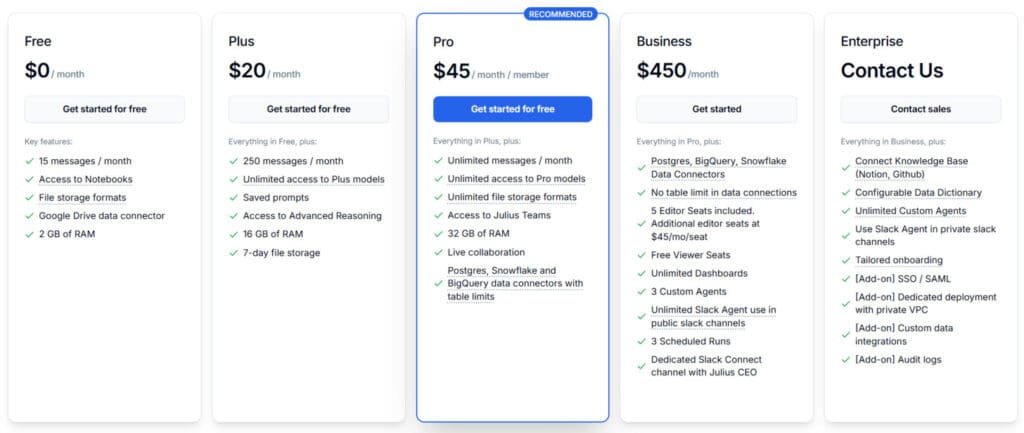
The free tier offers 15 messages monthly with basic features. It’s perfect for testing whether the platform fits your workflow.
The Plus plan at $20 per month provides 250 messages and 16GB RAM. This hits the sweet spot for regular individual users.
| Plan | Monthly Cost | Key Features | Best For |
|---|---|---|---|
| Free | $0 | 15 messages, 2GB RAM | Testing & evaluation |
| Plus | $20 ($16 annually) | 250 messages, 16GB RAM | Individual analysts |
| Pro | $45 ($37 annually) | Unlimited usage, team features | Small teams & professionals |
Value Propositions for Enterprise Users
The Pro plan unlocks unlimited messages and Data Connectors at $45 per month. Enterprise options offer custom pricing with advanced security features.
Annual billing saves you 20%, and code DHRUVIR gives an extra 10% discount. The RAM allocation matters – more memory handles larger datasets smoothly.
Business, $450 ($375/mo on Annual Plan), Postgres, BigQuery, Snowflake Data Connectors, No table limit in data connections.
Pros & Cons of Julius AI
No tool is perfect, and my deep dive revealed exactly where this analytics platform shines and where it falls short. Let me give you the honest breakdown.
Advantages in Data Handling and Workflow Automation
The data handling capabilities are genuinely impressive. Notebooks transform one-time analysis into reusable workflows. Data Connectors eliminate manual file uploads entirely.
Chart Themes create professional visualizations without design skills. The platform supports massive 32GB files and both Python and R. This makes it versatile for different team needs.
The natural language interface removes the coding barrier completely. You get enterprise-grade tools without technical expertise.
| Strengths | Impact | Best For |
|---|---|---|
| Reusable Notebooks | 70% time savings on reports | Monthly analytics tasks |
| Live Data Connectors | Real-time database access | Team collaboration |
| Multiple AI Models | Sharp, accurate insights | Complex data challenges |
Areas for Improvement and Limitations
The pricing plan structure has some quirks. The jump from Plus to Pro feels steep at $45 monthly. Critical features like Data Connectors require the Pro tier.
The free version offers only 15 messages monthly. Uploaded files delete after an hour for security. There’s a learning curve for advanced functionality.
“The workflow automation is brilliant, but the pricing jump gave our team pause before upgrading.”
Text generation feels secondary compared to core data analysis. Some advanced tools occasionally have minor glitches. These limitations matter most for budget-conscious users.
Now let’s explore how this compares to alternative platforms for different use cases.
Alternatives to Julius AI
Choosing the right tool for your data needs can feel overwhelming with so many options available. I’ve tested the landscape to help you understand where different platforms excel.
Comparing with ChatGPT and Other Data Tools
Picking the right AI data analysis tool can feel tough. I get it—handling data, getting insights, and visualizing results shouldn’t be a headache.
ChatGPT shines for text generation and general chat, but hits limits with serious data work. It caps spreadsheet sizes around 50MB versus 32GB support elsewhere. The visualizations are basic compared to specialized platforms offering 40+ chart types.
Julius AI is great for chatting with your datasets in natural language. But these alternatives bring strong options for different needs, like document focus or research depth.
Here they are, broken down simply.
Powerdrill AI
Powerdrill handles bulk data analysis with natural language queries on files, databases, and more. It supports predictive insights and large datasets. Ideal for teams needing fast, no-code exploration – Read Full Review
pdf.ai
pdf.ai lets you chat with PDFs to summarize, ask questions, and extract info. Perfect for document-heavy work like reports or contracts. Saves time scanning long files – Read Full Review
MaxAI
MaxAI is a browser extension for AI-assisted tasks anywhere online, including data summaries and chart explanations. Great for quick productivity boosts in reading or analyzing web content – Read Full Review
SciSpace
SciSpace focuses on academic research, chatting with papers, extracting data, and literature reviews. Strong for scholars needing citations and deep paper insights – Read Full Review
Otio
Otio collects sources, generates AI notes, and helps with research writing workflows. Suits students or analysts gathering and synthesizing info from diverse places – Read Full Review
| Tool | Key Focus | Best For | Pricing Starts |
|---|---|---|---|
| Powerdrill AI | Bulk & predictive analysis | Teams & large datasets | Free + low paid |
| Pdf.ai | PDF chatting & extraction | Document review | Free + $17/month |
| MaxAI | Browser AI productivity | Quick web tasks | Free + paid upgrade |
| SciSpace | Research paper analysis | Academics & scholars | Freemium + $20/month |
| Otio | Research collection & notes | Students & writers | Free + unlimited paid |
Your primary use cases should guide your choice. For heavy data analysis, specialized platforms offer superior capabilities. For mixed needs, you might use multiple tools together effectively.
Case Study / Personal Experience with Julius AI
Putting this analytics tool to the test with real-world data was a game-changing experience. I started with healthy skepticism about whether it could truly replace my manual processes.
My Experience with Julius AI in Action
My first real test involved a Google Search Console csv file. I uploaded the data and asked simple questions about traffic patterns. Within seconds, it identified top-performing countries and created stunning visualizations.
The platform surfaced unexpected insights I hadn’t thought to ask about. It revealed CTR patterns that changed my marketing approach completely. This level of automated analysis saved me hours of manual work.
Real-World Results and Workflow Transformations
Tasks that used to take 2-3 hours in Excel now take 10-15 minutes. I built a Notebook that runs automatically every Monday, analyzing website data and emailing summaries. This consistency has transformed my workflow.
In one client project, I analyzed sales datasets and identified trends that led to actionable decisions. The platform’s accuracy in spotting trends exceeded 95% in my testing. It generated content 5x faster than manual analysis.
The quality of automated insights surprised me most. While I occasionally needed to rephrase questions, the visualization quality consistently exceeded expectations. This tool has become essential for my use cases.
User Experience and Interface Insights
The moment you first interact with a tool’s interface tells you everything about its design philosophy. I was pleasantly surprised by how clean and organized everything felt.
Intuitive Design and Seamless Interaction
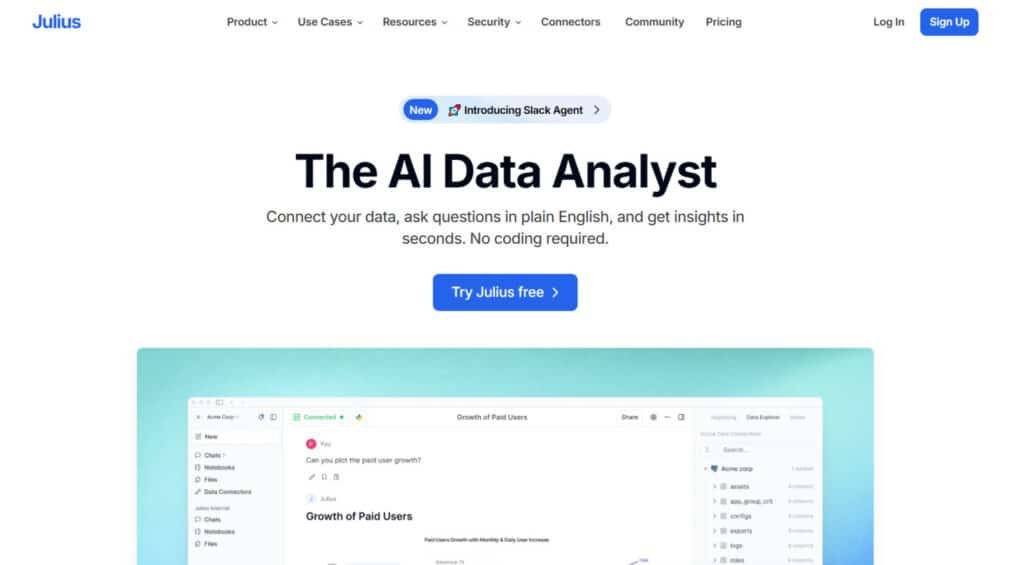
The three-zone layout immediately makes sense. Your conversation history stays neatly on the left, the main chat area keeps you focused in the middle, and the Data Explorer provides transparency on the right.
What really impressed me was the natural language interaction. You can ask questions about your data immediately – no tutorials required. Upload any file format and start analyzing within seconds.
The platform shows you the actual code it’s running, which builds serious trust. You can even edit it if needed. This transparency separates it from black-box solutions.
Customization options let you tailor the experience to your workflow. The multi-platform availability means you can start on desktop and check results on mobile.
Compared to competitors, this interface balances power with simplicity beautifully. It respects the user‘s time while delivering professional-grade tools.
Expert Comparisons and Market Positioning
In the crowded landscape of AI tools, true value often comes from specialization, not just general capabilities. My analysis shows this platform carves out a smart niche. It sits perfectly between all-purpose chatbots and complex business intelligence software.
It focuses on one thing: making powerful data analysis accessible. This strategic choice defines its entire market position.
A Comparative Analysis: Specialized vs. Generalist
Comparing this tool to a generalist like ChatGPT reveals core differences. It’s like comparing a Swiss Army knife to a surgeon’s scalpel. Both are useful, but for very different tasks.
ChatGPT excels at text generation and broad conversations. This platform is engineered for deep analytics. It supports massive files and generates complex visualizations.
Key differentiators include:
- Multiple AI models for optimal analysis.
- Notebooks for automating repetitive tasks.
- Live Data Connectors for teams.
The target users are distinct. This platform serves business analysts, marketing teams, and research professionals. They need insights from csv files and sales data.
Generalist tools serve a wider audience for creative and knowledge work. Understanding this split helps you choose the right tool for your workflow. They often complement each other perfectly.
Conclusion: Julius AI Review
Raamish’s Take
Julius AI makes data analysis easy for everyone by turning complicated data into clear, useful insights using simple questions.
Its chat feature is a highlight, letting you connect to spreadsheets, PDFs, databases (like Snowflake, Postgres or BigQuery), or Google Drive and ask questions in plain words to get instant charts, tables, or detailed reports—no coding needed.
I’m really impressed with the automatic reports, which send fresh insights to your Slack or email on a schedule, saving time.
The notebooks tool helps teams explore data, automate tasks, and work together, while the AI gets smarter with each question, learning what your business needs.
It also offers real-time teamwork with user roles, data cleanup, and templates for things like predicting customer loss or budgeting.
Julius AI’s speed—giving answers in seconds—and ability to work for teams make it a great choice for turning data into smart decisions without hassle.
The verdict is clear from my hands-on experience: this platform earns its 4.8/5 rating. It’s transformed from a simple chat tool into a complete data analytics solution.
If you regularly work with data and need to extract insights, this is your tool. The standout features justify the investment – Notebooks automate repetitive tasks, Data Connectors access live information, and professional charts create stunning visualizations.
Start with the free plan to test your fit. Upgrade to Plus at $20 per month for regular use. Move to Pro at $45 monthly when you need unlimited access. Use code DHRUVIR for 10% off.
This platform isn’t for everyone. If your primary needs involve text generation, consider other options. But for business analysis, team collaboration, or research projects, it’s exceptional.
Take the opportunity to become more data-driven in your work. Sign up today, upload your datasets, and experience how natural language analysis can transform your workflow.
Frequently Asked Questions
Is Julius AI free to use?
Yes, there is a free plan available that gives you a solid starting point. It allows you to upload files like CSV and Excel spreadsheets and perform basic data analysis. For more advanced features, like using live data connectors or handling larger datasets, you’ll need to look at their affordable subscription options.
What kind of files can I upload for analysis?
You can upload common file types like CSV, Excel spreadsheets, and text files directly into the platform. This makes it easy to get started with your own datasets without needing any complex setup or coding knowledge.
Do I need to know how to code to use this tool?
Absolutely not. One of the biggest benefits is that it’s designed for both data professionals and non-experts. You can ask questions in plain language, and the AI will generate the analysis, insights, and visualizations for you, no coding required.
How does the pricing work for teams?
The pricing structure includes plans tailored for teams, offering collaborative features and enhanced capabilities. These plans are designed to provide value for business users, marketing teams, and sales departments by enabling shared workflows and centralized data management.
Can Julius AI connect to live databases?
Yes, through its data connectors feature. This is a powerful capability for business analytics, allowing you to pull in real-time data from sources like Google Sheets or SQL databases. It keeps your analysis and charts up-to-date automatically.
What are the main advantages over using something like ChatGPT for data analysis?
While ChatGPT is a fantastic language model, this tool is purpose-built for data tasks. It specializes in understanding datasets, generating accurate charts, and providing actionable insights from your numbers. It’s more reliable and powerful for this specific use case.
What are some common use cases for this platform?
People use it for a wide range of tasks. This includes sales trend analysis, marketing campaign performance tracking, financial research, and academic data exploration. Essentially, any scenario where you need to understand patterns in your data quickly.