Struggling to keep up with the demand for fresh, eye-catching video content? You’re not alone. The pressure to constantly produce is real, and traditional video creation can feel slow, expensive, and technically overwhelming.
It’s frustrating, right? You have great ideas, but the gap between concept and final music videos or animations seems massive. This is the exact problem I set out to solve when I tested this platform. After extensive hands-on use, I can confirm it’s a genuine game-changer for modern content creators.
This tool acts as a creative superstudio, simplifying complex processes. It combines powerful video generation, animation, and more into one intuitive platform. The goal is professional results without the steep learning curve.
In this hands-on assessment, I’ll break down the features that truly matter. We’ll explore the pricing, the surprises I found, and who benefits most. My aim is to give you a clear, honest picture so you can decide if it fits your content goals and budget.
Ready to see how it works? Let’s dive into the details.
Key Takeaways: Kaiber AI Review
- This platform significantly simplifies the video creation process, making it accessible.
- It is designed specifically to meet the needs of modern content creators.
- The tool excels at generating unique music videos and animations.
- My testing revealed a focus on user-friendly features for rapid content production.
- This review provides a practical assessment of the platform’s real-world value.
- Understanding the pricing structure is crucial before investing in any video generation tool.
Kaiber AI Review: An Overview
Raamish’s Take
Kaiber AI’s Superstudio is a dynamic platform that empowers creative professionals with an all-in-one solution for multimedia production.
Its Custom Model Training stands out, enabling artists to craft AI models tailored to their unique style for consistent, personalized visuals.
I find it’s AI-generated video editing particularly convenient, which allows seamless storyboarding, animation, and motion refinement within a single intuitive canvas, streamlining complex workflows.
The Graphics and Logos feature excels in restyling and remixing visuals for diverse applications, from packaging to billboards.
Additionally, Music and Sound Integration brings tracks to life with reactive visuals and precise lip-sync animations, ideal for musicians and content creators.
Supporting best-in-class models like Flux, Luma, and Stability for images, videos, and audio, Superstudio ensures high-quality output.
The platform’s infinite canvas and flexible credit-based plans enhance scalability, while early access to beta features keeps creators ahead of the curve.
Kaiber AI’s unified interface and versatile tools make it a compelling choice for transforming imaginative concepts into professional-grade content.
Introduction to Kaiber AI SuperStudio
In a market flooded with complex editing software, one platform emerged with a different philosophy: creativity should be accessible, not intimidating. I discovered this tool when searching for solutions that could bridge the gap between creative vision and technical execution.
Company Origins & Founder’s Vision
Victor Wang, the co-founder and CEO, built this company with a clear mission. He wanted to democratize professional video production for creators who lacked technical expertise. His vision was simple but powerful: anyone with ideas should be able to create stunning visual content.
The platform specifically targets musicians, marketers, and educators. These users need a fast, intuitive way to produce engaging materials. They value creative possibilities over pixel-perfect control.
Position in the Current AI Landscape
This tool stands out in the crowded field of AI creative tools. While competitors focus on precision, it emphasizes artistic exploration. The platform functions more like a creative playground than a rigid editing suite.
What really sets it apart is audio-reactive video generation. This feature resonates particularly well on social media platforms where music-driven content thrives. Independent creators appreciate this focus on experimentation over predictability.
| Feature | This Platform | Runway ML | Pika |
|---|---|---|---|
| Audio Integration | Advanced | Basic | Limited |
| Target Audience | Creative Explorers | Professional Editors | Quick Content Creators |
| Learning Curve | Low | Medium | Low |
| Mobile Accessibility | Full Support | Limited | Web-Based |
What is Kaiber AI SuperStudio?
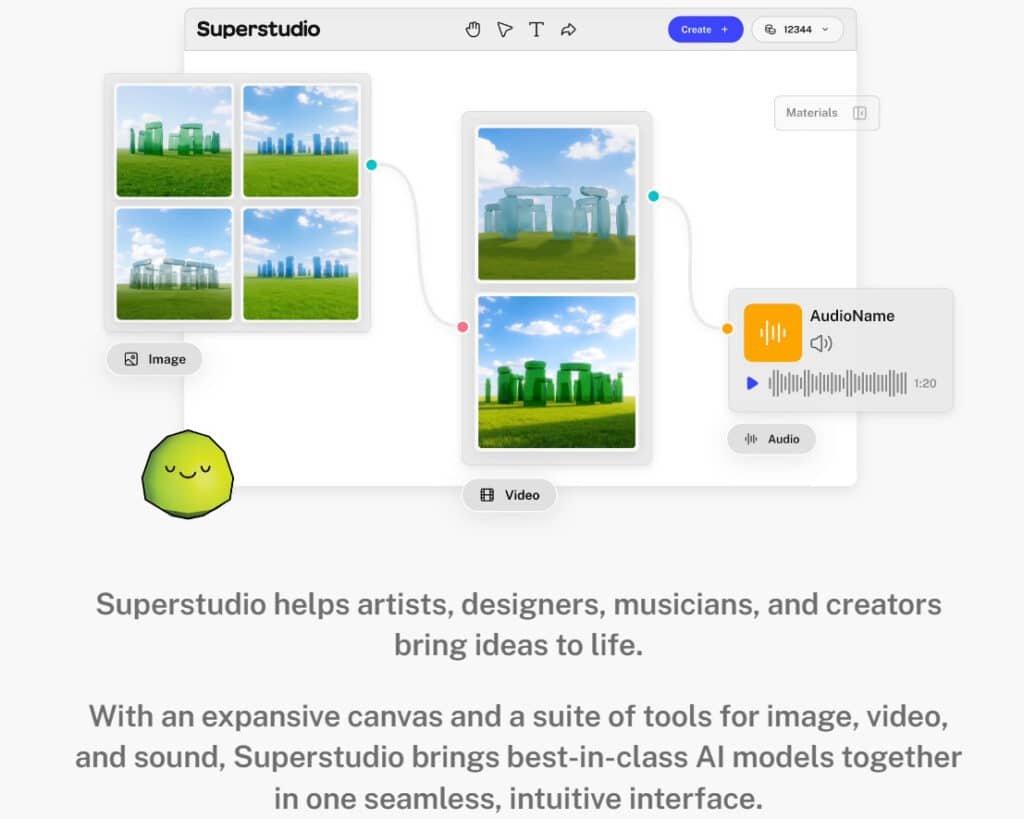
Imagine having a creative partner that turns your wildest visual ideas into animated reality with just a few words. That’s essentially what this platform offers—it’s less about technical precision and more about creative exploration. I’ve found it works best when you approach it as a collaborator rather than a rigid editing tool.
Inner Workings and User Benefits
The magic happens through machine learning models trained on massive visual datasets. You provide direction through text prompts or upload reference materials, and the system interprets your creative vision. It applies artistic styles, generates motion, and creates transitions based on your input.
This approach benefits specific content creators tremendously. Musicians can visualize their tracks, marketers quickly produce social media clips, and educators develop engaging instructional materials. The ability to sync visuals with audio makes it particularly powerful for music-driven projects.
How the Tool Operates
When you use Kaiber, you’ll encounter several core features. The Motion function handles video generation from text or images, while Flipbook focuses on animation creation. There’s also transformation capabilities that can completely restyle existing footage.
The platform’s strength lies in its simplicity. You’re not wrestling with complex timelines or effects layers. Instead, you’re guiding the aesthetic direction and letting the AI handle the heavy lifting of creating videos. It’s perfect when you prioritize visual impact over pixel-perfect control.
Features & Capabilities of Kaiber AI SuperStudio
The feature set goes far beyond simple video generation, offering a complete creative workflow. I discovered four distinct creative pathways that deliver impressive results for different types of content.
1. Core Interface and Workflow
Infinite Canvas
The infinite canvas provides users an unlimited workspace in Kaiber AI Super Studio to position elements freely, ideal for creating videos with expansive layouts.
Users drag video clips or assets into layers, constructing detailed scenes without borders. Kaiber offers zoom options switching from micro video editing tweaks to macro overviews, ensuring alignment accuracy.
Settings include customizable grids and snap tools, assisting users in precise video sequencing.
For videos using AI, generations sit beside storyboards, cutting tools changes. This option enables layout tests, accelerating video iterations. Kaiber navigation simplifies adjustments, reducing video workflow time.
Seamless Integration
Seamless integration combines AI models into one platform, giving users fluid access without external tools. Kaiber offers prompt inputs generating image generation that merges directly into ждет video projects.
Users select pay-as-you-go or subscription options for cost control in video editing. Kaiber profiles manage settings for model priorities, supporting hybrid video tasks. Shared resource options prevent interruptions during video creation.
Unified Tools Suite
The unified tools suite centralizes tools for video, audio, and image via one toolbar, allowing users instant mode switches.
Common prompt controls link functions, speeding video builds. Users store configurations in profiles, enhancing video editing efficiency.
Visibility options customize the suite layout, boosting overall video productivity.
2. Custom Models
Style-Mirroring Training
Style-mirroring training lets users upload references to craft models reflecting personal styles in Kaiber AI Super Studio.
Users refine through canvas settings, guaranteeing uniform video aesthetics across episodes. Kaiber offers iteration options for dataset tuning, perfect for creating videos with branded visuals.
Prompt previews confirm accuracy, minimizing frame-by-frame video adjustments. Batch upload options scale styles efficiently for long video series.
Cohesive Visual Generation
Cohesive visual generation outputs matching assets from trained models, preserving themes throughout video timelines. Users adjust prompt intensity with real-time preview options, ensuring video editing harmony.
Kaiber offers version branching, allowing users to evolve styles safely in ongoing video work. This maintains narrative flow, cutting revision needs in video projects.
Optimization for Illustration
Optimization for illustration enhances models for detailed artwork, speeding concept-to-video transitions.
Users access precision settings for lines and colors, bridging static to animated videos using AI. Style transfer options adapt illustrations to motion paths seamlessly in video sequences.
3. Graphics and Logos
Restyling and Remixing
Restyling and remixing transforms logos via AI, enabling users to tweak colors or shapes with prompt guidance.
Undo options in settings support safe experimentation, ideal for dynamic video intros. Users generate multiple variants quickly, integrating directly into video editing pipelines.
This ensures brand consistency across video formats.
Visual Mapping
Visual mapping projects graphics onto real-world surfaces like packaging, helping users simulate video product placements.
Scale and lighting options adjust for realism, with timeline previews confirming video fit. Users refine mappings iteratively, enhancing promotional video accuracy.
Optimization for Design Assets
Optimization for design assets delivers high-resolution, scalable files with vector options for crisp video overlays.
Users sharpen details automatically, ensuring professional insertion in video editing. This supports print-to-video workflows without quality loss.
4. Video Editing
AI-Generated Video Creation
AI-generated video creation builds full clips from prompt or assets, automating sequences for users. Model selection options control fidelity, suiting short or long video outputs.
Users combine text and references, streamlining video ideation to render.
Storyboarding and Animation
Storyboarding and animation constructs visual plans on canvas, applying AI keyframes for smooth video motion. Users drag elements into timelines, refining paths with intuitive tools. This accelerates video editing from concept to animated draft.
Motion Refinement
Motion refinement adjusts video speed, direction, and intensity live using precise settings. Users scrub timelines for frame-level control, polishing video dynamics. Real-time previews reduce guesswork in video finalization.
Single-Canvas Workflow
Single-canvas workflow contains all video editing phases in one space, eliminating app switches for users. Kaiber offers layer management options, maintaining organization during complex video assembly.
5. Music and Sound
Reactive Visuals
Reactive visuals generate animations synced to music beats, enriching video with dynamic effects.
Users upload tracks for instant waveform responses, enhancing video rhythm. Options tweak sensitivity, customizing video energy levels.
Lip-Sync Animations
Lip-sync animations align character mouths to audio precisely, ideal for music video or dialogue.
Users map phonemes via prompt, achieving natural video expressions. This saves manual keyframing in video editing.
Audio-Driven Creation
Audio-driven creation lets sound shape visuals, influencing video elements like color or pace. Users link stems to layers, creating immersive video experiences. Settings fine-tune influence strength for balanced video outputs.
6. Integrated AI Models
Image Models
Flux delivers photoreal image synthesis from prompt, feeding high-quality stills into video frames.
Recraft refines vectors for logos, scaling cleanly in video overlays. Stability supports inpainting/outpainting, fixing video backgrounds seamlessly.
Topaz upscales low-res assets, sharpening video sources without artifacts.
Video Models
Luma creates cinematic video from text or images, offering dream-like motion for users.
Google Veo 3 handles long-form clips with natural dynamics, suiting narrative video.
Kling ensures temporal consistency in short video, Minimax speeds realistic generation, Mochi adds expressive character animation, and Runway provides advanced video editing options like motion brushes.
Audio Models
Stability generates music or effects from prompt, layering into video soundtracks. Audioshake isolates stems (vocals/instruments), enabling users to remix for video syncing.
7. Additional Capabilities
Narrative Development
Narrative development layers image, video, and audio on canvas for complete stories. AI suggests transitions, ensuring video continuity for users.
Options group scenes, simplifying multi-act video structuring.
Export and Iteration
Export and iteration supports multiple formats (MP4, WAV, SVG) with one-click options. Users prototype video versions rapidly, applying feedback in loops. This accelerates video refinement cycles.
Accessibility for Creators
Accessibility for creators offers drag-and-drop tools requiring no code, welcoming all users.
Intuitive settings guide beginners through video tasks, while pros access advanced options. Kaiber offers tutorials, lowering entry barriers for video production.
| Feature | Best For | Credit Cost | Output Quality |
| Motion | Short, high-impact videos | 32 credits/4sec | Professional (with upgrade) |
| Flipbook | Longer animations, style transfers | 1-25 credits/sec | Consistently good |
| Audio Integration | Music videos, sync content | Varies by length | Excellent synchronization |
| Customization | Project organization, fine-tuning | No extra cost | Complete control |
Pricing Plans of Kaiber AI
Let’s talk money and competition—the two factors that ultimately determine if this creative tool fits your budget and workflow. Understanding the kaiber pricing and limitations helps you make a smart investment.
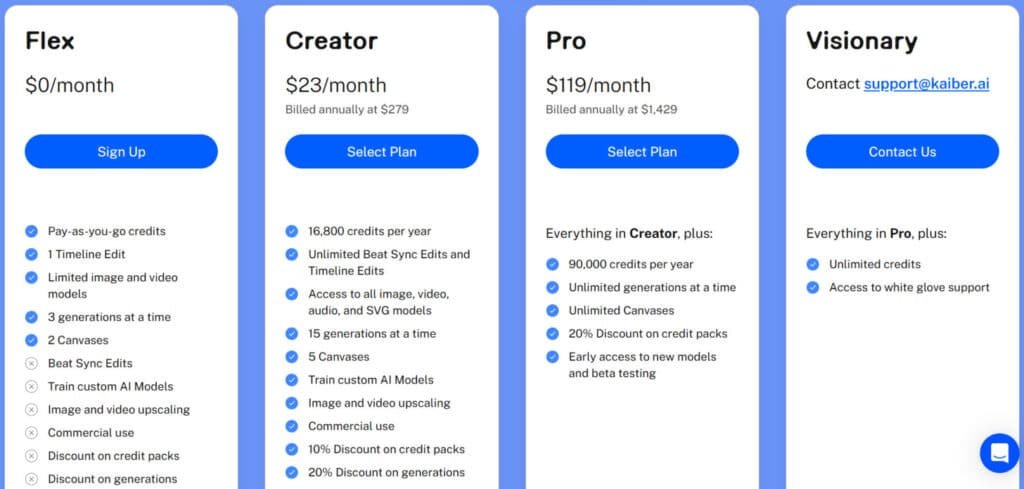
Flex Plan
$0/month (monthly/annual). Pay-as-you-go credits; limited models; 3 generations at a time; 2 Canvases; Beat Sync Edits; train custom AI Models; upscaling; commercial use Kaiber; discounts on credits/generations. Basic option for testing without commitment.
Creator Plan
$29/month or $23/month (billed $279/year). 1,400 credits/month (16,800/year); unlimited edits; all models; 15 generations; 5 Canvases; custom models; upscaling; commercial use Kaiber; 10-20% discounts; early access. No free trial mentioned.
Pro Plan
$149/month or $119/month (billed $1,429/year). 7,500 credits/month (90,000/year); unlimited generations/Canvases; 20% discounts; early access.
Visionary Plan
Contact support@kaiber.ai. Unlimited credits; white-glove support.
| Plan | Monthly | Annual (20% off) | Credits/Mo | Generations | Canvases |
| Flex | $0 | $0 | Pay-go | 3 | 2 |
| Creator | $29 | $23 | 1,400 | 15 | 5 |
| Pro | $149 | $119 | 7,500 | Unlimited | Unlimited |
Pros & Cons of Kaiber AI
Pros:
- Super easy to use. You jump in with text or images and get pro-looking videos fast—no tech headaches needed.
- Affordable plans. Starts at just $5 or $15 a month, way cheaper than big editing software, and it pays off quick for content makers.
- Tons of creative control. Mix styles, add music reactivity, and train custom models for that branded look you crave.
- Saves real time. Skip hours of manual editing; generate full clips or animations in minutes for social or marketing.
- Versatile for everyone. Perfect for music videos, ads, or art—upload your audio and watch it sync like magic.
Cons:
- Credit system limits you. Free tier runs out quick, and paid plans cap generations—frustrating if you’re experimenting a lot.
- Support feels spotty. Users report slow or unhelpful replies, leaving you stuck on glitches.
- Less fine-tuned control. You get options, but tweaking tiny details isn’t as precise as pro software.
- Cloud-only access. Needs solid internet—no offline work, which bites during travel or outages.
Competitive Alternatives in the AI Creative Space
If this platform doesn’t meet your needs, other tools exist. Your choice depends on your specific goals for content creation.
Kaiber AI makes video creation a blast, turning text, images, or clips into animated magic with audioreactivity and motion effects.
It’s perfect for musicians and creators, with a free plan for 50 credits and Creator at $29/month for 1,400 credits. But if you want broader image/video/music tools, these six platforms compete strong.
Imagine.Art
Imagine.Art shines in artistic image gen with 70+ styles, remix features, and short animations from prompts. Artists get endless play—free 50 credits/day, $15/month Basic for 3,500 credits – Read Full Review
Getimg AI
Getimg AI delivers consistent characters, LoRA training, and image-to-video motion. Brands build series seamless—free 100 images/month, $12/month Basic for 3,000 credits – Read Full Review
Hix.AI
Hix.AI packs 120+ tools for text rewriting, image gen, and short videos with bypass detectors. Power users crank content—free tier, $9/month entry for unlimited – Read Full Review
Heygen
Heygen excels in avatar videos with 500+ options, voice cloning, and lip-sync in 175+ languages. Teams scale explainers—free trial, $29/month Creator unlimited shorts – Read Full Review
Vadoo AI
Vadoo AI crafts faceless reels with auto-captions, B-roll, and viral templates. Daily posters batch fast—free tier (watermark), $19/month Pro unlimited – Read Full Review
Domo AI
Domo AI animates videos from text/images with style transfers and lip-sync. Creatives remix easy—free 500 credits/month, $6.99/month Basic for more – Read Full Review
Kaiber leads on music-reactive videos, but Imagine.Art edges in art styles while Heygen nails avatars.
| Tool | Key Strengths | Starting Price | Best For |
|---|---|---|---|
| Kaiber AI | Audioreactivity, motion, animation | $29/month | Music videos & creators |
| Imagine.Art | 70+ styles, remix, short animations | $15/month | Artistic image exploration |
| Getimg AI | Character consistency, LoRA, image-to-video | $12/month | Brand series & motion |
| Hix.AI | 120+ tools, text/image/video, bypass | $9/month | Content power users |
| Heygen | 500+ avatars, voice cloning, lip-sync | $29/month | Avatar explainers |
| Vadoo AI | Faceless reels, captions, templates | $19/month | Social daily posts |
| Domo AI | Style transfers, lip-sync, animation | $6.99/month | Video remixing |
For artistic video projects with a fair pricing structure, this tool remains a strong option. Weigh the plans against your output needs.
Conclusion: Kaiber AI Review
Raamish’s Take
Kaiber AI’s Superstudio is a dynamic platform that empowers creative professionals with an all-in-one solution for multimedia production.
Its Custom Model Training stands out, enabling artists to craft AI models tailored to their unique style for consistent, personalized visuals.
I find it’s AI-generated video editing particularly convenient, which allows seamless storyboarding, animation, and motion refinement within a single intuitive canvas, streamlining complex workflows.
The Graphics and Logos feature excels in restyling and remixing visuals for diverse applications, from packaging to billboards.
Additionally, Music and Sound Integration brings tracks to life with reactive visuals and precise lip-sync animations, ideal for musicians and content creators.
Supporting best-in-class models like Flux, Luma, and Stability for images, videos, and audio, Superstudio ensures high-quality output.
The platform’s infinite canvas and flexible credit-based plans enhance scalability, while early access to beta features keeps creators ahead of the curve.
Kaiber AI’s unified interface and versatile tools make it a compelling choice for transforming imaginative concepts into professional-grade content.
The real question isn’t whether this tool is powerful, but whether its unique approach aligns with your creative workflow. After extensive testing, I can confidently recommend it for specific users.
Should you buy it? Absolutely—if you’re creating music videos, social media content, or educational materials. The platform’s ability to transform simple inputs into striking videos saves tremendous time and money.
However, skip this option if you need pixel-perfect control. The tool prioritizes artistic impact over technical precision.
My final recommendation: Start with the free plan. Test it with projects that match your typical needs. If you value creative exploration over absolute control, this platform will significantly enhance your content creation capabilities.
Frequently Asked Questions
Is there a free plan or trial available?
Yes, you can start with a free trial that provides a limited number of credits to test the platform’s core features like video generation and image creation. It’s a great way to explore the tool’s potential before committing to a subscription.
What are the main differences between the pricing plans?
The plans differ primarily in the number of generation credits you receive per month, video resolution options, and access to advanced features like AI Cloning. Higher-tier subscriptions offer more flexibility for commercial use and frequent content creators.
Can I use the videos I create for commercial purposes?
Absolutely. Videos generated on paid plans are cleared for commercial use, making this tool a powerful asset for marketing, social media content, and music video production. Always check the latest terms of service for specific usage rights.
How difficult is it to learn and use the platform?
I found the interface quite intuitive. While there’s a slight learning curve to master advanced settings and text prompts, the basic video editing and generation process is straightforward. The platform is designed to be accessible for beginners while offering depth for pros.
What kind of content can I create beyond standard videos?
The possibilities are vast. Beyond standard clips, you can create animations using the Flipbook function, sync visuals to audio for music videos, and even use AI Cloning for consistent character generation. It’s a true creative playground.
How does the credit system work for video generation?
Credits are consumed each time you generate a video or image. The cost depends on the length, resolution, and specific features used. Your subscription renews your credit pool monthly, and unused credits typically do not roll over.
Are the text prompts the only way to generate content?
No, while text prompts are a powerful method, you can also use image uploads as a starting point or utilize the audio integration feature to drive the visual style of your creation. This multi-modal approach offers great flexibility.