Are you tired of spending hours sketching characters and illustrating concepts just to visualize a simple script?
That initial spark of a great idea can quickly fizzle out when you hit the manual labor wall. It’s frustrating, right?
Your creative flow gets interrupted by the tedious task of drawing.
What if you could bypass all that?
Imagine transforming your written words into a professional storyboard with a single click. This is the promise of a new visual storytelling platform.
I’ve tested many tools over the years, and this one aims to genuinely streamline the workflow for filmmakers, marketers, and other creators.
After a thorough, hands-on evaluation, I’m ready to share my complete findings. This isn’t just a surface-level look. I’ve dug into the features, the pricing, and how it performs in real-world scenarios.
My goal is to give you an honest, comprehensive assessment to see if it fits your needs.
In this Katalist AI Review, I will dive into the details and see if this tool can truly bring your visual narratives to life, saving you precious time and energy.
Key Takeaways: Katalist AI Review
- This platform uses generative AI to instantly convert scripts into visual storyboards.
- It is designed to save significant time for professionals in content creation.
- The tool is trusted by major advertising agencies for their creative projects.
- This review is based on extensive, hands-on testing of the platform’s capabilities.
- We will cover all essential aspects, including strengths, limitations, and pricing.
- The goal is to help you decide if it’s the right solution for your storytelling workflow.
Katalist AI Review: An Overview
Raamish’s Take
Katalist.AI is a powerful platform that simplifies turning scripts into visual storyboards and videos, making it easier for creators to visualize ideas without advanced skills or long production times.
Its 1-click script-to-storyboard feature stands out, analyzing uploaded scripts (via CSV, Word, or PowerPoint) to identify characters, scenes, and actions, then generating consistent visuals with AI.
I’m really impressed with the character consistency tool, which keeps actors looking the same across frames and allows one-click swaps if plans change, plus dynamic scene control for tweaking poses, angles, props, or moods in seconds.
The AI Video Studio takes it further, converting storyboards into full videos with voiceover, music, and effects using models like Runway Gen-4 or Google Veo 2.
Other strengths include templates for pitches or ads, batch editing, and exports to PowerPoint, ZIP, or shareable links.
Katalist.AI‘s focus on speed—cutting production time by 4x—makes it ideal for bringing concepts to life affordably, from sketches to polished demos.
Introduction to Katalist AI
Manual storyboarding feels like trying to run a marathon in dress shoes—possible, but painfully slow. I’ve been there, sketching frame after frame while my creative energy drained away. This platform emerged to solve that exact frustration.
Background and Company Origin
Blaž Blokar launched this venture in 2023 after watching content creators waste countless hours on manual sketches. He spotted a gap in the market where generative tools could revolutionize visual storytelling.
The current AI landscape is crowded, but this platform carves its niche by focusing specifically on the pre-production process. It’s not just another generic AI tool—it’s built for visual storytellers.
| Aspect | Traditional Storyboarding | AI-Powered Approach |
|---|---|---|
| Time Investment | Hours to days | Minutes |
| Skill Requirement | Drawing expertise needed | Accessible to beginners |
| Consistency | Variable quality | Uniform character representation |
| Revision Process | Manual redrawing | Instant adjustments |
Purpose and Industry Endorsements
The company’s mission is straightforward: streamline content creation for professionals who need speed without sacrificing quality. Filmmakers, marketers, and advertisers can use Katalist to transform scripts instantly.
“This tool has become essential for our creative pitches—it turns concepts into compelling visuals faster than we ever thought possible.”
What really impressed me during testing was seeing industry giants like Publicis, TBWA, and Leo Burnett already using this platform. These aren’t experimental adoptions—they’re serious agencies relying on it for high-stakes client work.
What is Katalist AI?
What if your script could instantly transform into a visual storyboard without any drawing skills?
This platform makes that possible through advanced technology. It’s designed specifically for visual storytellers who want to speed up their creative process.
Technology and Functionality
The tool uses generative AI to analyze your written content. It identifies characters, settings, and actions through natural language processing. This understanding allows it to create consistent visual narratives automatically.
After the initial generation, you maintain creative control. You can adjust framing, character poses, and scene compositions. The machine learning algorithms learn from vast datasets to improve output quality over time.
| Process Step | Traditional Method | AI-Powered Approach |
|---|---|---|
| Script Analysis | Manual reading and interpretation | Automatic NLP processing |
| Visual Creation | Hand-drawn sketches | AI-generated images |
| Revisions | Redrawing entire scenes | Instant parameter adjustments |
| Consistency | Artist-dependent | Algorithm-maintained |
User Benefits and Applications
Content creators save significant time in the pre-production phase. The learning curve is minimal—I generated usable storyboards within minutes. This accessibility makes visual storytelling available to more users.
The platform works exceptionally well for pitching ideas to clients or teams. Filmmakers, advertisers, and marketers can visualize concepts quickly. It’s perfect for those with clear narrative ideas but limited illustration skills.
Katalist AI Review
My hands-on evaluation uncovered what makes this platform stand out in the crowded visual storytelling space. After extensive testing, I’m giving it a solid 9.5 out of 10 rating. This katalist review represents my honest assessment based on real-world usage.
The tool genuinely excels at creating visually appealing storyboards. I was impressed by the exceptional detailing and consistent character representation across multiple frames. This consistency is something many similar platforms struggle with.
However, several planned features haven’t been implemented yet. The absence of AI voice, music, and video generation limits its current capabilities. These missing elements prevent it from being a complete all-in-one solution.
| Aspect | Current Strengths | Areas for Improvement |
|---|---|---|
| Visual Quality | Exceptional detailing and consistency | Already strong |
| Feature Set | Solid core storyboarding | Missing audio/video generation |
| User Experience | Intuitive interface | Could use more customization |
Throughout this detailed assessment, I’ll walk you through exactly what works well and what needs improvement.
You’ll get my transparent evaluation of whether the platform justifies its price for your specific needs.
Complete Features of Katalist AI
What separates this tool from others is how thoughtfully its features are designed for actual storytelling workflows. The platform gives you professional-level control without requiring advanced technical skills.
Let me walk you through the key functionalities that make this platform genuinely useful for content creators who need quality results fast.
1. One-Click Script Magic: From Words to Boards
Katalist offers a seamless upload process for scripts in CSV, Word, or PowerPoint formats. The system analyzes content to identify characters, scenes, and actions automatically. This generates vibrant storyboards in seconds without manual input.
Users benefit from reduced setup time, allowing focus on creative decisions rather than technical hurdles.
The website provides clear upload guidelines to ensure compatibility. This feature accelerates pre-production workflows, making it ideal for filmmakers needing quick visualizations. Key features include automatic scene breakdown, which maintains narrative flow.
Users can produce professional boards faster, cutting production timelines significantly.
Features Katalist excels in here involve intuitive parsing that handles complex scripts effortlessly.
This helps readers searching for efficient storyboard tools by delivering instant results, saving time effort in initial setup phases. Overall, it streamlines the transition from script to visual asset.
2. Script Automation and Customization
The Script Assistant in Katalist generates complete narratives from basic prompts or imports existing scripts in various formats.
Users gain extensive control over camera angles, shot styles, poses, and creative directions. This automation balances efficiency with personalization.
Key features encompass adjustable elements that adapt to specific storytelling needs. Users can refine outputs to match vision precisely, enhancing project quality.
The website details customization options for easy navigation. Katalist offers tools that integrate automation without sacrificing user input. Readers intending to automate script processes find this helpful for rapid iterations and polished results.
Features like detailed shot adjustments ensure coherence in output. This capability supports diverse content creation, from ads to films, by providing flexible scripting aids that boost productivity and creative output consistency.
3. Art Style Options
Katalist provides Cinematic mode for realistic 3D renders and Sketch mode for black-and-white illustrations.
Three aspect ratios—Landscape, Portrait, and Square—cater to platforms like YouTube, social media, and comics.
Users select styles instantly for visual direction. This flexibility eliminates reformatting needs post-generation.
Key features include predefined modes that align with output goals. Users save on adaptation work, focusing on content instead.
The website showcases style previews for informed choices. Features Katalist stands out with involve platform-specific ratios that optimize sharing.
Users seeking versatile styling options benefit from immediate applicability, reducing post-production adjustments and ensuring platform-ready visuals from the start.
4. Character Consistency: Keep Your Heroes on Point
Katalist ensures character appearances remain uniform across all frames after initial selection. One-click swaps allow changes throughout the project.
With 32 pre-built characters covering ages and genders, users build diverse casts quickly. This maintains storytelling coherence.
Users avoid inconsistencies that disrupt viewer immersion. Katalist review highlights this as a standout for reliability.
Users searching for consistent AI outputs find it helpful in creating professional narratives without rework.
It supports large-scale projects by automating uniformity, aiding in efficient character management for films or animations.
5. Dynamic Scene Generation
The AI analyzes scripts to produce fitting visuals automatically while preserving character consistency.
Users remix or create scenes from scratch, adjusting in seconds. Examples include themed environments like dinosaur worlds or medieval settings. This generation tool unlocks visual potential swiftly.
Users achieve coherent scenes without manual drawing.
Features Katalist include adaptive visuals that fit narrative demands. Readers with intent for fast scene building benefit from reduced creation time, enabling quicker project progression and higher output volume in storytelling tasks.
6. Pose and Framing Tools: Fine-Tune the Action
Katalist includes a posing tool for directing character actions like hand positions or jumps via simple sliders. This integrates with scene generation for seamless adjustments.
Users fine-tune framing and poses to convey specific emotions or actions. It enhances action sequences without complexity.
Users can control details precisely for dynamic results. This tool helps readers aiming for detailed visuals by providing easy refinements, improving overall scene impact and narrative precision in productions.
7. AI Video Studio: Boards to Full-Blown Clips
Katalist video studio converts storyboards into videos with voiceover, music, and sound effects. Lip-sync via advanced models ensures natural dialogue.
Users produce polished clips in minutes. This extends static boards to motion content. Users create demo-ready videos effortlessly.
Those looking for video extensions find this valuable for client presentations, transforming boards into engaging formats that demonstrate concepts fully.
8. Exports and Presentation Mode
Presentation Mode creates shareable slideshows via links, no account required for viewers. Export options cover ZIP files, video sequences, and PowerPoint.
Users adapt outputs to various contexts. Unlimited plans support extensive frames. Users share professionally without barriers.
This versatility aids readers in distribution, simplifying feedback loops and final deliveries across teams or clients.
9. No AI Experience? No Problem
Katalist acts as a translation layer between ideas and AI technology. Users upload and generate without prior knowledge.
The interface guides through processes intuitively. This accessibility lowers entry barriers.
Users focus on creativity over tech. Readers new to AI tools benefit from straightforward adoption, enabling immediate use in projects without training.
10. Workflow Boosters: Integrations and Collab
Integrations pull from tools like Final Draft; Pro tiers connect to Adobe Premiere. Real-time collaboration allows team edits.
Users streamline workflows end-to-end. API options for enterprises. Users reduce transfer issues.
This boosts efficiency for collaborative environments, helping readers in team settings maintain seamless progress.
11. Advanced Perks: For Pros Who Want the Edge
Unlimited custom characters and styles avoid generic outputs. Enterprise includes API, support, and integrations.
Users can scale without limits. This caters to professionals needing robust tools. Pros cons include high scalability versus tier costs.
Also those in advanced production can find expanded capabilities for complex, high-volume work.
Pricing and Plans for Katalist AI
Understanding the cost structure is crucial before committing to any creative tool. The platform provides several pricing plans tailored to different needs.
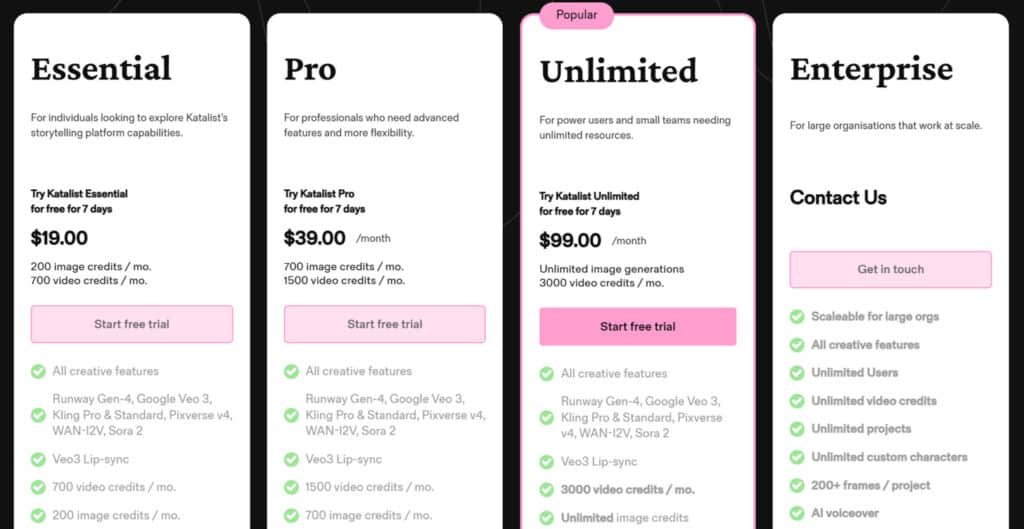
Katalist offers flexible pricing plans tailored to creators. All include a 7-day free trial with unlimited access. Annual billing saves up to 20% (e.g., via sales contact for quotes). Here’s the breakdown:
Essential Plan
Start with $19/month or $348/year (billed annually). Ideal for beginners testing Katalist‘s core tools.
Features: All creative AI models (Runway Gen-4, Google Veo 3, Kling Pro/Standard, Pixverse v4, WAN-I2V, Sora 2), Veo3 lip-sync, 200 image credits/mo, 700 video credits/mo, AI Script Assistant, consistent characters, AI voiceover, 5 project limit, 1 custom character.
Pro Plan
Upgrade to $39/month or $374/year (billed annually)—popular for pros. Adds editing power.
Features: All Essential plus 700 image credits/mo, 1500 video credits/mo, 20 project limit, 10 custom characters, AI image editor, Adobe Premiere Pro integration.
Unlimited Plan
Go all-in at $99/month or $948/year (billed annually, 2 seats). Perfect for teams.
Features: All Pro plus unlimited image generations/projects/custom characters, 3000 video credits/mo, real-time team collaboration, 200+ frames/project, ZIP & PPT export. Contact sales for extras.
Enterprise Plan
Custom pricing—reach sales@katalist.ai for quotes. For scaling orgs. Features: Unlimited everything, API access, enterprise integrations, 24/7 support, unlimited seats/projects.
| Pricing Plan | Monthly Price | Annual Price | Image Credits | Video Credits | Key Feature |
| Essential | $19 | $348 | 200 | 700 | Basics + free trial |
| Pro | $39 | $374 | 700 | 1500 | Premiere Integration |
| Unlimited | $99 | $948 | Unlimited | 3000 | Team Collab |
| Enterprise | Custom | Custom | Unlimited | Unlimited | API + Support |
Pros & Cons of Katalist AI
Let’s cut to the chase and examine the platform’s real-world strengths and weaknesses. After extensive testing, I have a balanced view. This honest breakdown will help you decide if its features match your creative needs.
Advantages
The biggest win is character consistency. The tool keeps characters looking the same across all scenes. This is a huge time-saver.
I was impressed by the platform’s versatility. You can use Katalist for realistic film scenes or sketch-style comics. The quality of detail, especially in close-ups, is exceptional.
You get lots of customization options. Tweaking scenes and camera angles is simple. It also handles fantasy creatures, not just people.
The modern interface is easy on the eyes. Multiple import/export formats allow for smooth integration into your workflow.
Drawbacks
Now for the limitations. Some promised features, like AI voiceovers, are not yet available. This limits the tool‘s completeness.
A major constraint is the one-character-per-frame rule. You cannot show two people talking in a scene. This makes dialogue-heavy content difficult.
You also cannot upload image references for style matching. Poses are limited to moving the whole character. I sometimes saw odd anatomy that needed fixing.
These pros cons show a powerful but evolving platform. It excels at visualization but has gaps. This naturally leads us to consider other options.
Alternatives to Katalist AI
When a single platform doesn’t meet all your creative needs, exploring alternatives becomes essential. I’ve tested several competing tools that approach visual storytelling differently.
Each has unique strengths that might better suit your specific workflow.
Competing Storyboarding and Content Tools
Getting your video vision on paper—or screen—early makes all the difference. It catches problems before they grow big.
Katalist AI turns scripts into pro storyboards with consistent characters, custom poses, and even voiceover previews. But if you’re after different vibes, like team collaboration or simple templates, these alternatives fit nicely.
Let’s go over them one by one.
Visme
Visme offers template-based boards with drag-and-drop. Add brand colors, icons, or stock images quick. Suits branded sequences where you build frames manually with some AI help for designs – Read Full Review
Superstudio from Kaiber
Superstudio uses an infinite canvas for linking AI-generated scenes. Storyboard by chaining prompts into narratives with motion previews. Great for experimental animation planning – Read Full Review
HeyGen
HeyGen has a drag-and-drop storyboard editor tied to avatars. Arrange scenes from scripts, add voiceovers, and preview text-to-video flow. Ideal for marketing videos with talking heads – Read Full Review
Synthesia
Synthesia builds scene-by-scene outlines with avatars and templates. Focuses on text-to-video previews, arranging talking segments. Good for simple training or explainer planning – Read Full Review
Canva
Canva’s Magic Studio generates boards from prompts or templates. Huge library for frames, plus AI image tweaks. Best for quick, beginner-friendly visual sequences.
| Tool | Storyboarding Approach | Strengths | Pricing Starts |
|---|---|---|---|
| Katalist AI | Auto script breakdown & consistency | Detailed tweaks, character lock | $29/month |
| Visme | Templates & drag-drop | Branding & assets | $15/month |
| Superstudio (Kaiber) | Infinite canvas & prompt chains | Motion prototyping | $15/month |
| HeyGen | Drag-drop with avatar previews | Script-to-ad flow | $24/month |
| Synthesia | Scene templates & text outlines | Quick avatar planning | $18/month |
| Canva | Prompt templates & library | Easy beginner frames | $15/month |
Full AI magic or easy templates—it comes down to your style. What’s the story you’re planning next?
No single platform handles every aspect perfectly. Your choice depends on whether you prioritize automation, customization, or collaboration features.
I recommend trying the free plan alongside one or two alternatives. See which workflow feels most natural for your creation process before committing. Contact sales teams for specific needs—they often provide customized demonstrations.
Case Study and Personal Experience with Katalist AI
I put this visual storytelling tool through its paces over several weeks of real projects. This hands-on experience revealed both its impressive capabilities and current limitations.
Real-World Results
My testing began with the AppSumo Tier 1 plan’s 250 image credits. They disappeared faster than I expected during the learning process. I quickly upgraded to unlimited generation for thorough evaluation.
The quality of output genuinely impressed me. Characters maintained consistent appearances across multiple scenes. Both Cinematic and Sketch styles produced professional-looking results.
My Personal Journey
I created a katalist video review demonstrating the entire workflow. For a short film concept, I completed a 20-frame storyboard in 90 minutes instead of 6-8 hours.
However, I hit limitations with dialogue scenes. The platform cannot show multiple characters in one frame. This required creative workarounds for certain content types.
My honest katalist review experience shows this tool excels at rapid prototyping. It works best when you understand its current strengths. The platform delivers solid value for visual storytelling despite some gaps.
This practical testing provided authentic insights beyond theoretical reviews. I learned how katalist work fits into real creative workflows. The process taught me to leverage its strengths while acknowledging areas for growth.
User Interface and Customization Options
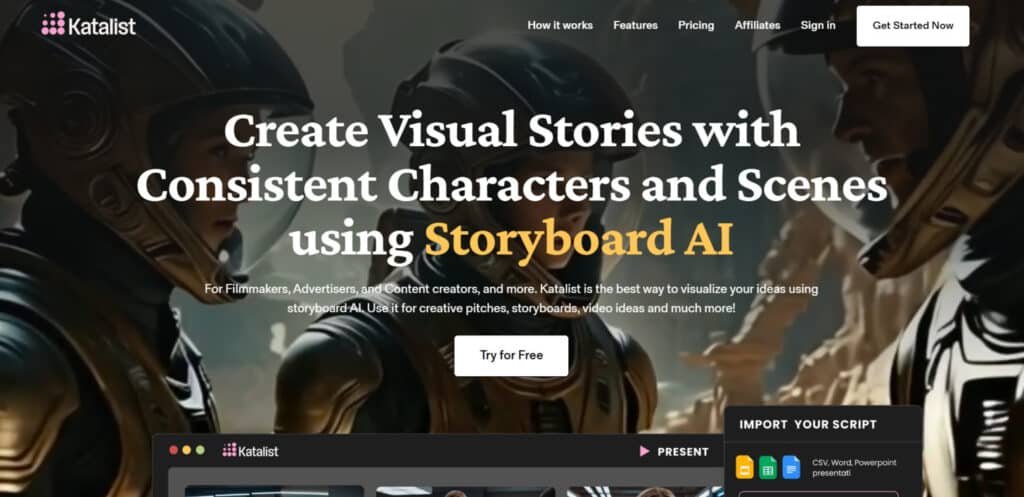
Navigating a new tool shouldn’t feel like solving a puzzle, and thankfully, this one doesn’t. The user-friendly interface immediately stands out with its sleek, modern design. I found myself creating projects within minutes of logging into the website.
The dark theme is easy on the eyes during long sessions. Your dashboard shows a clean list of projects with a big “Create New” button. Everything feels intuitive—support chat in the bottom left, credit monitor in the top right.
Effortless Navigation
Beginners will appreciate how the interface doesn’t overwhelm you. Buttons and icons are clearly labeled. You won’t need a manual to get started. The platform reveals advanced functionalities as you need them.
I never had to hunt for features. The workflow follows logical steps: generate image, modify character, adjust scene, edit pose. For users wanting more control, the Creative Direction box lets you type specific instructions.
Deep Customization Tools
The customization options surprised me with their depth. You can tweak camera angles, character positions, lighting, and mood. Each adjustment appears right where you’d expect it in the creative process.
- Simple enough for quick storyboards
- Advanced controls for precise adjustments
- Negative prompts to exclude unwanted elements
- Logical layout that matches storytelling workflow
My only minor complaint: Some advanced options could use tooltip explanations. But overall, the user-friendly interface strikes a perfect balance between simplicity and power.
Integration, Support, and Future Roadmap
Behind every great tool is a support system that ensures you can actually use it effectively when you need it most. I tested both the technical connections and human assistance to see how this platform handles real-world creative workflows.
Seamless Integrations and Collaborations
Currently, the platform operates independently—no direct integration with editing tools like Premiere Pro or Final Cut. You’ll export files manually into your production pipeline.
The team does provide universal export formats (ZIP, Video, PowerPoint) that work with virtually any workflow. While seamless connections aren’t there yet, you can still incorporate outputs into your process.
Customer Support and Planned Updates
Customer support starts with a chat bot for basic questions. When I needed complex assistance, human help arrived within hours—reasonable but not instant.
The knowledge base is sparse (one article, one video), but the public roadmap impressed me. Features are clearly categorized: Under Consideration, Planned, or Launched.
Planned capabilities include music generation, voiceovers, and video creation from storyboards. Based on user reviews, the platform is actively evolving toward a more complete solution.
My advice: purchase based on current features, not promised ones. The tool delivers solid value today, but wait for actual launches if you need those advanced capabilities.
Strategic Benefits for Content Creators
The real game-changer for storytellers isn’t just what this platform does, but how it reshapes your entire creative process. I’ve seen firsthand how it moves beyond simple time-saving to deliver genuine strategic advantages.
Enhanced Productivity
What traditionally took 6-8 hours of sketching now takes about 90 minutes. That time compression means you can handle multiple projects without burning out.
The speed advantage lets you iterate freely. Generating new versions doesn’t cost hours of rework anymore.
Creative Flexibility and Efficiency
You can visualize five narrative approaches in the time it took to sketch one. This removes the pressure of being locked into your first concept.
The platform enables rapid prototyping of ideas. You test whether concepts work visually before full production investment.
For content creators managing social media campaigns or client pitches, this efficiency creates competitive advantages. You present polished concepts that win approval faster.
- Handle more work without quality sacrifice
- Pivot quickly when ideas need refinement
- Reduce costly mistakes in the creation process
- Maintain consistent output during creative dry spells
The strategic value? You spend less time on mechanics and more on the creative strategy that differentiates your work. For creators wanting that edge, it’s transformative.
Conclusion
Raamish’s Take
Katalist.AI is a powerful platform that simplifies turning scripts into visual storyboards and videos, making it easier for creators to visualize ideas without advanced skills or long production times.
Its 1-click script-to-storyboard feature stands out, analyzing uploaded scripts (via CSV, Word, or PowerPoint) to identify characters, scenes, and actions, then generating consistent visuals with AI.
I’m really impressed with the character consistency tool, which keeps actors looking the same across frames and allows one-click swaps if plans change, plus dynamic scene control for tweaking poses, angles, props, or moods in seconds.
The AI Video Studio takes it further, converting storyboards into full videos with voiceover, music, and effects using models like Runway Gen-4 or Google Veo 2.
Other strengths include templates for pitches or ads, batch editing, and exports to PowerPoint, ZIP, or shareable links.
Katalist.AI‘s focus on speed—cutting production time by 4x—makes it ideal for bringing concepts to life affordably, from sketches to polished demos.
The ultimate question remains: Does this visual storytelling tool justify the investment for creative professionals?
After weeks of testing, my final Katalist AI Review verdict is clear—it delivers genuine value despite some limitations.
This platform excels at rapid storyboard generation with exceptional character consistency. The features make professional visualization accessible to creators without drawing skills.
However, missing elements like multi-character scenes require workarounds.
So should you buy it?
Absolutely if you’re a filmmaker, advertiser, or content creator needing fast storyboards for pitches.
Skip it if you need complex character interactions or complete video production. Test the free version with your actual projects first. This tool represents the future of creative workflow acceleration—imperfect but incredibly useful.
Frequently Asked Questions
Is there a free version or trial available?
Yes, you can start with a free plan that offers limited features. There’s also a free trial for the paid tiers, letting you test the full capabilities without commitment.
How easy is it for beginners to use?
I found the platform surprisingly intuitive. The user-friendly interface and straightforward tools mean you can create your first visual narrative quickly, even with no prior experience.
What kind of content can I create with this tool?
You can generate dynamic scenes for social media, marketing videos, educational content, and more. The art style options and script automation make it versatile for various projects.
How does the pricing work for teams?
The Studio plan is designed for collaboration, offering more seats and advanced features. It’s cost-effective for content creation teams needing seamless integration and shared workspaces.
What support is available if I get stuck?
Customer support is responsive. I’ve received helpful guidance through their channels. The platform also has resources to smooth out the learning curve.
Can I customize the generated content?
Absolutely. The customization options are a standout feature. You can edit scripts, adjust visual elements, and tweak scenes to match your brand’s voice perfectly.
Are there any major limitations I should know about?
The free version has some restrictions on export formats and generation limits. For heavy users, a paid plan is necessary to unlock the full potential and avoid bottlenecks.
How does it compare to other storyboarding tools?
From my experience, it holds its own against competitors by balancing ease of use with powerful features like dynamic scene generation. It saves significant time and effort in the creation process.