If you struggle to track real-time rankings across Google, Bing, and Yahoo — and lose hours stitching reports — you’re not alone. I see teams miss geo and device splits, which costs clients visibility and time.
That gap feels worse when dashboards lag, reports are manual, or pricing scales unpredictably as you grow. It’s frustrating to juggle multiple tools and still lack clear reporting for clients or bosses.
In this review I look at a focused rank-tracking platform that rebranded from SerpBook. I’ll show how its real-time checks, local-to-global tracking, mobile/desktop splits, competitor monitoring, white-label reports, and integrations (GA4, Search Console, Looker Studio) work in real-world seo workflows.
I’ll cover practical features, pricing tiers (from $24/month up to enterprise levels), where it saves you time, and when an all-in-one suite might be a better fit. Expect clear insights, honest pros and cons, and a recommendation you can act on.
Action: Let’s dive in — here’s how it works.
Key Takeaways: Keyword.com Review
- This article gives a hands-on review of a focused rank tracking tool for modern seo needs.
- Real-time checks, geo/device splits, and white-label reporting are the platform’s strengths.
- Pricing scales from small freelancers to large agencies — I map value by stage.
- Integrations (GA4, Search Console, Looker Studio) speed reporting and save time.
- I’ll compare it to broader suites and explain when a lean platform is the right solution.
Keyword.com Review: An Overview

Raamish’s Take
Keyword.com keeps things simple yet powerful as a dedicated rank tracking tool for SEO folks who want real data without the hassle.
I like how it nails accurate, daily updates on keyword positions, down to city or ZIP code level—verified by their Spyglass system for that 97% reliability punch. No guessing games here; it pulls unbiased SERP views using residential IPs, which means you spot real shifts fast.
What grabs me is the SERP analytics side, tracking features like featured snippets, People Also Ask, and even AI overviews from ChatGPT or Gemini.
It crunches share of voice to show your slice of traffic versus competitors, plus clusters keywords by intent for smarter grouping. Add in competitor keyword discovery, and you’re uncovering hidden gems to steal traffic from rivals without starting from scratch.
For agencies, the white-label reports shine—branded dashboards and live SERP proofs build client trust, as one user noted doubling lifetime value.
Keyword.com Integrates easy with Google Analytics or Search Console too. Sure, it’s not a full-suite monster, but that focus lets bloggers and small teams optimize quick, like refreshing local strategies in minutes.
If you’re chasing precise insights to grow organic hits, this cuts the noise and delivers wins.
Introduction to Keyword.com: Where a Classic Rank Tracker Fits in the AI-Search Landscape
In the current AI landscape, tracking raw SERP positions is only part of the story—AI assistants now shape discovery, too. I find this shift matters for anyone who reports performance to clients or stakeholders. You still need reliable rank data for Google, Bing, and Yahoo, but you also need signals from AI-driven engines like ChatGPT, Gemini, and Copilot.
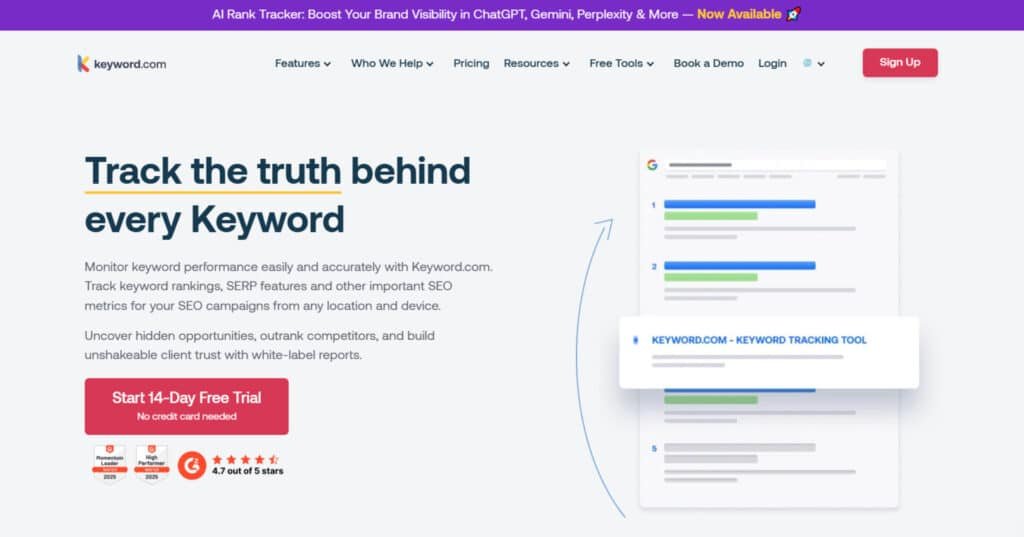
Origins and purpose: The platform—rebranded from SerpBook—keeps its core mission simple: deliver accurate, daily and on-demand rank tracking with clear verification down to city and ZIP (Spyglass). It integrates with GA4, Search Console, and Looker Studio so your data stays connected.
Who uses it? Agencies, enterprises, and in-house teams lean on this tool when they want focused tracking without a bulky suite. Users managing many locations or storefronts value the geo and device splits because those rankings link to real revenue.
- Practical takeaway: treat classic rankings and AI answers as two measurement channels.
- What I’ll cover next: how the tracker works day-to-day, feature strengths, and when pairing it with add-ons makes sense for businesses of different sizes.
What is Keyword.com?
The core of this tool is simple: add keywords, set a market, choose device and location, and the platform pulls fresh rank data daily with on-demand refreshes when you need instant clarity. It’s built to answer one question fast: where do we appear in search, right now?
How the platform works
The tracker queries Google, Bing, and Yahoo for your terms, then stores daily snapshots. On-demand checks give immediate updates for troubleshooting or live changes.
Device and local splits matter: you can view mobile vs. desktop positions separately and target a city or ZIP. Spyglass verification adds a third-party check so you can prove rankings in specific regions.
Who benefits most
Agencies and multi-location businesses win here—clean client reports and city-level accuracy remove a lot of arguing about visibility. Data-driven SEO teams like that the tool stays focused on rank performance without extra bloat.
Case study and my experience
I tracked a service-area client across 18 ZIP codes. Mobile led desktop by about 12–18 positions on high-intent terms, so we prioritized mobile speed and local pages. Calls rose within two weeks.
“City-level tracking flagged thin content on six franchise locations. After fixes, 40% of tracked terms moved into the top three.”
- Alerts: I set +/-10 position thresholds to cut noise.
- Competitor view: quick snapshot of who’s overtaking target terms.
- Reporting: white-label PDFs + Looker Studio integration kept stakeholders happy.
Best Features of Keyword.com
These are the platform features that actually change how teams act on rank data. Below I break down each capability—what it does, why it matters, and a quick way to apply it in your workflow.
1. Real-Time and On-Demand Rank Tracking
Monitors keyword ranking across major search engines like Google, Bing, and Yahoo with daily checks and instant on-demand refreshes (limited to the number of keywords in your plan). Includes 2 years of SERP history (unlimited in Enterprise plans) to track ranking trends.
The users can validate deployments or link pushes the same day, confirming SEO fixes or optimizations instantly, ensuring no delays in assessing website performance on various platforms.
2. Spyglass Verification (Local and Global Tracking with City and ZIP Precision)
Delivers unbiased, third-party verified ranking data at global, country, city, or ZIP/postal code levels, ensuring reliable reports that mirror real SERPs.
It connects store-level performance to keyword ranking, enabling users to prioritize regions driving revenue, enhancing SEO strategies for local users and building trust with transparent, granular data.
3. Mobile vs. Desktop Visibility
Tracks performance separately for devices (mobile and desktop), with each counting as one keyword credit, providing verifiable reports mimicking real SERPs. It allows users to quickly identify mobile-first issues, pushing engineering teams to improve Core Web Vitals or adjust mobile content to boost SEO performance on their website.
4. Competitor Tracking and Share of Voice
Calculates the percentage of searches directing traffic to your site versus competitors for key terms, using Share of Voice to assess market share by topic cluster.
It evaluates competitors’ strength with metrics like search volume, cost-per-click, and click-through rate via Google Search Console integration.
Ranking alone can mislead; SOV reveals true market presence, guiding users in content or internal linking strategies to enhance SEO outcomes.
5. White-Label Reports and Dashboards
Creates shareable dashboards and automated email reports (daily, weekly, or custom frequency) in CSV or PDF formats.
Supports white-label reports with your branding (for 5000+ keyword packages) and custom ViewKey domains (extra costs apply).
It automates client updates, reducing reporting time for users while maintaining professional, branded deliverables to showcase SEO success.
6. Integrations and Rank Tracker API
Connects to Google Looker Studio, Google Analytics (GA4), Google Search Console, and DashThis for enhanced data visualization. The rank tracker API allows users to pull unlimited data into internal BI tools, supporting scalable automation.
Itseamlessly blends rank tracker data into existing platforms, enabling custom dashboards and advanced analytics for data-driven SEO decisions.
7. Alerts and Access Control
Sends custom notifications for significant ranking changes, focusing on revenue-critical terms. Supports unlimited users with role-based permissions for team collaboration. Why it matters: Keeps work organized by alerting users to impactful changes and ensuring team access is controlled, streamlining agency or enterprise operations.
8. Simple UI and Scalability
Offers a user-friendly interface with minimal bloat and fast navigation, capable of handling thousands of locations or keywords without slowdowns.
Supports unlimited domains for flexibility. It can scale effortlessly for users managing multiple clients or locations, ensuring quick access to SEO insights without performance lags.
9. SERP Features Tracking
Detects whether keywords trigger special SERP elements like featured snippets or knowledge panels, helping users optimize content for enhanced visibility on search platforms.
10. Search Intent Analysis
Classifies keywords by user intent (e.g., informational, transactional) to align content with audience needs, improving SEO relevance and performance for users.
11. Keyword Organization and Tagging
Enables segmentation and tagging of keywords by topic, intent, or products, allowing users to analyze clusters and identify competitors’ gaps for strategic SEO gains.
12. Keyword Intelligence Tool
Discovers competitors’ keywords and identifies high-potential terms to expand SEO reach and drive traffic growth, providing actionable insights for users.
13. Keyword Suggestions
Generates relevant keyword ideas with search volume and competition data, supporting users in strategic SEO planning for their website.
14. Live ViewKey Reporting
Shares real-time ranking reports via secure links, enabling users to provide instant SEO data access to clients or teams.
15. Unlimited Users and Permissions
Allows unlimited users with role-based permissions, facilitating seamless collaboration for agencies or organizations managing SEO campaigns.
16. AI Visibility Add-On (Brand Mentions Monitoring)
Tracks brand performance across AI search engines like ChatGPT, Perplexity, Gemini, Claude, Mistral AI, DeepSeek, and Google AI Overviews. Includes AI rank tracker, competitor benchmarking, citation analysis, sentiment analysis, and AI search page audits with optimization recommendations. Requires purchasing credits; includes shareable dashboards for users.
17. Google AI Overviews Monitoring
Tracks ranking and visibility in Google’s AI-generated summaries, ensuring users optimize for emerging AI-driven SEO trends on modern platforms.
18. Free SERP Checker
A free tool for users to instantly check SERPs for any keyword, providing quick SEO insights without a subscription.
19. Free Readability Analyzer
A free tool for users to evaluate content readability, optimizing engagement and SEO performance on their website.
20. Educational Resources
Offers guides on keyword selection, tracking, and monitoring, plus case studies and a blog with in-depth SEO content for users to master their strategies.
21. Unlimited Domains Tracked
Allows users to track unlimited websites or projects, providing flexibility for managing multiple SEO campaigns.
22. Customer Support
Provides 7-day-a-week support via chat, email, or phone, ensuring timely assistance for users optimizing their SEO efforts.
23. Dedicated Account Manager
Offers personalized support for setup, strategy, and troubleshooting, included in Business and Enterprise plans to enhance SEO outcomes for users.
“Set alerts for revenue-driving terms — you’ll only hear about changes that matter.”
Pricing Plans of Keyword.com
Keyword.com offers scalable plans for SEO rank tracking, with unlimited domains and robust features like daily updates, API access, and integrations.
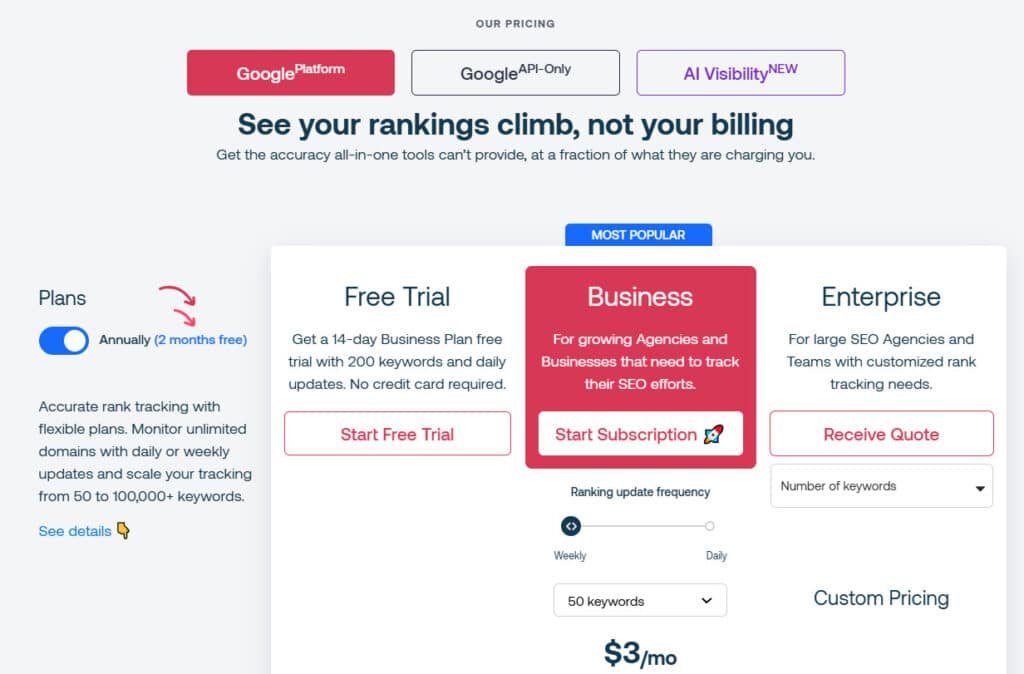
The Free Trial provides full Business access for testing. Business suits growing users with tiered keyword limits and white-label reporting.
Enterprise adds unlimited history for large teams. API-Only enables data pulls at low per-keyword costs. AI Visibility add-on tracks AI platforms like ChatGPT.
Free Trial
Free for 14 days (no card needed). Includes 200 keywords, daily ranking updates, all Business features (e.g., Spyglass verification, share of voice, mobile tracking, Looker Studio integration, custom alerts). Ideal for users to test SEO without commitment.
Business Plan
For agencies tracking competitors and website performance. Features: Weekly/daily updates, 2-year SERP history, full reporting (branded/automated email), unlimited users/permissions, local/ZIP tracking across devices, rank tracker API. Tiers (monthly/annual with 2 months free ~17% discount):
- $4/mo ($3 annual): 50 keywords
- $7/mo ($6 annual): 100 keywords
- $10/mo ($8 annual): 200 keywords
- $22/mo ($18 annual): 500 keywords
- $33/mo ($26 annual): 1,000 keywords
- $61/mo ($49 annual): 2,000 keywords
- $92/mo ($74 annual): 3,000 keywords
- $123/mo ($98 annual): 4,000 keywords
- $143/mo ($114 annual): 5,000 keywords
Scales to 100,000+ keywords (contact for quotes). Dedicated manager included.
Enterprise Plan
Custom pricing for large SEO teams. Features: All Business plus unlimited SERP history, custom subdomains. Weekly/daily updates, tailored keyword ranking limits (50–100,000+). Best for high-volume users needing advanced scalability.
API-Only Plan
$46/mo ($0.0092/keyword) for 5,000 keywords; lower rates for higher volumes (contact for details). Pulls unlimited SEO data via rank tracker API for integration into tools. Focuses on insights without full UI; no reporting/UI features.
AI Visibility Add-On
From $24.50/mo (credit-based). Tracks ranking on AI platforms (ChatGPT, Perplexity, Gemini, Claude). Features: Competitor benchmarking, sentiment analysis, audits, live dashboards. Add to any plan or standalone for users optimizing AI visibility.
| Plan | Starting Price (Monthly/Annual) | Keywords | Key Features | Best For |
| Free Trial | Free (14 days) | 200 | Daily updates, full Business tools | Testing |
| Business | $4/$3 (50 keywords) | 50–100k+ | API, white-label reports, integrations | Agencies |
| Enterprise | Custom | Custom | Unlimited history, custom domains | Large teams |
| API-Only | $46 (5k keywords) | 5k+ | Data pulls only | Developers |
| AI Visibility | $24.50 | Credit-based | AI platform tracking | AI SEO optimization |
Pros and Cons of Keyword.com
Pros I lean on
- Spot-on accuracy. Daily, verifiable tracking down to city level—no more guessing games.
- Super easy dashboard. Clean UI means no steep learning curve; even newbies onboard fast.
- Affordable entry point. Starts cheap at $24/month, way lighter on the wallet than Ahrefs.
- Client-ready reports. White-label PDFs and live shares? Impresses bosses without extra work.
- AI visibility bonus. Tracks brand mentions in ChatGPT and beyond—future-proof for current searches.
Cons to weigh
- No keyword research built-in. Gotta pair it with another tool for discovery—annoying extra step.
- Limited broader SEO features. Skips backlinks and audits; feels narrow if you want an all-in-one.
- Mobile view quirks. Keywords sometimes clip short; small but irks during quick checks.
Alternatives & quick comparisons
Keywords.com offers clean keyword discovery with volume, difficulty, and intent data—great for quick hunts at $29/month Starter. These five tools go further with AI briefs, outlines, or full content generation tied to research.
Agility Writer
Agility Writer pulls top SERP outlines and generates SEO articles in one click, with images and facts. Bloggers love the speed—free trial, $28/month Starter – Read Full Review
Content Harmony
Content Harmony builds comprehensive keyword reports, clusters topics, and grades outlines for SEO teams. Predictable ranking workflows—$99/month Starter – Read Full Review
Keywordly
Keywordly focuses on intent-driven keywords with SERP previews and competitor gaps. It pulls long-tail gems quick—free trial, $29/month Starter for unlimited searches. I spotted low-comp terms for a niche; traffic trickled in steady – Read Full Review
SEOWriting.Ai
SEOWriting.Ai detects winning keywords, auto-writes posts, and adds affiliate links. Bulk mode cranks 10+ articles fast—$12/month Basic – Read Full Review
Outranking
Outranking researches keywords, creates AI briefs with questions from SERPs, and optimizes drafts in real time. Agencies scale content—$79/month Solo – Read Full Review
RightBlogger
RightBlogger delivers unlimited keyword ideas, SERP analysis, and 70+ writing tools for bloggers. No credit limits—$29.90/month unlimited – Read Full Review
Arvow
Arvow automates keyword research into full SEO articles, with monitoring and auto-publishing to WordPress. Tracks targets and generates for laggards—$59/month Solo (up to 500k words). I set up an autoblog; posts went live and indexed overnight – Read Full Review
These alternatives blend research with creation—choose based on writing volume or team needs.
| Tool | Key Strengths | Starting Price | Best For |
|---|---|---|---|
| Keywords.com | Clean volume/difficulty/intent data | $29/month | Quick hunts & small teams |
| Agility Writer | SERP outlines + 1-click articles | $28/month | Fast drafting & roundups |
| Keywordly | Intent keywords, SERP previews, gaps | $29/month | Long-tail & competitor digs |
| Content Harmony | Topic clusters, outline grading | $99/month | Teams & steady rankings |
| SEOWriting.Ai | Auto posts, affiliate links, bulk mode | $12/month | High-volume content |
| Outranking | AI briefs, real-time optimization | $79/month | Agencies & strategic scaling |
| RightBlogger | Unlimited ideas + 70+ tools | $29.90/month | Unlimited bloggers & variety |
| Arvow | Auto research-to-article, monitoring | $59/month | Autoblogs & hands-off publishing |
“I use this tracker for fast, verifiable rankings and pair it with a research tool for content planning.”
Recommendation
If you run agencies or multi-location businesses and want fast, accurate rank tracking, this tracker is a solid, time-saving solution. If your goal is consolidation (research, backlinks, audits in one place), consider Ranktracker or another all-in-one.
| Plan / Feature | Starter | Mid | Enterprise |
|---|---|---|---|
| Price (monthly) | $24 (100 keywords) | $X (custom tiers) | $876 (15,000+ keywords) |
| Core strength | Basic rank tracking | Local & device splits | Scale, API, white-label |
| Missing features | No research | No backlink monitoring | No content optimization |
Conclusion
Raamish’s Take
Keyword.com keeps things simple yet powerful as a dedicated rank tracking tool for SEO folks who want real data without the hassle.
I like how it nails accurate, daily updates on keyword positions, down to city or ZIP code level—verified by their Spyglass system for that 97% reliability punch. No guessing games here; it pulls unbiased SERP views using residential IPs, which means you spot real shifts fast.
What grabs me is the SERP analytics side, tracking features like featured snippets, People Also Ask, and even AI overviews from ChatGPT or Gemini.
It crunches share of voice to show your slice of traffic versus competitors, plus clusters keywords by intent for smarter grouping. Add in competitor keyword discovery, and you’re uncovering hidden gems to steal traffic from rivals without starting from scratch.
For agencies, the white-label reports shine—branded dashboards and live SERP proofs build client trust, as one user noted doubling lifetime value.
Keyword.com Integrates easy with Google Analytics or Search Console too. Sure, it’s not a full-suite monster, but that focus lets bloggers and small teams optimize quick, like refreshing local strategies in minutes.
If you’re chasing precise insights to grow organic hits, this cuts the noise and delivers wins.
My bottom line: For agencies and multi-location businesses that need precise SERP measurement, this rank tracker is a reliable, time-saving platform. It delivers fast, verifiable ranks with local and device splits, Share of Voice, white-label reports, and solid integrations.
It doesn’t replace research, backlink tools, or on-page optimization. Pair it with a research or content tool and add an AI visibility layer to cover answers from search engines and assistants.
Next steps: Trial the workflow for 2–4 weeks, track priority terms and locations, set meaningful alerts, and feed results into reports that tie visibility to business performance. Start with a plan that fits your volume — small wins compound.
Action: Try the trial, map results to revenue terms, and decide if you expand into an all-in-one suite or keep a lean, best-of-breed stack.
Frequently Asked Questions
What exactly does Keyword.com do in the current AI landscape?
Keyword.com is a rank tracking platform that monitors search engine positions across Google, Bing, and Yahoo — with local and mobile splits, on-demand checks, and verification by city/ZIP. I use it to verify visibility swings, set alerts on big moves, and generate white-label reports for clients.
Who should consider using Keyword.com?
Agencies, multi-location businesses, and in-house SEO teams benefit most. If you manage many client projects, need city/ZIP precision, or want straightforward rank reporting and Share of Voice metrics, it’s a practical tracking-focused solution.
How accurate is its local tracking (city and ZIP)?
The platform uses Spyglass-style verification and localized checkers to improve accuracy. In my experience the city/ZIP splits are reliable for detecting local rank differences — though like any tool, occasional anomalies occur and cross-checking with live searches or GA4 helps.
Can Keyword.com track mobile and desktop separately?
Yes. It separates mobile vs. desktop visibility so you can align tracking with mobile-first indexing and see device-specific trends. I find that split useful when optimizing for mobile-heavy queries.
Does Keyword.com include keyword research and content optimization?
No — it’s focused on rank tracking and reporting. It does not offer built-in keyword research, backlink monitoring, or content optimization features. If you need those, pair it with a research tool or consider an all-in-one suite like Ranktracker or Dragon Metrics.
How fast are checks and is there real-time tracking?
The platform supports daily automated checks and on-demand (real-time) rank checks for immediate verification. You can also set custom alerts to notify you about significant rank changes so teams can react quickly.
What integrations are available?
Keyword.com integrates with Looker Studio, GA4, and Google Search Console, and it offers a robust API. Those connections let you pull rank data into dashboards and combine it with analytics for deeper insights.
Are white-label reports and shareable dashboards included?
Yes. It provides white-label reporting and client-ready dashboards, which I’ve used to deliver transparent performance updates without additional formatting work.
How scalable is the platform for agencies with many clients?
It’s built for scalability — project/group management, team access, and role-based permissions make it straightforward to manage multiple clients and region-specific datasets across accounts.
What are the pricing tiers and trial options?
Plans start around $24/month for 100 keywords and scale to support 15,000+ keywords. There’s typically a 14-day money-back or trial window so you can test tracking accuracy and reporting before committing.
What are the main advantages of using Keyword.com?
Strengths include accurate daily and on-demand checks, local/mobile splits, Share of Voice benchmarking, white-label reporting, and solid integrations. It’s straightforward, reliable, and focused on rank performance.
What are its limitations?
The primary limits are its narrow scope — no native keyword research, backlink tracking, or content optimization tools. If you want a full SEO suite you’ll need an additional product for research and on-page recommendations.
How does Keyword.com compare to alternatives like Ranktracker or Nightwatch?
Keyword.com is a focused rank tracker emphasizing accuracy and reporting. Ranktracker and Nightwatch offer broader toolsets (keyword research, additional SEO modules). Choose based on whether you want a best-in-class tracker or an all-in-one platform.
Can it track visibility in AI-powered answer sources (ChatGPT, Gemini, etc.)?
It doesn’t natively track AI model visibility (like ChatGPT or Perplexity) the way web SERPs are tracked. However, you can use it to monitor brand visibility and organic rankings that influence how content may be surfaced into AI answers.
Is there an API for custom reporting and integrations?
Yes — Keyword.com offers a robust API that lets you pull rank data for custom dashboards, BI tools, or automated client reports. I’ve used it to feed Looker Studio and internal reporting pipelines successfully.
How easy is the user interface for non-technical users?
The interface is clean and user-friendly — designed to highlight keyword performance and trends without overwhelming users. Teams can quickly set up projects, add keywords, and generate exportable reports.
Are there custom alerts and notifications for rank changes?
Yes. You can configure alerts for significant rank movements so you or your clients get notified immediately. Those alerts are handy for rapid response after algorithm updates or major SERP shifts.
Does it offer competitor tracking and Share of Voice metrics?
Yes — competitor tracking and Share of Voice are core features. They help benchmark market position and identify opportunities where competitors gain or lose visibility.
What’s the ideal workflow to combine Keyword.com with other SEO tools?
Use Keyword.com for authoritative rank tracking and reporting, then pair it with a keyword research tool (Ranktracker, Ahrefs, or SEMrush), a backlink monitor, and a content optimization tool for a complete SEO stack. I recommend integrating data into Looker Studio for unified reporting.
How does billing work for agencies managing many clients?
Billing scales with keyword volume and plan level. Agencies can buy larger packages or enterprise plans to cover multiple clients and add keywords as needed. Ask sales about multi-account discounts for high-volume use.