Does your digital toolbox feel like a cluttered junk drawer?
I know mine did. I was juggling separate subscriptions for writing, designing, and editing—each with its own login and price tag. It was expensive, confusing, and a huge time-suck.
The market for smart software has exploded. There’s a specialized product for every single task imaginable. While powerful, this fragmentation creates a real headache.
You end up paying for features you don’t use and wasting energy switching between different tools.
That’s why I was so intrigued by the promise of an all-in-one platform. The idea of replacing a dozen separate apps with a single login sounded like a dream. I had to put this one solution to the test.
I’ve spent weeks inside this platform, pushing every button. My goal was simple: To see if it truly delivers on its bold claim or if it’s just another overhyped offering. This honest review breaks down exactly what I found.
In this Krater AI Review, You’ll get a clear look at the core features, the pricing, and how it performs in real-world scenarios. By the end, you’ll know if consolidating your digital tools is the right move for you.
Let’s dive in and see what’s inside.
Key Takeaways: Krater AI Review
- This platform aims to solve the problem of managing multiple separate software subscriptions.
- It consolidates a vast array of specialized functions into a single dashboard.
- This analysis is based on extensive, hands-on testing of the system’s capabilities.
- The review will cover practical performance, not just a list of features.
- The final assessment will help you decide if an all-in-one approach saves you time and money.
Krater AI Review: An Overview
Raamish’s Take
Krater AI is a consolidated platform that integrates over 50 AI apps and tools into one subscription, enabling users to generate diverse content—from copy writing to graphics—efficiently without juggling multiple services.
Its unified interface is a primary strength, allowing seamless switching between apps for tasks like copywriting, image creation, or social media posts, all powered by leading models for fast, plagiarism-free outputs.
I am particularly impressed with the streamlined workflow: Select an app, input details, and generate content in seconds, saving up to 4 hours weekly on manual efforts.
Key AI apps include Copywriting for ad copy and emails, Chat with AI for brainstorming, Image Generation for custom visuals, Video Generation for clips from scripts, Text to Voice for narration in realistic voices & Audio Composer for custom sound tracks
It’s functionalities extent to Code Creator for developing programming scripts, Documents for summarization and editing, Speech to Text for transcription, Image Tools for edits, and Content Detector for originality checks.
Benefits extend to cost savings—replacing 11+ tools—and multi-language support for global use, with customization for brand-aligned outputs.
Krater AI‘s focus on productivity, with 100 generations monthly using multiple AI Apps, positions it as a practical choice for streamlining creative processes without the bother of purchasing multiple AI Tools.
Introduction to Krater AI
It feels like a new specialized tool for digital tasks launches every week. I’ve watched this space become incredibly fragmented.
You need one subscription for writing, another for images, and a third for audio. This is the exact problem the platform I’m reviewing aims to solve.
Current AI Landscape and Market Position
The market for ai-powered content creation is more crowded than ever. While choice is good, it leads to “subscription fatigue.” This is where the platform carves its niche. It doesn’t try to be everything to everyone. Instead, it focuses on combining the essential features creators need most.
Its goal is straightforward: Save you time and money by ending the juggling act. For professionals in marketing and content creation, this consolidation is a powerful draw.
Company Background and Endorsements
Founded in 2022 and based in Denmark, the company has a clear background. They aren’t building new AI models from scratch. Their smart approach involves curating top existing technologies, like OpenAI, into one seamless experience.
This practical background resonates with users. While not yet endorsed by giant corporations, it has strong support from its community. Seven verified reviews give it an impressive 9.2/10 overall rating, with its features scoring a stellar 9.4/10.
Users—often marketers, entrepreneurs, and content creators—consistently praise it as a “game-changer.”
They highlight how it simplifies their workflow for creating quality content.
What is Krater AI?
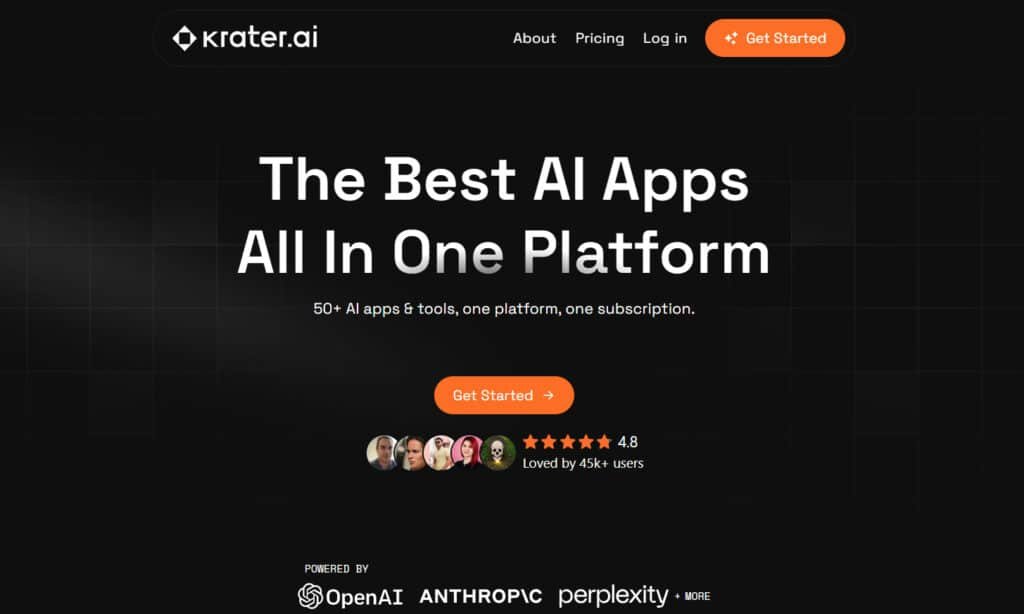
The concept behind this platform is surprisingly simple yet incredibly powerful. Think of it as your digital Swiss Army knife—a comprehensive solution that bundles 50+ specialized tools into one unified dashboard.
Instead of managing separate subscriptions, you get everything from copywriting to image generation through a single login. This approach fundamentally changes how you create content.
Behind the scenes, the platform integrates multiple advanced technologies. It combines models like FLUX.1, DALL-E, and OpenAI into one user-friendly interface. You’re essentially getting best-in-class features without the technical complexity. All these powerful apps work seamlessly together from one central location.
I found the unified credit system particularly clever. Rather than tracking different limits across multiple services, you have one pool of “generations” to use across all features. This makes budgeting for content creation much simpler and more predictable.
The ideal user for this tool regularly creates diverse content types. Freelancers, marketers, and small teams benefit most from this consolidated approach.
It streamlines your entire creative process by keeping everything in one place. You can move from writing to design to audio without ever switching tools or contexts.
Complete Features of Krater AI
During my testing, three specific tools consistently rose above the rest in terms of practicality and output quality.
These features cover the essential pillars of modern content creation: visuals, audio, and written copy. Understanding how they perform is key to knowing if this tool fits your workflow.
GENERATIVE Tools: Build Fresh Content Fast
1. Copywriting App
Ever need a quick & persuasive copy that pops? Krater AI‘s copywriting tool lets you generate high-quality content from simple prompts. Pick a template – say, for emails or ads – and tweak the tone to match your voice.
It spits out original text, 100% free of plagiarism. For marketers hunting for fast copy solutions, this means less time staring at a blank screen. You can optimize for SEO too, slipping in keywords that boost search ranks.
Think about your next campaign. How much easier would it be to generate high-quality content that hooks customers right away? Export as PDF or DOC, and you’re set for team reviews. This tool fits right into busy workflows, helping small biz owners craft messages that drive sales without the hassle.
2. Chat with AI
Your built-in chatbot in Krater AI feels like a smart buddy on call. Start a convo for ideas or answers – it remembers the flow, building on what you said before.
Upload files like PDFs, and the chatbot summarizes them in seconds. Perfect for folks searching how to handle questions on the fly, like devs brainstorming code fixes. Switch models for quicker replies or deeper dives.
This keeps things smooth for customer support teams too, turning chats into actionable insights. No more digging through notes. With Krater AI, that chatbot magic helps you tackle tough spots, saving hours on research or planning.
3. Image Generation App
Turn words into wow with image generation on Krater AI. Type a prompt – “sunset over mountains” – and get four crisp variants in styles like realistic or cartoon.
Upscale to 4K or edit spots with inpainting, fixing flaws fast. If you’re a blogger eyeing visual boosts, this tool cranks out images that match your content vibe without stock photo fees.
It even handles negative prompts to skip unwanted bits. For creators with search intent on easy visuals, Krater AI delivers pro-level images that engage customers and lift your site’s appeal. Quick and clean – just what you need.
4. Video Generation App
Video just got simpler in Krater AI. Feed it text or an image, set the length up to 30 seconds, and watch it animate with smooth motions or cinematic flair.
Add overlays or sync to voice for polished clips ready for social. Businesses looking to generate high-quality content like Reels will love how this skips editing software headaches.
It’s a game-changer for quick video promos that grab attention. Customers stick around longer with dynamic stuff like this. In Krater AI, turning ideas into shareable videos means more reach, less effort – ideal for your next post.
5. Text to Voice App
Give your words life with text-to-voice in Krater AI. Paste a script, pick an accent or emotion – excited or calm – and download natural-sounding audio.
Clone your own voice from a short sample for that personal touch. Podcasters or tutors searching for easy narration find this a lifesaver, creating episodes without mics or studios.
It handles batch jobs too, speeding up content production. Krater AI‘s text-to-voice ensures videos or lessons feel warm and real, drawing in customers who crave authenticity. Simple tweaks make it fit any project.
6. Audio Composer App
Layer sounds like a pro using Krater AI‘s audio composer. Prompt for beats or effects – “chill lo-fi track” – then mix stems with EQ sliders.
Pull from royalty-free bits and separate tracks if needed. For musicians or video makers wanting custom scores, this builds full pieces without DAW overload.
It ties into text-to-voice for narrated tunes. Customers notice the polish in your work, and Krater AI makes it happen fast. Whether for ads or intros, this tool elevates audio to match your vision.
7. Code Creator App
Stuck on code? Krater AI‘s code creator turns descriptions into snippets – “simple login in JS” – with comments and debug help.
Supports languages like Python or Rust, plus in-app testing. Devs with intent to prototype quick will appreciate exporting to GitHub seamlessly.
This cuts boilerplate time, letting you focus on logic. In Krater AI, generating clean code means faster builds and fewer bugs, helping teams ship features that wow customers.
ADAPTIVE Tools: Edit and Check What You’ve Got
1. Documentation App
Tame big files with Krater AI‘s documents tool. Upload a PDF, and it summarizes key points or rewrites sections.
Make tables from data or mind maps for overviews. Researchers digging for quick insights get structured outputs that clarify chaos.
Translate on the fly too. This adaptive feature in Krater AI streamlines reviews, aiding content pros in pulling value from reports without endless scrolling.
2. Speech to Text App
Capture talks effortlessly via speech-to-text in Krater AI. Record or upload audio – it transcribes with timestamps, spotting speakers in noisy clips.
Export as subtitles for videos. Interviewers or note-takers find accurate text that saves re-listening time. Handles multiple languages cleanly.
Krater AI turns rambling sessions into editable gold, perfect for customer call logs or lesson plans.
3. Image Tools
Polish pics fast with Krater AI‘s image tools. Remove backgrounds or sharpen uploads in batches.
Auto-enhance low-light shots or swap styles to sketches. Designers searching for touch-ups get seamless fixes that prep assets for use.
This keeps your visuals sharp. In Krater AI, adaptive edits mean pro results without Photoshop, boosting content that stands out to customers.
4. Content Detector App
Spot AI traces with Krater AI‘s content detector. Paste text – it scores likelihood and highlights bits.
Get rewrite tips to humanize it. Writers aiming for authentic posts avoid search penalties this way.
The chatbot-like scan in Krater AI ensures high-quality content passes checks, building trust with customers who value real voice.
Bonus Tools & Perks
1. Templates Galore
Jumpstart with 50+ templates in Krater AI for marketing or SEO. They guide copy or video setups. Creators save setup time, focusing on tweaks. This perk matches search needs for ready frameworks.
2. History & Saves
Track every gen in Krater AI‘s history – download or copy past work easy.No lost ideas for revisits. It helps organized flows, like pulling old content for updates.
3. Integrations
Hook Krater AI into email or social – it’s expanding. Seamless shares boost workflows. For teams, this means less app switching.
4. Plagiarism Checker
Built-in checks keep outputs original in Krater AI. Scan before publishing – vital for credible content. Avoids issues for pros.
5. Multi-Language Support
Krater AI handles 20+ languages for gens and detects. Global users create borderless videos or text. Expands your reach simply.
6. Studio Sound
Enhance audio to pro levels with Krater AI‘s studio sound. Noise reduction without gear. Podcasters get clear voice tracks fast.
Pricing Plans of Krater AI
The cost structure here is what really sets this platform apart from the subscription chaos I mentioned earlier. You get four straightforward tiers, starting with a genuinely useful free option.
Personal Plan
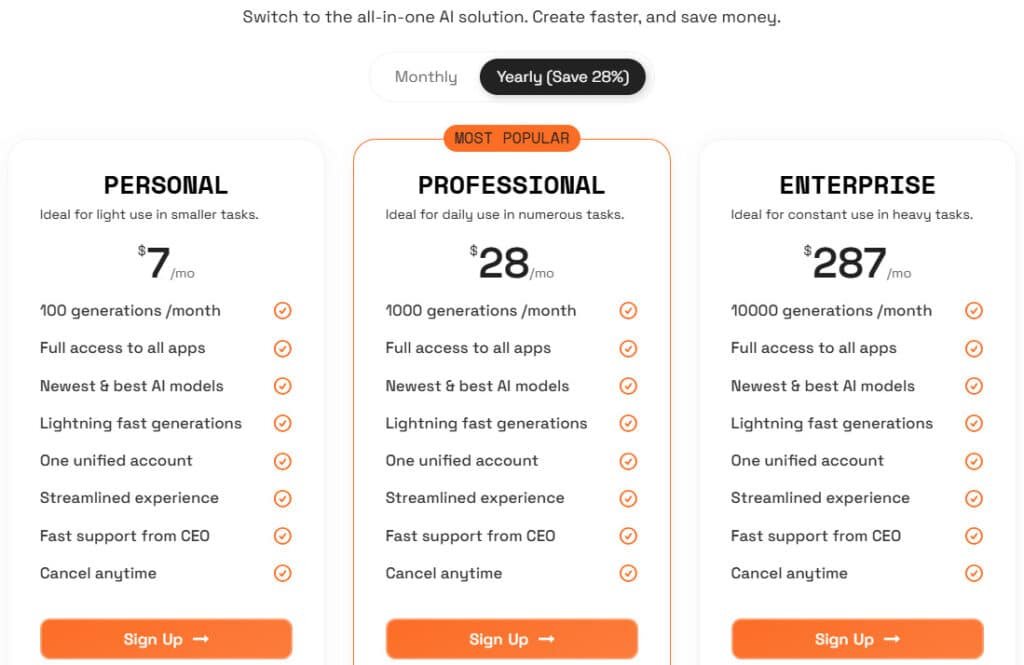
Krater.AI starts light at $9/mo or $7/mo annual (save 28%). Full access to all apps, newest AI models, lightning fast generations, one unified account, streamlined experience, fast support from CEO, cancel anytime, 14-day money-back guarantee. 100 generations/month.
Professional Plan (Most Popular)
Scale up with Krater.AI at $39/mo or $28/mo annual. Full access to all apps, newest AI models, lightning fast generations, one unified account, streamlined experience, fast support from CEO, cancel anytime, 14-day money-back guarantee. 1000 generations/month.
Enterprise Plan
Go big on Krater.AI for $399/mo or $287/mo annual. Full access to all apps, newest AI models, lightning fast generations, one unified account, streamlined experience, fast support from CEO, cancel anytime, 14-day money-back guarantee. 10000 generations/month.
| Pricing Plan | Monthly | Annual (Save 28%) | Generations/Mo |
| Personal | $9 | $7 | 100 |
| Professional | $39 | $28 | 1000 |
| Enterprise | $399 | $287 | 10000 |
Pros & Cons of Krater AI
Let’s cut through the hype and examine the real-world advantages and limitations I discovered. Every tool has trade-offs, and understanding them helps you make the right choice for your workflow.
Pros: Key Benefits and Advantages
The interface is genuinely intuitive—I was creating content within minutes. This platform saves significant use time by eliminating subscription juggling.
For the price, you get remarkable value. The comprehensive feature set handles diverse content types seamlessly. The unified credit system simplifies budgeting for your content creation process.
Cons: Limitations and Drawbacks
While versatile, some specialized output may not match dedicated tools. The images are good but occasionally need extra editing for perfection.
Heavy users might find credit limits restrictive. This isn’t the ideal solution for enterprise-scale projects requiring unlimited generations.
| Aspect | Strengths | Considerations |
|---|---|---|
| User Experience | Extremely intuitive interface | Learning curve for advanced features |
| Value Proposition | Excellent price-to-feature ratio | Credit limits for power users |
| Content Versatility | Handles multiple content types well | Specialized outputs may need refinement |
| Workflow Integration | Streamlines content creation process | Best for individuals/small teams |
Understanding these trade-offs is crucial. If the limitations concern you, there are alternative tools worth exploring in the next section.
Alternatives to Krater AI
Direct Competitors in All-In-One Content Creators
Managing a bunch of AI tools separately adds up quick—in time and money. You end up with tabs everywhere and bills stacking.
Krater AI pulls together copywriting, images, chat, and more affordably. But these alternatives pack even stronger all-in-one AI content features, like multi-model access or design extras.
Here’s what stands out.
Hix AI
Hix bundles 120+ writing tools with chat, bypassers, and browser extensions. Supports top models for SEO and emails. Fits marketers needing versatile text fast – Read Full Review
GlobalGPT
GlobalGPT combines advanced models like GPT-5.2 and Claude Sonnet with video gen and agents. Real-time search included. Good for creators handling text, images, and clips in one hub – Read Full Review
Magai
Magai links 50+ models with personas, unlimited gen, and team folders. Seamless collaboration. Suits pros brainstorming or scaling content without limits – Read Full Review
Galaxy AI
Galaxy offers 3000+ tools for chat, images, video, and audio. Credit-based but broad. Ideal for experimenters wanting massive options cheap – Read Full Review
Monica AI
Monica merges models for writing, art, translation, and productivity. Extension for on-the-go use. Great for daily tasks like summarizing or rephrasing – Read Full Review
BlueGPT
BlueGPT centralizes 40+ models for content, agents, and document analysis. Prompt libraries too. Perfect for boosting workflows with automation – Read Full Review
Simplified
Simplified mixes AI writing, design, video editing, and social planning. Templates and collaboration. Fits teams creating graphics and posts together – Read Full Review
Easy-Peasy.AI
Easy-Peasy.AI provides generators for text, images, audio, and transcription. Custom templates. Handy for quick content from blogs to markup – Read Full Review
| Tool | Key Content Features | Strengths & Notes | Best For | Pricing Starts |
|---|---|---|---|---|
| Hix AI | 120+ tools, chat, bypass, extensions | Strong SEO & multi-language | Marketers & writers | $9/month |
| GlobalGPT | GPT-5/Claude, video gen, agents | Advanced models & real-time | Video/research users | $12/month |
| Magai | 50+ models, personas, unlimited | Team collab & no limits | Professionals & teams | $19/month |
| Galaxy AI | 3000+ tools, image/video/audio | Huge variety, credit system | Experimenters | $15/month |
| Monica AI | Writing/art/translation, extension | Productivity & multi-model | Everyday tasks | $9/month |
| BlueGPT | 40+ models, agents, document analysis | Automation & prompt libs | Workflow boosters | $15/month |
| Simplified | Writer/design/video/social | Templates & visual heavy | Designers & social teams | $15/month |
| Easy-Peasy.AI | Text/images/audio/transcription | Custom gens & templates | Quick creators | $5/month |
Additional Alternatives
Your workflow is unique, and the perfect tool for someone else might be the wrong fit for you. If the all-in-one approach isn’t ideal, several excellent alternatives exist.
I’ve found the best choice often depends on whether you need a jack-of-all-trades or a master of one.
For a similar solution, consider platforms like HIX.AI or Simplified AI. They bundle multiple tools into a single product, much like the one we reviewed.
However, specialized tools often deliver superior results in their niche.
- Image Generation: For stunning visuals, Getimg is the industry leader. Its image generation quality is exceptional, though it’s a separate subscription.
- Text and SEO: If your focus is blog posts and search rankings, ScaleNut or Surfer AI offer deeper seo features. RightBlogger is a powerhouse for marketing copywriting.
- Social Media: For managing media campaigns, Rapidely provides direct posting and advanced scheduling.
- Voice Generation: Murf AI creates incredibly natural-sounding audio from text.
- Budget Option: ChatGPT offers powerful text generation at a low cost, which you can pair with free image tools.
Your decision hinges on your primary content needs. A versatile product is great for general content creation. But for specific, high-quality blog posts, media, or visuals, a dedicated tool might be the smarter investment.
Case Study / Personal Experience with Krater AI
Putting theory into practice is where any tool truly proves its worth. I designed a real-world test to mirror how most creators actually work—juggling multiple content types under time pressure.
My goal was to create a complete mini-campaign for a fictional vegan clothing launch using only this platform. This experience tested the entire content creation process in one sitting.
My Experience: A Real-World Success Story
First, I needed a blog post. The platform’s copywriting tool generated a 600-word blog post about the collection. It nailed the assignment, hitting all key messaging points. The output was coherent and required minimal editing.
Next, I turned to visuals. The image generator produced usable assets for the blog posts and social media. While not Midjourney-level, the cartoon and realistic images were solid. The built-in editor handled background removal perfectly.
For promotion, I crafted an Instagram caption for the launch. The tool formatted it with proper hashtags, saving me time. I even tested the speech-to-text on a complex news video—it achieved 100% accuracy.
This hands-on experience confirmed the platform’s strength: streamlining the way you generate high-quality content. It’s a powerful product for any user managing diverse media needs efficiently.
Conclusion: Should You Buy It?
Raamish’s Take
Krater AI is a consolidated platform that integrates over 50 AI apps and tools into one subscription, enabling users to generate diverse content—from copy writing to graphics—efficiently without juggling multiple services.
Its unified interface is a primary strength, allowing seamless switching between apps for tasks like copywriting, image creation, or social media posts, all powered by leading models for fast, plagiarism-free outputs.
I am particularly impressed with the streamlined workflow: Select an app, input details, and generate content in seconds, saving up to 4 hours weekly on manual efforts.
Key AI apps include Copywriting for ad copy and emails, Chat with AI for brainstorming, Image Generation for custom visuals, Video Generation for clips from scripts, Text to Voice for narration in realistic voices & Audio Composer for custom sound tracks
It’s functionalities extent to Code Creator for developing programming scripts, Documents for summarization and editing, Speech to Text for transcription, Image Tools for edits, and Content Detector for originality checks.
Benefits extend to cost savings—replacing 11+ tools—and multi-language support for global use, with customization for brand-aligned outputs.
Krater AI‘s focus on productivity, with 100 generations monthly using multiple AI Apps, positions it as a practical choice for streamlining creative processes without the bother of purchasing multiple AI Tools.
So, after all this exploration, is this all-in-one platform the right choice for you? My testing confirms it’s a legitimate comprehensive solution for creators tired of subscription sprawl.
If you regularly need diverse content—copy, images, audio—the value is undeniable. The $9 Personal Plan offers incredible access to 50+ tools.
The copywriting feature with its 33 templates alone justifies the cost. It consistently produces high-quality text that saves time.
Remember, AI detection is a reality. Budget time for human editing, especially for SEO purposes. The output is very good, not always perfect.
My final recommendation?
Start with the free trial. Test the tools with your actual projects. You’ll quickly know if this one solution simplifies your process.
For most generalist creators, it’s a smart investment that delivers on its promise.
Frequently Asked Questions
What exactly is Krater AI, and how does it work?
It’s a comprehensive platform that bundles over 50 different AI-powered tools name into a single subscription. You get access to everything from image generation and copywriting to text-to-voice and code assistance. The idea is to streamline your entire content creation process in one place.
Can I really generate high-quality images with this platform?
Absolutely. The image generation feature is surprisingly robust. I’ve used it to create visuals for blog posts and social media, and the output is impressive. It understands detailed prompts well, allowing for a high degree of creative control over the final product.
How does the copywriting tool compare to dedicated apps?
For a tool that’s part of a larger suite, it holds its own. It offers a variety of templates for marketing copy, emails, and product descriptions. While it might not have every advanced feature of a standalone app, it’s more than capable for most everyday business needs.
Is there a free plan or a trial to test the features?
Yes, there is a free tier that gives you access to a limited number of credits to try out the core apps. It’s a great way to get a feel for the platform’s capabilities before committing to a paid plan.
How does the text-to-voice feature sound? Is it natural?
The audio quality is quite good. The voices sound less robotic than many basic text-to-speech engines I’ve tested. It’s a handy feature for creating quick voiceovers or audio content without needing a separate service.
What are the biggest limitations or drawbacks I should know about?
The main limitation is that some of the more specialized tools, while functional, might not be as deep as a dedicated single-use application. Also, your monthly output is governed by a credit system, so high-volume users need to choose their plan carefully.
Who is this platform best suited for?
It’s an excellent solution for marketers, small business owners, and content creators who need a versatile toolkit. If you’re tired of juggling multiple subscriptions for different tasks, this platform consolidates them into one efficient solution.