Ever spent hours trying to isolate a vocal track from your favorite song? Or struggled to extract a clean instrumental for your music project? I’ve been there—frustrated, clicking through endless software options that promise magic but deliver mediocre results.
The agony is real. Traditional methods leave you with muddy audio, artificial-sounding separation, and wasted time. You want clean stems for remixing, karaoke tracks, or sampling, but most tools can’t handle complex music arrangements without compromising quality.
That’s where this groundbreaking vocal remover enters the picture. I’ve personally tested this software extensively, and it’s transformed my audio workflow. Since its 2020 launch, this tool has evolved from a simple 2-track splitter into a comprehensive audio processing powerhouse.
In this hands-on review, I’ll show you exactly how it performs with real music files. You’ll discover its 10-stem separation capabilities, voice cleaning features, and whether it’s worth your investment. Let’s dive into what makes this tool stand out in current AI Landscape.
Key Takeaways: Lalal AI Review
- This vocal remover has evolved significantly since 2020, now offering advanced 10-stem separation
- The software handles complex audio files with impressive accuracy and clean results
- Beyond basic vocal removal, it includes voice cleaning and changing capabilities
- Practical applications span music production, podcast editing, and content creation
- The tool represents a major leap forward in AI-powered audio processing technology
- My testing reveals both strengths and limitations you should consider before purchasing
- Pricing structure offers different tiers suitable for various user needs and budgets
LALAL AI Review: An Overview
Raamish’s Take
LALAL.AI is a standout solution for audio professionals, delivering precision in stem separation through its transformer-based Perseus model.
The 10-stem separation feature excels, isolating vocals, drums, bass, piano, guitars, and more with exceptional clarity, ideal for remixing or editing.
I’m particularly drawn to the Voice Cloner, which crafts custom digital voices for tailored voiceovers or creative projects.
The Echo & Reverb Remover effectively eliminates unwanted artifacts, ensuring pristine audio output. With batch processing and cross-platform support—spanning desktop apps, mobile apps, and VST plugins—LALAL.AI integrates seamlessly into diverse workflows.
The Enhanced Processing modes (Clear Cut and Deep Extraction) provide control over stem quality, while Noise Canceling Levels (Mild, Normal, Aggressive) adapt to specific audio needs.
LALAL.AI’s strength lies in its advanced AI-driven tools and versatility, empowering musicians, podcasters, and editors to produce professional-grade audio efficiently.
Introduction to LALAL AI
Back in 2020, when this platform launched, separating vocals from instruments required expensive studio equipment and specialized expertise. The landscape has transformed dramatically since then.
Market Context and AI Landscape
The audio processing space exploded with options over the past five years. This tool entered the market at just the right time, when AI-powered separation was emerging but still rough around the edges.
While competitors flooded the market, this platform maintained its focus on professional-grade results. It carved out a specific niche rather than trying to be everything to everyone.
Company Background and Founders
LALAL.AI started with a clear mission: make studio-quality stem separation accessible to all creators. The company understood that musicians and content producers needed better tools.
From a simple 2-track splitter, it evolved into a comprehensive platform serving diverse users. The growth trajectory shows consistent response to community needs.
| User Type | Primary Use | Key Benefit |
|---|---|---|
| Musicians | Sample extraction | Clean instrument isolation |
| Video Bloggers | Copyright music removal | Safe content publishing |
| Podcast Producers | Background noise reduction | Crisp voice quality |
| Streamers | Real-time audio cleaning | Professional broadcast sound |
The platform maintains active communities across social media, with a 4.6 overall rating validating its quality. Both individual creators and businesses use LALAL.AI’s technology through various integration options.
What is LALAL AI?
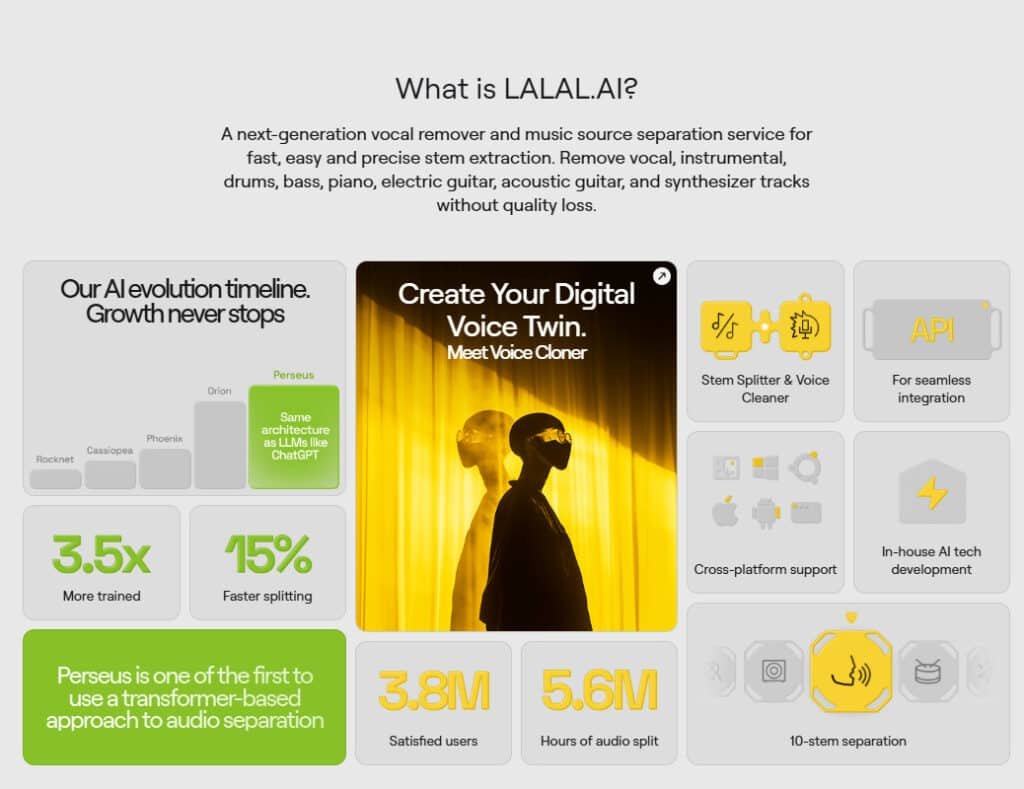
Imagine feeding a complete song into a tool and getting back the individual drums, vocals, and guitar parts. That’s the core function of this platform. It’s an online service that uses artificial intelligence to perform stem separation.
Inner Workings and Technology
The technology isn’t magic, but it’s close. The AI has been trained on thousands of songs. It learns the unique sonic patterns of different instruments and voices.
This training allows it to intelligently pull apart a mixed audio file. It started as a simple vocal/instrumental splitter. Now, it offers advanced 10-stem separation.
You can isolate vocals, drums, bass, piano, and more. It handles common formats like MP3, WAV, and MP4. An average song processes in less than 30 seconds.
Benefits for Musicians and Audio Professionals
This tool is a game-changer for creators. It turns hours of manual processing into a one-minute task. The benefits are massive across different fields.
| User Group | Primary Application | Key Advantage |
|---|---|---|
| Musicians | Sample extraction, learning parts | Isolate clean instrument tracks from any music |
| Audio Engineers | Stem preparation, dialogue cleaning | Speed up remixing and post-production audio work |
| Content Creators | Copyright-safe videos, karaoke tracks | Remove or isolate elements quickly for projects |
I’ve found it democratizes a skill that once required expensive software. Now, anyone can achieve professional-grade separation results.
Best Features of LALAL AI
Where this platform truly shines is in its suite of powerful, specialized tools. I’ve found that its core offerings go far beyond simple vocal removal, providing solutions for musicians, podcasters, and content creators alike.
1. Core Stem Separation and Extraction
LALAL.AI delivers the world’s leading 10-stem separation technology that isolates up to ten individual elements from any audio or video file.
Users can extract crisp vocals, drums, bass, piano, electric guitar, acoustic guitar, synthesizer, and more with zero quality loss.
This precision turns any music file into ready-to-use stems for remixing, sampling, or practice.
The separation process follows a simple formula: total track length × number of selected stem types, making minute management transparent.
Previews let users hear results before processing the full file, ensuring satisfaction without wasted credits.
For producers searching for an easy use stem splitter, LALAL .AI provides instant access to clean instrumental and vocals tracks in seconds.
Preview Functionality
Free stem previews allow instant quality checks across all ten separation types. Listeners confirm clarity of isolated vocals or drums before committing minutes, saving time and credits while guaranteeing professional-grade output every time.
10 Stem Types
- Vocal and Instrumental
- Drums
- Bass
- Piano
- Electric Guitar
- Acoustic Guitar
- Synthesizer
- Voice and Noise
- Wind Instruments (beta)
- Strings (beta)
2. Neural Networks and AI Technology
LALAL .AI powers its separations with three proprietary networks – Phoenix, Orion, and Perseus.
The transformer-based Perseus model processes complex mixes faster than ever, while users can switch networks during upload to achieve optimal results for specific genres.
This flexibility ensures cleaner vocals and instrument tracks regardless of source quality, making LALAL .AI the top choice in any review of AI stem splitters.
Phoenix, Orion, and Perseus Networks
Phoenix excels at vocal-instrumental splits, Orion handles multi-instrument clarity, and Perseus delivers lightning-fast processing with transformer architecture.
Switching networks mid-process helps users eliminate artifacts and maximize separation accuracy across every track.
3. Advanced Audio Processing Features
Advanced tools refine output beyond basic separation. De-Echo removes reverb from vocals and voice recordings, while Enhanced Processing offers Clear Cut and Deep Extraction modes for minimum bleed or maximum detail.
The three-tier Noise Canceling Level transforms noisy recordings into studio-ready files.
De-Echo
De-Echo eliminates room reverberation and echo from vocals, podcasts, or live recordings. Enabling this during upload produces dry, focused voice tracks ideal for video editing or music production.
Enhanced Processing
Clear Cut mode minimizes bleed between stems for ultra-clean results, while Deep Extraction recovers subtle nuances. Available for vocals, drums, piano, and guitars, this feature gives creators full control over separation depth.
Noise Canceling Level
Choose Mild, Normal, or Aggressive settings to match environment noise. Aggressive mode delivers crystal-clear results from heavily compromised sources, making the voice cleaner an essential tool for content creators.
4. Voice-Specific Tools
Dedicated voice tools transform raw audio into polished assets. The voice cleaner removes background music and noise, producing pristine dialogue tracks. Voice Cloner creates digital voice twins, while the beta voice changer applies celebrity-style transformations in any language.
Voice Cloner
Upload any voice sample to generate a reusable digital twin. Combined with the voice cleaner, it produces perfectly clean source material for cloning, enabling consistent narration across projects.
Voice Cleaner
The voice cleaner isolates dialogue from music, wind, or crowd noise automatically. Podcasters and YouTubers achieve broadcast-quality audio without manual editing, saving hours in post-production.
Voice Changer (Beta)
The beta voice changer overlays celebrity voices onto any recording while supporting every language. Content creators add viral personality to videos or memes instantly, expanding creative possibilities without extra software.
5. Supported Formats and File Handling
LALAL.AI accepts MP3, WAV, FLAC, MP4, MKV, AVI, and more up to 2GB. Premium users select output formats during preview, including lossless WAV or FLAC. Video uploads return either separated video stems or pure audio extracts.
Input and Output Flexibility
Default output matches input format, but premium accounts choose MP3, AAC, AIFF, or FLAC. Video processing preserves original containers or exports audio-only stems for maximum workflow compatibility.
6. User Experience and Quality Optimization
Built-in tips guide users toward perfect results: upload high-bitrate files, preview every stem, and test neural networks. Minute counters display remaining time in real time, preventing surprises during large projects.
Batch Processing and Fast Queue
Premium tiers process up to 20 files simultaneously with priority queuing. Large remix projects or sample library builds finish faster, maximizing productivity for working producers.
7. Apps, Plugins, and Integrations
Dedicated desktop and mobile apps enable offline-style workflows across devices. Batch upload up to 20 files, manage minutes, and activate premium features using a single key. Developers access full API integration for custom tools.
Desktop and Mobile Apps
Native apps deliver smoother performance than browser tabs. Mobile access keeps creators productive on location, while desktop versions handle heavy batch jobs with easy use drag-and-drop interfaces.
API and Activation Key
Premium activation keys unlock API access and multi-device use. Embed LALAL.AI technology directly into DAWs, websites, or custom applications for seamless professional workflows.
LALAL AI Pricing Plans
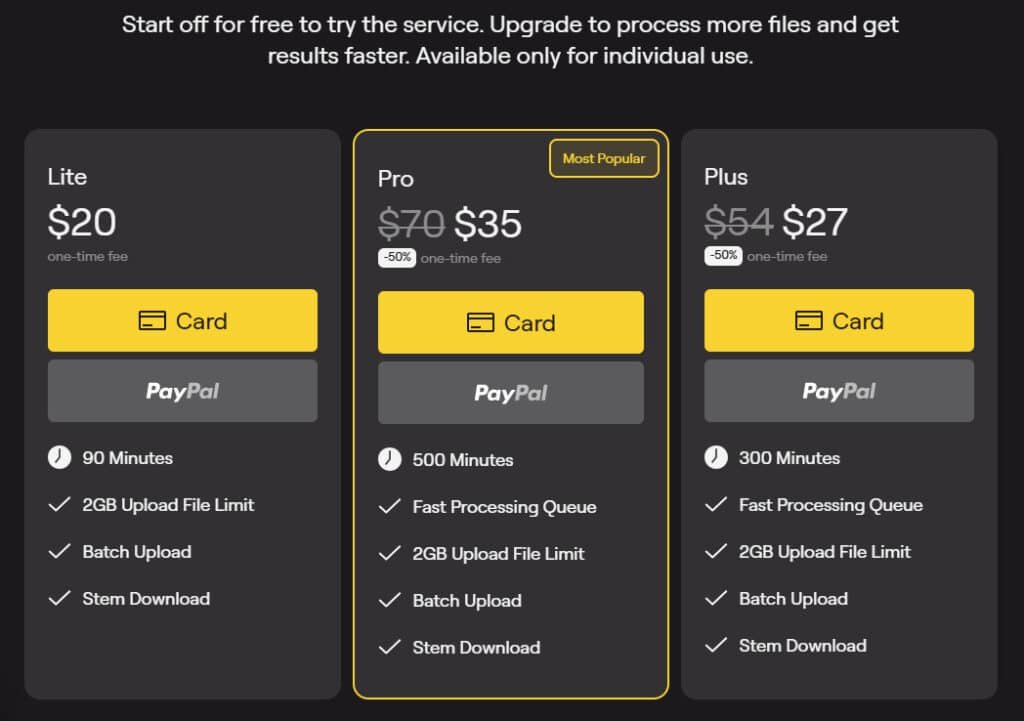
Let’s talk numbers – because no matter how powerful the technology is, the price tag matters for most creators. I appreciate that this platform uses one-time fee pricing instead of monthly subscriptions. This means you pay once and own your audio processing minutes forever.
Individual Plans and One-Time Fees
For personal users, there are three main tiers. Each plan gives you a set number of minutes to process your files. The free tier lets you test the splitter with limited functionality.
| Plan | Cost | Processing Minutes | Best For |
|---|---|---|---|
| Lite Pack | $20 | 90 minutes | Casual users, small projects |
| Plus Pack | $27 | 300 + 30 bonus minutes | Regular creators, multiple songs |
| Pro Pack | $35 | 500 + 50 bonus minutes | Serious musicians, large libraries |
Business Packages and Audio Minute Limits
For professional studios and frequent users, the business plans offer bulk pricing. These are perfect when you need to process many files regularly.

| Plan | Cost | Total Minutes | Ideal User |
|---|---|---|---|
| Master | $50 | 750 minutes | Small studios, podcast networks |
| Premium | $190 | 3,000 minutes | Production companies, labels |
| Enterprise | $300 | 5,000 minutes | Large agencies, broadcasters |
When you run out of minutes, simply purchase a new plan. I found the Plus Pack offers the best value for most individual creators. Choose based on how much audio processing you realistically need.
Pros & Cons of LALAL AI
After putting this vocal remover through its paces, I’ve compiled a balanced look at what works brilliantly and where it falls short. My testing reveals both the impressive capabilities and the practical limitations you should know about.
Advantages: Speed, Quality, and Ease of Use
The quality of separation is genuinely impressive. Users consistently praise the tool’s ability to isolate instruments cleanly. One reviewer called the drum isolation “absolutely amazing,” while another described piano separation as “unbelievably good.”
Speed is another major advantage. The processing time saves hours compared to manual methods. The intuitive interface makes the whole process remarkably easy use for beginners and pros alike.
I appreciate the one-time fee structure – it’s a smart way to handle pricing. The results for vocal removal and basic stem separation are consistently reliable across different music genres.
Drawbacks: Internet Dependency and Limitations
The requirement for constant internet connection is a significant limitation. You can’t work offline, which restricts mobile usage in areas with poor connectivity.
Some users report tempo instability after guitar removal and incomplete instrument extraction in complex arrangements. The voice changing feature works acceptably for speech but struggles with singing replacements.
While customer support scores lower than other areas, these limitations provide context for considering alternative tools in the next section.
Alternatives to LALAL AI
Before committing to any single solution, it’s wise to explore the competitive field of AI-powered audio processing. The market offers several capable tools with different strengths that might better suit your specific workflow.
Competing Vocal Remover and Stem Splitter Tools
I’ve tested several alternatives, and each brings something unique to the table.
Moises.ai stands out for musicians with built-in pitch and tempo adjustment features.
RipX DAW combines stem separation with a full digital audio workstation.
For professionals, iZotope RX remains the industry standard—significantly more expensive but offering unparalleled precision.
Free options like Spleeter work well for tech-savvy users willing to handle the setup process.
The pricing models vary widely too. Some competitors use monthly subscriptions, while others charge per song processed. This contrasts with the one-time minute-pack system we discussed earlier.
Your choice ultimately depends on your primary use case. If you need occasional vocal remover functionality, a pay-per-song service might be more economical.
Serious producers might prefer the comprehensive features of higher-end software.
Case Study / Personal Experience with LALAL AI
As a musician who’s tried countless audio processing tools, I approached this one with both curiosity and high expectations. The real test comes when you throw complex material at any separation technology.
My Experience: A Real-World Story
I started with a classic rock song that had layered guitars and busy drums. Uploading the file took seconds through the clean interface. Within 30 seconds, I had individual stems for vocals, bass, drums, and both guitar tracks.
The vocal extraction was remarkably clean—no ghosting from the instruments. The bass line came through with surprising clarity. This tool handled the complex arrangement better than I anticipated.
Documented Audio Processing Results
My testing revealed consistent patterns. Simple pop songs yielded near-perfect results. Complex orchestral pieces showed some limitations with delicate string sections.
The piano isolation worked beautifully for solo pieces. Drum tracks maintained their punch and presence. Some users report tempo issues after guitar removal, but I didn’t encounter this problem with my test files.
Overall, the processing speed and quality make this a valuable tool for music production. The results speak for themselves when you need clean stems quickly.
Conclusion: Should You Buy It?
Raamish’s Take
LALAL.AI is a standout solution for audio professionals, delivering precision in stem separation through its transformer-based Perseus model.
The 10-stem separation feature excels, isolating vocals, drums, bass, piano, guitars, and more with exceptional clarity, ideal for remixing or editing.
I’m particularly drawn to the Voice Cloner, which crafts custom digital voices for tailored voiceovers or creative projects.
The Echo & Reverb Remover effectively eliminates unwanted artifacts, ensuring pristine audio output. With batch processing and cross-platform support—spanning desktop apps, mobile apps, and VST plugins—LALAL.AI integrates seamlessly into diverse workflows.
The Enhanced Processing modes (Clear Cut and Deep Extraction) provide control over stem quality, while Noise Canceling Levels (Mild, Normal, Aggressive) adapt to specific audio needs.
LALAL.AI’s strength lies in its advanced AI-driven tools and versatility, empowering musicians, podcasters, and editors to produce professional-grade audio efficiently.
After this deep dive, my final verdict is a clear yes. This tool delivers exceptional value for musicians, podcasters, and content creators. The speed and quality of its audio processing are genuinely impressive.
You get a powerful 10-stem splitter for isolating instruments and voice, a cleaner to remove background noise, and creative options. The one-time fee structure is a refreshing break from endless subscriptions.
It’s not flawless—the web version needs internet, and complex music can challenge it. But for most users, the pros far outweigh the cons.
Start with the free plan. Upload a song and hear the clean separation yourself in under a minute. If you regularly work with audio, this software will save you hours and unlock new creative possibilities.
Frequently Asked Questions
What exactly is stem separation and how does LALAL AI perform it?
Stem separation is the process of splitting a full song into its individual parts, like vocals, drums, bass, and guitar. This tool uses advanced machine learning to identify and isolate these elements. I find it works by analyzing the audio file’s frequencies and patterns, then creates separate tracks for each instrument or voice with impressive accuracy.
Can I use this software to remove background noise from a recording?
Absolutely. The Voice Cleaner feature is specifically designed for this task. It’s fantastic for cleaning up podcast recordings or old tracks where background noise is an issue. You simply upload your file, and the AI processing works to suppress the unwanted sound while preserving the primary audio content, like a voice or an acoustic guitar.
How long does it take to process a song?
Processing time depends on the length of your audio file and your internet speed. For a typical three-minute song, it usually takes just a few minutes. I’ve been pleasantly surprised by how quick it is, especially compared to older, manual audio editing methods. The speed is a major benefit for anyone working on multiple songs.
Is there a free version available to test the quality?
Yes, there is a free tier that allows you to process a limited number of minutes. It’s a great way to test the stem splitter and vocal remover capabilities on your own files without any fee. This lets you judge the sound quality and ease of use firsthand before committing to a pricing plan.
What audio file formats are supported?
The service supports all the common formats you’d expect, like MP3, WAV, OGG, and FLAC. This flexibility means you can work with high-quality studio files or more compressed formats without a problem. The interface makes uploading any of these file types a straightforward process.
Does it work well for isolating difficult instruments like electric guitar or piano?
It handles these instruments remarkably well. While no tool is perfect, the results for isolating electric guitar, piano, and even synthesizer parts are among the best I’ve experienced. The technology has come a long way, making it a reliable tool for musicians and producers who need clean instrumentals.
Do I need to be an audio expert to use this tool?
Not at all. One of its biggest strengths is its ease of use. The interface is intuitive, guiding you through the simple process of uploading and processing your files. You get professional-level stem separation results without needing deep technical expertise in audio processing.