Are you drowning in the endless demand for fresh video content?
I feel your pain. In this digital landscape, the pressure to constantly produce engaging clips for multiple platforms is overwhelming. Content creators and marketers face a relentless treadmill of content creation.
The frustration is real. You spend hours recording webinars or podcasts, only to struggle with editing them into bite-sized social media gems. Traditional video editing software feels like learning a new language. This is where AI tools become essential partners, not replacements.
Enter the solution: an innovative platform trusted by over 80,000 users worldwide. This tool specifically focuses on content repurposing rather than generative AI.
Its mission?
To “demolish the skill barrier to video editing” and make professional-quality production accessible to everyone.
I’ve personally tested this platform extensively, and I’m excited to share my honest findings.
Whether you’re a podcaster, educator, or social media manager, this Latte Social Review will help you decide if it deserves a spot in your workflow.
Let’s dive into what makes this tool stand out in the crowded AI landscape.
Key Takeaways: Latte Social Review
- The platform addresses the overwhelming demand for consistent video content creation
- It serves as a content repurposing specialist rather than a generative AI tool
- Over 80,000 global users trust this solution for their media production needs
- Ideal for creators working with long-form content like podcasts and webinars
- The tool supports 35 languages and processes videos in 1-10 minutes
- Targets content creators, marketers, and businesses seeking efficiency
- Focuses on maximizing reach across platforms like TikTok and Instagram Reels
Latte Social Review: An Overview

Raamish’s Take
Latte Social is an advanced AI-driven creative studio that automates professional video production for social media, enabling generation, editing, and repurposing content with minimal effort—trusted by over 80,000 users for scaling engagement across TikTok, YouTube Shorts, and Instagram Reels.
Its AI Shorts Series stands out, producing daily automated videos from initial themes and styles for consistent audience growth on autopilot, while AI Brew transforms raw footage into polished edits by removing filler words, selecting optimal takes, and reducing editing time by up to 99%.
I am particularly impressed with the Viral Clips extractor, which intelligently identifies high-engagement segments from long-form content (webinars, podcasts) with platform-specific auto-cropping, plus AI Visual Enhancer for instant animated graphics and customizable animated subtitles in 10+ styles to boost retention.
Additional tools include AI Text-to-Story for script-to-video generation with voiceovers/music, social caption AI, and a text-based editor for fine tweaks.
Latte Social‘s seamless automation and multi-platform optimization empower rapid, high-quality content pipelines that drive viral reach without technical hurdles.
Introduction to Latte Social
As someone who’s tested numerous AI platforms, I’ve seen how they address specific creator pain points.
The current AI landscape shows AI has moved from experimental to essential. Industry reports confirm artificial intelligence is now a standard “thought partner” for content teams.
AI Landscape and Industry Context
The pressure for constant video content is relentless. Platforms like TikTok and Instagram Reels demand fresh clips daily. This creates what I call the Content Repurposing Challenge.
Hootsuite’s up to date report highlights a “Creative Disruption” trend. Successful teams prioritize entertainment over rigid brand consistency. This shift requires flexible editing tools that support experimentation.
| AI Tool Type | Primary Function | Best For | Examples |
|---|---|---|---|
| Generative AI | Creates video from scratch | Original content creation | Runway, Sora |
| Content Repurposing | Enhances existing footage | Maximizing content value | Latte Social |
| Automation Tools | Streamlines editing workflow | Efficiency and speed | Various platforms |
Company Background and Purpose
This platform emerged to solve a clear problem: the technical barrier to professional video editing. Its mission resonates with creators overwhelmed by complex software.
The tool focuses on democratizing access to quality editing. It serves as an intelligent assistant rather than a creativity replacement. This approach frees users to focus on strategy and engagement.
Over 80,000 global users trust this solution. It specifically targets the gap between existing content and social media requirements. The platform maximizes reach across multiple channels efficiently.
What is Latte Social?
Imagine having a smart assistant that automatically finds the most engaging moments from your long recordings. This platform specializes in content repurposing—transforming your existing footage into social-ready clips.
Unlike generative AI tools that create from scratch, this tool acts as a curator. It finds the gold within your content library.
Inner Workings and Technology
The process begins when you upload your long-form content. The AI analyzes visual cues, audio patterns, and speech sentiment to identify highlights.
It scans for engagement triggers like laughter, applause, or key phrases. This intelligent analysis saves you hours of manual scanning through footage.
Benefits for Content Creators and Marketers
Podcasters can promote episodes through compelling clips. Marketers repurpose webinars into multiple social media posts. Educators create digestible lesson snippets.
The key advantage? Dramatically reduced editing time. You go from hours of work to minutes of review. This platform maximizes your content investment efficiently.
It’s perfect for maintaining consistent social media presence without the technical headache. The video creation becomes streamlined and accessible to non-editors.
Best Features of Latte Social
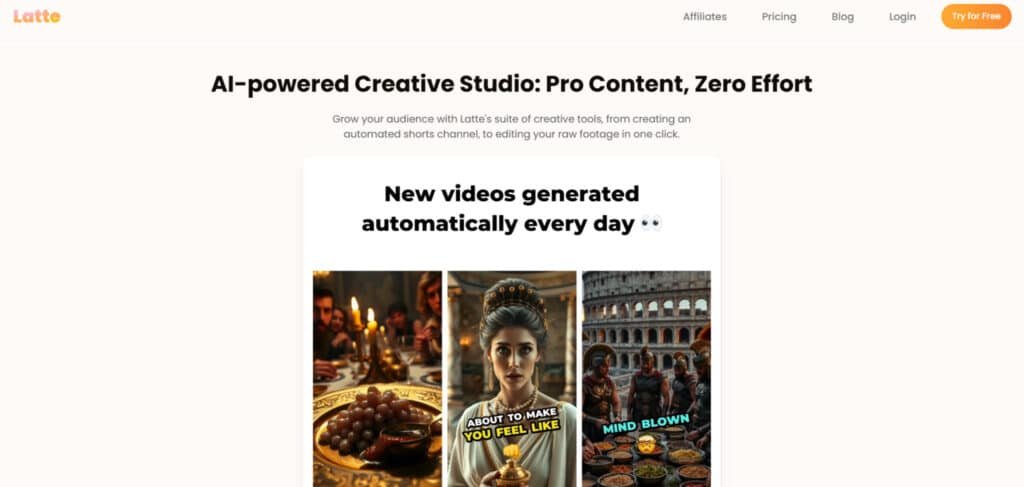
The latest version transforms video editing from a technical chore into an intuitive creative process. The v4 update introduces game-changing capabilities that go far beyond basic clipping.
1. AI Shorts Series: Hands-Free Daily Content
AI creates new videos daily based on your initial instructions
This feature turns one-time setup into an endless stream of fresh videos. Users simply define a topic, tone, and style, then the system generates new ai-powered video content every day without further input.
Customize your series theme and visual style once, then let it run
Creators lock in branding elements like colors, fonts, and layouts once. Every daily product stays perfectly consistent, saving hours of repeated adjustments while maintaining professional polish.
Build audience loyalty with consistent, engaging daily posts
Platforms reward daily posting with better reach. This automated series delivers ready-to-upload videos four days a week or more, helping channels grow faster through predictable, high-quality content drops.
Save hours every day and grow your channels on true autopilot
Manual creation of daily shorts can take 2–4 hours per piece. The AI Shorts Series removes that workload entirely, freeing creators to focus on strategy, sponsorships, or new product ideas while subscriber counts climb automatically.
2. AI Brew: Your Personal Video Editor
Automatically trims rambling into crisp, engaging videos
Long recordings become tight, watchable videos in minutes. The system detects slow sections and cuts them without losing context, producing content that holds attention from the first second.
Removes every “um,” “ah,” awkward pause, and bad retake
Filler words and silence kill viewer retention. AI Brew eliminates them instantly, delivering clean audio that makes any speaker sound confident and professional.
AI picks your best takes so you always sound pro
When multiple recordings exist, the engine compares performances and selects the strongest delivery. This ensures the final videos showcase peak energy and clarity every time.
Cuts editing time by up to 99% without losing quality
Traditional editing requires scrubbing timelines for hours. AI Brew finishes the same job in 1–10 minutes, letting creators publish more videos while maintaining broadcast-level standards.
Text-based editing: delete lines in the transcript and the video updates instantly
Users edit videos like a Google Doc. Highlight and delete sentences in the transcript, and the corresponding footage disappears immediately—perfect for removing off-topic sections or tightening messaging.
Typical processing: 1-10 minutes
Fast turnaround means creators can record, process, and post the same day, keeping content calendars full and audiences engaged.
3. AI Visual Enhancer: Instant Pro Graphics
Instantly adds eye-catching, animated visuals that match your content
Basic talking-head videos transform into dynamic pieces with relevant b-roll, icons, and motion graphics added automatically. Every visual element aligns with what is being said.
Saves hours hunting or creating graphics yourself
No more scrolling stock libraries or opening design tools. The enhancer pulls and animates assets in seconds, removing a major bottleneck for most creators.
Everything stays perfectly on-brand and synced to your footage
Uploaded style guides control colors, fonts, and animation pace. The result is consistent branding across hundreds of videos without manual oversight.
Upgrade simple recordings into platform-ready content
This feature alone upgrades simple recordings into platform-ready content that competes with teams of editors and designers.
4. Animated Subtitles in a Snap: Skyrocket Retention
Boosts viewer retention with dynamic, trendy animated captions
Silent viewing now accounts for 85% of social playback. Bold, moving subtitle styles keep eyes on screen longer, pushing watch time and algorithm performance higher.
Fully customizable fonts, colors, animations, size, and placement
Creators match subtitle appearance to channel aesthetics or campaign needs. Options include word-by-word highlights, zoom effects, and background shapes for maximum impact.
Supports 35+ languages
One upload produces accurate subtitle tracks in dozens of languages, letting a single video reach global audiences without extra work.
Includes retention-maxing styles like the bold Alex Hormozi look
Pre-built templates mimic proven high-retention designs, giving every product video the same hook that top creators use to hold millions of viewers.
Adding professional subtitle treatment used to require specialized software and time
Adding professional subtitle treatment used to require specialized software and time—now it happens with one click.
5. Viral Clips in a Click: Long-Form to Viral Shorts
Automatically extracts the best moments using visual, audio, and text cues
The system scans entire recordings for spikes in energy, laughter, or key phrases, then builds perfectly timed shorts ready for TikTok, Reels, and YouTube Shorts.
Creates optimized clips for TikTok, YouTube Shorts, and Instagram Reels
Each exported clip matches the ideal aspect ratio, length, and pacing for its target platform, removing guesswork and reformatting steps.
Expands your reach without extra manual work
One hour of long-form content can become 20–50 viral-ready shorts, multiplying views across platforms while the original video keeps earning watch time.
Same fast 1-10 minute processing
Large files finish quickly, so repurposing becomes part of a sustainable weekly workflow instead of a monthly chore.
Convert existing information assets into ongoing traffic sources
This turns existing information assets like podcasts or webinars into ongoing traffic sources.
6. AI Text to Story: From Idea to Finished Video
Turns scripts, blog posts, or short prompts into full videos
Writers feed a script or blog post into the tool and receive a complete narrated video with visuals, music, and voiceover—no camera required.
Perfect for kids stories, explainer videos, or quick educational content
Faceless channels, educators, and businesses produce high volumes of polished videos from text alone, opening new content formats without on-camera demands.
Choose your AI voice, visual style, and background music
Dozens of natural-sounding voices and royalty-free tracks let users match tone to topic, while style presets control pacing and imagery.
Works in all 35 supported languages
A single English script becomes localized videos for international markets instantly, scaling reach without translation teams or re-recording.
This feature removes the biggest barrier to consistent publishing
This feature removes the biggest barrier to consistent publishing: being on camera.
7. The Bonus Stuff That Makes It Smooth
Full override control—change anything the AI suggests
Every automated decision can be adjusted manually, ensuring final output always matches creative vision.
Simple dashboard: upload → process → download
Clean interface requires no training. New users start producing in minutes.
Your content stays encrypted and private
Files are never used for training and follow strict data protection standards—critical for brand and client work.
Free trial available—no card needed to start
Prospective users test every feature with their own footage before committing.
Cancel anytime
Flexible subscriptions match the needs of growing creators and teams.
These supporting features tie the entire platform together
These supporting features tie the entire platform together into a reliable daily tool rather than a one-off experiment.
Pricing Plans Of Latte Social
Let’s talk numbers – because even the most impressive AI features need to make financial sense for your content creation business. I always recommend testing tools thoroughly before committing financially.
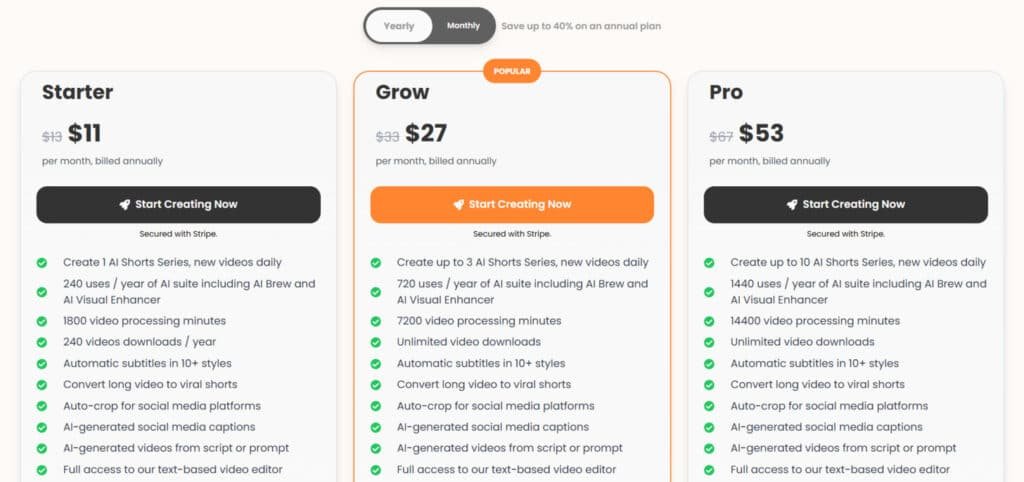
Starter Plan
Monthly: $15 (reg. $19) | Annual: $11/mo (billed $132/year, save 40%) 1 AI Shorts Series · 20 uses/mo AI suite · 150 min processing · 20 downloads/mo · All core tools (Brew, subtitles, viral clips, text-to-video) · Watermark-free · Priority support.
Grow Plan
Monthly: $39 (reg. $49) | Annual: $27/mo (billed $324/year, save 40%) 3 AI Shorts Series · 60 uses/mo · 600 min processing · Unlimited downloads · Full core suite + faster processing.
Pro Plan
Monthly: $79 (reg. $99) | Annual: $53/mo (billed $636/year, save 40%) 10 AI Shorts Series · 120 uses/mo · 1200 min processing · Unlimited everything · Max speed & support.
| Plan | Monthly | Annual/mo | Shorts Series | AI Uses/mo | Downloads |
| Starter | $15 | $11 | 1 | 20 | 20/mo |
| Grow | $39 | $27 | 3 | 60 | Unlimited |
| Pro | $79 | $53 | 10 | 120 | Unlimited |
Value for Different User Needs
Individual creators benefit from affordable professional tools. Agencies save significant time across multiple client projects. The platform adapts to various user needs and budgets.
Calculate your potential ROI: if the tool saves you just 2-3 hours weekly, it quickly pays for itself. Different subscription tiers cater to growing content volumes and team needs.
This approach ensures the platform delivers value whether you’re a solo creator or managing a team. The flexible pricing structure supports scaling as your requirements evolve.
Pros & Cons of Latte Social
No tool is perfect, and after extensive testing, I’ve identified both standout strengths and practical limitations. This balanced look helps you understand where this platform excels and where you might need workarounds.
Advantages: Efficiency and Seamless Integration
The speed improvement is genuinely remarkable. I reduced my video editing time from hours to minutes. The AI-powered tools have a very low learning curve.
- Incredible efficiency for quick content repurposing
- Real-time analytics that track viewer engagement
- Custom brand options with logos and color schemes
- Integrated stock media library for quick enhancements
- Direct publishing to multiple platforms
These features create a seamless workflow. The templates and multi-language support help global users maximize reach.
Drawbacks: Customization Limits and Resource Needs
However, I encountered some constraints. The editing options for advanced effects are limited compared to professional tools.
- Restricted customization for transitions and effects
- No offline functionality – requires constant internet
- Processing can be resource-intensive on older machines
- Output quality depends heavily on input data clarity
The AI suggestions aren’t always perfect. You’ll need to review the data and refine clips manually. The stock library is vast but requires careful selection.
These limitations matter most for professional editors needing granular control. For most creators, the pros significantly outweigh the cons. Now let’s explore how it compares to other options.
Alternatives and Real-World Experience
When evaluating any AI platform, I always ask: does it solve a specific problem better than alternatives?
This comparison helps you choose the right tool for your specific content needs.
Competing Tools Comparison
If you’re hooked on Latte Social for turning long videos into snappy short-form clips — with smart clip picking, animated subtitles, and text-to-video magic — but want more templates, avatars, or clip variety, I totally understand.
It’s a lifesaver for creators posting daily on TikTok or Reels.
But sometimes you need faster faceless content or better voiceovers. Here are strong alternatives for AI video editing in short-form creation.
Akool
Akool packs pro avatars, face swaps, and personalized videos. It shines at marketing with realistic talking heads and translations. Great for businesses wanting branded, engaging shorts quick — Read Full Review
VidGenie AI
VidGenie AI generates full narrative videos from prompts. It adds scripts, visuals, and voiceovers for short or longer clips. Perfect when you start from ideas, not footage — Read Full Review
Vid.AI
Vid.AI focuses on quick repurposing with auto-cuts and effects. It optimizes for platforms like YouTube Shorts. Handy for turning existing content viral fast — Read Full Review
AI Video Cut
AI Video Cut automates smart trimming and highlight reels. It detects best moments and adds captions easy. Super for podcasters or interviewers needing clips — Read Full Review
Bigmotion AI
Bigmotion AI creates dynamic animations and motion effects. It boosts plain clips into eye-catching shorts. Ideal when you want more energy without manual work — Read Full Review
Crayo AI
Crayo AI excels at viral TikTok-style clips with voiceovers and subtitles. It supports split-screens and fun effects. Awesome for quick, trendy content that hooks viewers — Read Full Review
Short AI
Short AI specializes in faceless shorts from text or scripts. It generates voice, music, and visuals automatically. Best for anonymous creators scaling output — Read Full Review
Alphana AI
Alphana AI offers advanced editing with custom styles. It handles complex shorts with smooth transitions. Great for pros wanting polished results — Read Full Review
Blipix.pro
Blipix.pro builds engaging shorts with easy templates. It focuses on social-ready exports and tweaks. Perfect for beginners chasing viral potential — Read Full Review
| Tool | Main Strength | Best For | Biggest Drawback |
|---|---|---|---|
| Latte Social | Long-to-short repurposing + subtitles | Daily social clips | Relies on input quality |
| Akool | Avatars & personalization | Branded marketing | Higher for enterprise |
| VidGenie AI | Prompt-to-narrative videos | Idea-based creation | Less repurposing focus |
| Vid.AI | Auto-cuts & platform optimization | Quick viral shorts | Basic templates |
| AI Video Cut | Highlight detection | Podcasts/interviews | Limited effects |
| Bigmotion AI | Motion & animation boosts | Energetic visuals | Newer, fewer voices |
| Crayo AI | Viral effects & voiceovers | TikTok trends | Split-screen heavy |
| Short AI | Faceless text-to-video | Anonymous scaling | No face cams |
| Alphana AI | Advanced custom styles | Pro polished edits | Steeper curve |
| Blipix.pro | Easy social templates | Beginner virality | Basic advanced options |
My Experience: Podcast to Social Clip
I recently transformed a 45-minute podcast into a social-ready clip in just 25 minutes. The process was remarkably straightforward.
Uploading took 3 minutes. AI analysis identified 15 potential clips in 5 minutes. I used text-based editing to clean up dialogue instantly.
Adding branding and generating subtitles took another 10 minutes. The final export in vertical format completed in under 2 minutes.
This real-world test confirmed the platform’s efficiency for quick video content repurposing. The time savings were substantial compared to manual editing.
Conclusion
Raamish’s Take
Latte Social is an advanced AI-driven creative studio that automates professional video production for social media, enabling generation, editing, and repurposing content with minimal effort—trusted by over 80,000 users for scaling engagement across TikTok, YouTube Shorts, and Instagram Reels.
Its AI Shorts Series stands out, producing daily automated videos from initial themes and styles for consistent audience growth on autopilot, while AI Brew transforms raw footage into polished edits by removing filler words, selecting optimal takes, and reducing editing time by up to 99%.
I am particularly impressed with the Viral Clips extractor, which intelligently identifies high-engagement segments from long-form content (webinars, podcasts) with platform-specific auto-cropping, plus AI Visual Enhancer for instant animated graphics and customizable animated subtitles in 10+ styles to boost retention.
Additional tools include AI Text-to-Story for script-to-video generation with voiceovers/music, social caption AI, and a text-based editor for fine tweaks.
Latte Social‘s seamless automation and multi-platform optimization empower rapid, high-quality content pipelines that drive viral reach without technical hurdles.
After putting this AI video editor through its paces, I can confidently say it delivers on its core promise.
The platform transforms lengthy recordings into engaging social media clips with impressive speed. For creators drowning in content repurposing tasks, this tool is a genuine lifesaver.
Marketers and podcasters will find exceptional value here. The AI identifies key moments from your long-form content in just 1-10 minutes. This efficiency dramatically improves your video production workflow and expands your audience reach.
Security is robust—your data remains encrypted with global protection standards. Support for 35 languages means you can connect with a worldwide audience. The platform makes content creation accessible without technical headaches.
Should you buy it?
Absolutely, if you regularly convert webinars or podcasts into social media content. The free trial lets you test the process with your own material. If manual editing consumes hours each week, this investment pays for itself quickly.
Focus on your creative strategy while the AI handles the tedious editing. Start your trial today and reclaim your time for what matters most—connecting with your audience.
Frequently Asked Questions
Does this platform offer a free trial?
Yes, there is a free trial period for new users. You can test the core features, like AI-powered video generation and subtitle editing, to see if it fits your content creation workflow before committing to a paid plan.
What kind of video content can I create with this tool?
It’s designed for social media clips. You can easily repurpose long-form content like webinars or podcasts into short, engaging videos. The automatic clip extraction feature is fantastic for finding the best moments to share on platforms like TikTok and Instagram Reels.
How accurate are the automatic subtitles?
The AI subtitle generation is impressively accurate for clear audio. It supports multiple languages and allows for extensive customization of the text style and appearance to match your brand, which is a huge time-saver for boosting accessibility and engagement.
Is there a steep learning curve for beginners?
Not at all. The interface is intuitive. I found the process straightforward, with pre-built templates that help you start creating professional-looking videos in minutes, even with minimal video editing experience.
Can I use my own stock footage and media?
Absolutely. While the tool provides resources, you can fully integrate your own media library. This is essential for maintaining brand consistency and creating unique content that stands out from generic templates.
What are the main limitations I should know about?
The primary drawback is the customization limit within templates. For creators needing highly specific, complex edits, you might feel constrained. It’s optimized for speed and efficiency over granular, frame-by-frame control.
How does it help with audience reach and engagement?
By streamlining video production, you can publish more consistently. The platform’s focus on creating shareable clips with compelling subtitles directly helps increase watch time and expand your organic reach across different social media channels.