Building a professional website from scratch can feel like a full-time job. You’re likely juggling design, content, and technical details. This process eats up valuable time you could spend growing your business. The frustration is real.
What if you could skip the complexity?
Imagine creating a complete, multi-page website in under a minute. This platform promises to turn that dream into reality. It uses advanced technology to generate sites from a simple text prompt.
This Lindo AI Review cuts through the hype. I’ve tested this white label website builder extensively. My goal is to give you an honest look at its capabilities and limitations. You’ll see if it’s the right tool for your entrepreneurial goals.
Let’s dive into the details and see what this powerful platform can really do.
Key Takeaways: Lindo AI Review
- Creates full websites in about 45 seconds from a simple text description.
- Offers a no-code environment, making it accessible for users without technical skills.
- Features white-label capabilities, allowing you to rebrand the tool as your own.
- Designed specifically for entrepreneurs and agencies to sell web design as a service.
- Aims to simplify and speed up the entire website creation process.
Lindo AI Review: An Overview

Raamish’s Take
Lindo AI strikes me as a solid choice for anyone tired of clunky website builders that drag on forever.
What grabs me most is how it cranks out full, functional sites in under 30 seconds—just drop a prompt like “sleek e-commerce page for handmade jewelry,” and it nails the layout, copy, and images without a single line of code.
The real edge comes from its white-label setup, letting agencies slap their own branding everywhere, from custom domains to login pages and even a branded help center. It’s not just building; it’s reselling, complete with a ready-made reseller website, social media graphics, and sales playbooks that make pitching clients feel effortless.
Digging deeper, the unlimited AI page creator and content assistant stand out for keeping things fresh and SEO-smart, while the blocks library (over 300 strong) lets you drag-and-drop pros like testimonials or footers tailored to niches like portfolios or online shops.
Integrations for chatbots and analytics tie it all together, and that reseller API on the Elite plan?
Game-changer for automating client flows. Sure, it’s pricier at higher tiers, but the hands-off scaling, from client billing to exportable code—means you own the output, no lock-in.
It’s straightforward power without the fluff, especially if you’re eyeing organic traffic boosts through AI-optimized content.
Introduction to Lindo AI in Today’s AI Landscape
Modern business challenges require modern solutions, especially when it comes to establishing an online presence efficiently.
The demand for instant website generation reflects a fundamental shift in how companies approach their online strategy. I’ve watched this evolution firsthand.
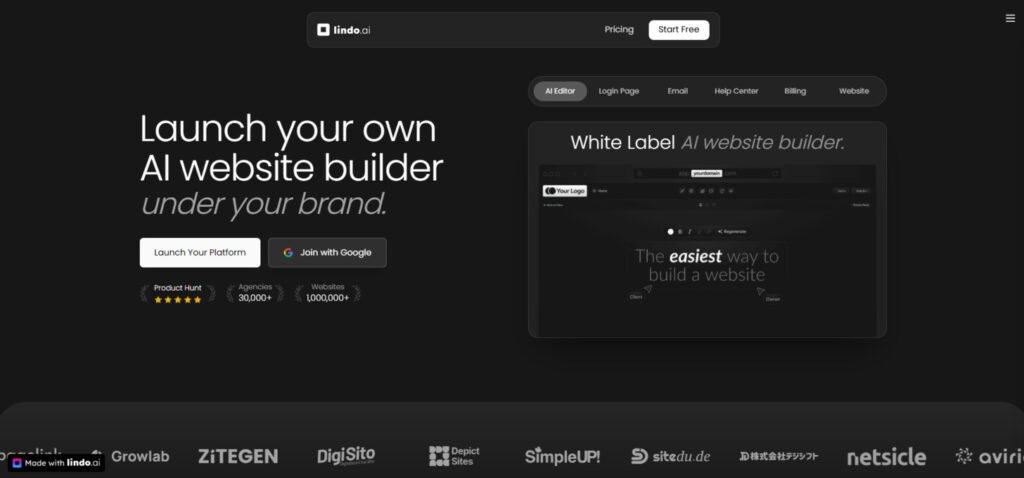
Traditional web development can take weeks or months. This lindo offers the next phase of this transformation. It moves beyond simple AI assistants to full-scale website creation.
Company Background and Founders
While specific founder details aren’t widely publicized, the tool was designed with a clear vision. It targets entrepreneurs and agencies wanting to offer web design services. The creators understood the pain points of building from scratch.
They built a solution that eliminates technical barriers. The platform has gained traction through early adoption on sites like AppSumo. This community-driven approach shows their commitment to user feedback.
Purpose and Endorsements by Leading Companies
The main purpose is democratizing website creation for service providers. It gives agencies the ability to scale without massive technical teams. Users on ProductHunt praise its comprehensive feature set.
One early adopter noted, “The speed of generation changed how we deliver projects to clients.”
The platform’s white-label capabilities make it stand out in a crowded market.
| Feature | Traditional Development | AI-Powered Platform |
|---|---|---|
| Development Time | Weeks to months | Under 1 minute |
| Technical Skill Required | High (coding knowledge) | Minimal (text prompts) |
| Cost for Agencies | High (developer salaries) | Predictable subscription |
| Customization Options | Unlimited but complex | Template-based but fast |
This comparison shows why businesses are embracing new approaches. The platform’s integration of advanced technology makes complex tasks simple. It’s a testament to how innovation can transform an industry.
What is Lindo AI?
For entrepreneurs tired of complex web development, there’s a smarter way to build online. This platform combines three powerful elements into one no-code solution.
It’s designed specifically for people who want to create websites quickly without technical headaches.
I’ve tested many website builders, and this approach stands out. The product focuses on speed and simplicity. You get AI-powered generation, visual editing, and business tools in one package.
How the Platform Works
The process begins with a simple text description of your business. Type a few sentences about what you do, and the technology handles the rest. In under a minute, you’ll have a complete multi-page site with content and images.
I was impressed by how logical the generated websites are. The system creates appropriate sections like Services, About, and Contact pages. It even populates them with relevant placeholder content.
After generation, you can customize everything using drag-and-drop functionality. No coding skills are needed. You get access to hundreds of pre-designed blocks to modify.
Ideal Users and Key Benefits
This builder isn’t for everyone. It’s perfect for agencies and entrepreneurs who want to sell web design services. The white-label features let you rebrand the entire platform as your own.
You can manage multiple client websites from one dashboard. The system handles hosting with reliable uptime. It’s a scalable solution for growing businesses.
| User Type | Traditional Approach | With This Solution |
|---|---|---|
| Agencies | High developer costs | Predictable pricing |
| Freelancers | Limited customization | Full white-label control |
| Business Owners | Technical complexity | Simple management |
| Marketers | Slow turnaround | Rapid deployment |
The way this system streamlines website creation is impressive. It removes barriers for people without technical backgrounds. Your lindo website can be up and running faster than you imagined.
Complete Features of Lindo AI
What separates a good tool from a great one? The features that solve real business problems. After testing this platform extensively, three categories stood out as game-changers for agencies.
1. Core: The Foundation That Keeps It Simple
AI Website Generator: Full Sites in Under 30 Seconds
The AI Website Generator is the flagship tool that turns a simple text prompt into a complete, ready-to-publish website in less than 30 seconds.
Users type something like “modern coffee shop landing page with menu and booking form” and the system instantly creates the full layout, writes all copy, selects matching images, and structures every page for mobile responsiveness and speed.
This feature removes hours of manual design work, making it ideal for freelancers who need fast client mockups or agencies delivering multiple proposals per day.
One prompt replaces what used to take entire afternoons, so users searching for rapid site creation get an immediate competitive edge.
The generated page structures are already SEO-ready, giving new sites a head start in search rankings right from launch.
AI Page Creator (Unlimited): Endless Pages On Demand
With AI Page Creator, users generate unlimited individual pages whenever needed. Whether it’s a detailed “About Us” section, a blog article, a pricing table, or a contact form, the tool produces polished, on-brand content in seconds.
Every new page follows the site’s existing style and tone automatically.
This unlimited creation means agencies never run out of fresh content for client sites.
Users managing multiple projects benefit from instant page population that keeps delivery timelines short and client revisions minimal.
Because the output is SEO-friendly by default, each added page contributes to better organic traffic without extra optimization work.
AI Content Assistant: Real-Time Copy Refinement
The built-in AI Content Assistant works directly inside the editor, offering instant suggestions for tone, length, readability, and SEO keywords.
Highlight any text block and the assistant rewrites or enhances it on the spot, eliminating writer’s block completely.
For agency teams and solo creators, this translates to faster turnaround and higher-quality copy across every project.
Users who struggle with persuasive writing gain professional-level results without hiring separate copywriters, while maintaining full control over the final voice.
Blocks and Templates Library: 300+ Ready Elements
Lindo provides a library of over 300 AI-powered blocks and dozens of niche-specific templates (e-commerce stores, portfolios, SaaS landing pages, local business sites, and more).
Users simply drag and drop heroes, testimonials, pricing sections, footers, and CTAs to build or customize any design.
This vast selection ensures agencies can match exact client needs without starting from scratch.
The templates are fully responsive and conversion-focused, helping users deliver proven layouts that perform better from day one.
Pro Blocks & Custom Code/Embed: Advanced Control When Needed
Beyond standard blocks, Pro Blocks let users insert advanced elements such as video embeds, custom forms, or third-party widgets.
Full support for HTML, CSS, JavaScript, and Tailwind CSS classes is included, so developers can achieve pixel-perfect designs or integrate unique functionality.
Users who occasionally need more than drag-and-drop gain the flexibility of traditional coding without leaving the platform. This hybrid approach satisfies both no-code users and those requiring custom touches for high-end client work.
Image Magic: Instant, Optimized Visuals
Image Magic gives access to millions of free and premium stock photos that automatically match the site’s color palette and style. The AI resizes, crops, and optimizes every image for web performance the moment it’s added.
Agencies save time and budget on photography or stock subscriptions while ensuring fast-loading pages. Users focused on site speed and visual appeal benefit from professional imagery that’s ready to use and fully optimized out of the box.
Client Management
A centralized dashboard tracks all client websites in one place. Users set access levels and monitor progress easily. This tool streamlines workflows for growing teams and ensures smooth communication when handling multiple clients at once.
Lindo Academy
Free training resources cover everything from basic setup to advanced techniques. New users learn how to maximize the platform and build better sites faster. This built-in education reduces the learning curve and helps users launch their first agency services confidently.
2. AI Website Builder: Speed Meets Smarts
Unlimited Website Contributors
Every plan allows unlimited team members and clients to work on the same project. This removes collaboration limits and lets agency teams, freelancers, and clients edit sites together in real time. Users scaling their operations gain efficiency without extra costs or restricted access.
This single feature turns Lindo into a true team tool rather than a solo builder. Multiple people can update a page simultaneously, making deadline-heavy projects much smoother and more manageable for busy agency owners.
3. Features: The Tools That Make Sites Sell
Reseller Platform
Users get a complete white-label setup to sell website services under their own brand. This includes a ready-made reseller site that showcases services professionally. Agencies can position themselves as full-service providers without building everything from scratch.
Social Media Assets
Ready-to-use graphics and ad templates come pre-loaded for immediate promotion. These assets help users launch marketing campaigns quickly and attract new clients without hiring designers.
Sales Playbook
Step-by-step email and call scripts guide users through closing deals. The playbook shortens sales cycles and increases conversion rates for agency owners starting or growing their client base.
Custom Integrations
Connect analytics, chatbots, and payment systems directly into client sites. These connections provide valuable data and improve user experience on every page. Users benefit from seamless third-party tools that make their websites more powerful and profitable.
4. Agency Panel: Scale Your Squad Like a Boss
White Label Platform
Elite users replace all Lindo branding with their own domain, logo, and colors. Clients see only the agency brand from login to delivery. This professional presentation builds trust and supports premium pricing.
Custom Domain and Branding
Connect a custom domain and use branded email addresses for all communication. The platform becomes completely invisible, letting agencies present a polished, independent image to every client.
Client Billing
Built-in client billing handles subscriptions, one-time payments, and invoices automatically. Agencies set their own rates and collect revenue directly. This system simplifies client billing and creates recurring income streams without external tools.
Agency Member Collaboration
Add up to six team members with role-based access. Everyone works together securely while maintaining control. This feature supports growing teams and smooth project handoffs.
Website Management
Duplicate, export, or modify sites instantly from the dashboard. Agencies reuse winning designs and deliver revisions fast. Full export options prevent vendor lock-in and give complete ownership.
Reseller API
Programmatic access lets advanced users automate client onboarding and site creation. The API integrates with existing systems for custom workflows and larger-scale operations.
5. Marketing Bundle: Pitch and Win Without the Hustle
Done-for-You Marketing Assets
A complete package of customizable materials speeds up client acquisition. Users launch professional marketing campaigns immediately without creating content from scratch.
Reseller Marketing Website
A high-converting agency website comes ready to use. Customize it once and start attracting leads the same day. This turnkey solution helps new agencies go live fast.
Social Media Assets (Expanded)
Beyond basic graphics, the bundle includes full campaign templates for platforms like Instagram and LinkedIn. Users maintain consistent branding across all marketing channels with minimal effort.
Go-to-Market Strategies
Detailed plans outline exactly how to position and sell services. Agencies follow proven steps to build their client pipeline quickly and effectively.
Sales Meeting Playbook
Ready-made email sequences and meeting scripts close deals faster. Users sound professional from the first contact and convert more prospects into paying clients.
Design System
A unified design language ensures every page and template looks cohesive. This consistency strengthens brand identity across all client projects and agency deliverables.
User Case Studies and Personal Experiences
I tested the platform by creating a sample site. The prompt was for a digital marketing agency for coffee shops. In under a minute, I had a coherent multi-page website. It included Services, About, and Contact sections.
The AI even picked thematic coffee shop imagery.
Customization was a breeze. I changed colors and fonts in moments. The AI copywriter improved generic headlines with professional alternatives.
What stood out most was how intuitive it felt. No coding needed. Just simple clicks to tweak layouts or add blocks. I loved the AI assistant—it suggested better wording and even generated extra content on the spot.
Then I dug into the SEO tools. They made optimization straightforward. I easily set meta titles and descriptions with targeted keywords.
“Accelerate Your Growth with Strategic SEO.”
The platform auto-handled fast loading and clean structure, which helps with Google rankings. For my sample site, I added local search terms like “coffee shop marketing tips.” It felt empowering, especially if you’re not an expert.
I also tried embedding things like forms and social feeds. Super easy. The site looked modern and responsive on phone too.
Overall, playing with Lindo.ai showed me how anyone can build a pro-looking site fast. It’s kind to beginners but powerful enough for real use. I get why so many folks are switching to tools like this—saves time and stress.
Have you tried an AI builder yet?
If you’re tired of complicated setups, this one might surprise you. It’s quick, helpful, and gets real results without the hassle.
This platform offers a unique way.
Pricing Plans of Lindo AI
I’ve dug deep into the numbers so you don’t have to – here’s what you need to know about the costs.
The pricing structure is more complex than it first appears, especially when comparing subscription plans versus lifetime deals.

Pricing Plan Overview
The core Pro plan costs $17/month with annual billing. This includes AI generation, unlimited storage, and basic white-label capabilities. For full white-label service with complete branding control, you’ll likely need to contact their team directly.
Pro Plan
Start simple with $30/mo or just $21/mo annually (save 30%). Includes 1 active website, unlimited storage & page views, email support, and full core AI tools. Extra sites $20/mo each.
Business Plan
Scale confidently at $150/mo or $105/mo annually. 10 active websites included, priority support, extras only $13/mo. Perfect for growing agencies.
Elite Plan
Go full white-label with $300/mo or $210/mo annually. 20 active websites, deepest branding options, same low $13/mo extras, and priority support.
| Plan | Monthly | Annual (30% Off) | Sites Included | Extra Site Cost | Support |
| Pro | $30 | $21/mo | 1 | $20/mo | |
| Business | $150 | $105/mo | 10 | $13/mo | Priority |
| Elite | $300 | $210/mo | 20 | $13/mo | Priority |
There’s no permanent free plan, but they typically offer a trial period. This lets you test the platform before making a financial commitment.
Your investment decision depends on your business needs. For agencies, the Pro plan offers solid value. Solo users might find traditional website builder options more cost-effective.
Always check the official website for current pricing before purchasing. The deal structures change frequently across different channels.
Pros & Cons of Lindo AI
Let’s cut straight to the chase – every tool has its bright spots and rough edges, and this platform is no exception. I’ve sifted through countless user experiences to give you the real story.
Strengths: Efficiency, Customization, and Lead Generation
The features that work are genuinely impressive. The speed of generating complete websites in under a minute is a game-changer. I’ve seen users complete client projects in 2 hours instead of 12.
Customization options are robust with 300+ blocks and design control. The white-label ecosystem lets you run a full service business under your own brand. Built-in SEO tools help clients rank faster.
Drawbacks: Customer Support Issues and Platform Bugs
Now for the concerning part. Multiple reviews highlight serious customer support issues. Users report waiting days or weeks for responses to critical problems.
Platform bugs are frequent – from wrong language rendering to login confusion. The most controversial deal problems involve feature gating that locked early buyers out of essential functions.
| Strengths | Drawbacks | Impact |
|---|---|---|
| Lightning-fast generation | Poor customer support | High |
| White-label capabilities | Platform instability | Medium |
| SEO optimization | Pricing controversies | High |
| Time savings | Template stagnation | Medium |
These patterns across multiple platforms suggest systemic issues rather than isolated complaints. The technology shows promise, but operational execution needs work.
Alternatives and Real-World Experiences
Choosing the right tool is like picking a vehicle for a journey. Do you need a race car or a delivery van? Your choice depends entirely on your destination.
Let’s compare this platform to other popular website builders.
Competing Website Builders Compared
If you’re using Lindo AI to build sites fast with AI and white-label options, you might want tools that do similar things for entrepreneurs, freelancers, and agencies.
These AI website builders let you create professional pages without coding skills. I know launching a site quickly can make or break a project. You need something reliable that fits your budget and clients. Here are some strong choices that get the job done.
Pineapple Builder
Pineapple Builder generates full sites with AI content, blogs, and even payment setups. It adds SEO and analytics right away. Many solo business owners love how it covers everything from start to launch. Perfect for all-in-one needs without extras. – Read Full Review
Dorik
Dorik combines drag-and-drop editing with AI for text and images. White-label features help agencies brand client sites. Users enjoy unlimited storage and easy blogging. Great for custom work that looks pro. – Read Full Review
Readdy AI
Readdy turns simple prompts into responsive layouts with clean code export. It handles Figma imports too. Freelancers find the quick tweaks super helpful for iterations. Ideal when you want modern designs fast. – Read Full Review
Hostinger AI Website Builder
Hostinger offers cheap plans with AI generation, e-commerce, and tools like heatmaps. Strong hosting comes built-in. Beginners and budget users rave about the value and speed. Suited for simple yet powerful sites. – Read Full Review
CodeDesign AI
CodeDesign uses AI magic feature for layouts, copy, and images. You can export code or host directly. Agencies run multiple projects smoothly. Good for flexibility and control. – Read Full Review
Pagepilot AI
Pagepilot specializes in Shopify pages with AI copy and visuals. One-click imports save tons of time. E-commerce folks use it for testing ideas quick. Best for online stores. – Read Full Review
Butternut AI
Butternut builds sites in seconds with SEO boosts and chatbots. Super simple process. Users say it’s one of the fastest out there. Strong for instant business presence. – Read Full Review
Mixo
Mixo creates landing pages from ideas with subscriber collection. AI handles design and text. Entrepreneurs validate products fast. Ideal for quick launches and feedback. – Read Full Review
SITE123
SITE123 gives easy templates with AI assistance for content. Multilingual support and forms included. Small teams like the no-fuss setup. Good for basic, reliable sites. – Read Full Review
| Tool | Key Features Summary | White-Label Support | Starting Pricing | Best Suited For |
|---|---|---|---|---|
| Lindo AI | AI page creation, client billing, reseller tools, SEO optimization | Yes | $25+/month | Agencies reselling branded builders |
| Pineapple Builder | One-click sites, blogs, payments, newsletters, SEO/analytics | No | $12-20/month | Small businesses needing all-in-one growth tools |
| Dorik | Drag-drop + AI generation, unlimited storage, blogging, client management | Yes | $15+/month | Agencies building custom client sites |
| Readdy AI | Prompt-to-code, Figma export, high-quality images, dynamic elements | No | Credit-based (~$20+) | Freelancers wanting editable modern designs |
| Hostinger AI | Fast AI builds, e-commerce, heatmaps, reliable hosting/domain | No | ~$3/month (long-term) | Budget starters and small e-commerce |
| CodeDesign AI | AI layouts/copy/images, code export, multiple projects | No | $29+/month | Teams handling flexible production sites |
| Pagepilot AI | Shopify-focused AI pages, images/copy, quick import | No | (~$19+) | E-commerce dropshippers testing products |
| Butternut AI | Instant sites, chatbots, SEO boosts, unlimited generations | No | ~$20/month | Super quick business launches |
| Mixo | Landing pages, subscribers, idea validation | No | $9+/month | Startups validating concepts fast |
| SITE123 | Templates, multilingual, forms, easy publishing | No | $10-13/month | Beginners with basic site needs |
Your best one depends on what you build most. Agencies often pick Dorik or Lindo for white-label.
Solo? Hostinger saves money. These tools help get sites live faster.
Your choice should match your goal. Building one site?
Consider CodeDesign AI or Hostinger AI Website Builder.
Building a web design business?
Conclusion: Lindo AI Review
Raamish’s Take
Lindo AI strikes me as a solid choice for anyone tired of clunky website builders that drag on forever.
What grabs me most is how it cranks out full, functional sites in under 30 seconds—just drop a prompt like “sleek e-commerce page for handmade jewelry,” and it nails the layout, copy, and images without a single line of code.
The real edge comes from its white-label setup, letting agencies slap their own branding everywhere, from custom domains to login pages and even a branded help center. It’s not just building; it’s reselling, complete with a ready-made reseller website, social media graphics, and sales playbooks that make pitching clients feel effortless.
Digging deeper, the unlimited AI page creator and content assistant stand out for keeping things fresh and SEO-smart, while the blocks library (over 300 strong) lets you drag-and-drop pros like testimonials or footers tailored to niches like portfolios or online shops.
Integrations for chatbots and analytics tie it all together, and that reseller API on the Elite plan?
Game-changer for automating client flows. Sure, it’s pricier at higher tiers, but the hands-off scaling, from client billing to exportable code—means you own the output, no lock-in.
It’s straightforward power without the fluff, especially if you’re eyeing organic traffic boosts through AI-optimized content.
Making the final call on this platform requires weighing groundbreaking technology against real-world execution. The tool delivers impressive website creation speed and comprehensive white-label features.
For entrepreneurs building a web design business, the platform offers genuine value. You get client management, billing tools, and complete branding options. Regular updates show commitment to improvement.
However, reviews highlight serious concerns about support response time and platform stability. This investment suits bold risk-takers, not those needing flawless execution.
My recommendation: Test the free trial thoroughly before committing. Verify all settings and features match your business needs. The right website builder depends on your specific goals and risk tolerance.
Frequently Asked Questions
Is this platform suitable for someone with no web design or coding skills?
Absolutely. The core appeal is its AI-driven approach. You describe your business, and the tool handles the heavy lifting of website creation. It generates the layout, writes the content, and sets up the pages. You get full creative control without needing any technical skills.
How reliable is the customer support if I run into problems?
Based on my experience and user reviews, this is a notable area for improvement. Support can be slow to respond, sometimes taking several days. While the platform is designed to be intuitive, having a more responsive support system would significantly enhance the user experience, especially for entrepreneurs on tight deadlines.
Can I truly white-label the entire platform with my own brand?
Yes, the white-label functionality is a standout feature. On the higher-tier plans, you can completely remove the builder’s branding. This means your clients will only see your company’s logo, colors, and brand name throughout the entire dashboard and on the final websites you deliver to them.
What kind of business tools and e-commerce functionality does it offer?
It goes beyond basic site building. You get integrated tools for lead generation, like contact forms and appointment schedulers. For e-commerce, you can set up product pages and manage basic online sales. It also includes SEO settings to help your sites rank better on search engines.
Are there any recurring issues or bugs I should be aware of?
Like many rapidly evolving platforms, you might encounter occasional bugs or glitches, particularly after new updates. Some users report issues with specific page elements or billing settings. The development team does release fixes, but it’s something to keep in mind.
How does the pricing work, and is there a free trial?
Pricing is tiered, starting with a Core Pro plan for individual creators and scaling up to a full White Label solution for agencies. They often offer a free trial period (like 14 days) so you can test the features. Be sure to check the current website for the most up-to-date plans and any add-on service costs.