Let’s be honest. Finding the perfect soundtrack for your project is a massive headache.
You either face copyright strikes, drain your budget on licenses, or waste hours on generic stock music sites. It feels like an endless, frustrating cycle that kills your creative momentum.
I know this pain firsthand. That’s why I dug deep into AI-powered solutions.
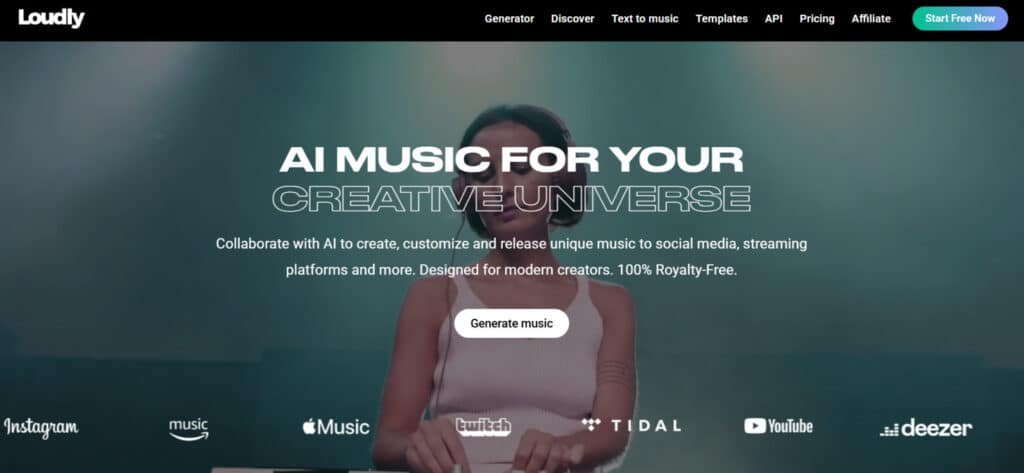
My search led me to Loudly, a Berlin-based platform founded in 2019. Under CEO Rory Kenny’s leadership, it promises a full creative universe for content creators.
I’ve spent serious time testing this AI music generator to see if it’s the real deal. Is it a game-changing tool, or just another overhyped platform?
This Loudly Review cuts through the noise to give you the unfiltered truth—the good, the bad, and everything in between.
By the end of this guide, you’ll have a clear answer. You will know if this platform fits your workflow or if you should keep searching.
Ready to find out?
Let’s dive into the details.
Key Takeaways: Loudly Review
- Finding copyright-safe, high-quality music is a common and expensive challenge for creators.
- AI music generation tools aim to solve this problem by offering original, royalty-free tracks.
- Loudly is an AI-powered music platform founded in 2019 and based in Berlin, Germany.
- This analysis is based on hands-on testing to evaluate its features and performance.
- The goal is to determine if Loudly is a worthwhile addition to a creator’s toolkit.
- We will cover both the strengths and potential drawbacks of the platform.
- You will get a straightforward recommendation based on practical use cases.
Loudly Review: An Overview

Raamish’s Take
Loudly is an exceptional AI Music generation platform that lets creators and businesses craft unique, royalty-free music with AI, all while ensuring ethical production through consented datasets and copyright respect.
Its AI music generator is a core highlight, instantly creating high-quality tracks from prompts or uploads, with options for remixes, mashups, or full songs up to 30 minutes long.
I’m really impressed with the text-to-music feature, where you type a concept and get personalized songs in seconds, customizable by genre, mood, or energy.
The studio tools allow remixing with infinite tweaks, while music stems and sample packs let you isolate instruments, download packs, and import into DAWs like Ableton for pro-level edits.
Additional strengths include audio clips for uploading your sounds to generate fresh variations, a royalty-free catalog with thousands of pre-cleared songs, stems, and sounds filtered by theme, plus seamless distribution to Spotify, Apple Music, YouTube, and Amazon for easy release and monetization.
Loudly‘s focus on productivity—saving hours on composition while keeping everything commercial-ready—makes it a smart choice for consistent, creative audio without legal headaches.
Introduction to Loudly
I’ve been tracking the rapid evolution of AI music tools, and the landscape today looks nothing like it did just a few years back. What started as experimental tech has become a legitimate solution for content production.
How the Tool Fits into the Current AI Music Landscape
The market for AI music generation is exploding—growing at over 30% annually. This boom is driven by creators needing unique, affordable tracks. The loudly music generator entered this space in 2019 with perfect timing.
What caught my attention was their ethical approach. While competitors face lawsuits, this platform claims to use only consented, transparent data. That’s a huge differentiator in today’s copyright-conscious environment.
Founders’ Background and Company Mission
Rory Kenny founded the Berlin-based company with a clear vision: Democratize music creation. The mission isn’t to replace artists but to complement human creativity. This philosophy resonates with today’s multimedia creators.
The platform serves diverse users—from YouTubers needing background music to indie filmmakers scoring scenes. Kenny’s background suggests he understands the real-world needs of content creators working under tight deadlines.
This context matters because the promise is compelling. But as I discovered during testing, there’s often a gap between what’s promised and what users actually experience with music generation tools.
What is Loudly?
At its core, this platform is a comprehensive AI-powered creative suite. It’s designed to let you generate, customize, and own 100% royalty-free music.
Forget scrolling through endless libraries. You become the director of your own soundtrack.
Overview of the Tool’s Inner Workings
The magic starts with your input. You choose parameters like genre, tempo, and mood. The AI generator then processes these choices. It uses complex algorithms to compose original music from scratch.
I was impressed by the control. You’re not just picking a pre-made track. You are guiding the music creation process itself. This parametric approach is the engine of the entire platform.
The table below breaks down the main tools that make this possible.
| Tool Name | Primary Function | Key Benefit for Users |
|---|---|---|
| AI Music Generator | Creates tracks based on selected parameters (genre, instruments, energy). | Total creative control over the core composition. |
| Text-to-Music | Generates a song from a simple text description. | Ideal for when you have a vibe in mind but lack technical terms. |
| Audio Remixing | Upload your own audio clips for the AI to remix and incorporate. | Adds a unique, personal layer to the generated music. |
| Stem Generation | Breaks any track into individual instrument stems (drums, bass, melody). | Allows for detailed, professional-level editing and mixing. |
Benefits for Creators and Content Producers
The main advantage is speed and uniqueness. Instead of hours of searching, you get a custom track in minutes. This is a game-changer for YouTubers, podcasters, and indie filmmakers on a deadline.
Users also get advanced features like stem separation. This lets you tweak individual parts of a song. The integrated distribution to streaming services is another huge plus for artists.
This tool turns a complex task into a straightforward process. It empowers users to produce professional-sounding loudly music without a music degree.
Complete Features of Loudly
Exploring the platform’s capabilities revealed a level of sophistication I hadn’t expected from AI music generation. The standout features genuinely impressed me during testing—they’re organized into three powerful categories that work together seamlessly.
1. AI Music Generator: Spark Ideas into Full Songs
The AI Music Generator on the Loudly website serves as the core service for transforming simple text prompts into complete, royalty-free songs.
Users input descriptions like “energetic pop track for motivation,” and the system produces full compositions with vocals, instruments, and structures in seconds.
This service supports moods, genres such as pop or hip-hop, tempos, and keys, allowing precise tailoring. Tracks can reach up to 30 minutes on higher plans, starting shorter for quick iterations.
It benefits creators searching for fast music solutions by eliminating the need for traditional composition skills, enabling rapid prototyping for videos or podcasts. Export options include MP3 or WAV with stems for further editing.
The website ensures ethical training on consented data, avoiding copyright issues. This feature helps readers with search intent for efficient music creation by providing instant, customizable outputs that fit project timelines, reducing production hours significantly.
On the Loudly website, signing into an account unlocks generation limits based on plan tiers.
2. Text-to-Music: Words to Waves, Super Simple
Text-to-Music is a dedicated service within the Loudly website that converts descriptive prompts into audio loops or full tracks effortlessly.
For instance, entering “dreamy synthwave at 90 BPM” yields tailored results with adjustable energy levels, instrument swaps like adding guitar or removing bass, and mood blends such as happy yet mysterious.
Previews load instantly, and AI refines suggestions for better matches. This tool aids users seeking straightforward music generation by turning natural language into professional-sounding audio without technical expertise.
It supports videos needing specific atmospheres, ensuring seamless integration. Readers benefit from this service as it streamlines workflow for content creators, allowing quick iterations that match visual elements precisely.
An account on the website is required for saving and exporting generated pieces, with outputs fully owned for commercial use.
This addresses search intent for accessible text-based music tools, delivering high-quality results that enhance project efficiency and creativity.
3. Genre Selection and Customization Options
Genre Selection and Customization Options provide access to over 20 genres on the Loudly website, including Electronica Downtempo, Lo-fi, and Jazz, with deep adjustments for duration, tempo, key, and energy levels. Blending styles creates unique hybrids, while selecting specific instruments offers granular control.
This service stands out for its precision, helping users craft sounds that align perfectly with project needs.
It assists readers in achieving differentiated audio for videos or ads, avoiding generic outputs from basic tools. By enabling style fusions, it supports diverse applications like background scores for streaming content.
The website integrates these options into the generation process, requiring an account for full access. This feature fulfills search intent for customizable music platforms by offering tools that produce tailored songs, saving time on manual edits and ensuring professional-grade variety for content production.
4. AI-Driven Music Generation and Remixing Capabilities
AI-Driven Music Generation and Remixing Capabilities feature intuitive parametric controls for creating tracks from prompts like “upbeat synthwave for a driving scene.” The remixing tool allows uploading clips for AI mashups, while stem generation isolates instruments for DAW compatibility.
This service on the Loudly website enables seamless evolution of ideas into polished pieces. It helps users by providing remix options that transform existing audio, ideal for enhancing videos or building on personal recordings.
Users gain from efficient remixing that integrates with workflows, producing mashups ready for streaming platforms.
Stem separation ensures clean edits, addressing needs for modular audio. An account facilitates unlimited remixes on paid plans.
This capability meets search intent for advanced AI music tools by delivering versatile generation and editing, streamlining production for creators and improving output quality without additional software.
5. Sample Generator: Build Your Sound Library on the Fly
The Sample Generator creates custom packs from any track or upload on the Loudly website, producing drum hits, melodies, or effects for direct DAW import like Ableton or Logic. Paid tiers allow up to 20 packs monthly, with high-resolution, royalty-free files.
This service builds expansive libraries quickly, benefiting users by supplying fresh elements for beats or sound design.
It supports videos requiring unique loops, ensuring variety without external searches. Readers with intent for sample creation find value in on-demand generation that fits specific genres, enhancing productivity.
The website limits free users to basics, but pros access endless options. This tool aids in constructing personalized soundsets, reducing reliance on stock libraries and enabling faster composition for projects targeting streaming platforms.
6. Stem Splitter: Remix Like a Pro DJ
Stem Splitter isolates audio elements from uploads or catalog tracks on the Loudly website, separating vocals, drums, bass, and more with clean results and no bleed. Free plans cover short clips, while upgrades handle longer files and unlimited splits.
This service facilitates pro-level remixing by providing editable components. It helps users flip genres or layer sounds for podcasts, directly improving remix quality.
Users benefit from precise isolation that integrates with DAWs, saving editing time for videos. Commercial use requires plan verification, but it ensures high-fidelity outputs. The website makes this accessible via account login.
This feature addresses search intent for audio separation tools by offering reliable splitting that enhances creative control and workflow efficiency in music production.
7. Music Browse & Catalog: Endless Royalty-Free Picks
Music Browse & Catalog offers thousands of pre-made, royalty-free tracks on the Loudly website, filterable by genre, mood, tempo, or duration with AI recommendations based on history.
One-click licensing and stem downloads provide instant access. This service supplies ready audio for ads or YouTube, with over 50 streaming platforms supported via add-ons.
Playlists like workout anthems curate selections. It benefits users by delivering cleared music quickly, ideal for videos needing immediate fits.
Users find curated options that match search intent for royalty-free libraries, reducing sourcing efforts. The website enhances discovery through personalized suggestions. This catalog helps in selecting professional tracks, ensuring compliance and variety for content across streaming platforms.
8. Editing & Studio Tools: Tweak Till It Clicks
Editing & Studio Tools allow remixing in the Studio on the Loudly website, swapping stems, adjusting energy, or mashing uploads with catalog items.
Exports reach 50+ monthly on pro plans, with FX renders up to 80. This service provides full control for shortening loops or mood-based generations. It aids users in refining audio for seamless DAW integration and Spotify distribution, keeping 100% royalties. Ethical data ensures fair use.
Users benefit from comprehensive editing that polishes songs for professional release. The website requires an account for advanced tweaks.
This suite meets intent for studio-like AI tools by enabling detailed modifications, improving final quality for videos and streaming platforms.
9. Integrated Music Distribution and Download Options
Integrated Music Distribution and Download Options enable direct releases to Spotify, Apple Music, and TikTok via built-in pipelines on the Loudly website. High-quality WAV files are available on paid plans with professional-grade audio.
This service saves time through one-click distribution. It helps users monetize songs without external services, ideal for indies.
Users gain from streamlined uploads to streaming platforms, ensuring global reach. Pro plans unlock commercial rights. The website includes download stems for edits.
This integration addresses search intent for end-to-end music tools by combining creation with release, enhancing efficiency for content targeting videos and platforms.
10. Collaboration & Distribution: Share and Monetize Easy
Collaboration & Distribution supports real-time AI co-creation and friend invites via shared queues on the Loudly website. A $1.99/month add-on handles distribution to streaming platforms with venue licenses for DJs.
Pro plans ensure full commercial rights and royalty retention. This service facilitates team workflows and monetization.
It benefits users by enabling joint projects and easy releases. Readers with collaborative needs find value in shared tools that streamline group input.
The website ties into distribution seamlessly. This feature helps in building and sharing music, supporting search intent for team-oriented platforms by providing secure, efficient sharing for professional outputs.
11. Mobile & Accessibility: Create Anywhere
Mobile & Accessibility makes the Loudly website responsive for phones and laptops, supporting quick generations and voice note uploads without a dedicated app.
Free tiers offer previews for beginners. This service ensures creation on the go. It helps users maintain productivity across devices, fitting mobile workflows for videos. Readers benefit from accessible tools that require no downloads.
The website provides support for issues. An account enables cross-device saves. This accessibility meets intent for flexible music services by allowing anytime access, with a positive review potential for usability.
It enhances portability for creators needing instant audio solutions.
12. Export and Quality Options: Pro Finishes, Your Way
Export and Quality Options include MP3, WAV, and stems with high-resolution, lossless formats on the Loudly website. Paid plans offer unlimited high-quality downloads optimized for digital use.
This service ensures pro finishes for all outputs. It aids users in preparing files for DAWs or streaming platforms, maintaining audio integrity. Readers gain from versatile exports that fit commercial needs, like videos.
The website handles optimizations automatically. This option supports search intent for quality-focused tools by delivering customizable, ready-to-use files that elevate project standards without extra processing.
Deep Dive into Customization
Customization is where this AI music generator truly separates itself from the competition. I spent hours exploring these features to understand their practical value for content creators like you.
Adjustable Parameters: Tempo, Mood, Structure, and More
The level of control surprised me. You can adjust duration with precise timing and select specific instruments for your composition. The genre blend feature lets you combine two styles for unique results.
Energy level controls the intensity—perfect for matching your content’s pacing. You can choose musical structure with intro, verse, chorus, and outro arrangements. Tempo and key selection complete the comprehensive parameter set.
Pro tip: Use “Low” energy for background music during dialogue. Select “High” energy for intros or montages. Start with complementary genres when blending styles.
Stem Pack Creation and Detailed Remixing Features
The stem generation feature creates 20 sample packs from any track. These can be transferred directly to your digital audio workstation. This opens up professional-level editing possibilities.
In the Studio view, you can mute or adjust volume for individual instrument stems. Control drums, bass, synths, and other elements separately.
This detailed remixing capability transforms basic music creation into professional production.
Pricing Plans of Loudly
The freemium model is common, but the details in this platform’s pricing structure reveal its true value for different creators. I find the tiered system quite logical, but one critical license rule demands your attention.
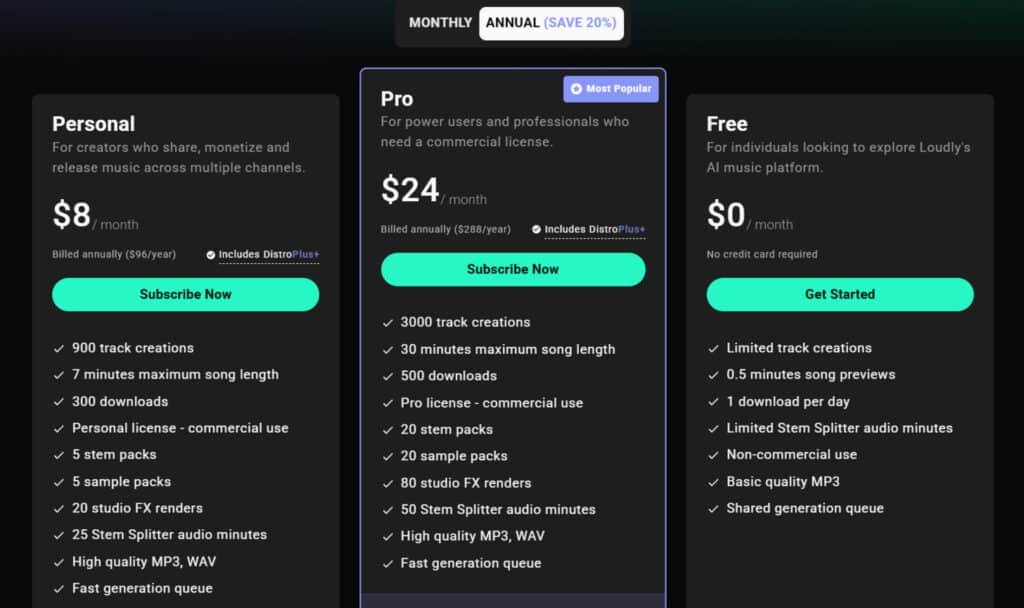
Free Plan
The Free plan is $0/month, no card required, for exploring basics.
Limited tracks, 0.5-min previews, 1 download/day, basic MP3, non-commercial on one channel, shared queue. No distro.
Personal (Monthly/Annual Plan)
Personal Monthly: $10/month – 900 tracks, 7-min max, 300 downloads, Personal license (social monetization), 5 stem/sample packs, 20 FX, 25 Stem minutes, high MP3/WAV, Basic Distro (20 tracks/mo).
Annual: $8/month ($96/year) – same + Distro Plus (200 tracks/mo, 100% royalties, DJ license).
Pro (Monthly/Annual Plan)
Pro Monthly: $30/month – 3000 tracks, 30-min max, 500 downloads, Pro license (ads/games), 20 packs, 80 FX, 50 Stem minutes, high audio, Basic Distro.
Annual: $24/month ($288/year) – same + Distro Plus.
| Plan | Price | Track Creations | Max Length | Downloads | License | Distro |
| Free | $0/month | Limited | 0.5 min | 1/day | Non-commercial | None |
| Personal Monthly | $10/month | 900 | 7 min | 300 | Personal | Basic (20 tracks/mo) |
| Personal Annual | $8/month ($96/yr) | 900 | 7 min | 300 | Personal | Plus (200 tracks/mo) |
| Pro Monthly | $30/month | 3000 | 30 min | 500 | Pro | Basic (20 tracks/mo) |
| Pro Annual | $24/month ($288/yr) | 3000 | 30 min | 500 | Pro | Plus (200 tracks/mo) |
Comparing Free and Paid Options for Different Users
Your choice depends entirely on your goals. A casual user can thrive on the Free plan. If you earn money from your content, the Personal plan is essential.
I recommend the Pro tier for anyone creating music for clients. The unlimited high-quality downloads and stem packs justify the cost. Be aware of a major limitation: if your subscription lapses, you lose the rights to use the music in new projects. This creates a perpetual need for the platform.
This pricing model effectively segments the market. It ensures all types of users can find a suitable entry point.
Pros & Cons of Loudly
After putting this tool through its paces and scouring countless user reviews, the complete picture is complex. It’s not all good or all bad. Here’s my honest breakdown of the major advantages and the critical drawbacks you must consider.
Advantages of Using the Platform
The pros are genuinely impressive. The AI generates music incredibly fast, often in under 20 seconds. You get deep control with customizable stems and remixing tools.
Integrated distribution to major platforms is a huge time-saver. The promise of 100% royalty-free music is a key selling point for content creators. This loudly music integrates seamlessly into video and social media projects.
Drawbacks and Limitations Reported by Users
Now for the significant cons. The biggest red flag from reviews is the risk of copyright claims, which contradicts the royalty-free music promise. Many user reports cite generic-sounding output.
Customer support is often described as unresponsive. Technical bugs and a confusing subscription model are common complaints. The table below summarizes these key points.
| Strengths (Pros) | Weaknesses (Cons) |
|---|---|
| Rapid music generation (15-20 seconds) | High risk of copyright claims on generated music |
| Powerful stem customization and remixing | Repetitive and generic audio output |
| Direct distribution to streaming services | Poor customer support and billing issues |
| High-quality WAV/MP3 files for video | Subscription dependency; rights lapse if you cancel |
Given these mixed results, it’s wise to look at other tools in the market before making a final decision.
Alternatives to Loudly
The competitive landscape for AI music tools is surprisingly diverse, with each platform offering distinct advantages. Given the copyright concerns I’ve highlighted, exploring other options makes practical sense.
Competing AI Music Generation Tools in the Market
Loudly is strong for customizable royalty-free music with stems and text prompts. But these alternatives bring their own strengths, like full songs with vocals or developer tools.
Here’s a quick look at each.
Soundraw
Soundraw creates royalty-free instrumentals with deep editing like muting instruments or blending genres. Exports stems too. Suits video creators needing safe, tweakable background scores – Read Full Review
Mureka AI
Mureka turns prompts or lyrics into full songs with vocals, voice cloning, and style matching. Supports multilingual. Ideal for artists wanting complete tracks quick – Read Full Review
Mubert
Mubert generates endless streams of ambient or mood-based music in real-time. Royalty-free for apps or content. Great for non-stop playback needs – Read Full Review
Imagine.Art (AI Music Generator)
Imagine.Art builds songs and instrumentals from text, with mixing and genre tweaks. Part of a creative suite. Good for experimenting with vocals or loops – Read Full Review
Freebeat AI
Freebeat focuses on music videos synced to beats, but generates visuals from tracks. Adds dance or lyrics. Fits creators pairing sound with motion – Read Full Review
MusicAPI AI
MusicAPI offers programmatic generation via API for songs, vocals, or customs. Scalable for apps. Perfect for developers integrating music features – Read Full Review
| Tool | Key Focus | Best For | Pricing Starts |
|---|---|---|---|
| Soundraw | Custom instrumentals & stems | Background scores | $17/month |
| Mureka AI | Full songs with vocals | Complete tracks | $10/month |
| Mubert | Real-time streams | Ambient playback | $14/month |
| Imagine.Art | Text-to-songs & mixing | Creative experiments | $10/month |
| Freebeat AI | Synced music videos | Visual pairings | $9.99/month |
| MusicAPI AI | API integrations | App developers | Pay-per-use |
Why Creators Might Consider Other Platforms
You might choose alternatives for better copyright protection. Soundraw’s ethical certification provides peace of mind that’s hard to find elsewhere.
Some creators prefer platforms with perpetual licenses rather than subscription-dependent models. The ability to own your music outright can be crucial for long-term projects.
Different music generation approaches also matter. If you need vocal tracks, Mubert’s capability might appeal despite the risks.
For background scoring, Imagine.Art’s scene-based system could be more effective.
Case Study / Personal Experience with Loudly
I needed a custom soundtrack for a recent YouTube video project and decided to put the loudly music generator to a real-world test. This wasn’t just a feature tour. It was about solving a real creative problem under a deadline.
The goal was simple: create a unique piece of background music that wouldn’t trigger copyright claims. Here’s what happened when I went through the entire process, step-by-step.
Real-World Results Achieved
The final track I created was surprisingly effective. It had a smooth, atmospheric quality that perfectly matched the video‘s pacing. The AI generated three distinct options in under 20 seconds.
I chose the best one and used the Studio view to mute the drums. This made the music less intrusive for voiceover. The entire workflow, from login to download, took less than ten minutes.
The result was a professional-sounding piece that felt unique. It worked well across different genres I tested. This experience proved the tool’s value for rapid content creation.
My Step-by-Step Journey
Getting started was straightforward. I created a free account and verified my email. The main dashboard was clean and intuitive.
Here’s the exact process I followed:
- I selected the AI Music Generator tool from the dashboard.
- For my project, I chose the Synthwave genres and set the duration to 2:00.
- I adjusted the tempo and selected a “Low” energy mood to ensure it worked as background music.
- Clicking “Generate Tracks” produced three options almost instantly.
- I previewed each track and selected my favorite.
- Clicking “Customize” opened the powerful Studio view.
- I could see individual instrument stems. I muted the drum stem to soften the beat.
- After adjusting the synth volume, I saved the final version to my library.
- The final step was downloading a high-quality WAV file for my edit.
This hands-on experience gave me a clear picture of the platform’s strengths. The speed and control are impressive. It genuinely simplifies music creation for busy creators.
Conclusion
Raamish’s Take
Loudly is an exceptional AI Music generation platform that lets creators and businesses craft unique, royalty-free music with AI, all while ensuring ethical production through consented datasets and copyright respect.
Its AI music generator is a core highlight, instantly creating high-quality tracks from prompts or uploads, with options for remixes, mashups, or full songs up to 30 minutes long.
I’m really impressed with the text-to-music feature, where you type a concept and get personalized songs in seconds, customizable by genre, mood, or energy.
The studio tools allow remixing with infinite tweaks, while music stems and sample packs let you isolate instruments, download packs, and import into DAWs like Ableton for pro-level edits.
Additional strengths include audio clips for uploading your sounds to generate fresh variations, a royalty-free catalog with thousands of pre-cleared songs, stems, and sounds filtered by theme, plus seamless distribution to Spotify, Apple Music, YouTube, and Amazon for easy release and monetization.
Loudly‘s focus on productivity—saving hours on composition while keeping everything commercial-ready—makes it a smart choice for consistent, creative audio without legal headaches.
After extensive testing and analysis, here’s my final verdict on this AI music platform. The music generator delivers impressive technical capabilities with deep customization for genres, instruments, and energy levels.
However, widespread copyright claims undermine its core promise of royalty-free music.
For professional creators building social media channels or client projects, the risk is simply too high. The subscription dependency and poor support compound these issues.
Your creative work deserves better protection.
My recommendation: Hobbyists might experiment safely, but serious users should choose certified alternatives. Always test any tool with non-critical projects first. Protect your content and reputation by prioritizing platforms with proven track records.
Frequently Asked Questions
Is Loudly’s music truly royalty-free for commercial use?
Yes, tracks you generate and download are royalty-free. You can use them in your YouTube videos, podcasts, and other social media content without worrying about copyright claims. It’s a huge benefit for creators who need reliable background music.
How does the AI music generator actually work?
You start by selecting a genre and adjusting parameters like tempo, mood, and energy. The platform’s AI then composes a unique, original track based on your inputs. It’s not just a library—it’s a custom music creation tool that generates digital audio on the fly.
Can I edit the music tracks after they are generated?
A> Absolutely. One of the best features is the ability to create stem packs. This gives you separate audio files for different instruments, allowing for detailed remixing and customization within your own production workflow.
What’s the biggest limitation of the free plan?
The main drawback is the download limit. You can generate tracks for free, but downloading them in high quality for use outside the platform requires a subscription. It’s great for testing, but serious content producers will need a paid plan.
How does Loudly compare to other music generation tools like AIVA or Soundraw?
Loudly stands out with its strong focus on social media creators and its integrated distribution options to major streaming platforms like Apple Music. While other tools might cater more to film scorers, Loudly’s interface and features are built for speed and ease of use for digital content.
Do I need any musical background to use this platform effectively?
Not at all. The tool is designed to be accessible. The sliders for mood and energy make it intuitive. If you know what feeling you want your video or project to have, you can guide the AI to create a suitable track without any technical music theory knowledge.