Are you tired of juggling a dozen different AI apps just to create a single piece of content?
I was too. The constant switching, the different subscriptions, the headache of it all—it’s enough to make any creator or marketer want to pull their hair out.
That frustration is exactly why I decided to put this new product through its paces. I spent weeks testing its core features to see if it could truly deliver on its big promise. Does it live up to the hype, or is it just another flashy tool?
This platform promises to be an all-in-one creative workspace. It integrates over 20 leading generative AI models—for both video and image creation—into one simple chat interface. The goal? To eliminate the tool-switching chaos for good.
In this Lucent Chat Review, I’ll cut through the marketing noise. I’ll share my real, hands-on results with the video generation and image creation capabilities.
You’ll get a straightforward look at the pricing, the pros and cons, and whether it’s a smart investment for your needs. Let’s dive in and find out if this is the solution you’ve been searching for.
Key Takeaways: Lucent Chat Review
- This analysis is based on hands-on testing of the platform’s core features.
- The tool integrates numerous top AI models into a single workspace.
- We will examine its performance for both video and image creation tasks.
- A clear pricing breakdown helps determine the value for different users.
- The review aims to provide an honest, hype-free assessment.
- We’ll help you decide if it fits your specific creative or marketing workflow.
Lucent Chat Review: An Overview

Raamish’s Take
LucentChat catches my eye as a no-fuss hub for AI visuals that pulls top models into one spot, cutting out the hassle of app-hopping for creators who just want results.
Its strength lies in blending image generators like FLUX1.1 and Seedream v4 with video generators such as Sora 2 and Veo 3.1, all powered by a chat interface that turns simple prompts into polished assets.
I like how it handles guided workflows—think UGC viral video templates for quick TikTok clips or product branding templates that mock up e-comm shots without a camera in sight. The Nano Banana model stands out for its speedy renders, delivering 8K upscales in seconds, which keeps things moving for daily content pushes.
What sets it apart is the model discounts—up to 40% off on premium ones like Kling 2.5—making pro tools affordable without skimping on quality. Batch processing shines for scaling, letting you crank 40,000 images a month on higher tiers, while analytics track what prompts hit best.
Integrations with tools like Photoshop or YouTube exports seal the deal for seamless workflows. It’s not flashy, but the reliability and privacy focus build trust, especially for teams dodging data leaks.
Early user feedback on LucentChat hints at quick adoption for its balance of power and simplicity, though it’s still gaining traction.
Introduction To Lucent Chat
The modern content creator’s desk is often cluttered with multiple subscriptions, each promising to solve a different piece of the creative puzzle.
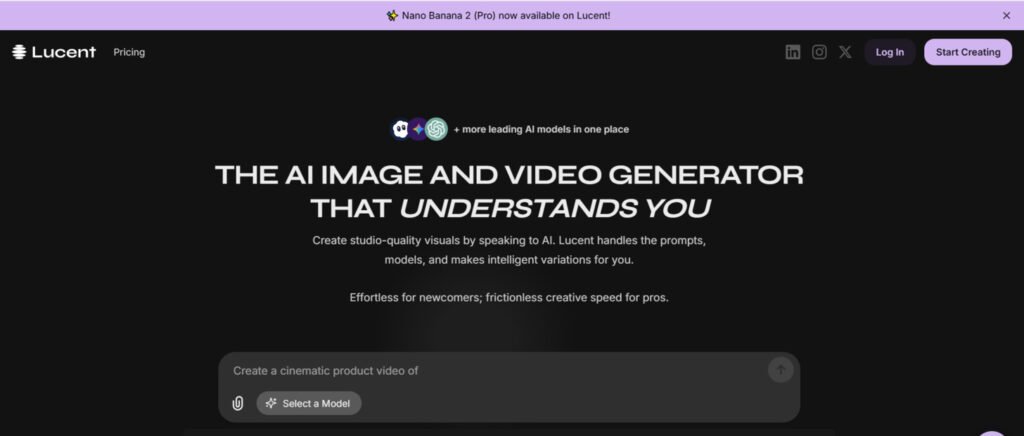
This platform enters the scene with a simple but powerful goal: To serve as a unified AI workspace where you can generate and refine video, image, and advertising content through natural conversation with an AI assistant.
AI Landscape and Company Background
In today’s crowded AI market, this tool stands out by integrating over 20 leading generative models.
The platform was designed specifically to eliminate the tool-switching chaos that plagues modern creative workflows. I’ve found it particularly useful for teams that need consistent branding across multiple formats.
Purpose, Endorsements, and Use Cases
The core purpose is straightforward: empower marketers and creators to produce professional visuals without complex prompt engineering.
While public endorsements are still emerging—it’s a newer platform—the design speaks to current market needs. Businesses increasingly want AI tools that boost output without requiring specialized technical staff.
This solution excels at rapid prototyping for video ad concepts and generating on-brand social media visuals. Performance advertisers will appreciate the ability to create multiple creative variations for A/B testing. Content teams can produce avatar-based video content and scale their social media presence efficiently.
Ideal projects include campaign-ready materials and social media content at scale. The platform works best for quick iteration rather than frame-by-frame precision work.
For users tired of juggling multiple tools, this could be the streamlined solution they’ve been seeking.
What is Lucent Chat
The real magic happens when multiple AI engines work together seamlessly. I found this platform’s integration approach genuinely impressive—it’s like having a creative team in one interface.
Inner Workings and Integration of AI Models
Behind the simple chat interface lies sophisticated orchestration. The system intelligently routes your requests to the most appropriate AI models based on your specific needs. This eliminates the guesswork of choosing the right tool for each task.
You get instant access to top-performing models without managing separate accounts. The platform handles the technical complexity while you focus on creativity.
Benefits for Creators, Marketers, and Businesses
Different users gain distinct advantages from this unified approach. The rapid iteration capability is particularly transformative—you can test variations in seconds rather than hours.
| User Type | Primary Benefit | Time Savings | Quality Improvement |
|---|---|---|---|
| Content Creators | Professional results without technical expertise | 70-80% faster | Consistent brand visuals |
| Marketers | Rapid A/B testing of creative concepts | 85% faster iteration | Data-driven creative decisions |
| Business Teams | Unified platform replaces multiple tools | 60% less tool management | Scalable content production |
The side-by-side comparison feature lets you evaluate different AI outputs simultaneously. This helps you understand which model works best for specific types of content without tedious trial-and-error across separate platforms.
For teams, the branded workspace ensures visual consistency across all projects. This maintains your brand identity while scaling content production efficiently.
Complete Features of Lucent Chat
What really stands out about this AI workspace is how it transforms complex processes into simple conversations. The design philosophy centers on accessibility, making advanced AI capabilities available to users of all skill levels.
1. Unified Access to Top Models
LucentChat delivers a true all-in-one experience by combining the world’s leading video generators and image generators inside a single, clean dashboard.
Instead of paying for five separate platforms, users across the United States and globally get instant access to more than 20 cutting-edge systems.
Popular choices include the lightning-fast nano banana performance of Nano and Seedream, cinematic Veo 3.1, high-motion Kling 2.5, photorealistic FLUX1.1, creative Wan 2.5, detailed Luma Ray-2, and the premium Sora 2 model.
This unified hub removes subscription fatigue and login chaos for busy creators and marketers.
Access to Leading AI Models
Every major model lives here permanently. Switch from a hyper-realistic image generators run on FLUX1.1 to a fluid video generators sequence on Veo 3.1 without ever leaving the page.
The platform updates models automatically, so users always work with the latest versions.
Multi-Format Generation
Run mixed workflows effortlessly. Start with a text prompt, generate matching stills via top image generators, then extend the same scene into motion using advanced video generators – all in one thread. Agencies producing full social campaigns finish in minutes instead of hours.
Model Selection Flexibility
Different projects need different rules. Select Wan 2.5 when looser moderation is required for bold UGC, or lock into Sora 2 for strict brand-safe advertising. This choice system protects creators marketers from wasted credits and compliance headaches while maximizing creative freedom.
2. Easy Prompting and Generation
The chat-style interface turns everyday language into production-ready instructions. No complicated syntax or long prompt engineering required – just type what you want and watch professional-grade generators deliver.
Natural Language Chat
Describe ideas conversationally. The system understands context, adds missing details, and optimizes for the chosen model automatically. Beginners get pro-level results on day one, while experts save hours of manual tweaking.
Quick Iterations
Change one word, one style, or one angle and regenerate instantly. The platform remembers previous versions, making A/B testing thumbnails or video hooks extremely efficient for creators marketers running performance campaigns.
Style Options
Cover every visual style imaginable – photorealistic product shots, anime characters, oil-painting landscapes, or cinematic footage. The same interface handles static image generators output and full-motion video generators sequences with identical ease.
3. Basic Customization Options
Powerful yet simple controls let users dial in exact specifications across all generators, ensuring every output fits the brief perfectly.
Parameter Adjustments
Set resolution up to native 8K, lock precise aspect ratios for TikTok, Instagram, or YouTube, and adjust motion intensity frame-by-frame. These sliders give pixel-perfect control without overwhelming the interface.
Batch Processing
Generate 10, 50, or 100 variations at once. E-commerce teams create complete product catalogs overnight, while social media managers test dozens of headline images simultaneously – dramatically cutting turnaround time.
Image Editing Templates
Upload any photo and apply instant professional enhancements. Templates handle background removal, lighting correction, color grading, and Topaz-quality upscaling in seconds, turning phone snaps into print-ready assets.
Product and Branding Templates
Skip expensive photoshoots entirely. Pre-built templates place products in realistic hands, lifestyle environments, or clean studio setups while automatically applying brand colors, fonts, and logos for perfect consistency.
UGC Viral Video Templates
Produce authentic user-generated-style content at scale.
Templates include shaky-cam testimonials, street interviews, unboxing reactions, and “day in the life” formats optimized for Reels and Shorts, complete with natural gestures and lip-sync.
4. Seamless Connections
Smart integrations move finished assets straight into the tools and platforms professionals already use daily.
Export Options
One-click downloads formatted for Photoshop, Premiere Pro, Canva, Instagram, YouTube, or any scheduler. Files arrive with correct dimensions, color profiles, and metadata intact.
API Hooks
Developers can connect LucentChat to custom pipelines, CMS platforms, or automation tools via clean integrations, enabling fully automated content factories.
Multi-Format Export
Generate every needed variation simultaneously – vertical video, horizontal cut, square crop, and matching thumbnail – ready for cross-platform posting without extra editing.
5. Analytics and Insights
Built-in intelligence tracks performance and teaches users how to improve results over time.
Usage Stats
See exact credit spend, generation success rates, and project-level breakdowns. Teams stay on budget and spot which model combinations work best.
Prompt Helpers
The system analyzes thousands of past jobs and suggests proven improvements, delivering free ongoing training that raises output quality with every session.
Content Moderation Insights
View each model’s policy level before generating. Avoid rejected outputs and wasted credits by picking the right generators for sensitive or bold content from the start.
6. Community Focus
LucentChat builds connection and shared knowledge directly into the platform.
Forums and Chat Support
Active groups let creators marketers exchange winning prompts, custom templates, and workflow shortcuts in real time.
Target User Groups
Everything is tuned for professional teams – agencies, e-commerce brands, social media managers – with training resources and examples focused on real revenue-driving use cases.
7. Uptime and Reliability
Enterprise-grade infrastructure keeps high-volume workflows running smoothly 24/7.
Pro-Reliability Aim
Servers are optimized for peak creative hours, delivering consistent speed whether generating one image or ten thousand.
High-Volume Handling
Supports massive daily output required by viral agencies, product listing factories, and meme pages that depend on rock-solid video generators and image generators performance.
8. Security
Professional-grade protection ensures creative work stays private and safe.
Data Privacy
All prompts, uploads, and outputs are end-to-end encrypted. LucentChat never uses customer content for training external models or shares data with third parties, giving creators marketers complete peace of mind.
Pricing Plans, Integrations, and Support Details
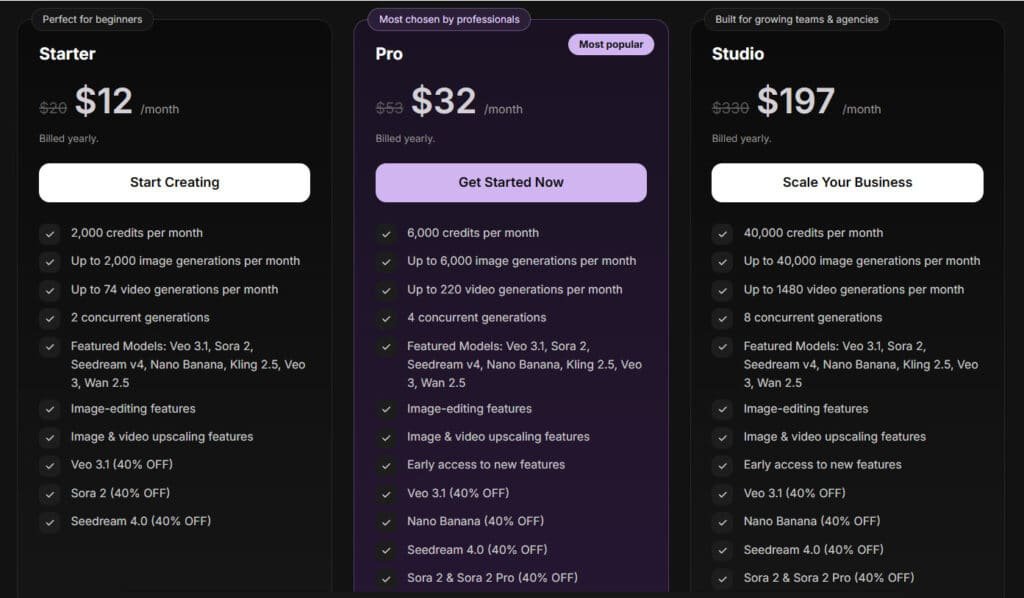
A first provide review: LucentChat offers flexible tiers with a limited-time 25% off first month and 40% annual savings – perfect for scaling AI visual production.
Starter Plan
$15/month (regular $20) or $12/month billed yearly ($144/year). Great entry point for beginners.
- 2,000 credits/mo
- Up to 2,000 images & 74 videos
- 2 concurrent jobs
- Full access to Veo 3.1, Sora 2, Nano Banana, Kling 2.5 & more (25–40% off models)
- Image editing + upscaling
Pro Plan (Most Popular)
$39/month (regular $53) or $32/month billed yearly ($384/year). Best value for professionals.
- 6,000 credits/mo
- Up to 6,000 images & 222 videos
- 4 concurrent jobs
- Early access to new features
- Same top models with bigger discounts
Studio Plan
$247/month (regular $330) or $197/month billed yearly ($2,364/year). Built for teams & agencies.
- 40,000 credits/mo
- Up to 40,000 images & 1,480 videos
- 8 concurrent jobs
- Priority support included
| Plan | Monthly (First/Regular) | Yearly (Per Month) | Images/Mo | Videos/Mo | Best For |
| Starter | $15 / $20 | $12 | 2,000 | 74 | Beginners |
| Pro | $39 / $53 | $32 | 6,000 | 222 | Professionals |
| Studio | $247 / $330 | $197 | 40,000 | 1,480 | Teams & Agencies |
User Experience, Ease of Use, and Flexibility
The ease of use is this platform’s greatest strength. The conversational interface feels intuitive from the start. You don’t need technical expertise to get impressive results.
For personal use, LucentChat turns solo creators into one-person production studios.
A hobbyist photographer can upload a quick phone snap, chat “make this sunset more dramatic with golden hour light,” and watch the AI deliver magazine-worthy edits in seconds.
Content creators building personal brands simply describe their next Reel idea…“a cozy morning routine with my new coffee maker, UGC style, vertical”…and get a polished, lip-synced video ready to post, no filming required.
For teams or solopreneurs working on complex projects, the flexibility shines. The process adapts well to different workflows. Managing multiple assets feels organized in the clean environment—history stays threaded, variations are easy to compare side-by-side, and exports land exactly where you need them.
There’s a learning curve, but it’s gentle. You’ll need to practice describing your vision clearly.
The ease of iteration makes this learning process enjoyable rather than frustrating—tweak one word and regenerate instantly until it’s perfect.
Switching between realistic product mockups, cartoon thumbnails, or viral talking-head clips happens in the same chat window, giving personal users the same firepower agencies enjoy, without the overhead.
As one of the first to provide a detailed review, I can say the platform shows great promise.
While user reviews are still limited, my testing reveals a tool that balances power with accessibility effectively—ideal for anyone creating daily content on their own terms.
Alternative to Lucent Chat
Ever feel stuck picking the right AI video tool?
Lucent Chat rocks for unified image-video gens with top models like Sora 2, but sometimes you need niche vibes.
Let’s stack it against eight solid picks: Simplified, Vidgenie AI, Getimg AI, Jogg AI, Imagine.Art, Predis AI, Scenario AI and Pollo AI. I dug into real user buzz and specs—here’s the quick scoop to match your workflow.
These options help create stunning visuals, avatars, and clips without switching apps a lot. I know juggling different AI tools can slow you down. You just want fast, high-quality results.
Here are some great picks that make it easier.
Simplified
Simplified packs AI writing, design, and video editing into one easy platform. It turns ideas into full posts, graphics, and short videos quickly. Many creators use it for complete workflows, saving hours on social content. Great when you need more than just generation. – Read Full Review
Vidgenie AI
Vidgenie shines at making UGC-style videos with realistic avatars that stay consistent. It supports tons of languages and auto-picks hooks for your product. Users love how authentic the clips look for ads and social. Perfect for high-volume marketing without hiring influencers. – Read Full Review
Getimg AI
Getimg focuses on text-to-image with powerful editing and custom models. It also does short image-to-video clips smoothly. Pros rave about the quality and speed for stills plus animations. Strong choice if images are your main thing with video as a bonus. – Read Full Review
Jogg AI
Jogg turns text or URLs into lifelike avatar videos with natural voices and movements. Templates make quick ads a breeze. Many marketers pick it for fast demos that feel personal. Ideal for promo content that grabs attention right away. – Read Full Review
Imagine.Art
Imagine.Art generates art in dozens of styles from simple prompts. It handles images well and some video too. Creative types enjoy experimenting with wild ideas safely. Suited for artistic visuals that stand out. – Read Full Review
Predis AI
Predis automates social posts with AI videos, captions, and scheduling. It even checks competitors for ideas. Brands use it to keep feeds fresh without daily effort. Best for planning and publishing at scale. – Read Full Review
Scenario AI
Scenario lets you train custom models for perfect brand consistency. Great for game assets or styled videos. Teams love the control over outputs. Strong when you need repeats that match exactly. – Read Full Review
Pollo AI
Pollo is an all-in-one generator mixing top models for videos and images. Effects and styles make viral clips fun. Users say it’s quick for styled content like anime or effects. Fun pick for creative experiments. – Read Full Review
| Tool | Key Features | UGC/Video Focus | Starting Pricing | Best For |
|---|---|---|---|---|
| Lucent Chat | Multi-model access, chat workflow | High | Subscription (varies) | Unified AI creation |
| Simplified | Full content suite, editing | Medium | $20+ | Marketing workflows |
| Vidgenie AI | Consistent avatars, hooks | High | $29 (200 videos) | Authentic UGC |
| Getimg AI | Custom models, image-to-video | Medium | $9-12 | High-quality images + video |
| Jogg AI | Avatar from text/URL | High | $19+ | Quick avatar ads |
| Imagine.Art | Many art styles | Low | $10+ | Artistic exploration |
| Predis AI | Social automation, analysis | Medium | $19-27 | Scheduling & branding |
| Scenario AI | Custom training | Medium | $15+ | Consistent assets |
| Pollo AI | Multi-model effects | High | $10+ | Styled viral clips |
Your best match depends on focus. UGC pros often choose Vidgenie or Jogg.
All-round? Simplified or Pollo.
These tools speed up your creative flow big time. What visuals are you creating next?
Conclusion: Lucent Chat Review
Raamish’s Take
LucentChat catches my eye as a no-fuss hub for AI visuals that pulls top models into one spot, cutting out the hassle of app-hopping for creators who just want results.
Its strength lies in blending image generators like FLUX1.1 and Seedream v4 with video generators such as Sora 2 and Veo 3.1, all powered by a chat interface that turns simple prompts into polished assets.
I like how it handles guided workflows—think UGC viral video templates for quick TikTok clips or product branding templates that mock up e-comm shots without a camera in sight. The Nano Banana model stands out for its speedy renders, delivering 8K upscales in seconds, which keeps things moving for daily content pushes.
What sets it apart is the model discounts—up to 40% off on premium ones like Kling 2.5—making pro tools affordable without skimping on quality. Batch processing shines for scaling, letting you crank 40,000 images a month on higher tiers, while analytics track what prompts hit best.
Integrations with tools like Photoshop or YouTube exports seal the deal for seamless workflows. It’s not flashy, but the reliability and privacy focus build trust, especially for teams dodging data leaks.
Early user feedback on LucentChat hints at quick adoption for its balance of power and simplicity, though it’s still gaining traction.
My final assessment reveals a tool that balances accessibility with impressive generative capabilities. This platform delivers on its core promise: unified access to premium AI models through a simple conversational interface.
I recommend this product for users seeking to scale content production without technical complexity. Marketing teams and creators will appreciate the streamlined process for video and image generation.
At $12 monthly, the value proposition is compelling compared to individual subscriptions. The comprehensive support system—including live assistance and training resources—mitigates adoption concerns for this newer platform.
If you’re juggling multiple AI tools, test this workspace with your specific needs. While no solution is perfect, this approach to simplifying creative workflows represents meaningful progress in making professional content creation more accessible.
Frequently Asked Questions
What kind of content can I create with this platform?
You can generate video scenes, images, and even voice content. The platform’s AI models are designed for various projects, from marketing materials to creative scenes. It’s a versatile toolkit for modern content demands.
How does the pricing structure work for teams?
Pricing is typically per month, with different tiers based on usage and features. Businesses can find plans that scale with their needs, often including better support and more generation capabilities. Always check their official site for the latest details.
Is it suitable for beginners without technical training?
Absolutely. The interface emphasizes ease of use, so even if you’re new to AI tools, you can start creating quickly. The design guides you through the generation process without a steep learning curve.
Can I integrate this tool with other software my business uses?
Yes, integrations are a key focus. The platform often supports connections with popular business tools, enhancing your existing workflow. This makes it easier to incorporate AI-generated content into your projects seamlessly.
What sets this product apart from other AI generators on the market?
Its combination of video, image, and voice capabilities in one environment is a major advantage. The quality of the output and the user-friendly design make it stand out for creators and marketers who need a reliable all-in-one solution.
How does the platform ensure the quality of generated content?
Through continuous model training and updates, the AI improves over time. User feedback also plays a role in refining the tools, ensuring that the content meets professional standards for various use cases.
Is there live support available if I run into issues?
Most plans include access to support, with higher tiers offering more responsive help. The company prioritizes user experience, so assistance is generally readily available to keep your projects on track.
Can I use this for commercial purposes, like client work?
Typically, yes—many users leverage the platform for commercial projects. It’s wise to review the specific terms of service to understand usage rights, but it’s built with business applications in mind.