Does your digital life feel like a chaotic mess of AI subscriptions? You’re not alone. In the current AI landscape, we’re all juggling multiple tools for writing, images, and data. It drains your wallet and your precious time.
This frustration is exactly why digital marketing veteran Dustin W. Stout created a solution. He was tired of switching between fragmented AI apps. So in 2023, he built Magai on a simple, powerful idea: one platform that does everything well.
This platform consolidates over 50 powerful AI applications into a single, unified dashboard. It’s designed to eliminate subscription fatigue for business professionals and individual people alike. The goal is to give you access to the world’s best AI models without the hassle.
The market has responded. By July 2025, Magai attracted over 50,000 users and hit $1 million in annual revenue. That’s real validation. As someone who’s tested dozens of AI tools, I was eager to see if it lives up to the hype.
This isn’t a surface-level look. I’ll give you my honest, hands-on experience. We’ll dive deep into features, pricing, and whether this platform truly delivers on its ambitious promise to simplify your workflow. Let’s get started.
Key Takeaways: Magai Review
- Magai consolidates 50+ AI tools into one platform to combat subscription overload.
- Founded in 2023 by digital marketing expert Dustin W. Stout.
- Achieved significant market validation with 50,000+ users and $1M ARR.
- Designed to save time and money for both businesses and individual users.
- This analysis provides a deep, experience-based evaluation of its real-world performance.
Magai Review: An Overview
The
Introduction to Magai
The “Marie Kondo of AI tools”—that’s how The AI Hat Podcast host described Dustin W. Stout’s vision. This analogy perfectly captures the mission: to spark joy in your workflow by decluttering the digital chaos.

AI Landscape and Company Background
In the current AI landscape, the market is consolidating. We’ve moved past the initial explosion of single-function apps. Now, people need integrated solutions. I know you feel the pain of managing ChatGPT Plus, Claude Pro, and other subscriptions. It drains your wallet and focus.
Founder Dustin W. Stout lived this frustration as a digital marketing consultant. He built this tool to solve his own workflow fragmentation. His background gives him a unique understanding of what teams truly need to create content efficiently.
Purpose, Endorsements, and User Adoption
The core purpose is simple: provide unified access. You get a single chat interface to over 50 different AI models. This is a game-changer for text, image, and video generation. It’s the smart way to handle your data and creative tasks.
The proof is in the adoption. By July 2025, over 50,000 users had joined. Reaching $1 million in annual revenue is solid validation. This value resonates. Professional teams across industries endorse it for consolidating their workflows, making it a trusted platform for serious work.
What is Magai?
What if you could combine the logical power of GPT-5.1 with Claude’s nuanced writing in a single conversation? That’s the fundamental idea behind this platform. It’s a unified interface that gives you access to over 50 different AI models through one subscription.
Core Functionality and Inner Workings
I find the inner workings brilliant. Instead of separate tabs for each tool, you have one main chat window. Inside, you can select from top-tier models like GPT-5.1, Claude 4.5 Sonnet, and Gemini 3 Pro for text. You also get research power from Perplexity and creators for images and video.
The revolutionary feature is context-switching. You can start a chat with one model and switch to another mid-conversation. Your entire history stays intact. This is a game-changer for content creation workflow.
| Feature | Traditional AI Tools | This Platform |
|---|---|---|
| Model Access | Separate subscriptions per tool | 50+ models in one place |
| Workflow | Start new chats for each model | Switch models without losing context |
| Cost for Solopreneurs | ~$70/month for multiple tools | ~$19/month for everything |
Benefits for Ideal Users
This platform is a lifesaver for specific users. Content creators can draft, refine, and fact-check in one continuous chat. Marketing teams maintain a consistent brand voice across different models.
Small business owners get immense versatility without subscription chaos. The value is clear. You consolidate your AI workflow and save significant money. It turns AI from a scattered toolkit into a cohesive partner.
Best Features of Magai
What separates exceptional AI tools from mediocre ones isn’t the number of features, but how intelligently they solve your actual workflow frustrations. I’ve found that Magai’s capabilities are designed around eliminating the copy-paste chaos that plagues most AI users.
Magai is an all-in-one AI platform designed for professionals and teams, integrating multiple leading AI models into a unified interface.
It emphasizes seamless workflows, context retention, and scalability without interruptions. Below is a comprehensive overview of all features, organized by category, based on the tool’s current offerings.
Each category includes detailed descriptions of functionalities, including sub-features and operational mechanics.
1. Core Functionalities
These foundational capabilities enable efficient AI interactions across diverse tasks, prioritizing continuity and customization.
Multi-Model Access & In-Chat Switching
The platform provides access to over 50 top AI models in one chat interface, including GPT-5.1, Claude Sonnet 4.5, Gemini 3 Pro, DeepSeek, Perplexity, o1, and Claude 3.7 Sonnet.
Users can switch models mid-conversation without losing context, maintaining full conversation history. This eliminates copy-paste workflows and supports seamless ongoing chats.
Auto Model Selection
In “Auto” mode, Magai intelligently selects the optimal model based on the user’s prompt, ensuring efficient and relevant output.
Reusable Personas
Users create custom AI instructions or personas once and apply them across all models with a single click.
The system includes 50+ pre-built personas for tasks like marketing, YouTube optimization, and copywriting. A Persona Marketplace enables sharing and access to expert-built personas, enhancing prompt management with predefined structures applied universally.
Prompt Enhance
This tool automatically refines vague or incomplete prompts into structured inputs for improved output quality.
Prompt Library
Users save, organize, search, and reuse high-performing prompts to streamline tasks.
Real-Time Edits
Modify inputs or AI-generated output inline within a chat, with immediate changes.
No Rate Limits or Cooldowns
Supports continuous generation without pauses or delays, with instant top-ups for word budgets.
Infinite Scalability
Accommodates unlimited nonstop generation.
Migration Support
Import workflows from ChatGPT or Claude via JSON files in under 5 minutes, preserving messages, prompts, and threads.
2. Integrations
Magai incorporates external resources directly into its ecosystem for enhanced productivity.
Integrated Web Search and Files
Perform real-time web searches or upload documents, webpages, or YouTube transcripts into chats. Uploaded files are unified and accessible across chats, allowing AI analysis without switching tools.
File Uploads
Support instant referencing of documents, PDFs, images, and data in any chat session.
3. Specific Modules
Dedicated modules extend core functionalities into specialized workflows.
Chat Module
Unified interface for multi-model interactions, auto-selection, mid-chat switching, and full history retention.
Content Creation Module
End-to-end development in a single chat, including drafting, editing, and exporting in PDF or DOCX formats.
Advanced Image and Content Generation Tools
Generate custom images (e.g., blog visuals, thumbnails) and product videos directly within chats, powered by models like DALL-E, Ideogram, Flux, and Stable Diffusion variants.
Document Editor
In-chat side-by-side editor for composing, revising, and exporting polished content.
Research Module
Uses models like Perplexity for concise research summaries.
4. User Interface Elements
The interface is designed for intuitive, distraction-free use.
Chat Interface
Centralized window with real-time tools, model controls, and organizational features like chat folders.
5. Collaboration Tools
Features focused on team-based environments ensure secure, efficient shared workflows.
Customizable Personas and Workflow Integration
Team collaboration transforms AI into a shared asset, allowing invitations for people to join live chats and role-based workspaces with permissions.
Instant Team Invitation
Invite team members directly into ongoing chats, retaining full history and files.
View-Only Sharing
Distribute secure, read-only links for chat threads.
Role-Based Workspaces
Define custom permissions, contexts, and access per team, project, or user, with support for multiple workspaces.
Strict Invite-Only Access
Conversations remain private, accessible only to invited people.
6. Other Capabilities
Additional safeguards and efficiencies round out the platform’s offerings.
Content Creation Made Easy
Holistic drafting, editing, and exporting in one environment.
Complete Data Privacy
Requests are processed transiently by model providers and deleted immediately; no data retention for training. Enterprise-grade security supports sensitive sectors.
Organizational Tools
Chat folders, searchable history, and bulk editing for efficient management.
Pricing Plans of Magai
Let’s talk numbers—the part of any tool evaluation that often makes or breaks the decision for practical users like us. The magai pricing structure here is refreshingly straightforward, which I appreciate after testing so many convoluted subscription models.
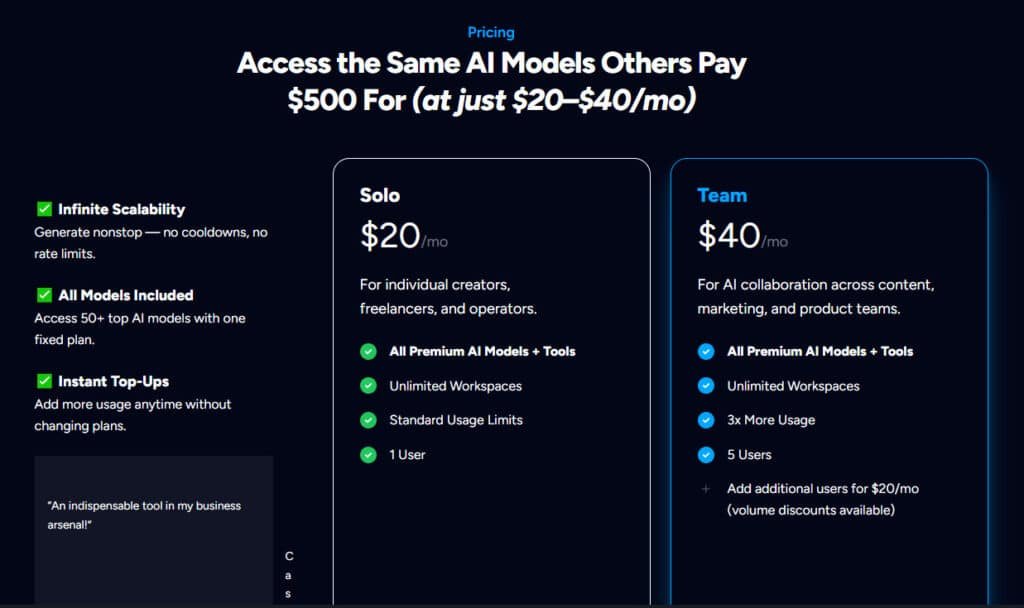
Overview of Pricing Plans and Word Budget
The Solo plan costs $20 per charges month and includes 100,000 words of usage. You get access to all 50+ AI models with this single subscription.
The Team plan runs $40 per month for up to 5 users with triple the usage capacity.
Here’s where it gets clever: Your word credits aren’t literal. More efficient AI models consume fewer words from your budget. A standard model might use 1,000 words, while an optimized one uses only 200 for similar output. This effectively multiplies your content creation power.
Cost Efficiency and Competitive Comparison
The value becomes crystal clear when you compare costs. At $0.00019 per word, this platform delivers nearly 4 times more value than competitors. Most users consume less than 30% of their monthly credits, making the allocation more generous than it appears.
| Platform | Cost Per Word | Monthly Subscription | Value Multiplier |
|---|---|---|---|
| Magai | $0.00019 | $19-20 | 3.8x |
| Narrato | $0.00072 | $49 | 1x |
| Separate Tools | ~$0.00040 | $70+ | 1.9x |
The only drawback? Unused credits don’t roll over each month. But instant top-ups are available if you exceed your limit. Compared to paying for ChatGPT, Claude, and other tools separately, this plan saves significant money while delivering superior value.
Pros & Cons of Magai
No tool is perfect, and after extensive testing, I’ve found both brilliant strengths and frustrating weaknesses in this platform. Let me give you the honest breakdown.
Advantages: Versatility, Privacy, and Value
The value proposition is undeniable. You get 50+ AI models for the price of one subscription. This saves significant time by eliminating constant app-switching.
The Persona system creates unmatched consistency in your content output. Set your instructions once and apply them across any model. Team collaboration features make it genuinely useful for groups of users.
Data privacy is a major advantage. Your data isn’t used for training models—critical for business users handling sensitive information.
Drawbacks: Learning Curve and Credit Limitations
The sheer number of features can overwhelm beginners. There’s a learning curve to unlock the platform’s full value.
The word budget system means unused credits vanish monthly. While most users only consume 30% of their credits, this feels wasteful.
Most concerning are customer service reports. Some user reviews mention ignored refund requests and continued charges after cancellation. This customer service issue is a legitimate red flag.
If these drawbacks concern you, several alternative platforms take different approaches to solving the multi-AI-tool problem.
Alternatives to Magai
The AI tool market offers several compelling alternatives that approach multi-model access from different angles. Depending on your specific needs—whether it’s specialized content creation, budget constraints, or privacy concerns—other platforms might serve you better.
Narrato and Specialized Content Platforms
Narrato stands out for marketing teams focused purely on content workflow. At $48 monthly, it provides SEO optimization and editorial management tools. This platform excels at content calendars and team collaboration features.
It’s more specialized than broader AI tools. You get fewer words but dedicated content creation capabilities. AIDetectPlus takes a unique approach with one-time fees starting at $9. Your credits never expire, which eliminates monthly subscription pressure.
DeepAI, Duck AI, and Other Comprehensive Tools
DeepAI Chat is a budget-friendly creative playground at just $4.99 monthly. It goes beyond text to include image generation, music creation, and video tools. This makes it ideal for creative professionals needing diverse media options.
Duck AI from DuckDuckGo prioritizes total privacy with zero tracking. You get free access to multiple models without signing up. ChatGPT Plus offers a polished interface for $20 monthly but locks you into OpenAI’s ecosystem.
Poe by Quora is the most direct competitor, offering similar multi-model chat interface functionality. However, users often find the platform we’re discussing has a more intuitive workflow for business applications.
Case Study / Personal Experience with Magai
Numbers and features are one thing, but how does this platform actually perform when you’re racing against a deadline? Let me show you with a real blog post example from my own workflow.
The entire process happened in one continuous chat. I started by using Perplexity to research “the top 5 trends in AI workflow automation.” This gave me a solid, fact-based foundation.
Then, I seamlessly switched to GPT-4o within the same chat to create a detailed outline. Its logical structuring is perfect for this phase. For the actual writing, I switched to Claude 3.7 Sonnet.
I prompted it section by section for a clear, engaging tone. Finally, I used Gemini Pro to generate 10 headline options. Each model built on the last without any copy-pasting.
Real-World Results Achieved with Magai
The results were transformative. What used to be a 4-5 hour juggling act across multiple tabs now takes me just 2-3 hours. That’s a time saving of 40-50%.
The quality of my content output also improved. By using the best model for each task, the final blog post was more cohesive and required far less editing.
My Personal Workflow Transformation Story
I was skeptical about migrating from ChatGPT Plus. But the import feature was a game-changer. I moved 10+ custom GPTs and months of history in under five minutes. Nothing broke.
This solved my biggest pain point: organization. I no longer waste time flipping through dozens of disorganized chats. Brandon Crawford’s testimonial perfectly captures this experience.
“Keeps me more organized… I hated flipping through 20-30 projects trying to find the right one. Now I have separate workspaces, personas, and prompts and can grab what I need when I need it.”
The financial results were just as impressive. I now pay $20 a month instead of $70. One startup founder I know saved over $200 monthly. For people creating serious content, this experience is a massive upgrade.
Magai in the Evolving AI Landscape
The era of single-purpose AI apps is giving way to a new paradigm where consolidation and automation reign supreme. Understanding these trends helps you see why platforms like this one represent the future rather than just another temporary solution.
How Magai Embraces AI Consolidation Trends
After the initial explosion of hundreds of single-function AI tools, we’re now seeing “The Great Consolidation.” Users and businesses are tired of managing dozens of subscriptions. This creates expensive, fragmented workflow chaos.
This platform exemplifies successful consolidation. Instead of separate subscriptions for text, images, and research, you get 50+ models in one workspace. Regular platform updates show it’s actively evolving to stay ahead of this trend.
The Shift from Tools to Autonomous Agents
The industry is moving beyond simple chat interfaces toward autonomous AI agents. These agents can complete multi-step tasks without constant human guidance.
The personas system combined with multi-model access serves as a stepping stone toward this future. Imagine telling a persona to “research, write, and illustrate a blog post.” It could autonomously select the best tools in sequence.
Based on industry trends, future updates will likely include deeper workflow automation and more sophisticated agent-like features. This evolution will further reduce manual switching between different AI models.
Magai vs. Competitors
Let’s cut through the marketing hype and compare this platform directly against its two biggest rivals. I’ve tested all three extensively, and the workflow differences are significant.
Comparative Review with ChatGPT Plus and Poe
For the same $20 monthly price, ChatGPT Plus gives you a polished interface but locks you into OpenAI’s ecosystem. You miss access to specialized models like Claude for creative writing.
This platform’s key advantage is diversity. Different models excel at different tasks. Having them all in one chat is genuinely liberating for content creation.
Poe by Quora is the most direct competitor. Both offer multi-model access. However, I find this platform’s interface more intuitive for business users.
Critical difference: Poe can lose your chat context when switching models. This platform preserves your entire conversation history seamlessly.
Competitive Positioning and Market Differentiators
The data privacy stance is a major differentiator. This platform explicitly states they don’t use your data to train AI models. This is crucial for business teams handling sensitive information.
Neither competitor offers a built-in document editor. This feature is essential for users who want to compile content directly from AI chat sessions.
If you only need OpenAI models, ChatGPT Plus works. For maximum privacy on a budget, consider Duck AI. But for the best multi-model value with professional tools, this platform delivers superior flexibility.
Customization & Workflow Integration with Magai
What separates a good AI assistant from a great one is how well it adapts to your specific workflow. The platform’s real power unlocks when you customize it to fit your creative rhythm.
Seamless Workflow Migration and Setup
Migrating from ChatGPT is surprisingly smooth. Request a data export from ChatGPT settings, download the ZIP file, and upload the conversations.json file to the import feature.
I moved 10+ custom GPTs and months of history in under five minutes. Nothing broke—the process was remarkably clean. This immediate access to your existing chat history eliminates the startup friction that plagues most platform switches.
The workspace system keeps everything organized. Create separate workspaces for different clients or projects. No more drowning in one endless chat list.
Reusable Personas and Tailored User Experiences
The persona system delivers consistent, high-quality output. Create detailed instructions once and reuse them across any model.
My “Social Media Remix Strategist” persona transforms any URL into five platform-specific posts. It handles X, LinkedIn, and Facebook with tailored tones and formats. The consistency beats generic prompts every time.
For teams, this system ensures brand consistency across all AI-generated content. When your entire team uses the same personas, you eliminate the wild variations that occur with individual prompts.
Conclusion
After weeks of testing, the verdict is clear: this platform fundamentally changes how you work with AI. The value is undeniable. You save significant money and time by consolidating dozens of tools into one powerful interface.
Let’s talk about the ideal user. If you’re a content creator, marketer, or business professional tired of subscription chaos, this is your solution. The Persona system and data privacy are game-changers.
Is there a learning curve?
Yes. But the investment pays off. My final review is a strong recommendation. If you’re serious about AI productivity, this platform delivers superior results for a fraction of the cost.
Frequently Asked Questions
How does the pricing work for the different plans?
The platform uses a straightforward monthly subscription model. Each plan gives you a specific word budget, or credit allocation, to use across the various AI models. You’re not locked into one model—your monthly credits let you access different tools based on your project needs.
Can I really switch between AI models within the same chat?
Absolutely. This is one of the standout features. You can start a conversation with one model, like GPT-5.1, and seamlessly switch to Claude, generate an image with an AI image model or another option mid-chat. It’s fantastic for comparing outputs or combining the strengths of different models for a single task.
What are “personas” and how do they help my workflow?
Personas are like pre-configured AI assistants tailored for specific jobs. Think of it as a let talk “Blog Writer” persona versus a “Code Assistant” persona. You can create and save your own, which saves time on writing detailed prompts for every new task. It seriously streamlines your content creation process.
Is there a free trial or a free plan available?
Yes, there is typically a free tier that offers limited access so you can test the interface and core features. For serious usage, the paid plans offer significantly more value with higher word limits and access to the more advanced models and image generation tools.
How does the image generation feature compare to dedicated tools?
It’s surprisingly capable for an all-in-one platform. While it may not have every advanced feature of a standalone image AI, it’s integrated directly into your chat. You can generate images based on your conversation context, which is a huge plus for creating cohesive content without switching apps.
How steep is the learning curve for a new user?
If you’re familiar with any modern AI chat interface, you’ll feel right at home. The main learning curve comes from exploring all the different models and personas to find what works best for you. The system is intuitive, and you’ll likely be productive within an hour.
Is my data and chat history private?
Privacy is a key focus. The company states that your data is not used to train their public models. For teams and businesses concerned about sensitive information, this is a significant advantage over some other platforms.