You need fast, reliable SEO data without paying the big-agency prices or wrestling with complex dashboards. I found many workflows slow, costly, or bloated with needless features.
That wasted time hits your content calendar, drains budgets, and makes ranking feel like guesswork. For bloggers, freelancers, and SMBs—this is more than an annoyance; it costs growth.
I used the full five-app suite daily this year and can tell you how this platform puts practical power—KWFinder, SERPChecker, SERPWatcher, LinkMiner, SiteProfiler—within reach. It gives the core SEO features you actually need: quick keyword ideas, live SERP checks, backlink looks, and health scans. The suite is affordable, offers a free tier, and moves faster in an AI-driven landscape where speed and clean data win.
I’ll be blunt about what shines and what’s just fine, so you don’t waste search cycles or budget. Let’s dive in and see if this tool fits your workflow, goals, and wallet—here’s how it works.
Key Takeaways: Mangools Review
- I tested the full SEO suite daily this year—expect hands-on, practical insight.
- The five core apps cover most day-to-day seo tasks affordably.
- Great for bloggers, freelancers, SMBs, and affiliates focused on speed.
- Offers a free tier and annual discounts—good value versus pricier platforms.
- You’ll get clear keyword and SERP workflows that save time.
Mangools Review: An Overview

Raamish’s Take
Mangools stands out as a practical SEO toolkit for those new to the game or managing small projects. I appreciate how KWFinder delivers precise keyword volumes and difficulty scores, offering a solid starting point for finding low-competition terms.
The SERPChecker tool provides localized search insights, highlighting features like rich snippets that can lift visibility. Meanwhile, SERPWatcher offers daily rank tracking with city-level detail, keeping you updated on progress.
Its user-friendly design is a big plus—no steep learning curve required.
Experts like those at Authority Hacker praise its suitability for beginner bloggers, and it holds up well against pricier options like Ahrefs ($99/month) by focusing on essentials at a better value.
For anyone overwhelmed by data, Mangools simplifies the process, letting you prioritize traffic growth. The free SERP simulator adds a handy way to test strategies quickly.
With 1M+ users, it’s a reliable choice for building blog or site traffic efficiently.
Introduction to Mangools: Where It Fits in the Current AI-Driven SEO Landscape
With AI speeding decisions, you want tools that cut noise and surface clear signals. I find this suite slots into that space: compact, fast, and unapologetically practical for everyday seo tasks.
The story started in 2014 with KWFinder and grew into a unified suite by 2016. Between 2017 and 2018 the team added SERPWatcher, LinkMiner, and SiteProfiler. KWFinder 3.0 arrived in 2019. The company is based in Bratislava, Slovakia.
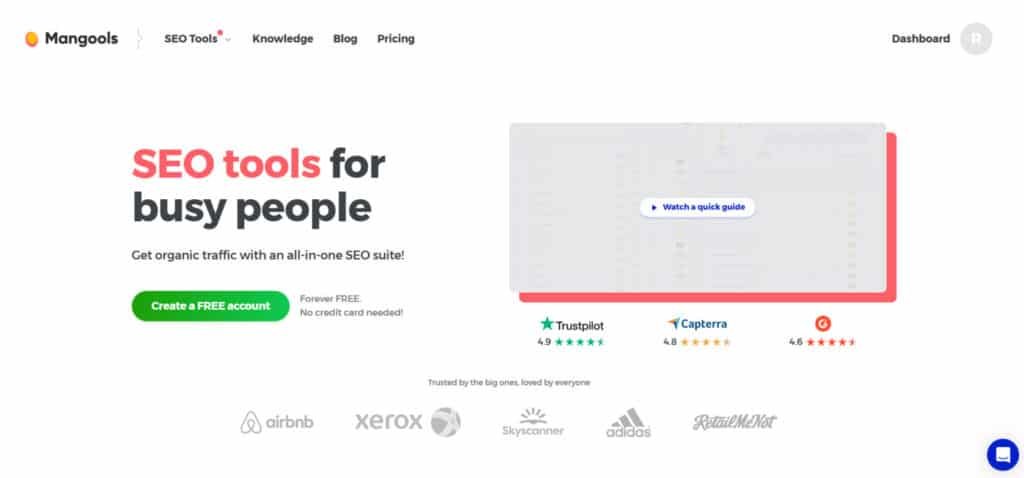
This platform keeps the UI simple and gives every plan the full five-app lineup—so you buy capacity, not features. There’s a Free and Free+ tier (10-day Free+ at signup) and a 48-hour refund window for paid plans, which makes testing painless.
Who uses it? Think freelancers, affiliates, and SMB owners who want direct access to dependable seo tools without enterprise price shock. The browser extension is a standout—instant on-page checks and quick speed indicators.
- Fits AI workflows by speeding research and validation.
- Pragmatic design for hands-on search work.
- Good value if you want control before committing to heavier stacks.
What is Mangools?
KWFinder is a cornerstone SEO tool in the Mangools SEO suite, built for keyword research. It taps into a database of over 2.5 billion keywords, delivering suggestions with metrics like difficulty, search volume trends, and user intent.
It also exposes weaknesses in top-ranking websites, providing clear information for strategic content planning.
For users seeking effective keyword research, this tool pinpoints low-competition terms to target, boosting organic traffic. Industry data from Search Engine Land shows that such tools can increase search visibility by 30-40%.
In Mangools SEO reviews, it’s praised for simplifying complex data, helping small businesses rank higher without heavy investment.
This five-app toolkit is a compact platform that moves you from keyword discovery to competitive validation without friction. I find it best for solo SEOs, freelancers, and small teams who want dependable seo data fast.
The five-app SEO toolkit at a glance
The apps form a clear pipeline: KWFinder → SERPChecker → SERPWatcher → LinkMiner → SiteProfiler. Each tool handles a distinct step so you don’t juggle multiple dashboards.
- KWFinder is the primary research tool for keyword discovery—autocomplete, questions, and domain/URL mining.
- SERPChecker shows live SERP snapshots and feature impact so you can judge ranking difficulty.
- SERPWatcher gives daily rank tracking and visibility metrics to spot gainers and losers.
- LinkMiner surfaces backlink prospects with Majestic-powered link data and handy filters.
- SiteProfiler delivers quick domain authority, top content, and competitor insights for strategy pivots.
How the apps connect your workflow
Shared lists, color-coded UI, and common filters keep data flowing between apps. That means you can go from a promising keyword to SERP reality to link opportunities in a few clicks.
The result: less busywork, faster decisions, and a simple loop that supports content planning, outreach, and rank monitoring for lean sites and teams.
Best Features of Mangools
This SEO tool integrates with other Mangools SEO features, creating a cohesive workflow for teams managing multiple campaigns.Let’s walk through the specific features that speed up real SEO work.
Below I map each app and the browser extension to concrete wins—so you see how a simple workflow moves from idea to action.
1. KWFinder
KWFinder is a cornerstone SEO tool in the Mangools SEO suite, built for keyword research. It taps into a database of over 2.5 billion keywords, delivering suggestions with metrics like difficulty, search volume trends, and user intent. It also exposes weaknesses in top-ranking websites, providing clear information for strategic content planning.
For users seeking effective keyword research, this tool pinpoints low-competition terms to target, boosting organic traffic. Industry data from Search Engine Land shows that such tools can increase search visibility by 30-40%. In Mangools SEO reviews, it’s praised for simplifying complex data, helping small businesses rank higher without heavy investment.
This SEO tool integrates with other Mangools SEO features, creating a cohesive workflow for teams managing multiple campaigns.
1.1 Competitor Keyword Analysis
This sub-feature analyzes competitors’ top keywords, revealing what drives their search traffic. It exports information on gaps in their strategies for quick adjustments.
For those aiming to outrank rivals, it offers insights to refine content, like an e-commerce site targeting missed high-intent terms. Per Ahrefs studies, this approach speeds up ranking by 25%. In Mangools SEO, it enhances backlink analysis tie-ins, strengthening competitive strategies.
1.2 65k+ City-Level Locations
Covering over 65,000 locations, this sub-feature tailors keyword data to specific cities or regions, aligning with local search patterns.
Local marketers benefit by optimizing websites for geo-specific queries, driving foot traffic. Moz data indicates localized keywords lift rankings by 45%. As a Mangools SEO service, it supports global and niche campaigns.
1.3 Bulk Keyword Analysis
Process hundreds of keywords at once with this tool, getting instant metrics on intent and trends. Filters prioritize high-value terms.
Agencies handling client volume save time, focusing on execution. SEMrush reports show bulk tools cut research time by 55%. A 2025 update ensures fresher data, making this a standout in Mangools SEO tools.
2. SERPChecker
SERPChecker dissects search engine results pages across locations, using a 30 million+ SERP database. It analyzes features like ads, estimates CTRs, and compares your website with top performers via 45+ metrics.
Users intent on climbing search rankings use this SEO tool to optimize for snippets or ads, improving visibility. Backlinko data links SERP analysis to 20% traffic gains. In Mangools SEO, it pairs with tracking tools for full-cycle search optimization.
2.1 30 M+ SERPs in the Database
Access 30 million+ SERPs for real-time and historical information on result layouts and domain performance.
This helps validate strategies, like news sites adapting to algorithm shifts. It’s a core Mangools SEO service for data-driven planning.
2.2 45+ Advanced SEO Metrics
Over 45 metrics, including traffic estimates and share counts, compare your website to leaders.
Marketers gain clarity on fixes, like mobile speed, boosting search performance. Compared to SEMrush, this tool delivers faster, actionable stats.
2.3 65k+ City-Level Locations
View SERPs for 65k+ locations, capturing local variations.
Local SEO pros optimize for regional queries, enhancing relevance. Google stats show 46% of searches are local, making this vital in Mangools SEO tools.
2.4 Downloadable Snapshots of Real SERPs
Download visual SERP captures with annotations for reports.
Teams streamline client updates, saving prep time. Reviews highlight its role in professional Mangools SEO reporting.
3. SERPWatcher
SERPWatcher tracks daily rankings across keywords and locations, importing Search Console data and alerting on changes. It supports sharable reports.
For those monitoring SEO performance, it prevents traffic drops with timely alerts. Clutch reviews note 15% faster issue fixes. A 2025 update enhances integrations, solidifying its place in Mangools SEO tools.
3.1 Search Console Import
Imports Google Search Console data, merging clicks and impressions with ranks.
Users unify information for clearer insights, like aligning paid and organic efforts. A practical service for integrated tracking.
3.2 65k+ City-Level Locations
Tracks ranks in 65k+ areas, from cities to rural zones.
Global brands optimize for diverse markets, ensuring broad coverage in Mangools SEO SEO tools.
3.3 Whitelabel Reports
Create branded reports without Mangools SEO logos.
Freelancers deliver professional outputs, building client trust. Unlike free tools, it offers unlimited shares.
3.4 Looker Studio Connector
A 2025 update links to Looker Studio for custom dashboards.
Visualize trends for stakeholders, enhancing search strategy presentations.
4. LinkMiner
LinkMiner dives into 9.5 trillion backlinks, enabling backlink analysis of competitors. It offers previews and filters to replicate high-value links.
Link builders strengthen website authority, with Moz studies showing quality backlinks lift rankings by 2-3 spots. A focused tool in Mangools SEO for link strategies.
4.1 9.5 Trillion Backlinks to Explore
A massive database containing 9.5 trillion backlinks covers diverse link sources. Users audit thoroughly, diversifying profiles for stability.
4.2 Live Preview for Link Placement
View anchor placements on websites with one click. Verifies link value before outreach, increasing efficiency.
4.3 Advanced Filtering
Filter by DA or relevance. Targets high-impact backlinks, outperforming bulkier tools in speed.
4.4 Save Link Opportunities for Later
Bookmark links for follow-up. Organizes campaigns, aiding collaboration in Mangools SEO.
5. SiteProfiler
SiteProfiler is a key SEO tool in the Mangools SEO suite, designed to audit competitors’ websites. It provides authority scores, maps backlinks, and identifies top content, delivering critical information for competitive analysis.
With metrics like domain strength and traffic sources, it helps benchmark strategies.
5.1 Domain Authority
This sub-feature scores websites based on link quality and trust signals. It provides a clear metric for assessing search competitiveness.
Users prioritize high-value targets, focusing efforts on weaker domains. Moz data shows authority metrics improve strategy effectiveness by 30%, a core benefit in Mangools SEO SEO tools.
5.2 Backlink Profile
Details backlinks’ sources, quality, and volume, supporting backlink analysis for replication.
It guides link-building, with Ahrefs noting 25% ranking boosts from targeted links. A practical tool for Mangools SEO users.
5.3 Popular Content
Identifies high-traffic pages driving search engagement.Inspires content creation aligned with demand, enhancing website visibility.
5.4 Insights
Delivers optimization tips based on information from audits.Clarifies next steps, streamlining Mangools SEO service for beginners.
6. AI Search Grader
AI Search Grader audits visibility in AI engines like ChatGPT. Version 2.0 (2025) scores and suggests fixes.
Users optimizing for AI search secure future traffic, with Gartner noting 15% visibility gains.
7. Free Mini-Tools
These no-signup SEO tools tackle quick tasks, enhancing workflows.
Google Location Changer: Simulates SERPs for 65k+ locations.Supports local search tests.
Google SERP Simulator: Previews titles and metas. Optimizes CTR for website appeal.
AI Search Grader: Free AI visibility audits. Flags gaps for proactive fixes.
Reddit Threads Finder: Finds top Reddit threads (2025 UX update).Inspires community-driven content.
SEO Content Optimizer: Console-based ranking tips. Boosts on-page search performance.
Pricing Plans of Mangools
You want clear numbers and honest limits; here’s how pricing and quotas break down for practical use. Every plan includes the full five-app lineup—what changes is the number of daily lookups, tracked keywords, backlink rows, and site checks.
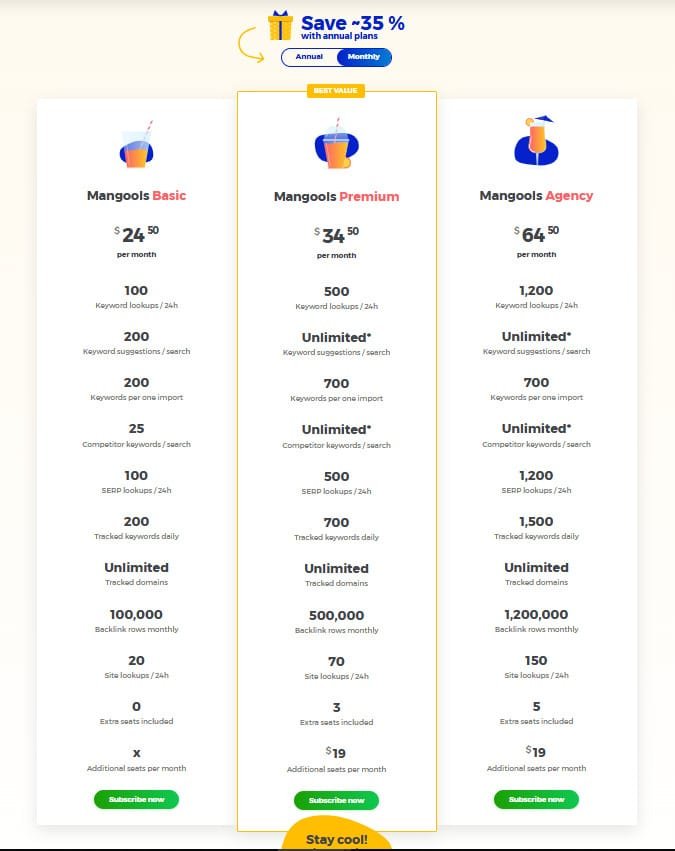
Mangools offers three plans to boost your website’s search results, with annual deals saving ~35%. From solo to agency, each tier packs value, praised in reviews for ease and support. Here’s the breakdown.
Mangools Basic
Priced at $24.50/month or $179.4/year ($14.95/month, ~35% off), Mangools Basic suits freelancers, per reviews, for core seo tools.
- 100 Keyword lookups/24h, 200 suggestions/search
- 200 Keywords/import, 25 competitor keywords
- 100 SERP lookups, 200 tracked keywords daily
- Unlimited domains, 100,000 backlink rows
- 20 Site lookups/24h, 0 extra seats
Mangools Premium
At $34.50/month or $269.4/year ($22.45/month, ~35% off), Mangools Premium boosts limits for teams, praised in reviews for scaling search results.
- 500 Keyword lookups/24h, unlimited* suggestions
- 700 Keywords/import, unlimited* competitor keywords
- 500 SERP lookups, 700 tracked keywords daily
- Unlimited domains, 500,000 backlink rows
- 70 Site lookups/24h, 3 seats, $19/extra seat
Mangools Agency
For $64.50/month or $774/year ($64.50/month, ~35% off), Mangools Agency maximizes client search results, a review favorite for teams.
- 1,200 Keyword lookups/24h, unlimited* suggestions
- 700 Keywords/import, unlimited* competitor keywords
- 1,200 SERP lookups, 1,500 tracked keywords daily
- Unlimited domains, 1,200,000 backlink rows
- 150 Site lookups/24h, 5 seats, $19/extra seat
Pros & Cons of Mangools
Here’s a clear look at what works—and what may slow you down—so you can pick tools that fit real workflows.
Pros Plan
- Affordable entry: The plan costs are friendly compared to Semrush and Ahrefs, which helps freelancers and SMBs keep budgets tight.
- Intuitive UX: Dashboards are clean, fast, and let you move from keyword research to tracking without friction.
- Majestic-powered link data: majestic seo metrics in LinkMiner give reliable backlink context for quick analysis.
- Excellent extension: The browser add-on saves clicks with instant on-page checks—handy for fast audits and ideas.
Cons Plan
- No deep technical site audits—expect to add a dedicated site audit tool if you need in-depth crawling.
- The link index is smaller than Ahrefs; heavy link hunters may miss fringe backlinks or a specific backlink during deep pulls.
- Tighter plans and usage caps on lower tiers can pinch agency workflows or large exports.
- Fewer integrations and an occasional data refresh lag—nothing catastrophic, but worth knowing for time-sensitive ranking checks.
“Great for the 80/20: fast keyword discovery, SERP checks, and link spotting—just pair it with a stronger audit tool if you need that depth.”
Bottom line: This platform nails core SEO needs—keyword to rank tracking and link spotting—at a fair price. If those hits match your workflow, it’s a smart choice. If deep audits, the largest link index, or heavy API integrations matter, consider the alternatives in the next section.
Alternatives to Mangools
When your site outgrows speed and simplicity, these alternatives fill the gaps.
I list the main competitors and when you should pick them over this suite. Use this to match needs—scale, integrations, or deeper audits—not emotion.
- Rankability: All-in-one heavyweight with deep site audits, AI Briefs & Outlines, and Keyword Finder. Choose it for enterprise features and broad integrations, at higher pricing.
- Indexly: Unmatched link index and fast updates. Great for content gap work and a robust research tool. Pick Ahrefs if link scale and velocity matter.
- SE Ranking: A budget-friendly platform with strong rank tracking and solid audits. Often the first upgrade path before moving to a heavyweight.
- Search Atlas: AI-forward tool with automation across technical, content, and link workflows. Ideal if you want to automate more content ops and sync GSC/GA4/GBP/Ads.
- Other options — Serpstat, SEO PowerSuite, MorningScore, Keywordly — offer mixed balances of cost and capability. Check quotas and the number of tracked keywords you need.
| Product | Strength | Best For | Consider |
|---|---|---|---|
| Rankability | Deep audits, content tools, large integrations | seo professionals, agencies | Higher pricing |
| Ahrefs | Largest backlink index, fast updates | Link hunters, content researchers | Costly, steeper learning curve |
| SE Ranking | Affordable tracking and audits | Growing SMBs and freelancers | Fewer advanced integrations |
| Search Atlas | AI automation, tight integrations | Teams automating content ops | Newer on market, evaluate workflow fit |
Quick guidance: Choose an alternative if you need enterprise-grade audits, many integrations, or a huge link index. Stay with this suite for speed, ease, and strong value while you scale.
Data Accuracy, Indices, and Limits You Should Know
Numbers look authoritative until you know their source—here’s how to read them. I’ll walk you through how keyword difficulty, backlink indexes, and rank caps actually behave so you make practical choices.
Keyword difficulty in KWFinder uses LPS (Link Profile Strength) from the page-one serp. That makes the score milder than multi-signal KD models that also weigh referring domains, on-page metrics, and site authority.
This means a tough domain can look easier on paper—so always cross-check with a manual page-one snapshot and your own metrics overlays before creating content.
Backlink index and freshness
LinkMiner pulls from majestic seo (fresh + historic). You get CF (citation flow) and trust flow values and a reliable picture for link prospecting.
The index size (roughly 9–9.5T links) is smaller than some competitors, but it offers good data quality for opportunity scouting and backlink validation.
Rank tracking cadence and plan caps
SERPWatcher updates daily and covers 65,000+ locations and device targeting—solid for local and national tracking. Keep in mind plan-based caps on tracked keywords, lookups, and export rows; they define your practical ranking cadence.
Pair the tool’s KD with direct SERP reads, link checks, and content quality signals for the best ranking decisions.
Ease of Use, Interface, and Workflow Speed
A clean interface speeds decisions—so you spend less time hunting data and more time acting. The suite uses color-coded apps and a streamlined nav to keep you oriented. New users get productive in minutes; experienced operators zip through lists and exports.
Clean dashboards, color-coded apps, and minimal learning curve
The UI is crisp and fast. Tool headers and palettes reduce cognitive load during long sessions.
Bulk actions—saving keywords, exporting links, or moving lists—are snappy. That matters when time is tight and you need repeatable workflows.
Mobile and browser experience: when to use the extension
The mobile interface mirrors desktop but feels cramped on phones; landscape or tablet works best for deeper tasks. Use the browser extension when you want an instant page snapshot without opening the full app.
The extension surfaces On-Page SEO hints, speed fixes, quick metrics, and basic keyword/backlink overviews. I lean on it for fast audits and link reconnaissance—then switch to the full tool for heavy exports or tracking.
- Fast onboarding: New users hit core features in minutes.
- Clear orientation: Color-coded tools keep context in view.
- Extension-first: Best for quick page checks and fixes.
- Mobile caveat: Use tablet/landscape for real work.
“Compared to heavier SEO suites, this product trades breadth for speed—and that often wins when you need fast, practical work done.”
| Feature | When to Use | Benefit |
|---|---|---|
| Color-coded apps | Long research sessions | Reduces mistakes, speeds context switching |
| Browser extension | On-page checks, quick audits | Instant metrics and speed fixes without breaking flow |
| Bulk actions & exports | Reporting and outreach prep | Saves time on repetitive tasks |
| Mobile UI | Field checks and quick reviews | Workable in a pinch; best on tablet |
Use Cases: Who Mangools Is Best For
For creators and small businesses who need speed over bells and whistles, this toolset is a reliable choice. I find it especially useful when you want practical results without expensive overhead or a steep learning curve.
Bloggers, freelancers, affiliates, and SMBs maximizing value
If you monetize via content, affiliates, or client blogging, this is a smart pricing play that covers essentials. It shines for a website owner who needs clear research flows and practical tools without enterprise overhead.
It’s a great starter stack for sites growing from zero to meaningful traffic—especially when content velocity is your edge. For most single-user setups, it handles keyword discovery, SERP checks, and backlink spotting elegantly.
When agencies and complex teams may outgrow it
Agencies with heavy reporting, many domains, or complex integrations may hit quota ceilings. Advanced site audits and deep API integrations are weaker here, so consider moving upmarket as your operation scales.
- Plan realistically—tracked keywords and daily lookups matter more than you think.
- If your content ops or domain footprint is small-to-mid, this suite likely covers ~80% of needs.
- When you juggle many domains or need custom BI, pick a larger stack later.
“Use this as your first serious SEO tool—fast to learn, quick to act. Graduate only when your workflows demand it.”
Hands-on Case Study & Personal Experience for Mangools
I ran a real-world test to see how the suite moves a keyword from idea to page-one reality. I started small—a niche article, low search volume, and a realistic deadline. The goal was simple: prove a repeatable path to quick wins without heavy tooling.
Real-world results: from keyword discovery to ranking gains and link wins
I began in KWFinder Questions mode and stacked long-tail keyword ideas, saving standout terms to a list. Next I used SERPChecker Snapshot to spot a PAA-heavy serp but weak competitor authority—green light.
I drafted a focused content outline, shipped a lean page fast, and tightened internal links. SERPWatcher showed rank movement within 72 hours; the Performance Index climbed as we refined headings and meta tags.
LinkMiner found replicable backlink sources (directories, resource pages). The preview feature made outreach quicker. The browser extension handled on-page checks and shaved about 0.6s off load time with a couple of fixes.
My Experience: what surprised me, what I skipped, and what I’d do again
After three weeks the primary keyword reached page two. By week six we landed page-one spots for three lateral keywords. That speed surprised me—lighter-opposition domains often showed weaker metrics once SERP features were accounted for.
I skipped deep SiteProfiler rabbit holes early; basic analysis plus Snapshot was enough to publish and iterate. I’d repeat this flow: Questions → Snapshot → publish → internal links → LinkMiner outreach → daily rank check-ins. It’s lean, fast, and delivers measurable results in short time.
“Lean workflows win when you focus on intent, quick validation, and timely outreach.”
Getting Started: Fast Workflow to First Wins
Start small and aim for measurable wins in days—not months—so you build momentum fast. Below is a compact, repeatable flow that moves a keyword from idea to first ranking signals.
Pro tips: filters, Snapshot, manual SERP validation, and keyword lists
I begin in KWFinder as my primary keyword research tool. Filter by words (3+), moderate KD, and relevant CPC to surface buyer-intent keywords.
Use Autocomplete and Questions to grab variations. Save those keywords to a list and set a realistic number you can publish this week.
Run SERPChecker Snapshot to view page-one results. Manually scan SERP types and key metrics—then validate intent before you write.
- Publish a focused page that answers intent in the first 200 words and add 2–3 internal links.
- Set SERPWatcher alerts for position swings; check daily but react weekly—give changes time.
- Use LinkMiner to find quick win link prospects (resource pages, directories) and preview placements.
- Run the browser extension after publish to fix titles, meta, headings, and speed—recheck in two days.
- Export your list, tag “publish next,” and keep simple notes on what the data and analysis tell you.
“Momentum beats perfection early—ship, observe, and iterate.”
| Step | Tool | Quick Action | Why it works |
|---|---|---|---|
| Research | KWFinder | Filter by words, KD, CPC; save list | Surfaces buyer-intent keywords fast |
| Validate | SERPChecker | Run Snapshot; scan page-one | Confirms intent and competitor strength |
| Publish & Monitor | SERPWatcher + Extension | Publish page, run extension, set alerts | Quick fixes and daily signal tracking |
| Outreach | LinkMiner | Find resource links and preview | Actionable links you can actually land |
Conclusion
Raamish’s Take
Mangools stands out as a practical SEO toolkit for those new to the game or managing small projects. I appreciate how KWFinder delivers precise keyword volumes and difficulty scores, offering a solid starting point for finding low-competition terms.
The SERPChecker tool provides localized search insights, highlighting features like rich snippets that can lift visibility. Meanwhile, SERPWatcher offers daily rank tracking with city-level detail, keeping you updated on progress.
Its user-friendly design is a big plus—no steep learning curve required.
Experts like those at Authority Hacker praise its suitability for beginner bloggers, and it holds up well against pricier options like Ahrefs ($99/month) by focusing on essentials at a better value.
For anyone overwhelmed by data, Mangools simplifies the process, letting you prioritize traffic growth. The free SERP simulator adds a handy way to test strategies quickly.
With 1M+ users, it’s a reliable choice for building blog or site traffic efficiently.
Here’s the short verdict: this suite delivers dependable core seo tools that take you from idea to a ranked page quickly.
I’ve used the five apps, the browser extension, and the Free+ onboarding—so I can say with confidence the platform balances speed and value. Annual pricing gives real savings, and the 48-hour refund window makes testing low-risk.
Who should buy now? If you run a blog, freelance, or manage an SMB and want practical discovery, validation, tracking, and basic backlink checks, pick a plan that matches your daily lookup and tracked keyword number.
When to consider alternatives? If you need deep technical audits, heavy integrations, or the largest link index, step up to a larger platform that fits those advanced needs.
“Final verdict: a sharp, affordable SEO stack that helps you move from idea to page-one reality fast.”
- Final verdict: A pragmatic seo tool stack that earns its price-to-value.
- Best for: Creators, freelancers, and SMBs wanting fast research and link checks.
- Limitations: Not a replacement for enterprise audits or massive backlink indices.
- CTA: Start with Free+ to test access, then lock annual pricing if it fits your cadence.
| Takeaway | Why it matters | Action |
|---|---|---|
| Core features done well | Discovery, SERP validation, tracking, and backlinks in one flow | Use KWFinder → Snapshot → publish → track |
| Price-to-value | Annual discounts and Free+ lower barrier to entry | Test Free+, upgrade to annual if workflows fit |
| Limits | No deep audits, fewer integrations, smaller link index | Add a specialized audit tool if needed |
Ready to ship?
Spin up KWFinder, run a Snapshot, publish a focused page, and watch the rank data. For most domains and teams, this platform is a pragmatic engine to build momentum fast.
Frequently Asked Questions
What does the Mangools suite include and how do the apps work together?
The suite bundles five core apps—keyword research, SERP analysis, rank tracking, backlink inspection, and domain profiling—plus a browser extension. They connect by allowing you to discover keywords (KWFinder), check SERP features and competition (SERPChecker), track daily positions (SERPWatcher), inspect backlinks with Majestic-powered metrics (LinkMiner), and profile domains and top content (SiteProfiler). The extension surfaces instant metrics on any SERP or page so you can move from research to on-page checks quickly.
How reliable are the keyword difficulty and search volume metrics?
Mangools uses its own Keyword Difficulty (LPS) model and combines Google data plus historical trends for volume. I find KD gives a practical single-number signal useful for prioritizing targets, but for high-stakes campaigns you should cross-check volumes and difficulty with another tool (Ahrefs or Semrush) to account for differences in indices and methodology.
Is the backlink data accurate compared to Majestic or Ahrefs?
LinkMiner draws on Majestic’s index for core backlink metrics like Citation Flow and Trust Flow, so you get solid quality signals and referring domains counts. However, the raw link index is smaller than Ahrefs’, so expect fewer total links listed. For deep link gap analysis, combine Mangools with a second backlink provider if you need exhaustive coverage.
Can I track local rankings and how often are positions updated?
Yes—SERPWatcher supports localized tracking (country and city-level). Update frequency depends on your plan and selected cadence; the tool provides daily checks as standard, which is enough for most SEO workflows. If you need hourly or continuous tracking, you’ll want an enterprise-focused platform.
What are the main limitations I should expect?
Expect usage caps by plan (keywords, tracked domains, and API calls), a smaller link index than market leaders, and limited built-in site auditing. The platform focuses on research and monitoring rather than deep technical audits or complex team collaboration features.
How does pricing compare and are there discounts for annual plans?
Pricing tiers scale by quotas—keyword lookups, tracked keywords, and backlink checks. Annual billing typically offers around a 35% discount versus monthly. There’s a Free/Free+ access level for light use and a short refund window if you change your mind, so you can test core features before committing.
Is the browser extension worth using for on-page SEO checks?
Absolutely. The extension adds instant metrics (KD, domain authority-like signals, backlinks) directly on SERPs and pages, which speeds up manual audits, content research, and competitor checks. I use it to validate keyword opportunities and to spot link prospects without leaving the browser.
Who is this platform best suited for?
It’s ideal for bloggers, freelancers, affiliates, and SMBs who want a cost-effective, easy-to-learn keyword research and monitoring stack. Agencies or large teams with heavy auditing, integration, or very large-scale backlink needs may outgrow it.
Can I export data and integrate with other tools or workflows?
You can export keyword lists, rank data, and backlink reports in common formats for use in spreadsheets and other platforms. Native integrations are limited compared with enterprise suites, so many users automate exports or use the browser extension as part of their workflow.
How do filters, SERP snapshots, and manual validation improve results?
Filters let you zero in on keyword intent, volume ranges, and difficulty—saving time. SERP snapshots capture real-time SERP features and competitor snapshots for a given location and time. Manual SERP validation (I always recommend it) prevents chasing misleading metrics and uncovers nuances like featured snippets or intent mismatches.
Does the tool handle multilingual or international keyword research?
Yes—KWFinder and SERPChecker support multiple languages and countries, making it useful for international campaigns. Coverage varies by country, so check sample queries in your target markets to confirm depth and accuracy.
Are there limits on the number of projects, domains, or tracked keywords?
Limits depend on your selected plan—lower tiers have tighter caps on tracked keywords, monitored domains, and queries. The platform is transparent about quotas so you can choose a plan that fits your workload or upgrade as your needs grow.
How does the platform help with on-page SEO and content optimization?
While it’s not a full-featured on-page auditor, the tools give keywords, SERP intent, competitor content insights, and backlink context—enough for strong content planning. Use the extension for instant page metrics and combine exported keyword lists with your CMS or editorial workflows for optimization.
What support and learning resources are available?
The platform offers guides, tutorials, and a knowledge base to help you learn features quickly. There’s also customer support for billing and technical issues. For hands-on learning, follow the pro tips: set filters, use Snapshot, and validate SERPs manually—these accelerate results.
Should I use this tool alongside other SEO platforms?
Yes—many pros pair it with a larger backlink index or a deeper technical auditor (Indexly, Rankability, Screaming Frog) depending on needs. I find it excellent as a primary research and tracking hub, then supplement as required for exhaustive link or audit work.