Ever spent hours searching for the perfect soundtrack, only to find the same generic tracks everyone else uses? I’ve been there too. As someone who’s tested dozens of AI tools, I know the frustration of finding unique, royalty-free music that doesn’t sound like elevator music.
The problem is real. You waste precious creative time scrolling through endless libraries. You worry about licensing issues. And you settle for tracks that don’t quite match your vision. It’s enough to make you want to create your own compositions—if only you had the time or musical training.
That’s where AI music generation changes everything. This Mubert Review explores a platform that promises to be your personal AI co-composer. Imagine having custom tracks created on-demand, tailored to your exact needs.
I’ve put Mubert through rigorous testing across multiple projects. From YouTube videos to podcast intros, I’ll share honest results about whether this tool delivers on its promises. No marketing fluff—just real experiences from someone who understands your pain points.
Ready to discover if this is the solution you’ve been searching for? Let’s dive into what makes this platform stand out in the current AI Content landscape.
Key Takeaways: Mubert Review
- AI music generation solves the time-consuming search for unique soundtracks
- Royalty-free music creation eliminates licensing headaches
- Custom tracks can be tailored to specific project needs
- The platform offers real-time music generation capabilities
- Personal testing reveals practical applications for content creators
- 2026 brings significant advancements to AI music technology
- Comparison with traditional stock libraries shows clear advantages
Mubert Review: An Overview

Raamish’s Take
Mubert emerges as a versatile platform that harmonizes human creativity with advanced algorithms to produce tailored, royalty-free music for diverse applications.
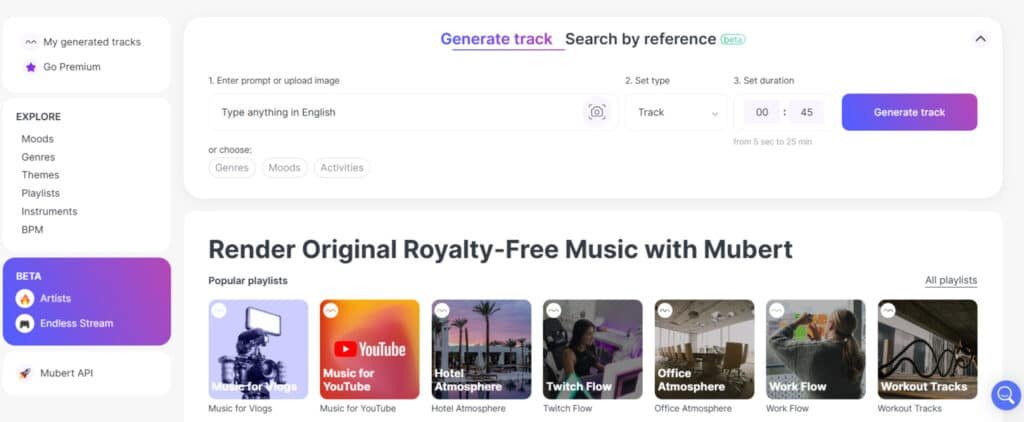
Its Mubert Render tool excels in generating soundtracks instantly from prompts or images, allowing precise control over duration (5 seconds to 25 minutes) and mood, ideal for video content, podcasts, and social media.
I am particularly impressed by the Mubert API, which enables seamless integration into apps and games, delivering infinite, brand-aligned audio variations drawn from millions of artist samples—scalable for commercial use without licensing hurdles.
The Mubert Studio empowers musicians to monetize unused loops and riffs by contributing to the AI ecosystem, fostering collaborative production and expanded reach.
Complementing these, Mubert Play offers evolving, mood-specific streams (from calm meditation to extreme sports), ensuring an adaptive listening experience.
With outputs that blend professional quality and originality, Mubert supports creators and businesses in enhancing engagement effortlessly.
For me, Mubert emphasis on symbiotic AI-human collaboration and unrestricted royalty-free deployment positions it as a strategic asset for innovative audio solutions.
Introduction to Mubert Review
When I first encountered AI music tools, most felt like gimmicks—but one platform stood out for its ethical foundation. The generative AI in music market is projected to reach nearly $2.8 billion by 2030, growing at over 30% annually. That’s not just growth; that’s a revolution in how we think about music creation.
Position in the AI Music Landscape
What makes this platform different?
It’s built on a human-AI collaborative model. Rather than generating music from scratch, the artificial intelligence works with samples contributed by real musicians. This approach addresses a critical gap in the market.
Traditional stock libraries feel finite and overused. Content creators need unique soundtracks that won’t trigger copyright issues. This platform delivers exactly that while ensuring artists get fair compensation—musicians earn 80% of revenue when their samples are used.
Background and Founding Vision
The founding team recognized that most AI music platforms overlooked artist rights. Their vision was simple: bridge the gap between accessibility for content creators and fairness for artists. This ethical foundation sets them apart in a crowded field.
They’ve even partnered with the Web3 Foundation to develop the Mubert Protocol. This decentralized system will manage ownership and monetization of AI-generated content. It shows they’re thinking long-term about how artificial intelligence and human creativity can coexist profitably.
Major agencies and developers already use this technology, validating its position as a serious player. The approach isn’t just innovative—it’s sustainable for the future of music.
What is Mubert?
What makes this platform truly powerful is its four-pronged approach to serving different user needs. It’s not just one tool but a complete ecosystem where each component serves a specific purpose. This architecture ensures everyone from individual creators to large development teams gets exactly what they need.
How the Platform Works
The core technology is fascinating. The system trains on millions of musical samples from real artists. When you input a text prompt or parameters, the AI assembles these elements in real-time.
Each track generation is unique. You’re not getting a pre-made file that thousands of others might use. The algorithm creates fresh compositions every time based on your specific request.
I’ve tested this extensively. Entering “energetic synthwave for coding sessions” produces completely different results each time. The platform can generate tracks up to 25 minutes long using over a million musical elements.
Benefits for Content Creators and Developers
For creators, this solves major headaches. The instant music generation eliminates hours of library searching. More importantly, every track is royalty-free—no copyright worries.
Developers get even more flexibility through the API. Imagine building a fitness app where the music tempo matches workout intensity. Or a game with soundtracks that adapt to player actions in real-time.
The ecosystem includes tools for musicians to contribute samples and earn revenue. This creates a sustainable cycle where everyone benefits from the AI music creation process.
Complete Features of Mubert
What separates a good AI music platform from a great one comes down to how its features solve actual creative problems.
I’ve tested many tools where impressive-sounding capabilities felt clunky in practice. The platform’s standout features genuinely enhance workflow rather than adding complexity.
1. Customizable Music Generation
This core capability in Mubert Render empowers users to create music tailored to specific needs. It offers three approaches for generating ai-generated music.
The text prompt method allows input of descriptive phrases, such as scenes or emotions, where the AI interprets language to produce fitting soundscapes.
This helps content creators quickly obtain track options that align with video narratives, saving time on manual searches.
Image-to-music generation analyzes uploaded photos, interpreting colors and textures to match visual moods. For users editing visuals, this produces a synchronized track that enhances storytelling without extra effort.
Parameter-based selection provides control over genres, moods, keys, BPMs, or activities, ensuring every track is unique.
This flexibility benefits podcasters or social media managers by delivering varied ai-generated music results, streamlining workflows and reducing pricing concerns for royalty-free assets.
1.1 Mood and Style Selection
Integrated within Mubert Render, this lets users choose from dozens of moods like Calm or Extreme Sports, or genres, with filters for BPM, energy, or activity.
It enables precise track matching for projects, helping video editors find ai-generated music that fits content tone instantly.
This feature supports efficient create music processes, ideal for those seeking quick, targeted results in a competitive plan.
1.2 Custom Track Length
Users set exact durations in Mubert Render, from 15 seconds to 25 minutes, fitting shorts, podcasts, or full videos.
This customization ensures the track aligns perfectly with content length, aiding creators in avoiding edits and maintaining flow. It contributes to cost-effective pricing by generating only needed ai-generated music.
1.3 Remix Tool
Available in Mubert Render, this tool allows on-the-fly adjustments to generated elements. It refines a track to match specific requirements, benefiting editors who need minor tweaks for seamless integration.
This enhances create music efficiency, producing polished ai-generated music without starting over.
1.4 Search by Reference
Mubert Render analyzes YouTube links to suggest similar track styles from the library, drawing inspiration without copying. This assists users in discovering fitting ai-generated music based on favorites, speeding up selection for consistent branding in videos or streams.
1.5 Instant Exports
Downloads in WAV, MP3, or stems occur immediately in Mubert Render, with outputs at -14 to -12 LUFS for easy mixing. This readies track files for commercial platforms, helping professionals meet upload standards and avoid post-production delays.
1.6 Platform Safety
All track outputs from Mubert Render are royalty-free for YouTube, TikTok, Instagram, Twitch, and Meta. This eliminates copyright risks, allowing users to monetize content freely and focus on creation rather than legal issues.
1.7 Canva Integration
Direct generation inside Canva via Mubert Render streamlines design-to-audio workflows. It helps graphic creators add custom track elements without switching tools, boosting productivity in visual projects.
1.8 Restream Partnership
Real-time adaptive soundtracks in Mubert Render suit live streams. This dynamic ai-generated music adjusts to content, enhancing viewer engagement for streamers managing interactive sessions.
1.9 Free Starter Generations
Mubert Render provides 5 free track tests, rising to 25 on Ambassador plan, no card required. This entry point lets users evaluate create music potential before committing to pricing.
1.10 Intuitive Interface & Workflow
The simple setup in Mubert Render involves inputting parameters, generating, and previewing. Regenerations refine track options while recalling preferences. This saves time over stock libraries, aiding busy creators in producing high-quality ai-generated music efficiently.
2. Sample and Loop Uploads
In Mubert Studio, artists upload riffs, loops, or packs for AI to create variations. This expands reach, turning unused assets into revenue-generating track components for global users.
2.1 AI Collaboration
Artists team with algorithms in Mubert Studio to build new track from samples, with editing options. This co-creation process helps musicians experiment and produce innovative ai-generated music for broader audiences.
2.2 Royalty Earnings
Mubert Studio offers $0.50 per sample sold and up to 80% royalties per track, minute, or API use. This payout model supports sustainable income, encouraging contributions without upfront pricing.
2.3 Verification System
Ownership claims in Mubert Studio ensure payout eligibility. This protects creators, building trust in the platform for long-term create music partnerships.
2.4 Marketplace Exposure
Contributions reach millions via Mubert Studio’s ecosystem. This visibility amplifies artist presence, helping samples integrate into diverse track productions.
2.5 Dashboard Tracking
Monitor earnings and usage in Mubert Studio’s dashboard. This transparency aids artists in optimizing outputs and tracking ai-generated music impact.
2.6 License Types
Six options control sample pack usage in Mubert Studio. This flexibility allows tailored distribution, suiting various commercial needs for track licensing.
2.7 Membership Gating
Lock exclusives behind memberships in Mubert Studio. This fosters fan engagement, creating additional revenue streams beyond standard track sales.
2.8 On-Chain Licensing
Blockchain rev share adds 10% for verified creators in Mubert Studio. This modern approach secures transactions, appealing to tech-savvy musicians.
2.9 Creator Resources
Webinars and tools in Mubert Studio maximize income. These guides help artists refine skills for better create music outcomes.
3. Seamless API Integration
Mubert API enables embedding ai-generated music generation into applications, with features like tempo synchronization for fitness or direct Adobe timeline insertion for editing, accommodating diverse plan requirements while scaling create music efficiently and managing pricing through adaptive track delivery in games or wellness tools.
3.1 Real-Time Streaming
API 3.0 in Mubert ensures sub-second track processing for live scenarios, facilitating immediate ai-generated music in dynamic app environments.
3.2 Text Prompt Integration
Mubert API accepts descriptive inputs to produce on-demand track, customizing create music for individual user interactions.
3.3 Preset Filters
Mubert API applies filters for mood or BPM to yield focused track results suited to specific needs.
3.4 Content Modes
Mubert API supports pre-built or generative modes, adapting to static or real-time demands while optimizing pricing.
3.5 Sublicensing
Higher Mubert API tiers permit track redistribution, extending utility in consumer-facing products.
3.6 Commercial Use
Mubert API provides royalty-free track for business implementations, simplifying ai-generated music deployment.
3.7 Custom Channels
Mubert API creates tailored preset collections to scale track for large-scale applications.
3.8 Scalable Plans
Mubert API progresses from trial to full-scale access, supporting growth without restrictive barriers.
3.9 Demo Requests
Mubert API offers tailored project demonstrations to streamline adoption processes.
3.10 UGC and Health Support
Mubert API adjusts track for user content or therapeutic uses, increasing engagement.
4. Mood-Based Streaming
Mubert Play curates over 50 mood categories to assemble continuous track streams, aligning ai-generated music with user activities for enhanced daily experiences and persistent novelty in listening sessions.
4.1 Unique Streams
Mubert Play constructs entirely new ai-generated music per session, eliminating redundancy to sustain listener interest.
4.2 Genre Exploration
Mubert Play unlocks diverse styles including lo-fi or thematic track, expanding discovery horizons.
4.3 Offline Downloads
Mubert Play allows track storage for disconnected playback, ensuring constant availability.
4.4 Personal Recommendations
AI suggests based on habits. This tailors experiences for regular users.
4.5 Ad-Free Premium
Unlimited skips on paid tier. This improves flow for dedicated listeners.
4.6 Mobile and Web Access
Stream evolving track platforms. This convenience fits mobile lifestyles.
Pricing Plans of Mubert
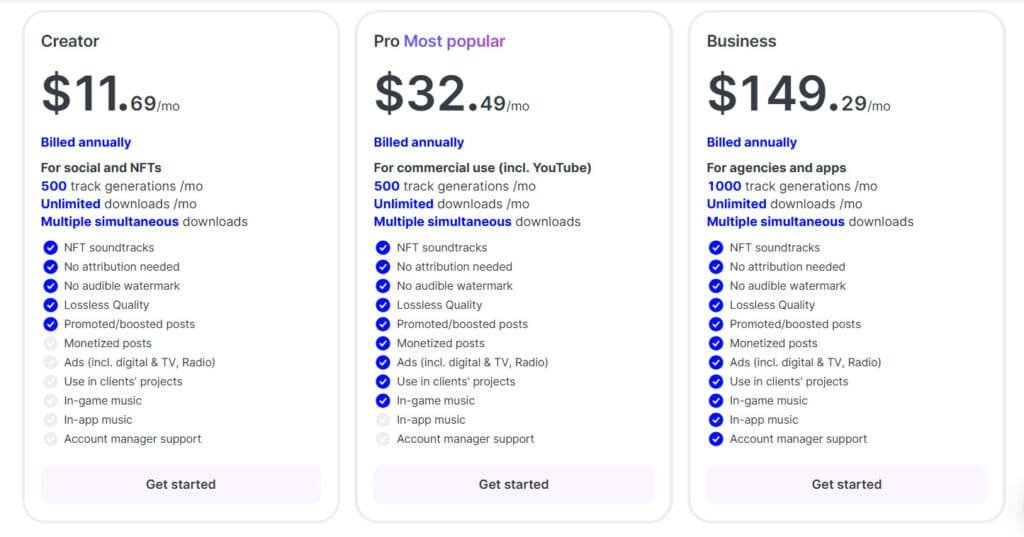
What surprised me most about this platform’s pricing was how transparently it caters to different user types. You get clear options without hidden fees or confusing licensing terms. I appreciate when companies respect my time by making costs straightforward.
Subscription Plans Overview
The four-tier subscription model scales logically with your needs. Each plan offers distinct advantages based on your usage:
- Ambassador (Free): Perfect for testing with 25 tracks monthly, though attribution is required
- Creator ($14/month or ($11.96/month on Annual Plan)): The sweet spot for serious creators with 500 tracks and monetization rights
- Pro ($39/month or ($32.49/month on Annual Plan)): Adds client project rights and Adobe integration for freelancers
- Business ($199/month or ($149.29/month on Annual Plan)): Comprehensive rights for agencies and larger business operations
Single Track Purchase Options
If you only need occasional music, single track purchases start at $19. This flexibility saves money for one-off projects. The pricing ranges based on usage rights:
- $19 for social media and blog use
- $99 for online advertisements
- $149 for all media including TV/radio
- $499 for sublicensing rights
Compared to hiring composers or stock libraries, these plans offer solid value for custom, unique tracks every time.
Pros & Cons of Mubert
After putting this AI music generator through its paces, I can now give you a clear picture of its real-world strengths and weaknesses. No tool is perfect for everyone, so let’s break down where it shines and where it might fall short for your needs.
Key Advantages
The speed is a massive win. I created solid background tracks in under 30 seconds, saving immense time compared to digging through a stock library. The interface is so intuitive that even non-musicians can get professional results quickly.
I deeply respect the ethical model. The platform ensures artists are fairly compensated for their contributions. For users, the clear royalty-free music licensing is a game-changer, completely eliminating copyright fears for content creators.
The ecosystem is versatile, serving different needs through separate products for creators, developers, and listeners. This focused approach generally leads to a better quality experience for each user type.
Areas for Improvement
However, the quality can be inconsistent. I often generated 3-5 variations before landing on a truly usable track. Some outputs felt repetitive, especially with niche genres.
Customer support is a recurring complaint in user reviews, with reports of slow responses to billing and technical issues. The platform also lacks fine-tuning controls found in dedicated DAWs and cannot generate vocals, unlike some competitors.
While the library is vast, the AI sometimes struggles with the emotional depth of human-composed music and newer world genres. It’s best for quick, custom background tracks, not complex compositions.
Alternatives to Mubert
I’ve tested enough AI music generators to know that the ‘best’ tool depends entirely on your specific creative needs and workflow preferences. The market offers specialized platforms for different types of creators.
Competeting AI Music Tools
Picking the right AI music generator can be tricky. I know—finding one that creates great tracks without copyright worries is key for your projects.
Mubert is awesome for real-time, royalty-free background music. But these alternatives offer fresh ways to generate tunes, from full songs to custom beats.
Here they are, broken down simply.
Soundraw
Soundraw lets you build royalty-free tracks with easy tweaks to tempo, mood, and instruments. Great for creators needing unique background music for videos or podcasts. Safe for commercial use – Read Full Review
Mureka AI
Mureka turns prompts or lyrics into full songs with vocals and custom styles. Supports voice cloning and multilingual options. Ideal if you want professional-sounding originals quick – Read Full Review
Loudly
Loudly generates studio-quality music from text or parameters like genre and energy. Includes stems for editing. Perfect for content makers wanting customizable, royalty-free sounds – Read Full Review
Freebeat
Freebeat focuses on music videos, syncing AI visuals to beats or uploaded tracks. Adds dance, lyrics, or effects. Suits artists going viral on social media – Read Full Review
Imagine.Art (Music Studio)
This tool creates songs and instrumentals from text, with genre tweaks. Part of a bigger creative suite. Good for quick, free trials on royalty-free music – Read Full Review
MusicAPI AI
MusicAPI is a developer-friendly API for generating tracks programmatically. Fast, scalable for apps. Best if you’re building tools needing integrated music – Read Full Review
| Tool | Key Focus | Best For | Pricing Starts |
|---|---|---|---|
| Soundraw | Custom instrumentals | Video/podcast backgrounds | $16.99/month |
| Mureka AI | Full songs with vocals | Songwriters/artists | Free tier + $10/month |
| Loudly | Text-to-music & stems | Content creators | Free + $9.99/month |
| Freebeat | AI music videos | Social media virals | Free trial + paid |
| Imagine.Art Music | Text-to-songs | Quick experiments | Free limited + paid |
| MusicAPI AI | API integration | Developers/apps | Pay-per-use/credits |
How This Platform Stands Apart
What makes this service unique is its ecosystem approach. While competitors focus on single use cases, it serves content creators, musicians, developers, and listeners in one interconnected platform.
The API integration is unmatched for building adaptive music into applications. For creators seeking background music, it hits the sweet spot between ease of use and customization. The ethical artist compensation model also provides peace of mind.
Case Study / Personal Experience with Mubert
The real test of any AI tool isn’t in its marketing claims but in how it performs when you’re facing a real deadline. I put this platform through its paces on actual projects to see if it could deliver when creative pressure mounted.
Real-World Results
My first test involved scoring a 5-minute travel video. I needed upbeat acoustic background music that wouldn’t overpower narration. Using Mubert Render, I typed “upbeat acoustic for a travel vlog” and set a 2:30 duration.
The generation took about 20 seconds. The first track was too mellow, but the regeneration feature saved the day. The second attempt nailed the energetic vibe I wanted. The entire process from concept to download took under 5 minutes.
For social media content, I experimented with re-imagining existing tracks. Clicking the lightning arrow next to a Lo-Fi playlist track generated a perfect continuous loop for YouTube background music.
My Personal Journey Using the Platform
I’ve now used this approach across multiple projects. The results speak for themselves:
- 8 YouTube video soundtracks created in minutes, not hours
- 12 Instagram reels with custom audio that matches each video’s mood
- 3 client podcast episodes with unique intro music
The download process is straightforward. You receive both the MP3 audio file and a PDF license. This clarity eliminates copyright worries for all your content.
My honest take? When you use mubert for its intended purpose—creating custom background music quickly—it delivers remarkable value. Just don’t expect it to replace human composers for emotionally complex projects.
Innovative Use Cases for Diverse Creators
After testing this platform across various scenarios, I’m convinced its greatest strength lies in serving diverse creative needs. The same technology that powers quick background tracks for social media can transform entire applications when developers tap into the mubert api.
Solutions for Content Creators and Agencies
For content creators, the immediate benefit is copyright peace of mind. I’ve seen YouTubers generate 25-minute tracks for long-form content while e-commerce brands create custom product video soundtracks. Educational media producers can enhance online courses without licensing headaches.
Agencies particularly appreciate the scalability. Instead of negotiating music rights for each client, they generate unlimited royalty-free music on demand. This approach saves both time and budget across multiple projects.
Opportunities for Developers and Tech Innovators
The real magic happens when developers integrate the API into their apps. Imagine fitness applications where music tempo syncs with heart rate in real-time. Meditation apps can offer endless, evolving soundscapes that never repeat.
Game developers are creating adaptive soundtracks that respond to player actions. This level of dynamic media creation was previously impossible without extensive audio engineering resources.
Conclusion
Raamish’s Take
Mubert emerges as a versatile platform that harmonizes human creativity with advanced algorithms to produce tailored, royalty-free music for diverse applications.
Its Mubert Render tool excels in generating soundtracks instantly from prompts or images, allowing precise control over duration (5 seconds to 25 minutes) and mood, ideal for video content, podcasts, and social media.
I am particularly impressed by the Mubert API, which enables seamless integration into apps and games, delivering infinite, brand-aligned audio variations drawn from millions of artist samples—scalable for commercial use without licensing hurdles.
The Mubert Studio empowers musicians to monetize unused loops and riffs by contributing to the AI ecosystem, fostering collaborative production and expanded reach.
Complementing these, Mubert Play offers evolving, mood-specific streams (from calm meditation to extreme sports), ensuring an adaptive listening experience.
With outputs that blend professional quality and originality, Mubert supports creators and businesses in enhancing engagement effortlessly.
For me, Mubert emphasis on symbiotic AI-human collaboration and unrestricted royalty-free deployment positions it as a strategic asset for innovative audio solutions.
The bottom line after weeks of hands-on experience: this tool solves real problems for creators who need music fast. It delivers custom background music in seconds, saving you time and eliminating copyright worries.
For most content creators, the platform offers tremendous value. The ability to generate tracks across countless genres and moods makes it perfect for YouTube videos, podcasts, and social media content.
If you need quick, royalty-free music without licensing headaches, use Mubert. Start with the free plan to test the quality for yourself. The time savings alone make the subscription worthwhile for busy creators.
Today’s content demands require smart solutions. This AI music generation tool delivers exactly that—practical audio creation that respects both your budget and creative vision.
Frequently Asked Questions
Is the music generated by Mubert copyright-free and safe for commercial use?
Yes, when you use a paid subscription plan or purchase a single track, the audio you generate is royalty-free. This means you can safely use it in your YouTube videos, podcasts, and other commercial projects without worrying about copyright claims. It’s a huge relief for content creators who need reliable background music.
How does the AI music generation process actually work?
The platform uses a sophisticated system that blends samples from a massive library created by human artists. You provide a text prompt describing the mood, genre, or vibe you want—like “upbeat electronic for a tech review.” The AI then composes a unique track in real-time based on your input. It’s like having a personal composer on demand.
What are the main differences between the free and paid subscription plans?
The free plan is great for testing the waters—you can generate tracks, but they are watermarked and for personal use only. The paid plans, like the Pro subscription, remove the watermark, grant you commercial rights, offer higher audio quality, and provide more generation time. It’s designed for serious content creators and businesses.
Can I integrate Mubert’s music generation capabilities into my own app or project?
Absolutely. The Mubert API is a powerful feature for developers. It allows you to embed AI-generated music directly into your applications, games, or digital experiences. This opens up incredible opportunities for tech innovators to add dynamic, adaptive audio to their products.
How does the quality of AI-generated tracks compare to music made by humans?
The quality is impressively high and constantly improving. While it may not yet replicate the deepest nuances of a top-tier human composer for a complex song, the tracks are perfectly suited for background music, social media content, and workflows where you need good-sounding audio quickly and affordably. It complements human creativity rather than replacing it.
What kind of genres and moods can I create with this platform?
The range is vast. You can generate everything from ambient and lo-fi to energetic rock and house music. The key is your text prompt—you can specify genres, instruments, moods (like “calm” or “epic”), and even activities (“music for studying”). The flexibility is one of its best features for matching audio to your specific content.