Finding the perfect background music for your projects can feel like searching for a needle in a haystack.
As a content creator myself, I’ve spent countless hours scrolling through royalty-free libraries only to find generic tracks that don’t match my vision. The frustration is real—you want original sound that reflects your brand’s personality.
What if you could describe the exact mood you’re going for and get a custom track in minutes?
That’s the promise that drew me to explore this platform. The current landscape of AI music generators has exploded with options, but most deliver cookie-cutter results that lack professional polish.
After testing multiple platforms, I discovered this tool combines composition, arrangement, recording, and mixing into one streamlined workflow. It transforms simple text prompts into complete songs with surprisingly realistic vocals and instruments.
For artists and creators needing original content, this could be a game-changer.
In this Mureka AI Review, I’ve put this generator through its paces to see if it delivers on its ambitious claims. Let’s dive into whether this tool can truly revolutionize your creative process.
Key Takeaways: Mureka AI Review
- This platform handles the entire music creation process from composition to final mixing
- You can generate complete songs using text descriptions, lyrics, or melody ideas
- The tool produces professional-quality vocals and realistic instrument sounds
- I’ve personally tested multiple input methods to assess real-world performance
- This review covers both impressive features and frustrating limitations
- Perfect for content creators needing original background music quickly
- Helps artists explore new creative directions through AI collaboration
Mureka AI Review: An Overview

Raamish’s Take
Mureka AI is a straightforward platform that lets you create full songs quickly from a single line or idea, making music production accessible for beginners and pros alike without needing instruments or studios.
Its easy mode is a standout, where you input one line, and the AI generates complete tracks with lyrics, melody, vocals, and instrumentals in seconds, customizable by style, vocal gender (male or female), and title.
I’m really impressed with the advanced options, offering tools like reference uploads for matching existing sounds, vocal fine-tuning for tone or emotion, melody idea brainstorming, lyric optimization, and instrumental layering to refine every element.
The custom workflow supports everything from pop hooks to full verses, with previews to tweak before finalizing. It handles genres like hip-hop or rock seamlessly, all royalty-free for sharing or monetizing.
Mureka AI‘s speed and flexibility turn vague concepts into polished songs effortlessly, ideal for sparking hits without creative blocks.
Introduction to Mureka AI
When exploring the latest wave of music creation tools, I immediately noticed how this service stands out from the competition. The platform enters a crowded field but brings some genuinely interesting technology to the table.
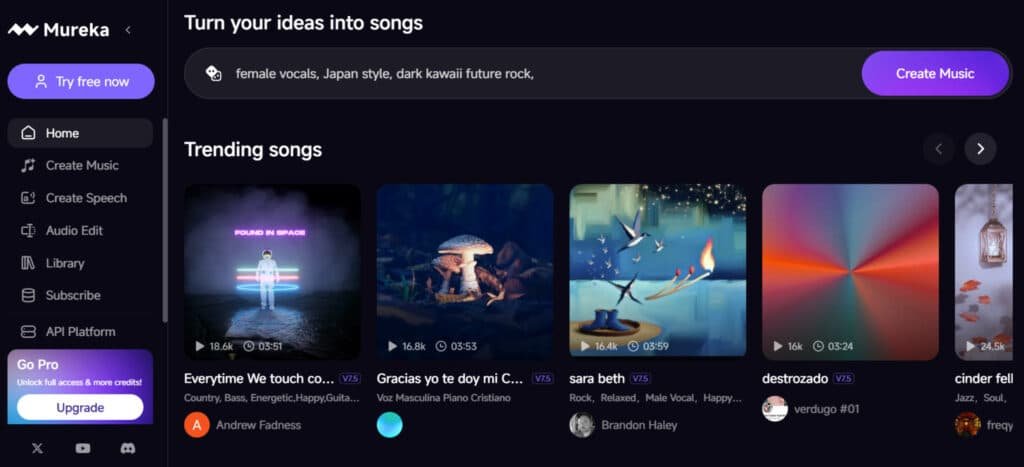
Positioning in the AI Landscape
This tool positions itself alongside heavyweights like Soundraw and Mubert, but it carves out its own space with unique features. The developers have focused on making professional composition accessible to everyone.
| Feature | Mureka | Soundraw | Mubert |
|---|---|---|---|
| Core Technology | MusiCoT & Multiple Models | Proprietary AI | Neural Networks |
| Available Models | Mureka 01, V7.5, V6 | Single Model | Limited Variants |
| Mobile Access | iOS Available | Web Only | Web Focused |
| Specialization | Full Song Generation | Short Formats | Experimental Sounds |
Founders, Background, and Company Credibility
While specific founder details are scarce, the team appears dedicated to democratizing music production. They’ve built a platform that eliminates traditional barriers like expensive equipment and music theory knowledge.
The company’s mission centers on making commercial-quality tracks accessible to non-musicians. This approach has gained attention in the creative community.
Purpose and User Endorsements
User feedback presents a mixed picture that’s important to share honestly. Some creators praise the platform’s capabilities, especially for generating Afrobeat songs and YouTube intros.
However, I found concerning patterns around billing practices and customer support. Multiple users report subscription issues that potential subscribers should consider carefully.
The tool offers both web and mobile access, making it flexible for different workflows. Despite some business practice concerns, the technical features show real promise for content creation.
What is Mureka AI?
What truly sets this tool apart is its ability to transform simple ideas into polished musical compositions. It’s essentially an end-to-end music generator that handles the entire creation process from start to finish.
Inner Workings of the Music Generator
At its core, the platform uses advanced models like Mureka 01 and V7.5 powered by MusiCoT technology. This enables coherent song generation where you provide text prompts, written lyrics, or melody ideas.
The system then handles composition, arrangement, vocal synthesis, and mixing simultaneously. You can create music up to 5 minutes long across 10 languages with surprisingly realistic vocal quality.
Benefits for Content Creators and Music Artists
For content creators, the platform delivers royalty-free tracks ready for commercial use. No more copyright headaches or recurring licensing fees for your YouTube videos or podcasts.
Artists benefit differently—it serves as a rapid prototyping tool. You can explore melodic ideas and generate demo tracks before investing in expensive studio time. The lyrics-to-music functionality breathes life into written words quickly.
Complete Features of Mureka AI
What impressed me most about this platform wasn’t the basic functionality but the professional-grade tools it offers.
I’ve tested many music generators, and this one stands out with features that actually matter for serious content creation.
1. Standard Music Generation API (Your Daily Beat Machine)
Song Generation Tool
The Standard Music Generation API serves as the core tools for music generation on the Mureka website. Song Generation creates full tracks from text prompts, allowing users to specify genres, mood, and lyrics.
It produces vocals with realistic voice quality and supports streaming playback for real-time listening. This feature helps developers build dynamic app experiences, such as in-game soundtracks or social media integrations, by delivering high-quality output without external dependencies.
Instrumental Generation Tool
Instrumental Generation focuses on vocal-free beats and background music, ideal for video content or workouts. It handles complex arrangements using advanced data processing to ensure studio-level polish.
Users benefit from this in video production workflows, where custom instrumentals reduce reliance on stock libraries and cut costs significantly.
Lyrics Generation Tool
Lyrics Generation is another key part of this API, generating themed words in multiple languages. Feed it a concept, and it outputs verses and choruses that align with chosen genres.
This tools aids content creators in overcoming writer’s block, enabling faster lyric development for songs or scripts on the Mureka website.
Song Extension Tool
Song Extension expands existing tracks by adding sections without disrupting flow. This capability supports remixes and longer compositions, making it valuable for podcasters or app developers needing extended audio.
Overall, these tools streamline music generation processes, saving time and enhancing creativity for users searching for efficient API solutions. In a review, this API stands out for its reliability and ease of use in professional setups.
| Feature | Basic Generators | This Platform |
|---|---|---|
| Song Length | 30-60 seconds | Up to 5 minutes |
| Vocal Languages | 2-3 options | 10 languages supported |
| Customization | Limited presets | Real-time adjustments |
| Output Quality | Basic mixing | Professional mastering |
2. Model Fine-Tuning (Craft Your Signature Sound)
Data Upload Process
Model Fine-Tuning on the Mureka offers customization of AI models to match specific styles, making it a standout tools for branded audio.
Users upload over 200 tracks with consistent elements, such as lo-fi or orchestral themes, and the system processes this data to create a dedicated model.
This fine-tuned model ensures all future outputs remain stable and distinctive, ideal for mass production in music generation.
Model Training Benefits
This feature benefits businesses in entertainment or audiobook production by reducing the need for repeated artist hires.
It processes uploaded data efficiently, locking in a unique voice and style that aligns with brand identity.
Developers integrating this into an app can generate consistent sounds for user-generated content, improving engagement.
Application in Apps
As part of the Mureka website offerings, fine-tuning leverages proprietary data handling to avoid generic results.
It helps users with large datasets in music software achieve cost savings and uniformity. For those seeking personalized tools, this process transforms standard AI into a tailored asset.
Professional Review Insights
In practical terms, it supports app ecosystems where themed audio is crucial, like educational platforms or games. The result is scalable output that maintains quality across generations.
A review of this feature highlights its role in cutting production expenses while delivering professional-grade results.
Users searching for advanced customization tools find this indispensable for long-term projects involving genres variation and voice consistency. This part elevates music generation beyond basic prompts.
3. Content Service (No-Code, Instant Tracks)
Track Delivery Mechanism
The Content Service provides no-code access to ready-made tracks, simplifying music generation for non-developers on the Mureka website.
It delivers polished audio directly for streaming, video, or soundtracks, eliminating coding requirements.
This service generates fresh content to bypass licensing issues, allowing users to create originals instead of purchasing rights.
Trend Cloning Capabilities
A key advantage is its trend-responsive cloning, where it replicates styles, voice elements, and instruments from popular hits.
Spot a viral track?
The service produces similar versions quickly, aiding media professionals in staying current. This helps educators or content creators fill needs without delays, enhancing video projects or lessons with custom BGM.
O1 Model Integration
Integrated with the O1 model, it supports contextual background music, such as mood-specific game sounds, and includes AI editing for refinements.
Users benefit from this in fast-paced environments, where instant tracks reduce turnaround time. As part of the platform’s tools, it processes requests using internal data for high fidelity.
No-Code Advantages
This no-code approach makes music generation accessible via the app or website, supporting diverse genres without technical barriers.
It slashes costs for podcasters or marketers needing filler audio. In a review, the service excels in delivering plug-and-play solutions that save resources.
Workflow Enhancements
For search intent focused on easy tools, this feature provides immediate value by handling everything from concept to final file.
It empowers users to focus on creativity rather than production hurdles, making it a vital part for video and audio workflows.
4. Model Specs & Extras (The Secret Sauce)
V7.5 Model Details
Model Specs & Extras form the technical foundation of Mureka’s tools, powering superior music generation across the platform.
The V7.5 model enhances melodies and arrangements, producing human-like voice quality and crisp instruments. Streaming support allows real-time monitoring, optimizing workflows on the website or app.
O1 Model Capabilities
The O1 model acts as an intelligent selector for premium tracks, incorporating multilingual capabilities for genres like Japanese pop or Spanish ballads.
It excels in contextual outputs, such as thriller scores, and offers pro-level editing tools. These specs use advanced data algorithms to ensure coherence and realism.
Real-Time Adjustment Features
Extras include real-time adjustments for style and mood during generation, adding flexibility. Security features protect data, with compliance and direct support from the core team. Integration is straightforward via docs and samples, enabling quick deployment in hours.
Scalability and Sync Benefits
This section benefits developers by providing battle-tested models synced with the 10-million-user app.
It reduces crashes and ensures scalability for high-volume needs. Users gain from voice realism and genres diversity in video or game applications.
Overall Platform Advantages
As a critical part, these extras make the platform reliable for professional use. A review praises the sync and ease, highlighting how they elevate standard tools.
For those needing robust music generation, this foundation delivers consistent, high-quality results across projects.
The multi-language support and royalty-free commercial use make it ideal for global content creators. You can even upload reference audio or hum melodies for the system to build upon.
Pricing Plans of Mureka AI
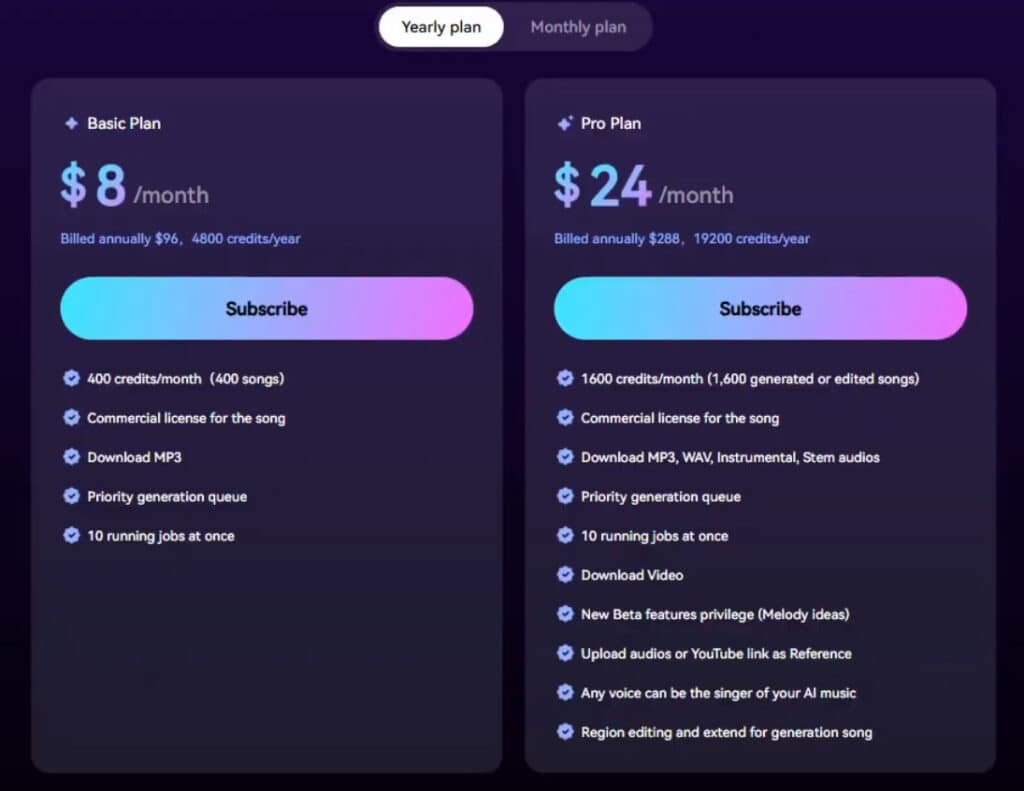
Let’s talk numbers – understanding the cost structure is crucial when choosing any creative tool. I’ve analyzed the subscription tiers to help you determine which plan offers real value for your specific needs.
Free Plan
The Free Plan runs at $0/month – no annual needed, just dive in. Limited credits let you test basics like song prompts and playback. Features: Explore the platform, simple gens, easy upgrade path. Perfect for beginners feeling out AI tunes.
Basic Plan
Basic Plan costs $8/month (annual billing) or $10/month billed monthly. Gets you 400 credits for songs or 200 speech minutes. Features: MP3 downloads, commercial licensing, 10 concurrent jobs, basic editing. Solid for steady creators avoiding stock music fees.
Pro Plan
Pro Plan is $24/month annual or $30/month straight monthly. Unlocks 1,600 credits for songs or 800 speech minutes. Features: All Basic plus WAV/stem downloads, advanced editing, reference uploads, voice cloning, pro text-to-speech. Ideal for pros cloning voices in projects.
| Pricing Plan | Monthly (Annual) | Credits Limit | Highlighted Features |
| Free | $0 | Limited | Basic exploration |
| Basic | $8 | 400 | Commercial licensing |
| Pro | $24 | 1,600 | Voice cloning, stems |
Pros & Cons of Mureka AI
No creative tool is perfect, and my testing revealed both impressive capabilities and frustrating limitations. Every music generator has trade-offs—I’m giving you the unfiltered reality of what works brilliantly and what might test your patience.
Understanding both sides helps you set realistic expectations. You can determine if this platform’s strengths match your specific creation needs.
Advantages: High-Quality Output and Flexibility
The quality of output genuinely surprised me. The V7.5 model delivers highly realistic instruments and expressive arrangements. You get professional-level vocals and mixing that stand out from basic generators.
Flexibility is another strong point. The platform supports reference audio, hummed melodies, and multi-language lyrics. Full-length song generation up to 5 minutes gives you substantial tracks.
For artists and content creators, royalty-free commercial usage rights are valuable. The stem separation feature in paid plans allows deeper music editing.
Drawbacks: Occasional Lyric Alterations and Interface Issues
Now for the honest drawbacks. The system sometimes alters your lyrics—truncating lines or changing words slightly. Pronunciation can sound unnatural in some languages.
The interface has a learning curve, and advanced tools require paid plans. More concerning are user reports about billing problems and poor support.
Multiple users mention difficulty canceling subscriptions. This review must highlight these real-world support issues alongside the technical features.
| Strengths | Weaknesses |
|---|---|
| Professional vocal and instrument quality | Lyric and pronunciation instability |
| Flexible input methods (audio, text, hum) | Advanced features locked behind paywall |
| Royalty-free commercial usage rights | Customer service and billing complaints |
| Stem separation for music producers | Interface can be less intuitive |
Alternatives To Mureka AI
If you’re feeling hesitant about committing to one tool, you’re not alone – I always research alternatives before making decisions.
The market offers several capable music generators that compete effectively in the professional music creation space.
Competitors to Mureka AI: Great Tools for AI Music Generation
Turning simple ideas into full tracks feels almost magical now. You type a prompt or lyrics, and out comes polished music ready to use.
Mureka AI stands out for creating complete songs with vocals, cloning voices, and multilingual support—perfect for quick, professional-sounding originals.
But these alternative song generator offer their own strengths, whether you need instrumentals, endless streams, or developer integration.
Here’s a straightforward breakdown.
Soundraw
Soundraw builds royalty-free instrumentals with tweaks to tempo, instruments, and moods. Exports stems for mixing. Suits video makers wanting safe, customizable backgrounds – Read Full Review
Mubert
Mubert streams real-time generative music for moods or apps. Human-AI collab for unique sounds. Ideal for non-stop ambient or game scores – Read Full Review
Loudly
Loudly generates studio-quality tracks from text, with stems and remixing. Genre blending and energy controls. Great for creators fine-tuning every part – Read Full Review
Imagine.Art (AI Music Generator)
Imagine.Art crafts songs or instrumentals from prompts, with genre and style options. Part of a visual suite. Good for experimenting with vocals in projects – Read Full Review
Freebeat AI
Freebeat pairs music with synced videos, adding dance or lyrics visuals. Beat-reactive effects. Fits artists going viral on social – Read Full Review
MusicAPI.AI
MusicAPI provides programmatic generation via API for songs or customs. Scalable for apps. Best for devs embedding music features – Read Full Review
| Tool | Key Focus | Best For | Pricing Starts |
|---|---|---|---|
| Soundraw | Instrumentals & stems | Video backgrounds | $11/month |
| Mubert | Real-time streams | Ambient & apps | $14/month |
| Loudly | Text-to-tracks & remixing | Fine-tuned creation | $9/month |
| Imagine.Art | Prompt-based songs | Creative experiments | $10/month |
| Freebeat AI | Video-synced music | Viral clips | $10/month |
| MusicAPI.AI | API integrations | Developers | Pay-per-use |
Case Study / Personal Experience with Mureka AI
I’ve always believed that hands-on experience tells you more about a tool than any marketing claims. That’s why I put this platform through rigorous real-world testing. The results surprised me in both expected and unexpected ways.
Real-World Results and Usage Scenarios
One creator successfully generated five unique Afrobeat songs using YouTube samples as reference tracks. They were thrilled with the quality for their channel intros. Another user finally heard their written lyrics come to life after years of struggling to create music.
The platform excels at transforming ideas into complete track productions. Users appreciate the voice customization and beat treatments. However, workflow friction exists when you can’t edit lyrics after finding a preferred treatment.
| Usage Scenario | Input Method | Result Quality |
|---|---|---|
| YouTube Intro Music | Reference Audio + Text Prompt | Professional commercial quality |
| Lyric Implementation | Written Lyrics + Style Selection | Good vocal realism, occasional alterations |
| Genre Exploration | Genre Tags + Mood Settings | Strong instrument authenticity |
| Rapid Prototyping | Hummed Melody + AI Enhancement | Fast song generation for artists |
My Experience: A Storytelling Approach
I tested the V7.5 model with a complex music creation challenge. Starting with reference track and custom lyrics, the system generated impressive vocals and authentic instruments.
The real world test revealed both strengths and limitations. While the mureka music generator produced commercial-grade ai-generated music, the inability to tweak individual stem elements felt restrictive. For quick music creation, it saves significant time.
Conclusion: Mureka AI Review
Raamish’s Take
Mureka AI is a straightforward platform that lets you create full songs quickly from a single line or idea, making music production accessible for beginners and pros alike without needing instruments or studios.
Its easy mode is a standout, where you input one line, and the AI generates complete tracks with lyrics, melody, vocals, and instrumentals in seconds, customizable by style, vocal gender (male or female), and title.
I’m really impressed with the advanced options, offering tools like reference uploads for matching existing sounds, vocal fine-tuning for tone or emotion, melody idea brainstorming, lyric optimization, and instrumental layering to refine every element.
The custom workflow supports everything from pop hooks to full verses, with previews to tweak before finalizing. It handles genres like hip-hop or rock seamlessly, all royalty-free for sharing or monetizing.
Mureka AI‘s speed and flexibility turn vague concepts into polished songs effortlessly, ideal for sparking hits without creative blocks.
After putting this platform through its paces, I can confidently say it delivers professional-grade music creation. The features are impressive—especially the V7.5 model’s output quality and flexible input methods.
However, I must be honest about the concerns. Some users report frustrating experiences with billing and support. This gives me pause when making a final recommendation.
Should you invest? If you need regular, commercial-ready tracks and can handle the Pro plan cost, the tools justify the price. But approach subscription terms carefully.
For those wanting to test the waters, the free trial lets you experience the generation power firsthand. If customer service is a priority, exploring others like TopMediai might be wiser.
The bottom line: This is one of the more capable music generators available today, but your comfort with its business practices will ultimately determine if it’s the right fit for your creative workflow.
Frequently Asked Questions
Can I use the music I create for commercial projects?
Yes, you can. The platform provides royalty-free output, which generally means you own the usage rights for the tracks you generate. This is a huge benefit for content creators needing background music for videos or other commercial use. Always double-check the specific terms in your subscription plan to be certain.
How does the reference audio feature work?
It’s a powerful tool for music creation. You can upload a short audio clip or a melody idea, and the AI model uses it as a style reference. This helps the generator match the vibe, instruments, or overall feel of your uploaded track, making the final song much closer to your original vision.
What is stem separation and why is it useful?
Stem separation is a feature that splits a generated song into its individual parts, like vocals, drums, and bass. This is incredibly useful for creators who want to remix a track, adjust the mix, or use specific elements in other projects. It gives you much more control over the final audio.
Are there any limitations on song length?
The platform specializes in full-length song generation. You can typically create tracks that are several minutes long, which is great for producing complete pieces rather than just short loops. The exact maximum length might depend on your subscription tier.
How good is the quality of the AI-generated vocals?
The vocal quality is generally impressive and has improved significantly with updates. While it might not always perfectly mimic a human singer, the technology is advancing fast. For many use cases, like background tracks or demos, the vocals are more than sufficient and can sound quite natural.
What kind of music styles can I create?
You can generate a wide variety of styles, from pop and rock to electronic and cinematic scores. The flexibility is one of its strongest points. Using detailed prompts and the reference audio upload feature helps you steer the music generation toward your desired genre.
Is it suitable for beginners with no music theory knowledge?
Absolutely. The interface is designed to be accessible. You can start with simple text prompts describing the mood or style you want. You don’t need to be an expert to create something that sounds professional, which makes it a fantastic tool for anyone looking to dive into music creation.