
Ever stare at a space and feel completely stuck?
You know it needs a refresh on interior or exterior design, but where do you even begin?
Budget worries, style confusion, and that frustrating gap between what you imagine and what you can actually create – I’ve been there too many times to count.
The struggle is real. That sinking feeling when you invest in furniture that doesn’t work or paint colors that look completely different on your walls. Traditional interior design services can be pricey, and DIY approaches often leave you second-guessing every decision. It’s enough to make anyone put off that much-needed room refresh indefinitely.
This is exactly why I decided to test My AI Room Designer among the booming landscape of digital design solutions. The AI interior design market is exploding – projected to grow from $1.09 billion to $1.39 billion in the current AI landscape alone.
As someone who’s tested multiple tool options and been featured in design publications, I wanted to see if this particular platform lives up to the hype.
In this comprehensive My AI Room Designer review, I’ll share my hands-on experience with the features, pricing, and real-world results. You’ll get honest insights about whether this tool can truly solve those common room design pain points. Ready to see if AI can finally bridge that imagination-reality gap?
Let’s dive in.
Key Takeaways: My AI Room Designer Review
- This review provides hands-on testing of an AI-powered interior design solution
- The digital design tool market is experiencing massive growth in this digital landscape
- Common redesign challenges include budget constraints and visualization difficulties
- Testing covers features, pricing, and practical application results
- The tool aims to simplify space transformation through photo uploads
- Evaluation focuses on whether it delivers value for homeowners and professionals
- Real-world testing reveals both strengths and limitations of the platform
My AI Room Designer Review: An Overview

Raamish’s Take
MyRoomDesigner.AI is a versatile 3-in-1 AI suite that redesigns rooms from uploaded photos in under 4 seconds, combining room transformation, mood board creation, and advanced editing for seamless interior planning.
Its interactive chat feature excels, allowing real-time refinements like “paint walls sage green” or “add beige curtains,” while room layout detection ensures accurate, context-aware results.
I am particularly impressed with the designer style integration, where users input names like Magnolia or Studio McGee for instant aesthetic matches, plus Find Similar Products to source real-life items with clickable links.
The Mood Board Editor supports shopping list generation, background removal, cropping, and one-click imports, with upscaling and item cleanup for polished outputs.
Bundled tools include MoodBoard AI for quick palettes and high-res exports. Users praise its speed over competitors—one noted effortless swaps.
MyRoomDesigner.AI‘s conversational customization and product sourcing streamline visualization, making pro designs accessible without software expertise.
Introduction to My AI Room Designer
When traditional interior design methods feel out of reach, technology steps in to bridge the gap between vision and reality. This platform emerged during a period of explosive growth in digital design solutions.
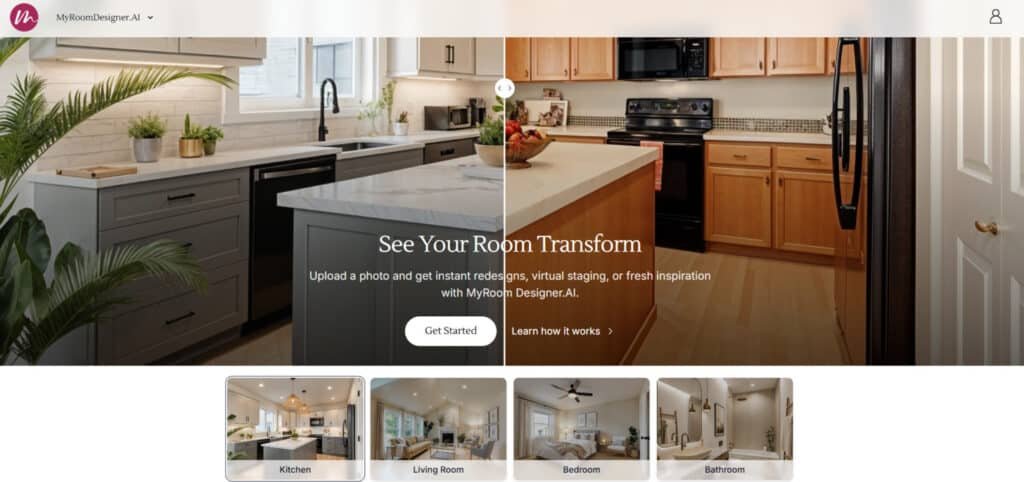
AI Landscape & Company Background
The company behind this tool recognized a massive opportunity in todays AI’s booming market. They built their mission around democratizing professional-quality interior design. Their team includes veterans from both tech and creative industries.
This unique blend of expertise allows them to create tools that balance technical sophistication with user-friendly interfaces. They’re part of a wave revolutionizing how people approach home redesign.
Purpose & Endorsements
The core purpose is simple: Eliminate the guesswork from room transformations. Users upload photos and select styles to see instant visualizations. This solves that age-old problem of committing to changes blindly.
The platform serves diverse users—homeowners planning renovations, renters testing ideas, and even professional designers creating client mock-ups. Several furniture retailers and real estate companies have integrated the technology into their customer experience.
Having tested multiple competing tools, I appreciate this platform’s focus on practical results over flashy features. It delivers tangible value for people actually wanting to transform their spaces.
What is My AI Room Designer?
Imagine showing a picture of your room to a designer and getting multiple new looks in under ten seconds. That’s the core promise of this platform. It’s an interior design tool powered by advanced algorithms that reinterpret your space.
How the Tool Works
The process is straightforward. You start by taking a photo of your current room. After you upload the image, you specify the room type—like a kitchen or bedroom.
Next, you pick from a wide array of styles, from Farmhouse to Tropical. You can also select a preferred color palette and add text prompts for specific requests. The platform uses two AI models, Qwen and Flux, to generate the new images. I found Qwen suggests bolder transformations, while Flux adheres more closely to your original photo.
Benefits for Designers & Homeowners
This technology offers distinct advantages for different users. It eliminates the financial risk of redecorating mistakes.
- Homeowners can experiment with layouts and color schemes before buying a single item.
- Interior design professionals can rapidly create client presentations.
- Renters visualize changes without permanent alterations.
- Real estate agents stage properties virtually to attract buyers.
Additional features like the Mood Board AI and a “Find Similar Products” function add tremendous practical value. The tool fosters a cohesive design mood throughout your home, saving significant time and money compared to traditional methods.
My AI Room Designer Review
After uploading photos of my actual bedroom, I discovered how well this tool handles real-world conditions. My testing used imperfect shots with typical clutter and lighting—no professional staging. This approach revealed the platform’s practical value for everyday users.
The interface felt surprisingly intuitive from the start. Navigation was straightforward, making the design process accessible even for beginners. Compared to other platforms I’ve tested, the learning curve here is minimal.
The generated results consistently impressed me with their realism. Unlike some competing tool options, the outputs didn’t scream “AI-generated.” Each style transformation maintained believable proportions and lighting.
| Tested Style | Color Palette | Realism Score | Execution Accuracy |
|---|---|---|---|
| Coastal | Pastels | 9/10 | Excellent texture rendering |
| Bohemian | Neutrals | 8/10 | Good pattern mixing |
| Farmhouse | Warm Tones | 9/10 | Authentic rustic elements |
| French Country | Complementary colors | 8/10 | Strong architectural adaptation |
| Minimalistic | Luxury Neutrals | 10/10 | Perfect spatial awareness |
This interior design solution exceeded expectations in understanding different aesthetics. The platform grasped each style‘s core principles and applied them convincingly to my room photos. While occasional quirks appeared, the overall experience delivered solid results.
For someone without design background, the platform offers immediate value. You can achieve professional-looking room transformations without extensive trial and error. The tool successfully bridges the gap between imagination and achievable interior updates.
Complete Features of AI Room Designer
After extensive hands-on testing, certain platform features consistently delivered results that impressed even my skeptical eye. The standout functionalities genuinely transform how you approach space transformation.
1. Core Features: The Basics of Your Room Glow-Up
Photo Upload and Smart Analysis
Users start by completing a simple upload photo process. The AI instantly analyzes every detail in the image, from furniture placement to lighting conditions.
This ensures accurate redesigns for any space, including your living room. The tool optimizes low-quality shots and provides immediate feedback, helping homeowners and designers save hours compared to traditional interior design tools.
Instant Room Redesigns
Generate up to four variations in seconds while keeping the original layout intact. Choose from popular styles like Modern, Rustic, or Scandinavian.
This feature delivers fast room design options for a living room makeover without needing professional software, making interior design accessible to everyone.
Virtual Staging Magic
Empty spaces transform into fully furnished rooms with realistic furniture and decor. Real estate agents and sellers benefit from professional-looking staging that highlights potential.
The tool preserves architectural details and creates compelling visuals that help properties sell faster.
2. Advanced Generation Power
Multi-Variation Magic
Powered by dual AI models, the system produces four high-quality variations simultaneously in under four seconds.
Windows, doors, and structural details stay perfectly preserved while the entire space receives a fresh look.
This speed and precision set it apart from slower interior design tools, enabling quick exploration of multiple ideas for any living room or bedroom redesign.
3. AI Smarts: The Brain Behind the Beauty
Layout Lock-In
The AI detects and locks every structural element so nothing warps or disappears. This guarantees realistic room design outcomes that respect existing architecture. Users achieve professional-grade results without manual corrections.
Style Copycat Mode
Reference famous designers by name or upload inspiration images. The tool replicates signature looks accurately, allowing users to achieve high-end aesthetics in their own living room with minimal effort.
Deep Photo Breakdown
Advanced algorithms examine lighting, materials, and proportions in the photo room upload. The system then applies real interior design principles to generate functional and beautiful layouts tailored to the space.
4. Chat and Edit Tools: Tweak Like a Pro
Chat Refinement Hub
Type natural language commands to adjust anything instantly. Change colors, swap furniture, or modify materials without starting over. This conversational approach makes precise room design adjustments simple and fast.
Item Swap and Cleanup
Remove unwanted items, replace furniture, or integrate products from external photos. The “Find Similar” function links directly to purchasable matches, bridging digital concepts with real-world shopping.
Prompt Power-Up
Edit prompts anytime to refine results further. Clear instructions produce detailed changes, giving full control over every aspect of the redesign.
Upscale for Crispness
Low-resolution uploads transform into high-definition images suitable for presentations or printing. This ensures final outputs look professional regardless of original photo quality.
5. User Interface: Simple Steps, Big Results
Guided Workflow
Follow a clear four-step process: upload, select style, chat refinements, export. Before-and-after comparisons keep progress visible throughout.
Visual Playground
Side-by-side views, cropping, flipping, and duplication tools provide complete creative freedom within an intuitive editor.
Privacy Perks
All images and designs remain encrypted and fully private. Users can delete projects anytime with confidence.
6. Export and Sharing Options: From Screen to Reality
High-Res Image Exports
Download redesigned rooms in sharp, print-ready formats. Perfect for client presentations or personal records.
Shopping List Creator
Automatically generates buyable product lists with direct links. This turns inspiration into actionable purchases quickly.
Before/After Comparisons
Export professional comparison images that clearly demonstrate transformation potential to clients or family members.
7. Integrations and Extras: Level Up Your Design Game
Mood Board Editor Link
One-click import of AI-generated designs into a dedicated mood board builder. Crop, remove backgrounds, duplicate items, and arrange freely.
MoodBoard AI Tie-In
Seamless connection to full mood boards with color palettes and expanded style options across interior and fashion categories.
Product Uploads
Drop real product images into designs for perfect integration and accurate visualization.
8. Customization Deep Dive: Make It Yours
Color and Palette Plays
Command exact color changes for walls, furniture, or the entire wall scheme. Match preferences precisely with simple text instructions.
Furniture Flex
Add, remove, or swap pieces and materials instantly. Turn wood into marble or modern into vintage with one prompt.
Advanced Edits in Editor
Background removal, cropping, flipping, and element duplication enable endless remixing possibilities.
Inspo Imports
Feed Pinterest or Instagram images directly for the AI to analyze and adapt, creating highly personalized room design outcomes.
This comprehensive feature set makes My AI Room Designer one of the most powerful yet user-friendlyexterior & interior design tools available today.
Pricing Plans & Options of My AI Room Designer
Let’s get straight to the numbers—understanding the cost is crucial before you dive into any new tool. The platform uses a tiered subscription model with four distinct options.
This structure makes it easy to find a plan that aligns with your project’s scale and budget.
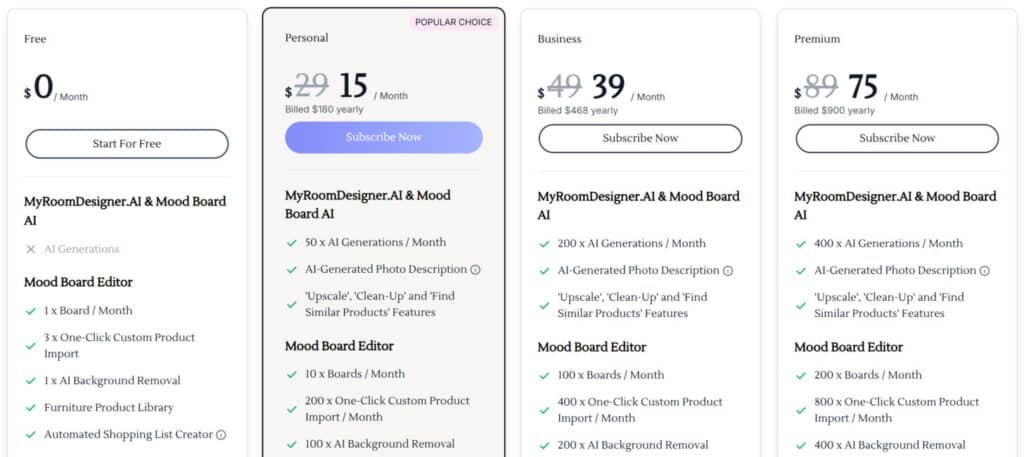
The Free Plan ($0/month) is a fantastic starting point. You get one design board monthly, AI background removal, and a color palette generator. It’s perfect for testing the core features without any financial commitment.
For serious homeowners, the Personal Plan ($15/month, billed yearly) is a solid investment. It offers 50 AI generations and 10 boards. I found this tier ideal for a single room makeover, providing ample room for experimentation.
Professional designers and stagers should look at the Business Plan ($39/month, billed yearly). It scales up significantly with 200 monthly generations and 100 boards, plus extended product import features.
The top-tier Premium Plan ($75/month, billed yearly) is built for firms managing numerous client projects. It includes 400 generations and 200 boards. Compared to other services, the pricing is competitive, especially for the volume offered.
Based on my testing, here’s my quick take: Start with the free tier. If you’re tackling one room, the Personal Plan delivers great value. Professionals will find the Business subscription essential for daily workflow. There are no hidden fees, making the options transparent and easy to evaluate.
Pros & Cons of My AI Room Designer
Pros:
The most compelling aspect of this tool isn’t just what it does, but how it transforms the entire design experience. During my testing, several advantages stood out that genuinely change how people approach their space transformations.
What impressed me most was how these benefits work together to create a seamless process. You’re not just getting individual features—you’re getting a complete system that supports your vision from start to finish.
Advantages of Streamlined Design
The platform’s streamlined approach eliminates traditional hurdles in interior planning. Instead of weeks of deliberation, you get immediate visual feedback that guides your decisions confidently.
This way of working proves particularly valuable for busy homeowners and professional designers alike. The time savings alone make it worth considering for any design project.
| Advantage | Time Savings | Cost Efficiency | User Benefit |
|---|---|---|---|
| Instant Visualization | Hours to seconds | Avoids costly mistakes | See changes before committing |
| Cohesive Styling | Unified planning | Consistent purchasing | Whole-home aesthetic harmony |
| Real-time Comparison | Simultaneous options | Informed decision making | Side-by-side style evaluation |
| Zero Learning Curve | Immediate usability | No training costs | Accessible to all skill levels |
These advantages collectively democratize quality interior design. The platform removes barriers that once made professional results inaccessible to most people. Your space can achieve magazine-worthy looks without the traditional headaches.
The realistic outputs and multiple variations create a foundation for successful interior transformations. You gain confidence knowing your vision will translate beautifully into reality.
Cons & Limitations:
No digital tool is perfect, and during my evaluation, I identified some significant drawbacks worth noting. While the platform delivers impressive visual results, it has constraints that affect real-world application.
| Limitation Type | Impact Level | User Challenge | Workaround |
|---|---|---|---|
| Building code compliance | High | Safety risks in kitchens/baths | Professional consultation required |
| Budget awareness | Medium | Financial planning disconnect | Manual product search needed |
| Personalization depth | Medium | Lifestyle fit limitations | Multiple prompt attempts |
| Architectural accuracy | Medium | Physical feasibility concerns | Careful output review |
I found the most critical limitation involves building regulations. The tool cannot account for safety codes or structural requirements. This makes professional oversight essential for kitchen and bathroom projects.
The platform sometimes takes creative liberties with your space. It might add windows that don’t exist or alter room dimensions unrealistically. You’ll need to carefully review each generated layout.
Budget considerations present another challenge. Beautiful designs don’t always translate to affordable, available products. The tool lacks integration with actual inventory and pricing data.
True personalization remains limited to text prompts. Unlike human designers who understand your lifestyle, the AI cannot grasp storage needs or daily space usage patterns. Getting the right results often requires multiple attempts with different phrasing.
While these limitations affect the design process, comparing alternative tools helps identify better matches for specific needs. The next section explores competing platforms that address some of these constraints differently.
Alternatives to My AI Room Designer
Having evaluated numerous platforms side-by-side, I can offer honest comparisons between leading alternatives. The digital design landscape offers specialized solutions for different needs and budgets.
Testing over 15 different tools revealed distinct strengths across the competitive field. Each platform serves specific user requirements effectively.
Comparative Analysis
If you’re loving how easy MyRoomDesigner.ai makes redesigning rooms — just upload a photo, pick styles, chat for tweaks, and get realistic ideas fast — but want more options, I totally understand.
It’s great for beginners and pros alike with its simple interface and mood board tools. But if you need better realism, more styles, or pro staging, here are helpful alternatives for AI interior/exterior design and virtual staging.
Collov AI
Collov AI gives photorealistic results with shoppable furniture from real brands. It handles precise staging and renovations, making spaces feel truly livable. Perfect when you want designs clients can buy right away — Read Full Review
HomeDesignsAI
HomeDesignsAI packs over 75 styles for interiors, exteriors, and gardens. It creates unlimited ideas quick, sparking creativity without limits. Great for exploring tons of looks in one go — Read Full Review
REImagineHomeAI
REImagineHomeAI shines at decluttering, full redesigns, and exterior tweaks. It turns messy or empty photos into clean, market-ready visuals. Ideal for real estate pros prepping listings fast — Read Full Review
AI HomeDesign
AI HomeDesign offers bulk processing and easy item removal. It stages multiple rooms with solid realism and speed. Handy when you’re handling lots of properties at once — Read Full Review
Virtual Staging AI
Virtual Staging AI keeps it affordable with one-click fills. It adds realistic furniture in various styles super cheap. Best for agents watching budgets closely — Read Full Review
InstantDecoAI
InstantDecoAI delivers quick pro staging, often with free trials. It supports many room types and styles instantly. Super when you want to test without paying first — Read Full Review
Archi AI
Archi AI focuses on high-res renders for detailed work. It handles complex designs from photos or sketches. Great for architects needing precision — Read Full Review
Easy-peasy AI
Easy-peasy AI is exactly that — dead simple uploads and generations. Pick a style, get cozy ideas with zero fuss. Perfect for casual home updates on the fly — Read Full Review
| Tool | Main Strength | Best For | Biggest Drawback |
|---|---|---|---|
| MyRoomDesigner.ai | Simple chat tweaks + mood boards | Beginner-friendly redesigns | Less photorealistic than pros |
| Collov AI | Shoppable realistic staging | Client buy-ready visuals | Credit-based pricing |
| HomeDesignsAI | 75+ styles & unlimited ideas | Endless creative options | Can overwhelm with choices |
| REImagineHomeAI | Declutter + exterior redesigns | Real estate prep | Limits on free/lower plans |
| AI HomeDesign | Bulk edits & fast processing | High-volume work | Slightly less polished realism |
| Virtual Staging AI | Affordable one-click | Budget staging | Basic customization |
| InstantDecoAI | Instant results + trials | Quick testing | Credit system |
| Archi AI | High-res professional renders | Architectural detail | Steeper for casual use |
| Easy-peasy AI | Ultra-simple quick generations | Everyday casual tweaks | Fewer advanced features |
The main platform holds strong for general interior transformations. However, specialized tools deliver superior results for specific use cases. Choose based on your primary need rather than one-size-fits-all solutions.
Other Leading AI Room Design Tools
Collov AI excels in space planning with to-scale floor plans. I use its mobile app regularly for professional projects. HomeDesignsAI stands out with Style Fusion technology that matches reference photo aesthetics.
Paintit.ai integrates furniture sourcing directly into its ChatGPT-like interface. VisualizeAI serves Canadian designers with strong exterior rendering capabilities. Spacely AI connects with SketchUp for professional workflows.
Simpler options like AI HomeDesign work well for homeowners. Renovate.AI focuses specifically on renovation planning. ArchiVinci and Artevia target architects with advanced sourcing integrations.
Case Study & Personal Experience
I’ll admit, I started this testing process with healthy skepticism about what digital tools could actually achieve. A client’s story stuck with me.
She tried using an online platform to redesign her condo’s living room. The result looked beautiful, but she still called me. The design suggested moving a load-bearing wall—a potentially dangerous result.
This experience highlighted both the potential and the pitfalls. It motivated me to test this specific platform with a critical, practical eye.
My Experience with an AI Room Makeover
For this review, I used actual photos of my bedroom—clutter and all. No professional staging. I wanted a real-world experience. The first style I tested was Coastal with a Pastels palette.
The transformation was instant. My somewhat dark room suddenly looked bright and airy. I genuinely did a double-take at the realism. The Bohemian style with Neutrals was next. The platform completely reimagined the space but kept the proportions believable.
Then came the Farmhouse design with Warm Tones. It made the room look incredibly cozy—a possibility I hadn’t considered. The French Country and Minimalistic styles were equally impressive. The black accents in the minimalist living room concept looked particularly sophisticated.
I compared the two AI models. Qwen suggested dramatic changes, even redesigning my bed. Flux stayed much closer to the original layout. Both produced outputs that could pass for real interior photographs.
So, would I implement any of these designs?
Some elements, yes. The platform opened my eyes to new styles. But it’s a starting point, not a finished plan. The gap between digital vision and physical execution remains, but it’s narrower than I expected.
Expert Insights & Design Tips
Getting the most from automated design tools requires understanding both their capabilities and their limitations. Through extensive testing, I’ve learned these platforms excel at generating inspiration but need human guidance for practical application.
The crucial reality?
These tools are fantastic starting points for exploring ideas, but they’re not complete interior design solutions. They can’t ensure building code compliance or tailor approaches to your unique lifestyle needs.
For better results, use detailed text prompts instead of vague requests. Experiment with multiple style combinations before settling on a direction. Generate several variations to compare side-by-side—this reveals which layouts work best for your space.
Create comprehensive mood boards before generating room designs. This clarifies your aesthetic preferences and ensures cohesive results across multiple areas. It’s like giving the system a visual vocabulary of your taste.
When evaluating furniture arrangements, consider your room’s actual dimensions and traffic flow. Some suggested layouts might look beautiful but prove impractical for daily use. Always measure twice before committing to any furniture placement.
For kitchen or bathroom projects involving plumbing or structural changes, consult professional designers. The “Find Similar Products” feature helps source realistic alternatives to suggested items, bridging the gap between digital vision and physical implementation.
Conclusion
Raamish’s Take
MyRoomDesigner.AI is a versatile 3-in-1 AI suite that redesigns rooms from uploaded photos in under 4 seconds, combining room transformation, mood board creation, and advanced editing for seamless interior planning.
Its interactive chat feature excels, allowing real-time refinements like “paint walls sage green” or “add beige curtains,” while room layout detection ensures accurate, context-aware results.
I am particularly impressed with the designer style integration, where users input names like Magnolia or Studio McGee for instant aesthetic matches, plus Find Similar Products to source real-life items with clickable links.
The Mood Board Editor supports shopping list generation, background removal, cropping, and one-click imports, with upscaling and item cleanup for polished outputs.
Bundled tools include MoodBoard AI for quick palettes and high-res exports. Users praise its speed over competitors—one noted effortless swaps.
MyRoomDesigner.AI‘s conversational customization and product sourcing streamline visualization, making pro designs accessible without software expertise.
The verdict is in: This design tool successfully bridges the gap between imagination and achievable room updates. After extensive testing, I recommend it for anyone wanting to visualize home transformations before committing financially.
It’s perfect for homeowners planning kitchen updates, renters testing living room ideas, and design enthusiasts exploring different styles. The platform delivers realistic interior visualizations in seconds—exactly what most people need for space planning.
Start with the free plan to test it risk-free. If you’re tackling a specific room project, the Personal Plan offers great value. This kind of tool makes home design accessible to everyone.
Frequently Asked Questions
How accurate are the AI-generated designs?
The accuracy is surprisingly good for conceptual purposes. The AI does a solid job of understanding room layouts and applying your chosen style. However, it’s best for inspiration and visualization, not for exact technical drawings. You’ll still want to measure your actual space before buying furniture.
What file types can I upload for my room photo?
The platform supports common image formats like JPG and PNG. I’ve found that using a clear, well-lit photo from a corner of the room gives the AI the best information to work with for a realistic redesign.
Can I use this tool for commercial design projects?
While it’s a fantastic tool for rapid prototyping and client presentations, I’d recommend it more for residential use and initial concept stages. For full-scale commercial projects, professional-grade software like AutoCAD or SketchUp is still the industry standard for precision.
Does My AI Room Designer offer different subscription plans?
Yes, there are typically tiered plans. You’ll often find a free version with basic features and then paid subscriptions that unlock higher-quality renders, more style options, and advanced customization features like detailed color palettes and furniture item swaps.
How does it compare to other interior design tools like Planner 5D or Roomstyler?
The main difference is the AI-driven speed. While Planner 5D offers more manual control for building layouts from scratch, this tool excels at instant transformations. It’s less about building and more about reimagining an existing space quickly, which is perfect for brainstorming.
What kind of design styles can I choose from?
You get a wide range of popular aesthetics, from modern and minimalist to rustic, industrial, and bohemian. I was impressed by the variety, which helps you explore directions you might not have considered for your living room, kitchen, or bedroom.
Can I save and share my design results?
Absolutely. You can save your mood boards and redesigned room images to your account. Most plans also allow you to generate shareable links or download the images, making it easy to get feedback from family or clients.