Are you drowning in a sea of social media accounts? I know that feeling all too well. Trying to manage multiple platforms while creating engaging content feels like a full-time job on its own.
The constant switching between apps, remembering posting schedules, and chasing trending topics can be exhausting. It’s enough to make anyone want to throw their phone across the room!
That’s why I decided to test Neulink – an AI-powered platform that promises to simplify your digital life. This tool handles scheduling across 12+ major social media platforms automatically.
What surprised me most was how quickly it’s gained traction. Digital marketing agencies, e-commerce businesses, and content creators are switching from established competitors. They’re raving about the time savings and intuitive design.
Ready to see if this platform lives up to the hype? Let’s dive into my hands-on experience with its features, pricing, and real-world performance.
Key Takeaways: Neulink Review
- Neulink supports 12+ major social media platforms including TikTok, Instagram, and LinkedIn
- The platform uses AI to automate scheduling and content management
- Digital marketers and small businesses report significant time savings
- It’s competing effectively with more established social media tools
- The interface is designed to be intuitive for users of all skill levels
- Content creators appreciate the cross-platform automation features
- E-commerce integration works with popular platforms like Shopify
Neulink Review: An Overview
Introduction: Neulink in the Modern AI Landscape
Navigating the crowded AI automation space feels like trying to find a needle in a haystack – until you discover a tool that actually delivers on its promises. I’ve watched countless platforms emerge during the recent AI boom, but most just repackage basic scheduling as “intelligent automation.”
Company Background and Founder’s Vision
The team behind this platform recognized a critical gap in social media management. They saw marketers juggling five different tools just to handle their media accounts. Their vision was simple but powerful: create one centralized solution that eliminates the fragmentation headache.
Instead of just scheduling posts, they built a system that understands modern content formats. The platform handles everything from TikTok videos to LinkedIn articles seamlessly. This forward-thinking approach sets it apart from traditional schedulers.
Purpose, Endorsements, and Current Market Position
The core purpose is crystal clear – help businesses maintain consistent social media presence without the manual time investment. Digital marketing agencies managing multiple client accounts report saving 5-6 hours weekly. E-commerce businesses with Shopify stores particularly appreciate the integration.
One user testimonial caught my attention: “I regularly use 4+ competitors and find Neulink to be easy and efficient. They’re also quickly adding new features, and listening to customer input.” This responsiveness to user feedback demonstrates their commitment to evolution.
What impressed me most is how the platform addresses today’s social media challenges. It doesn’t just schedule posts – it understands the nuances of different platforms and content types. This intelligent approach to automation is why users are switching from established competitors.
Neulink Review: What Is Neulink and How It Benefits You
What if you could tame the social media chaos with a tool that actually understands how modern content works? This platform isn’t just another scheduler – it’s a complete ecosystem for managing your digital presence efficiently.
Inner Workings and Core Functionality
The system connects to your social accounts through secure API integrations. This creates a centralized hub where you can manage everything from one dashboard. The interface is surprisingly intuitive – I was navigating between different media channels within minutes.
What impressed me most was the bulk scheduling feature. You can upload CSV files from Google Sheets and schedule months of content in one session. The platform stores your images and captions in organized libraries, ready for automatic publishing.
The AI component (NueAI) integrates seamlessly into your workflow. It helps generate captions and can even rewrite posts for different platforms. This media automation saves hours of manual work each week.
Ideal User Benefits and Enhanced Social Media Strategy
Digital marketing agencies love the client management tools. E-commerce businesses get automated product posting from their stores. Content creators appreciate the cross-platform scheduling capabilities.
Small business owners without dedicated staff save 5-6 hours weekly. The platform allows users to maintain consistent social media presence without daily manual effort. You can literally schedule posts for months ahead and focus on creating quality content.
My own workflow transformed from daily posting stress to monthly planning sessions. The analytics tools help make data-driven decisions about what content performs best across different media channels.
Complete Features of Neulink
It’s time for a deep dive into the specifics, from powerful automation features to honest pricing breakdowns. This is where we separate the hype from genuine utility.
1. Core Organization and Scheduling Features
Nuelink provides robust core organization and scheduling features that simplify media scheduling for busy professionals. These tools allow you to manage posts efficiently across multiple platforms from one place.
Collections
Collections act as specialized folders to organize your content into categories. Each collection supports independent posts, channels, time slots, and rules. This helps brands keep content segmented, making it easier to maintain consistency without overwhelming your main calendar. By using collections, you can schedule posts in bulk months ahead, reducing daily stress and ensuring steady presence.
Bulk Upload and Scheduling
Bulk upload lets you import hundreds of posts, including threads, reels, shorts, carousels, and stories, via CSV, Google Sheets, or media from Google Drive and Dropbox. This feature saves hours when planning content, allowing you to handle large volumes in one place and avoid manual entry errors.
Calendar and Feed Views
The unified calendar displays scheduled posts by day, week, or month across all channels, with drafts and previews. This visual calendar overview helps you spot gaps quickly, balance your media scheduling, and adjust plans to optimize timing without switching between apps.
Auto-Queue System
The auto-queue automatically places prepared posts into the next available slot, with options to pause, resume, shuffle, or customize per channel. It streamlines workflow, ensuring consistent posting even during busy periods.
Evergreen Recycling
Evergreen recycling re-queues and reposts content automatically when enabled in collections. This keeps valuable posts circulating, boosting long-term engagement without extra effort.
Custom Video Thumbnails, Polls, Quizzes, and Multimedia Posts
Support for advanced formats like polls, quizzes, and custom thumbnails enhances post variety. These options help increase engagement by making content interactive and visually appealing.
2. Post Creation and Enhancement Features
These features focus on creating high-quality posts with AI assistance, improving engagement and saving time in content preparation.
NueAI Assistant
The NueAI assistant brainstorms ideas, rewrites posts and threads, generates captions, and refines content for better engagement. This tool acts as a helpful aid, allowing you to produce polished posts quickly, even with a minimal learning curve.
Hashtag Generator and Manager
AI-driven hashtag generation suggests relevant and trending options, with grouping for reuse. Managed hashtags boost visibility and engagement across posts.
Shortcodes and Variables
Shortcodes insert dynamic text, like custom CTAs or link details, at publishing time. This ensures posts stay fresh and personalized automatically.
Thread Editor
The advanced editor supports auto-threading for platforms like X and Threads. It simplifies creating connected posts, improving readability and engagement.
Automated First/Follow-Up Comments
Schedule comments immediately, delayed, or based on performance conditions. Automated comments keep interactions alive, fostering higher engagement and community feel.
Auto Retweet
Auto retweet delays or conditions amplify reach based on likes. This feature helps extend post lifespan naturally.
Stories, Carousels, Reels/Shorts
Full support for stories, carousels (up to 10 items), and reels/shorts creation. These formats drive engagement through dynamic visuals.
Pre-Made Content Library
Access over 1,200 ready-to-use posts, including memes and quotes, organized for quick addition. The library provides inspiration when ideas run low.
Media Library
Centralized storage with search and filtering organizes media in one place. Easy access speeds up post creation.
3. Automation Features
Automation features in Nuelink turn repetitive tasks into hands-free processes, ideal for maintaining active social presence.
Auto-Post Products
Connect e-commerce stores to import and schedule product posts automatically, including new items. This promotes sales effortlessly across platforms.
Auto-Post Blog Articles
Import from WordPress, Medium, or RSS to share blog updates. New blog posts queue automatically, keeping audiences informed.
Auto-Post Podcast Episodes
Link Spotify or RSS for episode posts. Fresh content promotes episodes without manual work.
Auto-Post Reviews and RSS Feeds
General RSS integration pulls any source for automated posts. Versatile for diverse content needs.
Crossposting Reels/Shorts
Automatically share reels/shorts across platforms. This maximizes reach with minimal setup.
Integrations for Automation
Zapier, IFTTT, and others extend auto-posting. Enhanced connectivity fits various workflows.
Link in Bio (Nue.bio)
Customizable bio pages with shortener support drive traffic from profiles.
These automations reduce manual posts, allowing focus on business growth while content flows consistently.
4. Collaboration and Management Features
Designed for teams and agencies, these features support seamless collaboration across brands and clients.
Multi-Brand Workspaces
Independent workspaces per brand or clients, with separate channels, collections, automations, and insights. Managing multiple brands or clients stays organized in one place, minimizing confusion.
Team Collaboration
Invite members with roles, access controls, activity logs, and approval workflows. Smooth collaboration ensures efficient teamwork on posts and comments.
Client Access
Dedicated controls for clients to review content. Clients can review and provide feedback securely, building trust.
Unified Comment Inbox and Moderation
Manage comments across platforms in one inbox, with bulk actions and cleanup. Quick response to comments boosts engagement and review management.
These tools lower the learning curve for teams, enabling effective collaboration without scattered software.
5. Analytics and Insights
Analytics features provide data to refine strategies and measure success.
Post Analytics
Detailed performance reports per channel, top posts, and growth. Analytics reveal what resonates, guiding better content.
Advanced Insights
History, link clicks, and hashtag performance (in higher plans). Deeper analytics inform timing and topics.
Branded Reports and Export
Customizable reports for clients or teams. Sharing analytics supports informed decisions.
Analytics help track engagement, optimize posts, and demonstrate value to clients or stakeholders.
6. Additional Tools and Integrations
These supporting tools enhance overall media scheduling and functionality.
Smart Link Shortener
Automatic shortening with custom domains and click tracking. Tracked link performance improves analytics.
Canva Integration
Direct import for designs. Seamless creation integrates into post workflow.
Browser Extensions
Quick content capture from web. Easy saving for later scheduling.
Unified Comment Inbox and Moderation
Central comments management with multi-actions. Efficient moderation maintains positive interactions.
Integrations and tools like these complement core features, creating a comprehensive software solution for social media scheduling.
The minimal learning curve makes it accessible, while supporting multiple brands, blog promotion, review handling, and app-like convenience in one tool.
Pricing Plans for Neulink
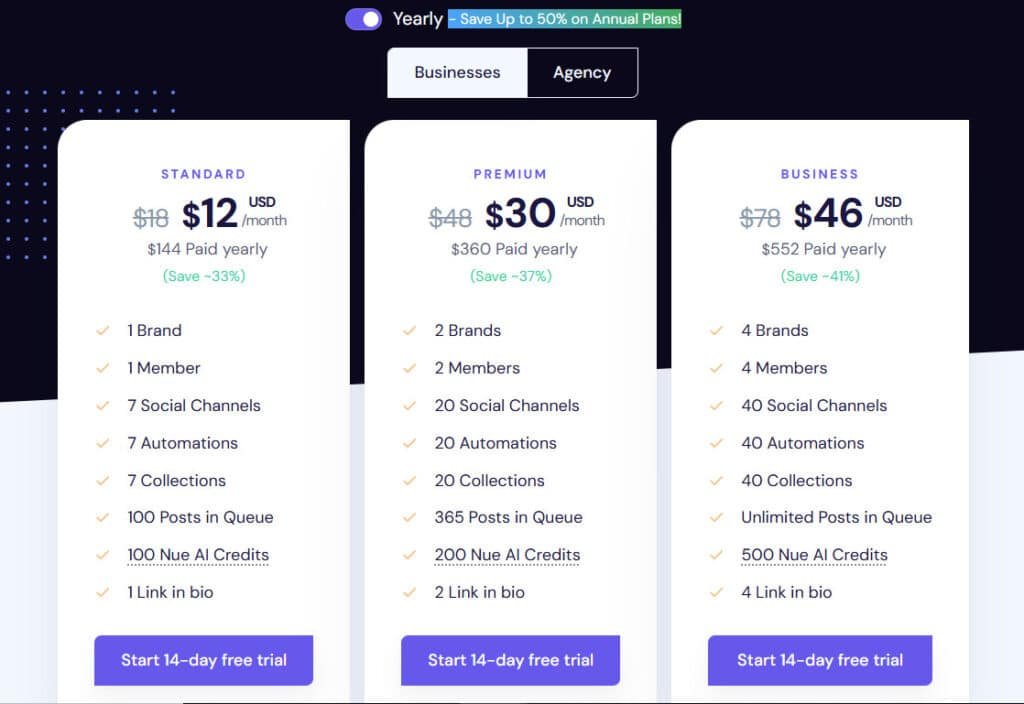
Standard Plan
The Standard plan is priced at $18 per month, or effectively $12 per month when billed annually at $144 yearly, providing a cost-effective entry point with substantial savings on longer commitments.
This plan includes 1 brand, 1 member, 7 social channels, 7 automations, 7 collections, 100 posts in queue, 100 Nue AI credits, and 1 link in bio.
Premium Plan
The Premium plan costs $48 per month, or $30 per month equating to $360 yearly with annual billing, offering expanded resources for growing needs.
It features 2 brands, 2 members, 20 social channels, 20 automations, 20 collections, 365 posts in queue, 200 Nue AI credits, and 2 links in bio.
Business Plan
The Business plan is available at $78 per month, or $46 per month for $552 yearly on an annual subscription, supporting more extensive operations.
Key elements encompass 4 brands, 4 members, 40 social channels, 40 automations, 40 collections, unlimited posts in queue, 500 Nue AI credits, and 4 links in bio.
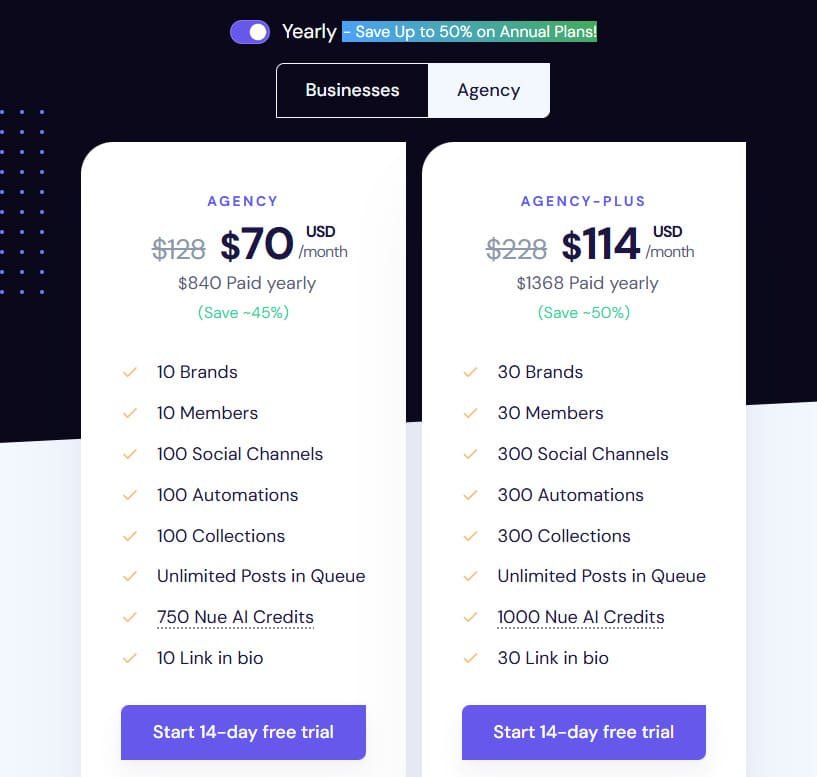
Agency Plan
The Agency plan is offered at $128 per month, or $70 per month totaling $840 yearly with annual payment, tailored for professional management.
It provides 10 brands, 10 members, 100 social channels, 100 automations, 100 collections, unlimited posts in queue, 750 Nue AI credits, and 10 links in bio.
Agency-Plus Plan
The Agency-Plus plan stands at $228 per month, or $114 per month for $1368 yearly annually, accommodating large-scale requirements.
Included are 30 brands, 30 members, 300 social channels, 300 automations, 300 collections, unlimited posts in queue, 1000 Nue AI credits, and 30 links in bio.
These scalable options suit individual users to agencies, with annual billing delivering up to 50% savings across each plan. The software efficiently meets diverse business demands via its intuitive app.
| Plan | Monthly Price | Annual Price (per month) | Brands | Members | Social Channels | Posts in Queue | Nue AI Credits |
| Standard | $18 | $12 | 1 | 1 | 7 | 100 | 100 |
| Premium | $48 | $30 | 2 | 2 | 20 | 365 | 200 |
| Business | $78 | $46 | 4 | 4 | 40 | Unlimited | 500 |
| Agency | $128 | $70 | 10 | 10 | 100 | Unlimited | 750 |
| Agency-Plus | $228 | $114 | 30 | 30 | 300 | Unlimited | 1000 |
Pros and Cons of Neulink
Pros of Nuelink
- Powerful automations enable hands-free posting from blogs, podcasts, and e-commerce stores.
- Bulk scheduling supports importing hundreds of posts efficiently via CSV or sheets.
- Multi-brand workspaces facilitate organized management for agencies and multiple clients.
- AI-assisted tools generate captions, hashtags, and content ideas effectively.
- Responsive human customer support resolves issues quickly.
Cons of Nuelink
- Analytics features lack advanced depth and detailed reporting options.
- User interface occasionally feels outdated or less intuitive.
- AI content generation quality falls short compared to leading competitors.
- Lower-tier plans impose strict limits on queues, automations, and features.
The interface is incredibly intuitive. It supports all major media platforms. The automation saves a massive amount of time.
There’s no mobile app, only web access. Mastering all features has a slight learning curve.
Alternatives to Neulink
Alternatives like Buffer offer freemium models, while Hootsuite targets enterprise needs. This platform strikes a strong balance for most users.
Real-World Case Study and Personal Experience Insights
My aha moment with Nuelink came when I finally realized I could shift from the daily stress of scrambling for social media content to calm monthly planning.
Now, I simply set aside one afternoon each month to bulk upload and schedule everything—hundreds of posts, threads, reels, and stories, using the easy CSV import and collections.
It’s incredibly liberating to know my accounts stay active and consistent even on my busiest weeks, without me having to log in every day.
The automation features have been a game-changer for my small online store. I connected my e-commerce platform, and Nuelink now automatically pulls in new products and schedules promotional posts across all channels. This hands-free promotion keeps traffic flowing steadily, and I’ve seen a real boost in sales without spending extra time on manual posting.
Managing multiple clients used to feel overwhelming, but the multi-brand workspaces keep everything neatly separated in one dashboard.
I can switch between accounts smoothly, use approval workflows for team reviews, and track activity logs—making collaboration so much more efficient and professional.
There was a time when I ran into a connection issue with one of my social accounts, and I felt that familiar panic rising.
Thankfully, the support team responded quickly and resolved it the same day. That kind of reliability is priceless—it gives me peace of mind knowing my consistent social media presence won’t drop when something unexpected happens.
The NueAI assistant has also become my quiet helper on days when creativity feels low. It suggests captions, generates hashtag sets, and even rewrites threads to sound more engaging. Paired with evergreen recycling, my best posts keep working for me months later, bringing in new likes and followers without any extra effort.
Overall, Nuelink has taken away so much of the overwhelm that used to come with social media management.
It lets me stay professional and consistent while giving me back time for the parts of my business I truly enjoy. If you’ve ever felt buried under daily posting demands, this tool genuinely understands that struggle and helps lift the weight.
Conclusion: Final Thoughts on Neulink and Your Social Media Strategy
Having put this system through its paces, I can confidently share my final assessment. Should you invest in this social media management solution? Absolutely – if you’re serious about reclaiming your time.
The platform’s social media automation genuinely saves 5-6 hours weekly. Its intuitive interface makes managing social media across various social media channels surprisingly simple. The analytics tools provide valuable insights for your social media strategy.
For agencies, e-commerce businesses, and content creators, the ROI is undeniable. The support team is exceptionally responsive, ensuring smooth work. If you manage multiple social media accounts, this tool transforms your workflow.
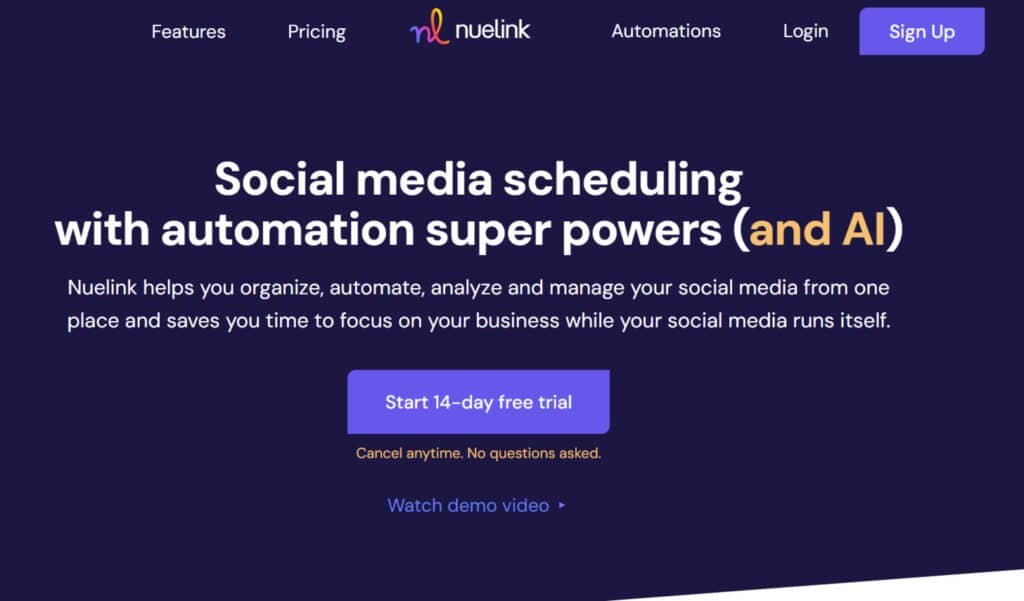
Start with the risk-free 14-day free trial – no payment required. Experience the relief of automated social media scheduling firsthand. Your future self will thank you for taking control of your social media presence.
Thanks for reading this comprehensive evaluation. I’m confident this platform will meet your needs for efficient media management.
Frequently Asked Questions
What is the primary benefit of using a social media automation tool like this?
The biggest benefit is time savings. You can schedule posts in bulk for various social media platforms, allowing you to maintain a consistent presence without being glued to your phone. It frees you up to focus on strategy and engagement instead of manual posting.
Does this platform support all the major social media channels I use?
Yes, it integrates with the key platforms, including Facebook, Instagram, Twitter, LinkedIn, and more. You can manage multiple media accounts from a single, unified dashboard, which streamlines your entire workflow.
How does the content scheduling and bulk upload feature work?
It’s quite straightforward. You can upload a CSV file or use a visual calendar to plan and schedule dozens of posts at once. This bulk scheduling feature is a game-changer for maintaining a steady flow of content across your media channels.
Are there analytics tools included to track performance?
Absolutely. The platform provides built-in analytics tools that give you insights into post performance, audience growth, and engagement metrics. This data is crucial for refining your social media strategy and proving ROI.
What kind of customer support can I expect if I run into issues?
The customer support team is known for being responsive and helpful. They offer support through various channels to assist with everything from technical glitches to strategy questions, ensuring your media management goes smoothly.
Is there a free trial available to test the features before committing?
Yes, they typically offer a free trial period. This allows you to explore the automation tools, test the scheduling capabilities, and see if the solution fits your team’s specific needs before any financial commitment.
Can multiple team members collaborate on the same account?
Yes, most plans include team collaboration features. You can assign roles, manage permissions, and have multiple users manage content and scheduling within a shared workspace, which is ideal for agencies or larger teams.