Ever feel like you’re drowning in a sea of academic articles?
Juggling dozens of tabs, losing track of citations, and spending hours just trying to find the right source? I’ve been there. The frustration is real. Your workflow is fragmented, and it feels like there’s no easy way to manage the chaos of serious academic research.
What if you had a single tool to consolidate everything?
After weeks of hands-on testing, I found a potential solution. This platform, which evolved from ChatWithPDF based on user feedback, now serves over half a million users. It’s designed to be more than a simple PDF reader.
This Paperguide review is my honest, no-fluff assessment. I pushed its limits to see if it actually delivers. We’ll cover the key features, the real cost, what works brilliantly, and where it might stumble. Skipping this could cost you valuable time and money.
Let’s dive into whether this AI assistant is the game-changer it promises to be.
Key Takeaways: Paperguide Review
- Paperguide evolved from ChatWithPDF to address deeper research needs beyond basic summarization.
- The platform boasts access to a massive database of over 200 million academic papers.
- This review is based on extensive, hands-on testing of the tool’s capabilities and limitations.
- We will break down the pricing, standout features, and potential drawbacks honestly.
- Understanding if this tool fits your workflow can save significant time and effort.
Paperguide Review: An Overview
Introduction to Paperguide
What if your entire research workflow could live in one intelligent platform? That’s the promise behind this tool’s evolution. The AI landscape has shifted dramatically from fragmented tools to integrated solutions.
How Paperguide Fits Into the Current AI Landscape
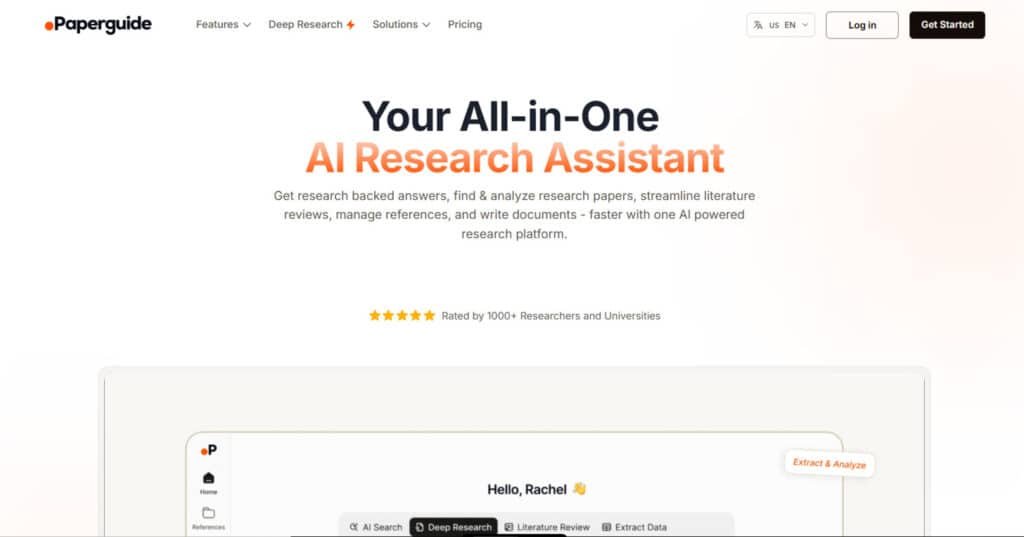
We’re seeing a “Great Consolidation” in AI tools. Instead of using separate apps for search, writing, and citations, platforms now aim to handle everything. This research assistant positions itself as that all-in-one workspace.
The traditional approach—Google Scholar to Zotero to Word—creates workflow friction. An integrated platform eliminates these jumps. It’s where the industry is clearly heading for serious academic work.
Founders, Background, and Endorsements
Founder Roop Kumar Reddy built this platform based on real user needs. It evolved from ChatWithPDF after gathering feedback from over 500,000 users. The pivot in 2024 wasn’t random—it came directly from researchers asking for more than basic PDF reading.
The tool serves students, PhD candidates, scientists, and even content teams needing evidence-based writing. As one user noted, “The trustworthiness compared to competitors stood out immediately.” This mission-driven approach shows deep understanding of research pain points.
What is Paperguide?
At its core, this platform represents a fundamental shift in how we approach academic investigation. It’s not just another PDF reader—it’s an intelligent workspace that handles your entire research journey.
The Inner Workings of the Product
The magic happens through advanced AI that understands your research questions naturally. Instead of keyword matching, it uses semantic search across 200+ million academic papers.
I found the system analyzes connections between studies, extracts key findings, and even helps generate text based on your curated sources. It’s like having a research assistant who never sleeps.
| Traditional Approach | Integrated Platform | Time Saved |
|---|---|---|
| Google Scholar + Zotero + Word | Single workspace | 60% reduction in context switching |
| Manual citation management | Automated reference handling | 2-3 hours per paper |
| Separate tools for writing/analysis | Unified AI-powered features | Seamless workflow integration |
| Basic keyword searches | Natural language understanding | More relevant results instantly |
Benefits for Academic and Research Users
PhD candidates get comprehensive literature review tools for thesis work. Undergraduates receive citation help that makes essay writing less daunting.
Content writers quickly find evidence-based sources, while research teams benefit from collaboration features. The platform’s user-friendly interface makes powerful AI accessible to everyone.
What used to take weeks of manual review now happens in hours. This frees researchers to focus on higher-level analysis rather than administrative tasks.
Best Features of Paperguide
After testing each component individually, I discovered the collective power of these interconnected features. They work together to solve the fragmentation problem researchers face daily.
1. AI Search
The AI Search feature in PaperGuide stands out as a powerful tool for discovering relevant research papers.
It employs semantic understanding to interpret complex queries, going beyond basic keywords to analyze millions of entries from a database exceeding 200 million papers.
By evaluating the top 10 most pertinent research papers, it synthesizes comprehensive, research-backed answers complete with accurate citations. This ability ensures users receive precise information directly, eliminating the need for manual sifting through irrelevant results.
Researchers searching for specific topics can quickly obtain verifiable information, saving significant time and enhancing the efficiency of initial literature exploration.
When using Paperguide, this feature helps streamline the discovery process, allowing focus on analysis rather than search. It supports seamless integration with other tools, making it ideal for those needing reliable sources in academic or scientific inquiries.
2. Literature Review Generator
The Literature Review tool automates the analysis of multiple research papers, extracting and comparing key data in customizable formats.
It generates structured summaries, graphical representations, and tabular table outputs, enabling efficient comparison across hundreds of papers. Users benefit from supporting quotes and direct access to original text for verification, ensuring accuracy in synthesized information.
This feature aids researchers in identifying trends and insights rapidly, presenting data in an easy-to-navigate table or visual format. For those conducting reviews, it reduces manual effort substantially, facilitating deeper understanding without exhaustive reading.
The ability to handle large volumes of research papers makes it valuable for systematic synthesis, helping users build robust literature foundations with traceable evidence.
3. AI Writer
The AI Writer serves as an advanced academic assistant, capable of generating full documents from outlines to complete drafts using selected reference sources or the platform’s extensive database. It incorporates automatic citations in thousands of styles, ensuring scholarly integrity while polishing text for clarity and natural tone.
This writer tool supports multilingual content, grammar checks, and plagiarism detection, allowing users to produce high-quality research papers efficiently.
Researchers can link personal reference libraries to the writer, enabling context-aware content creation backed by credible sources.
By accelerating the writing process from ideation to finalization, it helps overcome blocks and maintain consistency, making it essential for drafting essays or manuscripts with precise information integration.
4. Reference Manager
The reference managment system in Paperguide provides comprehensive organization for research papers and sources. It supports imports from various formats, including Zotero, BibTeX, PDFs, DOIs, or URLs, with automatic metadata retrieval and PDF fetching.
Users can create custom folders, add annotations, highlights, and AI-generated summaries of methodologies and findings. Real-time collaboration features allow sharing libraries with controlled permissions, enhancing teamwork.
This tool integrates citation generation and exports, streamlining workflows when incorporating sources into documents.
For managing extensive reference collections, it offers instant insights and efficient organization, helping researchers maintain ordered libraries and quickly access critical information during projects.
5. Deep Research AI
Deep Research AI automates in-depth synthesis starting from a research question, performing semantic searches, paper screening, and data extraction across vast databases.
Research Planning
Deep Research AI begins by interpreting your research question and automatically generating a detailed, structured research plan. It defines clear objectives, key parameters, sub-questions, inclusion/exclusion criteria, and search strategies, giving you a professional-grade roadmap before any paper is retrieved.
Semantic Search
The system performs autonomous, advanced semantic searches across more than 200 million papers, understanding context and intent rather than relying on keywords alone. It continuously pulls the most recent and relevant publications to ensure the information is always up-to-date.
Evaluating and Screening
Every retrieved paper undergoes rigorous evaluation based on relevance, methodological quality, citation impact, journal reputation, and user-defined criteria. Low-quality or off-topic papers are filtered out, leaving only credible, high-value sources for analysis.
Extracting and Analyzing
The tool intelligently extracts key data points, tables, results, and conclusions, then cross-compares findings across sources. It identifies and resolves contradictions, highlights consensus and gaps, and synthesizes everything into coherent, evidence-based narratives.
Research Reporting
Finally, it generates comprehensive, fully-cited research reports with structured sections, visual tables, charts, traceable references, and actionable insights—ready for systematic reviews, grant proposals, or publication in hours instead of weeks.
6. Additional Platform-Wide Features
Platform-wide enhancements include chatting with PDFs for instant answers, AI insights evaluating paper quality via metrics, and original text verification for claims.
These complement core tools by offering plagiarism checking, one-way Zotero integration, and browser extensions for adding papers. Collaboration extends across features, supporting shared workflows.
Such capabilities help users verify information accuracy and gain quick explanations from uploaded papers, improving overall productivity in handling research papers.
Pricing Plans for Paperguide
When it comes to pricing, this is where the conversation gets interesting – and a bit contentious. The features look impressive, but the subscription model creates real frustration for many users.
Plus
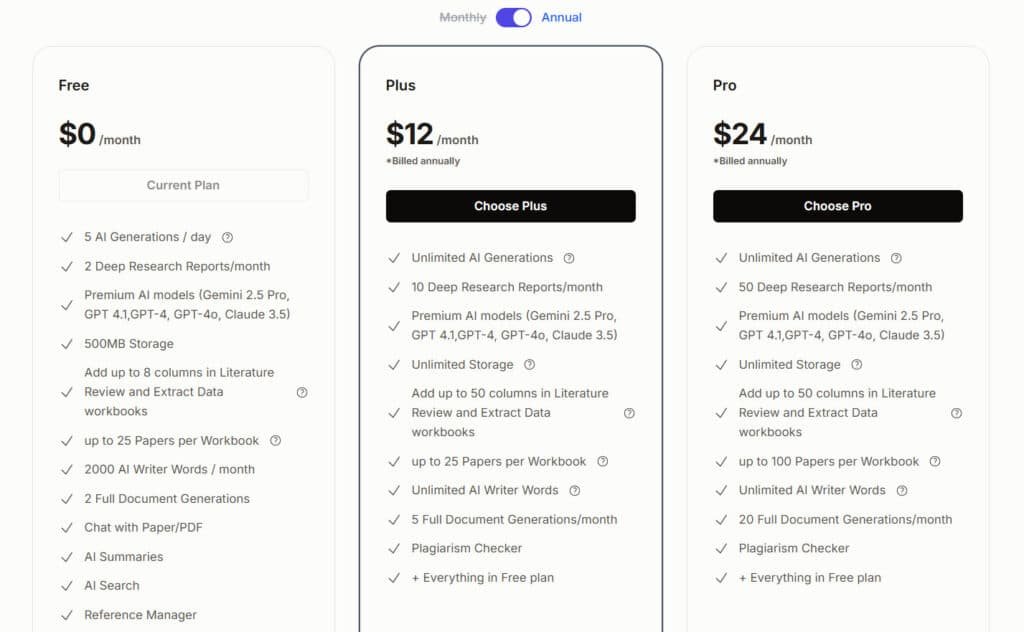
$19/month (monthly) or $12/month (billed annually). Offers unlimited AI generations, unlimited AI Writer words, 10 Deep Research Reports/month, 5 Full Document Generations/month, unlimited storage (100GB fair use), plagiarism checker, expanded workbooks (50 columns), and everything in Free.
Pro
$39/month (monthly) or $24/month (billed annually). Provides 50 Deep Research Reports/month, 20 Full Document Generations/month, 100 papers per workbook, and all Plus features.
Students receive 40% off with verified college email. Team/institutional plans available on request.
| Plan | Monthly Price | Annual Price | Deep Research Reports | Full Document Generations | AI Writer Words | Storage |
| Free | $0 | $0 | 2/month | 2/month | 2000/month | 500MB |
| Plus | $19 | $12 | 10/month | 5/month | Unlimited | Unlimited |
| Pro | $39 | $24 | 50/month | 20/month | Unlimited | Unlimited |
Overview of Free, Starter, and Pro Plans
The free plan costs nothing, but it’s essentially a trial. You get 5 AI generations daily and 2 deep research reports monthly. The 500MB storage and 2,000-word writing limit disappear quickly if you’re serious about research.
The Plus plan at $12/month offers unlimited AI generations and 10 deep research reports. However, “unlimited” has fair usage limits. Five full document generations can vanish with multiple assignments.
At $24/month, the Pro plan provides 50 deep research reports and manages 100 papers per workbook. This cost only makes sense for heavy users.
The biggest complaint? Credits expire monthly. Unused quotas vanish, creating pressure to “use it or lose it.” This feels unfair during busy periods when you can’t maximize usage.
Students get 40% off, but this doesn’t fix the fundamental subscription issues. Team plans require custom quotes, which typically mean higher costs without transparent pricing.
Pros & Cons of Paperguide
After extensive testing, I’ve identified clear advantages and notable limitations. A balanced assessment helps you understand if this tool fits your specific needs.
Advantages: Efficiency and Integrated Workflow
The all-in-one workflow is the standout benefit. Moving from search to writing without switching tabs saves significant time. The integrated platform keeps you focused.
I found the literature synthesis features transformative for complex research. What normally takes weeks can be compressed into hours. The built-in plagiarism checker and proper citation handling promote academic integrity.
Drawbacks: Credit Limits and Customer Support Issues
The subscription model creates real frustration. Monthly credit expiration means you pay for unused features. This “use it or lose it” pressure feels unfair.
Customer support experiences vary widely. Some users report quick responses, while others face ignored emails. These cons have led many to explore alternatives.
| Strengths | Weaknesses | Impact |
|---|---|---|
| Integrated workflow | Credit expiration | High time savings vs. financial waste |
| Powerful research tools | Inconsistent support | Efficiency gains vs. frustration risks |
| User-friendly interface | Search limitations | Easy adoption vs. missed sources |
| Academic integrity focus | Learning curve | Quality work vs. initial time investment |
Alternatives to Paperguide
If the subscription model and credit limits have you looking elsewhere, you’re not alone. Many researchers seek alternatives that better fit their workflow and budget. The right tool depends entirely on your primary need.
I’ve tested numerous competing tools to see how they stack up. Here’s a breakdown of top alternatives based on their unique strengths.
Top Competing Tools and Their Unique Strengths
For a comprehensive workflow similar to Paperguide, consider these options:
- AIDetectPlus stands out for its one-time credit purchases that never expire. It’s a full toolbox with an essay writer, PDF chat, and AI detection bypass. This is a strong choice if you hate monthly fees.
- Elicit excels at answering research questions directly from papers. It’s fantastic for systematic reviews and data extraction, though it focuses less on the writing phase.
- SciSpace helps you quickly understand complex scientific papers. Its summarization and explanation features are top-notch for analysis.
- Jenni is your go-to AI writing assistant. It’s brilliant for overcoming writer’s block across various content types, but it lacks deep research capabilities.
For specialized tasks, Paperpal polishes academic content for clarity, while Quillbot and Grammarly handle paraphrasing and grammar checks. Duck AI offers a free, privacy-focused search experience.
Determining which platform is paperguide better for you comes down to priorities. Need a full workflow? Or just a specialized tool? Your answer guides the best choice among these capable alternatives.
Case Study / Personal Experience with Paperguide
Facing a research deadline that felt impossible, I decided to put this tool through its ultimate test. My project involved analyzing AI’s impact on systematic review automation—exactly the scenario where Paperguide claims to excel.
Real-World Results and User Story
I started with a natural language questions about systematic reviews. The AI search delivered synthesized answers with key citations instantly. This saved me hours of manual research right away.
Building my foundation was surprisingly smooth. I gathered 15 relevant papers and used the literature review feature. It generated comparison tables that would have taken me half a day manually.
The chat with PDF feature became my secret weapon. I asked specific questions about methodology and results without reading entire documents. This deep analysis gave me precise data points efficiently.
My team’s experience mirrored my own. As one member noted, “We consolidated all our sources, found papers quickly, and the writing tools suggested better phrasing. The entire process became way smoother.”
The results were impressive. What normally takes 3-4 days of manual work compressed into about 8 hours. I did hit some credit limits on the free plan, but the time savings made upgrading worthwhile.
Paperguide Review
When I scoured forums and review sites, the user feedback painted a complex picture of satisfaction and frustration. This comprehensive analysis reveals what real users experience beyond the marketing promises.
User Feedback and In-Depth Analysis
Positive reviews consistently highlight the academic writing helpers. Users love the step-by-step guidance for creating research questions and managing citations. The “hand-holding” approach helps students who feel lost starting projects.
Organization capabilities receive strong praise. Consolidating sources eliminates PDF chaos. As David Kocsis noted on AppSumo: “For anyone who works at UNI or does some research, it’s a good buy. I have tested other tools and honestly speaking it was either so expensive or I had problems with the team… These guys from Paperguide are spot on.”
However, negative feedback reveals serious concerns. Customer support issues top the list—users report ignored emails and impossible refunds. The subscription model creates frustration when unused credits vanish monthly.
Search functionality disappoints many. Users get zero results on important topics while Google Scholar finds hundreds. This undermines the core value of a research tool.
| Feedback Type | Common Themes | User Impact | Frequency |
|---|---|---|---|
| Positive | Writing guidance, organization | Time savings, reduced stress | High for basic tasks |
| Negative | Support issues, credit expiration | Financial waste, frustration | Medium to high |
| Mixed | Search results, interface clarity | Variable efficiency | Depends on complexity |
| Technical | Feature delivery vs promises | Expectation mismatch | Common with advanced use |
This review shows the platform works well for straightforward tasks but struggles with complex research needs. Your experience will likely depend on how you use paperguide and what support you require.
Comparative Analysis: Paperguide vs. Competitors
I’ve spent weeks comparing the leading AI research platforms to understand their true strengths and weaknesses. The market has evolved beyond simple PDF readers into specialized tools for different academic needs. This comparison helps you choose the right platform for your specific workflow.
Each tool excels in different areas. Some focus on deep analysis while others prioritize writing support. Understanding these differences saves you from investing in the wrong solution.
Feature Matrix and Performance Comparison
The feature comparison reveals clear specialization patterns. Some tools dominate specific aspects of the research process while others offer broader coverage.
| Feature | Paperguide | Elicit | SciSpace | Perplexity AI |
|---|---|---|---|---|
| Automated Literature Review | ✅ Structured Tables | ✅ Data Synthesis | ✅ Thematic Analysis | ❌ Not Available |
| AI-Powered Writing | ✅ Context-Aware | ❌ Analysis Focus | ✅ Notebooks | ✅ Answers Only |
| Data Extraction | ✅ Tables & Figures | ✅ Structured Data | ✅ PDF Insights | ❌ Not Available |
| Natural Language Search | ✅ Academic Database | ✅ Question-Based | ✅ Copilot Feature | ✅ Real-Time Web |
| Reference Management | ✅ Zotero Sync | ✅ BibTeX Export | ✅ Built-In System | ❌ Not Available |
Key Differentiators in the AI Research Market
Paperguide’s strength lies in workflow integration. It handles the entire process from search to writing. The chat with PDF feature works well for quick document analysis.
Elicit dominates systematic reviews with superior data extraction. SciSpace excels at making complex papers understandable. Perplexity AI provides fast web-based answers with proper citations.
The right choice depends on your primary need. For end-to-end workflow, Paperguide offers comprehensive coverage. For specialized tasks, competitors might serve you better.
Future Outlook for AI Research Tools
Looking ahead, the evolution of research tools reveals three powerful trends that will define the next decade. We’re witnessing a fundamental shift from fragmented digital tools to intelligent, integrated assistants.
Emerging Trends and Paperguide’s Evolving Role
The first trend is The Great Consolidation. Researchers are tired of juggling multiple subscriptions. They want seamless workflows in one platform. This mirrors broader software trends where integrated workspaces replace specialized tools.
Second, AI is automating tedious work. Systematic reviews that took months now compress into hours. This frees researchers from data collection drudgery. They can focus on higher-level analysis and creative thinking.
The third trend is human-AI symbiosis. The future isn’t AI replacing researchers but augmenting them. The AI excels at finding and summarizing data from papers. Humans provide the critical interpretation of what it all means.
Looking back, we’ve evolved from 1990s card catalogs to 2000s Google Scholar to today’s integrated AI assistants. The research process keeps getting more efficient.
For this tool, the future likely involves deeper analytical capabilities. Imagine direct connections to statistical software or discipline-specific AI models. The research assistant could become even more specialized.
Challenges remain around academic integrity and pricing models. Users increasingly resist tools where credits expire monthly. The subscription vs. usage-based debate will shape which features succeed.
Ultimately, the research process is becoming more collaborative. AI handles mechanical tasks while humans tackle complex research questions. This transformation makes quality work more accessible to everyone.
Conclusion
Let me cut to the chase: here’s who should seriously consider this product and who should look elsewhere. After extensive testing, I found Paperguide delivers solid value for straightforward academic writing and source organization.
The integrated workflow saves significant time. The AI features provide helpful answers to complex questions. However, the subscription plan with expiring credits creates frustration.
If your research process involves basic literature reviews and citation management, this tool works well. But for complex projects requiring robust search, explore alternatives.
Use Paperguide‘s free tier first. See if the style fits your workflow. Only upgrade if the time savings justify the cost.
Ready to streamline your work?
Test the free access today. Your research productivity deserves the right tool.
Frequently Asked Questions
Is there a free plan available for Paperguide?
Yes, there is a free plan that gives you access to the basic AI-powered search and a limited number of credits each month. It’s a great way to test the core features, like summarizing research papers, before committing to a paid subscription.
How does the AI-powered search and deep research feature work?
The tool uses advanced language models to understand your research questions. Instead of just matching keywords, it finds semantically related academic papers. It then generates deep research reports that synthesize information from multiple sources, saving you hours of manual work.
Can Paperguide help me write a literature review?
Absolutely. The literature review generator is a standout feature. You provide a topic or research question, and the AI scans relevant sources to outline and draft a coherent review. It’s a massive time-saver for structuring your academic papers.
How accurate are the citations and references it generates?
The citation tool is generally reliable for common styles like APA and MLA. However, I always recommend double-checking the formatting against official guidelines, as with any automated system. It’s excellent for getting 90% of the way there quickly.
What are the main limitations of the free plan?
The primary limitation is the monthly credit cap. Each action, like generating a summary or a research report, consumes credits. For serious academic work, you’ll likely need a paid plan to avoid running out mid-project.
Can I really “chat” with a PDF document?
Yes, the “Chat with PDF” feature lets you upload a document and ask specific questions about its content. The AI will analyze the text and provide direct answers, which is incredibly useful for quickly extracting key points from dense research papers.
Are there any good alternatives to Paperguide?
Definitely. Tools like Semantic Scholar, Scite, and Jenni AI are strong competitors. Each has unique strengths; for example, Scite focuses on verifying citation contexts. Your choice depends on whether you prioritize writing assistance, deep analysis, or citation validation.
Does it include plagiarism checking?
Paperguide itself is primarily a research and writing assistant. While it helps you generate original content by synthesizing sources, it doesn’t have a built-in plagiarism checker. You would need to use a dedicated service like Turnitin or Grammarly for that final check.