Ever spent an entire afternoon hunting for one specific detail buried in a massive document?
You scroll endlessly, your eyes glaze over, and frustration builds. That valuable information is in there, but finding it feels like a full-time job. I’ve been there too, and it’s a massive drain on productivity.
What if you could simply ask your document a question and get an instant answer?
This is the promise of modern AI, and it’s exactly what PDF.ai delivers. This online tool transforms your static files into interactive partners. After testing it extensively, I can confirm it’s a genuine game-changer for anyone who regularly works with PDFs.
In this hands-on PDF.Ai Review, I’ll break down everything you need to know. We’ll explore its core features, pricing, and how it stacks up against manual methods. My goal is to give you an honest, clear picture to help you decide if this is the right solution for your workflow.
Let’s dive in and see how this technology can give you hours of your time back.
Key Takeaways: PDF.Ai Review
- PDF.ai turns static documents into conversational tools you can question directly.
- The AI provides instant answers with source references from your file.
- It excels at quickly summarizing lengthy reports and extracting key data.
- This review is based on extended, real-world testing of the platform.
- We will cover features, cost, and who benefits most from this tool.
- The goal is an unbiased assessment to help you make a smart decision.
PDF.Ai Review: An Overview
Raamish’s Take
PDF.ai is a handy tool that makes working with PDF files much easier by letting you chat with them like a smart assistant.
Its instant answers feature is a big win, where you upload a document and ask questions to get quick summaries, key facts, or details pulled straight from the file, with sources listed for trust.
I’m really impressed with the AI document agents, which are custom helpers tailored for fields like legal, finance, real estate, healthcare, education, or research—perfect for pulling insights from reports, contracts, or studies without digging through pages.
The RESTful API is great for developers, offering fast, secure ways to add document analysis, chat features, or real-time processing into apps, with over 15 endpoints and under 200ms response times.
It also handles OCR for scanned files, supports up to 100MB uploads, and integrates advanced models like OpenAI Whisper for audio.
PDF.ai‘s simple upload-and-ask flow saves hours on tasks like reviewing manuals or financial reports, making it a smart pick for quick, accurate document handling.
Introduction to PDF.Ai in the AI Era
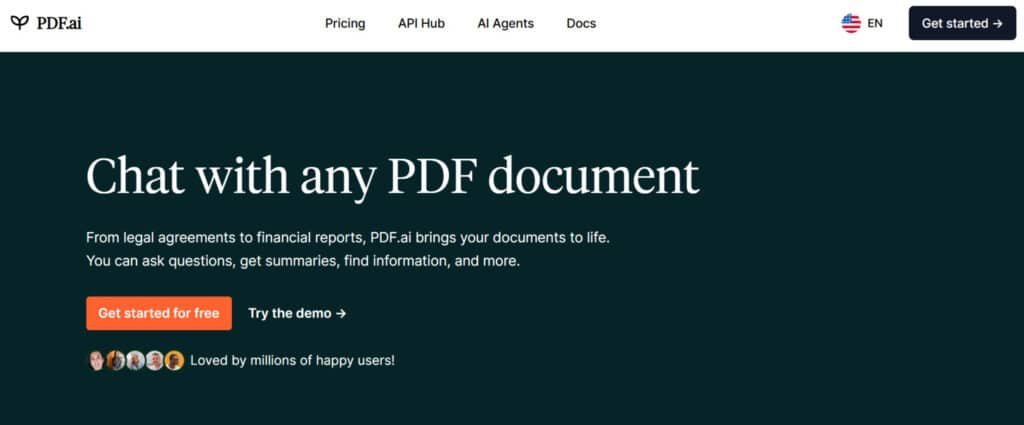
What if your documents could actually understand what you’re looking for and deliver precise answers instantly? We’re witnessing a fundamental shift from static files to interactive conversations. This platform represents the next evolution in how we work with information.
Background and Company Vision
The story behind this tool is fascinating. After a strategic $20,000 acquisition, the company scaled to over $50,000 in monthly recurring revenue. This growth demonstrates strong market validation for their vision.
Their goal is simple but powerful: transform document interactions from manual searching to natural conversations. They’re moving beyond traditional viewers toward intelligent agents that understand content.
Positioning in the Current AI Landscape
This isn’t just another niche tool. The Document AI market was valued at $3.14 billion in 2024 and projects to reach $15.57 billion by 2032. That’s massive growth potential.
Professionals across industries are adopting this approach. Legal teams, researchers, and financial analysts use it to extract insights from lengthy documents quickly. It addresses the universal frustration of information trapped in unsearchable files.
The platform positions itself as a productivity solution for modern document challenges. It’s part of a broader movement toward smarter, more efficient work tools powered by artificial intelligence.
What is PDF.Ai? Understanding Its Core Functionality
At its core, this platform transforms the way we extract value from our digital paperwork. I’ve found it works like having a super-smart research assistant dedicated to each file you own.
Inner Workings and Document Interaction
When you upload your document, the technology performs a two-step magic trick. First, Optical Character Recognition scans everything – even images and scanned pages – converting them into readable text.
Then advanced AI models analyze the content for deep comprehension. As one developer noted,
The system doesn’t just scan words; it understands context and relationships between concepts.
Every answer includes specific page references. This builds immediate trust since you can verify the source instantly.
Key Benefits for Ideal Users
The real power emerges for specific professional groups. Legal teams reviewing contracts save hours of manual searching. Researchers can synthesize findings across multiple papers in minutes.
Here’s how the workflow compares to traditional methods:
| Task | Traditional Method | With This Tool | Time Saved |
|---|---|---|---|
| Find specific data in report | 20-30 minutes manual search | Ask question, get answer in seconds | 95%+ |
| Review contract clauses | Hour-plus detailed reading | Targeted questions with citations | 80-90% |
| Academic research synthesis | Days of cross-referencing | Instant comparative analysis | Significant |
Financial analysts extracting figures and students tackling complex materials benefit enormously. The Chrome extension makes everything seamless across Google Drive and Dropbox.
PDF.Ai Review: Exploring Standout Features
What separates this tool from basic document viewers is its ability to understand context and provide meaningful responses. During my testing, several capabilities stood out as genuinely transformative for daily workflow efficiency.
1. Instant Q&A
The Instant Q&A in PDF.ai allows users to query pdf documents directly. This feature turns static pdfs into interactive sources.
Users simply type questions, and the tool provides precise answers from the documents. It references exact pages within pdf documents. This helps readers quickly extract needed data without manual scanning. For those searching pdf tools, it streamlines access to information in large pdfs.
The process saves time on pdf documents that contain dense data. Overall, it enhances efficiency in handling documents with chat pdf capabilities. Features like this make PDF.ai a top choice among pdf tools.
2. Multi-Doc Magic
Multi-Doc Magic enables uploading multiple pdfs simultaneously within the pdf editor. Up to 120 pdf documents can be handled in one session.
This feature supports cross-referencing data across various documents. Readers benefit by comparing content in different pdfs effortlessly. It is ideal for managing extensive pdf documents in projects.
Tools such as this reduce complexity in dealing with numerous pdfs. The ability to upload pdf files together boosts productivity. Chat pdf across files reveals connections in data. This stands out in pdf tools for multi-file tasks. Features integrate seamlessly for comprehensive documents analysis.
3. Follow-Up Vibes
Follow-Up Vibes maintains context in ongoing queries about pdf documents. It builds on previous interactions within the chat interface.
This ensures smooth progression when exploring data in pdfs. Readers gain deeper insights into documents through chained questions. It eliminates repetition in pdf tools for detailed reviews.
The chat interface keeps track of data points from pdf documents. Helpful for unraveling complex information in pdfs. Features like this support thorough examination of documents. Chat pdf becomes more intuitive with context retention.
4. One-Click Summaries
One-Click Summaries generate overviews of pdf documents instantly. Options include short or detailed bullet points.
This feature condenses data from lengthy pdfs into key points. Readers access essentials without reading full documents. It aids in quick decision-making with pdf tools. Summaries highlight critical data in pdf documents.
Useful for skimming multiple pdfs efficiently. The tool excels in chat pdf summary generation. Features provide customizable lengths for documents.
5. Key Insights Extractor
Key Insights Extractor identifies themes and risks in pdf documents. It automatically pulls significant data elements from pdfs.
This helps readers spot patterns in documents rapidly. Ideal for analyzing pdf tools output in reports. The feature flags action items within data. It enhances understanding of pdf documents content.
Tools benefit from this in-depth extraction. Features automate insight discovery in pdfs.
6. Custom Digest Mode
Custom Digest Mode tailors summaries to specific sections of pdf documents. Focus on areas like financial data in pdfs. Readers customize digests for targeted information.
This refines searches within documents using pdf tools. It isolates relevant data points from pdf documents.
Helpful for niche queries in chat pdf. Features allow precision in documents processing. The mode adapts to user needs in pdfs.
7. Rewrite Wizard
Rewrite Wizard transforms text from pdf documents into new formats. It shortens or clarifies data in pdfs. Readers repurpose content for emails or presentations.
This extends the utility of pdf tools beyond reading. Convert dense documents into accessible points. Chat interface supports rewriting commands. Features aid in content adaptation from pdf documents.
8. Citation Generator
Citation Generator extracts quotes with page links from pdf documents. It ensures accuracy in referencing data from pdfs. Readers build credible reports using this in pdf tools.
It simplifies sourcing information in documents. Features integrate citations seamlessly into workflows. Helpful for academic or professional pdf documents.
9. Export Options
Export Options save interactions as files from pdf documents. Formats include PDF or Word for data from pdfs. Readers share processed documents easily.
This enhances collaboration with pdf tools. Export points from chats involving pdf documents. Features preserve outputs from chat pdf.
10. Semantic Search
Semantic Search goes beyond keywords in pdf documents. It understands concepts within data of pdfs. Readers find ideas in documents intelligently.
Superior to basic search in pdf tools. Locates related information across pdf documents. Features improve discovery in complex pdfs.
11. Data Viz Lite
Data Viz Lite converts tables to charts from pdf documents. Visualize data pulled from pdfs quickly. Readers interpret trends in documents visually. This adds value to pdf tools for analysis. Features offer quick views of data points.
12. Trend Spotter
Trend Spotter connects patterns across multiple pdf documents. It analyzes changes in data over pdfs. Readers detect evolutions in documents series. Essential for longitudinal pdf tools use. Features link information in grouped pdf documents.
13. Shared Workspaces
Shared Workspaces allow team access to pdf documents. Collaborate on data in shared pdfs. Readers work together via pdf tools. Chat interface enables real-time input on documents. Features support group reviews of pdf documents.
14. Permissions Control
Permissions Control sets access levels for pdf documents. Secure data sharing in pdfs. Readers manage visibility in team documents. Critical for sensitive pdf tools environments. Features prevent unauthorized views of information.
15. History and Revisions
History and Revisions track past interactions with pdf documents. Revisit or undo data queries in pdfs. Readers maintain audit trails in documents. Useful in iterative pdf tools processes. Features ensure traceability in chat pdf.
16. Zapier Hooks
Zapier Hooks integrate with cloud services for pdf documents. Automate workflows involving data from pdfs. Readers connect to drives seamlessly. Enhances pdf tools with external documents. Features trigger actions on pdf documents.
17. API Access
API Access builds custom integrations for pdf documents. Developers extend data handling in pdfs. Readers create tailored pdf tools. Features allow programmatic access to information in documents.
18. Mobile App
Mobile App provides access to pdf documents on devices. Query data from pdfs anywhere. Readers use chat pdf on the go. Features support mobility in pdf tools.
19. End-to-End Encryption
End-to-End Encryption protects pdf documents during processing. Secures data in pdfs from breaches. Readers trust handling of sensitive documents. Vital for secure pdf tools. Features safeguard information.
20. GDPR-Compliant
GDPR-Compliant ensures regulation adherence for pdf documents. Handles data in pdfs legally. Readers comply with standards in documents. Features support enterprise pdf tools.
21. Unlimited Uploads (Paid)
Unlimited Uploads in paid plan remove caps on pdf documents. Process endless pdfs with data. Readers scale usage via pdf tools. Features enable high-volume documents management.
22. Priority Support
Priority Support offers faster assistance for pdf documents issues. Resolve queries on data in pdfs quickly. Readers get help in pdf tools promptly. Features improve user experience with documents.
23. Voice Queries
Voice Queries allow spoken input for pdf documents. Interact with data in pdfs hands-free. Readers query via voice in mobile chat interface. Features add convenience to pdf tools. (38 words)
24. Fair Use Policy
Fair Use Policy maintains performance for pdf documents. Balances data processing in pdfs. Readers ensure smooth operation in pdf tools. Features prevent overload on documents.
25. OCR Capabilities
OCR Capabilities scan and digitize pdf documents. Convert images to searchable data in pdfs. Readers make non-text documents interactive. Powerful addition to pdf tools for archives. Features achieve high accuracy in pdf documents.
| Feature | Traditional Approach | With This Tool | Efficiency Gain |
|---|---|---|---|
| Document Query | Manual search & scanning | Natural language questions | 90%+ time saved |
| Scanned Document Handling | Limited OCR accuracy | High-precision text extraction | Near-perfect recognition |
| Multi-Platform Access | Download/upload cycles | Direct browser integration | Seamless workflow |
Pricing Plans of PDF.Ai
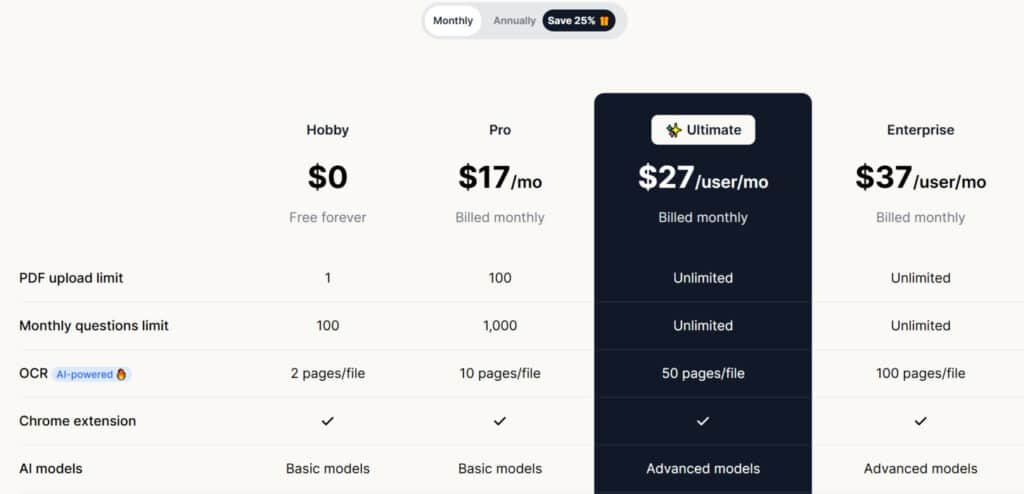
Let’s talk numbers – understanding the cost is crucial before committing to any software solution. The platform uses a freemium model with multiple tiers designed for different user needs.
Hobby Plan
The Hobby plan is your free entry point at $0, free forever—no strings attached. It’s perfect for casual users dipping into PDF chats.
Features include PDF upload limit of 1, monthly questions limit of 100, OCR up to 2 pages per file, basic AI models, max file size 10MB, and basic web API for audio. Start with a free trial to test the waters.
Pro Plan
Step up to the Pro plan for $17/mo billed monthly, or save with $10/mo on annual (25% off). This plan suits solo pros needing more juice.
Features: PDF upload limit 100, monthly questions limit 1,000, OCR 10 pages/file, Chrome extension, basic AI models, max file size 50MB, basic web API, and email support. Annual billing keeps costs low.
Ultimate Plan
The Ultimate plan shines at $27/user/mo monthly or $20/user/mo yearly (25% savings). Ideal for power users with advanced needs.
Features: Unlimited PDF uploads, unlimited questions, OCR 50 pages/file, Chrome extension, advanced AI models, Chat with all PDFs, AI Agents (demo), max file size 50MB, OpenAI Whisper & TTS, invite team members, Capture & ask (demo), white-labeled PDF embed, and email with priority support. Grab a free trial.
Enterprise Plan
For teams, the Enterprise plan runs $37/user/mo monthly or $30/user/mo annually (25% off). This top plan handles scale securely.
Features match Ultimate plus unlimited everything, OCR 100 pages/file, Chrome extension, advanced AI models, new feature early access, and live chat support. Free trial available.
| Plan | Monthly Price | Annual Price | Key Features |
| Hobby | $0 | $0 | 1 upload, 100 questions, basic OCR |
| Pro | $17/mo | $10/mo | 100 uploads, Chrome extension, 1K questions |
| Ultimate | $27/user/mo | $20/user/mo | Unlimited uploads, AI Agents, advanced models |
| Enterprise | $37/user/mo | $30/user/mo | Live support, 100-page OCR, early access |
Pros and Cons: Evaluating PDF.Ai’s Performance
No software solution is perfect, and my hands-on experience reveals a balanced picture of what this tool can truly deliver. Every user has different needs, so understanding both strengths and weaknesses is crucial for making an informed decision.
Advantages: Efficiency and AI-Driven Insights
The multi-document chat capability saves enormous amounts of research time. What previously took me 2-3 hours of manual review now takes 15-20 minutes. For knowledge workers, this represents 10-15 hours of monthly time savings.
GPT-5-powered responses with source citations build immediate trust. The OCR handles challenging scanned documents beautifully. Developer-friendly API access makes this more than just a tool – it’s a platform for custom workflows.
The clean interface requires minimal learning curve. Cloud integrations eliminate file management friction. At $15 monthly, the pricing is reasonable if it saves even a few hours of professional time.
Drawbacks: Limitations and Improvement Areas
The restrictive free tier essentially forces users onto paid plans without adequate trial opportunity. As one user noted,
it is fast. But it gives wrong results. That is a problem as it can mislead the user.
Accuracy can vary with complex formatting or specialized terminology. The interface, while functional, lacks the polish of newer competitors. Power users in legal or academic fields may find customization options limited.
These limitations aren’t dealbreakers for most users, but understanding them helps determine if this is the right fit. If not, several strong alternatives exist worth considering.
Alternatives to PDF.Ai in Document Analysis
Choosing the right PDF analysis tool depends heavily on your specific workflow needs and priorities. I’ve tested several competing solutions that offer different strengths for various use cases.
PDF.AI makes chatting with documents a snap. Upload a PDF, ask questions, get summaries or exact quotes—it’s like having a smart buddy for research papers or reports.
I used it for a long contract last week; pulled key clauses in seconds. Starts free for basics, but $17/month Pro unlocks unlimited uploads and OCR for scanned files.
Solid for quick insights, but if you need flashcards or team sharing, these five tools add more layers to your docs workflow.
MindGrasp
MindGrasp turns PDFs, videos, or lectures into notes, flashcards, and quizzes. Perfect for students cranking through textbooks—supports 30+ languages too. Free 4-day trial, then $9.99/month Basic for unlimited uploads. I quizzed myself on a chapter; nailed retention without rereading – Read Full Review
MaxAI
MaxAI brings multi-model chats (GPT-5.1, Claude Sonnet 4) right to your browser for doc summaries or rewrites. Free for basics, $12/month Pro for unlimited pro chats and file uploads. I summarized a PDF mid-tab; no app switch needed – Read Full Review
Atlas.org
Atlas.org acts as your personal study copilot, trained on class materials for homework help or exam prep. Free for students—upload lectures or texts for tailored answers. No paid tiers needed; it’s all about that context-aware boost. I synced a syllabus; got spot-on study tips – Read Full Review
A*Help
A*Help grades essays, fixes citations, and tutors across subjects—like a prof in your pocket. Free limited checks, $14.99/month for unlimited feedback. Non-natives love the tone tweaks. I ran a draft through it; suggestions felt human, not robotic – Read Full Review
ScholarAI
ScholarAI searches 200M+ papers, builds citation graphs, and chats with uploads for lit reviews. Free tier with limits, $9.99/month Basic for 50 credits/month. Integrates with Zotero seamlessly. I mapped sources for a project; gaps popped up clear as day – Read Full Review
These tools build on PDF.AI’s chat core with quizzes or searches.
| Tool | Key Strengths | Starting Price | Best For |
|---|---|---|---|
| PDF.AI | PDF chat, summaries, OCR quotes | $17/month | Quick doc questions |
| MindGrasp | Notes/flashcards from videos/PDFs | $9.99/month | Student reviews & quizzes |
| MaxAI | Browser multi-model doc chats | $12/month | In-tab productivity |
| Atlas.org | Class-trained homework/exam help | Start for Free | Personalized school support |
| A*Help | Essay grading, citation tutoring | $14.99/month | Writing feedback |
| ScholarAI | Paper search, citation graphs | $9.99/month | Lit reviews & research |
Your ideal choice depends on whether you prioritize pure analysis or need full editing capabilities. These alternatives each bring unique value to different document workflows.
Real-World Applications: Case Study and Personal Experience
I’ll never forget the sinking feeling when I realized my late-night document search had led to a costly mistake in a client presentation. I had spent hours scrolling through financial reports, my eyes burning from screen fatigue. The next morning, I presented incorrect quarterly figures that could have been avoided with better document analysis tools.
This experience motivated me to thoroughly test this platform across various document types. I spent a month using it daily with business reports, academic papers, contracts, and even old scanned documents.
My Experience Using PDF.Ai for Document Analysis
The financial analysis case study proved transformative. I uploaded a 150-page annual report and asked about Q3 profit margins. The system returned exact figures with page citations in under 10 seconds. This task previously took me 20-30 minutes of manual searching.
For academic research, I uploaded ten papers on child mortality determinants. The tool extracted key findings and methodologies from each paper simultaneously. My initial research time dropped from 8-10 hours to roughly 2 hours.
Results and Insights Gained from Real-World Testing
The time savings became undeniable. I now save 10-15 hours monthly that I previously spent on manual document review. This allows me to focus on higher-value analysis rather than information hunting.
The platform changed my entire approach to document-heavy projects. I confidently tackle larger research tasks knowing I can efficiently extract insights from dozens of files. The ability to ask questions across multiple documents simultaneously has revolutionized my workflow.
The Technology Behind PDF.Ai: AI Architecture and Innovation
Peeking behind the curtain reveals why this tool delivers accurate responses while others might hallucinate facts. Understanding the technical backbone helps explain both the impressive capabilities and occasional limitations you might encounter.
Role of Large Language Models and RAG in Accuracy
The system uses advanced artificial intelligence models like GPT-5.2 as its reasoning engine. These Large Language Models understand your questions and generate human-like responses. But here’s the clever part: Retrieval-Augmented Generation (RAG) ensures answers stay grounded in your actual document.
When you ask a question, RAG first searches your file for relevant text chunks. It then combines your query with this retrieved information before generating the final answer. This prevents the AI from making up facts based on its general training.
The Document AI Pipeline Explained
Before any chat happens, your document goes through a sophisticated processing pipeline. The system first extracts all text content, including from scanned images using OCR technology. It then breaks the document into manageable chunks for efficient analysis.
Each text segment gets converted into numerical vectors that capture semantic meaning. This allows the system to understand that “revenue” and “income” represent similar concepts. The vectors get stored for lightning-fast similarity searching.
| Processing Step | Traditional Approach | Modern AI Pipeline | Accuracy Impact |
|---|---|---|---|
| Text Extraction | Basic OCR with limited accuracy | Advanced OCR + layout analysis | 95%+ text recognition |
| Content Understanding | Keyword matching only | Semantic vector embeddings | Context-aware responses |
| Query Processing | Simple search terms | RAG with source grounding | Fact-based answers |
This architecture enables the tool to handle complex questions that require synthesizing information from multiple document sections. The result is a more intelligent and reliable document analysis experience.
Conclusion: Should You Invest in PDF.Ai?
Raamish’s Take
PDF.ai is a handy tool that makes working with PDF files much easier by letting you chat with them like a smart assistant.
Its instant answers feature is a big win, where you upload a document and ask questions to get quick summaries, key facts, or details pulled straight from the file, with sources listed for trust.
I’m really impressed with the AI document agents, which are custom helpers tailored for fields like legal, finance, real estate, healthcare, education, or research—perfect for pulling insights from reports, contracts, or studies without digging through pages.
The RESTful API is great for developers, offering fast, secure ways to add document analysis, chat features, or real-time processing into apps, with over 15 endpoints and under 200ms response times.
It also handles OCR for scanned files, supports up to 100MB uploads, and integrates advanced models like OpenAI Whisper for audio.
PDF.ai‘s simple upload-and-ask flow saves hours on tasks like reviewing manuals or financial reports, making it a smart pick for quick, accurate document handling.
So, is this tool worth your money? After my deep dive, the answer is a clear “it depends.” This review shows it’s a powerful analysis platform, but not a universal fit.
For researchers, legal teams, or anyone drowning in lengthy documents, the investment is a no-brainer. The ability to ask questions across multiple files saves hours. If you save just 2-3 hours monthly, the $15 cost pays for itself.
Casual users might find the free tier too restrictive. If you mainly need to edit PDFs, look elsewhere. But for professionals seeking to turbocharge their workflow, PDF.ai is a standout choice for extracting information from static content.
My final point? Try it for a month with your own data. See if it transforms how you handle your pdfs. The potential time savings are real.
Frequently Asked Questions
What exactly does PDF.Ai do?
It’s an AI-powered tool & pdf editor that lets you interact with your documents conversationally. You upload a file—like a PDF, Word doc, or even an image with text—and then you can ask questions about its content. The AI reads and understands the information, providing instant answers and summaries.
Is there a free version available?
Yes, there is a free plan. It gives you a limited number of questions per month, which is perfect for trying out the core features. If you need to process a high volume of documents, you’ll want to look at their paid monthly subscriptions.
How does the chat interface work with documents?
After you upload a file, a chat window opens. You simply type your questions as if you were talking to a research assistant. The AI scans the entire document and pulls relevant information, quotes, or data points to answer you directly. It’s like having a super-fast, focused reader.
Can it handle documents with images or scanned text?
Absolutely. One of its standout capabilities is Optical Character Recognition (OCR). This means it can extract text from images and scanned PDFs, making even non-searchable documents fully interactive for analysis.
What are the main limitations or drawbacks I should know about?
The primary limitation is the question quota on the free version. For heavy users, the cost per month can add up. Also, while very accurate, it’s always wise to double-check complex data or legal specifics, as with any AI tool.
How does it compare to tools like Adobe Acrobat or Wondershare PDFelement?
Unlike traditional PDF editors focused on formatting and editing, this tool is built for analysis and information retrieval. While Adobe Acrobat is great for creating and modifying files, this solution excels at helping you understand and extract insights from the content itself, much faster.
Does it integrate with cloud storage like Google Drive?
Yes, it offers cloud integrations, allowing you to pull documents directly from services like Google Drive. This streamlines your workflow significantly, as you don’t have to download and re-upload files manually.
Who would benefit most from using this tool?
It’s ideal for researchers, students, legal professionals, and anyone who regularly needs to digest large reports, contracts, or research papers. If you spend too much time searching through documents, this AI assistant can save you hours.