Let’s be honest – getting professional headshots can be a real pain. You either spend hundreds on a photographer or settle for mediocre selfies that don’t represent your best self. I’ve been there, staring at my phone camera wondering why I can’t get that perfect shot.
The frustration is real. Traditional photoshoots eat up your time and budget. You’re left with limited options and results that might not even match your vision. It’s enough to make you want to give up on professional images altogether.
That’s where this innovative platform comes in. I’ve spent weeks testing this service that transforms ordinary selfies into stunning, realistic portraits. The technology creates personalized models that capture your unique features perfectly.
In this PhotoGPT AI Review, I’ll show you exactly how it works, what it can do, and whether it’s worth your investment. Let’s dive into what makes this solution so powerful.
Key Takeaways: PhotoGPT AI Review
- This platform transforms selfies into professional-grade portraits using advanced technology
- Plans start at $16.99, making it accessible for various users
- Custom AI models create personalized, realistic images tailored to your features
- Ideal for content creators, professionals, and anyone needing quality headshots
- Saves significant time and money compared to traditional photography methods
- Extensive testing reveals both strengths and limitations of the service
- Honest assessment helps you make an informed decision about this tool
Introduction to PhotoGPT AI Review
The current landscape of digital portrait creation is crowded, but this service caught my eye for its unique approach to personalization. While many image generation tools produce generic results, this platform focuses specifically on creating realistic human portraits that actually resemble you.
I discovered that PhotoGPT comes from TAIC LLC, connected to Cogniai Private Limited in India. What’s fascinating is that engineering students founded the company after noticing the gap between standard AI outputs and truly personalized content. Their recent 2024 funding round shows serious investor confidence.
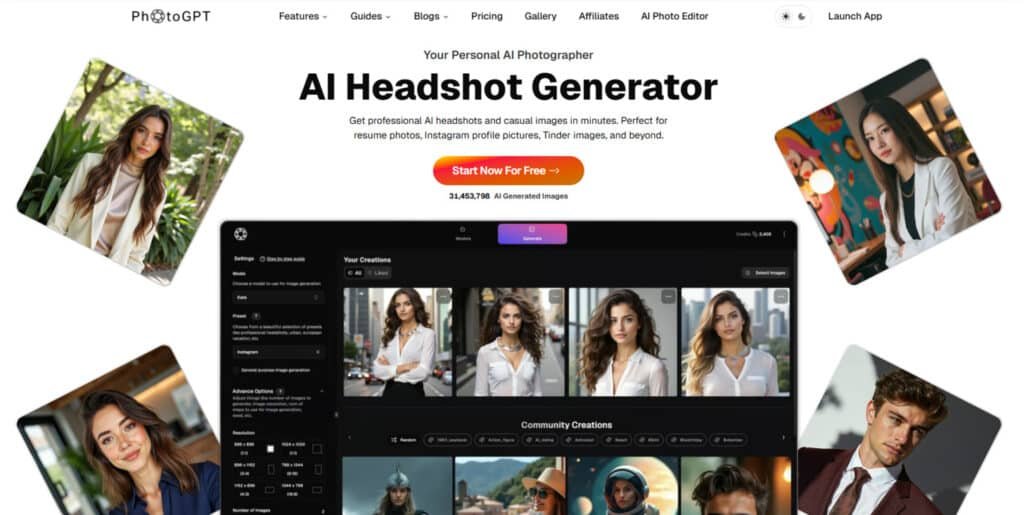
The platform serves a clear purpose: helping creators, marketers, and professionals get consistent, high-quality images without the recurring costs of traditional photography. You save significant time while maintaining professional results for LinkedIn, social media, and marketing materials.
The company also develops other practical tools like skincare AI, showing they’re building a broader ecosystem rather than being a one-trick pony.
What truly sets this tool apart is its ability to train custom models on your actual face. The outputs feel genuinely personal rather than generic stock images. It positions itself as the accessible alternative to expensive photoshoots while delivering professional quality.
Positioning PhotoGPT in Today’s AI Landscape
Behind every innovative tool lies a compelling story about the people who built it. I discovered that understanding the company’s background reveals why this platform stands out in a crowded market.
Company Background and Founders
TAIC LLC operates this service with connections to Cogniai Private Limited in India. The founding team consists of engineering students who identified a genuine need in the market.
They noticed how many people struggle with traditional photography costs and limitations. Their technical background gave them unique insight into solving this problem effectively.
The company stores data on AWS servers in Ohio and maintains GDPR compliance. This attention to infrastructure shows they’re building for long-term success.
Purpose and Endorsements
The platform’s purpose is crystal clear: democratize professional imaging for content creators and business professionals. It targets anyone needing quality headshots without expensive photoshoots.
TAIC isn’t putting all their eggs in one basket—they’re developing other practical applications too. This diversified approach suggests solid business strategy behind their operations.
| Traditional Photography | This Platform’s Approach | Key Advantage |
|---|---|---|
| Scheduled sessions | On-demand generation | Time flexibility |
| High upfront costs | Lifetime access model | Cost efficiency |
| Limited variations | Unlimited styles | Creative freedom |
| Location dependent | Cloud-based processing | Global accessibility |
The table above shows how this service reimagines professional imaging. It addresses real pain points that traditional methods often overlook.
What is PhotoGPT?
The magic behind this platform starts with something you already have: your own face. Unlike generic image creators, this service builds a personalized digital twin that captures your unique features perfectly.
I found the approach refreshingly simple. You provide the raw materials, and the technology does the heavy lifting to create professional-quality results.
Understanding the Inner Workings
The process begins with uploading 10-15 selfies showing different angles and expressions. The system studies these photos to understand your facial structure, hair texture, and even subtle features.
Within 15-30 minutes, it creates a custom model of your face. This digital twin becomes the foundation for all your future image generation. The technology doesn’t just apply filters—it genuinely learns your appearance.
Benefits for Content Creators and Businesses
Content creators gain incredible flexibility. You can produce fresh images for social media, YouTube thumbnails, or blog posts without scheduling photoshoots. The platform offers both text prompts and preset themes for easy customization.
Business owners save significantly on marketing visuals. Create consistent team headshots or branded lifestyle images featuring real people instead of generic stock photos. The results look professionally retouched, not artificially generated.
| Traditional Approach | This Platform | Key Advantage |
|---|---|---|
| Single photoshoot session | Continuous image generation | Ongoing value |
| Limited photo variations | Unlimited style options | Creative freedom |
| High per-image cost | Lifetime access model | Cost efficiency |
| Fixed location required | Cloud-based processing | Total flexibility |
Exploring the Custom Model Training Process
Creating your digital twin begins with a surprisingly simple photo upload process. You need upload 10-15 clear selfies showing different angles and expressions. I found variety crucial—include shots with different lighting and poses for best results.
The setup asks for basic details like gender, age range, and eye color. This extra information helps the system understand your characteristics better. It ensures consistent outputs across different image generations.
The actual training time impressed me—just 15-30 minutes after uploading your photos. Considering the system learns your entire facial structure, that’s remarkably fast. You’ll receive an email notification when your model is ready.
One important detail: each training session costs 1,500 credits. This makes getting your initial photos right the first time essential. The platform automatically generates 20 sample images once training completes.
These samples include various styles so you can immediately assess quality. The main challenge? Sourcing 12+ suitable photos without distractions. A quick 10-minute photo session with different poses gives you everything you need upload.
Your investment in creating this custom model pays off through unlimited future image generation. The system remembers your facial features perfectly after this initial training process.
Key Benefits for Users
What truly excites me about this platform is how it solves real-world problems for everyday users. The most obvious advantage is cost savings—instead of paying hundreds per photoshoot, you get lifetime access to unlimited image generation.
I’ve found it invaluable for creating professional headshots that actually resemble me. These work perfectly for LinkedIn, company websites, and speaker bios where you need polished presentation.
Content creators benefit tremendously from consistent, on-brand images for social media. You skip the exhausting cycle of planning shoots and waiting for edited results. Generate what you need in minutes rather than weeks.
If you’re camera-shy like me, this service is a lifesaver. You can create images showing your best self without awkward posing sessions. The platform lets you experiment with styles and settings you might not access in real life.
Business owners can create uniform professional headshots for entire teams without scheduling nightmares. The results look like professionally retouched photos when the technology works correctly.
You maintain complete ownership of all generated content for commercial use. This is crucial whether you’re building a personal brand or using images for client work.
Complete Features of PhotoGPT AI
What makes this tool stand out isn’t just one killer feature, but how all the components work together seamlessly. The platform’s thoughtful design ensures you get professional results whether you’re an expert or complete beginner.
1. Create Models / Your Own AI Model
For those searching for ways to generate personalized images, PhotoGPT AI allows you to upload 12–15 clear selfies to train model in about 15 minutes.
This process captures your unique facial features, angles, expressions, and style precisely. Once trained, the model enables the creation of realistic photo outputs tailored to your appearance in various outfits or environments.
Users looking to elevate their online presence will find this feature invaluable, as it eliminates the need for professional photography sessions, saving time and cost while delivering consistent results.
For instance, if you need a fresh profile picture for social media, this tool ensures every output reflects your authentic look without relying on filters.
By starting with simple selfies, you can quickly access unlimited personalized photo generation, making it ideal for busy professionals or content creators seeking efficiency.
This approach helps achieve high-quality visuals that boost confidence in digital interactions.
2. Generate / Enhanced Generation
After training your model, PhotoGPT AI’s Generate feature lets you produce hyper-realistic photos in seconds using text descriptions.
Specify any outfit, lighting, pose, or setting, and the AI delivers studio-quality outputs that look professionally shot. This is particularly beneficial for users exploring AI tools to create custom content, as it streamlines the process from idea to final image.
For example, generating a headshot for a job application becomes effortless, providing polished results that enhance your professional image.
The enhanced generation ensures lifelike details, helping users stand out in competitive fields like networking or job hunting. Without equipment or editing skills, you gain access to endless variations, making it a practical solution for those needing quick, high-impact visuals.
This feature supports creative exploration while maintaining realism, aiding in building a strong personal brand online.
3. AI Prompt Assistant
The AI Prompt Assistant in PhotoGPT AI offers context-aware suggestions to refine your text inputs for better image results. Describe a pose, mood, or setting, and it generates optimized prompts automatically, eliminating the need for advanced skills. This tool is essential for searchers wanting to master AI photo creation without trial and error.
It helps produce superior visuals by suggesting detailed elements that align with your vision, such as lighting for a dramatic effect.
Users can save hours by using these ideas to create compelling headshot or themed images, improving outcomes for social media or portfolios. For those new to AI tools, it provides a guided path to professional-grade photos, ensuring every generation meets expectations.
This assistance fosters creativity and precision, making complex tasks accessible and effective for everyday users.
4. One-Click Styling with Presets
With One-Click Styling, PhotoGPT AI provides a library of presets for instant transformations of your images.
Choose from cinematic, professional, or themed options, and apply presets with a single tap to adjust mood, tone, and composition. This feature is a game-changer for users seeking quick styling solutions, as it allows customization without manual adjustments.
For instance, applying presets to a base photo can turn a simple shot into a polished headshot suitable for LinkedIn. Users benefit by experimenting with various looks effortlessly, ideal for influencers or marketers needing diverse content. The presets ensure consistent quality, helping you achieve desired aesthetics rapidly.
This simplifies the workflow, enabling focus on creativity rather than technical details, and supports versatile applications like event previews or branding.
5. Reference Image Input / Image Guidance
Upload a reference photo in PhotoGPT AI to guide the AI’s output, controlling style, pose, attire, or layout with an adjustable slider.
Pair it with prompts or presets for precise results, replicating iconic looks or blending elements seamlessly. This is highly useful for searchers aiming to match specific inspirations, offering control over creative direction.
For example, use a favorite celebrity photo to style your own image, resulting in personalized yet familiar visuals. Users can replicate professional setups or artistic styles easily, enhancing portfolios or social feeds. It bridges imagination and execution, helping achieve exact matches without starting from scratch.
This feature empowers detailed customization, making it perfect for designers or hobbyists wanting tailored photo outputs.
6. AI Photo Editor
The AI Photo Editor enables one-click edits on any photo, including object removal, background replacement, retouching, shadow fixes, and lighting adjustments.
Achieve studio-quality standards in seconds, transforming ordinary images into professional ones. For those researching editing tools, this simplifies post-production, allowing quick refinements without software expertise.
It helps users polish headshots or social media photos to perfection, boosting appeal in personal or business contexts. The intuitive interface ensures accessibility, saving time for creators who need fast turnarounds.
By handling complex tasks automatically, it delivers consistent results, aiding in maintaining a cohesive visual style across projects. This tool is essential for elevating everyday photos to high standards efficiently.
7. Text in Image
Add customizable text layers to your images with PhotoGPT AI’s Text in Image feature, controlling fonts, shadows, 3D effects, and positioning.
Ideal for banners, posters, or social posts, it integrates text seamlessly for branded visuals. Users searching for design enhancements will appreciate how it stream.
This streamlines graphic creation, combining photos with messaging effortlessly. For marketing professionals, this means crafting eye-catching content quickly, improving engagement on platforms like Instagram.
It supports precise placement and styling, ensuring text complements the image without overwhelming it. This feature expands creative possibilities, helping users produce shareable assets that convey ideas effectively and professionally.
8. AI-Powered Image Upscaling
Use the built-in upscaler to convert standard images into high-resolution, detail-rich versions perfect for printing or publishing.
It enhances clarity and sharpness automatically, maintaining original quality. This is beneficial for searchers needing print-ready photos, as it upgrades low-res files without quality loss.
For example, upscale a generated portrait for professional use in resumes or displays. Users gain professional-level outputs suitable for large formats, aiding in presentations or merchandise.
The tool simplifies preparation for high-stakes applications, ensuring visuals look crisp and impressive. It supports diverse needs, from social polishing to commercial printing, making high-quality results accessible to all.
9. Unlimited Generations After Training
Once your model is trained, PhotoGPT AI allows unlimited generations, producing as many images as needed without restrictions (subject to plan credits).
This freedom is crucial for users experimenting with ideas, enabling endless variations for perfect matches. It helps content creators iterate quickly, refining concepts like outfit changes or settings.
For ongoing projects, this ensures a steady supply of fresh photos, supporting long-trends in personal branding or marketing. The lack of limits fosters creativity, allowing users to explore thoroughly and select the best results.
This feature maximizes value, providing ongoing utility after initial setup.
10. Hyper-Realistic Output
All outputs from PhotoGPT AI are hyper-realistic, resembling professional photographs rather than artificial renders. This realism comes from advanced AI processing, capturing lifelike details in skin, lighting, and expressions.
For those seeking authentic visuals, it delivers results that impress in any context, from profiles to ads.
Users benefit by gaining images that build trust and professionalism, ideal for career advancement or audience engagement. The high fidelity ensures outputs indistinguishable from real shoots, saving costs on actual sessions.
This quality elevates user work, making it suitable for high-visibility uses where appearance matters most.
11. Developer API Access
PhotoGPT AI offers a simple API for integrating headshot and portrait generation into apps. Make API calls to create realistic images without complex setups.
This is advantageous for developers searching for easy AI incorporation, enabling seamless features in their products.
For example, add custom photo tools to social apps, enhancing user experiences. It helps businesses scale personalized content delivery efficiently. The straightforward integration reduces development time, allowing focus on core functionalities.
This access opens opportunities for innovative applications, supporting growth in tech-driven markets.
12. Applications & Use Cases Supported
PhotoGPT AI supports diverse applications, including personal profile photos for dating apps, professional headshots for LinkedIn and resumes, influencer content in fitness or glam, YouTube thumbnails, creative themes, recreating missed events, and design assets like banners.
For searchers exploring versatile tools, these use cases demonstrate adaptability to various needs. Professionals can generate career-boosting headshots quickly, while creators revive memories through realistic recreations.
Marketers benefit from custom thumbnails and posters, improving online visibility. This broad support ensures the tool fits individual goals, from casual updates to commercial projects, helping users achieve targeted outcomes effectively.
| Feature Category | Key Benefits | Best For |
| Custom Model Training | Personalized results, accurate facial features | Professional headshots, branding |
| Preset Styles | Quick generation, no prompt writing needed | Social media, creative projects |
| Reference Image Upload | Exact style replication, consistent outputs | Matching specific aesthetics |
| Text In Image Tool | Thumbnail creation, magazine-style layouts | YouTube, marketing materials |
The community gallery provides endless inspiration—you can explore others’ creations and generate similar images with your own model.
These features combine to create a comprehensive platform that adapts to your skill level and needs. Whether you need quick presets or detailed customization, the tools are there.
Pricing Plans of PhotoGPT AI
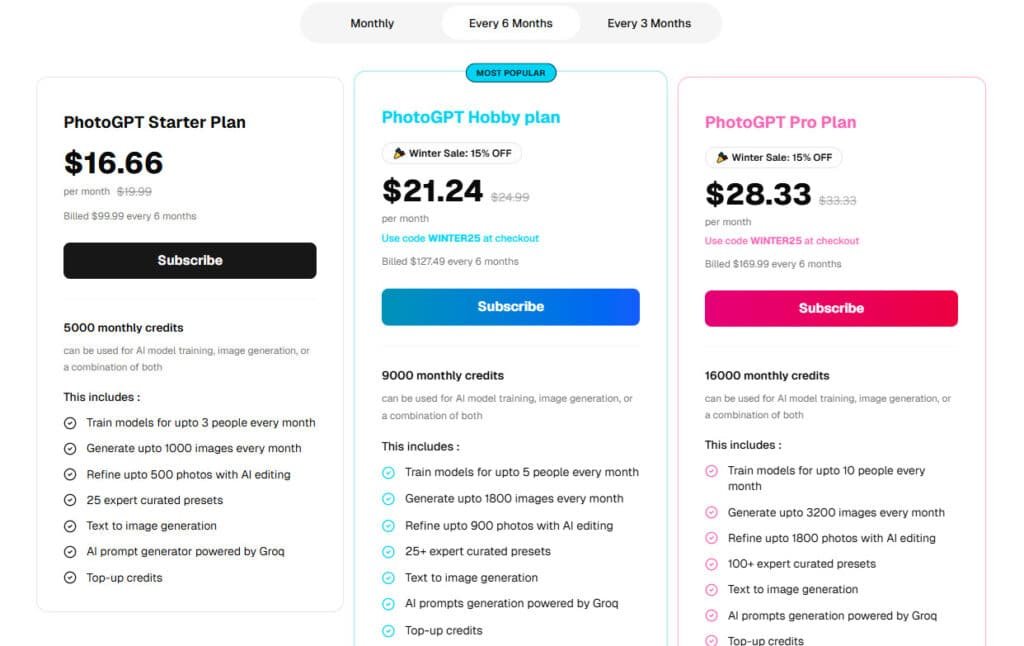
The financial aspect often determines whether a tool becomes a valuable asset or sits unused in your digital toolkit. I’ve tested both pricing structures extensively to help you make the smartest choice for your needs.
Starter Plan
The Starter Plan is priced at $19.99/month or $16.66/month (billed $49.99 every 3 months).
It includes 5,000 monthly credits, training for up to 3 models, up to 1,000 images, 500 photo refinements, 25 presets, text-to-image generation, AI prompt generator (Groq-powered), and credit top-ups.
Hobby Plan
The Hobby Plan (most popular) costs $29.99/month or $26.66/month (billed $79.99 every 3 months).
It provides 9,000 monthly credits, training for up to 5 models, up to 1,800 images, 900 refinements, 25+ presets, text-to-image, Groq prompts, top-ups, and high-resolution upscaling.
Pro Plan
The Pro Plan is $39.99/month or $33.33/month (billed $99.99 every 3 months).
It delivers 16,000 monthly credits, training for up to 10 models, up to 3,200 images, 1,800 refinements, 100+ presets, and all Hobby features.
| Plan | Monthly Price | Credits/Mo | Model Training | Images/Mo | Presets | Upscaling |
| Starter | $19.99 | 5,000 | 3 | 1,000 | 25 | No |
| Hobby | $29.99 | 9,000 | 5 | 1,800 | 25+ | Yes |
| Pro | $39.99 | 16,000 | 10 | 3,200 | 100+ | Yes |
Monthly plans offer more flexibility if you’re unsure about long-term commitment. The Starter plan at $16.99 provides 5,000 credits monthly—perfect for testing the waters before diving into a lifetime investment.
Pros & Cons of PhotoGPT
After putting this platform through its paces, I’ve uncovered some genuine strengths alongside a few frustrating limitations. Let me share the honest truth about what works brilliantly and what could use improvement.
Advantage Highlights
The quality of generated images genuinely impressed me. Headshots look remarkably realistic without that plastic AI appearance. The platform is surprisingly user-friendly, even for beginners.
Time and money savings are substantial. I created dozens of professional portraits in minutes that would cost thousands with traditional photography. The reference image feature dramatically improves your results.
You own all generated content with commercial rights. The lifetime deals offer incredible value. Hair replication is better than any other tools I’ve tested.
Drawbacks and Limitations
Credits disappear faster than expected. Training costs 1,500 credits, and failed generations still consume your allocation. The technology isn’t perfect—you’ll encounter strange hands or faces that don’t look like you.
Premium features like upscaling are locked behind top-tier plans. The interface for themes can be confusing. All pre-built models are 22-25 years old, which limits options for some users.
Despite these limitations, it remains one of the better options available. The cons are worth considering if you need consistently perfect results.
Alternatives in the AI Image Generation Market
While I’ve been impressed with this service, you should know there are alternative tools that might better suit specific needs. The market for portrait generation has several strong contenders worth considering.
HeadshotPro focuses exclusively on professional headshot creation. It’s simpler if you only need LinkedIn photos but lacks versatility for creative content. Aragon.ai offers consistent results but typically uses pay-per-use pricing rather than lifetime deals.
Artflow AI provides similar custom model training with a different interface. For general image generation beyond portraits, Midjourney and ChatGPT’s DALL-E are powerful options. However, they don’t specialize in training on your specific face.
This platform’s unique strength combines personalized face training with versatile creation capabilities. If you value specialization, HeadshotPro might work better. But if you want headshots plus creative images, this service offers more flexibility.
The decision ultimately comes down to your specific needs. Consider whether you prefer specialized tools or versatile platforms, and what pricing model works best for your budget.
In-Depth PhotoGPT AI Review: Features and Value
After crunching the numbers and comparing user experiences, the overall value of this platform becomes remarkably clear. Dave Swift’s 8.3/10 rating aligns with the 4.9-star AppSumo average from 30+ reviews. One user even gave it a solid 4.2/5.
The core proposition is straightforward: personalized, realistic image generation at a fraction of traditional photography costs. It serves both professional and creative needs effectively.
What truly stood out during my testing was the hair replication accuracy. One user specifically praised how complex ombre colors matched their real-life appearance perfectly. The platform captures facial features with impressive precision.
The features set is comprehensive yet manageable. You get custom model training, AI-enhanced prompting, 100+ preset themes, and useful interface tools. The community gallery provides endless inspiration.
| Use Case | Platform Strength | Value Delivered |
|---|---|---|
| Professional Headshots | High facial accuracy | Cost savings vs photographer |
| Social Media Content | Preset theme variety | Consistent brand imagery |
| Creative Projects | Reference image uploads | Style replication capability |
| Team Branding | Uniform model training | Scalable image production |
Weaknesses appear when you need perfect consistency. About 30-50% of generations might miss the mark, consuming credits with each attempt. Credit management becomes crucial.
This review confirms PhotoGPT delivers solid value with realistic expectations. The platform’s active development since 2023 suggests continued improvement, making the lifetime deal even smarter.
Real-World Case Study and Personal Experience
As someone who typically avoids cameras, I approached this experiment with equal parts skepticism and curiosity. The promise of transforming ordinary selfies into professional-quality images seemed almost too good to be true.
My Experience with Producing Professional Headshots
I started by uploading 16 different photos showing various angles and expressions. The training process took just 15 minutes and cost 1,500 credits as promised. Immediately after, the system generated 20 sample pictures that gave me instant results.
The professional headshots genuinely surprised me. They looked exactly like me but with that polished, retouched quality you’d expect from a studio session. I got several LinkedIn-worthy shots that I’d actually use for my business profiles.
Testing travel scenarios produced some of my favorite results. The platform placed me in Portugal (a trip I never took) with such realism that even my husband thought they were actual vacation photos. The system nailed outfits, settings, and natural expressions perfectly.
Café selfies came out relaxed and Instagram-worthy—far better than any real selfie I’ve managed to take. The hair replication was exceptional across all color variations I tested.
One important lesson: I made the mistake of not including smiling photos in my training set. This resulted in some creepy teeth in generated images. Variety in your training photos really matters for consistent results.
The reference image feature became my secret weapon. Once I learned to upload example pictures showing exactly what I wanted, my success rate jumped dramatically. When this tool gets it right, the quality exceeds anything else I’ve tested.
Tips for Maximizing Your PhotoGPT Experience
After burning through more credits than I’d like to admit, I’ve discovered several game-changing strategies that transform your results. These practical tips will help you get stunning images while conserving your resources.
Optimizing Credit Usage
Your credits disappear quickly if you’re not careful. I learned to generate three images at once rather than single attempts. This approach gives you variety without significantly increasing costs.
Always turn on the “Enhance Face” feature. It dramatically improves realism without major credit impact. Save your favorite outputs to track what works best for your specific face.
Improving Image Outputs with Custom Prompts
Clear instructions make all the difference. Use the prompt enhancement tool even when you think your description is sufficient. It expands simple ideas into optimized prompt structures.
Reference images are your secret weapon. Uploading example pictures improved my success rate from 30% to 70%. Include variety in training photos—especially smiling shots with teeth visible.
| Strategy | Credit Impact | Result Improvement |
|---|---|---|
| Batch Generation (3 images) | +10 credits | 300% more options |
| Reference Image Usage | No extra cost | 40% success increase |
| Enhanced Face Feature | Minimal increase | Much more realistic outputs |
| Quality Training Photos | One-time 1,500 credits | Better model consistency |
PhotoGPT’s Impact on Social Media and Branding
Maintaining a consistent social media presence used to feel like a full-time job until I discovered this platform’s game-changing approach. Instead of scrambling for fresh photos or recycling old shots, I now generate on-brand images whenever inspiration strikes.
For personal branding, consistency is everything. This tool lets you maintain a cohesive visual style across all platforms—from LinkedIn’s professional tone to Instagram’s creative aesthetic. The pressure to constantly produce new content disappears when you can generate what you need in minutes.
I’ve tested these generated images extensively on my own social media accounts. When done well, they receive the same engagement as traditional photos because they look authentic and professionally produced. The platform is particularly valuable for testing different content styles without expensive rebranding commitments.
YouTube creators can produce eye-catching thumbnails featuring themselves in impossible scenarios. Businesses building founder-led brands ensure everyone has consistent, professional-quality photos matching brand guidelines. The ability to create location-specific content without traveling is powerful for maintaining year-round content calendars.
I’m even using this tool to create vision boards with images that actually feature me in dream scenarios. This feels more personal and powerful than using random stock photos for goal visualization.
PhotoGPT in Comparison to Competing Tools
Making an informed decision about portrait tools requires understanding how different platforms stack up. I’ve tested the major players to give you a clear picture of where PhotoGPT fits in the competitive landscape.
Most competitors stick with monthly subscriptions, forcing you to pay indefinitely. Paying once for lifetime access saves serious money if you plan regular use.
| Feature | PhotoGPT | HeadshotPro/Aragon.ai | Midjourney |
|---|---|---|---|
| Personalized Face Training | Yes | Yes | No |
| Preset Themes | 100+ (Tier 3) | Limited | No |
| Reference Image Upload | Yes | No | Yes |
| Pricing Model | Lifetime Deal Available | Monthly Only | Credit-Based |
Specialized tools like HeadshotPro excel at consistent professional headshots. But they lack versatility for creative shots. PhotoGPT’s hybrid approach gives you both personalized models and general image generation.
The extensive presets library saves beginners from prompt writing. Higher tier plans unlock more styles and features. While some competitors offer features at lower price points, PhotoGPT’s lifetime deal provides better long-term value.
My recommendation?
Choose PhotoGPT for versatility and cost savings. Pick specialized tools if you only need basic headshots. The right choice depends entirely on your specific needs.
Conclusion
The question that brought you here—“Is this tool worth the investment?”—deserves a straightforward, experience-based answer. After extensive testing, I can confidently say PhotoGPT delivers exceptional value for content creators, professionals, and anyone needing quality headshots without traditional photography costs.
This platform isn’t perfect—you’ll encounter occasional strange images and credits deplete faster than expected. But when you use reference pictures and quality training photos, the results can be stunningly realistic. The lifetime deal is the real game-changer, offering permanent access for a one-time payment.
My recommendation? If you regularly need professional images and can invest a bit of time learning the platform, PhotoGPT is absolutely worth buying. The 60-day money-back guarantee removes all risk. Don’t overthink it—grab the starter plan that fits your needs and start creating images you’ll be proud to use.
Frequently Asked Questions
How does the custom model training work?
You upload 10-20 photos of a person or object. The system then trains a unique AI model on those images. This allows you to generate new, realistic pictures of that subject in various styles and settings without needing another photoshoot.
What’s the best way to get good results for professional headshots?
Start with high-quality, well-lit selfies or shots. Ensure your face is clear and you use a variety of angles. I found that spending a bit more time on the initial uploads dramatically improves the final image generation quality.
Are there any limitations on the types of images I can create?
The tool excels with human faces and portraits. While you can experiment, the most realistic outcomes are for headshots and people-centric content. Complex backgrounds or specific objects can sometimes be a challenge.
How do the credits and subscription plans function?
Credits are used for generating images and training models. Each plan offers a set number per month. The lifetime deal provides a one-time purchase for ongoing access, which is great for consistent users wanting to avoid monthly fees.
Can I use the generated pictures for my business social media?
Absolutely. The images are yours to use. The platform offers different aspect ratios perfect for platforms like Instagram or LinkedIn. The upscaling feature ensures they look sharp and professional.
What happens if I run out of credits before the month ends?
Your generation capabilities pause until your credits reset with the new billing cycle, or you can purchase additional packs. I recommend tracking your usage in the dashboard to optimize your credit expenditure.
How does this tool compare to other AI image generators like Midjourney?
Its main strength is personalization. While other tools create general images, this one specializes in creating realistic versions of *you*. It’s less about broad artistic creation and more about customized, specific output for branding and personal use.